AI Summary Powered by PixelBrainy
Have you ever wondered why your team still spends hours writing meeting notes when AI can automatically record conversations, summarize discussions, assign tasks, and update project management tools in seconds?
Modern businesses conduct dozens of virtual meetings every week, yet valuable decisions, action items, and follow ups often get buried inside lengthy conversations. This is exactly why AI meeting assistant app development has become a top priority for organizations looking to improve productivity and collaboration. Whether you want to build AI meeting assistant app solutions for enterprise teams or startups, intelligent meeting automation is transforming the future of workplace communication.
Imagine this scenario. I want to build a custom AI meeting assistant app for my company that automatically joins our Zoom and Google Meet calls, transcribes everything in real time, extracts action items with owner names and deadlines, and syncs them directly to our Jira and Slack. What are the steps involved and what will it cost to build this in 2026? This is one of the most common questions businesses ask before starting the development process of AI meeting assistant app solutions.
According to Grand View Research, the global AI Meeting Assistant market is expected to reach USD 4.3 billion in 2026 and is forecasted to grow to USD 21.5 billion by 2033 at a CAGR of 25.8%, highlighting the rapid enterprise adoption of AI powered collaboration tools.
Today, meeting assistant app development integrating AI goes far beyond simple transcription. Businesses are investing in intelligent assistants that generate summaries, detect decisions, identify action items, automate workflows, and integrate with enterprise software. If you want to develop AI meeting assistant app solutions or are exploring how to create an AI meeting assistant app, this comprehensive guide explains every stage from planning and development to deployment, integrations, and 2026 development costs.
An AI meeting assistant app is an intelligent software solution that automatically joins virtual meetings or captures meeting audio, transcribes conversations in real time, analyzes discussions using Natural Language Processing (NLP) and Large Language Models (LLMs), and converts unstructured conversations into structured outputs such as meeting summaries, action items, decisions, deadlines, and follow up tasks. Unlike traditional recording software, it understands the context of conversations and automatically shares valuable insights with the right people and business tools.
This makes AI meeting assistant app development an essential investment for organizations looking to improve productivity and reduce manual work.
Many businesses ask, "What is an AI meeting assistant app and how is it different from just recording a meeting and reading the transcript later?" The difference lies in intelligence. A recording or basic AI meeting transcription app simply captures conversations, leaving users to review lengthy transcripts manually. In contrast, a smart meeting assistant app identifies speakers, extracts action items, recognizes decisions and deadlines, highlights key discussion points, and generates concise summaries that teams can use immediately.
As a result, employees stay engaged in discussions instead of taking notes. Businesses looking to develop AI note-taking app solutions increasingly rely on this automation to streamline collaboration and accelerate decision making.
| Stage | What Happens |
| Pre Meeting | Calendar integration detects upcoming meetings and schedules the AI assistant to join automatically. |
| Join | The AI joins the meeting or securely captures meeting audio. |
| Transcription | Real time speech to text converts conversations while identifying individual speakers. |
| NLP Processing | AI extracts decisions, action items, deadlines, questions, risks, and key topics. |
| Summary Generation | LLMs create structured meeting summaries in a predefined format. |
| Distribution | Summaries, transcripts, and tasks are shared with Jira, Slack, Notion, Asana, or other integrated platforms. |
| Archiving | Meeting records are securely stored in a searchable knowledge base. |
| Follow Up | AI drafts follow up emails, reminders, or task lists for review and sharing. |
By combining real time transcription with AI powered insights and workflow automation, an AI meeting assistant transforms every meeting into clear, actionable outcomes that drive better team collaboration.
As virtual collaboration becomes the backbone of modern workplaces, businesses are rethinking how meetings are managed. Many organizations initially adopt tools like Otter.ai or Fireflies to automate meeting notes, but they quickly discover that generic solutions cannot keep pace with enterprise workflows, security requirements, or complex integrations. This is why AI meeting assistant app development has become a strategic investment rather than just another software initiative.
Business leaders often ask, "Why should we build a custom AI meeting assistant instead of using Otter.ai or Fireflies?" Others wonder, "Our sales team spends two to three hours every day on meeting administration. Can AI actually eliminate this?" The answer is yes. A custom meeting assistant goes far beyond transcription by understanding business context, assigning ownership, automating workflows, integrating with internal systems, and creating a searchable organizational knowledge base.
For companies with hundreds of employees or recurring subscription costs, choosing to build AI meeting assistant solutions can also reduce long term licensing expenses while delivering capabilities that off the shelf platforms simply cannot provide.
Meetings do not end when the call is over. Employees still spend valuable time writing notes, creating summaries, updating Jira tickets, sending follow up emails, and reminding teammates about pending tasks. This administrative work adds up quickly and reduces the time available for strategic projects.
Industry research shows that knowledge workers lose several hours every week to meeting related administration and unnecessary collaboration tasks, making it one of the biggest productivity drains across organizations.
A custom AI meeting assistant automates these repetitive activities by generating structured summaries, assigning action items, updating project management platforms, and preparing follow up communications within minutes. Instead of spending hours documenting meetings, employees can immediately focus on execution and decision making.
One of the biggest reasons meetings fail is not poor discussion but poor follow through. Teams frequently leave meetings with verbal commitments that are never documented or assigned, causing delays, missed deadlines, and accountability issues.
According to Harvard Business Review, nearly 47% of meeting action items are never completed because organizations lack a reliable system for capturing and tracking commitments made during meetings.
Unlike generic note taking tools, a custom meeting intelligence platform automatically identifies action items, links them to specific owners, extracts deadlines, prioritizes tasks, and synchronizes them with Jira, Asana, Monday.com, or other project management platforms. This creates accountability from the moment a meeting ends.
Every company has its own terminology, product names, customer references, abbreviations, and internal documentation standards. Unfortunately, generic AI meeting assistants are designed for broad audiences and often misunderstand industry specific conversations.
Whether your teams discuss medical terminology, financial regulations, legal clauses, or technical architecture, inaccurate transcription and summarization can result in costly misunderstandings.
When organizations develop custom meeting intelligence platform solutions, AI models can be trained on internal terminology, business workflows, output templates, and company specific knowledge. The result is significantly higher summary accuracy and meeting documentation that reflects the way your teams actually work.
Meeting conversations frequently include confidential business strategies, customer information, financial forecasts, intellectual property, and regulated data. For many organizations, sending this information to third party AI providers is simply not an option.
Healthcare organizations must comply with HIPAA, financial institutions follow FINRA regulations, while legal firms need to preserve attorney client privilege. These industries require complete visibility into where meeting recordings are stored and how AI processes sensitive information.
Building a private AI note-taking app for enterprise allows organizations to deploy AI within their own cloud or on premises infrastructure while maintaining full control over encryption, access permissions, compliance policies, and data retention.
Meeting summaries only create business value when they reach the tools employees already use. Unfortunately, most commercial meeting assistants support only a limited number of integrations, forcing employees to manually copy information between applications.
This manual process increases administrative effort, creates duplicate work, and causes important decisions to remain disconnected from ongoing projects.
A custom AI meeting assistant eliminates these silos by integrating directly with proprietary CRM platforms, ERP systems, internal knowledge bases, legacy software, HR systems, and project management tools. Every meeting automatically updates the organization's existing workflow without additional effort.
Sales and customer success meetings contain valuable signals that extend far beyond what was said during the conversation. Teams need to understand customer objections, competitor mentions, buying intent, renewal risks, pricing discussions, and next steps without manually reviewing lengthy transcripts.
Modern AI meeting assistants analyze conversations based on meeting type and automatically update CRM records, identify deal risks, recommend follow up actions, and surface opportunities that may otherwise be overlooked.
Industry analysts also predict that more than 35% of fintech applications will adopt agent-based AI frameworks by 2026, highlighting a broader shift toward AI systems that actively execute business workflows rather than simply documenting conversations.
Every meeting captures valuable organizational knowledge, including customer feedback, technical decisions, compliance discussions, product planning, and strategic conversations. Yet most businesses treat this information as disposable once the meeting ends.
Generic tools often store recordings and transcripts in isolated repositories with limited search capabilities, making it difficult to retrieve historical decisions or identify recurring trends.
A custom AI meeting assistant transforms every conversation into a centralized knowledge repository where employees can instantly search previous discussions, analyze recurring business patterns, retrieve decision history, and preserve organizational intelligence. As more meetings are processed, the platform becomes increasingly valuable, creating a lasting competitive advantage.
That's why Investing in AI meeting assistant app development enables businesses to reduce administrative overhead, accelerate collaboration, and build a scalable meeting intelligence platform that drives long term operational efficiency.
As AI continues to reshape workplace collaboration, businesses are no longer limited to a single type of meeting assistant. Depending on your goals, you can build a solution focused on transcription, sales intelligence, executive meetings, compliance, recruitment, or even launch a fully branded SaaS platform. Choosing the right architecture depends on your industry, security requirements, collaboration workflows, and long-term business objectives.
Many organizations ask, "What are the different types of AI meeting assistant apps I can build, and which one is right for my business?" Others want to know, "What is the difference between a bot-based AI meeting assistant and a bot-free device capture solution?" The answer depends on how meetings are conducted, where the data should be processed, and how deeply the AI needs to integrate with existing business systems.
The following are the most popular types of AI meeting assistant apps businesses are investing in for 2026.
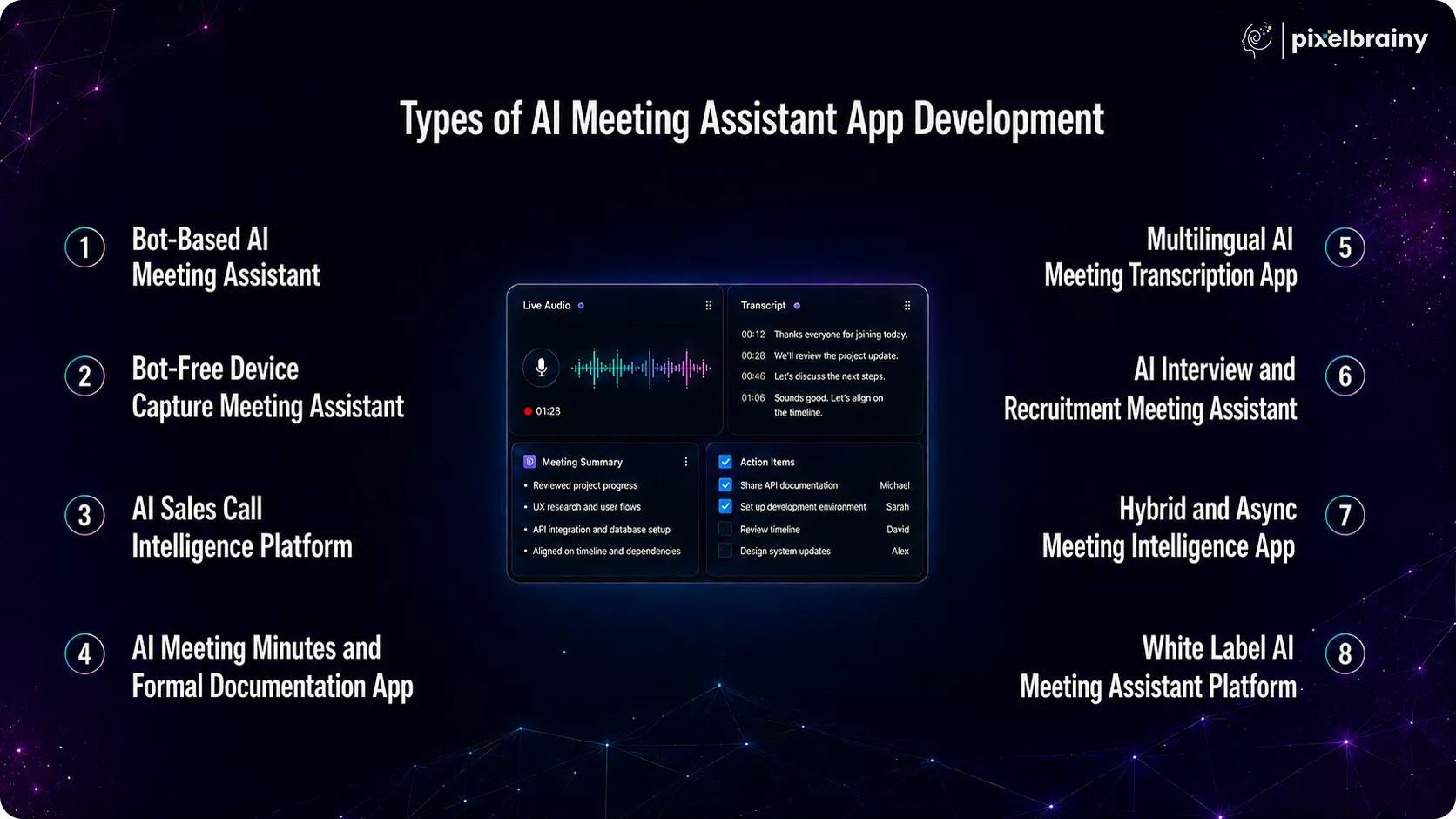
A bot-based AI meeting assistant automatically joins virtual meetings as a visible participant after receiving a calendar invitation or meeting link. It records conversations, performs real time transcription, generates summaries, and distributes meeting insights without requiring participants to install additional software.
This is currently the most common approach for AI meeting assistant app development because it works seamlessly across platforms like Zoom, Google Meet, and Microsoft Teams.
Key Capabilities
Best For
Estimated Development Cost
$30,000 to $100,000
Why Choose This Type?
If your organization conducts frequent online meetings across multiple collaboration platforms, a bot-based assistant provides the fastest deployment with minimal disruption to existing workflows.
Unlike bot-based systems, a bot-free meeting assistant captures meeting audio directly from the user's desktop or mobile device without appearing as a participant in the meeting. This creates a more natural meeting experience while maintaining greater privacy for participants.
Many executives and regulated industries prefer this architecture because no visible recording bot joins confidential meetings.
Key Capabilities
Best For
Estimated Development Cost
$25,000 to $80,000
Why Choose This Type?
Businesses that prioritize discretion, privacy, and executive level collaboration often choose bot-free solutions to avoid introducing visible AI participants into confidential discussions.
An AI Sales Call Intelligence Platform is designed specifically for sales and customer success teams. Rather than simply generating transcripts, it analyzes customer conversations to uncover buying signals, objections, competitor mentions, pricing discussions, sentiment, and deal risks.
This type of AI meeting intelligence platform development helps sales teams improve close rates while reducing manual CRM updates.
Key Capabilities
Best For
Estimated Development Cost
$50,000 to $150,000
Why Choose This Type?
If your revenue depends on customer conversations, this platform transforms every sales call into actionable intelligence, helping teams close deals faster and improve coaching with data driven insights.
Many organizations require structured meeting documentation instead of conversational summaries. An AI Meeting Minutes App automatically converts discussions into professionally formatted meeting minutes that follow predefined templates and compliance standards.
Unlike general note taking tools, these applications focus on governance, documentation accuracy, approvals, and record management.
Key Capabilities
Best For
Estimated Development Cost
$30,000 to $80,000
Why Choose This Type?
Organizations that rely on formal documentation can automate one of their most time-consuming administrative processes while improving consistency, compliance, and audit readiness.
As businesses expand across international markets, language barriers can slow collaboration and decision making. A multilingual AI meeting transcription app solves this challenge by transcribing conversations, translating content, and generating summaries in multiple languages simultaneously. This enables global teams to communicate more effectively without relying on manual translators or separate documentation processes.
Leading AI meeting assistants already support major languages such as English, Spanish, French, German, Japanese, and Chinese, while custom solutions can be extended to support 50 or more languages depending on business requirements. This makes multilingual capabilities a valuable investment for organizations operating across different regions and time zones.
Key Capabilities
Best For
Estimated Development Cost
$50,000 to $150,000
Why Choose This Type?
If your teams regularly collaborate across countries, a multilingual meeting assistant ensures every participant receives accurate meeting notes in their preferred language, improving communication and reducing misunderstandings.
Recruitment teams conduct hundreds of interviews every month, making it difficult to document candidate responses consistently. An AI Interview and Recruitment Meeting Assistant automates interview documentation, evaluates responses against predefined hiring criteria, and generates structured scorecards that help recruiters make faster and more objective hiring decisions.
Instead of manually taking notes throughout the interview, recruiters can focus entirely on engaging with candidates while AI captures every important detail.
Key Capabilities
Best For
Estimated Development Cost
$40,000 to $120,000
Why Choose This Type?
Businesses with high volume hiring processes can significantly reduce administrative effort while improving interview consistency, collaboration, and candidate evaluation quality.
Not every discussion happens in a live meeting. Distributed teams often rely on recorded presentations, training sessions, webinars, and asynchronous video updates. A Hybrid and Async Meeting Intelligence App supports both live meetings and uploaded audio or video files, ensuring every conversation receives the same AI powered analysis.
This flexibility makes it ideal for organizations operating across multiple time zones where employees cannot always attend meetings in real time.
Key Capabilities
Best For
Estimated Development Cost
$30,000 to $90,000
Why Choose This Type?
Organizations embracing hybrid work can ensure every employee receives the same structured meeting insights, regardless of whether they attended the meeting live or watched it later.
A White Label AI Meeting Assistant Platform is designed for software companies, consulting firms, managed service providers, and enterprise IT teams that want to offer AI meeting assistance under their own brand. Rather than building separate applications for each customer, organizations can develop a single multi tenant platform with customizable branding, workflows, integrations, and AI templates.
This approach enables businesses to launch commercial AI meeting products faster while serving multiple clients from one scalable backend.
Key Capabilities
Best For
Estimated Development Cost
$100,000 to $300,000
Why Choose This Type?
Businesses looking to monetize AI meeting technology can launch their own branded platform with flexible customization, recurring subscription models, and enterprise grade scalability.
| App Type | Bot Visibility | Compliance Focus | Estimated Cost | Best For |
| Bot Based AI Meeting Assistant | Visible | Standard | $30K to $100K | Remote teams, SaaS companies, customer success |
| Bot Free Device Capture Assistant | Invisible | High | $25K to $80K | Executives, legal firms, finance, consultants |
| AI Sales Call Intelligence Platform | Visible | CRM Focused | $50K to $150K | Sales teams, SDRs, revenue operations |
| AI Meeting Minutes App | Optional | High | $30K to $80K | Board meetings, governance, legal teams |
| Multilingual AI Transcription App | Visible | Medium | $50K to $150K | Global enterprises, multinational organizations |
| AI Interview Assistant | Optional | HR Compliance | $40K to $120K | Recruitment agencies, HR teams |
| Hybrid and Async Meeting Intelligence App | Optional | Standard | $30K to $90K | Remote first companies, distributed teams |
| White Label AI Meeting Assistant Platform | Configurable | Varies | $100K to $300K | SaaS founders, MSPs, enterprise platform providers |
The right solution depends on your business objectives, users, and long term growth strategy. If your primary goal is improving internal collaboration, a bot based or bot free meeting assistant is often the best starting point. Sales driven organizations benefit most from AI meeting intelligence platforms, while regulated industries should prioritize compliance focused documentation or private deployment.
Businesses planning to launch a commercial SaaS product should consider white label AI meeting assistant development, as it offers the flexibility to serve multiple clients with a single scalable platform.
Selecting the right type of AI meeting assistant app lays the foundation for a solution that aligns with your business goals, scales with future growth, and delivers measurable productivity gains across every meeting.
The value of an AI meeting assistant varies across industries because every business has unique workflows, compliance requirements, and documentation standards. While some organizations need automated meeting summaries, others require advanced capabilities such as sales coaching, legal compliance, clinical documentation, or recruitment intelligence. This is why modern AI meeting assistant apps are increasingly being customized for industry specific use cases instead of offering a one size fits all experience.
Whether you want an AI meeting assistant for sales teams, build AI meeting app for healthcare, develop AI meeting assistant for legal firms, or create AI meeting intelligence for recruiting, selecting the right features and integrations is essential for maximizing productivity and business outcomes.
Sales teams spend hours documenting customer conversations, updating CRM records, and preparing follow up emails after every meeting. Instead of simply generating transcripts, a custom AI meeting assistant can analyze conversations to uncover buying signals, identify competitor mentions, detect objections, and recommend the next best actions.
For organizations asking, "We want an AI meeting assistant that coaches our reps, not just takes notes. What should we build?" the answer is a sales focused meeting intelligence platform that provides actionable insights throughout the sales cycle.
Common Use Cases
Essential Features
ROI: Sales teams using AI meeting intelligence report a 30% to 40% reduction in post call administrative work, while improving follow up consistency and CRM data accuracy.
Law firms and compliance teams handle highly confidential discussions where security, privacy, and regulatory compliance are non-negotiable. Generic cloud-based meeting assistants often fail to meet these strict requirements.
For firms asking, "We need an AI meeting assistant that protects attorney client privilege. What features are essential?", a private deployment with enterprise security controls is the preferred approach.
Common Use Cases
Essential Features
ROI: Legal teams using AI meeting documentation solutions can reduce billing write offs caused by undocumented client work by 15% to 25%, while maintaining stronger compliance and documentation accuracy.
Healthcare professionals spend a significant amount of time documenting clinical discussions, multidisciplinary meetings, and patient care coordination. A custom healthcare meeting assistant automates this process while ensuring patient privacy and regulatory compliance.
Organizations looking to build AI meeting app for healthcare should prioritize medical language accuracy and secure handling of sensitive patient information.
Common Use Cases
Essential Features
Compliance Consideration
Patient identifiers should always be de identified before storage, and the platform must comply with HIPAA or other regional healthcare privacy regulations.
Recruitment agencies and enterprise HR departments conduct hundreds of interviews every week, making manual documentation both time consuming and inconsistent. AI meeting assistants streamline hiring by automatically generating interview summaries, evaluating responses, and populating applicant tracking systems.
For organizations conducting high volume hiring, AI meeting intelligence for recruiting can dramatically improve recruiter productivity.
Common Use Cases
Essential Features
ROI: Recruitment teams using AI interview assistants reduce interview documentation time by 60% to 75%, allowing recruiters to spend more time engaging with candidates.
Consultants often spend almost as much time documenting meetings as they do delivering client work. AI meeting assistants help consulting firms automate client documentation, project tracking, and follow up reporting while improving billable productivity.
An AI meeting assistant for consulting can transform client conversations into actionable project documentation within minutes.
Common Use Cases
Essential Features
ROI: Consulting firms report up to a 40% reduction in non-billable meeting administration time per consultant, enabling teams to dedicate more hours to client delivery and strategic work.
Engineering teams rely on meetings for sprint planning, architecture reviews, retrospectives, and technical decision making. However, documenting these discussions manually often delays development and creates inconsistencies across projects.
A custom AI meeting assistant automatically captures technical discussions and synchronizes outcomes with engineering workflows.
Common Use Cases
Essential Features
ROI: Engineering teams using AI meeting assistants eliminate an estimated 3 to 5 hours of documentation work per engineer during every sprint, allowing developers to spend more time building products instead of maintaining meeting records.
Customizing an AI meeting assistant for your industry's workflows, compliance requirements, and business objectives ensures greater adoption, higher productivity, and measurable returns from every meeting conducted across your organization.
Successful AI meeting assistant app development begins with building a strong functional foundation before introducing advanced AI capabilities. While features like AI agents, predictive analytics, and conversational assistants can enhance the experience, they deliver real value only when the app already provides reliable meeting capture, accurate transcription, structured documentation, and seamless collaboration. Focusing on the right core features ensures your application is scalable, user friendly, and capable of supporting diverse business workflows.
Businesses often ask, "What are the must have features to include when developing an AI meeting assistant app?" The answer is to prioritize capabilities that automate meeting management from start to finish, including meeting detection, transcription, note generation, task extraction, secure storage, and integrations with existing workplace tools. These essential features create the backbone of a smart meeting assistant and provide the functionality users expect from a modern collaboration platform.
| Core Feature | Description |
| User Registration and Authentication | Enable secure user onboarding through email, Google, Microsoft, or Single Sign On authentication while supporting role-based permissions, enterprise access control, and multi factor authentication to protect sensitive meeting data. |
| Calendar Integration | Integrate with Google Calendar, Microsoft Outlook, and Apple Calendar to automatically detect upcoming meetings, synchronize schedules, send reminders, and prepare the AI assistant to join meetings without manual intervention. |
| Automatic Meeting Detection | Continuously monitor connected calendars to identify scheduled meetings, retrieve meeting details, and automatically trigger recording or AI participation at the correct time for a seamless meeting experience. |
| Real Time Meeting Recording | Capture high quality meeting audio securely during live discussions while supporting cloud storage, playback functionality, and compliance with organizational recording policies for future review and documentation. |
| Real Time Speech to Text Transcription | Convert spoken conversations into highly accurate text in real time, allowing participants to follow discussions live while creating searchable transcripts for future reference and collaboration. |
| Speaker Identification | Automatically recognize and label individual speakers throughout the meeting, making transcripts easier to understand while improving summary generation, action item assignment, and conversation analysis accuracy. |
| AI Generated Meeting Summaries | Create concise and well structured summaries that highlight important discussion topics, key decisions, meeting outcomes, and next steps, allowing users to review lengthy meetings within minutes. |
| Action Item Extraction | Detect tasks, assign responsible team members, capture deadlines, and organize follow up activities automatically so important commitments are documented and shared without requiring manual note taking. |
| Searchable Meeting History | Store transcripts, recordings, summaries, and meeting metadata within a centralized repository that supports keyword search, filtering, and quick retrieval of historical discussions whenever needed. |
| Meeting Playback with Transcript Sync | Synchronize meeting recordings with corresponding transcript sections, allowing users to instantly jump to specific conversations, verify details, and review discussions more efficiently than traditional playback. |
| Team Collaboration Workspace | Provide a shared workspace where team members can review meeting notes, comment on summaries, assign follow up tasks, and collaborate effectively without switching between multiple applications. |
| Meeting Notifications and Reminders | Automatically notify participants about upcoming meetings, completed transcripts, generated summaries, assigned action items, and pending follow ups to improve accountability and team communication. |
| File and Transcript Export | Allow users to export meeting summaries, transcripts, and recordings in multiple formats such as PDF, DOCX, TXT, or CSV for documentation, reporting, compliance, and knowledge sharing purposes. |
| Role Based Access Control | Control access to recordings, transcripts, summaries, and shared workspaces by assigning user roles, department permissions, and administrative privileges to maintain enterprise level security and governance. |
| Basic Analytics Dashboard | Display essential meeting insights including meeting volume, transcription activity, participant engagement, completed summaries, and productivity metrics to help organizations monitor collaboration performance and adoption trends. |
Implementing these core features establishes a reliable foundation for AI meeting assistant app development, ensuring your platform delivers consistent user value while remaining ready for future AI powered enhancements and enterprise scalability.
Once the core functionality is in place, the next step is to enhance your application with intelligent capabilities that improve productivity, decision making, and workflow automation. These advanced features transform a standard meeting assistant into a comprehensive business intelligence platform capable of understanding meeting context, automating complex processes, and delivering personalized insights. During AI meeting assistant app development, organizations often introduce these capabilities in later development phases to maximize long term value and scalability.
A common question business ask is, "Which advanced AI features should we add after building the core meeting assistant app?" The answer depends on your industry, workflows, and business goals. Whether you are building an enterprise collaboration platform, an AI meeting intelligence platform, or a commercial SaaS solution, the following advanced features can significantly enhance user experience and operational efficiency.
| Advanced Feature | Description |
| AI Powered Meeting Insights | Analyze meeting conversations to identify recurring discussion themes, business risks, customer sentiment, decision patterns, and productivity trends, helping organizations make smarter and more data driven decisions over time. |
| Custom AI Agents for Meeting Automation | Deploy intelligent AI agents that automatically create tasks, schedule follow up meetings, assign responsibilities, answer meeting related questions, and perform repetitive post meeting workflows without manual intervention. |
| Personalized Meeting Summary Templates | Allow users and departments to create customized summary formats based on meeting type, ensuring outputs match business workflows for sales calls, board meetings, interviews, project reviews, or client consultations. |
| Multilingual Translation and Summarization | Support real time translation, multilingual transcription, and AI generated summaries across multiple languages, enabling global teams to collaborate effectively regardless of their preferred language or location. |
| AI Powered Meeting Search and Knowledge Retrieval | Enable users to ask natural language questions about previous meetings and instantly retrieve relevant transcripts, decisions, action items, or discussion highlights from the organization's meeting knowledge base. |
| Predictive Action Item Recommendations | Analyze meeting context and historical project data to recommend additional follow up tasks, identify missing action items, and suggest priorities that help teams avoid overlooked responsibilities. |
| Voice Command and Conversational Assistant | Integrate conversational AI that allows users to retrieve meeting insights, generate summaries, search transcripts, or schedule follow ups using simple voice or text commands within the application. |
| AI Sentiment and Engagement Analysis | Measure participant sentiment, speaking patterns, engagement levels, and conversation dynamics to identify communication issues, customer satisfaction trends, or opportunities for improved team collaboration. |
| Custom Workflow Automation Engine | Automatically trigger workflows such as creating Jira tickets, updating CRM records, sending Slack notifications, generating reports, or initiating approval processes based on meeting outcomes and predefined business rules. |
| Executive Analytics and Organization Intelligence Dashboard | Provide enterprise leaders with advanced analytics covering meeting effectiveness, decision velocity, collaboration trends, team productivity, and organizational knowledge growth through interactive dashboards and AI generated reports. |
Adding these advanced features enables your AI meeting assistant to evolve from a productivity tool into an intelligent collaboration platform that automates workflows, uncovers business insights, and delivers long term strategic value across the organization.
Building an AI meeting assistant involves much more than integrating speech-to-text technology into a video conferencing platform. Modern businesses need a solution that can automatically join meetings, generate accurate transcripts, identify action items with assigned owners, create structured summaries, and synchronize updates with tools like Jira, Slack, Salesforce, and Notion. Delivering this level of automation requires a well-planned AI meeting assistant app development process that combines Artificial Intelligence, Large Language Models, workflow automation, secure integrations, and an intuitive user experience.
Consider this scenario. Your software company has 150 engineers and conducts 40 to 60 meetings every day across product, engineering, sales, and customer success teams. You want an internal AI meeting assistant that automatically captures every meeting, extracts action items, identifies task owners, and routes each task to the appropriate Jira project based on the meeting context. Building a solution like this requires selecting the right architecture, integrating with meeting platforms and enterprise tools, implementing security controls, and continuously improving AI performance.
Whether you want to create an AI meeting assistant from scratch or launch a commercial SaaS platform, the following guide explains how to build an AI meeting assistant app through a structured development approach, from planning and technology selection to deployment and continuous optimization.
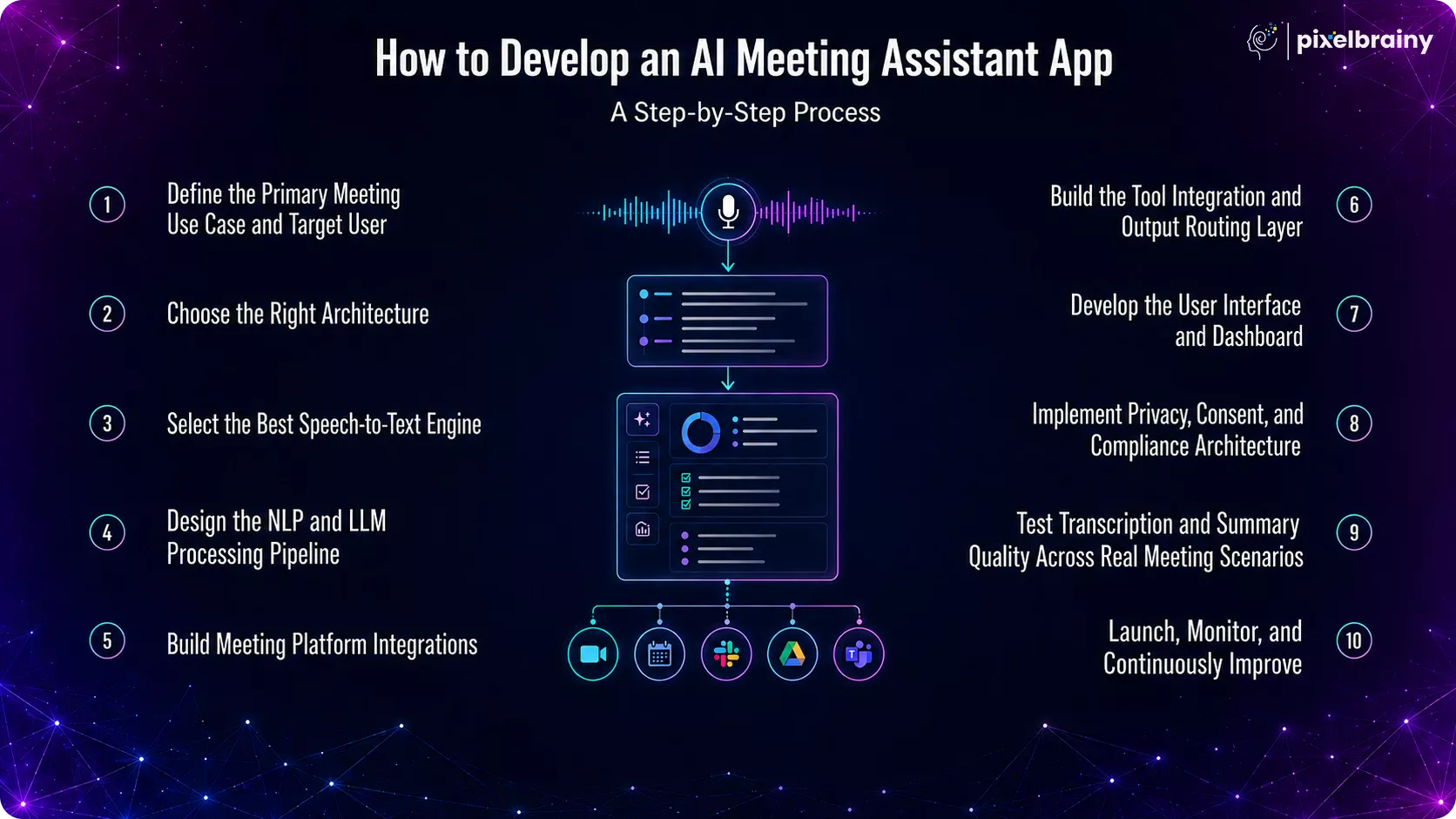
Before writing a single line of code, identify the primary problem your application will solve. The most successful AI meeting assistants focus on one business workflow exceptionally well before expanding into additional use cases. Your priorities may include transcription accuracy, automated action item extraction, CRM synchronization, sales coaching, compliance documentation, or executive meeting summaries.
At the same time, clearly define your target users. A sales representative expects deal insights and CRM updates, while recruiters need interview scorecards and hiring recommendations. Engineering teams require sprint documentation, whereas executives value concise strategic summaries.
Timeline: 3 to 5 days
Common Mistake to Avoid: Trying to build a generic meeting assistant for every department instead of solving one specific business problem exceptionally well.
One of the most important technical decisions is selecting the meeting capture architecture.
A bot-based architecture joins meetings as a participant through Zoom, Google Meet, or Microsoft Teams. It offers excellent cross platform compatibility and does not require software installation.
A bot free architecture captures meeting audio directly from the user's desktop or mobile device. Although users must install an application, it provides greater privacy and avoids introducing visible bots into confidential meetings.
Your architecture choice directly affects enterprise adoption, security, development complexity, and user experience.
Timeline: 2 to 3 days
Common Mistake to Avoid: Choosing a bot-based approach without confirming whether enterprise customers permit AI bots to join confidential meetings.
Speech recognition is the foundation of every AI meeting assistant. Choosing the wrong transcription engine can negatively affect summary quality, action item extraction, and user satisfaction.
Evaluate leading providers such as AssemblyAI, Deepgram, OpenAI Whisper, Google Speech-to-Text, and Amazon Transcribe using real meeting recordings instead of benchmark datasets. Engineering discussions, sales conversations, and multilingual meetings all present unique transcription challenges.
Also evaluate speaker diarization accuracy because even perfect transcription loses value if speakers are incorrectly identified.
Timeline: 1 to 2 weeks
Common Mistake to Avoid: Selecting a speech recognition provider solely based on published accuracy benchmarks instead of testing with real customer meeting recordings.
After transcription, the raw text must be transformed into structured business intelligence. This stage defines how the application extracts action items, identifies decisions, recognizes deadlines, detects risks, and generates meeting summaries.
Design a consistent output structure that matches your business workflows. Decide whether prompt engineering alone is sufficient or whether custom AI model development is required for industry specific terminology and formatting. If you are validating a new product idea, beginning with PoC development or MVP development can help reduce technical risk before investing in full scale implementation.
A well-designed processing pipeline ensures every meeting produces predictable, accurate, and actionable outputs.
Timeline: 2 to 3 weeks
Common Mistake to Avoid: Using generic prompts that generate inconsistent meeting summaries requiring manual editing after every meeting.
Once the AI pipeline is ready, integrate the application with major meeting platforms such as Zoom, Google Meet, and Microsoft Teams. Each platform has unique authentication methods, recording permissions, participant policies, and API limitations that must be handled independently.
Your application should also integrate with Google Calendar and Microsoft Outlook to automatically detect scheduled meetings, retrieve joining information, and enable seamless AI participation without requiring manual setup.
At this stage, partnering with an experienced AI company ensures the meeting experience remains intuitive while reducing friction during onboarding, scheduling, and meeting management.
Timeline: 3 to 5 weeks
Common Mistake to Avoid: Assuming every meeting platform follows identical API standards or participant approval workflows, resulting in integration failures during production deployments.
An AI meeting assistant becomes significantly more valuable when it can automatically deliver outputs to the business tools your teams already use. Instead of asking users to manually copy meeting notes, action items, or decisions, build an integration layer that routes information to the appropriate destination based on the meeting context.
For example, action items can be pushed to Jira or Asana, sales notes can be synchronized with Salesforce or HubSpot, engineering discussions can be documented in Notion, and meeting summaries can be shared in Slack channels. To support enterprise customers with unique workflows, implement a webhook framework and flexible APIs that allow seamless integration with internal business systems. If your platform is expected to connect with operational technologies or smart workplace environments, planning for future AI integration services can also improve long-term scalability.
Timeline: 3 to 5 weeks
Common Mistake to Avoid: Building integrations for only a handful of popular tools and overlooking the custom software or internal systems used by enterprise customers.
A powerful AI engine requires an equally intuitive interface that helps users access meeting information quickly. Build a web dashboard where users can browse meeting history, search transcripts, review AI-generated summaries, track action items, and configure integrations from a single location.
For greater accessibility, develop companion mobile applications for iOS and Android that allow users to manage meetings, view summaries, and receive notifications on the go. The transcript viewer should support annotations, keyword search, sharing, and exports to PDF or Word formats. Working with an experienced UI/UX design company helps create workflows that encourage adoption while keeping complex AI capabilities easy to use.
Timeline: 3 to 4 weeks
Common Mistake to Avoid: Spending excessive time perfecting the interface before validating that the AI consistently produces accurate and useful meeting outputs.
Meeting conversations often contain confidential business information, making privacy and compliance essential from the beginning of development. Build participant consent notifications that inform attendees before recording starts and provide administrators with controls to manage recording policies across the organization.
Enterprise customers may also require data residency options that allow meeting recordings and transcripts to remain within specific geographic regions. Implement GDPR compliant data deletion workflows, role-based access controls, audit logs, encryption for data at rest and in transit, and secure authentication to protect sensitive business information. Organizations operating in regulated industries should also evaluate additional compliance requirements during the planning phase, often with guidance from specialized AI consulting services.
Timeline: 2 to 3 weeks
Common Mistake to Avoid: Treating privacy and compliance as features to add after launch instead of building them into the application's architecture from the first day.
Before launching your application, validate its performance using real meeting recordings from your target users. Test meetings with different accents, speaking speeds, multiple participants, industry terminology, background noise, and varying audio quality to ensure reliable transcription and summarization.
Measure key performance metrics such as transcription word error rate, speaker attribution accuracy, action item extraction quality, and summary completeness. Invite actual users to review AI-generated outputs and compare them with manually prepared meeting notes. Their feedback will help refine prompts, improve AI models, and identify usability issues before public release.
Timeline: 2 to 3 weeks
Common Mistake to Avoid: Testing only with clean demo recordings and overlooking the noisy, fast-paced conversations that occur in real business meetings.
Launching your application marks the beginning of continuous optimization rather than the end of development. Monitor transcription success rates, AI summary latency, integration reliability, infrastructure performance, and user engagement to identify opportunities for improvement.
Collect in-app feedback on summary quality and use this information to refine prompts, update AI models, and improve workflow automation. As meeting platforms introduce new APIs and enterprise requirements evolve, regularly update integrations, security controls, and AI capabilities to maintain long-term reliability. Businesses that partner with experienced top AI app development companies often establish continuous evaluation cycles to keep their products competitive as AI technologies rapidly evolve.
Timeline: Ongoing after launch
Common Mistake to Avoid: Assuming the AI pipeline is complete after deployment instead of continuously improving models, prompts, and integrations based on user feedback and changing business requirements.
By following this structured AI meeting assistant app development process, businesses can reduce development risks, accelerate product delivery, and build a scalable platform that delivers accurate meeting intelligence, automates business workflows, and continues to improve as user needs and AI technologies evolve.
The AI meeting assistant app development cost depends on several factors, including the product's feature set, AI capabilities, supported meeting platforms, integrations, security requirements, and deployment model. A basic MVP focused on transcription and AI summaries can be developed with a relatively modest budget, while an enterprise-grade platform with custom AI models, advanced analytics, compliance, and white-label capabilities requires a significantly larger investment.
Many businesses ask, "How much does it cost to build a custom AI meeting assistant app in 2026?" The answer depends on whether you're building an internal productivity tool, a commercial SaaS platform, or an enterprise solution tailored to complex workflows. For startups with a $50,000 budget, it's realistic to develop a robust MVP that includes real-time transcription, AI-generated summaries, speaker diarization, and essential integrations, leaving advanced intelligence features for future releases.
| App Type | Features Included | Estimated Cost | Timeline |
| Basic Meeting Note-Taker MVP | Transcription, basic summaries, one integration | $10,000 - $30,000 | 6-10 weeks |
| Mid-Level Custom Meeting Assistant | Speaker diarization, action items, multi-tool sync | $30,000 - $80,000 | 3-5 months |
| Advanced Meeting Intelligence Platform | Sales coaching, sentiment analysis, custom templates, analytics | $80,000 - $180,000 | 4-7 months |
| Enterprise White Label Platform | Multi-tenant architecture, SSO, compliance, custom integrations | $120,000 - $300,000 | 5-9 months |
| HIPAA or FINRA Compliant On-Premise Platform | Self-hosted AI, on-premise deployment, enterprise compliance | $150,000 - $350,000+ | 6-10 months |
| Development Component | Estimated Cost Range |
| Architecture design and STT engine evaluation | $3,000 - $10,000 |
| Speech-to-text and speaker diarization integration | $8,000 - $25,000 |
| NLP and LLM summary pipeline development | $8,000 - $25,000 |
| Meeting platform integrations (Zoom, Google Meet, Microsoft Teams) | $10,000 - $30,000 |
| Tool integrations (CRM, project management, knowledge base) | $8,000 - $30,000 |
| Web dashboard and UI development | $8,000 - $25,000 |
| Mobile app (iOS and Android) | $10,000 - $35,000 |
| Privacy, consent, and compliance architecture | $5,000 - $25,000 |
| Testing and quality assurance | $3,000 - $10,000 |
| Deployment and infrastructure setup | $3,000 - $10,000 |
| Post-launch support and AI model updates | $1,500 - $8,000/month |
A common question from growing organizations is, "We pay $180,000 per year for Fireflies. Would building our own meeting assistant cost less over three years?" For businesses with hundreds of users or strict compliance requirements, building a custom platform often delivers better long-term value through lower recurring costs, complete data ownership, and unlimited customization.
| Factor | SaaS Tool (Per User Per Month) | Custom AI Meeting Assistant |
| Year 1 for 100 users | $12,000 - $60,000 | $30,000 - $150,000 one-time |
| Year 3 total for 100 users | $36,000 - $180,000 | $40,000 - $180,000 with lower ongoing costs |
| Customization | Platform limitations | Fully customizable |
| Integrations | Pre-built integrations | Connect with any business system |
| Data Ownership | Vendor managed | Full ownership and control |
| Compliance Control | Depends on vendor | Fully configurable |
| On-Premise Deployment | Rarely available | Fully supported |
Several technical and business decisions directly influence the cost to develop a smart meeting note-taking app:
By understanding this AI meeting app development cost breakdown, businesses can plan a realistic budget, prioritize high-impact features, and choose an implementation strategy that balances upfront investment with long-term operational savings and scalability.
The success of an AI meeting assistant depends not only on its features but also on the technologies powering it behind the scenes. Whether you are building a simple meeting note-taking MVP or an enterprise-grade platform with real-time transcription, AI-generated summaries, workflow automation, and multi-platform integrations, using the right technology stack directly impacts development speed, AI accuracy, scalability, security, and long-term maintenance.
A carefully planned tech stack also makes it easier to integrate with platforms like Zoom, Google Meet, Microsoft Teams, Jira, Slack, Salesforce, and other business applications as your product evolves.
A common question business ask is, "What technologies are required to build an AI meeting assistant app, and which tools should we use for speech recognition, AI summaries, cloud infrastructure, and integrations?" The following table outlines the recommended tools and technologies used in modern AI meeting assistant app development, helping you build a secure, scalable, and high-performing solution from MVP to enterprise deployment.
| Technology Layer | Recommended Tools & Technologies | Purpose |
| Frontend (Web) | React.js, Next.js, Vue.js | Build responsive and interactive web dashboards for meeting history, transcripts, and summaries. |
| Mobile Development | Flutter, React Native, Swift, Kotlin | Develop cross-platform or native mobile apps for iOS and Android. |
| Backend Development | Node.js, Python (FastAPI, Django), Java Spring Boot | Manage business logic, APIs, authentication, and workflow orchestration. |
| Speech-to-Text (STT) | OpenAI Whisper, Deepgram, AssemblyAI, Google Speech-to-Text, AWS Transcribe | Convert meeting audio into accurate transcripts with speaker diarization support. |
| AI & LLM Frameworks | OpenAI GPT, Anthropic Claude, Google Gemini, LangChain, LlamaIndex | Generate summaries, extract action items, answer questions, and automate meeting intelligence. |
| Vector Database | Pinecone, Weaviate, Milvus, pgvector | Store meeting embeddings for semantic search and Retrieval-Augmented Generation (RAG). |
| Database | PostgreSQL, MongoDB, MySQL | Store user data, meeting metadata, transcripts, and application settings. |
| Cloud Infrastructure | AWS, Microsoft Azure, Google Cloud Platform | Host applications, manage AI workloads, and scale infrastructure securely. |
| Meeting Platform Integration | Zoom SDK & API, Microsoft Teams Graph API, Google Meet API | Join meetings, retrieve recordings, and automate meeting workflows. |
| Calendar Integration | Google Calendar API, Microsoft Outlook Calendar API | Detect scheduled meetings and enable automatic meeting participation. |
| Authentication & Security | OAuth 2.0, JWT, Auth0, Firebase Authentication | Secure user authentication, authorization, and access management. |
| File Storage | Amazon S3, Google Cloud Storage, Azure Blob Storage | Store meeting recordings, transcripts, exported reports, and attachments. |
| Notifications | Firebase Cloud Messaging, Twilio, SendGrid | Deliver email, SMS, and push notifications for meeting reminders and summaries. |
| Workflow Automation | Zapier, Make, n8n, Custom Webhooks | Automate routing of action items to business applications and enterprise workflows. |
| Monitoring & Analytics | Prometheus, Grafana, Datadog, New Relic | Monitor application health, AI performance, API usage, and system reliability. |
| DevOps & CI/CD | Docker, Kubernetes, GitHub Actions, Jenkins | Automate deployment, scaling, containerization, and continuous delivery pipelines. |
Using the right tools and technology stack lays the foundation for AI meeting assistant app development, enabling better performance, seamless integrations, enterprise-grade security, and long-term scalability.
An AI meeting assistant delivers the greatest value when it fits naturally into the tools your teams already use every day. Even the most accurate meeting summaries and transcripts provide limited business impact if users must manually copy action items into Jira, update opportunities in Salesforce, or share notes in Slack. Building seamless integrations ensures meeting insights automatically flow into existing workflows, improving productivity, increasing adoption, and eliminating repetitive administrative tasks.
When planning an enterprise AI meeting assistant, one of the first decisions is determining which business tools the platform should integrate with. For example, "Our team uses multiple business applications. How do we build an AI meeting assistant that automatically routes action items to Jira and Asana, deal notes to Salesforce, and meeting summaries to Slack based on the meeting type?"
The answer is to build an intelligent integration layer that automatically identifies the meeting context and delivers the right output to the right business system without requiring manual intervention.
A robust AI meeting assistant CRM integration automatically routes client meeting summaries, next steps, contact notes, competitor mentions, and deal stage updates into Salesforce, HubSpot, or Pipedrive. Sales representatives no longer need to spend time updating CRM records after every meeting, allowing them to focus on customer conversations while maintaining an accurate and up-to-date sales pipeline.
If you plan to develop an AI meeting assistant with project management integration, the platform should automatically extract action items from meeting transcripts, assign task owners, identify deadlines, and create tasks in Jira, Asana, Linear, or Trello. Intelligent routing rules can direct engineering tasks to Jira while marketing deliverables are automatically created in the appropriate Asana workspace.
When you build an AI meeting app with Slack integration, meeting outcomes become instantly visible to everyone who needs them. AI-generated summaries can be shared in the appropriate Slack channel or Microsoft Teams workspace, while employees assigned action items receive direct notifications. Routing rules ensure executive updates, project meetings, and client discussions reach the correct audience automatically.
Knowledge base integrations automatically organize meeting documentation into a searchable repository. Based on the meeting type or participating team, the AI creates structured pages in Notion or Confluence containing summaries, transcripts, attendee lists, action items, and supporting documents. This eliminates manual documentation while preserving valuable organizational knowledge.
Calendar integrations allow the AI meeting assistant to prepare before the meeting starts. By reading Google Calendar or Outlook events, it can schedule automatic bot participation or device capture, determine the appropriate summary template using meeting details, and attach summary links back to the calendar invitation once the meeting ends, making notes easy for attendees to access.
Recruitment teams can significantly reduce interview administration by integrating the meeting assistant with applicant tracking systems. The AI automatically generates interview summaries, candidate scorecards, and structured feedback, then synchronizes them with Greenhouse, Lever, or Workday. This reduces documentation time while ensuring consistent evaluation records across every stage of the hiring process.
| Team Type | Priority Integrations |
| Sales Team | Salesforce or HubSpot, Slack, Google Calendar |
| Engineering Team | Jira or Linear, Slack, Confluence |
| Recruiting Team | Greenhouse or Lever, Slack, Google Calendar |
| Executive Team | Notion or Confluence, Outlook, Slack |
| Consulting Firm | Notion, Slack, Google Drive, Email |
| Customer Success Team | Salesforce, Jira, Slack, HubSpot |
Building the right integrations transforms an AI meeting assistant from a note-taking application into an intelligent business platform that automates workflows, improves collaboration, and delivers measurable value across every team in the organization.
Building an AI meeting assistant that performs reliably in real business environments is far more challenging than integrating speech-to-text and a Large Language Model. Enterprise meetings often involve multiple speakers, industry-specific terminology, strict compliance requirements, and complex workflows that generic AI solutions struggle to handle. Addressing these AI meeting assistant development challenges early helps improve transcription accuracy, summary quality, scalability, and user adoption.
A question many product teams face is, "What are the hardest technical problems to solve when building an AI meeting assistant app?" Another common challenge is, "Our AI meeting tool struggles with multi-speaker technical meetings, and Whisper performs poorly on our domain vocabulary. How can we improve accuracy?"
The following challenges and solutions highlight the areas that require careful planning during development.
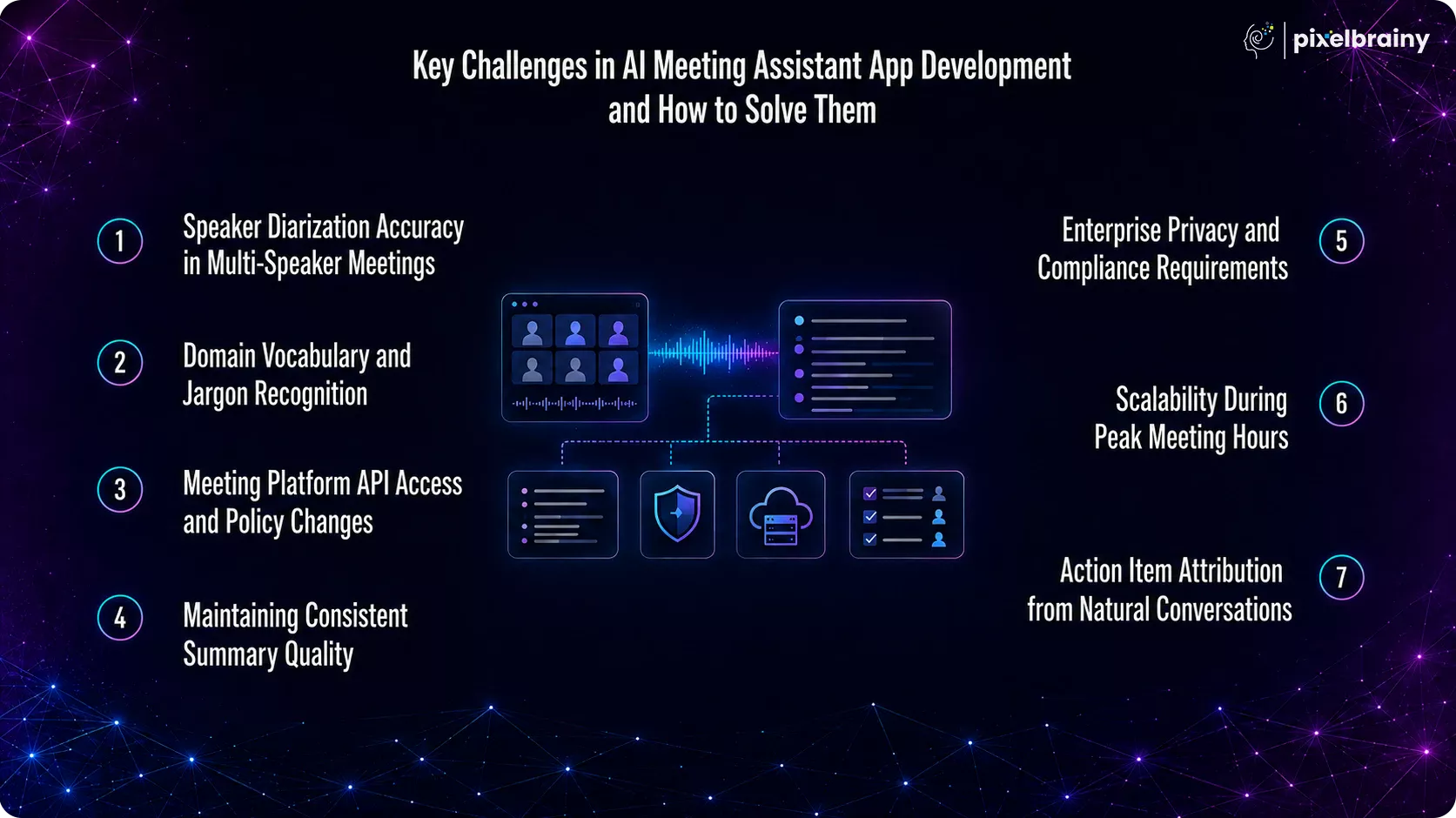
Identifying who said what becomes increasingly difficult in meetings with multiple participants, overlapping conversations, or inconsistent audio quality. Poor speaker attribution makes even accurate transcripts difficult to trust.
Solution: Use advanced speaker diarization models such as AssemblyAI or Pyannote.audio, combined with optional speaker enrollment for recurring participants who consent to voice profiling. This significantly improves speaker identification accuracy.
Generic speech recognition models often struggle with technical terminology, product names, internal abbreviations, and industry-specific language, leading to inaccurate transcripts.
Solution: To solve AI meeting transcription accuracy problems, implement custom vocabulary injection where supported or fine-tune models such as Whisper using domain-specific meeting recordings to improve recognition accuracy.
Zoom, Google Meet, and Microsoft Teams regularly update their APIs, recording permissions, and bot admission policies. A single platform change can disrupt integrations if the application is tightly coupled to platform-specific APIs.
Solution: Build an abstraction layer that separates your business logic from individual meeting platform APIs, allowing updates to be managed through platform-specific adapters instead of rebuilding the entire integration.
Sales calls, engineering stand-ups, executive reviews, and recruitment interviews all require different summary formats. A single prompt template rarely delivers consistent results across every meeting type.
Solution: Implement a meeting classification layer that analyzes meeting titles, attendees, and transcript content before applying specialized prompt templates optimized for each meeting category.
Many regulated organizations cannot send meeting recordings or transcripts to external AI services because of security and compliance requirements.
Solution: Address these custom AI meeting assistant development problems by supporting on-premise deployments with self-hosted speech recognition and locally deployed open-source language models, ensuring sensitive data never leaves the customer's infrastructure.
Business meetings typically occur during predictable time windows, creating sudden spikes in transcription requests that can overload fixed infrastructure and increase processing delays.
Solution: Build asynchronous processing pipelines using message queues and auto-scaling cloud infrastructure that dynamically allocates computing resources during peak demand while optimizing costs during quieter periods.
Meeting participants often make commitments without explicitly assigning owners or mentioning deadlines, making automated task extraction challenging.
Solution: Implement a two-stage AI pipeline where the first model extracts explicit commitments and a second reasoning model identifies implied owners, deadlines, and responsibilities based on the broader conversational context.
Overcoming these AI meeting assistant development challenges with the right architecture, AI models, and engineering practices results in a more accurate, scalable, and enterprise-ready solution that delivers long-term business value.
Off-the-shelf AI meeting assistants work well for general note-taking, but they often fall short when businesses need industry-specific terminology, enterprise integrations, strict compliance, or complete ownership of their meeting data. That's where a custom solution makes the difference.
At Pixelbrainy, we don't just build AI-powered meeting applications. We build intelligent meeting platforms designed around the way your organization actually works. Whether you're creating an internal meeting assistant for your engineering teams, developing a SaaS product for customers, or replacing expensive subscription-based tools, our focus is on delivering AI solutions that fit your workflows instead of forcing your teams to adapt to generic software.
From the very beginning, we work closely with you to understand how meetings are conducted across your organization, what information matters most, where action items should be routed, and which systems your teams already rely on. The result is an AI meeting assistant that feels like a natural extension of your business, not another disconnected tool.
| Our Expertise | What It Means for Your Business |
| Custom AI Meeting Assistant Development | Every solution is designed around your workflows, business goals, and operational requirements. |
| Enterprise AI Engineering | We build scalable AI pipelines for transcription, summarization, action item extraction, and meeting intelligence. |
| Deep System Integrations | Connect seamlessly with Salesforce, HubSpot, Jira, Asana, Slack, Microsoft Teams, Notion, and your internal business systems. |
| Security & Compliance by Design | Support for HIPAA, GDPR, SOC 2, role-based access control, encryption, and on-premise deployments where required. |
| Scalable Cloud Infrastructure | Applications designed to support thousands of meetings without compromising performance or reliability. |
| End-to-End Product Development | From product strategy, UI/UX design, AI engineering, and testing to deployment, optimization, and long-term support. |
Whether you're an early-stage startup validating an AI SaaS idea or an enterprise modernizing internal collaboration, our team has the expertise to deliver production-ready solutions.
We partner with:
As an experienced AI app development company, Pixelbrainy combines AI expertise with enterprise software engineering to build solutions that go beyond meeting transcription. We create intelligent platforms that automate workflows, improve team collaboration, protect sensitive business data, and scale as your organization grows. Whether you're planning to build an AI meeting assistant for internal operations or launch a commercial SaaS platform, our team helps you move from concept to production with confidence.
Have an AI meeting assistant idea in mind? Let's connect to discuss your requirements and explore the best approach for your business.
Every organization conducts meetings, but not every organization turns those conversations into actionable business outcomes. That's what sets a well-designed AI meeting assistant apart. Beyond recording discussions and generating transcripts, it captures institutional knowledge, automates repetitive tasks, keeps teams aligned, and ensures important decisions never get lost.
Throughout this guide, you've explored everything from AI meeting assistant app development, features, technology stack, integrations, development costs, and implementation challenges to the best practices for building a scalable, enterprise-ready solution. If you're asking, "How do I build an AI meeting assistant that delivers real business value instead of becoming just another productivity tool?", the answer is to create a platform tailored to your workflows, AI requirements, security standards, and long-term growth strategy.
Whether you're validating a new SaaS idea, replacing expensive subscription-based software, or building a secure internal meeting intelligence platform, a custom solution gives you the flexibility, ownership, and scalability needed to support your business for years to come.
Have an AI meeting assistant idea in mind? Let's connect. Schedule a call with Pixelbrainy to discuss your project, explore the right development approach, and build an AI-powered meeting solution that's designed specifically for your business goals.
The AI meeting assistant app development cost typically ranges from $10,000 to $350,000+, depending on features, AI capabilities, integrations, compliance requirements, and deployment model. A basic MVP costs less, while enterprise platforms with custom AI models, on-premise deployment, and advanced integrations require a higher investment.
The timeline depends on the project's complexity. A basic MVP can usually be developed in 6 to 10 weeks, while a fully customized enterprise solution typically takes 3 to 6 months. Projects involving advanced AI, compliance, and multiple integrations may require additional development time.
A bot-based AI meeting assistant joins meetings as a participant using platform APIs, making it easy to deploy across Zoom, Google Meet, and Microsoft Teams. A bot-free solution captures audio directly from a user's device, offering greater privacy but requiring software installation on individual devices.
Yes. A custom AI meeting assistant can integrate with multiple meeting platforms simultaneously using their respective APIs and SDKs. Supporting multiple platforms requires separate integrations because each service has different authentication methods, recording permissions, and API policies that must be managed independently.
Modern speech recognition can achieve very high accuracy under good audio conditions. To improve performance for technical meetings, healthcare, legal, or engineering discussions, use custom vocabulary injection, domain-specific AI models, speaker diarization, and train the system with real meeting recordings from your industry.
Yes. Enterprises with strict security or regulatory requirements can deploy an AI meeting assistant entirely within their own infrastructure. Self-hosted speech recognition, locally deployed language models, and private cloud environments ensure sensitive meeting data remains under complete organizational control.
The most valuable integrations include Salesforce or HubSpot for CRM, Jira or Asana for project management, Slack or Microsoft Teams for collaboration, Google Calendar or Outlook for scheduling, and Notion or Confluence for knowledge management. These integrations automate workflows and reduce manual administrative work.
HIPAA compliance requires encrypted data storage, secure user authentication, audit logs, role-based access controls, consent management, and secure infrastructure. Many healthcare organizations also prefer on-premise or private cloud deployments to ensure protected health information remains secure throughout the meeting lifecycle.
After launch, budget for cloud infrastructure, AI model usage, speech-to-text APIs, storage, monitoring, maintenance, security updates, and feature enhancements. Depending on usage and platform complexity, ongoing operational costs generally range from $1,500 to $8,000 per month.
For small teams, SaaS subscriptions may be more affordable initially. However, organizations with hundreds of users, complex workflows, or compliance requirements often achieve a better return on investment by building a custom AI meeting assistant that eliminates recurring subscription costs and provides complete ownership of data and functionality.
Yes. Modern AI meeting assistants can transcribe, translate, and summarize conversations across multiple languages using multilingual speech recognition and Large Language Models. This enables global teams to collaborate more effectively while generating summaries in the preferred language of each participant.
The right development partner should have hands-on experience building AI-powered enterprise applications, integrating with platforms like Zoom, Microsoft Teams, Salesforce, Jira, and Slack, and delivering secure, scalable solutions that align with your business workflows. At PixelBrainy, we specialize in custom AI meeting assistant app development, helping startups and enterprises build production-ready meeting intelligence platforms with advanced AI capabilities, enterprise integrations, and compliance-focused architectures tailored to their unique requirements.

About The Author
Sagar Bhatnagar
Sagar Sahay Bhatnagar brings over a decade of IT industry experience to his role as Marketing Head at PixelBrainy. He's known for his knack in devising creative marketing strategies that boost brand visibility and market influence. Sagar's strategic thinking, coupled with his innovative vision and focus on results, sets him apart. His track record of successful campaigns proves his ability to utilize digital platforms effectively for impactful marketing efforts. With a genuine passion for both technology and marketing, Sagar continuously pushes PixelBrainy's marketing initiatives to greater success.

Working with the PixelBrainy team has been a highly positive experience. They understand the design requirements and create beautiful UX elements to meet the application needs. The dev team did an excellent job bringing my vision to life. We discussed usability and flow. Sagar worked with his team to design the database and begin coding. Working with Sagar was easy. He has the knowledge to create robust apps, including multi-language support, Google and Apple ID login options, Ad-enabled integrations, Stripe payment processing, and a Web Admin site for maintaining support data. I'm extremely satisfied with the services provided, the quality of the final product, and the professionalism of the entire process. I highly recommend them for Android and iOS Mobile Application Design and Development.

Great experience working with them. Had a lot of feedback and I found that unlike most contractors they were bugging me for updates instead of the other way around. They were extremely time conscience and great at communicating! All work was done extremely high quality and if not on time, early! They were always proactive when it comes to communication and the work is great/above par always. Very flexible and a great team to work with! Goes above and beyond to present us with multiple options and always provides quality. Amazing work per usual with Chitra. If you have UI/UX or branding design needs I recommend you go to them! Will likely work with them in the future as well, definitely recommended!

PixelBrainy is a joy to work with and is a great partner when thinking through branding, logo, and website layout. I appreciate that they spend time going into the "why" behind their decisions to help inform me and others about industry best practices and their expertise.

I hired them to design our software apps. Things I really like about them are excellent communication skills, they answer all project suggestions and collaborate right away, and their input on design and colors is amazing. This project was complex and needed patience and creativity. The team is amazing to do business with. I will be using them long-term. Glad to see there are some good people out there. I was afraid to try and outsource my project to someone but I am glad I met them! I really can't say enough. They went above and beyond on this project. I am very happy with everything they have done to make my business stand out from the competition.

It was great working with PixelBrainy and the team. They were very responsive and really owned the project. We'll definitely work with them again!

I recently worked with the PixelBrainy team on a project and I was blown away by their communication skills. They were prompt, clear, and articulate in all of our interactions. They listened and provided valuable feedback and suggestions to help make the project a success. They also kept me updated throughout the entire process, which made the experience stress-free and enjoyable.

PixelBrainy is very good at what it does. The team also presents themselves very professionally and takes care of their side of things very well. I could fully trust them taking up the design work in a timely and organised manner and their attention to detail saved us lots of effort and time. This particular project was quite intense and the team showed that they function very well under pressure. Very much looking forward to working with her again!

It's always an absolute pleasure working with them. They completed all of my requests quickly and followed every note I had for them to a T, which made our process go smoothly from start to finish. Everything was completed fast and following all of the guidelines. And I would recommend their services to anyone. If you need any design work done in the future, PixelBrainy should be your first call!

They took ownership of our requirements and designed and proposed multiple beautiful variants. The team is self-motivated, requires minimum supervision, committed to see-through designs with quality and delivering them on time. We would definitely love to work with PixelBrainy again when we have any requirements.

PixelBrainy was a big help with our SaaS application. We've been hard at work with a new UI/UX and they provided a lot of help with the designs. If you're looking for assistance with your website, software, or mobile application designs, PixelBrainy and the team is a great recommendation.

PixelBrainy designers are amazing. They are responsive, talented, and always willing to help craft the design until it matches your vision. I would recommend them and plan to continue them for my future projects and more!!!

They were awesome! Did a good job fast, and good communication. Will work with them again. Thank you

Creative, detail-oriented, and talented designers who take direction well and implement changes quickly and accurately. They consistently over-delivered for us.

PixelBrainy team is very talented and creative. Great designers and a pleasure to work with. PixelBrainy is an excellent communicator and I look forward to working with them again.

PixelBrainy has a very talented design team. Their work is excellent and they are very responsive. I enjoy working with them and hope to continue on all of our future projects.


Transform your ideas into reality with us.
Across these industries, each engagement brings unique challenges, from early-stage product development to scaling complex systems, helping us build a practical understanding of real-world product environments.