
 AI Summary Powered by PixelBrainy
What if your front desk never missed a call, never took a break, and never kept your customers waiting?
That single question is pushing businesses across industries to rethink how they manage first impressions. As customer expectations rise and response time becomes a competitive advantage, traditional front-desk operations are no longer enough. This shift has given birth to a new era often described as “From Front Desk to AI Desk: The Rise of AI Receptionist Software.”
AI Receptionist Software is transforming how enterprises, startups, healthcare providers, law firms, real estate agencies, and service-based businesses handle inbound calls, appointment scheduling, and customer inquiries. Companies today are actively exploring AI Receptionist Software Development to automate repetitive communication tasks while maintaining a professional and personalized experience.
Decision-makers frequently search queries like How to develop an AI Receptionist Software, cost to create AI Receptionist Software, best AI receptionist for small businesses, or Receptionist Software Development Integrating AI. These searches reflect a growing demand for intelligent, scalable, and cost-efficient reception solutions.
For CTOs, founders, operations managers, and customer support leaders, building an AI Receptionist Software is no longer just an innovation experiment. It is a strategic move to reduce operational costs, improve response times, and ensure 24/7 availability. Understanding the development process of AI Receptionist Software helps businesses make informed decisions about technology, investment, and long-term value.
This blog explores everything you need to know, from use cases and benefits to costs, challenges, and best practices, to confidently move forward with AI-powered receptionist solutions.
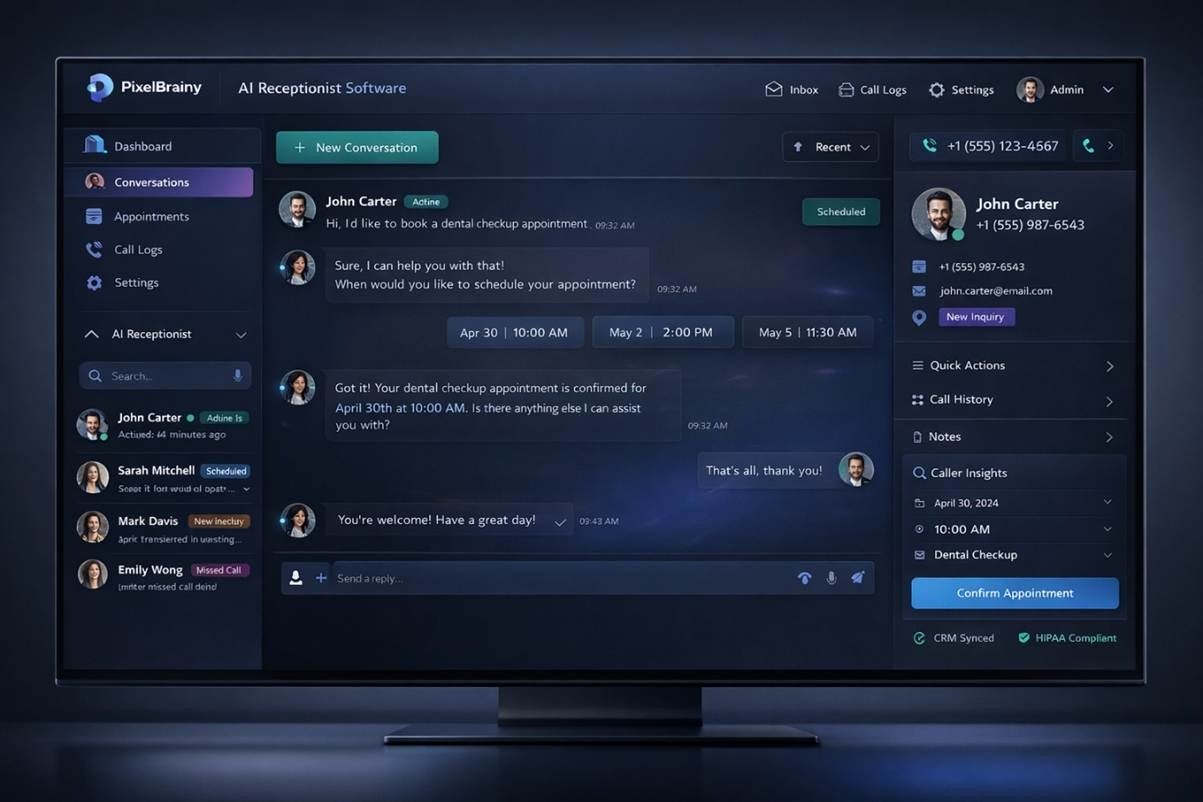
AI Receptionist Software is an intelligent digital solution designed to handle front-desk communication tasks without human intervention. It answers incoming calls, responds to customer inquiries, schedules appointments, routes calls, and captures essential caller information in real time. Unlike traditional IVR systems that rely on rigid menus, AI-powered receptionist software understands natural language and responds conversationally, creating a more human-like experience.
Built using artificial intelligence, natural language processing, and voice recognition technologies, AI Receptionist Software can communicate across multiple channels such as voice calls, chat, SMS, and messaging platforms. It adapts to customer intent, remembers context, and continuously improves through learning.
For businesses, AI Receptionist Software acts as a virtual front desk that operates 24/7, reduces manual workload, and ensures every customer interaction is handled professionally, consistently, and efficiently, regardless of call volume or business hours.
An AI receptionist software follows a structured yet flexible interaction flow that allows it to handle customer communication smoothly and accurately. Each step in the process is designed to mirror how a human receptionist listens, understands, and responds.
The process begins when a customer places a call or sends a message through chat, SMS, or other supported channels. The system immediately captures the input without delays or call queues.
For voice calls, the software converts speech into text using speech recognition technology. Natural language processing then analyzes the text to understand what the customer needs, such as booking an appointment, requesting information, or connecting to a specific team.
Once the intent is identified, the AI receptionist follows predefined workflows and business rules. It securely accesses connected systems like calendars, CRMs, or databases to retrieve or update information.
Based on the request, the system performs actions such as scheduling appointments, answering questions, transferring calls, or collecting customer details.
The AI delivers a clear, natural response through voice or text. With continuous learning from interactions, the system becomes more accurate and efficient over time, improving the overall customer experience.
By seamlessly combining intelligent listening, decision-making, and real-time action, an AI receptionist delivers fast, accurate, and human-like interactions without manual effort.
Today’s business world is moving fast and customers expect immediate responses at all hours. For companies weighing the decision of Investing in Developing an AI Receptionist Software, the practical and strategic benefits are clearer than ever. Rising call volumes and customer inquiries are putting pressure on traditional staffing models. Recruiting, training, scheduling, and retaining reception personnel are expensive and difficult to scale.
By choosing AI Receptionist Software Development, companies gain a solution that operates around the clock, ensures a consistent customer experience, and significantly cuts operational overhead.
The market growth around virtual receptionist software reflects this shift in priorities. The global virtual receptionist service market is projected to reach more than $15.9 billion in 2025 and expand to over $44.2 billion by 2034 with consistent yearly adoption growth.
Further supporting the case for AI Receptionist Software Creation, broader customer service automation trends continue to accelerate. By 2025, AI is expected to power up to 95 percent of customer interactions, delivering cost savings and improved satisfaction.
In addition, research shows that a majority of companies will use generative AI tools in customer service this year to boost productivity and customer experience.
As these trends continue, to make AI Receptionist Software is not about future proofing alone. It directly addresses today’s challenges by improving efficiency, reducing costs, and enabling businesses to meet modern customer expectations without compromising quality or response time.
As customer engagement channels continue to grow, businesses need communication systems that can keep pace without increasing complexity or cost. Understanding the advantages of developing an AI Receptionist Software highlights why more organizations are moving toward automation. When companies choose to make an AI Receptionist Software, they invest in a reliable, scalable solution that strengthens both operational efficiency and customer experience.
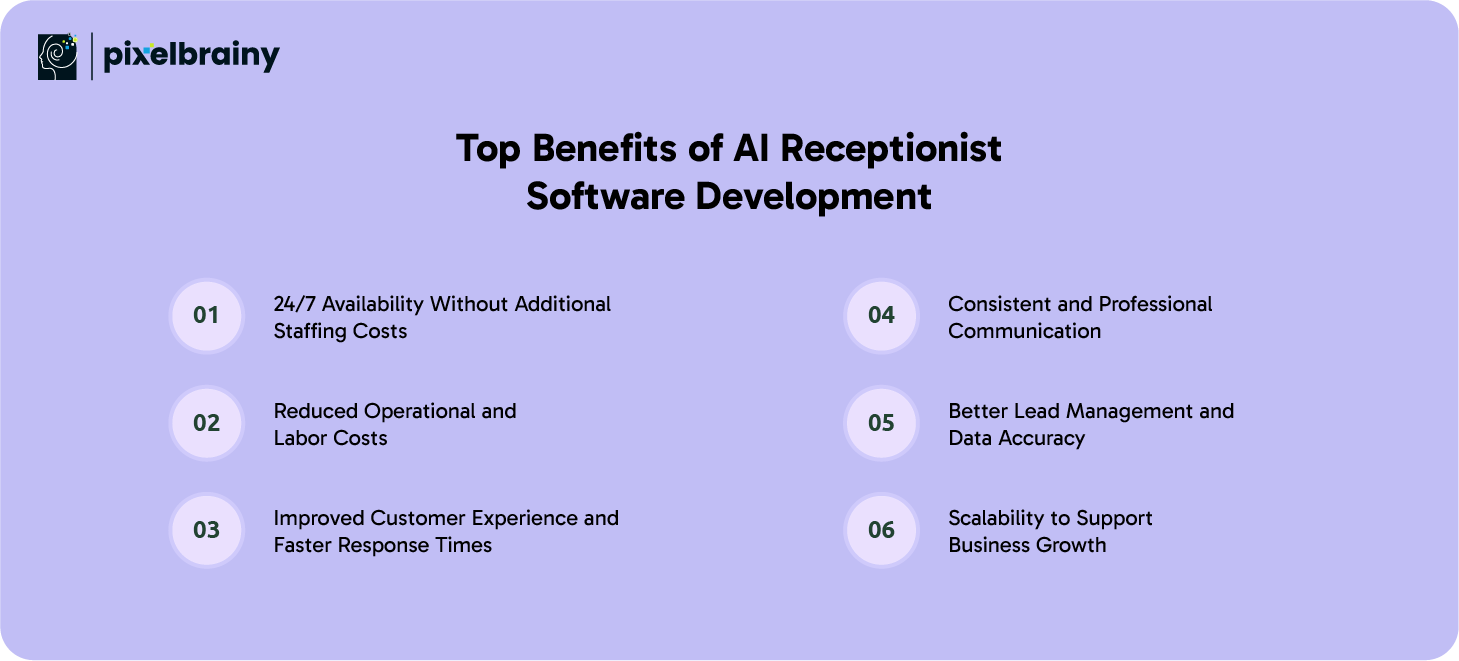
One of the most impactful outcomes of Receptionist Software Development integrating AI is continuous availability. An AI receptionist does not rely on office hours, shift schedules, or holidays to operate. It remains active at all times, ensuring customers can reach your business whenever they need assistance.
This level of availability is especially valuable for industries such as healthcare, real estate, and global services where inquiries often occur outside standard business hours. By building an AI Receptionist Software, companies eliminate missed calls and lost opportunities while avoiding the expense of hiring night or weekend staff.
Maintaining a traditional reception team involves ongoing costs including salaries, benefits, training, and infrastructure. As call volumes increase, businesses are often forced to expand teams, which further raises expenses. To make an AI Receptionist Software is to replace repetitive, high-volume tasks with automation that works at a fixed cost.
AI receptionist solutions can manage hundreds of interactions at the same time without performance degradation. This allows organizations to control expenses while still meeting customer demand, making Receptionist Software Development integrating AI a financially sustainable choice.
Customers expect immediate responses and clear answers. Long wait times or call transfers often lead to frustration and dissatisfaction. AI receptionist software instantly understands customer intent and provides accurate responses without delay.
By building an AI Receptionist Software, businesses ensure every caller receives attention right away. Whether it is answering common questions, booking appointments, or routing calls to the right department, the speed and accuracy of AI-driven interactions significantly improve the overall customer experience.
Human reception teams may vary in tone, accuracy, or adherence to company messaging. AI receptionist software delivers standardized responses based on predefined rules and brand guidelines. This ensures that every customer interaction remains professional and consistent.
For businesses focused on brand reputation, this consistency is a major advantage of Receptionist Software Development integrating AI. Customers receive uniform service quality regardless of call time, channel, or interaction volume.
Capturing customer details manually often leads to errors, missed information, or inconsistent data storage. AI receptionist software automatically collects and records caller information, intent, and interaction history in real time.
When businesses make an AI Receptionist Software with CRM integration, sales and support teams gain access to accurate, structured data. This improves follow-ups, enhances lead qualification, and supports more informed decision-making across departments.
As businesses grow, communication demands increase rapidly. Scaling human reception teams is time-consuming and costly. AI receptionist software, however, can scale instantly to handle increased call volumes without requiring additional resources.
By building an AI Receptionist Software, organizations prepare their operations for future growth. Whether handling seasonal spikes or long-term expansion, AI-powered receptionist solutions adapt effortlessly to changing business needs.
The advantages of developing an AI Receptionist Software extend far beyond automation, offering businesses a smarter, scalable, and cost-effective way to manage customer communication as they grow.
AI receptionist software is being adopted across industries because it solves real operational challenges related to communication, availability, and efficiency. From customer-facing services to internal operations, businesses of all sizes are discovering practical ways to use AI-driven reception systems. These use cases highlight how organizations can streamline workflows and improve customer experience through intelligent automation.
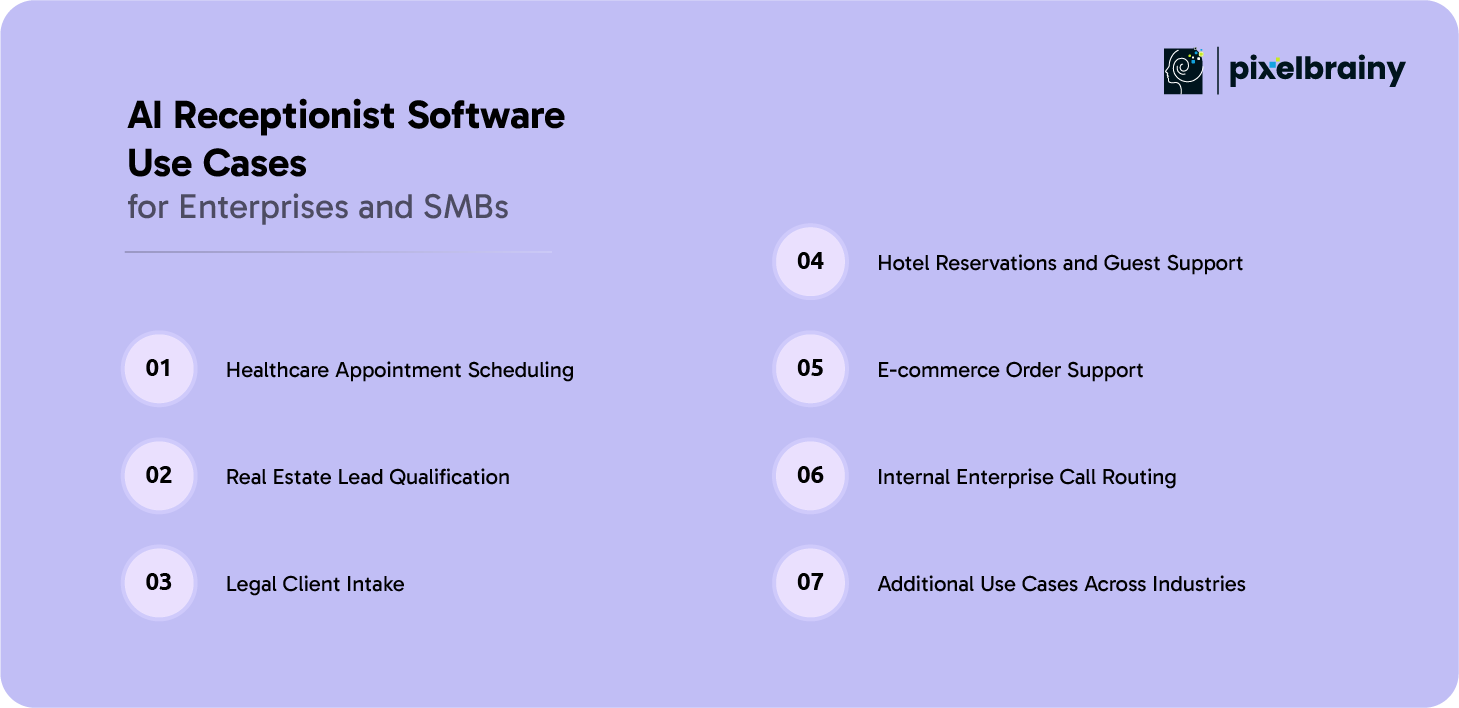
In healthcare environments, managing appointment requests and patient inquiries is time-sensitive and volume-heavy. AI receptionist software handles incoming calls to schedule, reschedule, or cancel appointments without placing patients on hold. It can verify availability, send confirmations, and share basic clinic information.
This reduces administrative burden on staff and ensures patients receive timely assistance, even after working hours. For clinics and hospitals, this use case improves operational efficiency while maintaining patient satisfaction.
Additional capabilities include:
Real estate businesses often deal with a high number of property inquiries that require quick follow-up. AI receptionist software captures caller details, understands property preferences, and qualifies leads based on predefined criteria. It can also schedule property viewings automatically.
By filtering serious prospects from casual inquiries, agents save time and focus on closing deals. This use case is especially valuable for agencies managing multiple listings and high call volumes.
Additional capabilities include:
Law firms rely heavily on accurate client intake and case qualification. AI receptionist software assists by collecting essential client information, understanding case type, and routing calls to the appropriate legal team. It can also handle follow-up questions and appointment scheduling.
This ensures that no potential client is missed and that legal professionals receive well-structured information before consultations, improving productivity and service quality.
Additional capabilities include:
Hotels and hospitality businesses use AI receptionist software to manage reservations, booking inquiries, and guest requests. The system can check room availability, confirm bookings, and provide details about amenities or policies.
This allows hotels to offer consistent guest support at all times while reducing dependency on front desk staff during peak hours or late nights.
Additional capabilities include:
Online retailers face constant inquiries related to order status, returns, and shipping. AI receptionist software answers common questions instantly and retrieves order details by integrating with e-commerce platforms.
This reduces support ticket volume and improves response time, leading to better customer satisfaction and repeat purchases.
Additional capabilities include:
Large organizations often struggle with internal call management. AI receptionist software routes internal calls based on department, urgency, or employee availability. It also assists employees by answering internal queries related to policies or resources.
This use case improves internal communication efficiency and reduces time spent navigating complex phone systems.
Additional capabilities include:
AI receptionist software is also widely used in education institutions for admissions inquiries, in financial services for customer onboarding, and in service-based businesses for booking consultations and handling follow-ups. Its adaptability makes it suitable for both enterprises and SMBs looking to modernize communication workflows.
Additional capabilities include:
By applying AI receptionist software across these use cases, enterprises and SMBs can transform everyday communication into a scalable, efficient, and customer-centric experience.

An AI receptionist is often the first point of contact between a business and its customers, which makes functionality and reliability critical. Successful AI Receptionist Software Creation focuses on delivering accurate responses, smooth interactions, and seamless integration with business workflows.
Below are the must have features to integrate while developing an AI Receptionist Software that meets real operational needs.
| Feature | Explanation |
| Call Handling and Routing | The AI receptionist should answer incoming calls and route them to the right department or person. It must understand caller intent clearly to avoid misrouting. This improves call efficiency and reduces wait times. |
| Natural Language Understanding | The system must understand conversational language rather than rigid commands. This allows callers to speak naturally and still be understood. Strong language understanding improves customer satisfaction and reduces call friction. |
| Speech to Text and Text to Speech | Accurate speech recognition converts voice input into text for processing. High quality text to speech ensures responses sound natural and professional. Together, these form the core of voice based interactions. |
| Appointment Scheduling | The AI receptionist should book, reschedule, or cancel appointments automatically. It must sync with calendars to avoid conflicts. This feature reduces manual workload and missed bookings. |
| Business Hours and Availability Management | The system should recognize business hours and respond appropriately after hours. It can share opening times or capture messages when staff are unavailable. This ensures consistent communication at all times. |
| Call Transfer and Escalation | When the AI cannot resolve an issue, it should transfer the call to a human agent smoothly. Proper escalation logic prevents customer frustration. This keeps the experience reliable and trustworthy. |
| CRM Integration | Integration with CRM systems allows the AI receptionist to identify callers and personalize responses. It can access basic customer details to provide relevant information. This creates a more professional interaction. |
| Multi Language Support | Businesses serving diverse audiences need multi language capabilities. The AI receptionist should handle common languages accurately. This expands reach and improves accessibility. |
| Voicemail and Message Recording | When calls cannot be answered, the system should capture messages clearly. These messages must be stored and shared with the right team. This ensures no customer query is missed. |
| Basic Query Handling | The AI receptionist should handle frequently asked questions like services, pricing, or directions. This reduces repetitive calls to staff. It allows teams to focus on higher value tasks. |
| Customizable Conversation Flows | Every business communicates differently. The system should allow customization of greetings and responses. This helps align the AI with brand tone and business needs. |
| Data Security and Privacy | Call data and customer information must be protected. Secure storage and access control are essential. This builds trust and supports compliance requirements. |
| Call Analytics and Logs | The software should track call volumes, durations, and outcomes. These insights help businesses improve service quality. Analytics turn conversations into actionable data. |
| Easy Admin Dashboard | Non technical users should be able to manage settings easily. The dashboard should allow updates to scripts and routing rules. Ease of management improves adoption. |
| Scalability and Reliability | The AI receptionist must handle high call volumes without downtime. It should scale as business demand grows. Reliability is critical for customer facing systems. |
These core features form the foundation to build AI Receptionist Software that delivers consistent, professional, and efficient customer interactions.
As businesses mature, advanced capabilities become critical to delivering differentiated experiences. During AI Receptionist Software Development, advanced features enable smarter conversations, deeper personalization, and higher operational intelligence.
Companies looking to make AI Receptionist Software future-ready should consider integrating these enhancements.
| Advanced Feature | Explanation |
| Context Aware Conversations | The AI remembers previous interactions during a call. This avoids repetitive questions and improves conversation flow. Context awareness makes interactions feel more human. |
| Sentiment Analysis | The system can detect caller emotions from voice tone and language. It adapts responses based on frustration or urgency. This helps de escalate negative experiences. |
| Voice Biometrics | Voice recognition can identify repeat callers securely. This adds a layer of personalization and security. It is useful for customer verification. |
| Predictive Call Routing | AI predicts the best department or agent based on call intent and history. This reduces transfers and resolution time. It improves overall call efficiency. |
| Integration with Business Tools | Advanced systems connect with ticketing, ERP, and helpdesk tools. This enables end to end workflow automation. Calls can trigger tasks automatically. |
| Real Time Transcription | Calls are transcribed instantly for review and compliance. Teams can access conversation records easily. This supports quality assurance and training. |
| Proactive Call Handling | The AI can initiate calls for reminders or follow ups. This is useful for appointments or payment notifications. It turns the receptionist into an active assistant. |
| Learning from Feedback | The system improves based on user corrections and outcomes. Continuous learning keeps responses relevant. This reduces manual tuning over time. |
| Advanced Analytics and Insights | Beyond call counts, the system analyzes trends and intent patterns. Businesses gain deeper customer insights. These insights support strategic decisions. |
| Omnichannel Receptionist Support | The AI receptionist extends beyond voice to chat and messaging apps. Customers can interact across channels seamlessly. This creates a unified experience. |
By incorporating advanced capabilities into AI Receptionist Software Development, businesses create intelligent, adaptive systems that elevate customer experience and operational efficiency.
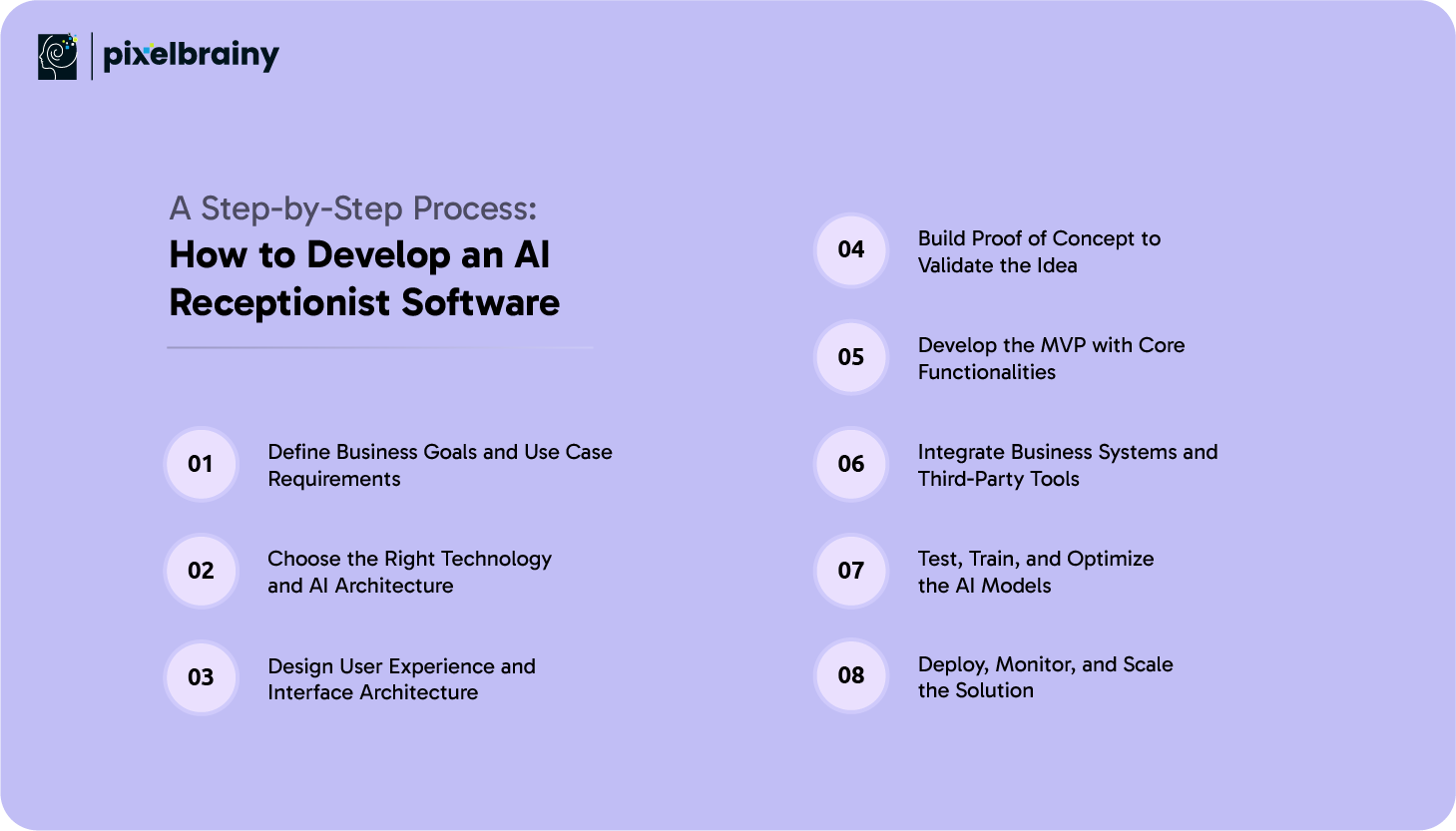
Building a reliable and intelligent receptionist solution requires a structured and well-planned approach. The AI Receptionist Software Development Process involves combining business strategy, user experience, and advanced AI technologies to create a system that works seamlessly in real-world environments.
For organizations exploring what is the process to make an AI Receptionist Software, the following steps outline a practical and proven path from idea to deployment.
Aim of this step: To align the software with real business needs and measurable outcomes.
The first step in developing an AI Receptionist Software is to clearly define why the system is being built and what problems it should solve. This involves identifying the target industry, expected call volume, communication channels, and specific use cases such as appointment booking, lead qualification, or customer support. Without clarity at this stage, even the most advanced technology can fail to deliver value.
Stakeholders from operations, customer support, and management should collaborate to outline expectations. Questions such as response time goals, service availability, and compliance requirements must be addressed early. This step sets the foundation for the entire Creation of an AI Receptionist Software, ensuring every development decision supports real business objectives.
Aim of this step: To ensure scalability, performance, and future readiness.
Selecting the right technology stack is critical in Receptionist Software Development With AI. This includes choosing speech recognition engines, natural language processing frameworks, cloud infrastructure, and integration tools. Decisions made here directly affect performance, scalability, and maintenance costs.
Top AI development companies often recommend cloud-based architectures for flexibility and scalability. The goal is to create a system that can grow with business demand without major rework. Choosing proven tools also reduces development risks and improves long-term stability.
Aim of this step: To create intuitive experiences for both users and administrators.
UI and UX design plays a crucial role in how the AI receptionist is perceived and managed. Working with an experienced UI UX design company ensures the admin dashboard, analytics panels, and configuration tools are easy to use. While customers interact through voice or chat, internal teams need simple interfaces to manage workflows.
This step focuses on conversation flows, dashboard layouts, and accessibility. A well-designed experience improves adoption, reduces training time, and ensures smooth day-to-day operations. Good design supports both efficiency and trust in the system.
Aim of this step: To test feasibility before full-scale investment.
PoC development allows businesses to validate their concept with minimal risk. A proof of concept focuses on core functionality such as intent recognition, basic responses, and call routing. It demonstrates whether the AI can handle real conversations effectively.
This stage helps identify technical limitations, refine use cases, and gather early feedback. By validating assumptions early, companies reduce costly changes later in the AI Receptionist Software Development Process.
Aim of this step: To launch a functional product quickly and gather real-world insights.
MVP development involves building a minimum viable version of the AI receptionist with essential features. This includes voice recognition, intent detection, appointment scheduling, and basic integrations. The MVP is designed for real usage, not just testing.
Launching an MVP helps businesses observe user behavior and identify improvements. It accelerates time to market and allows teams to refine the solution based on actual data rather than assumptions.
Also Read: Top 10 AI MVP Development Companies in USA
Aim of this step: To ensure seamless data flow and operational efficiency.
An AI receptionist must connect with existing systems such as CRM platforms, calendars, telephony services, and databases. Integration ensures the software delivers accurate information and performs actions in real time.
This step is critical in Receptionist Software Development With AI because disconnected systems lead to poor experiences. Proper integration allows the AI to act as a true extension of business operations rather than a standalone tool.
Aim of this step: To improve accuracy, reliability, and conversation quality.
Testing goes beyond technical validation. It involves simulating real conversations, edge cases, and high-volume scenarios. AI models are trained using real interaction data to improve intent recognition and response accuracy.
Continuous optimization ensures the system adapts to new patterns and customer behavior. This step strengthens performance and prepares the solution for live deployment.
Aim of this step: To ensure stable operations and long-term success.
Deployment marks the transition from development to live usage. The system is launched on secure cloud infrastructure with monitoring tools to track performance, uptime, and user behavior.
Ongoing monitoring helps detect issues early and optimize workflows. As demand grows, the AI receptionist scales without service disruption, completing the Creation of an AI Receptionist Software that is future-ready and business-aligned.
Following a structured AI Receptionist Software Development Process ensures businesses build a reliable, scalable, and intelligent communication system that delivers long-term value and operational efficiency.
For most businesses, one of the first and most important questions is what is the cost to make AI Receptionist Software that actually delivers results. While AI-powered reception solutions offer long-term savings and efficiency, the initial investment can vary widely based on goals, features, and scale. Understanding the cost estimation for AI Receptionist Software development helps decision-makers plan realistically and avoid unexpected expenses during implementation.
In practical terms, the AI Receptionist Software development cost typically falls between $30,000 and $250,000+. This wide range exists because an AI receptionist can be built as a simple MVP to validate an idea or as a fully customized enterprise-grade system capable of handling complex workflows, compliance requirements, and high-volume interactions. The sections below break down these options clearly, along with the factors that influence the final development budget.
| Software Type | Estimated Cost | Development Timeline | What You Get |
| Basic AI Receptionist Software (MVP) | $30,000 to $60,000 | 8 to 12 weeks | Core AI capabilities such as voice recognition, basic intent detection, call routing, appointment scheduling, limited integrations, and a simple admin dashboard |
| Advanced AI Receptionist Software | $60,000 to $120,000 | 3 to 5 months | Multi-channel communication, CRM and calendar integration, analytics dashboard, multilingual support, contextual conversations, and improved AI accuracy |
| Enterprise AI Receptionist Software | $120,000 to $250,000+ | 6 to 9 months | Custom AI models, high scalability, enterprise-grade security, regulatory compliance, deep system integrations, advanced analytics, and performance optimization |
The number and depth of features have a direct impact on the development budget of AI Receptionist Software. A basic MVP focuses on essential interactions, while advanced and enterprise solutions include analytics, personalization, and automation at scale.
Estimated cost impact: $10,000 to $80,000
Using prebuilt AI services lowers upfront costs, while custom-trained models increase accuracy but require additional investment in data preparation and training.
Estimated cost impact: $15,000 to $50,000
Supporting voice calls, chat, SMS, and messaging platforms adds development and testing effort. Each additional channel increases complexity.
Estimated cost impact: $8,000 to $30,000
Connecting the AI receptionist with CRMs, scheduling tools, telephony systems, and internal databases requires custom integration work.
Estimated cost impact: $10,000 to $40,000
Enterprise-grade solutions demand stronger security measures, monitoring tools, and compliance features, especially in regulated industries.
Estimated cost impact: $10,000 to $35,000
Launching with a minimum viable product helps validate assumptions and avoid overbuilding.
Potential savings: $30,000 to $70,000
Using existing speech recognition and NLP services reduces custom development effort.
Potential savings: $15,000 to $40,000
Developing features incrementally spreads costs over time and improves budget control.
Potential savings: $20,000 to $50,000
Cloud-based deployment eliminates heavy upfront infrastructure investments.
Potential savings: $10,000 to $25,000
Working with skilled teams minimizes rework and delays, protecting the overall budget.
Potential savings: Up to 20 percent of total development cost
With the right planning and cost strategy, businesses can manage the AI Receptionist Software development cost effectively while building a solution that delivers strong long-term returns.
Also Read: AI Software Development Cost: A Complete Software Cost Guide
Behind every reliable AI receptionist software is a carefully selected technology stack that supports accuracy, speed, and long-term scalability. The right tools make it easier to manage real-time conversations, handle large call volumes, and integrate seamlessly with existing business systems.
When chosen correctly, this stack ensures the AI receptionist performs consistently while remaining flexible enough to evolve with changing business needs.
| Layer | Tools Commonly Used | How It Supports the AI Receptionist |
| Speech Recognition | Google Speech-to-Text, AWS Transcribe, Azure Speech | Converts caller voice into text with high accuracy. These tools help the system understand different accents and speaking styles, which is essential for natural conversations. |
| Natural Language Processing | Rasa, Dialogflow, spaCy, OpenAI APIs | Interprets what the caller actually means, not just what they say. NLP allows the receptionist to understand intent, context, and follow-up questions. |
| Voice Response Generation | Amazon Polly, Google Text-to-Speech, Azure TTS | Turns system responses into natural-sounding speech. This helps the AI receptionist sound clear, professional, and human-like during calls. |
| Backend Development | Python, Node.js, Java | Handles conversation logic, integrations, and AI workflows. These technologies ensure stability and performance under high call volumes. |
| Admin Dashboard and UI | React, Angular, Vue.js | Used to build intuitive dashboards for managing calls, workflows, analytics, and system settings. A clean interface simplifies daily operations. |
| Telephony and Voice APIs | Twilio, Plivo, Vonage | Enables inbound and outbound calling, call routing, and voicemail handling. These platforms provide global coverage and reliable call quality. |
| Databases | PostgreSQL, MongoDB, MySQL | Stores customer information, call logs, and conversation history securely. Databases support fast access to data for real-time responses. |
| Cloud Infrastructure | AWS, Microsoft Azure, Google Cloud | Provides scalable hosting, load balancing, and storage. Cloud platforms allow the system to grow without performance issues. |
| Analytics and Monitoring | Grafana, Prometheus, CloudWatch | Tracks call performance, response times, and system health. Monitoring tools help teams improve accuracy and reliability over time. |
| Security and Access Control | SSL, OAuth, JWT | Protects sensitive customer data and controls user access. Strong security ensures compliance and builds customer trust. |
A well-chosen technology stack gives AI receptionist software the stability, intelligence, and flexibility needed to deliver reliable customer communication at scale.
Once an AI receptionist solution is built, the next critical step is defining how it will generate consistent and scalable revenue. Choosing the right monetization model depends on the target audience, usage patterns, and long-term business goals. A well-planned pricing strategy ensures that AI receptionist software remains profitable while still delivering clear value to customers.
Subscription-based pricing is one of the most common and predictable monetization approaches for AI receptionist software. Customers pay a recurring monthly or annual fee to access the platform and its core features. This model works well for businesses that prefer stable costs and continuous service availability.
Subscriptions are often structured in tiers based on call volume, features, or number of users. This allows small businesses to start at a lower cost while giving larger organizations the option to upgrade as their needs grow. For software providers, this approach creates steady recurring revenue and long-term customer relationships.
Usage-based billing charges customers based on actual usage, such as number of calls handled, minutes consumed, or conversations processed. This model is attractive to businesses with fluctuating call volumes or seasonal demand.
It provides transparency and flexibility, as customers only pay for what they use. From a provider perspective, this model aligns revenue directly with platform usage and encourages efficient system performance.
Enterprise licensing targets large organizations that require customized solutions and high-volume capacity. Clients pay a fixed licensing fee for broad access, often combined with long-term contracts.
This model works well for enterprises seeking predictable costs, dedicated infrastructure, and advanced security. It also allows providers to offer premium support, customization, and service-level agreements as part of the package.
White-label monetization allows businesses or agencies to rebrand the AI receptionist software as their own product. This is especially valuable for telecom providers, SaaS companies, and IT service firms.
White-label solutions expand market reach without direct sales to end users. Providers earn revenue through licensing or revenue-sharing arrangements while partners handle branding and distribution.
Add-on features allow customers to purchase advanced capabilities separately. Examples include multilingual support, advanced analytics, sentiment analysis, or CRM integrations.
This model increases average revenue per customer by allowing businesses to customize the software based on their needs. It also encourages long-term upgrades as customer requirements evolve.
By combining flexible monetization strategies, AI receptionist software providers can build sustainable revenue models while meeting the diverse needs of businesses across industries.
Building a reliable AI receptionist is not just about adding advanced features. It requires a thoughtful approach that balances automation with real-world usability and trust. Following proven best practices during AI Receptionist Software Development helps businesses create systems that perform consistently, adapt over time, and deliver real value to customers and internal teams.
One of the most effective best practices is to begin with clear, simple use cases rather than trying to automate everything at once. Common starting points include appointment scheduling, basic customer inquiries, or call routing. These scenarios are easier to design, test, and optimize during early stages of Receptionist Software Development With AI.
Starting simple allows teams to validate assumptions, gather user feedback, and improve accuracy before expanding functionality. This approach reduces development risk and ensures the AI receptionist delivers measurable benefits from the beginning.
No AI system can handle every scenario perfectly. Providing a smooth handoff to a human agent is essential for maintaining trust and service quality. When conversations become complex or emotionally sensitive, the AI receptionist should seamlessly transfer the interaction to a trained staff member.
Human fallback options ensure customers never feel stuck or misunderstood. This practice is especially important for industries like healthcare, legal services, and finance, where personal interaction remains critical.
AI receptionist software improves over time through continuous learning. Regularly training models using real conversation data helps the system understand new phrases, accents, and customer behavior patterns. This ongoing optimization is a key component of successful AI Receptionist Software Development.
Continuous improvement also reduces errors and increases response accuracy. Businesses that invest in regular model updates see better performance and higher customer satisfaction.
AI receptionist systems handle sensitive customer information, making data protection a top priority. Implementing strong encryption, access controls, and compliance measures ensures customer trust and regulatory adherence.
Data privacy should be considered from the earliest stages of development. Clear policies and secure architecture protect both the business and its customers from data risks.
Tracking performance metrics helps businesses understand how well the AI receptionist is performing. Metrics such as call resolution rate, response time, and customer satisfaction provide valuable insights.
Regular monitoring allows teams to identify gaps, optimize workflows, and improve overall efficiency. Feedback from customers and internal users plays a critical role in refining the system and ensuring long-term success.
By following these best practices, businesses can build AI receptionist software that is reliable, secure, and capable of delivering consistent value as customer needs evolve.
When businesses decide to adopt AI receptionist technology, one of the most important decisions is how that solution should be built or sourced. Some organizations need full control and long-term flexibility, while others prioritize speed and simplicity. Understanding the differences between custom development and off-the-shelf solutions helps businesses choose an approach that aligns with their operational needs and future growth plans.
Custom AI receptionist software is developed specifically for your organization, taking into account industry workflows, customer interaction patterns, and internal systems. This approach allows businesses to design conversation flows, AI behavior, and integrations exactly as required. Custom solutions can be enhanced over time, making them ideal for organizations that expect growth or have complex operational requirements.
Although custom development requires higher upfront investment and longer development time, it offers greater control, better performance, and stronger alignment with business objectives. Over time, this flexibility often results in higher return on investment.
Off-the-shelf AI receptionist software provides a ready-made solution that can be deployed quickly with minimal setup. These platforms are designed to serve common use cases and are often priced on a subscription basis. For small teams or businesses with straightforward needs, off-the-shelf solutions offer a convenient starting point.
However, these solutions may lack the ability to adapt to unique workflows or integrate deeply with existing systems. As businesses grow, limitations in customization and scalability can become a challenge.
| Aspect | Custom AI Receptionist Software | Off-The-Shelf AI Receptionist Software |
| Customization Level | Fully tailored workflows, AI behavior, and conversation logic | Limited configuration based on preset options |
| Scalability | Easily adapts to growing call volumes and expanding operations | Scaling may increase costs or introduce performance limits |
| System Integrations | Deep integration with CRMs, ERPs, and internal tools | Supports only standard or limited integrations |
| Branding Control | Complete control over voice, tone, and brand experience | Generic branding with minimal personalization |
| AI Training | Trained on business-specific data for higher accuracy | Uses generalized models with limited training |
| Time to Market | Longer development cycle due to customization | Fast deployment with minimal setup |
| Cost Structure | Higher initial investment with long-term cost efficiency | Lower upfront cost with ongoing subscription fees |
| Long-Term Flexibility | Can evolve with changing business needs | Restricted by vendor roadmap and platform limits |
Choosing between custom and off-the-shelf AI receptionist solutions depends on whether your business values long-term flexibility and control or immediate deployment and convenience.
Selecting the right AI receptionist development partner can determine whether your project becomes a competitive advantage or a costly experiment. With AI systems directly interacting with customers, the margin for error is small. The right partner brings not only technical expertise but also a clear understanding of business communication, user expectations, and long-term scalability.
Rather than focusing solely on development cost or speed, businesses should evaluate partners based on their ability to translate real-world requirements into reliable AI-driven solutions. A thoughtful selection process helps ensure the AI receptionist is accurate, adaptable, and aligned with your growth strategy.
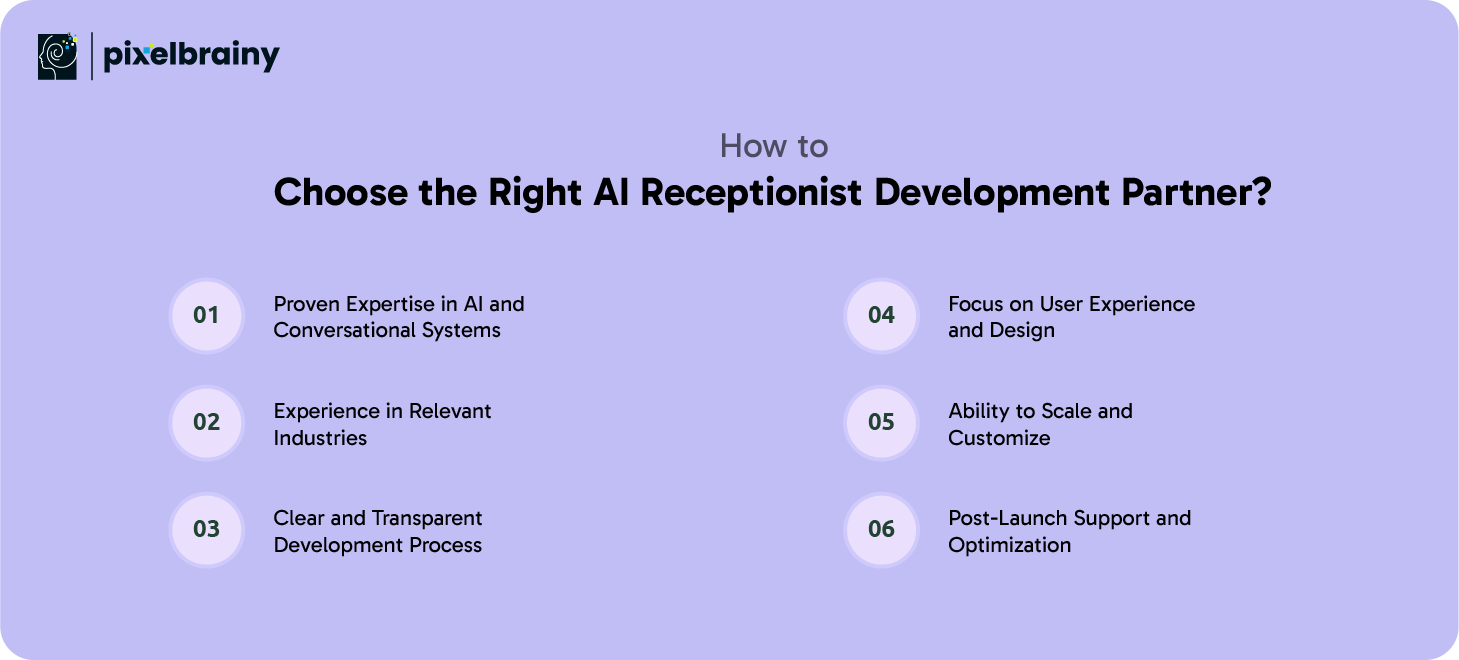
Look for a partner with hands-on experience in AI-driven voice systems, natural language processing, and automation platforms. A strong technical background ensures they can build accurate, scalable, and reliable AI receptionist software.
Industry familiarity allows a development partner to understand real-world workflows, compliance needs, and customer behavior. This results in faster development, fewer revisions, and a solution aligned with your business environment.
A reliable partner clearly explains how they approach PoC development, MVP releases, and full-scale deployment. Transparent communication around timelines, milestones, and costs helps build trust and prevents unexpected delays.
Beyond AI functionality, the partner should prioritize intuitive UI and smooth conversation flows. Strong design thinking ensures the AI receptionist is easy to manage internally and pleasant for customers to interact with.
Your business needs will evolve. Choose a partner capable of building flexible architecture that supports feature expansion, increased call volume, and deeper integrations over time.
AI receptionist software requires ongoing training, monitoring, and improvement. A dependable partner offers long-term support to refine performance, address issues, and adapt to changing business needs.
Choosing the right AI receptionist development partner ensures your solution is built to perform, adapt, and deliver consistent value as your business grows.
AI receptionist software is evolving rapidly as businesses demand smarter, more human-like interactions and deeper system intelligence. What started as basic call handling is now moving toward adaptive communication systems that can understand emotions, anticipate needs, and operate with minimal human oversight. These emerging trends are shaping how AI receptionist solutions will function in the coming years.
Emotion-aware AI enables receptionist software to detect the emotional state of callers through voice tone, speech patterns, and language cues. This allows the system to adjust its responses based on whether a caller sounds frustrated, confused, or calm. For example, urgent or emotional calls can be prioritized or escalated to human agents. This capability improves empathy in automated interactions and enhances customer satisfaction, especially in service-sensitive industries.
Voice biometrics is becoming an important trend for both security and convenience. By recognizing unique voice patterns, AI receptionist software can verify callers without requiring passwords or security questions. This speeds up authentication while reducing fraud risks. Businesses in finance, healthcare, and enterprise environments are expected to adopt voice-based identity verification more widely.
Future AI receptionist systems will deliver highly personalized interactions by leveraging customer history, preferences, and behavior. Instead of generic responses, the software will tailor conversations based on past interactions, location, and intent. This level of personalization helps businesses build stronger relationships and deliver experiences that feel relevant and attentive.
AI receptionists are evolving into autonomous agents capable of completing tasks end-to-end without human involvement. These agents will handle complex workflows such as scheduling, follow-ups, reminders, and issue resolution independently. As autonomy increases, businesses can reduce manual intervention while maintaining service quality and consistency.
Future development will focus on tighter integration with CRM and ERP systems. AI receptionist software will not only retrieve data but also update records, trigger workflows, and support decision-making across departments. This deep integration transforms the AI receptionist into a central communication hub that connects customer interactions with business operations in real time.
As these trends mature, AI receptionist software will shift from reactive communication tools to intelligent, proactive systems that drive efficiency, personalization, and business growth.
PixelBrainy LLC is a trusted AI development company focused on delivering practical, scalable, and business-ready AI solutions. When it comes to the development of AI Receptionist Software, PixelBrainy combines technical depth with a strong understanding of real-world communication challenges. Their approach goes beyond automation by building AI receptionist software solutions that align with business workflows, customer expectations, and long-term growth plans.
What sets PixelBrainy apart is its end-to-end capability. From strategy and PoC development to full-scale deployment and optimization, the team supports businesses at every stage to create an AI receptionist software that delivers measurable value. Their experience in building an AI receptionist software includes voice-based systems, NLP-driven conversations, CRM integrations, and enterprise-grade security, ensuring solutions are reliable and future-ready.
PixelBrainy successfully delivered an AI receptionist solution for a US-based service enterprise handling high inbound call volumes. The objective was to automate appointment scheduling, customer inquiries, and call routing while maintaining service quality. The solution reduced missed calls by over 60 percent, improved response times significantly, and enabled 24/7 customer availability without increasing staffing costs. This project highlights PixelBrainy’s ability to build scalable, market-ready AI receptionist software tailored for the US business environment.
With proven expertise, industry-focused execution, and real-world results, PixelBrainy LLC is a reliable partner for businesses looking to build intelligent AI receptionist solutions that scale with confidence.
From the growing demand for faster customer responses to the need for scalable and cost-efficient operations, AI receptionist software has emerged as a practical solution for modern businesses. As discussed throughout this guide, AI-powered receptionist systems are no longer limited to answering calls. They now play a vital role in appointment scheduling, lead qualification, customer support, and internal communication across industries.
Understanding use cases, development steps, costs, and best practices helps businesses make informed decisions when planning AI receptionist initiatives. Whether you choose a custom-built solution or start with an MVP, investing in AI receptionist software enables consistent service, improved customer experience, and long-term operational efficiency. With the right development partner and strategy, businesses can confidently transition from traditional front desks to intelligent AI-driven communication systems.
Ready to get started? Book an appointment today to discuss how an AI receptionist solution can be tailored to your business needs.
AI receptionist software is designed to manage most routine and semi-complex conversations such as inquiries, scheduling, and routing. For highly complex or sensitive cases, it can seamlessly transfer the interaction to a human agent, ensuring customers always receive appropriate support.
Implementation timelines vary based on complexity. A basic version can be deployed within a few weeks, while more advanced or enterprise-grade solutions may take several months due to customization, integrations, and testing requirements.
Yes, AI receptionist software is highly suitable for small and medium businesses. It helps manage calls efficiently, reduces staffing costs, and provides 24/7 availability without requiring large operational budgets.
Most AI receptionist solutions can integrate with CRMs, scheduling tools, telephony platforms, and internal databases. These integrations allow the system to retrieve and update information in real time.
Security is a core consideration in AI receptionist software development. Data encryption, access controls, and compliance with industry standards help protect sensitive customer information and maintain trust.
Yes, AI receptionist software can be customized in terms of tone, language, and interaction style. This ensures that customer conversations remain aligned with your brand identity and communication standards.

About The Author
Sagar Bhatnagar
Sagar Sahay Bhatnagar brings over a decade of IT industry experience to his role as Marketing Head at PixelBrainy. He's known for his knack in devising creative marketing strategies that boost brand visibility and market influence. Sagar's strategic thinking, coupled with his innovative vision and focus on results, sets him apart. His track record of successful campaigns proves his ability to utilize digital platforms effectively for impactful marketing efforts. With a genuine passion for both technology and marketing, Sagar continuously pushes PixelBrainy's marketing initiatives to greater success.


Transform your ideas into reality with us.
Working with the PixelBrainy team has been a highly positive experience. They understand the design requirements and create beautiful UX elements to meet the application needs. The dev team did an excellent job bringing my vision to life. We discussed usability and flow. Sagar worked with his team to design the database and begin coding. Working with Sagar was easy. He has the knowledge to create robust apps, including multi-language support, Google and Apple ID login options, Ad-enabled integrations, Stripe payment processing, and a Web Admin site for maintaining support data. I'm extremely satisfied with the services provided, the quality of the final product, and the professionalism of the entire process. I highly recommend them for Android and iOS Mobile Application Design and Development.

Great experience working with them. Had a lot of feedback and I found that unlike most contractors they were bugging me for updates instead of the other way around. They were extremely time conscience and great at communicating! All work was done extremely high quality and if not on time, early! They were always proactive when it comes to communication and the work is great/above par always. Very flexible and a great team to work with! Goes above and beyond to present us with multiple options and always provides quality. Amazing work per usual with Chitra. If you have UI/UX or branding design needs I recommend you go to them! Will likely work with them in the future as well, definitely recommended!

PixelBrainy is a joy to work with and is a great partner when thinking through branding, logo, and website layout. I appreciate that they spend time going into the "why" behind their decisions to help inform me and others about industry best practices and their expertise.

I hired them to design our software apps. Things I really like about them are excellent communication skills, they answer all project suggestions and collaborate right away, and their input on design and colors is amazing. This project was complex and needed patience and creativity. The team is amazing to do business with. I will be using them long-term. Glad to see there are some good people out there. I was afraid to try and outsource my project to someone but I am glad I met them! I really can't say enough. They went above and beyond on this project. I am very happy with everything they have done to make my business stand out from the competition.

It was great working with PixelBrainy and the team. They were very responsive and really owned the project. We'll definitely work with them again!

I recently worked with the PixelBrainy team on a project and I was blown away by their communication skills. They were prompt, clear, and articulate in all of our interactions. They listened and provided valuable feedback and suggestions to help make the project a success. They also kept me updated throughout the entire process, which made the experience stress-free and enjoyable.

PixelBrainy is very good at what it does. The team also presents themselves very professionally and takes care of their side of things very well. I could fully trust them taking up the design work in a timely and organised manner and their attention to detail saved us lots of effort and time. This particular project was quite intense and the team showed that they function very well under pressure. Very much looking forward to working with her again!

It's always an absolute pleasure working with them. They completed all of my requests quickly and followed every note I had for them to a T, which made our process go smoothly from start to finish. Everything was completed fast and following all of the guidelines. And I would recommend their services to anyone. If you need any design work done in the future, PixelBrainy should be your first call!

They took ownership of our requirements and designed and proposed multiple beautiful variants. The team is self-motivated, requires minimum supervision, committed to see-through designs with quality and delivering them on time. We would definitely love to work with PixelBrainy again when we have any requirements.

PixelBrainy was a big help with our SaaS application. We've been hard at work with a new UI/UX and they provided a lot of help with the designs. If you're looking for assistance with your website, software, or mobile application designs, PixelBrainy and the team is a great recommendation.

PixelBrainy designers are amazing. They are responsive, talented, and always willing to help craft the design until it matches your vision. I would recommend them and plan to continue them for my future projects and more!!!

They were awesome! Did a good job fast, and good communication. Will work with them again. Thank you

Creative, detail-oriented, and talented designers who take direction well and implement changes quickly and accurately. They consistently over-delivered for us.

PixelBrainy team is very talented and creative. Great designers and a pleasure to work with. PixelBrainy is an excellent communicator and I look forward to working with them again.

PixelBrainy has a very talented design team. Their work is excellent and they are very responsive. I enjoy working with them and hope to continue on all of our future projects.


