AI Summary Powered by PixelBrainy
Imagine a system that takes a client’s submission, understands it instantly, generates a personalized output, delivers the results without human intervention, and stores every detail for future use. This is no longer a futuristic vision. It is the power of an AI Workflow Automation System. As businesses continue shifting toward intelligent digital operations, the development of AI Workflow Automation Systems has become a game changer for organizations that want faster execution, higher accuracy, and consistent results.
An AI Workflow Automation System is designed to automate the journey from input to output. It captures client data, processes it with intelligence, creates custom deliverables, and ensures those outputs reach the right person in seconds. Many businesses today want to understand how to develop an AI Workflow Automation Software that can streamline their internal processes and enhance client experiences at the same time. The building of AI Workflow Automation Systems goes beyond simple automation. It involves integrating artificial intelligence, workflow logic, and data management into one connected ecosystem that runs smoothly around the clock.
The goal of developing an AI Workflow Automation System is to remove repetitive manual tasks, speed up personalized content generation, and allow businesses to operate at a level of precision that traditional systems cannot match. Companies want software that receives client submissions, generates personalized outputs, delivers results automatically, and stores data for future outputs without requiring constant supervision. Understanding the process behind the development of AI Workflow Automation Systems allows businesses to innovate faster, scale operations effortlessly, and deliver exceptional client results every time.

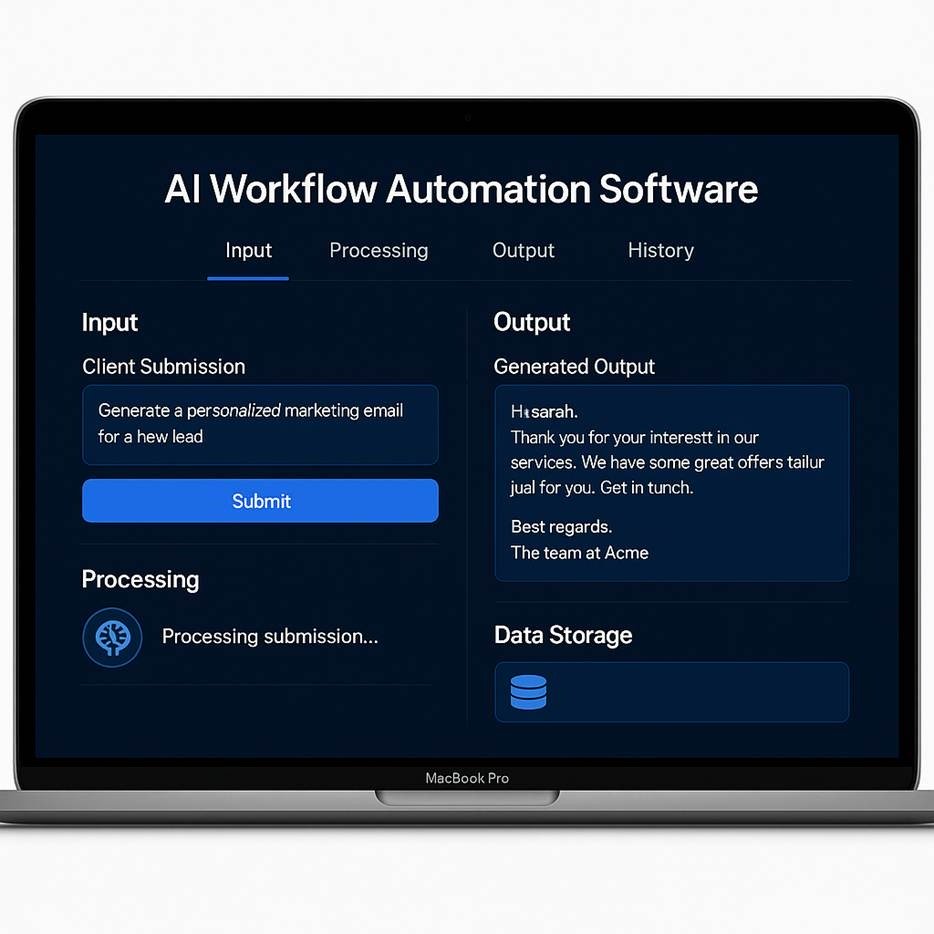
AI Workflow Automation Software is a digital system that takes over repetitive, decision-based tasks by combining artificial intelligence with structured workflow logic. Instead of humans reading submissions, analyzing details, and producing results one by one, the software handles everything automatically. To understand it clearly, it helps to look at how the system works in a simple, practical flow.
At its core, AI Workflow Automation Software is a tool that:
It becomes a continuous engine that keeps running in the background and handles tasks as soon as they arrive.
A client sends in information through a form, chat interface, uploaded file, or API submission. This becomes the starting point of the workflow.
The system reads the submission using natural language processing or machine learning. It identifies the request, extracts important details, and determines what needs to be done next.
The software applies business rules, workflow logic, and AI models to create a personalized response. This may involve writing content, analyzing data, or generating recommendations.
A custom output is created based on the client’s submission. The format depends on the workflow. It could be a document, a report, a summary, or a message.
The system sends the generated output to the intended destination. Delivery options include email, dashboards, notifications, or integrated apps.
Every input and output is stored securely. This allows the system to improve future responses and maintain a complete history for reference.
By following this structured cycle, the software continuously handles submissions, processes them intelligently, delivers results, and builds a growing knowledge base over time.
The demand for intelligent automation is rising rapidly across industries. According to Mordor Intelligence, the global workflow automation market is valued at 23.77 billion USD in 2025 and is expected to reach 37.45 billion USD by 2030, showing significant long-term growth potential.
Investing in AI Workflow Automation System Development is becoming a strategic move for businesses that want to streamline operations and reduce dependency on manual processes. One of the primary reasons companies invest in this technology is the massive boost in productivity. Tasks that once required hours of human effort can now be processed in minutes, allowing teams to focus more on creative and strategic activities instead of routine administrative work.
Another major advantage is the consistency that AI brings to operations. Human errors, delays, and inconsistencies can heavily impact customer experience. An AI Workflow Automation System ensures that every client submission is processed uniformly, producing high quality personalized outputs without variation. This level of reliability builds trust and improves overall service delivery.
Businesses also save significantly on operational costs. Automation reduces the need for manual labor and lowers the expenses associated with slow or inefficient workflows. Over time, companies experience financial benefits through optimized performance, faster turnaround, and reduced resource wastage.
Scalability is another key reason for investment. AI systems can operate 24/7, handle large volumes of submissions simultaneously, and deliver results instantly. This helps businesses grow without increasing staff, infrastructure, or operating hours.
Finally, automated workflows store all submissions and outputs, creating a valuable data repository. This stored data helps improve future outputs, train AI models, support analytics, and build a strong foundation for future digital transformation. As industries move toward AI driven operations, companies that invest now position themselves ahead of competitors and gain a significant advantage in efficiency, performance, and client satisfaction.
Investing in AI Workflow Automation System Development offers businesses a powerful way to streamline operations, enhance accuracy, and deliver personalized outputs at scale. As companies handle growing client demands, the top benefits of developing AI Workflow Automation Software become even more valuable for long-term efficiency and competitiveness.
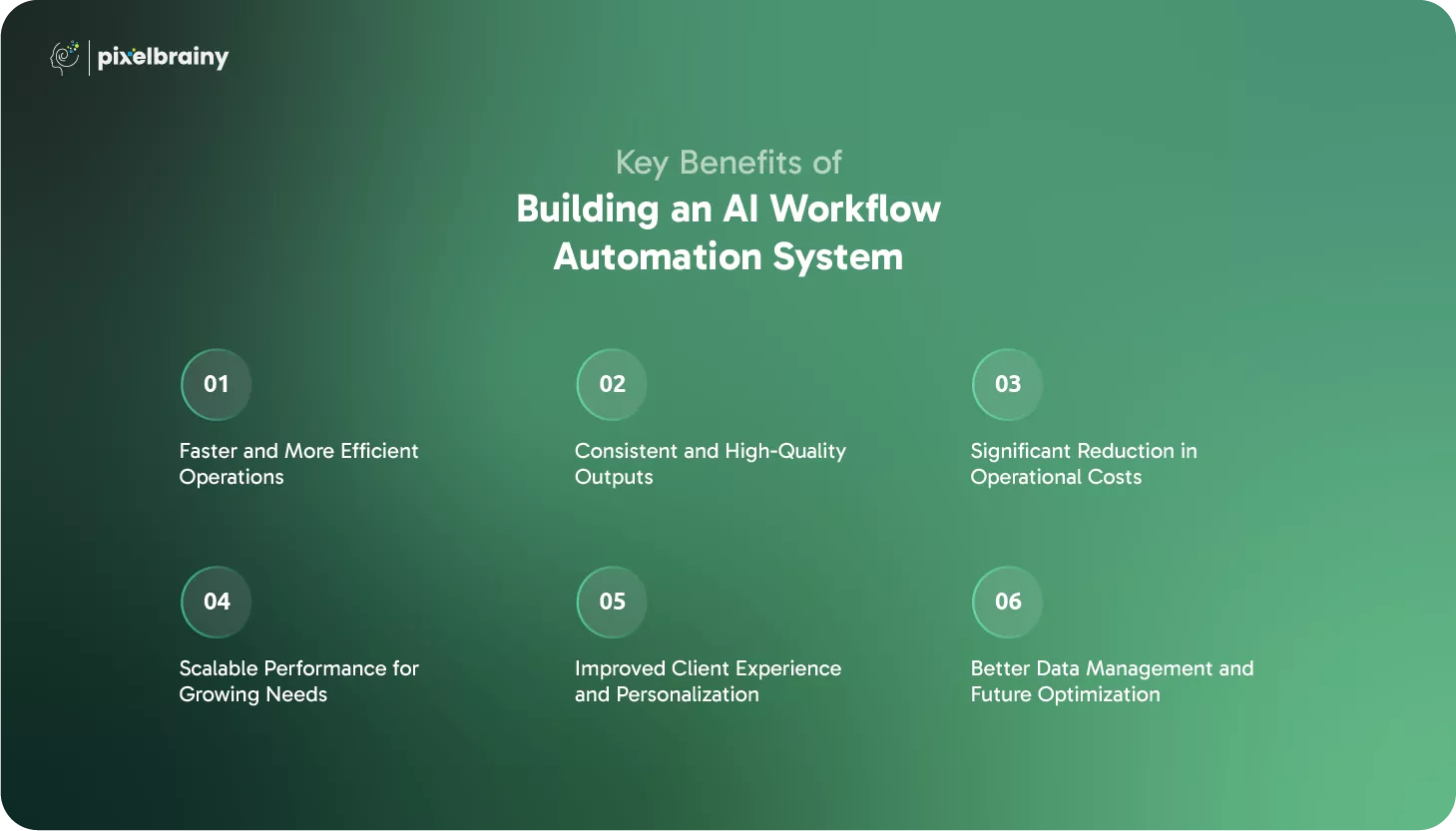
One of the strongest benefits of building an AI Workflow Automation System is the dramatic improvement in operational speed. Tasks that typically take hours when done manually can be completed within seconds through automated workflows. AI can read submissions, analyze information, and generate outputs instantly, eliminating delays caused by human bottlenecks. This high level of efficiency allows businesses to handle more client tasks in less time while maintaining superior performance.
Human processing often varies depending on workload, mood, or attention to detail. AI Workflow Automation Software ensures every client submission is processed with the same level of accuracy and consistency. The system follows predefined logic combined with intelligent analysis, which guarantees predictable and high-quality results. This reliability helps businesses strengthen trust with clients and deliver a professional experience every time.
AI Workflow Automation System Development allows companies to cut unnecessary manual labor and administrative work. Since AI handles repetitive tasks, businesses can reduce staffing costs, minimize human errors, and avoid expensive rework. The long-term cost savings become substantial as workflows become faster, more accurate, and more streamlined. This makes AI automation one of the most cost-effective investments for modern organizations.
Traditional operations have limitations, especially when client submissions increase. An automated AI system can scale effortlessly without hiring additional staff or restructuring the workflow. It can process thousands of submissions simultaneously, deliver personalized outputs on demand, and operate continuously without breaks. This scalability gives companies the flexibility to grow without facing operational pressure.
With AI Workflow Automation Software, businesses can deliver fast, accurate, and personalized outputs tailored to each client’s needs. The system analyzes the context of the submission and produces customized results that feel human-like and relevant. Clients receive what they need instantly, which improves satisfaction and enhances the overall experience. Faster delivery and personalized service also help businesses stand out in competitive markets.
Every submission and output generated through the system is stored securely. This creates a valuable data history that can be used for insights, analysis, and future improvements. Over time, the AI becomes smarter by learning from past entries, allowing businesses to refine the workflow and enhance accuracy. This makes the AI Workflow Automation System more powerful and more aligned with business goals as time goes on.
A well-built AI Workflow Automation System not only improves how businesses operate today but also prepares them for future growth and modernization.
AI workflow automation is reshaping industries by reducing manual effort, speeding up output generation, and enhancing personalization at scale.
Below are the top real-world use cases across multiple sectors, each showcasing how businesses are using AI-powered systems to improve efficiency, accuracy, and client satisfaction.
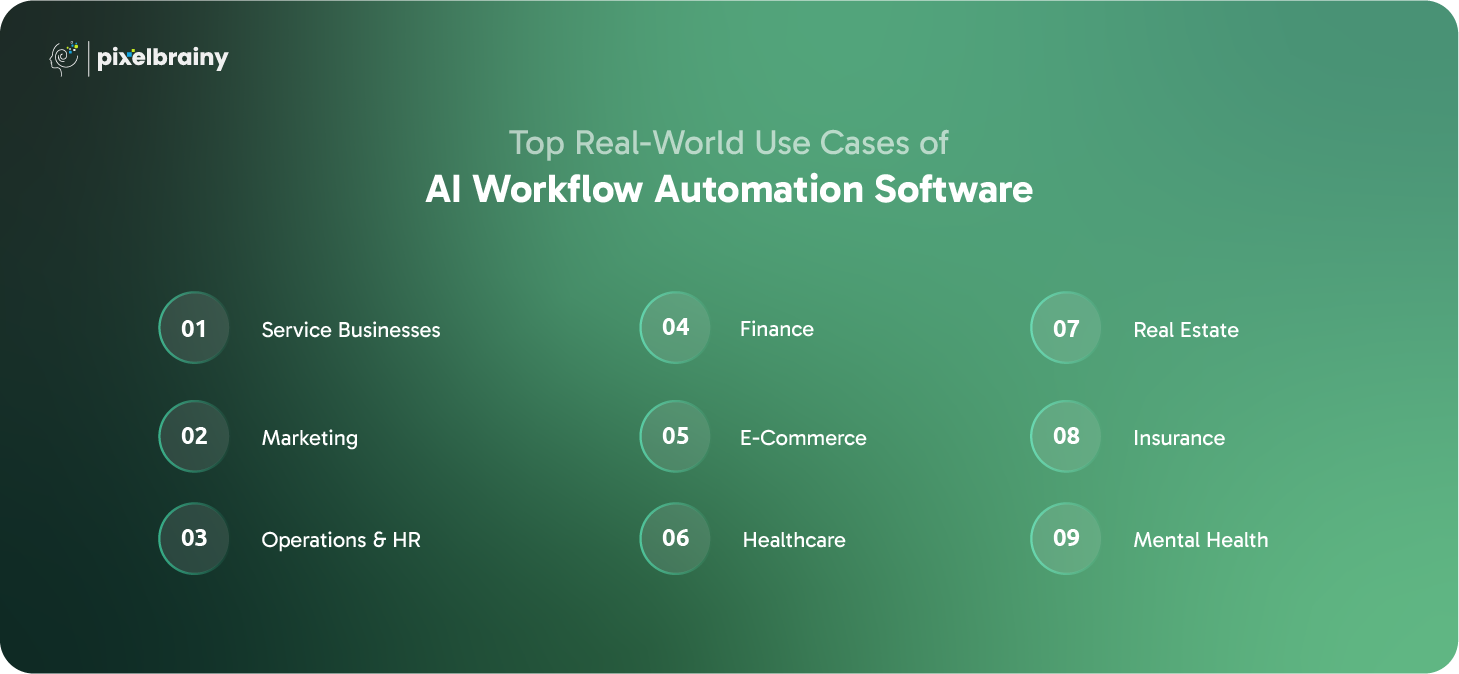
AI workflow automation enables service-based companies to deliver faster, more accurate, and highly personalized results to clients. It handles repetitive administrative tasks, manages client submissions, and automatically generates service deliverables without manual intervention.
Key Use Case Overview: Service providers use AI to streamline end-to-end workflows such as onboarding, report generation, and proposal creation. This reduces turnaround time, improves consistency, and enhances the overall client experience.
Use Case Highlights:
Marketing teams benefit from AI workflows that simplify content creation, campaign execution, and customer engagement. AI systems help generate personalized marketing outputs and automate repetitive processes across different channels.
Key Use Case Overview: Marketing automation uses AI to analyze inputs, generate customized content, schedule campaigns, and optimize performance, allowing marketers to focus on strategy rather than manual tasks.
Use Case Highlights:
AI workflow automation improves HR and operational efficiency by handling internal processes like employee management, compliance, and documentation. It reduces organizational workload and minimizes administrative errors.
Key Use Case Overview: Ops and HR teams leverage AI to automate repetitive paperwork, streamline hiring workflows, manage employee onboarding, and maintain accurate internal records.
Use Case Highlights:
Financial operations require accuracy, precision, and strict compliance. AI workflow automation helps organizations streamline calculations, document generation, and financial management processes effortlessly.
Key Use Case Overview: AI systems assist finance teams by automating data extraction, generating structured financial output, and ensuring error-free reporting.
Use Case Highlights:
E-commerce businesses rely heavily on automated workflows to manage customers, orders, and personalization at scale. AI helps create seamless shopping experiences, optimize operations, and increase conversion rates.
Key Use Case Overview: AI workflows in e-commerce support personalized product suggestions, automated customer service, inventory optimization, and post-purchase communication.
Use Case Highlights:
Healthcare organizations use AI workflow automation to manage patient data, speed up administrative processes, and support medical professionals with faster decision-making. It enhances efficiency while improving patient experience.
Key Use Case Overview: AI automates clinical workflows like appointment scheduling, medical documentation, and patient communication, freeing healthcare teams to focus on patient care.
Use Case Highlights:
Real estate professionals use AI workflows to streamline client communication, property documentation, and market analysis. Automation allows agents and agencies to deliver faster responses and personalized recommendations.
Key Use Case Overview: AI enhances property management, lead nurturing, and transaction workflows by generating relevant content and insights based on user input.
Use Case Highlights:
Insurance companies rely on AI workflows to manage claims, underwriting, and customer communication efficiently. Automation speeds up evaluation and enhances client experience through accurate, timely processing.
Key Use Case Overview: AI automates paperwork-heavy processes like claims assessment, policy generation, and risk evaluation by analyzing client inputs and generating ready-to-use documents.
Use Case Highlights:
Mental health professionals and platforms use AI workflow automation to manage patient submissions, personalize treatment plans, and maintain documentation while ensuring privacy and accuracy.
Key Use Case Overview: AI aids therapists and wellness platforms by generating structured therapy summaries, personalized wellness recommendations, and resource-based outputs tailored to each client’s submissions.
Use Case Highlights:
AI workflow automation continues to empower every industry by transforming complex, manual operations into streamlined, intelligent, and highly personalized experiences.
When businesses aim to develop AI Workflow Automation Software, they need a system equipped with powerful features that support speed, intelligence, and scalability. The creation of an AI Workflow Automation System requires capabilities that streamline every stage from input collection to output delivery.
Below is a detailed list of core features that define a high performing AI Workflow Automation tool Development project.
| Feature | Purpose |
| Intelligent Input Capture | The system collects client submissions through forms, chat, file uploads, or APIs. It ensures every input is captured accurately and structured properly for further processing. This forms the foundation for automated workflows. |
| Natural Language Understanding | AI reads and interprets user submissions with natural language processing. It understands context, intent, and relevant details to determine the correct workflow path. This makes the automation feel smart and human like. |
| Automated Decision Logic | The system applies business rules and workflow conditions to route tasks correctly. It ensures every process follows the right steps without manual supervision. This maintains flow consistency throughout the system. |
| Personalized Output Generation | AI creates custom responses, documents, proposals, or reports based on the input. Each output is tailored to client needs and business guidelines. This enhances service quality on every submission. |
| Multi Step Workflow Engine | Complex tasks can be broken into multiple automated steps. The engine moves the task through each stage until completion. This supports larger, more dynamic workflows. |
| Real Time Processing | The system processes submissions instantly and generates outputs without delays. Clients receive results in seconds instead of waiting hours. This significantly improves satisfaction and speed. |
| Automated Delivery Channels | Outputs can be sent through email, dashboards, client portals, or third party integrations. Delivery happens automatically once the result is ready. This ensures smooth end to end automation. |
| Data Logging and Storage | Every submission and output is stored securely for future reference. This helps with tracking, analytics, and improving future outputs. Data becomes a valuable asset for optimization. |
| Workflow Tracking Dashboard | Admins can monitor active tasks, review logs, and check performance. This dashboard provides visibility into all automated activities. It helps businesses maintain control even with full automation. |
| Integration with External Systems | The system can connect with CRM, ERP, email services, payment gateways, and cloud apps. This makes the automation part of a larger business ecosystem. Integrations increase flexibility and efficiency. |
| Error Handling and Recovery | The workflow engine detects issues and intelligently retries or reroutes processes. It prevents workflow breakdowns and ensures smooth operations. This keeps the system reliable, even under pressure. |
| User Authentication and Permissions | Admins and team members receive secure access based on role. Sensitive data remains protected and only authorized users can modify workflows. This supports compliance and security. |
| Template Based Output System | Outputs are generated using structured templates for consistency. Templates can be customized for branding, tone, and formatting. This ensures uniform results across all clients. |
| AI Learning and Optimization | The system improves over time by learning from past data and outputs. It becomes more accurate, faster, and more aligned with business needs. This long term improvement adds strategic value. |
| Analytics and Performance Insights | Businesses can track workflow efficiency, client trends, and output quality. Insights help refine decision logic and enhance the automation. This turns the system into a continuous optimization engine. |
A strong set of core features ensures that an AI Workflow Automation System operates with intelligence, speed, and long-term reliability.
As businesses grow and processes become more complex, basic automation is no longer enough. To build AI Workflow Automation Software that stays future ready, companies must include advanced capabilities that support intelligence, adaptability, and high-level performance.
These advanced features help in developing an AI Workflow Automation tool that not only automates tasks but also enhances decision making and long-term scalability within the organization.
| Advanced Feature | Explanation |
| AI Powered Predictive Routing | This feature allows the system to analyze incoming submissions and predict the optimal workflow path for each task. It ensures that complex processes follow the most efficient routes automatically. By learning from patterns, the routing becomes smarter over time. |
| Context Aware Output Generation | Instead of relying only on templates, the system generates outputs based on deeper context recognition. It understands tone, purpose, and user intent to produce more natural and meaningful results. This makes the output feel more personalized and high quality. |
| Multi Model AI Integration | The system can use multiple AI models for different tasks such as text analysis, image processing, or data extraction. This enhances accuracy and gives businesses the flexibility to choose the right model for each requirement. It also increases reliability across various workflows. |
| Automated Workflow Optimization | The tool studies workflow performance and suggests improvements automatically. It identifies delays, redundant steps, and performance gaps without human involvement. This ensures the system keeps evolving for better efficiency. |
| Dynamic Rule Engine | Instead of static rules, the system updates rules based on triggers, conditions, or new data patterns. It allows workflows to adjust automatically to changes in business operations. This offers long term flexibility and adaptability. |
| Smart Notification and Alert System | The system monitors errors, delays, or unusual activity and sends alerts to the right person instantly. It reduces downtime and ensures issues are handled before they affect clients. This keeps operations smooth and dependable. |
| RPA Integration for Extended Automation | Robotic Process Automation can be integrated to handle tasks outside AI capabilities such as clicking, copying, or interacting with legacy apps. This extends the automation to a wider range of processes. It creates a more complete and powerful workflow system. |
| Advanced Data Security and Compliance Layer | The system includes high level encryption, access control, and industry specific compliance features. This protects sensitive data throughout workflows. It supports organizations that require strict regulatory adherence. |
| Self-Learning Recommendation Engine | The system studies user preferences and business patterns to offer personalized recommendations. It helps improve workflows, outputs, and decision logic based on real data. This turns the automation into a smarter decision support tool. |
| Cross Platform Workflow Execution | The AI automation can operate across mobile, web, cloud, and third party applications. This ensures tasks continue seamlessly no matter the platform. It improves user experience and supports flexible usage environments. |
Including these advanced features allows businesses to create stronger, smarter, and more adaptable AI Workflow Automation Systems that remain effective as operations evolve.
The journey of creating an AI Workflow Automation Software is more than just coding a tool. It is a structured process that transforms a business concept into an intelligent system capable of thinking, analyzing, generating outputs, and executing tasks automatically. Many organizations today want to understand what is the process of AI Workflow Automation Software development because the demand for automation is rising, and companies need systems that can reduce manual work, increase efficiency, and provide personalized results at scale.
The steps below outline the complete development path, helping businesses visualize exactly how to build an AI Workflow Automation System from the ground up.
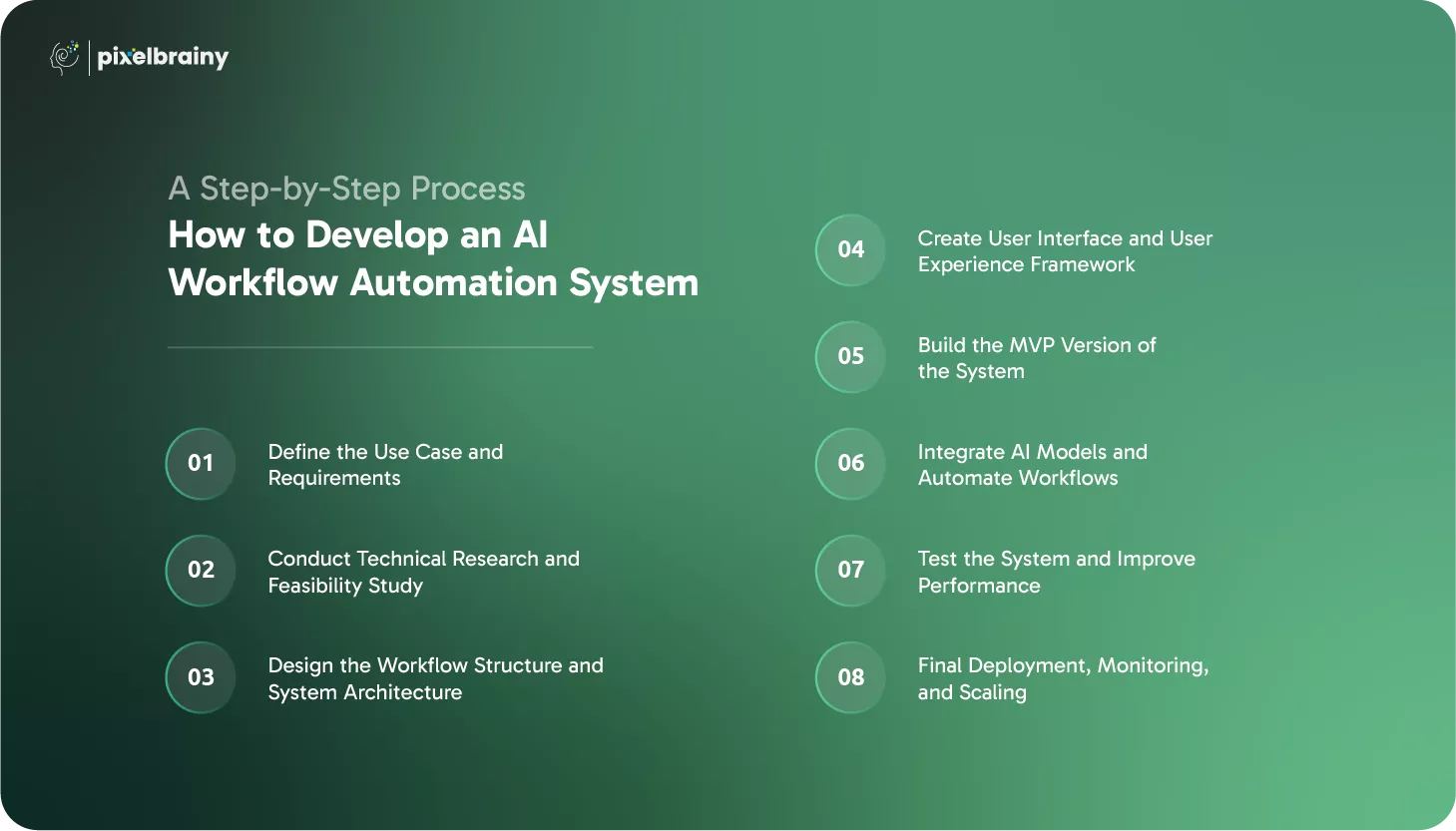
The first phase involves identifying the core problem the system will solve. Businesses must understand what type of submissions the system will receive, which tasks need automation, and what kind of personalized outputs should be generated. This includes studying user needs, pain points, and workflow obstacles that slow down operations. Detailed requirement gathering ensures that every feature built later supports real business goals and client expectations.
Aim of this step: Build a clear direction and purpose for the entire project by knowing exactly why you want to make an AI Workflow Automation System and what outcomes you expect.
After defining the concept, teams must research the technical aspects to determine whether automation is feasible. This includes evaluating data sources, workflow complexity, integration challenges, and selecting suitable AI models or frameworks. A thorough feasibility study also helps estimate resource requirements, development costs, and potential performance limitations. Similar to PoC development, this stage clarifies whether the solution can be built effectively and what adjustments may be needed.
Aim of this step: Gain clarity on technical requirements and eliminate risks early by validating whether the concept is practical and achievable.
In this step, developers map out each process within the system, including how inputs are collected, how decisions are made, and how outputs are generated. Architecture design involves outlining databases, automation engines, AI integration layers, and user interfaces. This is also where the team decides how the system will scale and how it will communicate with external applications. A detailed blueprint is essential because it ensures the final product operates smoothly and can evolve over time.
Aim of this step: Establish a strong architectural foundation that guides all future development stages with clarity and precision.
The interface plays a major role in user satisfaction. A well-designed UI allows users to submit information easily, manage workflows, and track outputs without confusion. Collaborating with a UI/UX design company can help businesses create layouts that are clean, intuitive, and visually appealing. Good design encourages users to adopt the system quickly and ensures they can interact with automation tasks with minimal training.
Aim of this step: Build a user-friendly experience that supports seamless interaction and boosts engagement with the system.
Once the foundations are set, developers begin working on MVP Development. This version includes core features such as input handling, workflow setup, and basic AI response generation. The MVP gives the business a functional prototype they can test internally or with selected users. It also helps identify missing features, workflow issues, and user experience challenges early in the development cycle.
Aim of this step: Validate the concept in a real environment and collect feedback before committing to full scale development.
Also Read: Top 10 AI MVP Development Companies in USA
This is one of the most important stages of AI Workflow Automation Tool Development. Here, developers integrate AI models for decision making, text analysis, or output generation. They also configure workflow rules, triggers, and automation sequences. The system learns to understand submissions, generate personalized outputs, and complete tasks without manual involvement. This stage may also involve integrating external systems, building APIs, and setting up databases for storage.
Aim of this step: Turn the software into an intelligent automation engine by enabling advanced AI capabilities and workflow automation logic.
Before launching the system, rigorous testing is required to ensure accuracy, security, and reliability. Developers perform workflow testing, stress testing, AI output evaluation, and performance audits. The goal is to catch bugs, optimize processing time, and improve AI predictions. Testing also includes user feedback sessions where real users try the system and share suggestions for refinement. This stage ensures the system performs consistently across various use cases.
Aim of this step: Deliver a stable, error free automation system that works smoothly in real world conditions.
The final step is deploying the system into a live environment where it can start processing real client submissions. Ongoing monitoring helps identify unusual activities, workflow challenges, and optimization opportunities. Businesses may also scale the system by adding new workflows, integrating additional AI models, or expanding features as operations grow. Many companies follow best practices used by Top AI development companies in USA to ensure long term success and scalability.
Aim of this step: Launch a fully functional automation system and maintain continuous improvement as business needs evolve.
By following these structured steps, businesses can confidently build a powerful AI automation system that transforms their workflows and enhances how they operate at every level.
Businesses often ask what is the cost to develop an AI Workflow Automation System because pricing can vary significantly depending on software complexity, features, workflow scope, AI model strength, and long-term scalability plans. On average, the development budget of AI Workflow Automation Software ranges between $40,000 and $300,000+, depending on what level of automation and intelligence a company needs. Below is a detailed cost breakdown and the factors that influence the total investment.
| Type of AI Workflow Automation Tool | What It Includes | Estimated Cost |
| Basic AI Workflow Automation Tool (MVP) | Includes essential workflow automation features, simple rule based logic, basic AI model integration, limited data storage, and minimal UI screens. Ideal for businesses performing concept validation and early testing. | $40,000 to $70,000 |
| Medium AI Workflow Automation Tool | Includes multi step workflows, improved AI capabilities, custom dashboards, real time processing, external integrations, and better data management. Suitable for operational business use. | $80,000 to $150,000 |
| Advanced AI Workflow Automation Tool | Includes enterprise workflows, predictive AI, multi model integration, advanced security, custom reporting, large scale architecture, and complex automation pipelines. Built for big organizations and high volume environments. | $160,000 to $300,000+ |
Below are the major cost drivers along with how much each can influence the final AI Tool development cost for Automating Workflow.
More complex workflows with multiple branches, decision layers, and automation rules increase development time. A simple workflow engine might cost an additional $5,000 to $15,000, while highly intricate workflows with dozens of paths can add $20,000 to $50,000+. The complexity defines how intelligent and versatile the system becomes.
If the system uses basic AI for text processing, the cost impact is moderate, approximately $8,000 to $20,000. But if you require advanced natural language understanding, custom training, or multi model AI, the cost can rise to $30,000 to $80,000. High performance AI significantly increases the cost of developing an AI Workflow Automation Software due to model optimization and testing.
Integrating with CRMs, ERPs, email systems, cloud tools, or third-party platforms adds complexity. Simple integrations may cost $3,000 to $7,000 each, while deep integrations with real time data sync may cost $10,000 to $25,000 per connection. More integrations mean a higher total development budget.
Clean, intuitive, and highly interactive interfaces require design expertise. Basic UI screens cost around $4,000 to $8,000, while full dashboard systems, role based screens, and complex navigation structures may add $12,000 to $30,000. High quality UI design directly affects usability and adoption.
Systems designed for large scale operations require advanced cloud architecture, load balancing, and optimized backend structures. This scaling layer typically adds $10,000 to $40,000+. High performance environments need more resources and engineering effort.
If the tool must meet industry regulations such as GDPR or HIPAA, the system needs encryption, audit logs, secure authentication, and data isolation. These security implementations can cost $8,000 to $35,000, depending on industry needs. The more sensitive the data, the higher the investment.
Hiring highly skilled AI developers, workflow engineers, and system architects impacts the budget. A junior level team adds minimal cost, while senior AI experts can add $20,000 to $60,000 to the overall project. Quality and experience directly affect system accuracy and performance.
After deployment, the system requires updates, bug fixes, performance tuning, and AI model improvements. Annual maintenance typically ranges from $10,000 to $50,000, depending on the size and complexity of the system. This ensures the automation tool remains stable and future ready.
Planning these cost factors carefully allows businesses to estimate a realistic budget and build an AI Workflow Automation System that fits both their goals and their long-term automation strategy.

Building a powerful and reliable AI Workflow Automation System requires a combination of advanced technologies, AI models, frameworks, and development tools. These technologies enable intelligent decision making, automated processing, and seamless workflow execution.
Below is a table listing the core advanced tools and technologies used during development.
| Category | Tools and Technologies | How They Support Development |
| AI Models and LLMs | OpenAI GPT, Google Gemini, Claude AI, Llama Models | Provide natural language understanding, intelligent decision making, and personalized output generation for automated workflows. These models power the core intelligence of the system. |
| Machine Learning Frameworks | TensorFlow, PyTorch, Scikit-learn | Used for training, fine tuning, and deploying custom AI models. They help build specialized automation logic and predictive engines. |
| Workflow Automation Engines | n8n, Apache Airflow, Temporal, Camunda | Manage multi step processes, triggers, scheduling, and workflow routing. These tools ensure workflows run smoothly from input to output. |
| Cloud Platforms | AWS, Google Cloud, Microsoft Azure | Provide hosting, storage, compute power, scalable architecture, and AI APIs. Cloud platforms support performance, reliability, and global availability. |
| Database and Storage Solutions | MongoDB, PostgreSQL, Firebase, Supabase | Used to store submissions, logs, outputs, and workflow data. Helps maintain historical data for future intelligence improvement. |
| RPA Tools | UiPath, Automation Anywhere, BluePrism | Extend automation by interacting with legacy software, performing robotic tasks, and handling non-API applications. |
| Backend Technologies | Node.js, Python, FastAPI, Django | Power the server-side logic, API development, workflow processing, and integration of AI models into the system. |
| Frontend Technologies | React.js, Next.js, Vue.js | Used to build interactive dashboards, submission interfaces, admin panels, and workflow monitoring screens. |
| Integration & API Tools | Zapier, Make.com, REST APIs, GraphQL | Connect the automation system with third party services, business tools, CRMs, and cloud apps to enhance workflow capabilities. |
| Security and Compliance Tools | OAuth2, JWT, SSL Encryption, Vault, Cloud Security Suites | Protect data, secure user access, manage encryption, and ensure compliance with GDPR and HIPAA standards. |
These technologies work together to create a strong and scalable AI Workflow Automation System capable of handling complex business processes with intelligence and precision.
Building AI workflow automation software involves multiple moving parts, from data ingestion and workflow logic to model accuracy and integration stability. While the benefits are substantial, development teams often face several recurring challenges that can disrupt efficiency and output quality.
Below are the most common obstacles along with detailed solutions to overcome them.
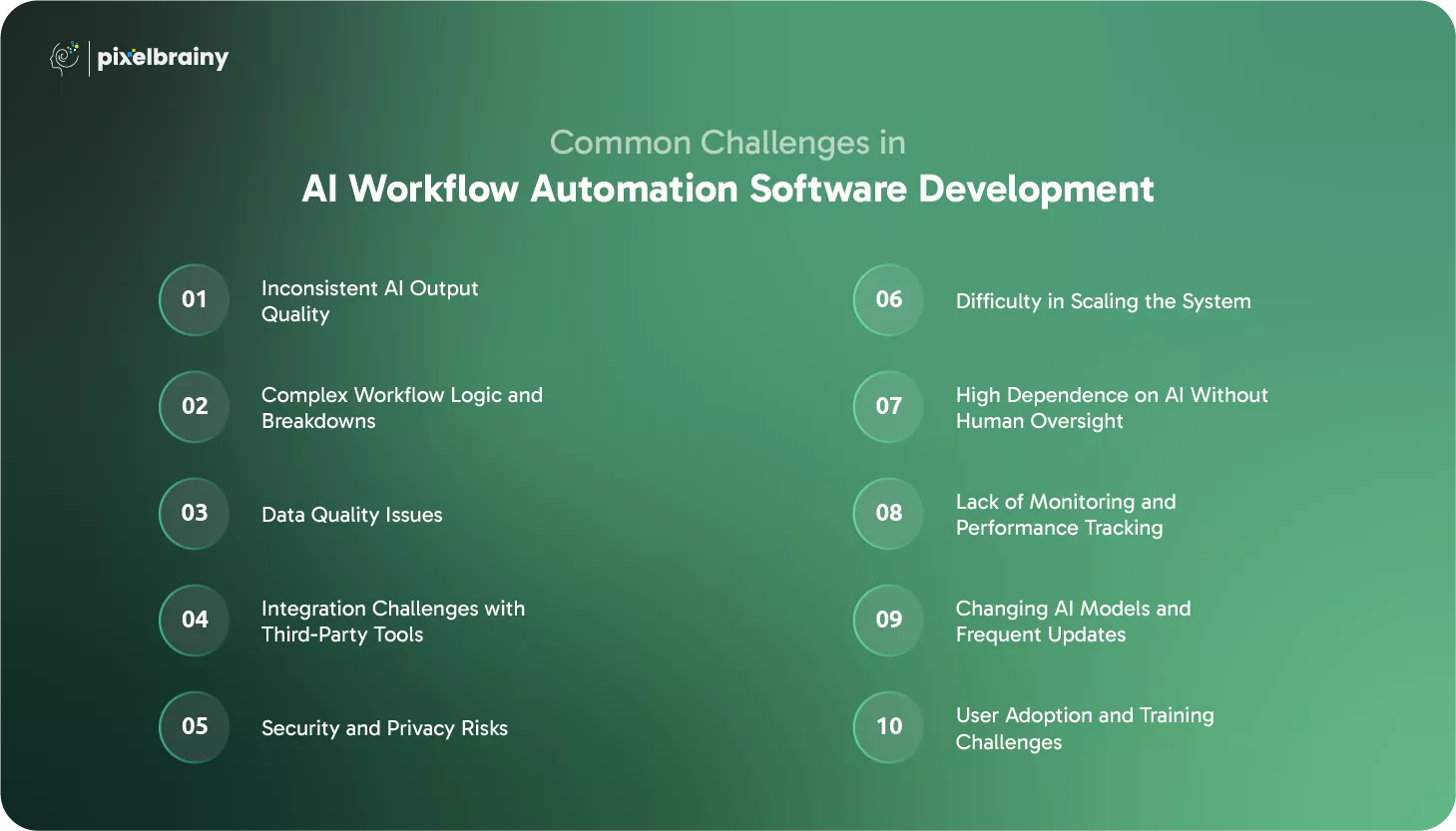
AI-generated outputs can vary depending on the prompt, the model, or the data provided. Inconsistent responses lead to unreliable workflows, frustrated users, and reduced system accuracy.
Why This Happens:
How to Solve It:
AI workflows often rely on multiple triggers, conditional paths, and automation sequences. A small error can break the entire system or create unwanted loops.
Why This Happens:
How to Solve It:
AI systems rely heavily on the quality of data they receive. Incorrect, incomplete, or unstructured data leads to poor results and unreliable automation.
Why This Happens:
How to Solve It:
AI workflow systems often integrate with CRM tools, email APIs, payment gateways, and databases. Integration issues can slow down operations or break automation entirely.
Why This Happens:
How to Solve It:
AI workflows often process sensitive data, making security and compliance top priorities. Mishandled data can lead to legal issues, leaks, and loss of trust.
Why This Happens:
How to Solve It:
AI workflows must handle increasing data loads, more users, and complex processes. Scaling poorly designed systems leads to performance issues.
Why This Happens:
How to Solve It:
AI automation may sometimes generate incorrect or suboptimal results if left unchecked. Over-reliance can cause operational risks.
Why This Happens:
How to Solve It:
Many organizations fail to track how well the AI workflow is performing, leading to unnoticed issues and declining output accuracy.
Why This Happens:
How to Solve It:
AI models evolve constantly. System updates, API changes, or deprecation of features can break workflows unexpectedly.
Why This Happens:
How to Solve It:
Even the best AI automation system is ineffective if users struggle to adopt it or do not trust its outputs.
Why This Happens:
How to Solve It:
AI workflow automation development comes with challenges, but each obstacle can be overcome with proper planning, strong architecture, and continuous optimization.
PixelBrainy empowers businesses to build intelligent, scalable, and fully automated systems through advanced AI-driven engineering. As a leading AI Development Company, we specialize in creating AI automation software that streamlines operations, enhances personalization, and enables businesses to operate more efficiently with minimal manual intervention. Our expertise covers everything from strategic planning to end-to-end AI Workflow Automation Software Development, ensuring you get a future-ready system tailored to your organization’s needs.
PixelBrainy combines deep technical expertise with industry-specific insights, helping businesses design and deploy intelligent workflows that reduce workload, improve accuracy, and accelerate output delivery. Whether you want to modernize your current processes or completely automate your operations, our team provides full-cycle support.
What We Deliver:
Our solutions go beyond simple automation. We help you create a system that learns, adapts, and improves over time.
(Client Name Confidential)
Here is a real example of how PixelBrainy delivered a complete AI Workflow Automation System Development project from start to finish.
Objective: The client needed a fully automated solution to handle user submissions, generate personalized documents, deliver outputs instantly, and maintain a complete history for improved personalization.
What PixelBrainy Delivered:
Impact:
Businesses trust PixelBrainy because we deliver systems that are intelligent, scalable, secure, and tailored to real-world workflows. Our team ensures your automation operates smoothly from day one, with ongoing support and optimization to keep improving your results.
Well, AI Workflow Automation Software Development is rapidly transforming how modern businesses function by reducing manual workloads, enhancing accuracy, and enabling personalized outputs with unmatched speed. As the demand for intelligent automation continues to rise, organizations are turning to the development of AI Workflow Automation System solutions that streamline operations from end to end.
By building an AI Workflow Automation System, companies can optimize workflows, improve performance, and deliver consistent results using automated decision-making and AI-powered processes. Workflow Automation System Development Integrating AI allows businesses to operate more efficiently while focusing on higher-value tasks that drive growth.
If you are ready to automate your processes and build a smarter workflow ecosystem powered by AI, PixelBrainy is here to guide you every step of the way. Book an appointment today.
AI workflow automation goes beyond rule-based actions by using machine learning and natural language processing to make intelligent decisions, personalize outputs, and adapt to new data over time. Traditional automation only follows predefined steps without learning or evolving.
The development timeline depends on workflow complexity, required integrations, and custom AI features. On average, building a full system can take anywhere from four to twelve weeks, depending on scope and scale.
Yes, most AI automation systems are designed with flexible APIs to integrate seamlessly with CRM platforms, ERPs, communication tools, databases, and third-party applications.
No. These systems are built with user-friendly dashboards and automated triggers. You can manage workflows, monitor outputs, and make updates without technical expertise.
Absolutely. Modern AI automation solutions include encryption, authentication, compliance controls, and secure storage to protect sensitive business or user data throughout the workflow.
AI can automate tasks such as document creation, data extraction, reporting, onboarding workflows, communication sequences, approvals, content generation, and more depending on industry needs.

About The Author
Sagar Bhatnagar
Sagar Sahay Bhatnagar brings over a decade of IT industry experience to his role as Marketing Head at PixelBrainy. He's known for his knack in devising creative marketing strategies that boost brand visibility and market influence. Sagar's strategic thinking, coupled with his innovative vision and focus on results, sets him apart. His track record of successful campaigns proves his ability to utilize digital platforms effectively for impactful marketing efforts. With a genuine passion for both technology and marketing, Sagar continuously pushes PixelBrainy's marketing initiatives to greater success.

Working with the PixelBrainy team has been a highly positive experience. They understand the design requirements and create beautiful UX elements to meet the application needs. The dev team did an excellent job bringing my vision to life. We discussed usability and flow. Sagar worked with his team to design the database and begin coding. Working with Sagar was easy. He has the knowledge to create robust apps, including multi-language support, Google and Apple ID login options, Ad-enabled integrations, Stripe payment processing, and a Web Admin site for maintaining support data. I'm extremely satisfied with the services provided, the quality of the final product, and the professionalism of the entire process. I highly recommend them for Android and iOS Mobile Application Design and Development.

Great experience working with them. Had a lot of feedback and I found that unlike most contractors they were bugging me for updates instead of the other way around. They were extremely time conscience and great at communicating! All work was done extremely high quality and if not on time, early! They were always proactive when it comes to communication and the work is great/above par always. Very flexible and a great team to work with! Goes above and beyond to present us with multiple options and always provides quality. Amazing work per usual with Chitra. If you have UI/UX or branding design needs I recommend you go to them! Will likely work with them in the future as well, definitely recommended!

PixelBrainy is a joy to work with and is a great partner when thinking through branding, logo, and website layout. I appreciate that they spend time going into the "why" behind their decisions to help inform me and others about industry best practices and their expertise.

I hired them to design our software apps. Things I really like about them are excellent communication skills, they answer all project suggestions and collaborate right away, and their input on design and colors is amazing. This project was complex and needed patience and creativity. The team is amazing to do business with. I will be using them long-term. Glad to see there are some good people out there. I was afraid to try and outsource my project to someone but I am glad I met them! I really can't say enough. They went above and beyond on this project. I am very happy with everything they have done to make my business stand out from the competition.

It was great working with PixelBrainy and the team. They were very responsive and really owned the project. We'll definitely work with them again!

I recently worked with the PixelBrainy team on a project and I was blown away by their communication skills. They were prompt, clear, and articulate in all of our interactions. They listened and provided valuable feedback and suggestions to help make the project a success. They also kept me updated throughout the entire process, which made the experience stress-free and enjoyable.

PixelBrainy is very good at what it does. The team also presents themselves very professionally and takes care of their side of things very well. I could fully trust them taking up the design work in a timely and organised manner and their attention to detail saved us lots of effort and time. This particular project was quite intense and the team showed that they function very well under pressure. Very much looking forward to working with her again!

It's always an absolute pleasure working with them. They completed all of my requests quickly and followed every note I had for them to a T, which made our process go smoothly from start to finish. Everything was completed fast and following all of the guidelines. And I would recommend their services to anyone. If you need any design work done in the future, PixelBrainy should be your first call!

They took ownership of our requirements and designed and proposed multiple beautiful variants. The team is self-motivated, requires minimum supervision, committed to see-through designs with quality and delivering them on time. We would definitely love to work with PixelBrainy again when we have any requirements.

PixelBrainy was a big help with our SaaS application. We've been hard at work with a new UI/UX and they provided a lot of help with the designs. If you're looking for assistance with your website, software, or mobile application designs, PixelBrainy and the team is a great recommendation.

PixelBrainy designers are amazing. They are responsive, talented, and always willing to help craft the design until it matches your vision. I would recommend them and plan to continue them for my future projects and more!!!

They were awesome! Did a good job fast, and good communication. Will work with them again. Thank you

Creative, detail-oriented, and talented designers who take direction well and implement changes quickly and accurately. They consistently over-delivered for us.

PixelBrainy team is very talented and creative. Great designers and a pleasure to work with. PixelBrainy is an excellent communicator and I look forward to working with them again.

PixelBrainy has a very talented design team. Their work is excellent and they are very responsive. I enjoy working with them and hope to continue on all of our future projects.


Transform your ideas into reality with us.
Across these industries, each engagement brings unique challenges, from early-stage product development to scaling complex systems, helping us build a practical understanding of real-world product environments.