AI Summary Powered by PixelBrainy
Every growing business eventually reaches a breaking point with documents. Files are scattered across systems, employees spend hours searching for information, compliance risks increase, and manual processes slow down operations. What worked in the early stages no longer supports scale. This is where AI-powered Document Management becomes a strategic necessity rather than a technical upgrade.
In the U.S. market, companies across SaaS, enterprise, and startup ecosystems are actively investing in the development of document management software integrating AI to manage growing volumes of unstructured data. SaaS companies need intelligent systems to handle customer records at scale. Enterprises in healthcare, finance, legal, manufacturing, and real estate require secure and compliant solutions. Startups are focused on speed, automation, and differentiation by building an AI document management system directly into their products.
As document complexity increases, business leaders are no longer satisfied with basic storage and keyword search. They want to understand how to develop AI document management software that can automatically classify files, extract critical data, improve search accuracy, and streamline workflows. This shift has made AI document management system development a priority for organizations looking to reduce operational costs and improve productivity.
Today, business owners, entrepreneurs, and technology leaders are searching for answers to questions such as how to eliminate manual document processing, how to manage compliance without slowing teams down, how to scale document workflows as data grows, how to reduce human errors, and how to develop AI document management software without excessive cost or complexity.
This guide is built to address these needs and provide a clear path for organizations planning the development of AI-powered document management software that delivers measurable business value.
AI document management software helps businesses manage documents without relying on constant manual work. Instead of simply storing files, it understands document content and makes information easier to organize, find, and use. This is especially useful for companies dealing with large volumes of contracts, invoices, reports, and customer records.
Unlike traditional systems that depend on folders and exact keywords, AI-powered document management software can read documents, identify their type, and organize them automatically. It uses text recognition and language understanding to extract important details, apply tags, and connect related files. This allows users to search documents using natural language and get accurate results faster.
AI document management software also automates everyday tasks such as document routing, approvals, updates, and version tracking. These features reduce human errors and save time across teams. Security and access control are built in, helping businesses protect sensitive data and meet compliance requirements.
In simple terms, AI document management software turns documents into structured, usable information. For organizations planning to build smarter systems, it provides a flexible foundation that scales with growing data and business needs.
Businesses today are dealing with an explosion of digital documents. Contracts, invoices, customer records, compliance files, and internal reports are growing faster than teams can manage manually. The global document management system market is forecast to grow from around USD 8.7 billion in 2024 to over USD 17.8 billion by 2030, reflecting accelerating adoption of intelligent systems across industries.
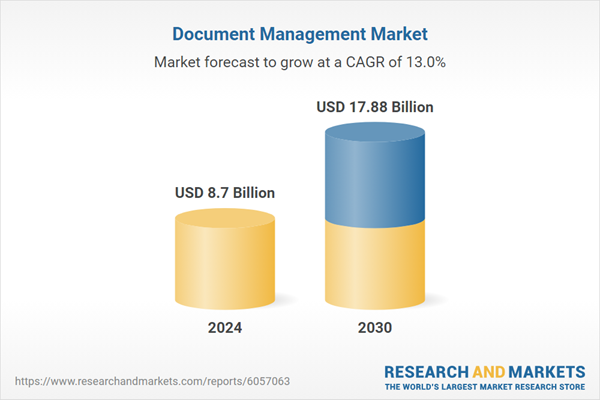
At the same time, demand for AI-powered Document Management capabilities is rising as companies seek solutions that can automatically classify, tag, and process unstructured data. AI technologies make it possible to scale document workflows, improve data accuracy, and add value that traditional systems cannot deliver.
This trend is not limited to large enterprises. SaaS companies are investing in AI document management system development to differentiate their products. Mid-sized businesses and startups are prioritizing development of document management software integrating AI to automate internal processes and support remote work models. Healthcare, finance, legal, and insurance industries are especially focused on intelligent solutions due to strict regulatory requirements and high volumes of sensitive documents.
Business leaders face increasing pressure to modernize information management, improve operational agility, and support hybrid workforces. These market trends show that why now is the right time to build AI document management software extends beyond hype and into measurable industry growth and strategic technology priorities.
As organizations deal with growing volumes of documents and rising operational complexity, investing in AI-driven solutions has become a practical decision. The advantages of developing AI Document Management Software go far beyond basic storage and search. When built correctly, these systems reshape how businesses handle information, workflows, and decision-making at scale.
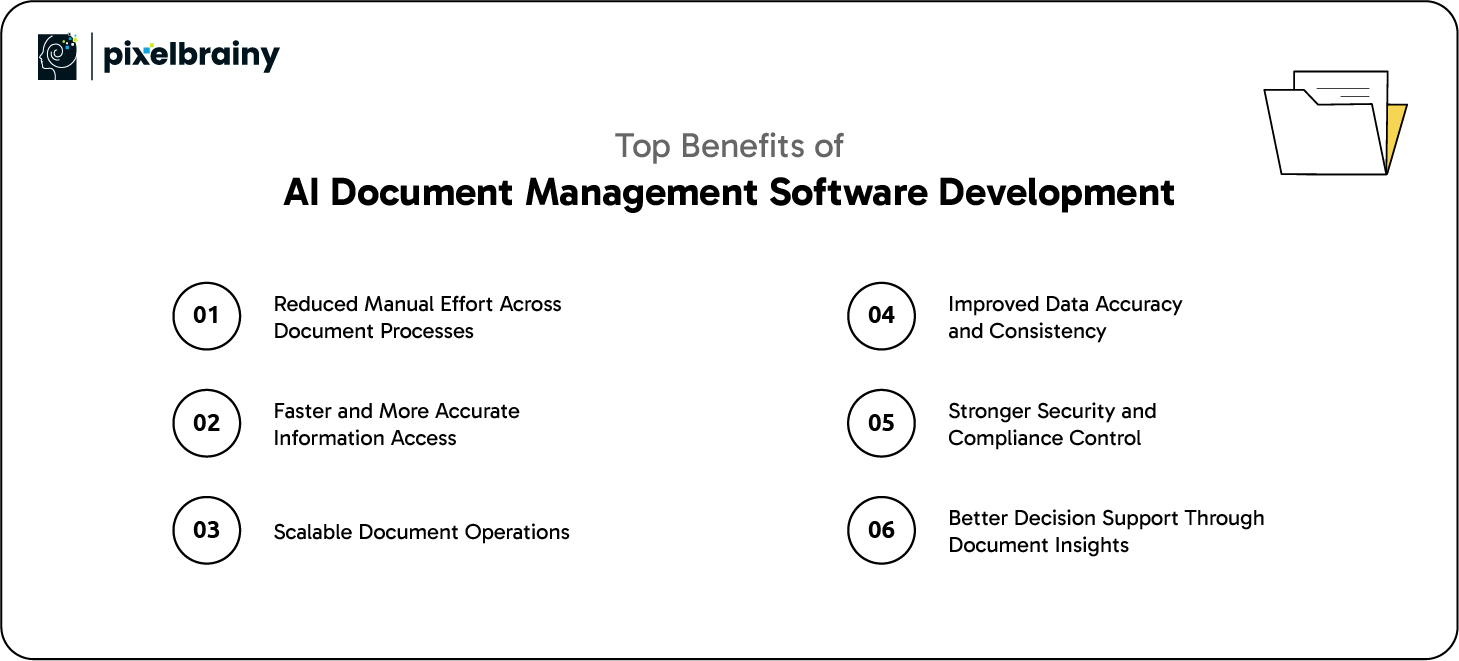
One of the biggest advantages of AI Document Management System development is the reduction of repetitive manual tasks. AI can automatically read, classify, and extract information from documents that would otherwise require human input. This minimizes dependency on manual data entry, reduces processing time, and allows teams to focus on higher-value work instead of routine document handling.
AI-powered document systems improve how users find and retrieve information. Instead of searching through folders or relying on exact file names, users can search based on meaning and context. This makes it easier to locate documents quickly, even in large repositories, and ensures teams always work with the most relevant and up-to-date information.
As businesses grow, document volume increases rapidly. AI-driven systems are built to scale without breaking existing workflows. Whether adding new users, expanding departments, or handling more documents, organizations that create Document Management Software using AI can support growth without constant restructuring or manual intervention.
Human errors are common in document-heavy environments. AI helps maintain consistency by applying standardized rules for classification, tagging, and data extraction. This leads to cleaner data, fewer discrepancies, and better reliability across business processes that depend on documents.
AI document management software supports controlled access, activity tracking, and audit-ready records. This is especially critical for industries with strict regulatory requirements. Intelligent monitoring also helps detect unusual activity and reduces the risk of data misuse or loss.
Documents contain valuable business information that often goes unused. AI makes it possible to analyze content at scale, uncover patterns, and surface insights that support faster and more informed decisions across teams and leadership.
These are the top advantages of developing AI Document Management Software make it a long-term investment that improves efficiency, scalability, and information control across the organization.
AI document management software plays a critical role in organizations that depend heavily on documents to run their operations. As businesses scale and data volumes increase, managing documents manually becomes inefficient and risky. AI helps streamline document workflows, improve accuracy, and provide better visibility across departments.
Below are some of the most practical and widely adopted use cases, explained with real-world business examples.
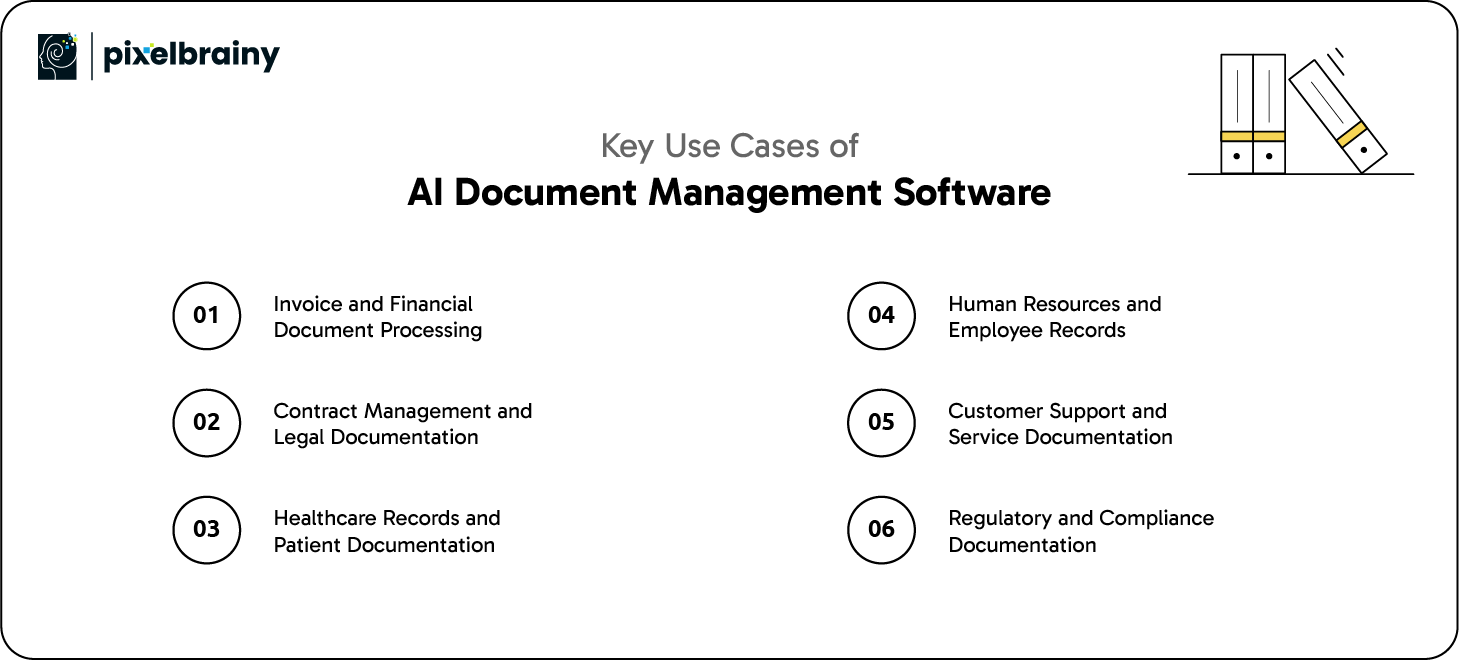
Finance teams process invoices, purchase orders, receipts, and expense reports on a daily basis. Manual data entry often leads to delays, duplicate payments, and reconciliation issues. AI document management software can automatically read financial documents, extract structured data, and validate it against existing records.
For example, a retail company handling thousands of supplier invoices each month can use AI to extract invoice details and route them for approval based on predefined rules. This shortens payment cycles, improves vendor relationships, and reduces operational bottlenecks within finance departments.
Legal teams manage a high volume of contracts that contain critical terms, obligations, and timelines. AI document management software helps classify contracts, extract important clauses, and track renewals or compliance requirements.
For instance, a global enterprise with vendors across multiple regions can use AI to quickly identify contracts nearing expiration or containing specific risk clauses. This reduces legal exposure and allows teams to act proactively instead of reacting to missed deadlines.
Healthcare organizations deal with complex documentation, including patient records, insurance claims, clinical notes, and consent forms. AI document management software organizes these records while supporting regulatory compliance and data privacy.
A hospital group, for example, can use AI to digitize and index scanned patient documents, making them instantly searchable for clinicians. This improves care coordination, reduces administrative workload, and ensures accurate information is available when needed.
Also Read: AI Medical Imaging Software Development: Architecture, Process, Costs & Key Challenges Explained
HR departments manage documents across recruitment, onboarding, performance management, and compliance. AI helps categorize employee files and maintain structured records throughout the employee lifecycle.
A fast-growing startup, for example, can use AI to screen resumes based on skills and experience, while also organizing onboarding documents for new hires. This helps HR teams operate efficiently even as headcount increases rapidly.
Also Read: AI HR Software Development: Top Benefits and Features
Customer support teams rely on a wide range of documents, including emails, manuals, troubleshooting guides, and internal knowledge bases. AI document management software helps link customer queries to the most relevant information.
For example, a SaaS company can use AI to analyze incoming support tickets and recommend relevant documentation to agents. This leads to faster resolutions and more consistent customer experiences.
Industries such as finance, insurance, and manufacturing are subject to strict regulatory requirements. AI document management software helps maintain version control, track document history, and ensure audit readiness.
A financial services firm, for instance, can quickly retrieve historical records during regulatory audits, reducing risk and saving time.
These expanded use cases show how AI document management software adapts to real operational challenges while improving efficiency, accuracy, and compliance across industries.

When planning AI Document Management Software Development, the foundation matters more than anything else. Core features ensure the system works reliably, scales with business needs, and delivers real operational value. These features are essential for any organization looking to build a stable and usable AI-driven document platform.
| Feature | Description |
| Intelligent Document Upload | The system should support multiple file formats such as PDFs, images, Word files, and scans. AI should automatically detect document type during upload. This removes the need for manual sorting and speeds up ingestion. |
| Optical Character Recognition | OCR allows the system to convert scanned and image-based documents into searchable text. This is critical for handling paper-based or legacy documents. Accurate OCR ensures no data is locked inside images. |
| Automated Document Classification | AI should categorize documents based on content rather than file names. This helps maintain consistency across departments. It also reduces errors caused by manual tagging. |
| Metadata Extraction | The software must extract key information such as names, dates, IDs, and values. This structured data improves search, reporting, and workflow automation. It also reduces dependency on manual data entry. |
| Advanced Search Functionality | Users should be able to search documents using keywords, phrases, or context. AI-powered search improves accuracy and saves time. This is critical when dealing with large document repositories. |
| Version Control | The system must track document changes and maintain version history. Users should always know which version is current. This avoids confusion and supports audit requirements. |
| Role-Based Access Control | Different users need different access levels. AI document management software should enforce permissions based on roles. This protects sensitive information and supports compliance. |
| Workflow Automation | Documents should move automatically through predefined workflows. This includes approvals, reviews, and notifications. Automation reduces delays and manual coordination. |
| Audit Logs and Tracking | Every action taken on a document should be recorded. This includes access, edits, and approvals. Audit trails are essential for regulated industries. |
| Data Security and Encryption | Documents must be protected both at rest and in transit. Strong encryption helps prevent unauthorized access. Security is a non-negotiable requirement for enterprise adoption. |
| Cloud and On-Premise Support | The system should support flexible deployment options. Some organizations require cloud solutions while others prefer on-premise environments. This flexibility increases adoption. |
| Integration Capabilities | AI document management software should integrate with ERP, CRM, and other business tools. Seamless integrations reduce data silos. This ensures documents support broader business processes. |
| User-Friendly Interface | The platform should be simple to use without extensive training. Clear navigation improves adoption across teams. A poor interface often leads to low usage rates. |
| Scalability | The system must handle increasing document volumes and users. AI Document Management System development should support growth without performance issues. Scalability ensures long-term value. |
| Backup and Recovery | Automated backups protect against data loss. Recovery options ensure business continuity. This feature is critical for risk management. |
Together, these must-have features form the backbone of reliable and scalable AI Document Management Software Development.
Once core functionality is in place, advanced features can significantly enhance system intelligence and business impact. These capabilities help organizations move beyond basic automation toward smarter, more predictive document workflows.
| Feature | Description |
| Semantic Search | Semantic search understands user intent rather than exact keywords. This allows users to find documents based on meaning. It improves discovery in large document collections. |
| Natural Language Query Support | Users can search documents using conversational language. This lowers the learning curve for non-technical users. It also improves accessibility across teams. |
| AI-Powered Document Summarization | The system can generate concise summaries of long documents. This helps users quickly understand content without reading entire files. It is useful for contracts and reports. |
| Intelligent Recommendations | AI can suggest related documents based on user behavior. This improves productivity by surfacing relevant information automatically. Recommendations add contextual intelligence to workflows. |
| Machine Learning Model Training | Custom model training allows AI to adapt to specific document types. This improves accuracy over time. Businesses can fine-tune models based on their data. |
| Multi-Language Support | AI can process documents in multiple languages. This is critical for global organizations. It enables consistent document handling across regions. |
| Sentiment and Context Analysis | AI can analyze tone and intent in documents. This is useful for customer feedback, legal reviews, and communications. Context awareness improves decision-making. |
| Predictive Workflow Automation | AI can predict next steps based on historical patterns. This helps automate complex workflows. Predictive automation reduces delays and manual follow-ups. |
| Compliance Intelligence | The system can flag missing documents or compliance risks. AI helps ensure regulatory requirements are met. This reduces audit stress and legal exposure. |
| Analytics and Insights Dashboard | Advanced dashboards provide visibility into document usage and workflow performance. These insights help leaders optimize processes. Data-driven decisions become easier to make. |
These advanced features elevate AI Document Management System development from functional automation to intelligent, insight-driven operations.
Developing an intelligent document solution is a strategic initiative that impacts operations, compliance, and scalability. Whether you are planning AI Document Management Software for enterprise environments or AI Document Management Software for startups, a clear step-by-step approach ensures long-term success.
Below is a practical roadmap that explains how to develop an AI Document Management System aligned with real business needs.
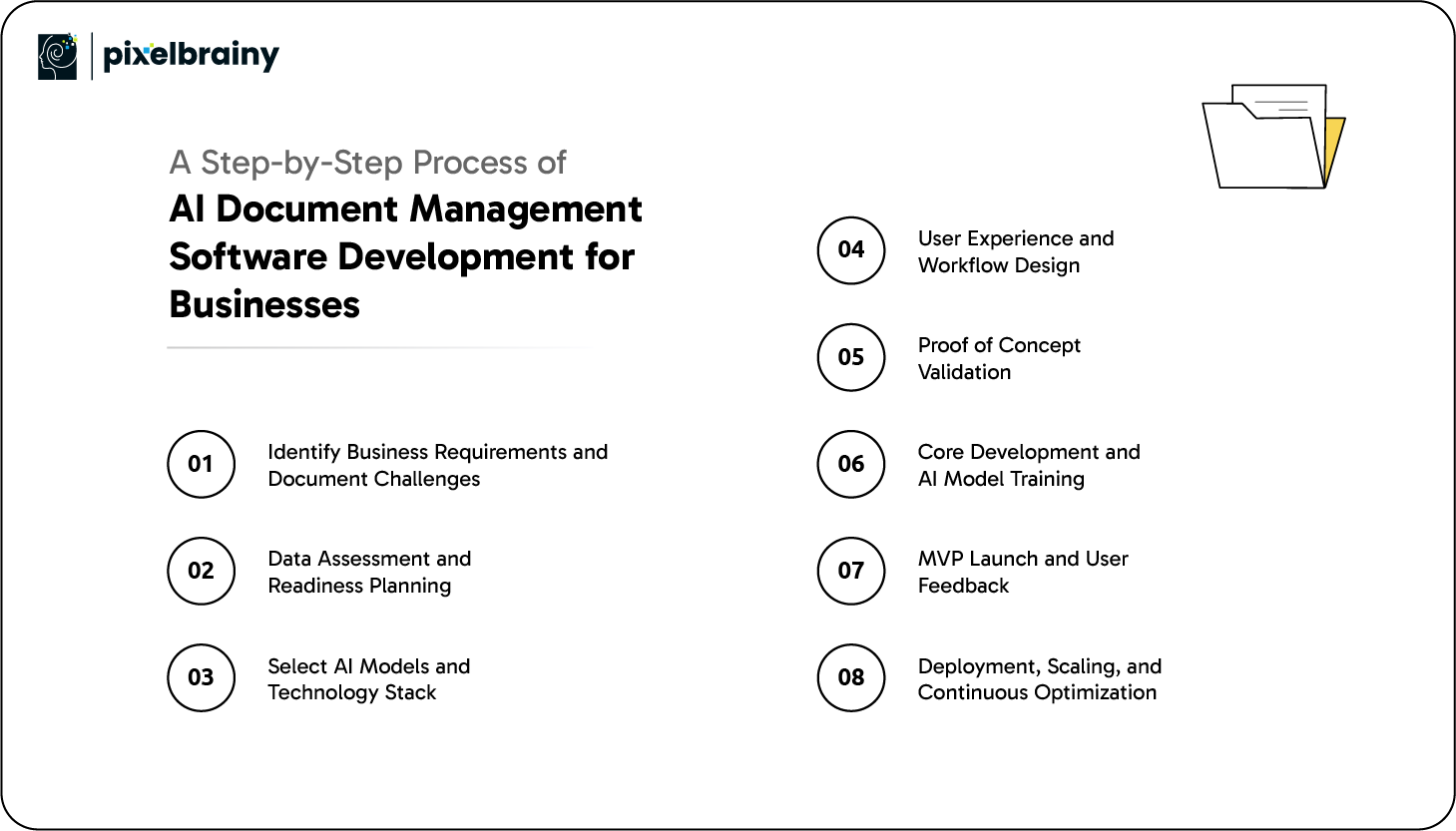
The first step is to clearly understand how documents are currently created, stored, accessed, and processed across the organization. Enterprises often deal with compliance-heavy documents such as contracts, audits, and regulatory records, while startups may focus on speed, automation, and cost efficiency. Interviews with department heads help uncover bottlenecks, security concerns, and workflow gaps. This stage also defines success metrics such as accuracy, processing speed, and scalability.
Goal of this step: To establish a clear vision and scope for AI Document Management Software for enterprise and startups, ensuring the system addresses real operational challenges and aligns with business growth plans.
AI performance depends heavily on document quality and structure. Businesses must assess existing data to understand formats, languages, volume, and consistency. Enterprises often have legacy documents and scanned records, while startups may work with digital-first data. This step involves organizing datasets, identifying missing metadata, and planning data normalization. It also includes defining data privacy and retention policies.
Goal of this step: To prepare reliable and compliant data that supports accurate AI processing during the development of Document Management Software Integrating AI.
Choosing the right technology stack is critical for scalability and long-term maintenance. This includes selecting OCR engines, NLP frameworks, machine learning models, databases, and cloud infrastructure. Enterprises may prioritize security, integrations, and on-premise options, while startups often favor cloud-native and API-driven tools. Consulting Top AI Development Companies in USA can help businesses make informed technology decisions.
Goal of this step: To build a secure and scalable foundation for building AI Document Management Software that supports current needs and future expansion.
AI systems must be easy to use to drive adoption. This step focuses on designing document workflows, dashboards, and search experiences that match how users actually work. Enterprises require role-based views and approval hierarchies, while startups prioritize simplicity and speed. Collaboration with a UI/UX design company ensures the platform is intuitive for both technical and non-technical users.
Goal of this step: To deliver a user-friendly experience that supports productivity and adoption across teams using AI Document Management Software for enterprise and startups.
Before full development, teams validate assumptions through PoC development. A limited version of the system tests document ingestion, classification accuracy, data extraction, and processing speed. Enterprises may test compliance-heavy workflows, while startups validate core automation features. This step helps identify technical limitations early.
Goal of this step: To confirm feasibility and reduce risk before committing resources to full-scale AI Document Management System Development.
This phase involves backend development, AI model development and training, integration of workflows, and security implementation. Models are trained on real document data to improve accuracy over time. Enterprises often require integrations with ERP or CRM systems, while startups focus on rapid iteration. Continuous testing ensures reliability under real workloads.
Goal of this step: To create AI Document Management Software that processes documents accurately, securely, and efficiently across use cases.
Rather than launching everything at once, businesses release a controlled version through MVP Development. This version is used by selected teams or early customers to gather real feedback. Enterprises validate performance at scale, while startups test market fit and usability. Feedback helps refine features and workflows.
Goal of this step: To validate real-world performance and refine the product before fully rolling out to develop Document Management Software with AI.
Also Read: Top 10 AI MVP Development Companies in USA
After validation, the system is deployed across the organization or customer base. Enterprises focus on scaling securely across departments, while startups prepare for rapid user growth. Ongoing monitoring, model retraining, and feature enhancements ensure the system evolves with business needs.
Goal of this step: To ensure long-term success by continuously improving AI Document Management System Development as data volumes, users, and regulations change.
By following this structured approach, businesses can confidently build AI document management software that supports enterprise-scale operations and startup agility alike.
The cost to build an AI document management software depends on the product scope, AI complexity, security requirements, and scalability needs. Businesses building internal tools, SaaS platforms, or enterprise-grade systems will see different cost ranges based on features and long-term goals.
On average, the total investment typically falls between $30,000 to $300,000+, depending on the level of intelligence and customization required.
| Software Type | Estimated Cost | Timeline | What You Will Get |
| Basic AI Document Management Software (MVP) | $30,000 – $60,000 | 2 to 3 months | Core document upload, basic OCR, document classification, keyword search, limited workflows, and basic security. Ideal for startups validating ideas or internal automation needs. |
| Medium AI Document Management Software | $70,000 – $150,000 | 4 to 6 months | Advanced OCR, NLP-based data extraction, semantic search, workflow automation, role-based access, integrations, and scalable cloud deployment. Suitable for growing SaaS products and mid-sized businesses. |
| Advanced AI Document Management Software | $180,000 – $300,000+ | 6 to 9+ months | Enterprise-grade AI, custom model training, predictive workflows, compliance intelligence, analytics dashboards, high security standards, multi-tenant architecture, and large-scale deployment support. Built for enterprises and regulated industries. |
Basic systems cost less because they focus on essential features. Adding automation, analytics, and AI intelligence increases development effort.
Estimated cost impact: $10,000 to $80,000+
Using pre-trained AI APIs is more affordable, while custom model training increases cost significantly. Advanced AI requires more data and testing.
Estimated cost impact: $15,000 to $70,000+
Simple interfaces require less effort, while enterprise-grade dashboards and role-based views add cost. A polished UX improves adoption but increases development time.
Estimated cost impact: $5,000 to $25,000+
Industries like healthcare, finance, and legal require strict compliance and encryption standards. Implementing these controls increases development cost.
Estimated cost impact: $10,000 to $50,000+
Connecting the software with ERP, CRM, or legacy systems adds complexity. Each integration requires testing and maintenance.
Estimated cost impact: $5,000 to $40,000+
Cloud-native solutions are generally cost-effective, while hybrid or on-premise deployments increase setup and maintenance expenses.
Estimated cost impact: $5,000 to $30,000+
AI models require continuous monitoring, retraining, and performance optimization. Long-term maintenance adds recurring costs.
Estimated cost impact: $1,500 to $6,000 per month
In summary, the cost to build AI document management software depends on how intelligent, secure, and scalable the solution needs to be, making early planning critical for budget control and long-term success.
Also Read: AI Software Development Cost: A Complete Software Cost Guide
Choosing the right tools and technology stack plays a critical role in the success of AI document solutions. The stack should support scalability, AI accuracy, security, and smooth integrations with existing systems.
Whether you are building AI Document Management Software for enterprises or agile products for startups, the following technology stack is widely used and proven in real-world implementations.
| Layer | Tools & Technologies | Explanation |
| Frontend Development | React.js, Angular, Vue.js | These frameworks help build fast, responsive, and user-friendly interfaces. They support complex dashboards, document previews, and role-based views needed in AI document management software. |
| Backend Development | Node.js, Python, Java, .NET | Backend technologies handle business logic, API management, document workflows, and integrations. Python is especially popular due to strong AI and machine learning ecosystem support. |
| AI and Machine Learning | TensorFlow, PyTorch, Scikit-learn | These frameworks are used to train and deploy machine learning models for document classification, extraction, and learning patterns over time. They support both custom and pre-trained models. |
| Optical Character Recognition | Tesseract OCR, AWS Textract, Google Vision OCR | OCR tools convert scanned documents and images into machine-readable text. Cloud-based OCR services provide high accuracy and support multiple document formats and languages. |
| Natural Language Processing | spaCy, NLTK, Hugging Face Transformers | NLP tools help the system understand document content, extract entities, and improve semantic search. They are essential for intelligent document classification and text analysis. |
| Search and Indexing | Elasticsearch, OpenSearch, Solr | These tools enable fast document indexing and advanced search capabilities. They support keyword search, contextual search, and scalability for large document repositories. |
| Databases | PostgreSQL, MongoDB, MySQL | Structured and unstructured databases store document metadata, user information, and system configurations. NoSQL databases are often used for flexible document schemas. |
| File Storage | AWS S3, Azure Blob Storage, Google Cloud Storage | Cloud storage services are used to store documents securely and at scale. They offer durability, backups, and easy integration with AI services. |
| Workflow and Automation | Apache Airflow, Camunda, Temporal | These tools manage document workflows such as approvals, routing, and task automation. They help orchestrate complex document lifecycle processes. |
| Security and Access Control | OAuth 2.0, JWT, IAM | Security tools manage authentication, authorization, and access control. They ensure sensitive documents are accessed only by approved users. |
| Cloud Platforms | AWS, Microsoft Azure, Google Cloud | Cloud platforms provide infrastructure, AI services, scalability, and deployment flexibility. They support enterprise-grade security and compliance requirements. |
| DevOps and CI/CD | Docker, Kubernetes, Jenkins, GitHub Actions | DevOps tools help automate deployments, scale services, and maintain system reliability. They are essential for continuous updates and performance optimization. |
| Monitoring and Analytics | Prometheus, Grafana, ELK Stack | Monitoring tools track system performance, document processing metrics, and AI model behavior. Analytics helps teams improve workflows and system efficiency over time. |
By using this right combination of tools and technologies ensures AI document management software is scalable, secure, and capable of delivering consistent business value as document volumes and complexity grow.
Building intelligent document solutions brings clear value, but it also comes with technical and operational challenges. Businesses developing AI-driven platforms must address data quality, accuracy, security, and scalability concerns from the start.
Understanding these challenges early helps teams plan smarter and avoid costly rework during AI Document Management System Development.
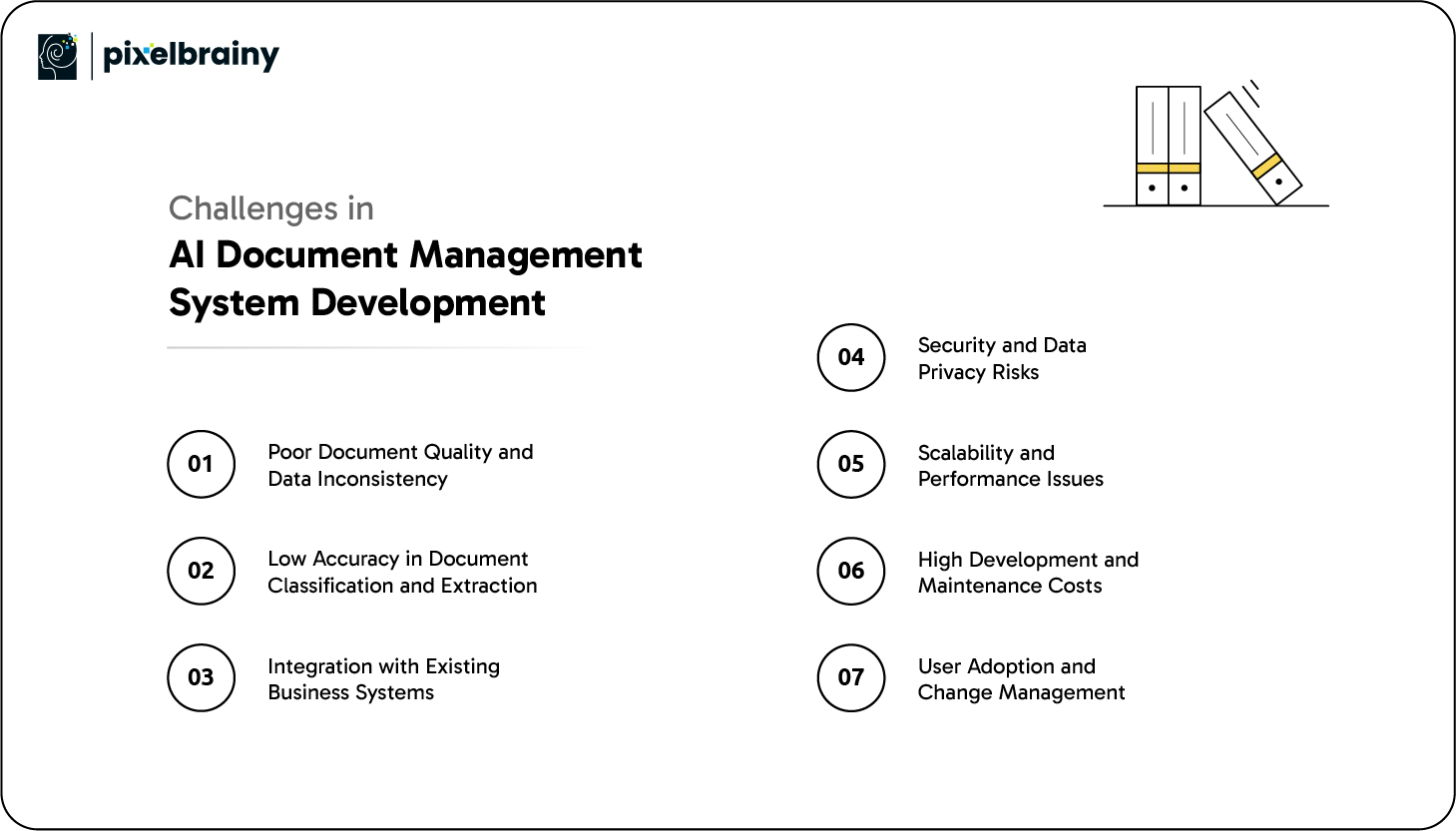
One of the most common challenges is working with low-quality or inconsistent documents. Scanned files, handwritten notes, and outdated formats reduce AI accuracy and slow processing. This issue often impacts organizations digitizing legacy records.
How to overcome it: Implement data preprocessing steps such as document normalization, image enhancement, and format standardization. Using reliable OCR tools during the development of document management software integrating AI significantly improves text recognition and extraction accuracy.
AI models may struggle to classify documents correctly, especially when document types vary widely. This affects search results, workflows, and reporting accuracy.
How to overcome it: Train AI models using industry-specific data and continuously retrain them with real documents. Human validation during early stages of building AI document management software helps improve long-term accuracy.
Many organizations rely on ERP, CRM, and legacy platforms. Integrating AI document management software with these systems can be complex and time-consuming.
How to overcome it: Use API-first architecture and modular integrations. Planning integrations early during AI Document Management System Development reduces technical debt and ensures smoother data flow.
Handling sensitive documents increases the risk of data breaches and compliance violations. This is a major concern in healthcare, finance, and legal industries.
How to overcome it: Apply strong encryption, role-based access control, and audit logging. Following security best practices during to develop document management software with AI ensures compliance with regulations and protects sensitive information.
As document volume grows, systems may face slow processing and search delays. Poor scalability can limit business growth.
How to overcome it: Design cloud-native architectures with auto-scaling and load balancing. Performance testing during AI Document Management System Development ensures the system handles future growth smoothly.
AI projects can become expensive if not planned properly. Custom model training and infrastructure costs often exceed initial estimates.
How to overcome it: Start with a focused feature set and scale gradually. Using pre-trained models and phased development helps control costs while still allowing teams to create AI document management software that evolves over time.
Even well-built systems can fail if users resist adoption. Complex interfaces and unfamiliar workflows discourage usage.
How to overcome it: Focus on usability and provide proper training. Clear onboarding and simple workflows make it easier for teams to adopt AI document management system development initiatives.
By addressing these challenges with the right strategies, businesses can successfully develop AI document management systems that are accurate, secure, scalable, and ready for long-term use.
When organizations invest in AI, they look for outcomes such as operational efficiency, risk reduction, and scalability. PixelBrainy is an experienced AI development company that focuses on delivering these outcomes through practical and reliable AI integration in Document Management Software. Our approach is grounded in understanding how documents flow across departments, where inefficiencies occur, and how AI can solve those challenges in measurable ways.
We support businesses throughout the full development of AI Document Management System, from strategy and architecture to deployment and optimization. PixelBrainy works closely with enterprise leaders, product teams, and IT stakeholders to ensure the solution aligns with security standards, compliance requirements, and long-term business goals. This collaborative approach allows us to make AI Document Management Software that is not only technically strong but also easy to adopt across teams.
Our expertise in creating an AI Document Management Software spans industries such as finance, healthcare, legal, and SaaS. We design systems that handle large document volumes, integrate smoothly with existing platforms, and scale as business needs evolve.
PixelBrainy partnered with a U.S.-based enterprise operating in a highly regulated environment where document accuracy and audit readiness were critical. The organization was managing tens of thousands of documents across multiple systems, leading to slow retrieval times, manual errors, and compliance risks.
Our team delivered a custom AI document management solution that automated document classification, enabled intelligent data extraction, and introduced semantic search capabilities. The system was integrated with the client’s existing infrastructure to avoid disruption while improving performance. As a result, document retrieval time was reduced significantly, manual processing effort dropped, and the organization gained better visibility and control over compliance-related documentation.
Due to confidentiality requirements, the client name remains undisclosed. However, this project reflects PixelBrainy’s ability to deliver enterprise-grade AI integration in Document Management Software tailored specifically for the U.S. market.
By choosing PixelBrainy, businesses gain a long-term technology partner committed to building intelligent document systems that deliver reliability, security, and sustained business value.

From the sections above, it is clear that AI is no longer an optional upgrade for document handling but a core part of modern business operations. As organizations manage growing volumes of unstructured data, AI Document Management System Development provides a practical way to improve control, accuracy, and scalability. Whether it is AI Document Management Software for enterprise environments or agile solutions for startups, intelligent systems help businesses move away from manual processes and toward automation.
The right approach to building AI Document Management Software combines strong architecture, reliable AI models, secure integrations, and user-focused design. When done correctly, the development of document management software integrating AI supports compliance, operational efficiency, and long-term growth. Companies that invest early gain a competitive advantage by turning documents into valuable business assets instead of operational burdens.
If you are planning to develop document management software with AI or upgrade an existing system, now is the right time to take action. Book an appointment today to discuss how we can build a tailored AI document management solution for your business.
The timeline depends on the scope and complexity of the system. A basic AI document management solution can take a few months, while enterprise-grade platforms with advanced AI and integrations may require six months or more. Planning, data readiness, and testing also influence development time.
Yes, AI document management software can process scanned and paper-based documents using OCR and text recognition technologies. With proper preprocessing, even older records can be digitized, indexed, and made searchable.
Absolutely. Many startups and small businesses start with a limited feature set and scale over time. AI-driven document management helps reduce manual work early and supports growth without requiring major system changes later.
Security depends on how the system is designed. With encryption, role-based access control, audit logs, and compliance-focused architecture, AI document management software can meet strict security and regulatory standards.
Yes, most AI document management systems are built with API-based integrations. They can connect with ERP, CRM, accounting, and other enterprise platforms to ensure smooth data flow across systems.
Yes, AI models can improve as they process more documents. With ongoing training and feedback, the system becomes more accurate in classification, extraction, and search, delivering better results over time.

About The Author
Sagar Bhatnagar
Sagar Sahay Bhatnagar brings over a decade of IT industry experience to his role as Marketing Head at PixelBrainy. He's known for his knack in devising creative marketing strategies that boost brand visibility and market influence. Sagar's strategic thinking, coupled with his innovative vision and focus on results, sets him apart. His track record of successful campaigns proves his ability to utilize digital platforms effectively for impactful marketing efforts. With a genuine passion for both technology and marketing, Sagar continuously pushes PixelBrainy's marketing initiatives to greater success.

Working with the PixelBrainy team has been a highly positive experience. They understand the design requirements and create beautiful UX elements to meet the application needs. The dev team did an excellent job bringing my vision to life. We discussed usability and flow. Sagar worked with his team to design the database and begin coding. Working with Sagar was easy. He has the knowledge to create robust apps, including multi-language support, Google and Apple ID login options, Ad-enabled integrations, Stripe payment processing, and a Web Admin site for maintaining support data. I'm extremely satisfied with the services provided, the quality of the final product, and the professionalism of the entire process. I highly recommend them for Android and iOS Mobile Application Design and Development.

Great experience working with them. Had a lot of feedback and I found that unlike most contractors they were bugging me for updates instead of the other way around. They were extremely time conscience and great at communicating! All work was done extremely high quality and if not on time, early! They were always proactive when it comes to communication and the work is great/above par always. Very flexible and a great team to work with! Goes above and beyond to present us with multiple options and always provides quality. Amazing work per usual with Chitra. If you have UI/UX or branding design needs I recommend you go to them! Will likely work with them in the future as well, definitely recommended!

PixelBrainy is a joy to work with and is a great partner when thinking through branding, logo, and website layout. I appreciate that they spend time going into the "why" behind their decisions to help inform me and others about industry best practices and their expertise.

I hired them to design our software apps. Things I really like about them are excellent communication skills, they answer all project suggestions and collaborate right away, and their input on design and colors is amazing. This project was complex and needed patience and creativity. The team is amazing to do business with. I will be using them long-term. Glad to see there are some good people out there. I was afraid to try and outsource my project to someone but I am glad I met them! I really can't say enough. They went above and beyond on this project. I am very happy with everything they have done to make my business stand out from the competition.

It was great working with PixelBrainy and the team. They were very responsive and really owned the project. We'll definitely work with them again!

I recently worked with the PixelBrainy team on a project and I was blown away by their communication skills. They were prompt, clear, and articulate in all of our interactions. They listened and provided valuable feedback and suggestions to help make the project a success. They also kept me updated throughout the entire process, which made the experience stress-free and enjoyable.

PixelBrainy is very good at what it does. The team also presents themselves very professionally and takes care of their side of things very well. I could fully trust them taking up the design work in a timely and organised manner and their attention to detail saved us lots of effort and time. This particular project was quite intense and the team showed that they function very well under pressure. Very much looking forward to working with her again!

It's always an absolute pleasure working with them. They completed all of my requests quickly and followed every note I had for them to a T, which made our process go smoothly from start to finish. Everything was completed fast and following all of the guidelines. And I would recommend their services to anyone. If you need any design work done in the future, PixelBrainy should be your first call!

They took ownership of our requirements and designed and proposed multiple beautiful variants. The team is self-motivated, requires minimum supervision, committed to see-through designs with quality and delivering them on time. We would definitely love to work with PixelBrainy again when we have any requirements.

PixelBrainy was a big help with our SaaS application. We've been hard at work with a new UI/UX and they provided a lot of help with the designs. If you're looking for assistance with your website, software, or mobile application designs, PixelBrainy and the team is a great recommendation.

PixelBrainy designers are amazing. They are responsive, talented, and always willing to help craft the design until it matches your vision. I would recommend them and plan to continue them for my future projects and more!!!

They were awesome! Did a good job fast, and good communication. Will work with them again. Thank you

Creative, detail-oriented, and talented designers who take direction well and implement changes quickly and accurately. They consistently over-delivered for us.

PixelBrainy team is very talented and creative. Great designers and a pleasure to work with. PixelBrainy is an excellent communicator and I look forward to working with them again.

PixelBrainy has a very talented design team. Their work is excellent and they are very responsive. I enjoy working with them and hope to continue on all of our future projects.


Transform your ideas into reality with us.
Across these industries, each engagement brings unique challenges, from early-stage product development to scaling complex systems, helping us build a practical understanding of real-world product environments.