 AI Summary Powered by PixelBrainy
Can a CRM do more than record what your sales team already knows and actually predict which customers will buy, identify which deals are about to slip, and tell every sales representative what to do next?
For a B2B SaaS founder, that is the real opportunity behind AI CRM softwares. The objective is not to attach a chatbot to an existing CRM. The objective of AI CRM software development is to create an intelligent revenue platform that can understand customer behavior, identify buying signals, predict conversion probability, detect deal risk, and recommend the next best action for every opportunity.
The market is moving rapidly in this direction. According to a 2026 market forecast, the global artificial intelligence in customer relationship management market is estimated at $15.06 billion in 2026 and is projected to reach $51.67 billion by 2030, growing at a 36.1% CAGR.
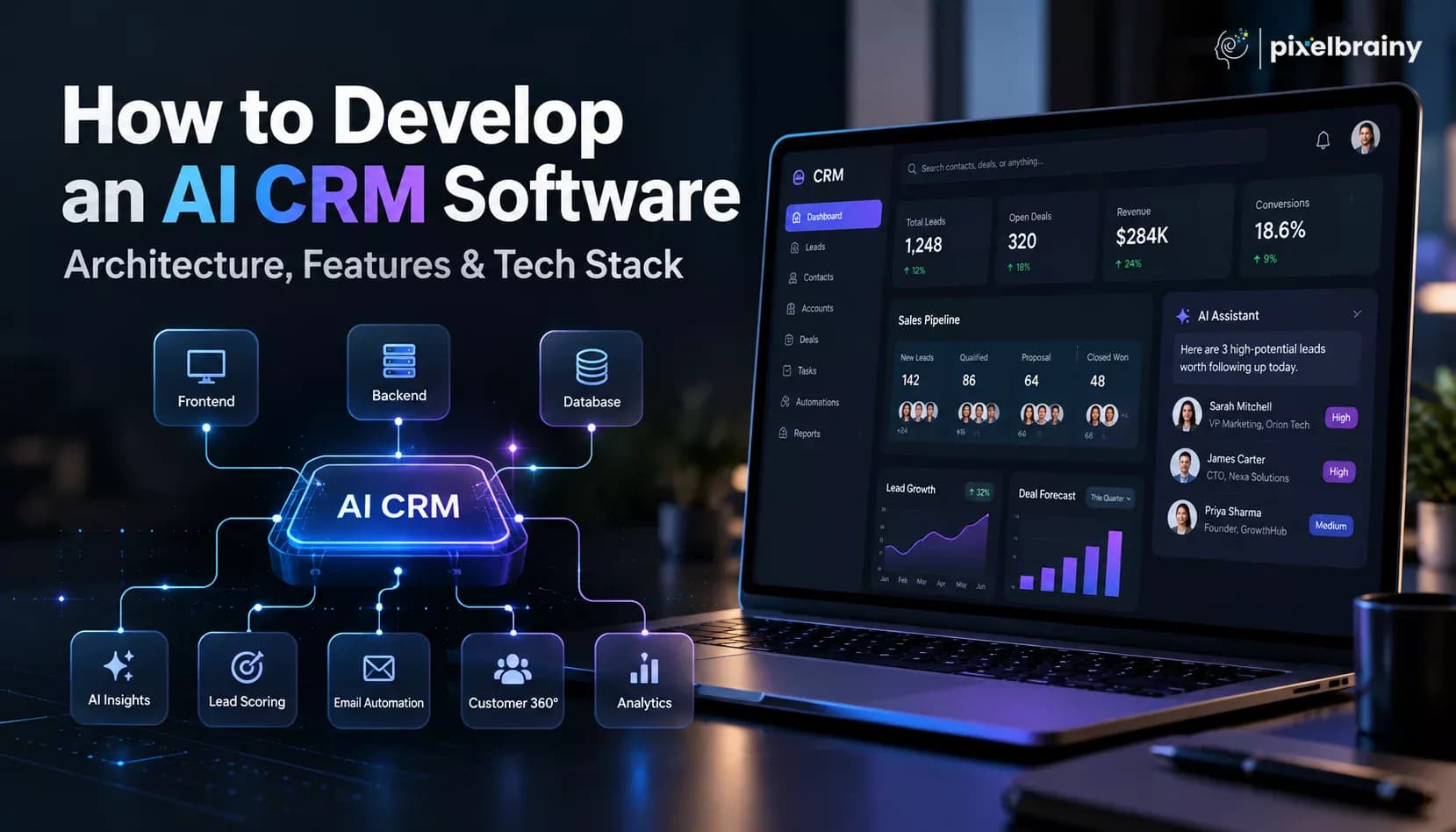
For founders researching how to create AI CRM software with customer data platform and 360 degree customer view features, the architecture is just as important as the AI model. A production-grade platform needs unified customer data, behavioral event tracking, identity resolution, predictive models, generative AI, recommendation engines, workflow orchestration, security, observability, and continuous feedback loops.
The practical question is therefore not simply "How much does an AI CRM cost?" A serious B2B SaaS AI CRM containing behavioral lead scoring, deal risk detection, next best action recommendations, customer 360, integrations, analytics, security, and production infrastructure can require a six-figure development investment, depending on data complexity, integrations, AI sophistication, compliance requirements, and scalability.
This guide explains developing an AI CRM software from architecture and core functionality through AI models, technology selection, development methodology, production deployment, challenges, and cost.
It also addresses the exact question many B2B SaaS founders have: What does a production-grade AI CRM software cost to build, and which development companies have built custom AI CRM systems with documented sales conversion improvement?
The answer requires looking beyond generic CRM development and focusing on measurable revenue outcomes.

An AI CRM software is a customer relationship management platform that combines CRM functionality with artificial intelligence, machine learning, predictive analytics, natural language processing, generative AI, and intelligent automation. Its purpose is not only to store customer information but also to analyze customer behavior, predict revenue outcomes, identify risks, and recommend the next best action.
Traditional CRM platforms primarily function as a system of record. They store contacts, accounts, opportunities, sales activities, communication history, and pipeline information. An AI CRM adds an intelligence layer that evaluates this information and turns it into actionable insights.
For example, a traditional CRM may show that a prospect visited the pricing page, attended a product demo, opened an email, and has an active opportunity. An AI CRM can combine those signals with product usage, stakeholder engagement, meeting history, email responses, support activity, and historical conversion patterns to calculate the prospect's probability of becoming a customer.
| Capability | Traditional CRM | AI CRM |
|---|---|---|
| Primary function | Stores and manages customer records | Analyzes data and supports revenue decisions |
| Lead scoring | Rules, demographics, firmographics | Behavioral and predictive signals |
| Lead prioritization | Manual or static ranking | Dynamic conversion probability |
| Deal management | Tracks pipeline stages and values | Predicts close probability and deal risk |
| Risk detection | Manual pipeline reviews | Automated detection of risk signals |
| Next action | Tasks and reminders | Context-aware next best action |
| Customer data | Primarily CRM records | CRM, product, marketing, support, billing, and behavioral data |
| Customer 360 | Basic account profile | Unified behavioral and commercial customer view |
| Communication analysis | Stores emails and calls | Extracts sentiment, intent, objections, and buying signals |
| Forecasting | Historical and rep-entered data | Predictive models and real-time signals |
| Personalization | Templates and workflows | AI-generated contextual recommendations |
| Automation | Predefined rules | AI-powered workflows and agents |
| Learning | Limited | Learns from outcomes and feedback |
The biggest opportunity in AI CRM software development is connecting fragmented customer information. A B2B SaaS company may have data spread across its CRM, product analytics platform, marketing automation, email, customer support, billing system, and data warehouse. A customer data platform can unify these sources to create a genuine 360 degree customer view.
This allows the AI to evaluate behavioral signals such as:
For example, instead of assigning points because a prospect works for an enterprise company, an AI CRM can determine that product adoption increased 38%, four stakeholders became active, pricing content was viewed repeatedly, and the economic buyer joined the latest meeting, resulting in an 81% predicted conversion probability.
Therefore, businesses looking to build an AI CRM software should think beyond adding an AI chatbot to an existing CRM. The objective is to create a platform where customer data, behavioral intelligence, predictive analytics, customer 360, next best action recommendations, generative AI, and automation work together.
Traditional CRM: Data → Record → Workflow → Report
AI CRM: Data → Context → Prediction → Recommendation → Action → Outcome → Learning
This shift transforms CRM from a system that records sales activity into an intelligent system that helps sales teams decide which customer to prioritize, what risk requires attention, why the situation is changing, and what action should happen next.
An AI CRM software works by collecting customer data from multiple sources, unifying that information into a single customer profile, analyzing behavioral signals with AI models, and converting the resulting insights into predictions, recommendations, and automated actions.
Unlike a traditional CRM that mainly records sales activities, an AI CRM continuously processes customer information to determine what is happening, what is likely to happen next, and what action should be taken.
A production-grade AI CRM typically works through the following interconnected layers:
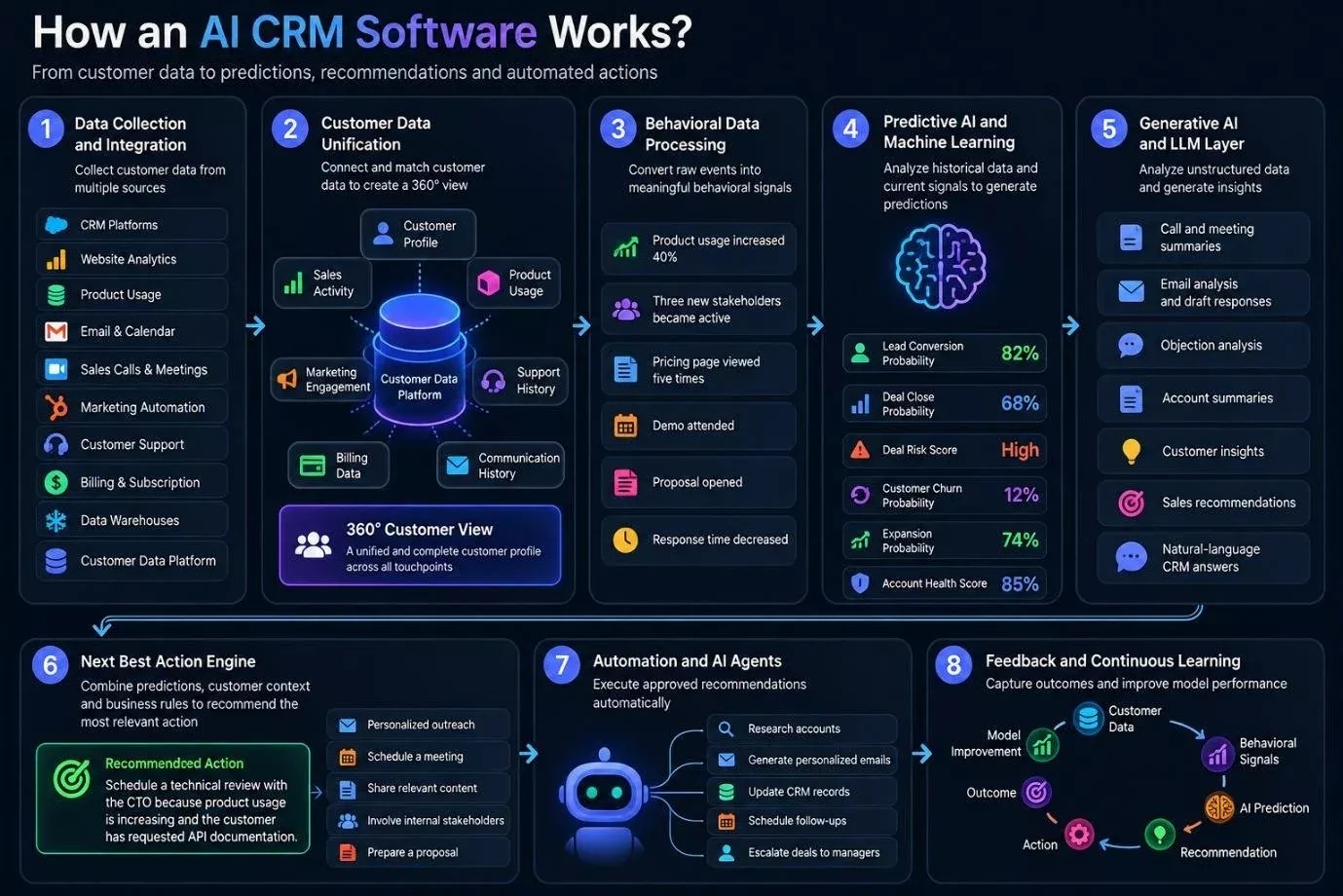
The process begins by collecting data from systems such as:
For a B2B SaaS business, product behavior can be particularly valuable because activities such as feature adoption, login frequency, user invitations, pricing-page visits, and API usage can indicate purchase intent.
The AI CRM then connects information belonging to the same customer or account. Identity resolution prevents fragmented records from producing incomplete insights.
The resulting 360 degree customer view can combine:
Customer profile + product usage + marketing engagement + sales activity + support history + billing data + communication history
This unified data becomes the foundation for AI-powered decision-making.
Raw customer events are converted into meaningful signals.
For example:
These signals can then be used as features for predictive models.
Machine learning models analyze historical customer outcomes and current behavioral signals to generate predictions.
An AI CRM can calculate:
For example:
Lead conversion probability: 82%
Deal risk: High
Expansion probability: 74%
The system should also explain the factors influencing each prediction instead of presenting unexplained scores.
Large language models analyze unstructured information such as sales calls, emails, meeting transcripts, support conversations, proposals, and customer feedback.
They can generate:
The AI CRM combines predictions with customer context and business rules to recommend the most relevant action.
For example:
Recommended action: Schedule a technical review with the CTO because product usage is increasing and the customer has requested API documentation.
This is more valuable than a generic "follow up" reminder.
Approved recommendations can trigger automated workflows. An AI agent may research an account, prepare personalized outreach, update CRM records, schedule follow-ups, or escalate a deal to a sales manager.
After an action occurs, the outcome is captured. The system can measure whether the recommendation was accepted, whether the customer responded, and whether the opportunity converted.
This creates a continuous loop:
Customer Data → Behavioral Signals → AI Prediction → Recommendation → Action → Outcome → Model Improvement
This architecture is the foundation of effective AI CRM software development, enabling businesses to move from reactive customer management to predictive, personalized, and increasingly automated revenue operations.
Businesses are investing in AI CRM software development because conventional CRM systems increasingly fail to answer the questions revenue teams actually need answered: Which account is most likely to convert? Which opportunity is becoming risky? What customer signal changed? What should the sales rep do next? And which action is most likely to move the deal forward?
The investment decision is therefore shifting from buying another CRM interface to building an intelligence layer around proprietary customer and revenue data.
AI is becoming a planned business investment rather than a side project. A 2026 Gartner survey found that 85% of functional leaders expect to increase AI spending in 2026, after organizations allocated an average of 12% of functional budgets to AI in 2025.
For B2B SaaS companies, this creates a stronger case for building an AI CRM software where AI is designed directly around sales workflows, customer data, and revenue operations instead of being added as a disconnected feature.
Generic AI tools can generate text or summarize conversations, but production-grade sales intelligence requires access to CRM records, product usage, website activity, emails, calls, support interactions, billing events, and historical opportunity outcomes.
This is one reason founders are asking how to create AI CRM software with customer data platform and 360 degree customer view features. The investment is driven by the need to create a trusted data foundation that AI models can actually reason over.
This data problem is already visible in the market. Salesforce's 2026 India marketing research found that 66% of Indian sales leaders with AI say disconnected systems are slowing their AI initiatives, while 82% of Indian sales professionals are focusing on data cleansing.
Businesses are also investing because AI is evolving from individual capabilities such as email generation or CRM summaries toward connected workflows involving prediction, decision-making, and execution.
McKinsey's 2026 B2B Pulse Survey of nearly 4,000 buyers and sellers across 13 countries found that 71% of B2B growth champions increased AI investment by double digits in 2026, compared with 25% of other companies. McKinsey also identifies end-to-end commercial workflows as the direction in which leading organizations are applying agentic AI.
This matters for developing an AI CRM software because a sales team may need one intelligence system covering lead qualification, behavioral scoring, opportunity analysis, deal risk, forecasting, next best action, account intelligence, and sales execution.
A commercial CRM may provide predefined AI capabilities, but companies with differentiated sales processes often need their own rules, models, signals, scoring logic, integrations, and approval workflows.
For example, a B2B SaaS company may want its AI CRM to calculate conversion probability using:
That requires an architecture designed around the company's own revenue data. This is a major reason organizations choose custom AI CRM software development instead of relying entirely on configurable commercial CRM features.
The broader AI infrastructure market is also expanding rapidly. Gartner forecasts worldwide spending on AI models and platforms will reach $64.25 billion in 2026, representing 63.4% growth from 2025. Specialized domain-specific and generative AI models are becoming increasingly important within that spending.
For companies with substantial sales operations, this makes a dedicated AI CRM architecture increasingly practical because predictive models, LLMs, customer data platforms, vector search, and AI agents can be designed as one connected system.
The investment decision is also forward-looking. IBM's 2026 research involving 2,000 C-suite executives found that surveyed organizations expect AI investment to increase approximately 150% between now and 2030, while 79% expect AI to contribute significantly to revenue by 2030. At the same time, 68% are concerned that AI initiatives could fail because they are not integrated with core business activities.
That combination explains why companies are considering AI CRM software development services as a strategic architecture project rather than simply purchasing another SaaS application.
| Fragmented customer data | Connect CRM, product, marketing, support, billing, and engagement data |
|---|---|
| AI adoption | Move from isolated AI tools to AI embedded inside revenue workflows |
| Proprietary intelligence | Train or configure models around company-specific sales signals |
| Sales complexity | Analyze hundreds of behavioral signals that humans cannot consistently monitor |
| CRM limitations | Go beyond static records, rules, dashboards, and reminders |
| Data ownership | Maintain control over customer intelligence, models, prompts, and decision logic |
| Workflow requirements | Build AI around the company's actual qualification, sales, and deal processes |
| Agentic AI direction | Prepare CRM systems to recommend and execute multi-step sales actions |
| Long-term AI strategy | Establish an architecture that can evolve as models and AI agents improve |
That is the strategic foundation behind the growing demand for AI CRM software development and custom AI-powered customer 360 platforms.
Commercial CRM platforms can provide ready-made sales workflows, reporting, integrations, and AI features. However, businesses with complex sales processes or proprietary customer data often need more control over how their CRM works and how AI makes decisions.
With custom AI CRM software development, companies can build the platform around their own customer data, sales methodology, integrations, and AI requirements instead of adapting their operations to a vendor's predefined capabilities.
Below are the key benefits of building a custom AI CRM over licensing a commercial CRM platform:
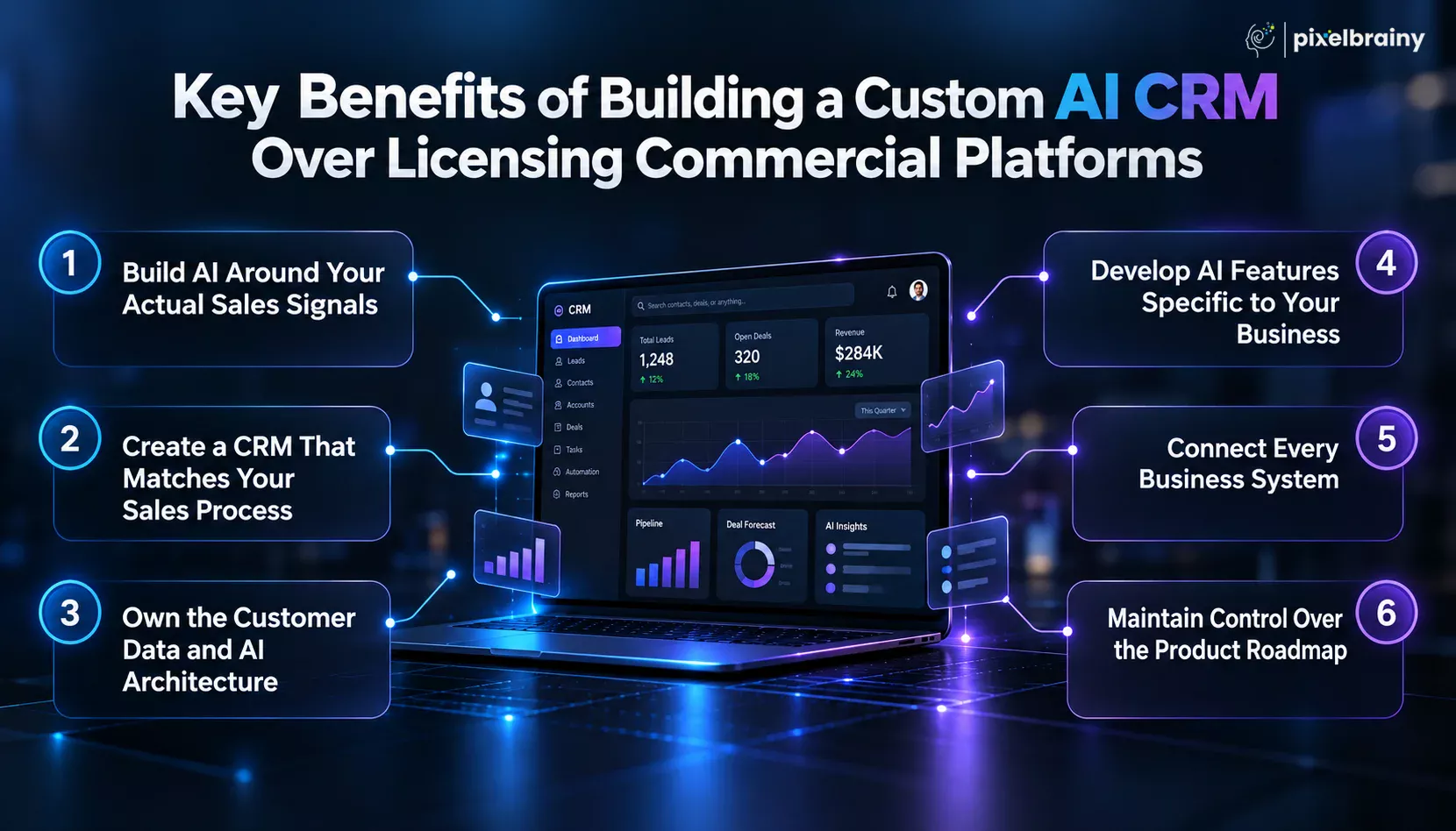
One major benefit of building a custom AI CRM is the ability to define exactly which signals AI should evaluate.
Instead of relying mainly on standard CRM fields, your system can analyze product usage, website activity, email engagement, meeting behavior, trial activity, support interactions, and historical deal outcomes. This makes AI-powered lead scoring more relevant to your sales model and supports conversion prediction based on behavioral intelligence.
A commercial CRM provides a predefined structure that must be configured around your business. Custom development reverses that approach.
With custom CRM software development, pipeline stages, approval flows, account structures, sales methodologies, territories, qualification rules, and internal workflows can be designed around how your sales team actually operates. This becomes especially important when evaluating when to build a custom CRM instead of buying one.
A custom platform gives businesses greater control over their customer data architecture, AI models, business rules, APIs, and data flows.
For companies exploring AI CRM development with customer 360, CRM records can be combined with product analytics, billing, marketing, support, communication, and behavioral data. This creates a unified foundation for AI-driven customer intelligence.
Another major benefit is the ability to create AI capabilities that match your exact revenue requirements.
A custom AI CRM can include behavior-based lead scoring, deal risk prediction, next best action recommendations, account health intelligence, churn prediction, AI sales forecasting, and opportunity intelligence. This is useful for businesses asking how to build an AI CRM tailored to a B2B SaaS sales process.
Sales teams rarely work with CRM data alone. Customer information may exist across product analytics, marketing platforms, billing systems, support software, communication tools, data warehouses, and internal applications.
With custom AI CRM development, these systems can be connected through APIs, event pipelines, data warehouses, and identity resolution. The CRM can become a centralized intelligence layer across the revenue ecosystem.
Commercial CRM vendors control their product roadmap, AI capabilities, integrations, pricing models, and platform limitations. A custom system gives the business greater control over its technology direction.
With AI CRM software development services, companies can decide which capabilities to build, modify, replace, or expand as their revenue model evolves. The business remains responsible for infrastructure, security, maintenance, and AI operations, but it also controls how the CRM develops over time.
The strongest reason to build an AI CRM software is control over customer data, AI logic, workflows, integrations, and product direction.
For businesses where sales intelligence is a competitive differentiator, that control can make a custom AI CRM a strategic technology investment rather than simply another CRM license.
Not every business needs to build a custom CRM. The strongest candidates are companies whose sales complexity, customer data, industry requirements, or AI use cases cannot be handled effectively by a standard CRM configuration.
These businesses typically need more than contact management and pipeline tracking. They need an intelligence layer that can understand behavioral signals, connect fragmented data, map stakeholder relationships, and recommend specific revenue actions.
Below are the six business types most likely to invest in AI CRM software development, AI CRM development, and specialized AI CRM development solutions.
B2B SaaS companies with product-led growth often have large volumes of behavioral data that traditional CRM systems do not fully use. Product logins, feature adoption, trial activity, usage frequency, workspace expansion, pricing-page visits, and account engagement can all indicate buying intent.
These companies may build an AI CRM software platform to connect product behavior with sales intelligence. The AI can identify accounts showing expansion potential, detect changes in engagement, prioritize product-qualified leads, and recommend when sales should intervene.
This makes custom AI CRM software development particularly valuable for SaaS companies where product usage is one of the strongest indicators of conversion or expansion.
Large enterprise deals rarely depend on a single decision-maker. Multiple stakeholders can influence the evaluation, including economic buyers, technical teams, procurement, legal, security, end users, and executive sponsors.
A company may create an AI CRM software to understand these relationships rather than simply storing stakeholder contact information.
For example, the real requirement may be:
“We need AI that maps stakeholder relationships and influence patterns, tracks each stakeholder's engagement and sentiment from communication data, and recommends the next action for each stakeholder based on where they are in the evaluation process.”
This is a strong use case for AI enterprise CRM software development, because the system can combine communication intelligence, stakeholder mapping, engagement scoring, sentiment analysis, and opportunity-stage data into one decision layer.
Revenue teams often struggle when customer information is distributed across CRM platforms, marketing tools, support systems, product databases, billing systems, and communication applications.
One of the clearest reasons to build an AI CRM software is this exact problem:
“Our biggest CRM challenge is that our customer data is fragmented across Salesforce, HubSpot, Intercom, and our product database with no unified customer intelligence layer.”
In this situation, AI CRM development can create a centralized customer intelligence architecture using data integration, identity resolution, customer 360 profiles, event pipelines, and AI models.
Instead of asking sales representatives to search several systems before making a decision, the custom platform can bring relevant account signals into one intelligent workspace.
Financial services businesses often depend heavily on long-term client relationships. Relationship managers need to understand changes in customer circumstances, portfolio activity, communication history, engagement levels, and potential financial needs.
A financial services company may develop an AI CRM software that continuously analyzes relationship signals and identifies opportunities or situations requiring attention.
A representative use case is:
“We want to build a custom AI CRM that monitors client portfolio changes, life events, and communication patterns to surface the specific relationship actions each RM should take.”
Here, AI CRM development solutions can combine customer profiles, portfolio data, communication intelligence, event detection, and recommendation engines while supporting the organization's security and compliance requirements.
Agencies, consulting firms, legal services organizations, technology service providers, and other professional services businesses often manage many clients simultaneously.
Their CRM requirements can extend beyond traditional sales pipelines. Teams may need to track multiple stakeholders, contracts, projects, renewals, upsell opportunities, communication history, account health, and ongoing service relationships.
These organizations can build an AI CRM software platform that provides account-level intelligence across multiple clients. AI can identify engagement changes, surface renewal opportunities, summarize account activity, and recommend relationship actions based on client history.
For organizations managing complex client portfolios, custom AI CRM software development can therefore connect sales intelligence with long-term account management.
Some organizations cannot treat CRM as a generic SaaS application because customer information, access controls, auditability, retention policies, data residency, and regulatory requirements are central to the system architecture.
Healthcare, financial services, insurance, government contractors, and other regulated industries may require customized security and governance layers.
For these companies, AI enterprise CRM software development can incorporate role-based access, encryption, audit logging, tenant isolation, consent management, data retention policies, secure integrations, and controlled AI access into the architecture from the beginning.
The goal is not simply to create an AI CRM software with industry-specific screens. The entire data and AI architecture must support the organization's operational and compliance requirements.
| Business type | Primary reason for custom AI CRM |
|---|---|
| B2B SaaS with PLG | Convert product behavior into sales intelligence |
| Enterprise sales organization | Understand stakeholder influence and buying dynamics |
| Revenue operations team | Unify fragmented customer data |
| Financial services company | Turn relationship signals into RM actions |
| Agency or professional services firm | Manage complex multi-client relationships |
| Regulated enterprise | Combine AI with industry-specific governance and security |
The strongest candidates for AI CRM development are businesses where customer intelligence is too complex, fragmented, or specialized for a standard CRM configuration.
For these organizations, build an AI CRM software is not simply a technology decision. It is a way to create an intelligence layer specifically aligned with how the business acquires, manages, and grows customer relationships.
A successful AI CRM software needs more than an AI model added to a traditional CRM. The platform must first have a strong operational foundation for managing customer records, sales activities, opportunities, communications, workflows, permissions, and connected business data. These core capabilities provide the structured information AI needs to generate reliable sales intelligence later.
If you are asking “What are the core features required to develop an AI CRM software for sales teams?”, the answer begins with these essential capabilities. They form the foundation of AI CRM development, support a unified customer view, and prepare the platform for predictive intelligence and advanced AI capabilities covered in the next section.
The following 15 core features should be considered when planning AI CRM software development:
| Core Feature | What It Should Include |
|---|---|
| Contact and Account Management | Centralized contact and account profiles should store customer details, company information, roles, interactions, ownership, and relationship history, giving sales teams one reliable place to manage customer records. |
| Lead Management | Lead management should capture, organize, qualify, assign, and track prospects throughout the sales process, while maintaining lead sources, engagement history, ownership, status, and relevant qualification information. |
| Opportunity Management | Opportunity management should provide complete visibility into deals, including pipeline stage, expected value, close date, stakeholders, activities, notes, products, and current deal status for every active opportunity. |
| Pipeline Management | A visual sales pipeline should allow teams to monitor opportunities across defined stages, identify pipeline movement, update deal information, and maintain consistent visibility into current revenue activity. |
| Activity and Task Management | The system should record calls, meetings, emails, notes, follow-ups, and sales tasks while connecting each activity to the relevant lead, contact, account, or opportunity for complete interaction history. |
| Communication Management | Centralized communication management should capture relevant emails, calls, meetings, and messages, allowing representatives to review previous conversations without switching between multiple applications or losing important customer context. |
| Customer 360 Profile | A customer 360 profile should combine contacts, accounts, activities, purchases, interactions, support history, engagement signals, and relationship information into a unified view for more informed sales decisions. |
| Lead Scoring | The core AI CRM should support configurable lead scoring using customer attributes, engagement activity, interactions, and business rules, creating a structured foundation for future predictive scoring capabilities. |
| Lead Assignment and Routing | Automated lead assignment should distribute prospects according to territory, ownership, workload, specialization, or predefined business rules, helping organizations maintain consistent routing across sales teams and regions. |
| Sales Workflow Automation | Workflow automation should handle repetitive CRM processes such as status updates, task creation, notifications, assignments, approvals, and follow-up triggers based on predefined business conditions and sales events. |
| Sales Dashboard and Reporting | Dashboards should provide visibility into pipeline activity, lead status, opportunity movement, sales performance, conversion metrics, activity levels, and revenue information through configurable reports and visual analytics. |
| Search and Filtering | Powerful search and filtering should help users quickly locate accounts, contacts, opportunities, activities, and customer records using attributes, stages, ownership, dates, tags, and other relevant CRM fields. |
| Role-Based Access Control | Role-based access control should determine which users can view, create, edit, export, or delete specific CRM information, helping organizations protect sensitive customer data and maintain operational governance. |
| CRM Integration APIs | API capabilities should allow the AI CRM platform to exchange customer and business information with marketing, support, billing, communication, analytics, and other enterprise applications through secure integration mechanisms. |
| Audit Logs and Data History | Audit logging should maintain records of important data changes, user actions, record updates, and system events, creating traceability for CRM operations, troubleshooting, governance, and accountability. |
These core capabilities establish the operational and data foundation required for a reliable AI CRM software development project before advanced intelligence and automation layers are introduced.
Once the core CRM foundation is established, advanced AI capabilities can turn the platform from a system of record into a system of intelligence. These features use customer behavior, communication data, historical outcomes, and real-time business signals to help sales teams predict outcomes and make better decisions.
A key question for companies planning AI CRM software development is: “How can we build an AI CRM that tells sales representatives what action to take next instead of simply reminding them about pending tasks?” Advanced features should be designed specifically to answer this type of question.
The following capabilities can be considered when developing an intelligent, predictive, and increasingly autonomous AI CRM software platform:
| Advanced Feature | What It Should Include |
|---|---|
| Predictive Lead Scoring | AI should calculate conversion probability using behavioral signals such as product usage, engagement, website activity, communication patterns, and historical outcomes instead of relying only on demographic or firmographic attributes. |
| Deal Risk Detection | AI should continuously analyze opportunity activity, stakeholder engagement, communication gaps, stage duration, sentiment, and other signals to identify deals showing early signs of becoming stalled, delayed, or lost. |
| Next Best Action Recommendations | The system should recommend the most relevant action for each lead, account, or opportunity based on current signals, sales stage, customer behavior, previous interactions, and predicted business outcomes. |
| AI Sales Forecasting | Predictive models should analyze historical performance, pipeline quality, opportunity signals, conversion patterns, and current sales activity to produce more dynamic forecasts than manually entered CRM estimates. |
| AI Account Health Scoring | AI should evaluate engagement, product activity, support interactions, relationship strength, commercial activity, and other customer signals to identify whether an account is healthy, declining, expanding, or requiring attention. |
| Conversation Intelligence | AI should analyze sales calls, meetings, emails, and transcripts to identify customer sentiment, objections, buying signals, competitor mentions, stakeholder concerns, and important commitments from conversations. |
| AI Opportunity Intelligence | The CRM should automatically summarize opportunity history, identify missing information, surface important changes, highlight risks, and provide sales representatives with relevant context before customer interactions. |
| AI Customer Churn Prediction | Machine learning models should identify behavioral patterns associated with customer churn by analyzing engagement changes, product usage, support activity, communication signals, and historical customer outcomes. |
| AI-Powered Personalization | AI should use customer context, account information, engagement history, industry signals, and previous interactions to generate personalized messaging, recommendations, follow-ups, and sales content for individual prospects. |
| AI Sales Agents | AI agents can handle defined multi-step CRM workflows such as researching accounts, updating records, preparing meeting briefs, qualifying inbound leads, creating follow-up actions, and escalating activities that require human judgment. |
These advanced capabilities can make AI CRM development significantly more valuable for organizations that want predictive intelligence, contextual recommendations, and AI-assisted revenue workflows rather than basic CRM automation.
The development process of AI CRM software needs to cover much more than interface development and CRM database setup. A production-grade platform must connect customer data, sales workflows, AI models, integrations, security, and continuous feedback into one reliable architecture.
For businesses researching the steps to develop AI CRM software from idea to launch, the process should begin with defining the revenue problems the platform must solve and end with production monitoring and model improvement. This is especially important when building an AI CRM software for a large sales organization where inaccurate data, manual CRM updates, and unreliable forecasting directly affect revenue operations.
A practical AI CRM software development process can be divided into these eight stages.
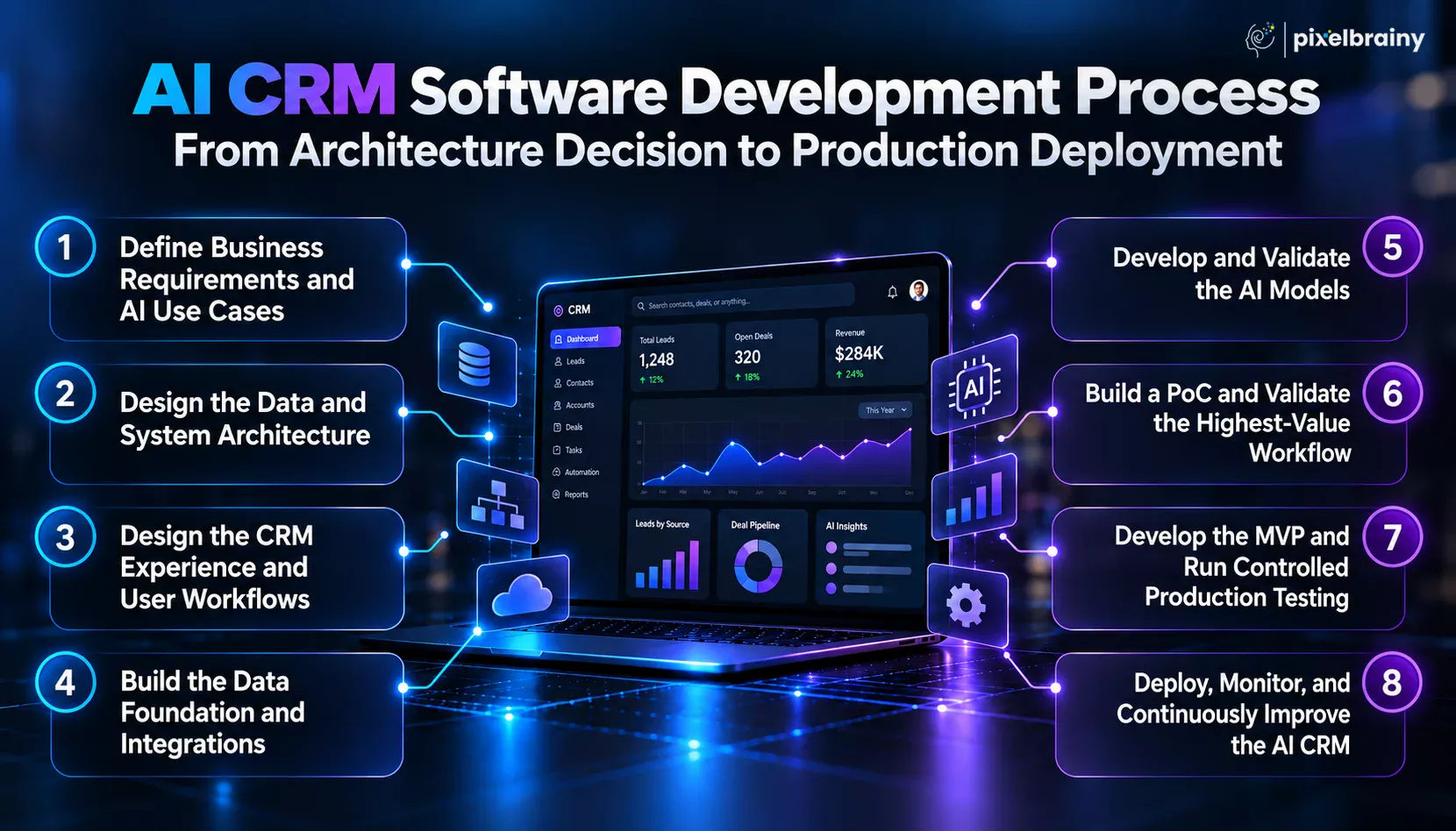
The first step is to identify exactly what the CRM must solve before selecting technologies or designing screens. For an enterprise sales organization, this could include automatic activity capture, behavioral pipeline forecasting, lead prioritization, deal risk detection, customer 360, and next best action recommendations.
A useful real-world requirement is: “We are a mid-market enterprise with 280 salespeople and our Salesforce implementation has become so slow and over-customized that reps spend more time updating records than selling and pipeline forecasts are unreliable from inconsistent data entry. We want to build a custom AI CRM that auto-populates activity from emails and calls, forecasts from deal behavior rather than rep-entered probability, and reduces CRM admin burden to near zero.”
At this stage, AI consultation helps define measurable AI and CRM requirements.
Also Read: Top 10 AI Consulting Companies in USA
The second step is deciding how customer, sales, communication, product, and behavioral data will move through the platform. A scalable architecture may include an operational CRM database, data warehouse, event streaming layer, customer data platform, feature store, AI services, API gateway, and analytics layer.
Architecture decisions should also cover tenant isolation, identity resolution, permissions, data retention, integration patterns, and real-time versus batch processing.
For companies evaluating how to build AI CRM software from scratch, this stage determines whether the platform can handle hundreds of sales users and millions of customer events without becoming another slow, over-customized CRM environment.
The interface should be designed around the salesperson's actual workflow rather than reproducing every screen found in a traditional CRM. Reps should see relevant account intelligence, opportunity context, recommended actions, customer activity, and alerts without manually navigating multiple records.
A UI/IUX design company can help structure dashboards, account views, opportunity workspaces, activity timelines, search, notifications, and AI recommendation interfaces.
The goal is to reduce cognitive and administrative workload. For example, an AI CRM should automatically surface a stalled opportunity, explain why it is at risk, show the supporting signals, and recommend an action instead of forcing the representative to inspect several CRM fields.
Also Read: Top 10+ UI/UX Design Companies in USA
AI quality depends heavily on data quality. The CRM should connect with email, calendars, calling platforms, marketing systems, support applications, product analytics, billing systems, communication tools, and existing CRM data where required.
During AI integration, developers establish secure APIs, webhooks, event pipelines, data synchronization, identity resolution, and data transformation processes.
For the enterprise scenario described above, emails and calls should automatically generate structured activities rather than requiring representatives to enter them manually. Historical Salesforce data can also be migrated and normalized so the new system does not inherit duplicate records, inconsistent fields, outdated information, or unreliable historical probabilities.
Also Read: Top 10+ AI Integration Companies in USA
The next stage focuses on building the intelligence layer. AI model development should start with clearly defined prediction targets and measurable outcomes.
For pipeline forecasting, the model could learn from historical deal behavior, stage duration, stakeholder engagement, communication frequency, product activity, meeting patterns, and previous conversion outcomes. Lead scoring can similarly use behavioral signals to estimate conversion probability.
Models should be evaluated against historical data using appropriate metrics and tested against business baselines. Explainability is also important. A sales representative should understand why an opportunity received a high-risk score or why the system recommends a particular next action.
Also Read: Top 12+ AI Model Development Companies in the USA
Before developing the complete platform, teams should validate the most important AI workflow with representative data and users. PoC development can focus on one measurable problem, such as automated activity capture or behavioral pipeline forecasting.
For the 280-person sales organization, a practical proof of concept could compare AI-generated forecasts with rep-entered probability and historical deal outcomes. Another test could measure how accurately emails and calls are converted into structured CRM activities.
The objective is to validate technical feasibility, prediction quality, data availability, and user acceptance before committing to the complete product architecture.
After validating the core concept, the team can begin MVP development around the highest-priority workflows. The initial product might include customer 360, opportunity management, automated activity capture, behavioral forecasting, AI summaries, dashboards, permissions, and essential integrations.
The MVP should be released to a controlled group of sales representatives before organization-wide deployment. Their feedback can reveal incorrect recommendations, missing data, workflow friction, false risk signals, and usability problems.
This stage is where top AI product development companies typically focus on balancing product scope with measurable business outcomes instead of attempting to build every possible CRM capability in the first release.
Also Read: Top 10 AI MVP Development Companies in USA
Production deployment is not the end of developing an AI CRM software. Once users begin generating new customer and sales data, the system needs continuous monitoring.
Teams should track model accuracy, forecast performance, data quality, integration failures, latency, AI recommendation acceptance, user adoption, security events, and changes in prediction behavior.
Organizations may hire AI developers or work with specialized AI development companies to maintain models, improve workflows, optimize infrastructure, and introduce additional capabilities. Over time, the system can learn from actual deal outcomes and representative feedback, creating a continuous improvement cycle from customer data to prediction, recommendation, action, and outcome.
Therefore, a successful AI CRM software development process connects business requirements, reliable customer data, scalable architecture, AI intelligence, user workflows, and continuous model improvement into one production-ready system.
The cost to develop an AI CRM software depends primarily on the number of users, CRM complexity, integrations, AI capabilities, data architecture, security requirements, and level of automation. A simple AI-assisted CRM can start around $30,000, while a sophisticated enterprise platform with predictive models, automated communication capture, customer 360, and AI agents can exceed $250,000.
For businesses planning the development budget of AI CRM software, the right approach is to estimate each technical component separately instead of using one fixed development price. The cost estimation of AI CRM software development should consider both the initial product build and the infrastructure, AI, maintenance, and data costs required after launch.
For example, consider this real business requirement:
“We are a real estate company with 320 agents and we want to build a custom AI CRM that captures every agent-client interaction from email, phone, and text automatically, identifies buyer and seller intent signals from communication content, prioritizes the leads most likely to transact in the next 90 days, and gives each agent a daily prioritized action list based on their specific pipeline rather than a generic CRM contact list that treats every lead with equal priority. Which development companies have built AI CRM software for real estate brokerages with automated communication capture and predictive transaction timing intelligence?”
A system with these requirements would typically fall into the advanced to enterprise AI CRM development category because it requires communication integrations, NLP, predictive modeling, real-time data processing, personalized recommendations, and support for hundreds of users.
AI CRM Software Development Cost Breakdown:
| Basic AI CRM Software | $30,000 to $75,000 | 2 to 4 weeks | Contact and account management, lead management, opportunity tracking, basic dashboards, workflow automation, CRM integrations, basic AI summaries, simple lead scoring, user roles, APIs, and cloud deployment. |
| Advanced AI CRM Software | $75,000 to $150,000 | 4 to 7 weeks | Customer 360, multiple integrations, behavioral lead scoring, AI summaries, communication intelligence, predictive analytics, deal insights, personalized recommendations, advanced dashboards, workflow automation, and scalable data architecture. |
| Enterprise AI CRM Software | $150,000 to $250,000+ | 7 to 12+ weeks | Multi-tenant architecture, enterprise security, automated communication capture, predictive models, customer data platform, AI recommendations, advanced forecasting, AI agents, complex integrations, data governance, monitoring, high scalability, and custom enterprise workflows. |
These are planning ranges rather than fixed market prices. The final AI CRM software development cost for businesses depends heavily on the complexity of the AI models, data infrastructure, integrations, security requirements, and development team.
| Cost Factor | Estimated Cost Impact | What Drives the Cost |
|---|---|---|
| CRM Core Development | $15,000 to $45,000 | Contact management, accounts, leads, opportunities, pipelines, activities, dashboards, permissions, search, and CRM workflows. |
| AI and Machine Learning | $20,000 to $70,000+ | Predictive lead scoring, transaction probability, deal risk detection, forecasting, recommendation models, model evaluation, and AI infrastructure. |
| Communication Capture | $15,000 to $45,000+ | Email, phone, SMS, meeting, call transcription, conversation extraction, activity synchronization, and communication history. |
| Customer 360 and Data Platform | $15,000 to $50,000+ | Data ingestion, identity resolution, customer profiles, event processing, data warehouse integration, and unified customer records. |
| AI/NLP Processing | $10,000 to $40,000+ | Intent detection, sentiment analysis, entity extraction, conversation summaries, buying signals, seller signals, and communication classification. |
| Next Best Action Engine | $15,000 to $40,000 | Personalized recommendations, action prioritization, sales workflows, contextual rules, recommendation models, and agent-specific task generation. |
| Third-Party Integrations | $5,000 to $30,000+ | Salesforce, HubSpot, email, telephony, SMS, marketing platforms, billing systems, support tools, calendars, analytics, and other APIs. |
| UI/UX and CRM Workspace | $8,000 to $25,000 | Sales dashboards, account views, pipeline interfaces, AI insight panels, activity timelines, mobile responsiveness, and personalized workspaces. |
| Security and Compliance | $10,000 to $40,000+ | SSO, RBAC, MFA, encryption, audit logs, tenant isolation, data retention, compliance controls, secure APIs, and access governance. |
| Cloud and Data Infrastructure | $5,000 to $25,000+ initially | Cloud hosting, databases, data pipelines, storage, compute, monitoring, backups, model serving, and scalable infrastructure configuration. |
| AI Model/API Usage | $500 to $10,000+ per month | LLM API calls, transcription, embeddings, inference, document processing, AI agents, and usage volume across hundreds of users. |
| Testing and Quality Assurance | $5,000 to $20,000 | Functional testing, API testing, security testing, performance testing, AI evaluation, integration testing, and user acceptance testing. |
| Maintenance and AI Optimization | 15% to 25% of development cost annually | Bug fixes, infrastructure updates, model monitoring, retraining, integrations, security updates, performance optimization, and new AI capabilities. |
Therefore, the realistic cost to develop an AI CRM software is usually $30,000 to $250,000+, with enterprise-grade predictive intelligence and automated customer interaction processing pushing the investment toward the upper end of the range.
A production-ready AI CRM software requires a technology stack that can handle CRM operations, customer data integration, real-time events, predictive analytics, generative AI, security, and scalable cloud infrastructure. The right combination depends on the CRM's complexity, expected data volume, AI use cases, integration requirements, and number of users.
For businesses researching which technologies are required to develop an AI CRM software, the stack should support the complete flow from data collection to AI prediction and sales action. Modern customer data architectures commonly combine ingestion, identity resolution, unified customer profiles, analytics, machine learning, and activation layers.
For example, a company asking “What tech stack should we use to build an AI CRM that captures customer interactions, predicts sales outcomes, and recommends the next best action?” needs more than a frontend, backend, and database. It needs an integrated data and AI architecture.
| Technology Layer | Recommended Tools and Technologies | Role in AI CRM Development |
|---|---|---|
| Frontend Development | React, Next.js, TypeScript, Vue.js | Builds responsive CRM dashboards, customer 360 screens, sales pipelines, AI insight panels, activity timelines, reports, and personalized sales workspaces. |
| Backend Development | Python, FastAPI, Node.js, Java, Spring Boot, .NET | Handles CRM business logic, APIs, authentication, workflows, user management, integrations, AI services, and communication between application components. |
| Primary Database | PostgreSQL, MySQL, MongoDB | Stores contacts, accounts, leads, opportunities, activities, tasks, permissions, workflow information, and other operational CRM records. |
| Caching and Fast Data Access | Redis | Provides fast access to frequently requested CRM information, session data, temporary results, recommendation outputs, and high-frequency application workloads. |
| Data Warehouse / Lakehouse | Snowflake, BigQuery, Amazon Redshift, Databricks | Stores and analyzes large volumes of historical customer, product, marketing, communication, and sales data for analytics and machine learning. |
| Data Ingestion | Apache Kafka, Amazon Kinesis, Google Pub/Sub, AWS DMS, Fivetran | Collects real-time and batch data from CRM systems, product applications, communication platforms, billing systems, websites, and other business applications. |
| Data Transformation | dbt, Apache Spark, Apache Airflow, Dagster | Cleans, transforms, validates, schedules, and prepares customer data for analytics, customer 360 profiles, reporting, and AI model development. |
| Customer Data Platform | Custom CDP, Segment, Salesforce Data 360, cloud-native CDP architecture | Unifies customer information from different sources, resolves identities, creates customer profiles, and provides the data foundation for personalized AI experiences. AWS describes CDP architecture around ingestion, identity resolution, unified profiles, analysis, and activation. AWS Documentation |
| Machine Learning | Python, scikit-learn, XGBoost, LightGBM, PyTorch, TensorFlow | Supports predictive lead scoring, conversion probability, deal risk prediction, churn prediction, sales forecasting, account health scoring, and other machine learning use cases. |
| Generative AI and LLMs | OpenAI, Anthropic, Google Gemini, open-source LLMs | Powers CRM summaries, conversational assistants, opportunity analysis, email generation, natural-language queries, meeting summaries, and contextual sales intelligence. |
| Vector Database | pgvector, Pinecone, Weaviate, Milvus | Stores embeddings for semantic search, customer knowledge retrieval, conversation analysis, document retrieval, and retrieval-augmented generation workflows. |
| AI Orchestration | LangChain, LlamaIndex, custom orchestration services | Coordinates LLM calls, retrieval, tools, business rules, structured outputs, and AI workflows that connect CRM intelligence with business actions. |
| Communication APIs | Twilio, SendGrid, Microsoft Graph, Google Workspace APIs | Captures and processes email, SMS, calls, calendars, and other communication events so CRM records can be updated automatically. |
| API and Integration Layer | REST APIs, GraphQL, webhooks, API Gateway | Connects the AI CRM with external CRM platforms, ERP systems, marketing tools, support platforms, communication services, analytics systems, and internal applications. |
| Cloud Infrastructure | AWS, Microsoft Azure, Google Cloud | Provides scalable compute, databases, storage, networking, AI infrastructure, monitoring, security services, and deployment environments for production AI CRM applications. |
| Containers and Orchestration | Docker, Kubernetes | Packages and manages application services, AI workloads, background jobs, and microservices while supporting scalable and reliable production deployment. |
| DevOps and CI/CD | GitHub Actions, GitLab CI/CD, Terraform | Automates testing, infrastructure deployment, application releases, environment management, and infrastructure-as-code workflows. |
| Monitoring and Observability | Datadog, Grafana, Prometheus, OpenTelemetry | Tracks application performance, API latency, infrastructure health, model behavior, errors, data pipelines, and production AI workloads. |
| Security and Identity | OAuth 2.0, OpenID Connect, SSO, MFA, RBAC, KMS | Protects customer information through authentication, authorization, encryption, identity management, role-based access, and secure credential management. |
| AI Evaluation and MLOps | MLflow, Weights & Biases, custom evaluation pipelines | Tracks model versions, experiments, prediction quality, datasets, evaluation metrics, model performance, and changes between AI model releases. |
The right technology stack gives AI CRM software development the foundation needed to turn fragmented customer data into reliable predictions, contextual intelligence, and actionable sales workflows.
A company can have a strong AI CRM idea and still struggle during implementation because the difficult part is not simply adding AI to a CRM. The real challenge is making customer data reliable, connecting multiple systems, producing trustworthy predictions, protecting sensitive information, and getting sales teams to use AI recommendations consistently.
For example, consider a business asking: “We have fragmented CRM data, inconsistent sales activity, and unreliable AI predictions. How can we develop an AI CRM software that gives sales teams trustworthy recommendations without increasing their CRM workload?” This question reflects the challenges businesses face when developing an AI CRM software for real-world sales operations.
Research from Capterra found that 39% of surveyed respondents identified high-quality data as a top challenge when adopting AI features, while 32% cited data privacy concerns. Salesforce also highlights data quality, integration complexity, adoption, governance, and AI accuracy as important challenges for AI CRM implementation.
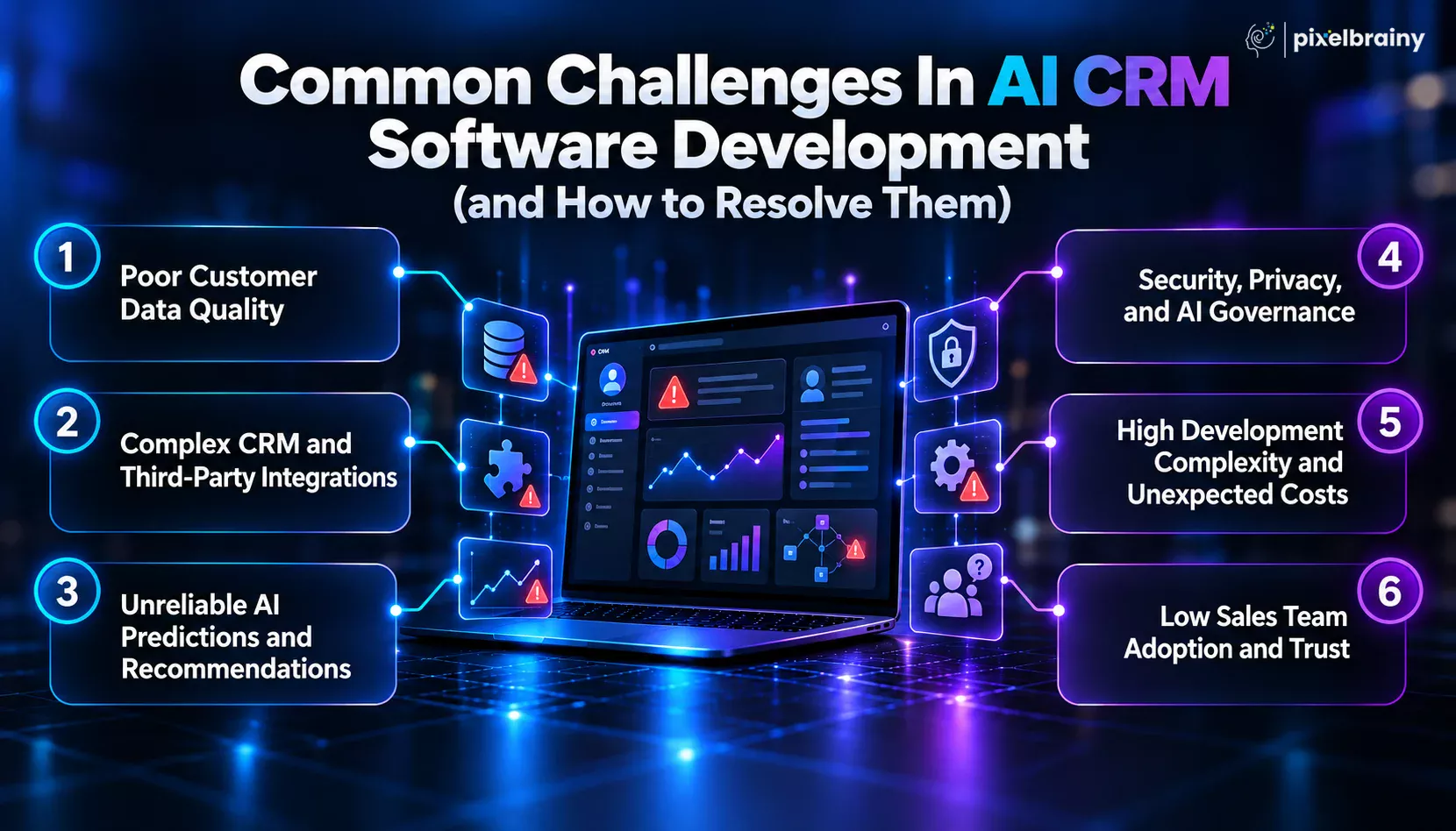
AI CRM software depends on accurate and consistent customer information. If the underlying CRM contains duplicate records, missing activities, outdated contacts, inconsistent pipeline stages, or incomplete customer histories, AI predictions can become unreliable.
Why this creates a problem:
How to resolve it:
Most businesses do not keep all customer information inside one system. An AI CRM development project may need to connect Salesforce, HubSpot, Intercom, product databases, marketing platforms, billing systems, email, telephony, calendars, and support applications.
Why this creates a problem:
How to resolve it:
A CRM becomes difficult to trust when its AI repeatedly produces inaccurate lead scores, weak forecasts, incorrect deal-risk alerts, or irrelevant next actions.
Why this creates a problem:
How to resolve it:
An AI CRM can process emails, call transcripts, customer profiles, financial information, behavioral data, and other sensitive records. This makes security and governance critical during AI CRM software development.
Why this creates a problem:
How to resolve it:
A basic CRM can be relatively straightforward, but an intelligent CRM requires data pipelines, machine learning, LLM integration, model evaluation, cloud infrastructure, monitoring, security, and multiple external integrations.
Where complexity increases:
How to resolve it:
Even technically strong AI CRM development can fail when sales representatives do not trust the system or feel that it adds more administrative work.
This is particularly important for companies trying to reduce CRM administration. If representatives still need to manually enter every email, call, meeting, and opportunity update, the new AI CRM may simply recreate the same problem with a different interface.
Why this creates a problem:
How to resolve it:
The strongest AI CRM software development strategy treats data quality, integrations, AI accuracy, security, cost, and user adoption as connected priorities from the beginning.
Businesses looking for a reliable partner to turn complex CRM requirements into production-ready AI products need more than a team that can connect an LLM to an existing application. PixelBrainy as a leading AI development company combines AI engineering, product development, UX, data architecture, integrations, and business-focused strategy to create intelligent CRM systems designed around real sales workflows.
Our approach focuses on understanding the business problem first, identifying where AI can create measurable value, and then designing the technology around those requirements. This is particularly important for companies that need predictive lead scoring, customer 360 intelligence, automated activity capture, deal-risk detection, sales forecasting, or personalized next best action recommendations.
Business-focused AI architecture: We design CRM intelligence around specific business workflows, customer data, sales processes, and measurable outcomes rather than adding generic AI features.
End-to-end product engineering: From strategy and architecture to design, engineering, deployment, and optimization, PixelBrainy supports the complete product lifecycle. The company states that its work spans AI product development, AI consulting, AI agents, integrations, and UX/UI for AI products.
Complex system integrations: AI CRM platforms can connect with existing CRM systems, communication tools, product databases, ERP systems, marketing platforms, and internal applications. PixelBrainy describes experience integrating AI sales systems with Salesforce, HubSpot, Microsoft Dynamics, Google Workspace, and internal business systems.
Predictive and behavioral intelligence: Our engineering approach can support behavioral scoring, customer health analysis, churn prediction, opportunity intelligence, and recommendation workflows where historical and real-time customer signals drive AI decisions.
Scalable enterprise architecture: Businesses can start with a focused product scope and expand toward a larger AI CRM platform as users, data volumes, integrations, and intelligence requirements increase.
In one confidential US-based SaaS engagement, PixelBrainy developed an AI client success solution for a company managing more than 1,500 enterprise accounts. The objective was to improve retention, scale account management, and identify expansion opportunities using customer behavior.
The delivered solution included:
According to the published case study, the solution achieved a 23% reduction in annual churn, 81% accuracy in 60-day churn prediction, 2.4x greater account manager coverage, 34% reduction in time-to-value, and 18% growth in expansion revenue. The client's identity and commercially sensitive information remain confidential.
Whether you want AI CRM development services, need to build AI CRM software, want to develop AI CRM software around proprietary customer data, or need to create AI CRM software as a commercial SaaS product, the architecture should reflect your actual business model.
PixelBrainy can also support CRM software development integrating AI, including predictive intelligence, conversational AI, workflow automation, customer data integration, and AI-driven recommendations.
If your requirement is similar to the real query addressed throughout this guide, such as replacing an over-customized CRM, reducing manual data entry, improving behavioral forecasting, or giving every sales representative personalized actions, the right approach is to design the AI CRM around those specific operational problems rather than reproduce an existing CRM.
Ready to Build Your Custom AI CRM? Connect with PixelBrainy to discuss your AI CRM idea, architecture, and development roadmap.
Building an AI CRM software means creating an intelligent revenue system that brings customer data, sales workflows, behavioral signals, predictive models, automation, and user experience into one connected platform. The strongest implementations begin with a clearly defined business problem and then align the architecture, features, technology stack, AI models, integrations, security, and development process around that requirement.
As covered in this guide, businesses can build an AI CRM software to support predictive lead scoring, deal risk detection, customer 360 intelligence, AI forecasting, automated activity capture, communication analysis, and next best action recommendations. The right AI CRM software development approach also considers data quality, model accuracy, scalability, security, user adoption, and long-term maintenance.
The real value comes from making AI useful within everyday sales workflows. When the system can understand customer behavior, identify meaningful signals, and recommend relevant actions, the CRM becomes a practical intelligence layer for revenue teams.
Ready to build your custom AI CRM? Book an appointment with our AI experts today.
An AI CRM software can analyze behavioral signals such as website visits, product usage, email engagement, meeting frequency, content interactions, response patterns, and historical deal outcomes. Machine learning models can convert these signals into a probability score that estimates which prospects are more likely to convert.
Yes. AI CRM development can integrate email, calendar, telephony, meeting, and messaging systems to automatically capture customer interactions. NLP and AI models can extract activities, participants, topics, sentiment, commitments, objections, and buying signals, reducing the amount of manual CRM data entry required from sales representatives.
The AI CRM software development cost can range from approximately $30,000 to $250,000+ depending on complexity. Enterprise systems with predictive forecasting, automated communication capture, customer 360, custom machine learning, extensive integrations, advanced security, and AI agents generally require a substantially larger development budget.
To build AI CRM software with reliable predictive capabilities, businesses can use historical CRM records, opportunity outcomes, customer interactions, product usage, website activity, email engagement, meeting data, support records, billing events, and other behavioral signals. The quality, consistency, and historical depth of this data directly influence model performance.
A custom AI CRM software platform can replace some or all functions of an existing CRM, but the decision depends on business requirements. Some organizations use a custom AI layer alongside their existing CRM, while others build a complete replacement when their workflows, data architecture, or AI requirements exceed what commercial platforms can practically support.
An AI CRM can evaluate the customer's current engagement, opportunity stage, previous interactions, stakeholder activity, behavioral signals, and historical outcomes. Its recommendation engine then identifies the most relevant action, such as contacting a decision-maker, scheduling a technical discussion, addressing an unresolved objection, or following up with a specific stakeholder.
Yes. AI CRM development solutions can combine information from CRM systems, product databases, marketing platforms, customer support tools, billing systems, email, telephony, and other applications. Identity resolution and data integration create a unified customer profile that gives AI access to broader context when generating predictions and recommendations.
The timeline depends on product scope and AI complexity. A focused AI CRM MVP can typically take around 3 to 5 weeks, while an advanced production platform may require 6 to 10 weeks or longer. Enterprise implementations with complex integrations, proprietary AI models, extensive security requirements, and large-scale data infrastructure can take considerably longer.

About The Author
Sagar Bhatnagar
Sagar Sahay Bhatnagar brings over a decade of IT industry experience to his role as Marketing Head at PixelBrainy. He's known for his knack in devising creative marketing strategies that boost brand visibility and market influence. Sagar's strategic thinking, coupled with his innovative vision and focus on results, sets him apart. His track record of successful campaigns proves his ability to utilize digital platforms effectively for impactful marketing efforts. With a genuine passion for both technology and marketing, Sagar continuously pushes PixelBrainy's marketing initiatives to greater success.

Working with PixelBrainy has been a great experience. They took our vision for an AI-powered platform and turned it into a fully functional product. What impressed me most was their strong understanding of both design and development, and their ability to handle complex requirements with ease. The team was responsive, cooperative, and always open to feedback. They kept things organized, communicated clearly, and delivered quality work on time. I highly recommend PixelBrainy to anyone looking for a skilled and reliable development partner.

Working with the PixelBrainy team has been a highly positive experience. They understand the design requirements and create beautiful UX elements to meet the application needs. The dev team did an excellent job bringing my vision to life. We discussed usability and flow. Sagar worked with his team to design the database and begin coding. Working with Sagar was easy. He has the knowledge to create robust apps, including multi-language support, Google and Apple ID login options, Ad-enabled integrations, Stripe payment processing, and a Web Admin site for maintaining support data. I'm extremely satisfied with the services provided, the quality of the final product, and the professionalism of the entire process. I highly recommend them for Android and iOS Mobile Application Design and Development.

Great experience working with them. Had a lot of feedback and I found that unlike most contractors they were bugging me for updates instead of the other way around. They were extremely time conscience and great at communicating! All work was done extremely high quality and if not on time, early! They were always proactive when it comes to communication and the work is great/above par always. Very flexible and a great team to work with! Goes above and beyond to present us with multiple options and always provides quality. Amazing work per usual with Chitra. If you have UI/UX or branding design needs I recommend you go to them! Will likely work with them in the future as well, definitely recommended!

PixelBrainy is a joy to work with and is a great partner when thinking through branding, logo, and website layout. I appreciate that they spend time going into the "why" behind their decisions to help inform me and others about industry best practices and their expertise.

I hired them to design our software apps. Things I really like about them are excellent communication skills, they answer all project suggestions and collaborate right away, and their input on design and colors is amazing. This project was complex and needed patience and creativity. The team is amazing to do business with. I will be using them long-term. Glad to see there are some good people out there. I was afraid to try and outsource my project to someone but I am glad I met them! I really can't say enough. They went above and beyond on this project. I am very happy with everything they have done to make my business stand out from the competition.

It was great working with PixelBrainy and the team. They were very responsive and really owned the project. We'll definitely work with them again!

I recently worked with the PixelBrainy team on a project and I was blown away by their communication skills. They were prompt, clear, and articulate in all of our interactions. They listened and provided valuable feedback and suggestions to help make the project a success. They also kept me updated throughout the entire process, which made the experience stress-free and enjoyable.

PixelBrainy is very good at what it does. The team also presents themselves very professionally and takes care of their side of things very well. I could fully trust them taking up the design work in a timely and organised manner and their attention to detail saved us lots of effort and time. This particular project was quite intense and the team showed that they function very well under pressure. Very much looking forward to working with her again!

It's always an absolute pleasure working with them. They completed all of my requests quickly and followed every note I had for them to a T, which made our process go smoothly from start to finish. Everything was completed fast and following all of the guidelines. And I would recommend their services to anyone. If you need any design work done in the future, PixelBrainy should be your first call!

They took ownership of our requirements and designed and proposed multiple beautiful variants. The team is self-motivated, requires minimum supervision, committed to see-through designs with quality and delivering them on time. We would definitely love to work with PixelBrainy again when we have any requirements.

PixelBrainy was a big help with our SaaS application. We've been hard at work with a new UI/UX and they provided a lot of help with the designs. If you're looking for assistance with your website, software, or mobile application designs, PixelBrainy and the team is a great recommendation.

PixelBrainy designers are amazing. They are responsive, talented, and always willing to help craft the design until it matches your vision. I would recommend them and plan to continue them for my future projects and more!!!

They were awesome! Did a good job fast, and good communication. Will work with them again. Thank you

Creative, detail-oriented, and talented designers who take direction well and implement changes quickly and accurately. They consistently over-delivered for us.

PixelBrainy team is very talented and creative. Great designers and a pleasure to work with. PixelBrainy is an excellent communicator and I look forward to working with them again.

PixelBrainy has a very talented design team. Their work is excellent and they are very responsive. I enjoy working with them and hope to continue on all of our future projects.


Transform your ideas into reality with us.
Across these industries, each engagement brings unique challenges, from early-stage product development to scaling complex systems, helping us build a practical understanding of real-world product environments.