AI Summary Powered by PixelBrainy
What if the knowledge your company depends on is scattered across Confluence, SharePoint, Google Drive, Slack, and the minds of 12 senior employees who are about to retire?
If you are a business owner, founder, CIO, or operations leader, this is not just a documentation problem. It is a serious operational and financial risk. Every day, your internal support teams may be spending hours searching through disconnected systems, outdated documents, chat conversations, ticket histories, and shared folders just to find a single answer. The information exists somewhere, but accessing it quickly and accurately is becoming increasingly difficult.
Perhaps this situation sounds familiar:
"We have knowledge scattered across Confluence, SharePoint, Google Drive, Slack, and the heads of 12 senior employees who are about to retire. I want to build an AI knowledge management system that can pull all of this together, surface the right answer at the right moment, and keep itself updated without someone manually maintaining it, but I don't know where to start and I'm not sure if we need to build something custom or if an off-the-shelf solution can actually handle our complexity."
This exact challenge is driving a massive shift toward enterprise AI adoption. According to industry research, the AI-Driven Knowledge Management System market is valued at approximately $11.24 billion in 2026 and is projected to reach $51.36 billion by 2030, growing at an impressive 46.2% CAGR, highlighting how rapidly organizations are investing in AI-powered knowledge discovery, retrieval, and automation capabilities.
The reason is simple. As organizations scale, knowledge becomes fragmented. Internal support teams struggle with duplicated efforts, inconsistent answers, slower ticket resolution, lengthy employee onboarding, compliance concerns, and the growing threat of institutional knowledge walking out the door when experienced employees leave. What was once manageable with traditional documentation systems becomes nearly impossible to maintain manually.
This is why AI knowledge management system development for internal support teams has become a strategic priority. Modern AI systems can connect knowledge from multiple repositories, understand user intent, retrieve contextually relevant information, learn from organizational interactions, and continuously keep knowledge fresh. Instead of forcing employees to search across multiple platforms, AI delivers the most relevant answer instantly through a unified interface.
Whether you want to build an AI knowledge management system from scratch, customize an existing platform, or adopt a hybrid architecture, the path forward is not always obvious. Technology choices, data architecture, integrations, governance, security requirements, and long term scalability all play critical roles in success.
By the end of this guide, you will understand everything involved in developing an AI-powered knowledge base for internal teams, including architecture, technology stacks, implementation strategies, integrations, costs, and best practices for successful AI KMS development, enabling you to create a centralized, self-improving knowledge ecosystem that delivers the right information to the right employee at exactly the right moment.
If you're asking "what is an AI knowledge management system?", the simplest answer is this: it is an intelligent platform that automatically captures, organizes, understands, retrieves, and continuously updates organizational knowledge using technologies such as Natural Language Processing (NLP), machine learning, Retrieval-Augmented Generation (RAG), and generative AI.
For internal support functions, a modern generative AI knowledge management system acts as a centralized intelligence layer that connects information scattered across Confluence, SharePoint, Google Drive, Slack, Jira, ServiceNow, emails, HR systems, SOPs, and other enterprise applications. It enables IT helpdesk, HR, operations, finance, and compliance teams to instantly answer employee questions, reduce repetitive tickets, and preserve institutional knowledge without relying on manual documentation.
This is where many organizations misunderstand the technology.
A traditional Confluence wiki or Notion workspace stores information, but employees still need to search, interpret, validate, and connect information manually. An AI KMS vs traditional knowledge base comparison reveals a fundamental difference: traditional systems are repositories, while AI KMS platforms are intelligent knowledge engines that generate contextual answers.
Similarly, an enterprise search tool retrieves documents but does not synthesize answers. A customer support chatbot is typically designed for narrow customer interactions, whereas AI knowledge management for internal IT support must handle complex internal policies, permissions, procedures, compliance requirements, and cross-department workflows.
An advanced NLP knowledge base for internal teams is powered by four core intelligence layers:
1. Knowledge Ingestion Layer
Automatically captures and synchronizes knowledge from enterprise systems.
2. Semantic Search Layer
Uses NLP and vector search to understand meaning rather than keywords.
3. Generative Answer Layer
Leverages RAG and LLMs to generate contextual, source-grounded responses.
4. Continuous Learning Layer
Improves answer quality through feedback, usage patterns, and knowledge updates.
| Dimension | Traditional KMS | AI Knowledge Management System |
|---|---|---|
| Knowledge Capture | Manual documentation | Automated multi-source ingestion |
| Search Accuracy | Keyword-based | Semantic AI-powered search |
| Answer Quality | User reads documents manually | Contextual generated answers |
| Maintenance Effort | High manual effort | Automated synchronization and updates |
| Knowledge Freshness | Often outdated | Continuously refreshed |
| Ticket Deflection Rate | Limited | High through instant self-service |
| Multi-Domain Handling | Siloed knowledge repositories | Unified cross-functional intelligence |
So, when leaders ask, "What's the actual difference between an AI knowledge management system and a well-organized Confluence wiki?", the answer is simple: a wiki stores knowledge, while an AI KMS understands, retrieves, connects, and delivers knowledge at the exact moment employees need it. And unlike a standalone enterprise chatbot, an AI KMS serves as the foundational intelligence infrastructure that powers smarter internal support across your entire organization.
If your employees constantly ask questions like "How do I access the VPN?", "What is the latest travel reimbursement policy?", "Who approves software purchases?", or "Where is the onboarding checklist?", you do not have an information problem. You have a knowledge delivery problem.
Many business leaders initially believe that adding an AI assistant to Confluence, SharePoint, Notion, or Google Drive will solve this challenge. However, most organizations quickly discover that generic tools only improve access to individual repositories. They do not create an intelligent knowledge ecosystem capable of understanding, connecting, governing, and delivering enterprise knowledge across departments.
This is the primary reason organizations are increasingly evaluating why build a custom AI knowledge management system instead of relying solely on off-the-shelf platforms.
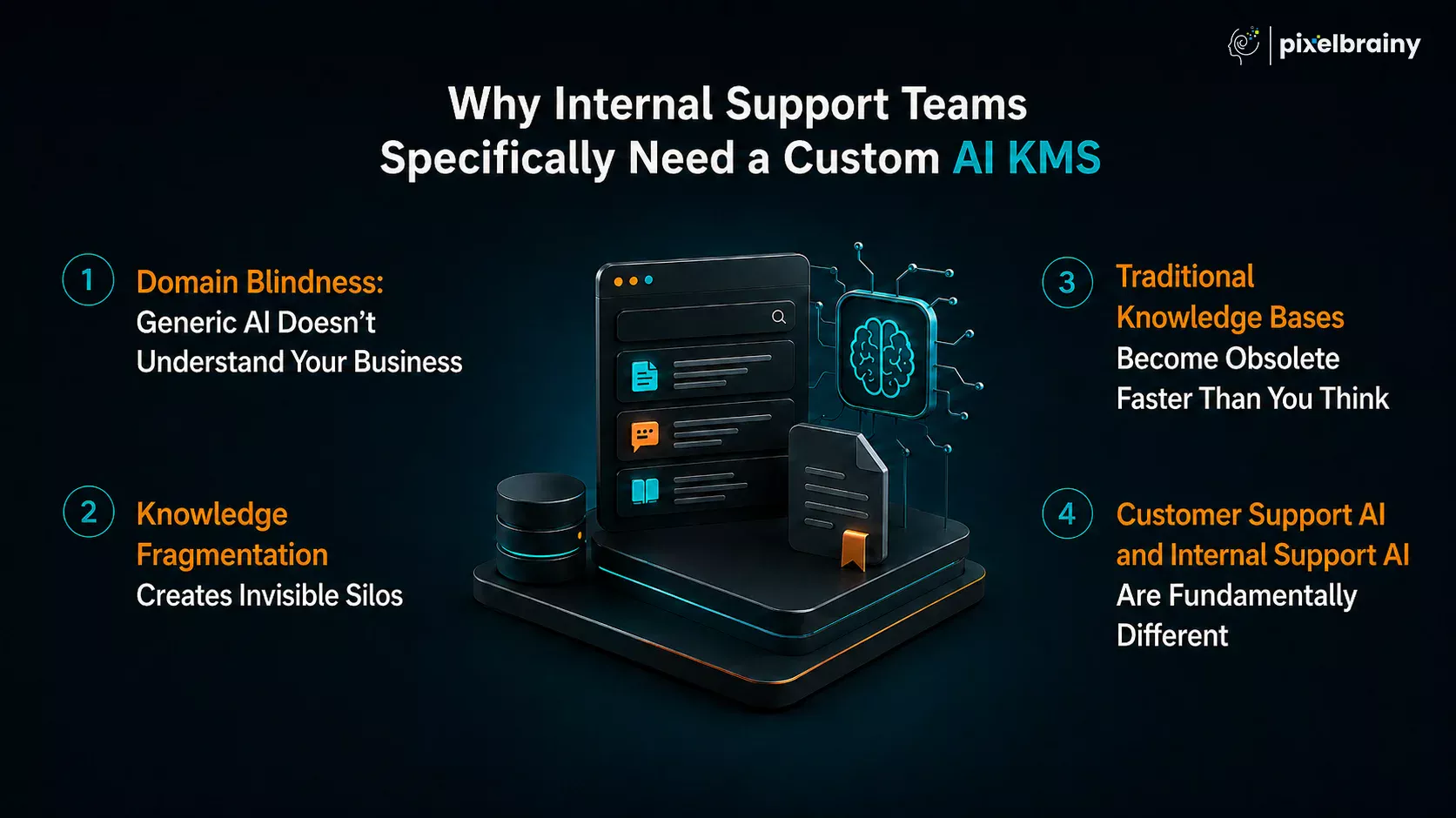
Public AI models are trained on broad internet knowledge, not your company's internal processes.
They do not understand your VPN architecture, software provisioning workflows, procurement approvals, HR policies, compliance procedures, finance controls, escalation paths, or operational playbooks.
When an employee asks: "How do I request production database access for Project Falcon?"
A generic AI tool has no context. A custom AI KMS for IT helpdesk teams understands your organization, permissions, systems, and workflows because it is connected directly to your enterprise knowledge sources.
The average enterprise stores knowledge across dozens of systems:
No single off-the-shelf tool was designed to unify all these sources while maintaining security, permissions, and context.
As a result, employees spend more time searching than solving problems.
A custom AI KMS acts as a centralized intelligence layer across your entire digital workplace.
One of the biggest hidden costs of internal support operations is documentation maintenance.
Policies change. Processes evolve. Software gets replaced. Compliance requirements update.
Yet most knowledge bases rely on manual edits and dedicated knowledge managers to remain accurate.
Within months, many repositories become partially outdated, reducing employee trust and increasing support ticket volume.
A modern AI knowledge base for HR internal support, IT operations, finance, and compliance continuously ingests and indexes new information from connected systems, ensuring employees receive current answers rather than outdated documentation.
Many organizations mistakenly evaluate customer support chatbots as internal support solutions.
The reality is that internal support environments are significantly more complex.
A customer chatbot might answer: "What is your return policy?"
An internal AI KMS may need to answer: "As a Level 2 Engineer in Germany working on a regulated healthcare project, what security approvals do I need before accessing production data?"
That answer requires:
Traditional chatbot architectures were never designed for this level of contextual reasoning.
The strongest argument for a custom AI KMS is measurable business impact.
According to workplace productivity research, employees spend approximately 2.5 hours per day searching for information. AI-powered knowledge retrieval can reduce search effort by roughly 35%, returning thousands of productive hours back to the business annually.
Consider a company with 5,000 employees, an average fully loaded labor cost of $50/hour, and a 35% reduction in information-search time. The productivity gains can quickly translate into millions of dollars in annual value.
The support-side impact is equally compelling. Organizations implementing advanced AI knowledge systems commonly achieve:
| Business Metric | Typical Improvement |
|---|---|
| Internal Ticket Deflection | 40%–60% |
| Employee Search Time | 25%–35% Reduction |
| New Employee Onboarding Time | 30%–50% Faster |
| First Contact Resolution | 20%–40% Improvement |
| Knowledge Discovery Speed | Up to 10x Faster |
| Support Operational Costs | 30%–50% Reduction |
| Knowledge Retention During Employee Turnover | Significantly Improved |
For support teams answering the same 300, 500, or even 5,000 recurring questions each month, the break-even period often falls between 6 and 18 months, depending on deployment scope and support volume.
The biggest value of a custom AI KMS is not ticket reduction. It is institutional knowledge preservation.
Every retirement, resignation, promotion, acquisition, or organizational restructuring risks losing years of expertise that was never formally documented.
When senior employees leave, they take with them: troubleshooting knowledge, operational shortcuts, compliance insights, process history, and business context.
A custom AI KMS captures and operationalizes that knowledge before it disappears. In many organizations, this becomes one of the most valuable long-term intellectual property assets the company owns.
A custom AI knowledge management platform is often the right investment if your organization has:
Ultimately, the debate between custom AI KMS vs off-the-shelf tools is not about whether an AI plugin can answer questions. It is about whether your organization needs a true enterprise knowledge intelligence platform.
If your teams are still searching through documents, messaging colleagues for answers, and recreating knowledge that already exists somewhere in the business, then building a custom AI knowledge management system is no longer a future initiative. It is becoming a competitive necessity.
Building an AI knowledge management system is far more complex than connecting a chatbot to your company documents. For internal support teams, the system must continuously ingest knowledge from dozens of enterprise platforms, understand the meaning behind that information, retrieve the most relevant content in real time, generate trustworthy answers, and improve itself as organizational knowledge evolves.
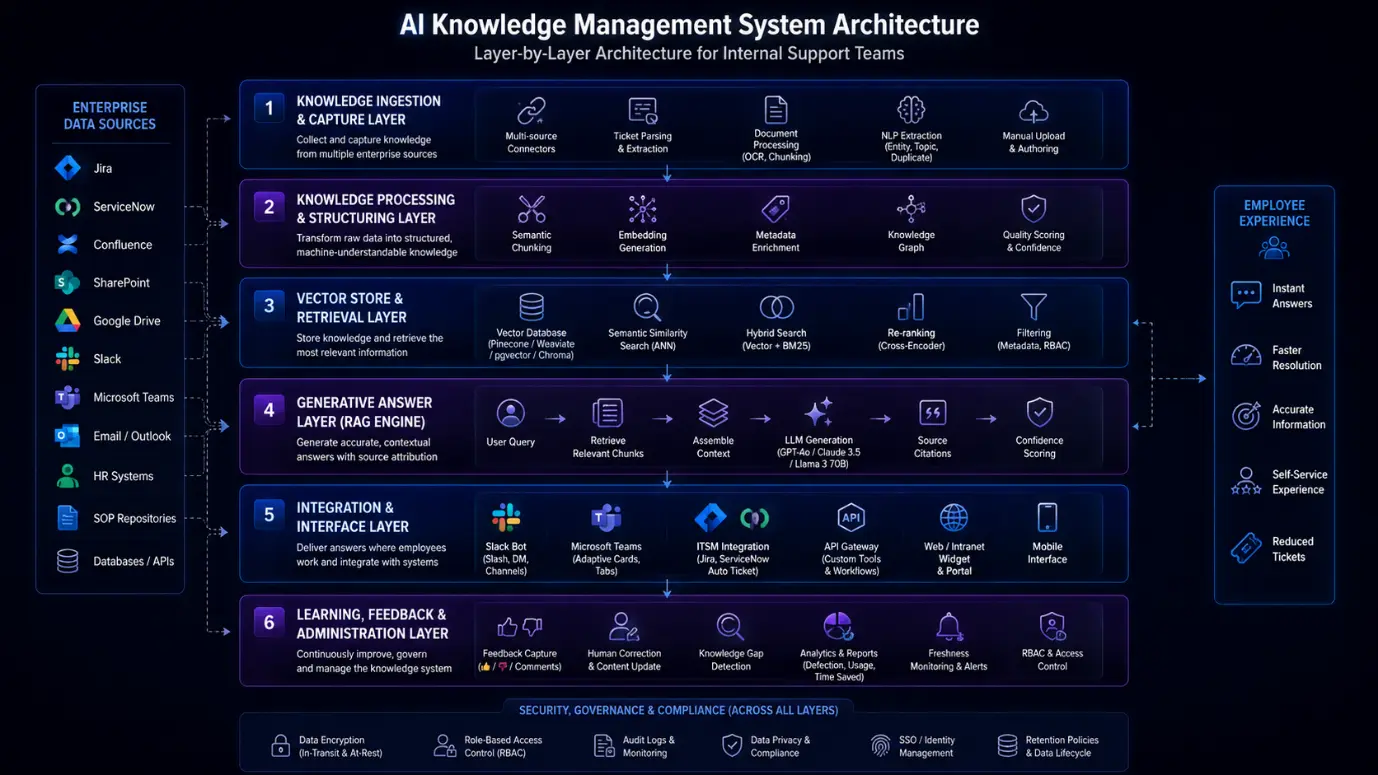
This is why modern AI knowledge management system architecture is designed as a multi-layered intelligence framework rather than a single software application. Each layer performs a specific function, and removing any one of them creates gaps that directly impact answer quality, adoption, and business value.
Below is a complete breakdown of the architecture behind a modern enterprise-grade AI knowledge management platform.
The first challenge in any AI KMS initiative is capturing knowledge from where it already exists.
In most organizations, internal support knowledge is scattered across multiple systems: Jira, ServiceNow, Confluence, SharePoint, Google Drive, Slack, Microsoft Teams, email archives, SOP repositories, HR systems, and internal portals.
The knowledge ingestion pipeline enterprise KMS serves as the foundation that continuously collects information from these sources.
Beyond document ingestion, advanced systems automatically convert support interactions into reusable organizational knowledge. For example, when a Jira ticket is resolved, AI can analyze the ticket conversation, identify the root problem, extract troubleshooting steps, generate a resolution summary, create a draft knowledge article, and categorize and tag the content automatically.
This auto-documentation capability relies heavily on NLP knowledge extraction internal support techniques such as entity extraction, topic classification, resolution pattern detection, duplicate identification, and conversation summarization.
Document processing pipelines also include OCR for scanned PDFs, image-to-text extraction, intelligent chunking, metadata tagging, and version tracking.
What Breaks Without This Layer? Without a robust ingestion layer, the AI only sees fragments of organizational knowledge, leading to incomplete answers, missing context, and low employee trust.
Raw information is not useful to AI until it is transformed into a machine-understandable format. The purpose of this layer is to organize, enrich, and structure incoming knowledge.
Semantic Chunking: Large documents are divided into logical knowledge units. Instead of treating a 150-page employee handbook as one document, the system separates it into hundreds of context-rich sections focused on individual policies and procedures.
Embedding Generation: Each knowledge chunk is converted into vector embeddings using models such as OpenAI Embeddings, Cohere Embed, BGE Models, or Voyage AI. These mathematical representations allow AI to understand meaning rather than simply matching keywords.
Metadata Enrichment: Every piece of knowledge is enriched with metadata such as department, topic, author, date, access level, region, and policy type.
Knowledge Graph Construction: Advanced systems build relationships between concepts. For example: Employee Onboarding → HR Policy → Equipment Request → IT Provisioning → Security Access Approval. This relationship mapping enables deeper reasoning across organizational processes.
Quality Scoring: Knowledge assets are continuously evaluated based on freshness, usage frequency, source authority, and confidence level.
What Breaks Without This Layer? The system cannot understand relationships between concepts, resulting in poor retrieval quality and fragmented responses.
This layer is the engine that powers intelligent knowledge discovery. Traditional enterprise search relies on keyword matching. Modern AI systems rely on semantic understanding. This is where vector database AI knowledge management becomes essential.
| Technology | Primary Use Case |
|---|---|
| Pinecone | Large-scale enterprise deployments |
| Weaviate | Hybrid semantic search environments |
| pgvector | PostgreSQL-native implementations |
| Qdrant | High-performance retrieval systems |
| Chroma | Lightweight AI deployments |
Unlike traditional search engines, semantic retrieval understands intent. For example, if an employee asks: "I can't connect to company resources from home," the system understands the user may be experiencing VPN issues, authentication failures, remote access restrictions, or network configuration problems — even if the exact phrase "VPN" never appears.
Most enterprise-grade solutions combine vector search, BM25 keyword search, metadata filtering, and cross-encoder re-ranking. This hybrid approach significantly improves retrieval precision.
What Breaks Without This Layer? Employees receive lists of documents instead of relevant answers, creating the same search problem the platform was intended to solve.
The retrieval layer finds knowledge. The RAG engine turns that knowledge into answers.
Modern RAG architecture for internal knowledge base deployments follow a structured workflow: Employee Query → Knowledge Retrieval → Context Assembly → LLM Processing → Response Generation → Source Attribution → Confidence Scoring
Instead of relying solely on model training, RAG dynamically injects organizational knowledge into every response. This enables real-time accuracy, up-to-date answers, policy-aware responses, and reduced hallucinations.
| Model | Best Fit |
|---|---|
| GPT-4o | Enterprise support environments |
| Claude 3.5 | Long-document reasoning |
| Llama 3 70B | Private on-premise deployments |
| Mistral Large | Cost-sensitive enterprise implementations |
Enterprise AI assistants typically include role-aware prompts, department-specific context, policy citation requirements, escalation instructions, and compliance constraints.
Reliable generative AI knowledge base architecture depends on source-grounded responses, citation enforcement, confidence thresholds, human escalation workflows, and retrieval validation.
What Breaks Without This Layer? Employees receive raw documents instead of contextual, actionable answers.
The most intelligent knowledge platform is worthless if employees never use it. This layer delivers answers where employees already work.
Slack Integration: Capabilities include direct messaging, slash commands, team-aware responses, and channel-specific context.
Microsoft Teams Integration: Features include adaptive cards, embedded AI assistants, Teams tabs, and workflow automation.
ITSM Integration: When questions cannot be resolved automatically, the system can create Jira tickets, open ServiceNow incidents, trigger escalation workflows, and route requests to specialists.
API Gateway: Supports custom integrations with ERP systems, CRM platforms, finance applications, and internal business tools.
Intranet & Web Portal Integration: AI assistants can also be embedded directly into employee portals, HR systems, IT service centers, and knowledge hubs.
What Breaks Without This Layer? Adoption declines because employees are forced to leave their daily workflows to search for information.
A successful AI KMS is not static. It continuously improves. This final layer ensures knowledge quality increases over time.
Feedback Collection: Employees can rate responses through thumbs up, thumbs down, or written feedback. Every interaction becomes a learning signal.
Human Correction Interface: Support agents can edit AI-generated responses, correct inaccuracies, improve knowledge articles, and add missing context. These corrections are reintegrated into the system.
Knowledge Gap Detection: The platform automatically identifies unanswered questions, missing documentation, emerging support trends, and frequently escalated issues.
Usage Analytics: Leadership teams gain visibility into most searched topics, deflection rates, employee adoption, resolution times, time savings, and cost savings.
Knowledge Freshness Monitoring: The system proactively flags expired policies, outdated procedures, stale documentation, and unsupported workflows.
RBAC Administration: Access controls can be enforced based on department, job role, region, security clearance, and team membership.
What Breaks Without This Layer? Knowledge quality deteriorates over time, reducing trust and eventually driving employees back to manual support channels.
A modern AI knowledge management system architecture succeeds because every layer has a specialized responsibility. The ingestion layer captures knowledge, the processing layer structures it, the vector database AI knowledge management layer retrieves it intelligently, the RAG architecture for internal knowledge base generates trustworthy answers, the integration layer delivers those answers where employees work, and the learning layer continuously improves the system.
Together, these layers create an enterprise-grade intelligence platform capable of transforming fragmented organizational knowledge into instant, reliable support across IT, HR, finance, operations, and compliance teams.
Organizations evaluating AI knowledge management system development for internal support teams often focus on AI models, vector databases, and RAG architecture. However, the success of the platform ultimately depends on the capabilities employees interact with every day.
If your goal is to build an AI knowledge management system that can pull knowledge from multiple repositories, answer employee questions instantly, reduce repetitive support tickets, and preserve institutional expertise, certain features are non-negotiable.
The following capabilities form the foundation of every enterprise-grade AI KMS.
| Must-Have Feature | Why It Matters |
|---|---|
| Multi-Source Knowledge Ingestion | The system must continuously ingest information from Confluence, SharePoint, Google Drive, Jira, ServiceNow, Slack, Teams, emails, and internal databases. Without unified ingestion, organizational knowledge remains fragmented and employees continue searching across disconnected systems. |
| Semantic AI Search | Unlike traditional keyword search, semantic search understands intent, context, abbreviations, and business terminology. Employees receive relevant answers even when questions are phrased differently from the original documentation or source content. |
| RAG-Powered Answer Generation | A modern AI KMS should leverage Retrieval-Augmented Generation to retrieve relevant information and generate contextual answers. This ensures employees receive actionable guidance instead of manually reviewing multiple documents and knowledge articles. |
| Automatic Knowledge Extraction from Tickets | Resolved Jira, ServiceNow, and support tickets contain valuable expertise. AI automatically extracts root causes, troubleshooting steps, and resolutions, converting support interactions into reusable organizational knowledge without manual documentation efforts. |
| Source Attribution & Evidence-Based Responses | Every answer should display source references, linked documents, and supporting evidence. This improves trust, reduces hallucination risks, and enables employees to verify information before taking critical business actions. |
| Role-Based Access Control (RBAC) | Internal knowledge often contains sensitive HR, finance, legal, and operational information. RBAC ensures employees only access content aligned with their role, department, permissions, and compliance requirements. |
| Knowledge Freshness Monitoring | Policies, procedures, and operational workflows constantly evolve. AI should automatically identify outdated content, flag stale knowledge, and notify administrators before inaccurate information spreads throughout the organization. |
| Slack & Microsoft Teams Integration | Employees should access knowledge directly within collaboration platforms. Native integrations eliminate context switching and enable support teams to receive answers where daily work already happens. |
| ITSM & Ticketing Platform Integration | The platform should integrate with Jira, ServiceNow, Zendesk, and similar tools. Unresolved questions can automatically create tickets, escalate requests, and maintain support workflow continuity. |
| Feedback & Continuous Learning Engine | User feedback helps improve retrieval quality and answer accuracy. Every thumbs-up, correction, or rejected answer provides signals that continuously strengthen the AI knowledge management system over time. |
| Knowledge Gap Detection | AI should identify frequently asked questions that lack quality answers. This enables organizations to proactively create missing content and continuously improve their internal knowledge ecosystem. |
| Enterprise Analytics Dashboard | Leaders need visibility into ticket deflection rates, employee adoption, top search queries, knowledge usage trends, and productivity gains to measure AI KMS ROI accurately. |
| OCR & Document Intelligence | Many organizations store critical information in scanned PDFs, images, and legacy files. OCR enables AI to extract and index knowledge that traditional search systems cannot access. |
| Multi-Language Knowledge Access | Global organizations require support for multilingual employees. AI-powered translation and multilingual retrieval ensure knowledge remains accessible regardless of location, language, or business unit. |
| Compliance, Audit & Governance Controls | Regulated industries require complete visibility into knowledge access, AI-generated responses, document changes, and retention policies to satisfy governance and compliance requirements. |
Realistically, what features are absolutely required if you want an AI system to unify Confluence, SharePoint, Slack, Google Drive, Jira, and tribal employee knowledge? At a minimum, you need multi-source ingestion, semantic search, RAG-powered answer generation, automated knowledge extraction, role-based security, and continuous learning capabilities. Without these core features, you're simply building another searchable repository rather than a true AI knowledge management system.
The best AI KMS platforms are not defined by how much information they store, but by how effectively they transform organizational knowledge into instant, trustworthy answers.
As AI knowledge management systems mature, leading enterprises are moving beyond search and retrieval toward predictive, autonomous, and self-improving knowledge ecosystems.
If your objective is not only to build an AI knowledge management system but to create a long-term competitive advantage, these advanced capabilities can significantly increase adoption, automation, and business value.
The following features are rarely found in standard knowledge platforms but are increasingly becoming differentiators in enterprise AI KMS development projects.
| Advanced Feature | Why It Matters |
|---|---|
| Proactive Knowledge Recommendations | Instead of waiting for employees to search, AI proactively surfaces relevant policies, procedures, and documentation based on user roles, workflows, projects, and behavioral patterns. |
| AI-Powered Expert Locator | When documentation cannot fully solve a problem, AI identifies the most knowledgeable employee based on expertise, project history, ticket resolutions, and organizational interactions. |
| Knowledge Graph Intelligence | Knowledge graphs map relationships between policies, procedures, departments, systems, and business processes, enabling deeper contextual reasoning than traditional document-based knowledge repositories. |
| Persistent Conversational Memory | The AI remembers previous interactions and context across sessions, enabling more natural conversations and reducing repetitive explanations from employees seeking support assistance. |
| Policy Impact Analysis Engine | When policies change, AI automatically identifies affected departments, procedures, documentation, compliance requirements, and workflows, helping organizations manage change more effectively. |
| Workflow Execution Directly from Answers | Employees can initiate approvals, submit requests, create tickets, reset passwords, or trigger workflows directly from AI-generated responses without switching applications. |
| Predictive Support Intelligence | AI analyzes historical patterns and support trends to anticipate recurring issues before they escalate, allowing support teams to resolve problems proactively. |
| Voice-Based Knowledge Assistant | Employees can interact through natural voice conversations, making organizational knowledge accessible in mobile, field-service, warehouse, and hands-free work environments. |
| Sentiment & Escalation Detection | The system identifies frustration, urgency, compliance risks, or unresolved issues within conversations and escalates cases before employee experiences deteriorate significantly. |
| Organizational Knowledge Digital Twin | Advanced AI creates a dynamic representation of company knowledge, expertise networks, operational dependencies, and business processes, enabling sophisticated enterprise knowledge intelligence. |
Beyond search and chatbots, what advanced features create a truly future-ready AI knowledge management system? The biggest differentiators are proactive recommendations, expert discovery, workflow execution, knowledge graphs, predictive analytics, and organizational knowledge digital twins. These capabilities transform AI from a support tool into a strategic intelligence platform that actively improves how the business operates.
The future of AI knowledge management is not finding information faster. It is enabling organizations to anticipate, automate, and continuously optimize knowledge-driven decisions before employees even realize they need help.
Building an AI knowledge management system is not a matter of deploying a chatbot and connecting it to company documents. Internal support environments contain fragmented knowledge, sensitive data, complex workflows, department-specific policies, and years of undocumented expertise spread across multiple systems. To successfully centralize, automate, and operationalize this knowledge, organizations need a structured roadmap that aligns business goals, AI architecture, governance, and user adoption.
This AI knowledge management system implementation guide outlines how to develop an AI knowledge management system step by step, helping you move from scattered knowledge repositories to a unified enterprise intelligence platform.
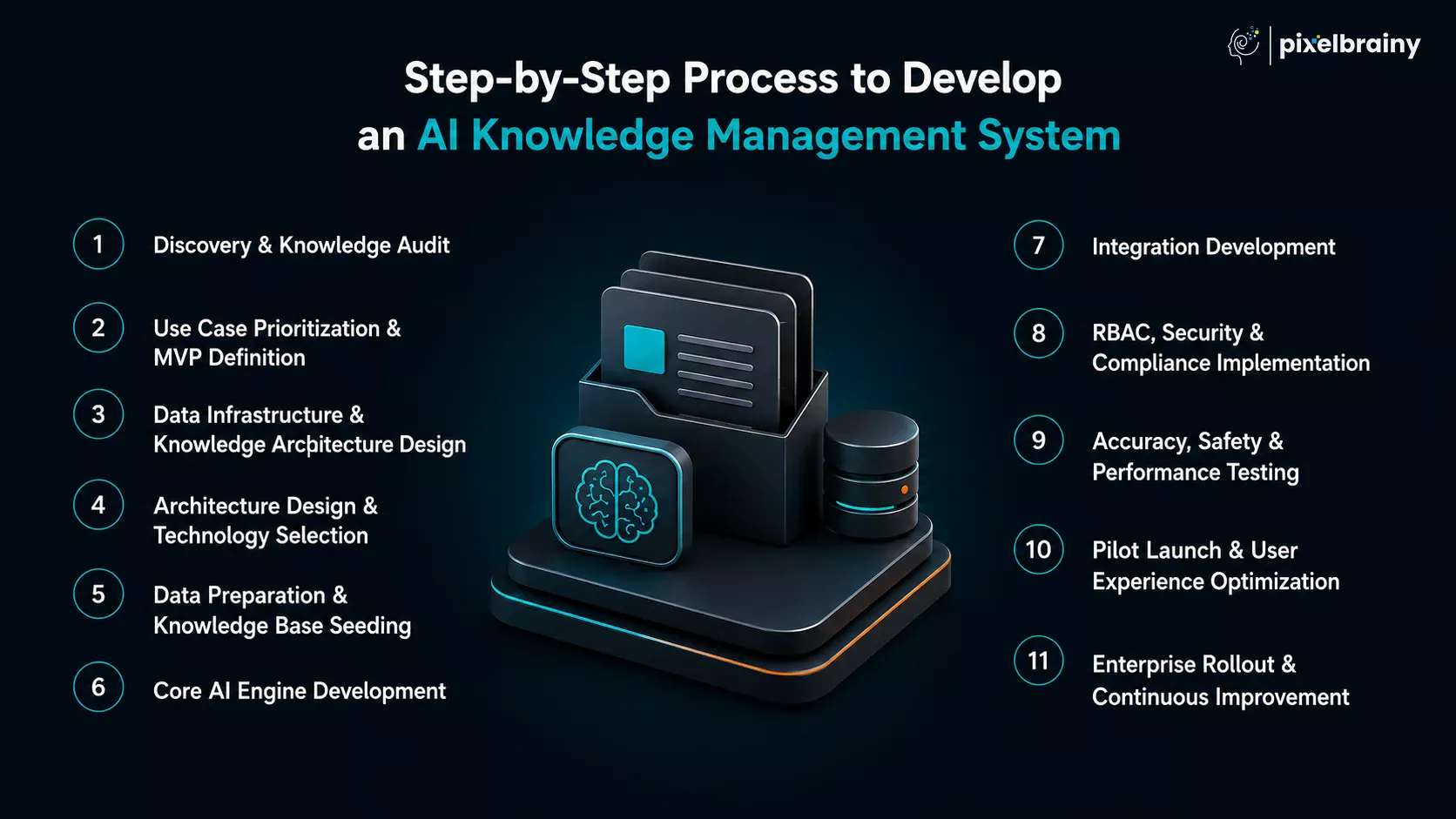
What Happens? Every successful AI initiative begins with understanding the current knowledge landscape. Teams identify and audit all existing knowledge sources, including Confluence, SharePoint, Google Drive, Jira, ServiceNow, Slack, Teams, SOP repositories, internal portals, email archives, and undocumented tribal knowledge held by experienced employees. The objective is to understand where knowledge lives, how it is consumed, and where critical gaps exist.
Organizations often engage AI consulting services during this phase to assess knowledge maturity, evaluate internal support workflows, and establish measurable business outcomes before development begins.
Who Does It? Business Analysts, Solution Architects, IT Leaders, HR Leaders, Operations Stakeholders
Typical Duration: 2–4 Weeks
Critical AI Decision: Identify which knowledge sources will be included in the initial AI ecosystem.
What Breaks if Skipped? The system launches with incomplete knowledge coverage, leading to low answer accuracy and reduced employee trust.
What Happens? Not every support function should be automated simultaneously. Most organizations begin by creating an AI internal helpdesk knowledge system because IT support teams typically handle the largest volume of repetitive employee requests. Common use cases include VPN troubleshooting, password resets, software access requests, onboarding support, and hardware provisioning.
This phase also establishes measurable success criteria such as ticket deflection targets, response time reduction, agent productivity improvements, and employee self-service adoption.
For many enterprises, this stage resembles an MVP development initiative where the goal is to validate business value quickly before investing in a larger enterprise rollout.
Who Does It? Product Owners, Department Heads, Executive Stakeholders
Typical Duration: 1–2 Weeks
Critical AI Decision: Define what a successful first release looks like.
What Breaks if Skipped? Scope creep increases costs, delays timelines, and complicates implementation.
What Happens? This phase defines how knowledge will move through the system. Teams design knowledge ingestion workflows, metadata structures, taxonomies, chunking strategies, embedding frameworks, access-control models, and governance standards. The goal is to create a scalable architecture capable of supporting future departments and use cases.
Who Does It? Data Architects, AI Engineers, Enterprise Architects
Typical Duration: 2–3 Weeks
Critical AI Decision: Determine how knowledge should be organized for optimal retrieval and governance.
What Breaks if Skipped? Poor data structure leads to weak retrieval quality regardless of AI model performance.
What Happens? This is where the technical blueprint for the platform is finalized. One of the most critical stages of the AI KMS development process involves selecting RAG vs Fine-Tuning vs Hybrid Architecture, Vector Database Technology, Embedding Models, Large Language Models, Cloud vs On-Premise Infrastructure, and Orchestration Frameworks such as LangChain, LlamaIndex, or Haystack.
Some organizations begin with PoC development to validate retrieval accuracy, answer quality, and user adoption before investing in a full-scale enterprise deployment.
During vendor evaluation, businesses frequently compare specialized enterprise AI vendors and top AI product development companies in USA that have experience building internal support platforms rather than customer-facing chatbot solutions.
Who Does It? AI Architects, Engineering Leaders, Security Teams
Typical Duration: 2–4 Weeks
Critical AI Decision: Select an architecture that balances scalability, security, cost, and accuracy.
What Breaks if Skipped? Technical limitations emerge later and often require costly re-engineering.
What Happens? Before AI can generate trustworthy answers, knowledge must be cleaned, validated, and structured. The building AI knowledge base for internal teams process typically includes removing duplicate content, eliminating outdated documentation, importing historical support tickets, categorizing knowledge assets, enriching metadata, and defining source authority levels. This phase determines the quality of the foundation that powers future AI responses.
Who Does It? Knowledge Managers, Subject Matter Experts, Data Specialists
Typical Duration: 3–6 Weeks
Critical AI Decision: Establish quality thresholds for knowledge ingestion.
What Breaks if Skipped? Poor content quality directly impacts AI response reliability.
What Happens? This is where intelligence is built into the platform. Development teams implement knowledge ingestion pipelines, embedding generation workflows, vector search infrastructure, RAG pipelines, prompt engineering frameworks, source citation mechanisms, and hallucination prevention systems.
A major objective when developing an AI knowledge management system with automatic knowledge capture and curation is ensuring that new knowledge continuously enters the ecosystem from support tickets, conversations, documents, and operational systems.
Who Does It? AI Engineers, Machine Learning Specialists, Backend Developers
Typical Duration: 4–8 Weeks
Critical AI Decision: Prioritize retrieval quality before focusing on answer generation quality.
What Breaks if Skipped? Even the most advanced LLMs fail when retrieval is inaccurate.
What Happens? Knowledge only becomes valuable when employees can access it within their daily workflows. This phase includes integrations with Slack, Microsoft Teams, Jira, ServiceNow, Confluence, SharePoint, Google Drive, Enterprise Applications, and Identity Providers.
Many organizations require specialized AI integration services at this stage to ensure seamless connectivity across legacy systems, cloud platforms, and internal business applications.
Who Does It? Integration Engineers, Platform Developers, DevOps Teams
Typical Duration: 3–6 Weeks
Critical AI Decision: Determine where employees will naturally interact with the AI system.
What Breaks if Skipped? Low adoption rates prevent the platform from delivering meaningful ROI.
What Happens? Internal knowledge often contains highly sensitive information. This phase focuses on implementing Role-Based Access Control (RBAC), Department-Level Permissions, Audit Logging, PII Detection, Encryption Standards, Data Residency Controls, and SSO and SAML Authentication.
Who Does It? Security Architects, Compliance Teams, Identity Management Specialists
Typical Duration: 2–4 Weeks
Critical AI Decision: Define who can access what information and under which conditions.
What Breaks if Skipped? Security risks and compliance violations become unavoidable.
What Happens? Before launch, the platform must prove it can deliver reliable answers consistently. Testing includes domain-specific accuracy validation, hallucination testing, RBAC penetration testing, concurrent user load testing, performance benchmarking, and answer quality comparisons.
Who Does It? QA Teams, AI Engineers, Subject Matter Experts
Typical Duration: 2–4 Weeks
Critical AI Decision: Define confidence thresholds and escalation policies.
What Breaks if Skipped? Employees quickly lose trust after receiving inaccurate answers.
What Happens? The AI KMS is deployed to a limited audience, typically an IT helpdesk team. Teams measure ticket deflection, search success rates, user satisfaction, resolution times, knowledge utilization, and adoption metrics.
Because adoption determines long-term success, many organizations collaborate with a specialized UI/UX design company during this phase to refine search experiences, conversational workflows, employee dashboards, and support interactions.
Who Does It? Product Managers, Support Teams, AI Operations Teams
Typical Duration: 4–8 Weeks
Critical AI Decision: Use real employee interactions to optimize retrieval and response quality.
What Breaks if Skipped? Enterprise rollout occurs before major usability issues are discovered.
What Happens? Following a successful pilot, the platform expands across additional departments. Many organizations eventually create a custom AI knowledge management system for HR IT and operations teams, enabling a unified support experience across the enterprise.
Advanced capabilities are then activated, including Knowledge Gap Detection, Auto-Documentation, Knowledge Freshness Monitoring, Predictive Support Analytics, and Continuous Learning Workflows.
This is also the stage where organizations begin to develop a generative AI knowledge management platform that reduces ticket volume, scales employee self-service, and preserves institutional knowledge at enterprise scale.
Who Does It? Enterprise AI Teams, Governance Committees, Department Stakeholders
Typical Duration: Ongoing
Critical AI Decision: Establish governance processes that maintain knowledge quality over time.
What Breaks if Skipped? Knowledge gradually becomes outdated and system adoption declines.
| Project Scope | Estimated Timeline |
|---|---|
| MVP AI Knowledge Management System | 2–4 Months |
| Mid-Tier AI KMS with Full Enterprise Integrations | 4–7 Months |
| Enterprise Multi-Team AI Knowledge Management System | 6–12 Months |
Following a structured roadmap dramatically increases the probability of success. Organizations that invest in discovery, architecture, governance, integrations, security, and continuous optimization are far more likely to transform fragmented information into an intelligent support ecosystem that improves employee productivity, preserves institutional expertise, and delivers measurable operational ROI.
Also Read: AI Software Development Cost: A Complete Software Cost Guide
When you plan to develop AI knowledge management system, choosing the right technology stack can determine whether your AI knowledge management system becomes a high-performing enterprise intelligence platform or an expensive experiment that struggles with scalability, retrieval accuracy, and user adoption.
The reality is that there is no universal stack that fits every organization. The ideal architecture depends on your existing infrastructure, security requirements, data sensitivity, internal support workflows, and long-term AI strategy. However, certain technologies have emerged as clear leaders for enterprise AI knowledge management deployments in 2026.
| Layer | Recommended Technology | Alternatives | When to Choose It |
|---|---|---|---|
| RAG & Orchestration Framework | LlamaIndex | LangChain, Haystack | Best for document-heavy enterprises with large knowledge repositories and complex retrieval requirements. |
| Workflow & Agent Orchestration | LangChain | LangGraph, Haystack | Ideal when building multi-agent workflows, ticket automation, and advanced enterprise support processes. |
| Large Language Model (Cloud) | GPT-4o | Claude 3.5 Sonnet, Gemini 1.5 Pro | Strongest overall balance of reasoning, retrieval augmentation, tool use, and enterprise support capabilities. |
| Large Language Model (On-Premise) | Llama 3 70B | Mistral Large, Falcon 40B | Best choice for organizations requiring data residency, privacy, and regulatory compliance. |
| Embedding Model | OpenAI text-embedding-3-large | Cohere Embed v3, BGE-M3, Sentence Transformers | Highest retrieval accuracy for enterprise knowledge management workloads. |
| Vector Database | Pinecone | Weaviate, pgvector, Chroma | Best for large-scale enterprise deployments requiring managed infrastructure and high-performance retrieval. |
| Hybrid Search Layer | Elasticsearch | OpenSearch, Azure AI Search | Provides keyword search and semantic search together, improving internal support accuracy significantly. |
| Backend API Layer | FastAPI (Python) | Node.js, Django | Excellent performance and native compatibility with AI/ML ecosystems. |
| Knowledge Metadata Storage | PostgreSQL | MySQL, SQL Server | Reliable relational storage for users, permissions, metadata, and system administration. |
| Caching Layer | Redis | Memcached | Accelerates retrieval performance and session management. |
| Containerization | Docker | Podman | Simplifies deployment consistency across environments. |
| Container Orchestration | Kubernetes | ECS, AKS, GKE | Essential for enterprise-scale deployments and high availability. |
| Cloud Infrastructure | Azure | AWS, GCP | Particularly effective for Microsoft-centric organizations. |
| Authentication & SSO | OAuth 2.0 + SAML 2.0 | OpenID Connect | Standard enterprise identity management approach. |
| Secrets Management | HashiCorp Vault | AWS Secrets Manager, Azure Key Vault | Secure storage of API keys, credentials, and encryption keys. |
| Monitoring & LLMOps | LangSmith | Weights & Biases, Arize AI | Enables visibility into retrieval quality, prompts, and AI performance. |
| Infrastructure Monitoring | Grafana | Datadog, New Relic | Real-time operational monitoring and observability. |
One of the most common questions during LangChain LlamaIndex knowledge management development projects is whether to use LangChain or LlamaIndex. The answer depends entirely on your use case.
| Criteria | LangChain | LlamaIndex |
|---|---|---|
| Primary Strength | Workflow orchestration | Knowledge retrieval |
| Best For | Multi-agent systems and automation | Enterprise knowledge management |
| RAG Performance | Strong | Excellent |
| Document Processing | Good | Outstanding |
| Data Connectors | Extensive | Extensive |
| Agent Frameworks | Industry Leading | Moderate |
| Learning Curve | Higher | Lower |
| Internal Support Knowledge Base | Good | Excellent |
Recommendation: If your primary goal is building a document-centric knowledge platform, LlamaIndex is usually the strongest RAG framework for enterprise knowledge management. If your roadmap includes AI agents, workflow automation, ticket orchestration, approval systems, and complex support operations, LangChain becomes the better choice. Many enterprise deployments actually combine both technologies.
| Deployment Model | Recommended Model | Why It Works |
|---|---|---|
| Cloud Hosted | GPT-4o | Best overall balance of reasoning, retrieval, and enterprise integrations. |
| Cloud Hosted | Claude 3.5 Sonnet | Excellent for policy-heavy and long-document environments. |
| Cloud Hosted | Gemini 1.5 Pro | Strong Google ecosystem integration and large context windows. |
| On-Premise | Llama 3 70B | Best open-source enterprise option for sensitive knowledge. |
| On-Premise | Mistral Large | Strong multilingual performance and lower infrastructure requirements. |
| On-Premise | Falcon 40B | Useful for organizations prioritizing self-hosted deployments. |
For organizations handling HR records, legal documents, financial data, compliance policies, or government information, an on-premise LLM for internal knowledge base deployments should be strongly considered to maintain full control over sensitive enterprise data.
| Embedding Model | Strength |
|---|---|
| OpenAI text-embedding-3-large | Highest retrieval accuracy |
| Cohere Embed v3 | Excellent multilingual support |
| BGE-M3 | Strong open-source performance |
| Sentence Transformers | Lightweight and cost-effective |
For organizations prioritizing retrieval quality above all else, OpenAI currently remains the strongest option. For privacy-focused enterprises, BGE-M3 is often preferred.
| Vector Database | Best Use Case |
|---|---|
| Pinecone | Enterprise-scale managed deployments |
| Weaviate | Hybrid search and open-source flexibility |
| pgvector | Organizations already using PostgreSQL |
| Chroma | MVP and prototype deployments |
Recommendation: For enterprises already heavily invested in PostgreSQL, pgvector often provides the most practical path because it minimizes infrastructure complexity while delivering strong semantic retrieval capabilities.
For organizations asking: "What is the best tech stack for developing an AI knowledge management system for an enterprise that runs on Microsoft Azure and uses Teams and SharePoint for everything?"
| Layer | Technology |
|---|---|
| Cloud Platform | Microsoft Azure |
| Knowledge Sources | SharePoint, Teams, OneDrive |
| Search Layer | Azure AI Search |
| LLM | GPT-4o via Azure OpenAI |
| Vector Store | Azure AI Search Vector Index |
| Authentication | Azure Active Directory |
| Compliance | Microsoft Purview |
| Bot Framework | Microsoft Bot Framework |
| Monitoring | Azure Monitor + Grafana |
This architecture provides the smoothest integration with existing Microsoft ecosystems.
| Layer | Technology |
|---|---|
| Cloud Platform | Google Cloud Platform |
| Knowledge Sources | Google Drive, Gmail, Workspace |
| Search Layer | Vertex AI Search |
| LLM | Gemini 1.5 Pro |
| Vector Storage | Vertex AI Vector Search |
| Authentication | Google Identity |
| Compliance | Google Cloud DLP |
| Integrations | Workspace APIs |
| Monitoring | Google Cloud Operations Suite |
This approach minimizes integration complexity while maximizing native Workspace compatibility.
The best technology for building AI knowledge base platforms in 2026 is not a single tool but a carefully selected ecosystem. The highest-performing enterprise deployments combine a robust retrieval layer, hybrid search, strong security controls, scalable infrastructure, and a mature orchestration framework. When these components work together, organizations gain an AI-powered knowledge management system capable of delivering accurate answers, reducing support costs, preserving institutional knowledge, and supporting thousands of employees across IT, HR, operations, finance, and compliance teams.

One of the most important architectural decisions during an AI KMS project is determining how the system should access and reason over organizational knowledge. For enterprises building an internal support platform, the debate is rarely about which AI model to choose. The real question is: Should we use RAG, fine-tuning, or a hybrid approach?
The answer depends largely on how frequently your knowledge changes, how critical accuracy is, and how much ongoing maintenance your organization is willing to manage.
When evaluating RAG vs fine-tuning AI knowledge management system architectures, RAG is usually the strongest starting point.
Instead of storing company knowledge inside model weights, the AI retrieves relevant information from a vector database at query time and uses that information to generate an answer: Employee Question → Vector Search → Knowledge Retrieval → LLM Response → Source Citation
Because the model always references the latest documents, policies, tickets, and procedures, answers remain current even as knowledge evolves.
Best For: Frequently updated policies, internal IT support, HR knowledge bases, operations support, compliance documentation, organizations requiring source attribution.
Internal support knowledge changes constantly. New policies, software updates, onboarding procedures, security requirements, and operational workflows can change weekly or even daily. A well-designed RAG architecture for internal knowledge base deployments can update knowledge in minutes simply by indexing new content.
Typical Accuracy: 85%–92% for internal support queries when retrieval pipelines are properly optimized.
Fine-tuning retrains a base model using your organization's internal data, teaching it company-specific terminology, communication patterns, and domain expertise. Instead of retrieving documents at runtime, knowledge becomes embedded within the model itself.
Best For: Stable knowledge domains, legal definitions, product specifications, industry terminology, standardized response formats.
The biggest weakness in the fine-tuning vs RAG enterprise knowledge management debate is knowledge freshness. If a policy changes tomorrow, the model does not automatically know about it. Updating knowledge requires retraining, validation, and redeployment. Typical retraining costs can range from $5,000 to $50,000+ per training cycle, depending on model size and infrastructure requirements.
Recommendation: Fine-tuning should rarely be the primary architecture for dynamic internal support environments.
The most advanced enterprises increasingly adopt hybrid RAG knowledge management system development strategies.
The model is fine-tuned on company terminology, internal acronyms, communication style, support response formats, and domain-specific language. RAG is then used to retrieve current policies, operational procedures, ticket resolutions, knowledge articles, and compliance documentation.
Example: An IT support organization may fine-tune a model to understand internal infrastructure terminology while using RAG to access the latest troubleshooting procedures and security policies.
Best For: Large enterprises, global organizations, highly specialized industries, complex support environments, mature AI programs.
| Criteria | RAG | Fine-Tuning | Hybrid |
|---|---|---|---|
| Knowledge Update Frequency | Excellent | Poor | Excellent |
| Answer Accuracy | High | Medium-High | Highest |
| Maintenance Cost | Low | High | Medium |
| Privacy Risk | Low | Medium | Low |
| Implementation Speed | Fast | Slow | Medium |
| Cost Per Knowledge Update | Minimal | High | Low |
| Hallucination Risk | Low (with citations) | Medium | Lowest |
| Recommended For | Most Internal Support Teams | Stable Domains | Large Enterprises |
For organizations with evolving documentation, ongoing support requests, and multiple knowledge repositories, RAG is typically the best AI architecture for internal support knowledge base initiatives because it keeps answers current without requiring retraining. Fine-tuning is valuable when domain expertise and communication consistency matter, but it struggles with rapidly changing knowledge. Hybrid architectures deliver the highest long-term performance, but they also introduce additional complexity and cost.
For most organizations, RAG is the best starting architecture because it delivers high accuracy, supports continuously changing knowledge, provides source citations, and requires minimal maintenance. If your internal policies, procedures, and support documentation change frequently, start with RAG and consider a hybrid approach later as your AI KMS matures.
An AI knowledge management system becomes valuable only when employees can access it inside the tools they already use every day. Even the most advanced retrieval engine or RAG pipeline will struggle to deliver adoption if users are forced to leave their workflow to search for answers.
This is why internal knowledge base integration architecture plays a critical role in project success. The goal is not simply to connect systems but to create a seamless knowledge flow between collaboration platforms, ticketing systems, document repositories, and support workflows.
A robust AI knowledge management system Slack integration enables employees to access knowledge directly within conversations without opening another application.
| Component | Details |
|---|---|
| What It Enables | Instant Q&A, self-service support, policy lookup, troubleshooting assistance |
| Technical Connection | Slack Bolt SDK, Slash Commands (/ask, /search), Events API, Webhooks |
| Advanced Capabilities | DM-based support, channel-aware responses, thread escalations, proactive policy notifications |
| Estimated Effort | 2–4 Weeks |
| Common Challenge | Workspace-wide OAuth permissions often require administrator approval, which can delay deployment timelines |
Example Workflow: Employee asks: "How do I request production database access?" The AI retrieves approved procedures and returns the answer directly inside Slack with source references.
For Microsoft-centric organizations, AI KMS Microsoft Teams integration is often the primary user interface.
| Component | Details |
|---|---|
| What It Enables | AI-powered employee support directly inside Teams |
| Technical Connection | Microsoft Bot Framework, Azure Bot Service, Microsoft Graph API |
| Advanced Capabilities | Adaptive Cards, Teams Tabs, Role-Aware Responses, SharePoint Synchronization |
| Estimated Effort | 3–5 Weeks |
| Common Challenge | Multi-tenant environments often require separate Azure app registrations for each tenant |
Microsoft Graph API allows the AI system to understand employee role, department, reporting structure, and permissions, significantly improving answer relevance and RBAC enforcement.
Organizations looking to integrate AI knowledge base with Jira ServiceNow often begin with Jira because support tickets contain valuable operational knowledge.
| Component | Details |
|---|---|
| What It Enables | Ticket ingestion, auto-documentation, escalation workflows |
| Technical Connection | Jira REST API, Webhooks, Event Triggers |
| Advanced Capabilities | Auto-convert resolved tickets into knowledge articles, AI-generated issue creation |
| Estimated Effort | 2–4 Weeks |
| Common Challenge | Every Jira instance uses different custom fields, workflows, and ticket structures |
Example Workflow: Ticket Closed → AI Extracts Resolution → Knowledge Article Generated → Vector Database Updated. This creates a continuous knowledge capture loop.
ServiceNow is often the backbone of enterprise support operations.
| Component | Details |
|---|---|
| What It Enables | Incident management, knowledge synchronization, automated support workflows |
| Technical Connection | ServiceNow Table API, REST APIs, Predictive Intelligence Integration |
| Advanced Capabilities | Incident creation, article synchronization, ticket enrichment |
| Estimated Effort | 3–5 Weeks |
| Common Challenge | ServiceNow's native AI capabilities (Now Assist) may overlap with external AI KMS functionality |
Organizations must clearly define which system handles knowledge retrieval, incident resolution, conversational support, and AI-assisted recommendations. Failing to define ownership often creates duplicated functionality and user confusion.
For most enterprises, Confluence SharePoint AI knowledge management integration forms the foundation of the knowledge ecosystem.
| Component | Details |
|---|---|
| What It Enables | Continuous knowledge synchronization |
| Technical Connection | Confluence REST API, Microsoft Graph API |
| Advanced Capabilities | Version tracking, incremental indexing, permission-aware retrieval |
| Estimated Effort | 2–4 Weeks |
| Common Challenge | Full repository re-indexing becomes expensive and slow at enterprise scale |
Best Practice: Use Delta Queries, Webhooks, and Incremental Syncing instead of daily full-document reprocessing. This significantly reduces indexing costs and improves freshness.
For organizations operating outside the Microsoft ecosystem, Google Workspace integration becomes essential.
| Component | Details |
|---|---|
| What It Enables | Knowledge retrieval across Google applications |
| Technical Connection | Google Drive API v3, Google Chat API, Gmail API |
| Advanced Capabilities | Document synchronization, conversational support, email knowledge capture |
| Estimated Effort | 2–4 Weeks |
| Common Challenge | Managing permissions consistently across multiple Workspace applications |
| System | Effort Level | Typical Timeline | Most Common Failure Point |
|---|---|---|---|
| Slack | Medium | 2–4 Weeks | OAuth permission approvals |
| Microsoft Teams | Medium-High | 3–5 Weeks | Multi-tenant app registration complexity |
| Jira | Medium | 2–4 Weeks | Custom workflows and field mappings |
| ServiceNow | High | 3–5 Weeks | Overlapping AI functionality with Now Assist |
| Confluence | Medium | 2–3 Weeks | Version synchronization challenges |
| SharePoint | Medium-High | 3–4 Weeks | Complex permission inheritance structures |
| Google Drive | Medium | 2–3 Weeks | Access control consistency |
| Google Workspace | Medium | 2–4 Weeks | Multi-service authentication management |
The most common failure points are underestimating permission and RBAC complexity, assuming every Jira or ServiceNow instance follows the same structure, using full-document synchronization instead of incremental indexing, overlooking multi-tenant authentication requirements, failing to define ownership between existing AI tools and the new AI KMS, and not planning for ongoing maintenance of integrations as enterprise systems evolve.
A successful integration strategy treats Slack, Teams, Jira, ServiceNow, Confluence, SharePoint, and Google Workspace not as isolated connectors, but as part of a unified enterprise knowledge ecosystem where information flows continuously, securely, and in real time across every internal support channel.
For internal support teams, the question is rarely whether an AI knowledge management system delivers value. The real question is how much investment is required to build a platform that can unify knowledge from Confluence, SharePoint, Jira, ServiceNow, Slack, Microsoft Teams, and other enterprise systems while meeting security, compliance, and scalability requirements.
The reality is that AI knowledge management system development cost depends on three major factors: the number of departments being supported, the complexity of integrations and workflows, and the level of AI sophistication required.
Ideal For: Single department deployments such as IT Helpdesk or HR Support.
Typical Scope: RAG-powered AI assistant, Slack integration, 3–5 knowledge source integrations, basic analytics, role-based access controls, knowledge retrieval and citation engine.
| Cost Component | Estimated Cost |
|---|---|
| AI/RAG Pipeline Development | $30,000–$60,000 |
| Integration Development (Slack + 3 Source Systems) | $20,000–$40,000 |
| Vector Database Setup & Knowledge Seeding | $10,000–$20,000 |
| Admin Dashboard & RBAC | $15,000–$25,000 |
| QA, Security & Performance Testing | $10,000–$20,000 |
| Total MVP Cost | $85,000–$165,000 |
Development Timeline: 2–4 Months
This is often the most practical starting point when evaluating the cost to build AI knowledge base for internal teams without committing to a large-scale enterprise rollout.
Ideal For: Multi-department deployments covering IT, HR, and Operations.
Typical Scope: Teams and Slack integrations, 6–10 enterprise integrations, auto-documentation engine, knowledge analytics, advanced RBAC, automated ticket-to-knowledge workflows.
| Cost Component | Estimated Cost |
|---|---|
| AI Pipeline + Auto-Documentation Engine | $60,000–$120,000 |
| Enterprise Integration Suite | $40,000–$80,000 |
| Multi-Team RBAC & Security Layer | $20,000–$40,000 |
| Knowledge Analytics Dashboard | $20,000–$35,000 |
| LLMOps Setup & Monitoring | $15,000–$30,000 |
| Total Mid-Tier Cost | $155,000–$305,000 |
Development Timeline: 4–7 Months
For organizations asking, "I have a budget of $200K for this AI knowledge management project, what can we realistically build?", this budget range typically supports a production-ready multi-team platform with core automation capabilities while reserving advanced features for future phases.
Ideal For: Large enterprises requiring organization-wide deployment.
Typical Scope: IT, HR, Operations, Finance, Legal, and Compliance support; agentic AI workflows; multilingual knowledge support; on-premise LLM deployment; advanced governance and compliance; custom enterprise integrations.
| Cost Component | Estimated Cost |
|---|---|
| Full AI Stack + Agentic Layer | $120,000–$250,000 |
| Enterprise Integration Suite | $80,000–$150,000 |
| On-Premise LLM Deployment & Infrastructure | $50,000–$150,000 |
| Enterprise Security, Compliance & RBAC | $40,000–$80,000 |
| LLMOps & Continuous Improvement Pipeline | $30,000–$60,000 |
| Total Enterprise Cost | $320,000–$690,000 |
Development Timeline: 6–12 Months
This level of investment is common among organizations handling sensitive HR, financial, healthcare, government, or legal information.
| Budget | What You Can Build |
|---|---|
| ~$150K | AI-powered knowledge retrieval, Slack integration, 3–5 source systems, RBAC, IT helpdesk deployment, analytics dashboard |
| ~$300K | Multi-team platform, Teams integration, auto-documentation engine, advanced analytics, workflow automation, 6–10 integrations |
| $500K+ | Enterprise-wide deployment, agentic workflows, multilingual support, on-premise LLMs, advanced governance, custom enterprise integrations |
For organizations asking "What's the actual total cost to develop a custom AI knowledge management system for our 400-person IT and HR support operation?", a realistic budget range is typically $175,000–$275,000. This generally includes IT support automation, HR knowledge management, Slack and Teams integration, Jira and ServiceNow integration, RAG architecture, analytics and reporting, and enterprise-grade security controls.
| Cost Component | Estimated Cost |
|---|---|
| LLM API Consumption | $12,000–$120,000/year |
| Vector Database Hosting | $6,000–$36,000/year |
| AI Model Updates & Retraining | $20,000–$60,000/year |
| Integration Maintenance | $15,000–$40,000/year |
| Knowledge Curation & Quality Assurance | $10,000–$30,000/year |
| Estimated Annual Total | $63,000–$286,000/year |
| Criteria | ServiceNow Knowledge Management | Custom AI KMS |
|---|---|---|
| Initial Investment | Lower | Higher |
| AI Customization | Limited | Fully Customizable |
| Knowledge Ownership | Vendor-Controlled | Organization-Owned |
| Integration Flexibility | Platform-Dependent | Unlimited |
| Vendor Lock-In | High | Low |
| Long-Term Cost | Recurring License Growth | Lower After Initial Build |
| AI Training on Internal Processes | Limited | Fully Supported |
For a 500-user organization: ServiceNow Knowledge Management may cost $150,000–$300,000 annually, while a custom AI KMS may require a larger Year 1 investment but often delivers lower total ownership costs by Years 2–3 while providing significantly greater flexibility and AI capabilities. The biggest advantage is ownership — every improvement made to a custom platform becomes part of your organization's intellectual property rather than a vendor-controlled feature.
| Development Region | Relative Cost |
|---|---|
| United States | 100% |
| United Kingdom | 90–100% |
| Western Europe | 80–95% |
| India | 40–60% Lower |
A project costing $300,000 in the United States may often be delivered for approximately $120,000–$180,000 by an experienced India-based AI development team with equivalent technical expertise. However, organizations should prioritize experience in enterprise AI, RAG systems, vector databases, security architecture, and internal support workflows over hourly rates alone.
Most companies can expect to invest $85,000–$305,000 for a production-ready AI knowledge management system, while enterprise-scale deployments typically range from $320,000–$690,000+. The right investment depends on the number of teams, integrations, security requirements, and automation goals, but for most organizations, the long-term gains in ticket deflection, employee productivity, and knowledge retention outweigh the initial development cost.
Creating an AI knowledge management system is not primarily a technology challenge. Most projects fail because organizations underestimate the complexity of managing enterprise knowledge, ensuring answer accuracy, enforcing security controls, and driving employee adoption. Understanding these AI knowledge management system development challenges early can significantly improve the chances of a successful deployment.
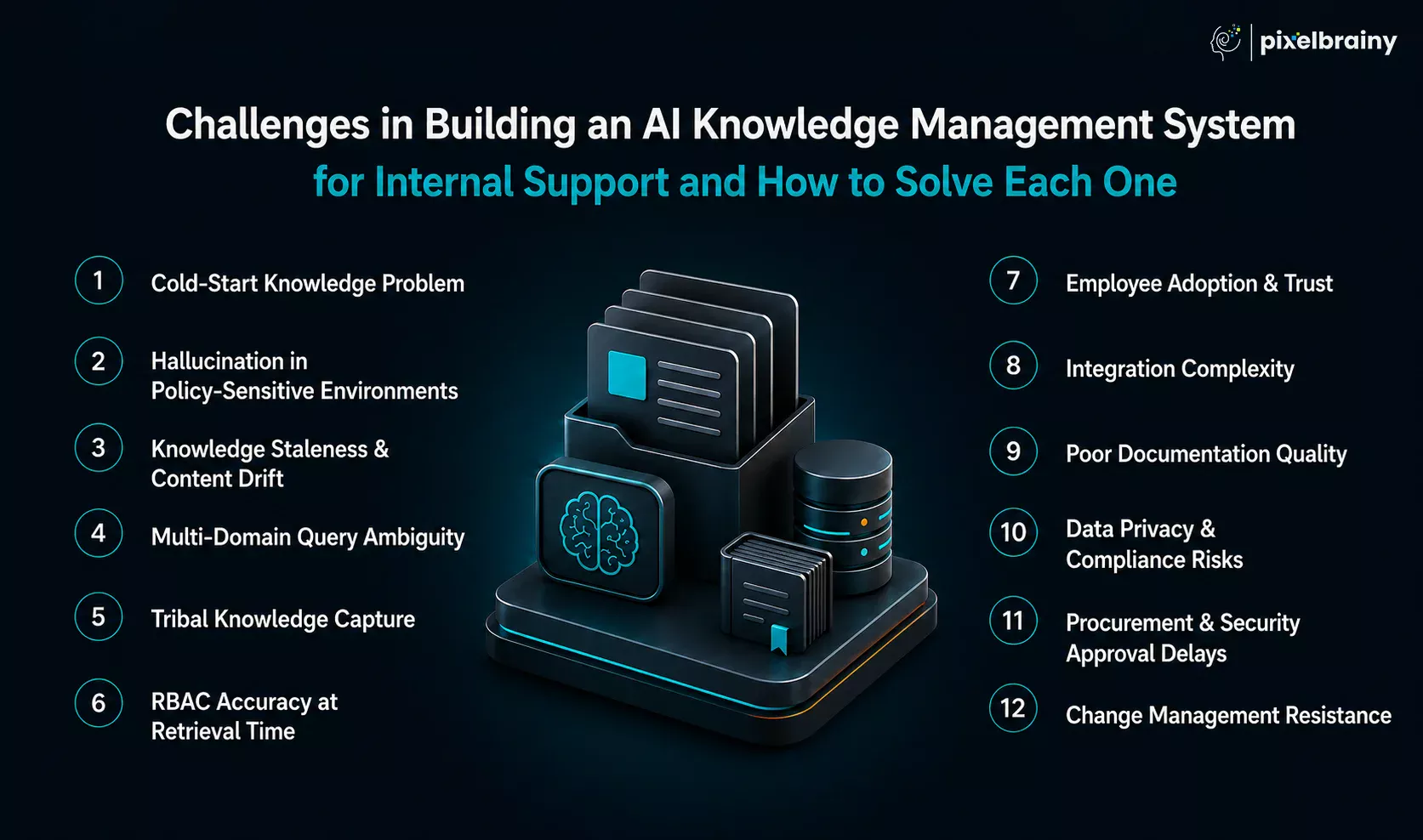
| Challenge | Why It's Harder Than Expected | Recommended Solution |
|---|---|---|
| Cold-Start Knowledge Problem | A new AI platform has no understanding of your organization on day one. Even the best model performs poorly when knowledge sources are incomplete, inconsistent, or poorly organized. | Conduct a structured 2–3 week knowledge seeding sprint. Prioritize high-value documents, historical tickets, SOPs, FAQs, and support resolutions before launch. |
| Hallucination in Policy-Sensitive Environments | One inaccurate HR, compliance, legal, or security response can damage employee trust and create business risk. Hallucination in enterprise AI knowledge management becomes especially dangerous when AI sounds confident while being wrong. | Implement strict RAG grounding, source citations, confidence scoring, and automatic escalation to human experts for high-risk queries. |
| Knowledge Staleness & Content Drift | Policies, procedures, and systems evolve continuously. Without active maintenance, the platform begins referencing outdated information. | Use automated freshness scoring, webhook-triggered re-indexing, document version tracking, and stale-content alerts within the admin dashboard. |
| Multi-Domain Query Ambiguity | Internal support requests are often vague. A simple request like "reset my account" may refer to VPN access, email credentials, SSO login, or finance systems. | Implement intent classification before retrieval and enrich search context using employee role, department, location, and system access data. |
| Tribal Knowledge Capture | Critical organizational knowledge often exists only in the experience of senior employees rather than formal documentation. Retirement and turnover can result in permanent knowledge loss. | Run AI-assisted knowledge extraction workshops, record expert interviews, transcribe conversations, and automatically convert them into structured knowledge articles. |
| RBAC Accuracy at Retrieval Time | Many organizations secure results after retrieval rather than before retrieval. This can expose sensitive content through citations or generated responses. | Apply role-based filtering directly at the vector search and retrieval layer so unauthorized content never enters the generation process. |
| Employee Adoption & Trust | Even highly accurate systems fail when employees prefer asking colleagues instead of using AI. Trust must be earned gradually. | Start with low-risk support scenarios, display source citations, show confidence indicators, and continuously improve answers using employee feedback. |
| Challenge | Why It Creates Problems | Recommended Solution |
|---|---|---|
| Integration Complexity | Modern enterprises operate across dozens of systems, each with different APIs, permissions, and data structures. | Prioritize integrations based on business value and establish a standardized integration architecture early in the project. |
| Poor Documentation Quality | Historical content is often duplicated, outdated, inconsistent, or poorly tagged, reducing retrieval accuracy. | Conduct content audits, clean legacy documentation, and establish governance standards before large-scale ingestion. |
| Data Privacy & Compliance Risks | HR, legal, finance, and compliance information requires strict handling throughout the AI pipeline. | Implement encryption, PII detection, audit logging, RBAC controls, and compliance reviews during development. |
| Procurement & Security Approval Delays | Enterprise AI projects often stall while waiting for vendor reviews, security assessments, and compliance approvals. | Engage security, legal, and procurement stakeholders during the discovery phase rather than after development begins. |
| Change Management Resistance | Support teams may perceive AI as a threat rather than a productivity tool, slowing adoption and knowledge contribution. | Position AI as an assistant that augments human expertise, reduces repetitive work, and enables agents to focus on higher-value tasks. |
The organizations that successfully deploy AI knowledge management platforms treat them as knowledge transformation initiatives rather than software projects. They focus on knowledge quality before AI, implement strong RAG governance to reduce hallucinations, enforce security at the retrieval layer, capture tribal expertise early, and build employee trust through transparency and measurable accuracy. In most cases, these operational decisions have a greater impact on success than the choice of AI model itself.
Most AI knowledge management projects struggle because they are designed around technology instead of how internal support teams actually work. The challenge becomes even greater when a single platform must support IT, HR, and finance operations simultaneously. Each team has different knowledge domains, different access requirements, different compliance needs, and different workflows.
A common concern we hear is: "How do we build one AI KMS that serves all three teams without creating a fragmented mess that's harder to maintain than the separate systems we already have?"
Our answer is simple: build one unified intelligence layer, not three separate knowledge systems.
As an AI development company, PixelBrainy designs AI knowledge platforms around a centralized knowledge architecture with domain-specific retrieval, role-based access controls, and workflow-aware experiences. This allows IT, HR, and finance teams to share the same platform while receiving answers tailored to their specific responsibilities and permissions.
"Generic vendors don't understand our knowledge ecosystem." We begin every project with a Knowledge Domain Discovery Workshop. Our experts map knowledge sources, support processes, user roles, access requirements, and common employee questions before architecture decisions are made.
"We're worried the AI will provide inaccurate answers." We implement strict RAG grounding, source citations, confidence thresholds, and escalation workflows. When confidence is low, the system routes employees to the appropriate expert instead of generating unsupported responses.
"We need integrations that fit our environment." Our team builds integrations with Jira, ServiceNow, Confluence, SharePoint, Slack, Microsoft Teams, Google Workspace, and custom enterprise applications, ensuring knowledge flows seamlessly across the organization.
"We don't want another system that requires constant maintenance." We build automated knowledge capture directly into the platform. The system learns from resolved tickets, identifies knowledge gaps, monitors content freshness, and continuously improves without requiring a dedicated knowledge management team.
"We need measurable results." We define ticket deflection, support workload reduction, answer accuracy, and employee adoption as success metrics from day one. Our experts continue optimizing the platform after launch to ensure it delivers lasting business value.
If your support teams are answering the same questions every week, we can help you build a unified AI knowledge management system that learns, scales, and improves automatically while keeping knowledge organized, secure, and easy to maintain.
Building an AI knowledge management system is one of the most impactful investments organizations can make to improve internal support efficiency, preserve institutional knowledge, and empower employees with instant access to accurate information.
To achieve long-term success, four decisions matter most. First, selecting the right architecture, with RAG serving as the best starting point for most enterprises and hybrid approaches offering additional capabilities for mature AI environments. Second, creating a scalable knowledge integration strategy that connects systems such as Confluence, SharePoint, Jira, ServiceNow, Slack, and Microsoft Teams into a unified knowledge ecosystem. Third, implementing robust RBAC and security controls so employees only access information relevant to their role and permissions. Fourth, working with a development partner that understands both AI technologies and the operational realities of internal support teams.
Employees spend valuable hours every week searching for information that should be available within seconds. That lost productivity translates into slower support resolution, higher operational costs, and unnecessary pressure on IT, HR, and operations teams.
If you're exploring how an AI knowledge management system could fit into your organization, the PixelBrainy team is happy to share guidance on architecture, implementation approaches, and realistic development roadmaps tailored to your goals.
Schedule a free consultation call with our AI experts to discuss your requirements and identify the most practical path forward.
An AI knowledge management system is a platform that uses AI, NLP, semantic search, and Retrieval-Augmented Generation (RAG) to capture, organize, retrieve, and deliver organizational knowledge. It helps IT, HR, finance, and operations teams answer employee questions instantly while reducing repetitive support requests.
The cost of developing an enterprise AI knowledge management system typically ranges from $85,000 to $690,000+, depending on project scope, integrations, security requirements, deployment model, and AI capabilities. Most mid-sized enterprise implementations fall between $150,000 and $300,000.
The primary difference is how knowledge is accessed. RAG retrieves information from connected knowledge sources in real time, while fine-tuning embeds knowledge into model weights. For internal support environments with frequently changing policies, RAG is generally the preferred architecture.
Development timelines typically range from 2 to 12 months. A basic MVP can often be delivered within 2–4 months, while enterprise-wide deployments with advanced integrations, security controls, and automation capabilities may require 6–12 months.
The most common integrations include Jira, ServiceNow, Confluence, SharePoint, Slack, Microsoft Teams, Google Drive, and HR platforms. These integrations ensure employees can access accurate knowledge directly within the tools they already use daily.
AI automatically analyzes resolved support tickets, identifies root causes, extracts resolution steps, generates knowledge articles, and categorizes content for future retrieval. This creates a continuous knowledge capture process without requiring manual documentation for every resolved issue.
A well-designed AI knowledge management system can typically deflect 40% to 60% of repetitive internal support tickets. Actual results depend on knowledge quality, integration coverage, employee adoption, and the effectiveness of the retrieval architecture.
Role-based access control restricts knowledge visibility based on employee roles, departments, permissions, and security levels. Advanced systems apply access controls during retrieval, ensuring unauthorized content never enters the AI response generation process.
The biggest risks include poor knowledge quality, AI hallucinations, outdated documentation, weak access controls, integration challenges, and low employee adoption. Successful projects address these risks through governance, RAG architecture, security controls, and continuous optimization.
Yes, AI knowledge management systems can be deployed entirely on-premise using self-hosted LLMs, vector databases, and private infrastructure. This approach is commonly used by organizations handling sensitive HR, financial, healthcare, legal, or government-related information.
An AI knowledge management system is a comprehensive knowledge platform that captures, organizes, retrieves, and continuously updates organizational knowledge. An enterprise chatbot is typically just the interface employees use to interact with that knowledge ecosystem.
The most effective approach is strict RAG grounding. The AI should generate answers only from verified source documents, provide citations, apply confidence thresholds, and escalate uncertain or high-risk questions to human experts when necessary.

About The Author
Sagar Bhatnagar
Sagar Sahay Bhatnagar brings over a decade of IT industry experience to his role as Marketing Head at PixelBrainy. He's known for his knack in devising creative marketing strategies that boost brand visibility and market influence. Sagar's strategic thinking, coupled with his innovative vision and focus on results, sets him apart. His track record of successful campaigns proves his ability to utilize digital platforms effectively for impactful marketing efforts. With a genuine passion for both technology and marketing, Sagar continuously pushes PixelBrainy's marketing initiatives to greater success.

Working with the PixelBrainy team has been a highly positive experience. They understand the design requirements and create beautiful UX elements to meet the application needs. The dev team did an excellent job bringing my vision to life. We discussed usability and flow. Sagar worked with his team to design the database and begin coding. Working with Sagar was easy. He has the knowledge to create robust apps, including multi-language support, Google and Apple ID login options, Ad-enabled integrations, Stripe payment processing, and a Web Admin site for maintaining support data. I'm extremely satisfied with the services provided, the quality of the final product, and the professionalism of the entire process. I highly recommend them for Android and iOS Mobile Application Design and Development.

Great experience working with them. Had a lot of feedback and I found that unlike most contractors they were bugging me for updates instead of the other way around. They were extremely time conscience and great at communicating! All work was done extremely high quality and if not on time, early! They were always proactive when it comes to communication and the work is great/above par always. Very flexible and a great team to work with! Goes above and beyond to present us with multiple options and always provides quality. Amazing work per usual with Chitra. If you have UI/UX or branding design needs I recommend you go to them! Will likely work with them in the future as well, definitely recommended!

PixelBrainy is a joy to work with and is a great partner when thinking through branding, logo, and website layout. I appreciate that they spend time going into the "why" behind their decisions to help inform me and others about industry best practices and their expertise.

I hired them to design our software apps. Things I really like about them are excellent communication skills, they answer all project suggestions and collaborate right away, and their input on design and colors is amazing. This project was complex and needed patience and creativity. The team is amazing to do business with. I will be using them long-term. Glad to see there are some good people out there. I was afraid to try and outsource my project to someone but I am glad I met them! I really can't say enough. They went above and beyond on this project. I am very happy with everything they have done to make my business stand out from the competition.

It was great working with PixelBrainy and the team. They were very responsive and really owned the project. We'll definitely work with them again!

I recently worked with the PixelBrainy team on a project and I was blown away by their communication skills. They were prompt, clear, and articulate in all of our interactions. They listened and provided valuable feedback and suggestions to help make the project a success. They also kept me updated throughout the entire process, which made the experience stress-free and enjoyable.

PixelBrainy is very good at what it does. The team also presents themselves very professionally and takes care of their side of things very well. I could fully trust them taking up the design work in a timely and organised manner and their attention to detail saved us lots of effort and time. This particular project was quite intense and the team showed that they function very well under pressure. Very much looking forward to working with her again!

It's always an absolute pleasure working with them. They completed all of my requests quickly and followed every note I had for them to a T, which made our process go smoothly from start to finish. Everything was completed fast and following all of the guidelines. And I would recommend their services to anyone. If you need any design work done in the future, PixelBrainy should be your first call!

They took ownership of our requirements and designed and proposed multiple beautiful variants. The team is self-motivated, requires minimum supervision, committed to see-through designs with quality and delivering them on time. We would definitely love to work with PixelBrainy again when we have any requirements.

PixelBrainy was a big help with our SaaS application. We've been hard at work with a new UI/UX and they provided a lot of help with the designs. If you're looking for assistance with your website, software, or mobile application designs, PixelBrainy and the team is a great recommendation.

PixelBrainy designers are amazing. They are responsive, talented, and always willing to help craft the design until it matches your vision. I would recommend them and plan to continue them for my future projects and more!!!

They were awesome! Did a good job fast, and good communication. Will work with them again. Thank you

Creative, detail-oriented, and talented designers who take direction well and implement changes quickly and accurately. They consistently over-delivered for us.

PixelBrainy team is very talented and creative. Great designers and a pleasure to work with. PixelBrainy is an excellent communicator and I look forward to working with them again.

PixelBrainy has a very talented design team. Their work is excellent and they are very responsive. I enjoy working with them and hope to continue on all of our future projects.

Transform your ideas into reality with us.
Across these industries, each engagement brings unique challenges, from early-stage product development to scaling complex systems, helping us build a practical understanding of real-world product environments.