AI Summary Powered by PixelBrainy
What happens when your order volume grows faster than your manual order management process can handle?
For wholesalers, distributors, retailers, and eCommerce businesses, processing orders through email, phone, EDI, marketplaces, and websites can become increasingly difficult as transaction volumes rise. When teams manually reconcile orders, update ERP records, route fulfillment requests, and track shipments, even small data-entry mistakes can create inventory mismatches, delayed deliveries, duplicate orders, and unnecessary operational costs.
Consider this real-world scenario: “I am the operations director at a wholesale distribution company and we process 800 orders per day from 600 retailer accounts through a combination of email, phone, EDI, and our website that our order management team manually reconciles into our ERP system. We lose significant time and make costly errors routing orders from different channels into our fulfillment system and our team cannot scale this manual process as our order volume grows. Before I present an order automation software investment to our CEO I need an honest cost breakdown for building custom order automation software that unifies all our order channels and integrates with our existing ERP system.”
This is where order automation software development becomes valuable. A custom solution can centralize orders from multiple channels, validate order information, synchronize inventory, automate routing, connect with ERP and CRM systems, trigger fulfillment workflows, and provide real-time order visibility through one unified system.
Unlike rigid off-the-shelf tools, custom order automation software can be designed around specific business workflows, integration requirements, order volumes, and scalability goals. Businesses can also incorporate AI and machine learning for order prediction, intelligent routing, anomaly detection, demand forecasting, and personalized customer experiences.
In this guide, we will explore how to develop order automation software, essential order management software features, advanced capabilities, development steps, technology choices, common implementation challenges, and the cost of order automation software development for businesses planning to automate and scale their order operations.
What exactly is order automation software, and how does it manage the entire order lifecycle with less manual intervention?
Order automation software is a digital system designed to automate and coordinate the activities involved in receiving, processing, fulfilling, and tracking customer orders. It connects order channels and business systems so information can move through predefined workflows with greater speed, consistency, and visibility.
For businesses receiving orders through eCommerce websites, marketplaces, EDI, email, phone, or other sales channels, the software can bring order data into a centralized workflow. It can also connect with ERP, CRM, inventory, warehouse, payment, and shipping systems to reduce repetitive data entry and improve coordination between teams.
The order automation process typically follows these stages:
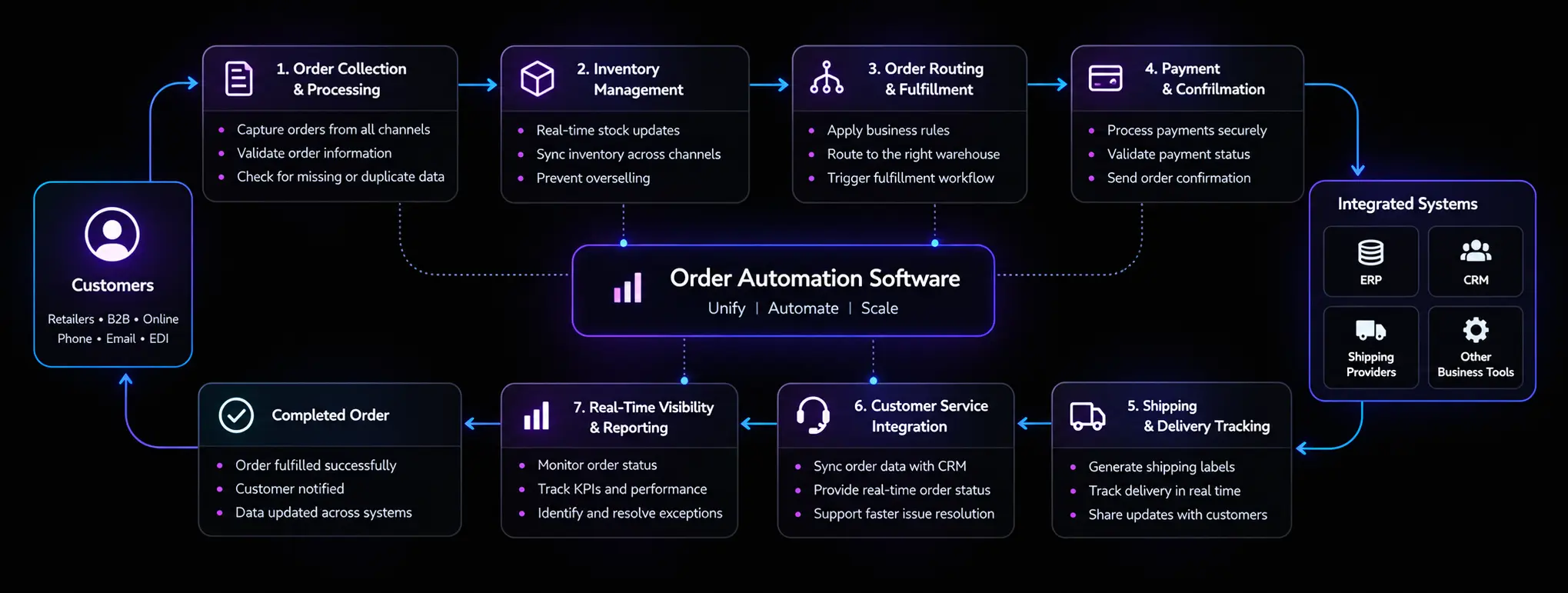
The system collects orders from connected channels and brings them into a centralized order management environment. It can validate customer details, product information, quantities, pricing, and other required fields before the order moves forward.
Once an order is received, the system checks inventory availability and updates stock information across connected channels. This provides teams with current inventory visibility and helps reduce overselling and stock discrepancies.
Based on predefined business rules, orders can be automatically routed to the appropriate warehouse, fulfillment center, or delivery location. Routing can consider factors such as stock availability, customer location, warehouse capacity, and fulfillment priorities.
The software connects with payment gateways to process transactions and verify payment status. After successful processing, automated order confirmations and status updates can be triggered for customers and internal teams.
Once an order is ready for dispatch, the system can connect with shipping providers to generate shipment information and track delivery progress. Customers and support teams can access updated order status throughout the delivery journey.
Order information can flow into connected CRM or customer support systems, giving service teams access to order history, payment status, fulfillment progress, and delivery updates when responding to customer requests.
Order automation software connects order intake, inventory, fulfillment, payments, shipping, and customer service into one coordinated workflow, helping businesses manage orders more efficiently as they scale.
Custom order automation software development is the process of designing and developing an order management solution around a company’s specific workflows, operational requirements, integration needs, and growth plans. Instead of adapting business processes to a pre-built platform, businesses can create automation software that fits how their orders are received, validated, processed, fulfilled, and tracked.
A custom solution can connect multiple order channels, including eCommerce websites, marketplaces, EDI, email, and phone-based workflows, with core business systems such as ERP, CRM, inventory, warehouse, payment, and shipping platforms. This creates a connected order processing environment where information can move between systems with less manual intervention.
One of the major advantages of custom order automation software is the ability to automate repetitive and rule-based activities. Businesses can automate order validation, inventory synchronization, order routing, fulfillment triggers, notifications, invoicing, and status updates while maintaining control over their unique business rules.
Custom order automation software development can also support evolving operational needs. As order volumes increase, businesses can add new sales channels, warehouses, product categories, fulfillment workflows, integrations, and advanced technologies without being restricted by the capabilities of a standard solution.
For organizations dealing with complex order operations, legacy systems, high transaction volumes, or specialized workflows, custom development provides a more adaptable foundation for automation, integration, operational visibility, and long-term scalability.
When the right workflows and integrations are automated, businesses can reduce manual workload, improve order accuracy, accelerate fulfillment, and create a more reliable experience for both teams and customers.
So overall, custom order automation software turns fragmented order processes into a connected, scalable workflow designed around the way your business actually operates.
Why are businesses moving from manual order processing to custom order automation software development, and what makes this investment relevant for companies managing multiple sales channels, high order volumes, and complex fulfillment workflows?
As order operations become more distributed across eCommerce stores, marketplaces, EDI, phone, email, warehouses, and ERP systems, manual reconciliation becomes harder to scale. A modern order automation system can centralize these workflows, reduce repetitive intervention, improve order visibility, and help operations teams process more transactions without adding the same level of manual effort.
The market is also moving in this direction. The global multichannel order management market was valued at $4.18 billion in 2025 and is projected to reach $4.52 billion in 2026, with a 12.2% CAGR through 2034, according to Fortune Business Insights. The market includes capabilities such as order fulfillment, centralized inventory management, channel integration, workflow automation, and analytics.
How can a distributor processing hundreds of daily orders avoid manually reconciling every transaction?
Order automation software for businesses can bring orders from websites, marketplaces, EDI, email, and other channels into a centralized workflow. This gives operations teams a consistent view of incoming orders while reducing duplicate data entry and channel-specific processing.
When employees repeatedly enter customer, product, pricing, inventory, and shipping information across different systems, the risk of errors increases.
With order processing automation, businesses can automate validation, data mapping, order creation, status changes, and workflow triggers. This helps teams spend less time on repetitive reconciliation and more time handling exceptions that genuinely require human attention.
Businesses often ask, “How can we scale order automation as our order volume grows?”
A well-designed custom order automation software solution can scale with increasing transactions, additional warehouses, new product lines, and expanding sales channels. Cloud-native infrastructure, modular services, queue-based processing, and configurable workflows can help the system handle higher workloads without forcing businesses to rebuild the entire platform.
For organizations already using an ERP, replacing the entire technology environment may not be practical.
Custom order automation software development can connect the order workflow with existing ERP, CRM, warehouse, inventory, payment, accounting, and shipping systems. This creates a continuous flow of order data from capture to fulfillment while preserving the systems that already support core business operations.
What happens when the right order reaches the wrong warehouse or inventory information is outdated?
Automated order routing can apply predefined rules based on inventory availability, customer location, warehouse capacity, delivery priorities, product type, or fulfillment cost. This can help businesses make faster routing decisions and maintain greater consistency across fulfillment operations.
AI is becoming increasingly relevant to operational workflows. Deloitte's 2026 research found that 48% of surveyed Indian enterprises reported at-scale AI deployment in supply chain, while 56% reported at-scale adoption in strategy and operations.
For an AI-powered order automation software strategy, businesses can progressively add demand forecasting, order prediction, intelligent exception handling, anomaly detection, customer insights, and other data-driven capabilities. The foundation, however, must be reliable order data and well-integrated workflows.
The next stage of order management automation is moving beyond simple task execution toward connected and increasingly intelligent workflows. McKinsey's June 2026 operations research found that almost 90% of organizations reported at least experimenting with AI, while only 7% said they had scaled it across the enterprise.
For businesses evaluating how to develop order automation software, this highlights an important investment consideration: the platform should be designed not only for today's order processing requirements but also for future AI, analytics, automation, and integration capabilities.
Investing in custom order automation software gives businesses a scalable foundation to unify channels, streamline fulfillment, integrate existing systems, and progressively introduce intelligent automation as operational needs grow.
Which type of order automation software development is right for a business: a basic automation tool, a fully custom order automation software platform, an enterprise-grade system, or a cloud or on-premise deployment?
The answer depends on how your business receives and processes orders, the number of transactions handled each day, existing ERP and CRM infrastructure, fulfillment complexity, integration requirements, security expectations, and future growth plans. A small business may only need automation for invoicing, order entry, and inventory updates, while a growing distributor may require multi-channel order management, real-time inventory synchronization, automated order routing, and ERP integration.
For example, an operations team processing orders from an eCommerce website, EDI, email, and marketplaces may ask, “Should we invest in custom order management software or use a ready-made automation platform?” The right approach depends on whether the business needs configurable workflows, specialized integrations, greater control, or enterprise-level scalability.
Understanding the major types of order automation software helps businesses compare capabilities and identify the architecture and deployment model that best fit their operational requirements.
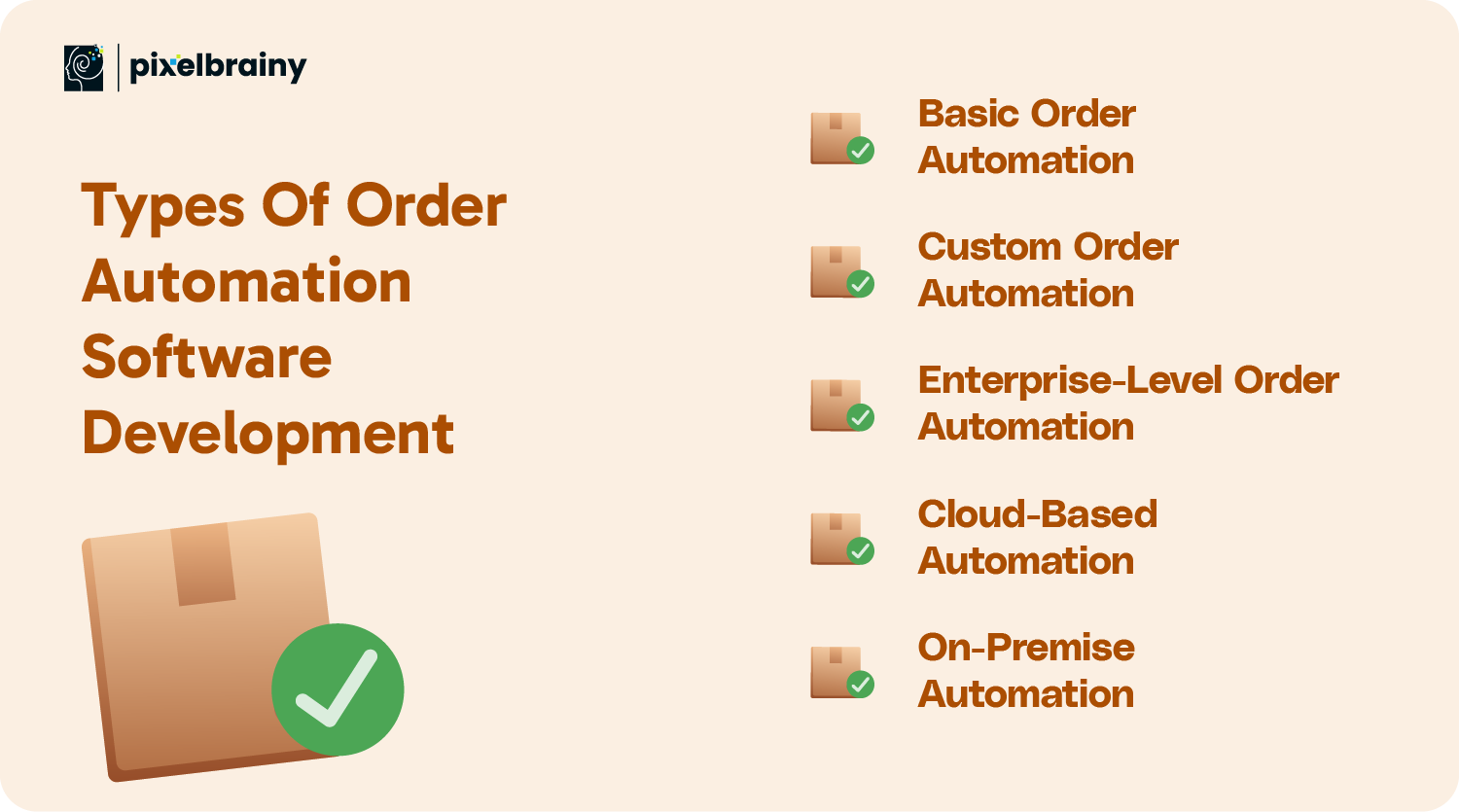
This type of software is widely chosen for automating simple, repetitive jobs like invoicing, order processing, and inventory updates. Small businesses with specific requirements and unlimited complexity can go for this type of software. It offers basic automation without integration or advanced customization.
Key Features:
Best For:
Custom order automation software is tailored to business-specific requirements, providing scalability and flexibility. It allows businesses to integrate seamlessly with their existing systems, such as CRM and ERP, and it can be designed to manage complex workflows and specific business processes.
Key Features:
Best For:
This solution is crafted for large organizations with high-volume order processing requirements. Customizable order management software for enterprises arises with advanced features like complex inventory management, multi-channel order fulfillment, real-time analytics, and seamless operations across different regions and departments.
Key Features:
Best For:
Cloud-based order management software offers flexibility, facilitating businesses to access and manage order automation software from anywhere. Such systems are cost-effective, scalable, and perfect for companies looking for quick deployment, easy access to real-time data, and minimal IT maintenance.
Key Features:
Best For:
Installed directly on business servers, on-premise solutions offer complete control over the system's operations and security. This type of software is ideal for organizations with strict data privacy needs or those that prioritize handling infrastructure internally.
Key Features:
Best For:
The right type of order automation software depends on your order volume, workflow complexity, integration needs, infrastructure preferences, and scalability goals, making business requirements the starting point for every automation decision.

What can your business actually gain when you move from manual order processing to automated workflows?
For companies handling orders across multiple channels, the value of automation extends beyond saving employees time. A well-designed solution can improve order accuracy, keep inventory information synchronized, accelerate fulfillment, strengthen operational visibility, and create a smoother customer experience. These advantages become even more important when order volumes increase and teams need to process more transactions without creating additional manual bottlenecks.
Consider a growing wholesale or distribution business asking, “Can we create an order automation software solution that connects our sales channels with inventory and fulfillment while giving our team real-time stock visibility?” This is where the right order automation software development strategy can create measurable operational value.
Whether a business wants order automation software development with inventory sync and real time stock management features, the benefits can extend across both internal operations and the customer journey.
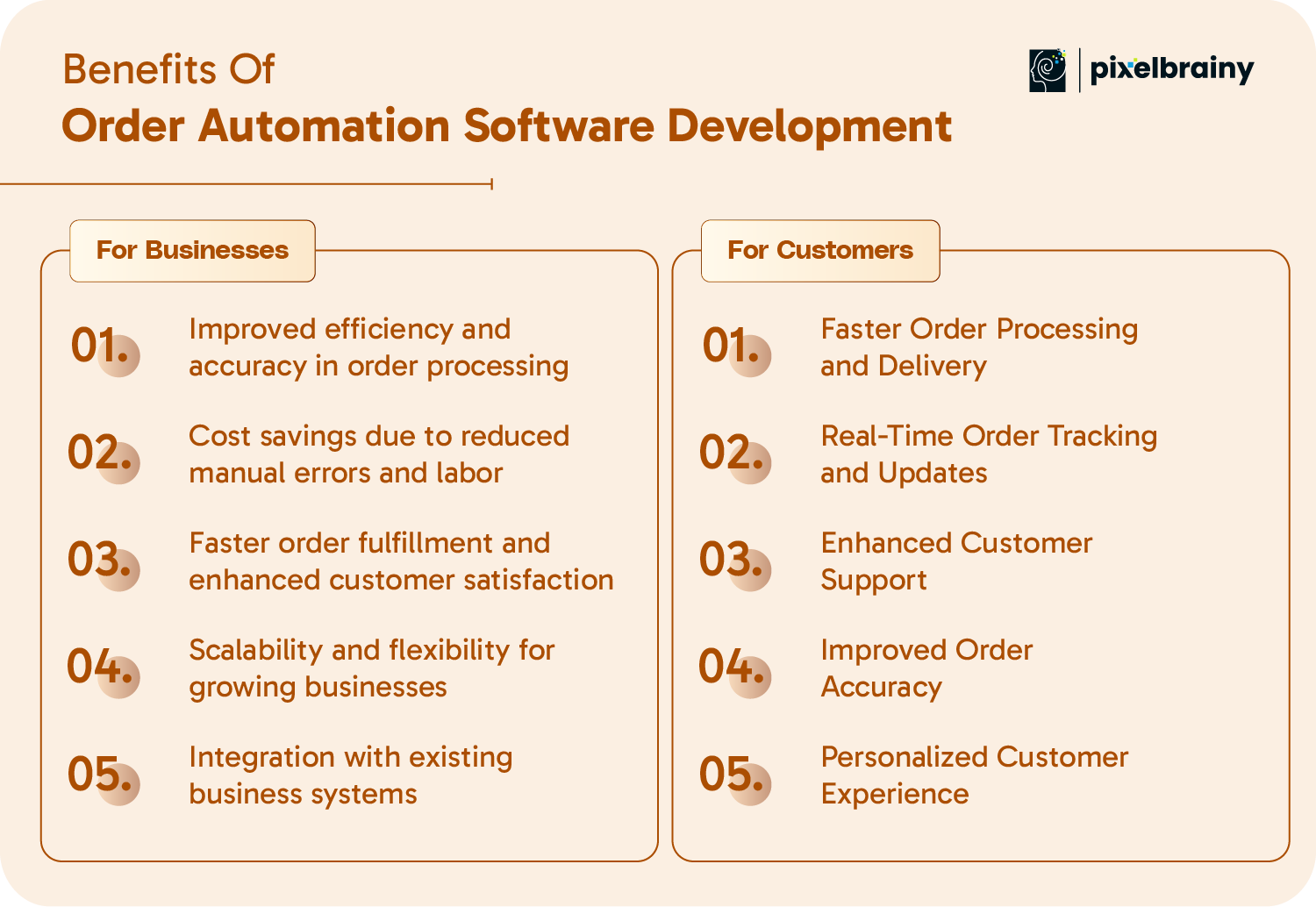
For Businesses
Order automation software diminishes the requirement for manual data entry, ensuring more precise, faster order processing, reducing human errors, and enhancing consistency across business operations.
Businesses can save resources and time by automating their routine jobs. This results in significant cost savings with mitigated manual work and reduced risk of expensive errors.
Order fulfillment automation software development is a must for all-sized businesses. By automating the order fulfillment process, companies can pace up fulfillment times, ensuring that customers get their orders accurately and quickly, leading to increased repeat business and higher customer satisfaction.
With the expanding business, order automation software holds the caliber to scale with it. The flexibility of software helps firms manage boosting order volumes, new products, and growing business operations without any need for additional resources.
CRM or ERP integration with order automation software enables seamless data flow and improved coordination between departments, enhancing overall business efficiency.
For Customers
With order processing automation software, businesses can rapidly process and fulfill orders, ensuring timely deliveries. This paste operation increases customer satisfaction and improves customers' overall experience with the brand.
With the real-time order tracking software, customers can instantly track their orders through timely updates on their order status, shipment, and expected delivery time. This transparency improves customer confidence and keeps them well-informed during the process.
Leveraging the power of automated systems, customer service teams can effortlessly manage orders and aim to resolve issues more efficiently. Customers enjoy providing solutions to their queries and quicker responses that enhance their experience with the brand.
Order automation eliminates human error risks in order processing, ensuring customers receive the right items, quantities, and sizes. This precision fosters trust and mitigates the chances of returns and complaints.
Order automation software can accumulate data on customer's past purchases, preferences, and browsing behavior, allowing businesses to provide tailored recommendations, promotions, and discounts, creating a more personalized shopping experience.
By leveraging these benefits of developing order automation software, businesses can streamline order operations, improve inventory visibility, reduce processing errors, accelerate fulfillment, and deliver a more consistent customer experience as order volumes grow.
What features should businesses prioritize when they develop order automation software for high-volume, multi-channel order operations?
A modern order automation software development solution should do more than capture and process orders. It should connect the complete order lifecycle, from order intake and inventory availability to fulfillment, payments, delivery, returns, and customer communication. The right feature set can help businesses automate repetitive tasks, maintain accurate data across systems, and give teams real-time visibility into operational performance.
Consider a distributor handling orders through an eCommerce store, EDI, marketplaces, and direct sales channels. A common question is, “What features should we include in order management automation software to synchronize inventory, route orders automatically, and prevent fulfillment errors?” The answer depends on business workflows, but capabilities such as real-time order tracking, automated inventory management, multi-channel order management, ERP and CRM integration, intelligent order routing, and analytics form the core of an effective solution.
The following features can help businesses create a connected and scalable order management automation system:
| Feature | Description |
| Real-Time Order Tracking | Allows customers and businesses to monitor orders in real-time, enhancing transparency and diminishing uncertainty. |
| Automated Inventory Management | Updates the stock levels automatically, ensuring precise inventory tracking and controlling overstocking or shortages. |
| Payment Gateway Integration | Permits seamless and secure online payments via various methods, such as UPI, credit cards, or digital wallets. |
| Customer Order Notifications | Sends automated SMS alerts or emails to inform customers about their order status. |
| Multi-Channel Order Management | Combine orders from multiple sales channels (e.g., website, marketplace) into a unified system. |
| Order Status Updates | Shows detailed updates for every order stage, like processing, shipping, and delivery. |
| Automated Order Routing | Automatically assign orders to the closest warehouse or delivery hub for quicker fulfillment. |
| Product Recommendations | Utilizes AI to suggest relevant or frequently bought-together items to customers for a tailored shopping experience. |
| Order History and Data Analytics | Offers businesses valuable insights into purchase behaviors, order trends, and customer preferences. |
| Customizable Order Workflows | Delivers flexibility to tailor workflows per the specific business requirements and operational needs. |
| Integration with Third-Party Systems | Seamlessly connects with existing CRM, ERP, and other business tools to provide seamless data flow. |
| Returns and Refund Management | Facilitates the handling of returns and refunds, improving customer satisfaction and loyalty. |
| Order Validation and Error Detection | Recognizes and resolves order discrepancies automatically, providing accuracy and consistency. |
| Shipping and Delivery Integration | Connects with shipping partners to simplify delivery processes and offer real-time shipping updates. |
| Reporting and Dashboard Analytics | Provides actionable insights via dashboards, enabling businesses to make informed decisions to optimize operations. |
These features give businesses the foundation to automate order workflows, synchronize operational data, improve fulfillment accuracy, and create a more scalable order management environment across growing sales channels.
What capabilities can take order automation software development beyond basic order processing and make it better suited to complex, high-volume operations?
As businesses connect more sales channels, warehouses, suppliers, and customer touchpoints, advanced automation needs to handle more than repetitive tasks. Modern order management software development can incorporate AI, machine learning, predictive analytics, intelligent routing, real-time synchronization, and configurable workflows to improve operational decision-making and responsiveness.
For example, a growing distributor may ask, “How can we build order automation software that predicts demand, keeps stock synchronized across channels, detects unusual transactions, and automatically routes orders to the most suitable fulfillment location?” Advanced features can address these requirements while creating a stronger foundation for future expansion.
When developing custom order automation software, businesses should prioritize advanced capabilities according to their order volume, data maturity, integration landscape, operational complexity, and long-term automation roadmap.
| Feature | Description |
| Artificial Intelligence for Order Prediction | Leverage AI algorithms to anticipate customer orders depending on past data, boosting efficiency. |
| Voice Command Integration | Allow users to manage orders via voice commands for hands-free convenience. |
| Blockchain for Supply Chain Transparency | Ensure transparent, secure, and tamper-proof orders and easy supply chain tracking. |
| Machine Learning for Dynamic Pricing | Automatically modify pricing based on competition, demand, and market trends. |
| Predictive Analytics for Inventory Replenishment | Predict inventory requirements to avoid stockouts and overstocking issues. |
| Robotic Process Automation (RPA) for Repetitive Tasks | Automate manual, redundant tasks, such as data entry and invoicing, to save time. |
| Cross-Platform Synchronization | Synchronize orders across numerous platforms in real time to maintain consistency. |
| Smart Order Routing Based on Location | Automatically assign orders to the nearest fulfillment center or warehouse. |
| Automated Tax Calculation | Ease tax compliance with automated calculations depending on location and type. |
| AI-Powered Fraud Detection | Identify and avoid fraudulent activities during transactions with AI algorithms. |
| Real-Time Stock Synchronization Across Platforms | Update stock levels immediately to prevent overselling or discrepancies. |
| Augmented Reality (AR) for Order Visualization | Permit customers to visualize products before purchase in real-time. |
| Multi-language and Multi-Currency Support | Meet the global customers' requirements with language and currency options. |
| Advanced Customization of Order Workflows | Personalize order processing workflows suiting unique business needs. |
| Cloud-Based Scalability for Future Growth | Ensure seamless scalability with a cloud-based infrastructure for business expansion. |
Advanced features give order automation platforms greater intelligence, synchronization, flexibility, and scalability, helping businesses move from basic task automation toward a more connected and data-driven order operation.
What does it take to move from an order automation idea to a production-ready system that can handle real orders, connect with existing business software, and scale with growing operations?
The development process of order automation software should begin with business workflows rather than technology choices. Teams need to understand how orders enter the organization, how inventory is checked, how fulfillment decisions are made, which systems exchange data, and where manual intervention creates delays or errors.
For businesses wondering about the steps to build order automation software from idea to launch, the process generally covers requirements, architecture, interface design, MVP planning, development, testing, deployment, and continuous improvement. Each stage reduces implementation risks while keeping the solution aligned with operational goals.
Here is a practical approach for building an order automation software solution that can support multi-channel ordering, ERP integration, inventory synchronization, fulfillment automation, analytics, and future AI capabilities.
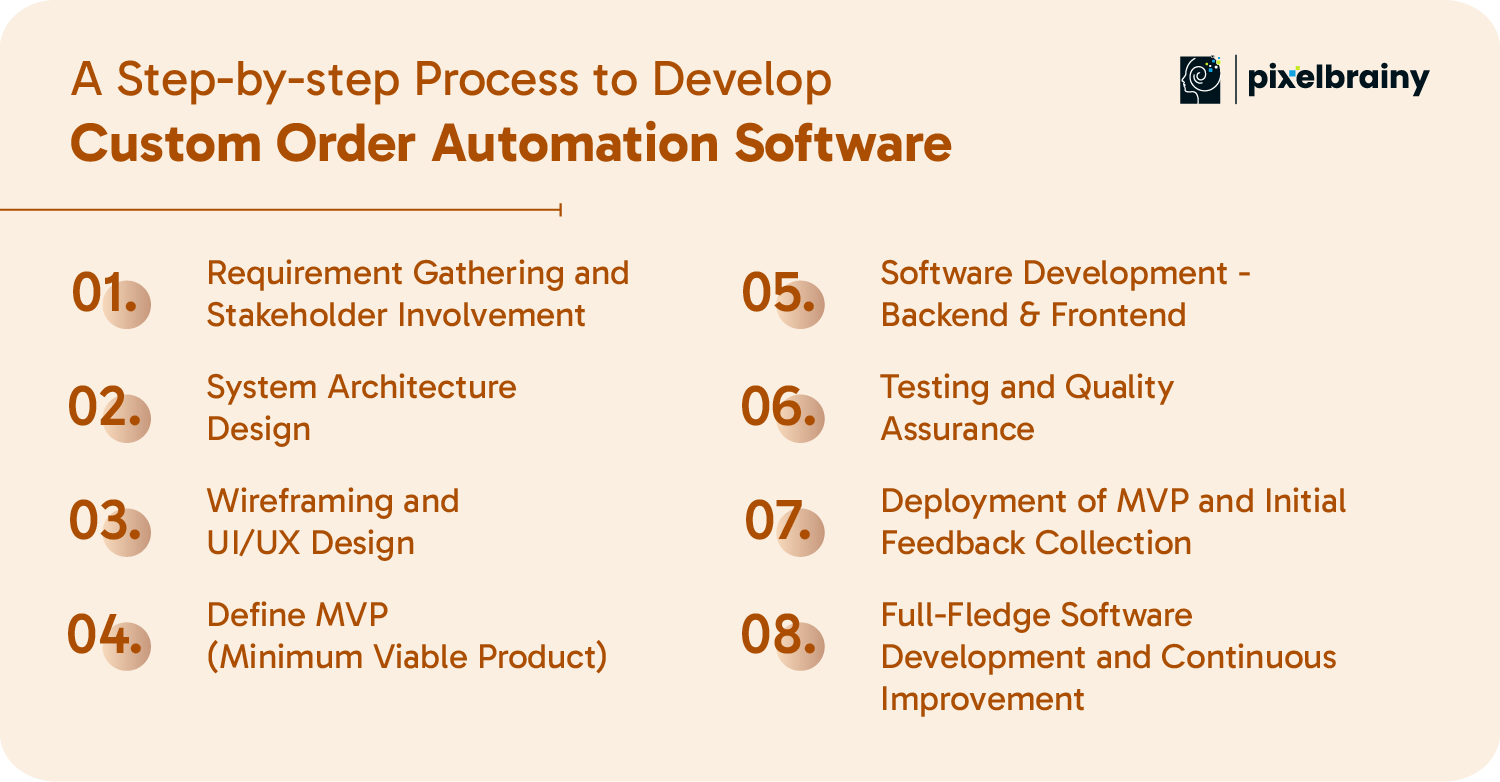
The first step in how to build order automation software from scratch is understanding the current order lifecycle. Bring together operations, sales, warehouse, finance, customer support, IT, and other relevant stakeholders to document how orders are received, validated, processed, fulfilled, returned, and reported.
Identify every order source, including websites, marketplaces, EDI, email, phone, and internal sales systems. Map the ERP, CRM, inventory, payment, warehouse, and shipping integrations that the software must support.
Also document order volumes, business rules, approval requirements, exception cases, user roles, reporting needs, and security expectations. A detailed requirements baseline helps the team determine what the solution must automate and which processes should remain human-controlled.
Once requirements are clear, define the technical architecture for the solution. The architecture should support current order volumes while leaving enough flexibility for new sales channels, warehouses, products, integrations, and business rules.
For order automation software development, the architecture may include separate services for order intake, validation, inventory, routing, fulfillment, payments, notifications, analytics, and administration. API-based integrations can connect the platform with ERP and other systems, while event-driven workflows can help process updates across multiple services.
Architecture planning should also cover authentication, data storage, monitoring, backups, error handling, and access control. A scalable foundation at this stage can reduce expensive restructuring as the business expands.
The interface should reflect the actual workflows of the people using the system. Operations teams may need dashboards for order queues, exceptions, inventory status, routing decisions, and fulfillment progress, while customers may need simple order placement and tracking experiences.
Working with a specialized UI/UX design company can help translate complex workflows into clear screens, navigation, alerts, and actions. Wireframes should be validated with actual users before development begins.
The design phase should also account for role-based access, responsive layouts, accessibility, search, filtering, bulk actions, and real-time status visibility. A well-planned interface reduces training requirements and makes automated workflows easier to monitor.
The next stage is to determine the smallest useful version that can solve the most important operational problems. Instead of automating every process immediately, prioritize capabilities that deliver immediate business value.
A typical MVP may include multi-channel order capture, order validation, inventory synchronization, ERP integration, automated routing, fulfillment status, notifications, and basic reporting.
Organizations can also use PoC development when a critical integration or automation workflow needs technical validation before full implementation. The MVP development should have measurable success criteria, such as reduced manual touches, faster processing time, fewer order errors, or improved inventory visibility.
This is where the planned workflows are converted into working software. The backend handles business rules, order processing, integrations, inventory updates, routing, authentication, and data management, while the frontend provides interfaces for customers, operations teams, administrators, and other users.
When businesses develop order automation software, integration reliability becomes especially important. ERP, CRM, warehouse, payment, shipping, and external sales channels should exchange data through well-defined APIs and validation rules.
Advanced capabilities can be introduced through AI integration for demand prediction, anomaly detection, intelligent recommendations, or workflow assistance where sufficient data and clear business use cases exist.
Testing should verify much more than whether individual features work. The solution needs to handle real-world order scenarios, integration failures, inaccurate data, duplicate orders, inventory conflicts, payment issues, routing exceptions, and unexpected traffic.
Functional testing confirms that workflows behave according to business rules. Integration testing validates communication with ERP, CRM, inventory, payment, and shipping systems. Performance testing checks how the platform behaves under increasing order volumes.
Security testing should cover authentication, authorization, sensitive data handling, API security, and vulnerability assessment. User acceptance testing should involve operational teams to confirm that the system works effectively in real business conditions.
After successful testing, deploy the MVP in a controlled environment rather than switching the entire operation at once. A phased rollout can begin with selected users, order channels, product categories, warehouses, or regions.
Monitor order processing times, integration performance, exception rates, inventory synchronization, fulfillment accuracy, and user adoption. Collect structured feedback from operations and customers to identify workflow gaps or usability issues.
This stage is particularly useful for validating assumptions made during planning. The data collected during the initial launch can guide improvements before broader deployment and help establish a stronger business case for additional automation.
Once the MVP has demonstrated value, expand the system based on operational priorities and validated feedback. Additional capabilities may include advanced analytics, intelligent routing, predictive inventory replenishment, automated returns, additional sales channels, supplier integrations, and AI-powered decision support.
Continuous improvement should include performance monitoring, security updates, integration maintenance, workflow optimization, and regular feature enhancements. Businesses also need a clear process for reviewing automation rules as products, customers, markets, and fulfillment strategies change.
For companies evaluating to create an order automation software platform for long-term use, working with experienced top product development companies can provide support across product strategy, engineering, integrations, scaling, and post-launch optimization.
A structured development process helps businesses turn complex order workflows into a reliable automation platform that can launch efficiently, integrate with existing systems, and scale as operational demands increase.

What is the cost to develop custom order automation software? Let’s find out.
The cost to develop order processing software can vary ranging from $40,000 to $400,000. The investment amount depends on various factors, such as the complexity of the software, features, the technology stack, and the expertise of the development team you hire. Businesses seeking to ease their operations, get rid of manual errors, and boost productivity will acknowledge this software as a game-changer.
Cost-Affecting Factors
The factors below significantly impact the development cost of order automation software.
Let you know the basic features, such as order tracking and reporting, will cost you less than the advanced features, like blockchain integration, AI-powered order prediction, and real-time analytics. Deciding the best features of order automation software for small businesses and enterprises will influence overall success.
Also Read: AI In eCommerce: 15 Use Cases Artificial Intelligence is Transforming The eCommerce Industry
The cost to hire an in-house team will cost you more than outsourcing a team of experienced developers. Or you can hire a specialized company like PixelBrainy and enjoy a hassle-free custom automation software development journey.
Before you build order automation software, you should know that leveraging advanced technologies such as AI, machine learning, cloud computing, or RPA can help your business drive growth. But for that, you must fix an additional budget other than the basic software cost.
Customized software tailored to specific business processes will cost more than the standard off-the-shelf solutions. While you build software, you should know that with the customization requirements, the cost also increases.
The choice of our development platform also impacts the overall cost. If you are building for a single platform (mobile or web), it will cost you more than the cross-platform development.
Integrating ERP, CRM, payment gateways, and other third-party systems will not only boost the functionality but also increase software development costs.
You should keep an amount aside for performing rigorous testing that will ensure your software is secure, scalable, and doing as expected. But it will come at an extra cost.
Besides, for development, you need an additional amount for post-launch support to get ongoing updates, maintenance, and feature improvements that will increase the cost.
| Cost Type | Cost Range |
| Basic Order Automation Software | $40,000–$70,000 |
| Custom Order Automation Software | $70,000–$150,000 |
| Enterprise-Level Software | $150,000–$400,000 |
Yes, you need a considerable amount of order automation software development, but trust the fact that the benefits in terms of scalability and productivity will far outweigh the upfront cost.
You need to meticulously analyze your business requirements and work with experienced developers to create a solution that suits your budget and paces up your business growth. Also, to be on the safer side, remember to consider these factors that may hinder your development process later.
Also Read: AI Software Development Cost (10K-300K+): Know How Much Your Software Will Cost
Which technology stack is best for order automation software development when a business needs to connect multiple order channels, synchronize inventory, integrate ERP and CRM systems, and process growing transaction volumes?
The answer depends on the platform’s workflow complexity, integration requirements, expected order volume, security needs, deployment model, and future automation roadmap. A small order processing system may require a relatively lightweight stack, while enterprise order automation software may need cloud infrastructure, microservices, event-driven communication, robust databases, API integrations, AI capabilities, and DevOps automation.
For example, a wholesale business handling orders through EDI, eCommerce, marketplaces, and direct sales may ask, “What technology should we use to build order automation software that keeps order and inventory data synchronized across every channel?” In this scenario, the technology stack should prioritize reliable integrations, real-time data exchange, scalability, security, and fault tolerance rather than simply choosing the most popular tools.
The following technologies can be considered when developing order automation software, based on the solution’s functional and technical requirements:
| Category | Tools & Technologies |
| Programming Languages | Python, Java, JavaScript, C#, PHP |
| Frontend Frameworks | React, Angular, Vue.js |
| Backend Frameworks | Node.js, Django, Ruby on Rails, Spring Boot |
| Database Systems | MySQL, PostgreSQL, MongoDB, Oracle |
| Cloud Platforms | AWS, Microsoft Azure, Google Cloud |
| AI & Machine Learning | TensorFlow, PyTorch, scikit-learn |
| Automation Tools | UiPath, Zapier, Blue Prism, Power Automate |
| Blockchain Frameworks | Ethereum, Hyperledger Fabric |
| API Tools | Postman, Swagger, GraphQL |
| Testing Tools | Selenium, JUnit, TestNG, Postman |
| Integration Platforms | MuleSoft, Dell Boomi, Apache Kafka |
| Version Control | Git, GitHub, Bitbucket |
| DevOps Tools | Jenkins, Docker, Kubernetes |
| Analytics Tools | Google Analytics, Power BI, Tableau |
| Payment Gateways | Stripe, PayPal, Razorpay |
The right technology stack gives order automation software the foundation to integrate business systems, automate workflows, handle real-time data, and scale reliably as order volumes and operational complexity increase.
Businesses evaluating order automation software development generally have two paths: invest in a custom platform designed around their workflows or implement a ready-made solution with predefined capabilities. The right option depends on the complexity of order operations, existing technology infrastructure, integration requirements, budget, implementation timeline, and long-term growth plans.
A ready-made platform can work well when standard order processing, inventory management, reporting, and fulfillment workflows meet the business requirements. However, companies managing multiple sales channels, complex routing rules, legacy ERP systems, high transaction volumes, or specialized workflows may need the flexibility offered by custom order automation software development.
For example, a growing distributor may ask, “Should we build custom order management automation software or adopt an off-the-shelf platform when our workflows need ERP integration and channel-specific automation?” Comparing both approaches across customization, scalability, integration, ownership, cost, security, and maintenance can help decision-makers identify the better fit.
| Aspect | Custom Order Automation Software | Ready-Made Solutions |
| Customization | Completely customizable to fulfill unique business needs. | Limited customization linked to the vendor’s offerings. |
| Implementation Time | More extended development time is needed because of the tailored design. | Quick to implement with pre-built functionalities. |
| Scalability | Easily scalable and supports business growth and varying needs. | Scalability relies on the vendor's updates and policies. |
| Initial Cost | Higher upfront cost but delivers long-term ROI. | Lower initial cost, fit for small budgets. |
| Integration | Seamless integration with existing systems like ERP or CRM. | It may need extra effort or compromise for integration. |
| Ownership | Complete ownership of the software with full control. | Limited ownership; depends on the vendor for updates and support. |
| Features | Features are created based on precise business needs. | Comes with predefined features and may lack advanced options. |
| Maintenance and Support | Needs in-house or outsourced maintenance. | Counts on vendor-provided support, which may increase costs. |
| Flexibility | Provides maximum flexibility to adjust to business processes. | Limited to the vendor’s framework and limitations. |
| Security | Custom-built with advanced security protocols tailored to your requirements. | Security relies on the vendor and is shared with other users. |
The comparison shows that custom order automation software is generally better suited to businesses with unique processes, complex integrations, and long-term scalability requirements, while ready-made solutions can be practical for organizations that prioritize faster deployment and standard functionality.
The best choice depends on whether your business needs immediate access to standard automation or a flexible order management platform built around its workflows, integrations, and future growth.
Successful order automation software development requires careful planning across technology, integrations, security, scalability, and user adoption. The complexity increases when a business already has established ERP systems, multiple order channels, high transaction volumes, or workflows that vary by product, warehouse, customer, or region.
For example, an operations team may need to develop order automation software that connects an aging ERP with eCommerce, EDI, warehouse, payment, and shipping systems while maintaining accurate inventory and order status in real time. In such environments, automation cannot simply be layered onto existing processes. The solution needs a clear integration strategy, flexible workflow architecture, strong security controls, and an implementation plan that supports gradual adoption.
Below are the common challenges businesses may encounter while building an order automation software solution, along with practical approaches for addressing them.
Challenge #1: Legacy systems usually lack compatibility with the latest automation tools, which makes data exchange difficult.
Solution: Go for middleware and APIs to bridge the gap and witness smooth integration between older and new systems.
Challenge #2: You need to build a tailored solution that can align with dynamic business requirements, which can be complex and time-consuming.
Solution: You should conduct a detailed requirement analysis and connect with expert developers to design customized features without impacting functionality.
Challenge #3: With automation systems, you can manage sensitive business and customer data, but it can make them prone to cyber threats.
Solution: Implement robust security measures, like multi-factor authentication and encryption, and perform regular security audits to protect data.
Challenge #4: You can handle increasing transaction volumes and growing user demands scaling your software. But this may strain system resources.
Solution: You must create a modular cloud-based architecture to ensure easy scalability without impacting performance.
Challenge #5: Customers and employees may find adopting new tools challenging because of a lack of familiarity or a steep learning curve.
Solution: Build a user-friendly UI/UX and provide in-depth training programs to facilitate seamless adoption.
While order automation system development arrives with challenges, dealing with them can result in a solution that revolutionizes business operations and boost ROI.
Addressing these challenges early helps businesses build a secure, scalable, and integration-ready order automation platform that can support reliable operations as order volumes and business complexity increase.
The future of order automation software development is moving toward connected, intelligent, and increasingly autonomous order operations. Businesses are progressing beyond basic task automation and looking at technologies that can improve demand prediction, decision-making, order accuracy, fulfillment coordination, and real-time customer experiences.
For companies planning to develop order automation software for growing order volumes, the technology roadmap should account for more than current operational needs. AI-driven decision support, intelligent process automation, real-time synchronization, cloud-native infrastructure, and emerging interaction models can help create an order management environment that is more adaptable and scalable.
For example, a business may ask, “What technologies should we add to our order automation platform to reduce repetitive work today while preparing our operations for more intelligent automation in the future?” The following trends highlight the capabilities that are likely to influence the next generation of order management automation.
AI automation is transforming order automation software by enabling businesses to predict customer demand, automate repetitive tasks, detect order anomalies, and improve operational decision-making. Integrating AI and automation can streamline order processing, reduce manual errors, improve efficiency, and deliver more personalized customer experiences.
Voice-activated ordering has been chosen as a crucial feature in order automation systems because of the increasing popularity of voice assistants like Alexa, Siri, and Google Assistant. This technology eases customers with hands-free order placement, building a convenient and seamless experience, specifically in a fast-paced world.
Blockchain holds the caliber to offer secure and transparent transaction records, and this makes it the most adopted technology worldwide. Blockchain facilitates order traceability, improving customer trust, enhancing the overall supply chain efficiency, diminishing fraud, and boosting data integrity.
Leveraging the power of Robotic Process Automation (RPA), companies automate redundant jobs in the order fulfillment process, like order entry and inventory tracking. With RPA, they can ease operations, avoid human errors, and improve speed, resulting in scalability and cost savings.
Cloud-based order management software revolutionizes how order automation software is built and deployed. Cloud-native solutions arrived with scalability and flexibility for businesses and let them access data in real time for rapid decision-making and smooth collaboration across global teams.
Order automation software development is going to thrive, integrating with new technologies like AI, machine learning, blockchain, voice activation, and cloud systems, driving increased transparency and efficiency.
These trends are pushing order automation toward intelligent, connected, and scalable operations where AI, workflow automation, real-time data, and cloud infrastructure work together to support faster and more adaptable order management.
For businesses looking to modernize complex order operations, the development partner matters as much as the technology itself. PixelBrainy is an AI software development company that helps businesses design and develop custom automation solutions aligned with their operational workflows, integration requirements, and long-term growth goals.
Our approach goes beyond simply automating order entry. We focus on creating connected order automation software that can integrate with ERP, CRM, inventory, warehouse, payment, and shipping systems while providing the flexibility to evolve as business requirements change.
For a business handling high order volumes across multiple channels, PixelBrainy can help transform fragmented manual processes into a connected, AI-enabled order automation ecosystem designed around real operational requirements.
Partner with PixelBrainy to build custom order automation software that combines AI, automation, integration, security, and scalability into one business-ready solution.

As order volumes, sales channels, and fulfillment workflows become more complex, custom order automation software development can give businesses the control and scalability needed to manage operations more efficiently. From automated order processing and inventory synchronization to ERP integration, real-time tracking, intelligent routing, and AI-powered capabilities, a well-designed platform can connect critical processes through a unified workflow.
The right solution should be built around your existing systems and operational requirements rather than forcing your business to adapt to rigid processes. Whether you are modernizing a legacy order management environment, managing multi-channel orders, or preparing for higher transaction volumes, a scalable automation architecture can support both current workflows and future expansion.
PixelBrainy, an AI software development company, helps businesses design and develop tailored order automation solutions with AI integration, system connectivity, scalable architecture, secure workflows, and user-focused experiences. From initial requirements and product planning to development, deployment, and continuous optimization, our approach is focused on creating software that addresses real operational challenges.
Ready to modernize your order operations? Partner with PixelBrainy to build a secure, scalable, and intelligent order automation platform designed for long-term business growth.
The cost typically ranges between $40,000 and $400,000. The overall investment depends on factors such as features, software complexity, integrations, technology stack, and development team expertise. For an accurate estimate based on your business requirements, connect with a trusted software development company for a detailed cost assessment.
The timeline to develop order automation software depends on the product scope, number of integrations, automation workflows, technology stack, and testing requirements. An MVP with essential order processing features can be delivered faster than a fully customized platform with multi-channel ordering, ERP integration, real-time synchronization, AI features, and advanced reporting.
Yes. You can build order management automation software that integrates with existing ERP, CRM, inventory, warehouse, accounting, payment, and shipping systems. APIs, middleware, and event-driven integrations can synchronize operational data while allowing the business to retain its existing core infrastructure.
Yes. Modern order automation software can consolidate orders from eCommerce websites, marketplaces, EDI, email, phone-assisted sales, and other channels into a unified workflow. It can validate orders, apply business rules, synchronize inventory, route orders to fulfillment locations, and maintain consistent order statuses.
Order processing automation can reduce repetitive data entry, improve order accuracy, accelerate fulfillment, and provide greater visibility across operations. Businesses handling high order volumes can also automate validation, routing, notifications, inventory updates, and other recurring workflows to reduce manual bottlenecks.
AI automation can add intelligent capabilities to custom order automation software, including order prediction, demand forecasting, anomaly detection, intelligent routing, product recommendations, customer insights, and exception identification. These capabilities can help businesses make faster data-driven decisions while reducing unnecessary manual intervention.
Custom order automation software is generally suitable for businesses with unique workflows, complex integrations, specialized fulfillment rules, high order volumes, or long-term scalability requirements. Ready-made solutions can be practical when standard order management workflows are sufficient and faster deployment is the priority.
Look for a development partner with expertise in order automation software development, ERP integration, real-time data synchronization, scalable architecture, AI integration, and secure business applications. PixelBrainy helps businesses develop tailored order automation solutions with inventory synchronization, real-time operational visibility, AI capabilities, and integrations designed around specific business workflows.

About The Author
Sagar Bhatnagar
Sagar Sahay Bhatnagar brings over a decade of IT industry experience to his role as Marketing Head at PixelBrainy. He's known for his knack in devising creative marketing strategies that boost brand visibility and market influence. Sagar's strategic thinking, coupled with his innovative vision and focus on results, sets him apart. His track record of successful campaigns proves his ability to utilize digital platforms effectively for impactful marketing efforts. With a genuine passion for both technology and marketing, Sagar continuously pushes PixelBrainy's marketing initiatives to greater success.

Working with the PixelBrainy team has been a highly positive experience. They understand the design requirements and create beautiful UX elements to meet the application needs. The dev team did an excellent job bringing my vision to life. We discussed usability and flow. Sagar worked with his team to design the database and begin coding. Working with Sagar was easy. He has the knowledge to create robust apps, including multi-language support, Google and Apple ID login options, Ad-enabled integrations, Stripe payment processing, and a Web Admin site for maintaining support data. I'm extremely satisfied with the services provided, the quality of the final product, and the professionalism of the entire process. I highly recommend them for Android and iOS Mobile Application Design and Development.

Great experience working with them. Had a lot of feedback and I found that unlike most contractors they were bugging me for updates instead of the other way around. They were extremely time conscience and great at communicating! All work was done extremely high quality and if not on time, early! They were always proactive when it comes to communication and the work is great/above par always. Very flexible and a great team to work with! Goes above and beyond to present us with multiple options and always provides quality. Amazing work per usual with Chitra. If you have UI/UX or branding design needs I recommend you go to them! Will likely work with them in the future as well, definitely recommended!

PixelBrainy is a joy to work with and is a great partner when thinking through branding, logo, and website layout. I appreciate that they spend time going into the "why" behind their decisions to help inform me and others about industry best practices and their expertise.

I hired them to design our software apps. Things I really like about them are excellent communication skills, they answer all project suggestions and collaborate right away, and their input on design and colors is amazing. This project was complex and needed patience and creativity. The team is amazing to do business with. I will be using them long-term. Glad to see there are some good people out there. I was afraid to try and outsource my project to someone but I am glad I met them! I really can't say enough. They went above and beyond on this project. I am very happy with everything they have done to make my business stand out from the competition.

It was great working with PixelBrainy and the team. They were very responsive and really owned the project. We'll definitely work with them again!

I recently worked with the PixelBrainy team on a project and I was blown away by their communication skills. They were prompt, clear, and articulate in all of our interactions. They listened and provided valuable feedback and suggestions to help make the project a success. They also kept me updated throughout the entire process, which made the experience stress-free and enjoyable.

PixelBrainy is very good at what it does. The team also presents themselves very professionally and takes care of their side of things very well. I could fully trust them taking up the design work in a timely and organised manner and their attention to detail saved us lots of effort and time. This particular project was quite intense and the team showed that they function very well under pressure. Very much looking forward to working with her again!

It's always an absolute pleasure working with them. They completed all of my requests quickly and followed every note I had for them to a T, which made our process go smoothly from start to finish. Everything was completed fast and following all of the guidelines. And I would recommend their services to anyone. If you need any design work done in the future, PixelBrainy should be your first call!

They took ownership of our requirements and designed and proposed multiple beautiful variants. The team is self-motivated, requires minimum supervision, committed to see-through designs with quality and delivering them on time. We would definitely love to work with PixelBrainy again when we have any requirements.

PixelBrainy was a big help with our SaaS application. We've been hard at work with a new UI/UX and they provided a lot of help with the designs. If you're looking for assistance with your website, software, or mobile application designs, PixelBrainy and the team is a great recommendation.

PixelBrainy designers are amazing. They are responsive, talented, and always willing to help craft the design until it matches your vision. I would recommend them and plan to continue them for my future projects and more!!!

They were awesome! Did a good job fast, and good communication. Will work with them again. Thank you

Creative, detail-oriented, and talented designers who take direction well and implement changes quickly and accurately. They consistently over-delivered for us.

PixelBrainy team is very talented and creative. Great designers and a pleasure to work with. PixelBrainy is an excellent communicator and I look forward to working with them again.

PixelBrainy has a very talented design team. Their work is excellent and they are very responsive. I enjoy working with them and hope to continue on all of our future projects.


Transform your ideas into reality with us.
Across these industries, each engagement brings unique challenges, from early-stage product development to scaling complex systems, helping us build a practical understanding of real-world product environments.