
 AI Summary Powered by PixelBrainy
Have you ever noticed how scheduling still takes more time and effort than it should, even with all the digital tools available today? Whether it’s organizing meetings across time zones, creating shift plans for employees, or managing project timelines, scheduling remains one of the most time-consuming tasks for businesses. AI Scheduling Applications are changing that by bringing automation, accuracy, and intelligence to the process.
Many companies are now investing in AI Scheduling Application Development to simplify operations, reduce manual work, and make better use of time. These applications use artificial intelligence and machine learning to understand availability, preferences, and priorities, then automatically arrange tasks, meetings, or resources in the most efficient way. The result is smarter planning, fewer conflicts, and higher productivity across teams and departments.
If you are considering building an AI Scheduling Application, understanding how these systems work and what makes them effective is essential. You’ll also need to know which features to include and how much it may cost to bring your idea to life. This guide will walk you through everything you need to know — from the types of AI Scheduling Applications available, to their key features, advanced capabilities, and development process. Whether you are a business owner looking to modernize operations or a tech entrepreneur planning to launch your own scheduling solution, this article will give you a clear starting point for your journey into AI Scheduling Application Development.
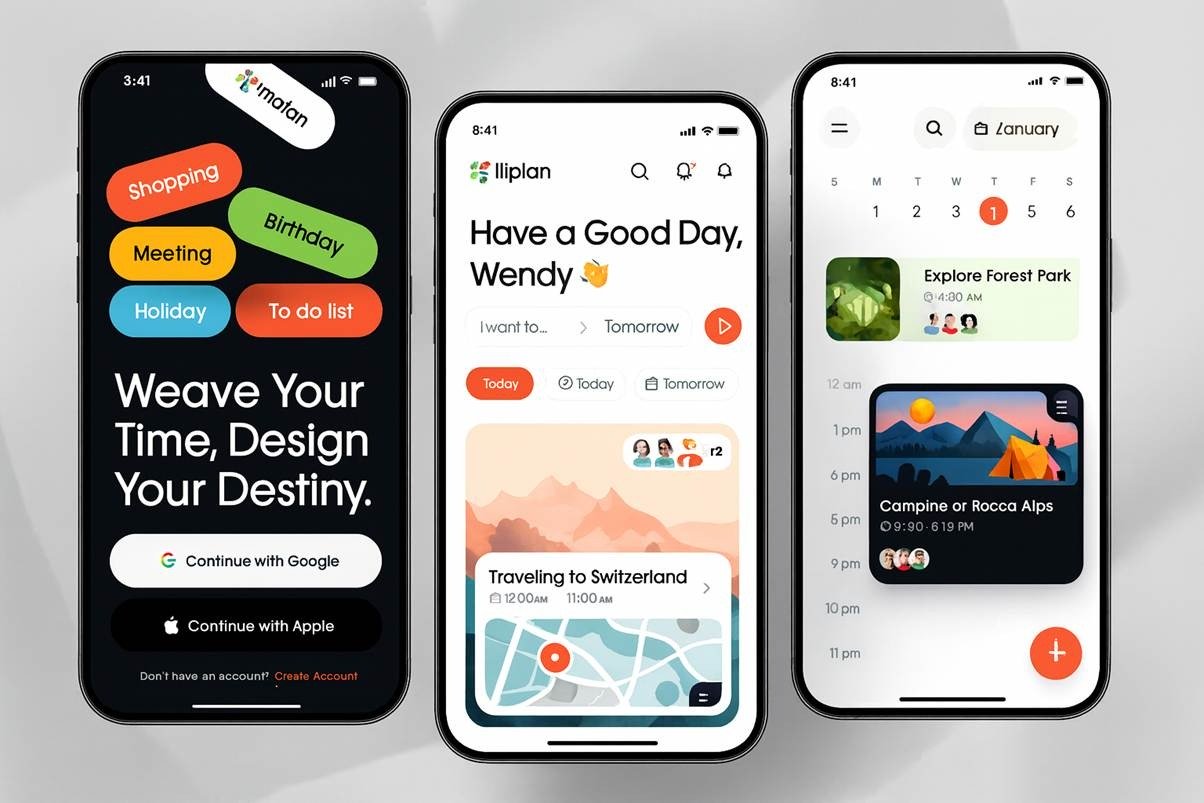
An AI Scheduling Application is an intelligent software system designed to automate the process of planning, organizing, and managing schedules. It eliminates the need for manual coordination by using artificial intelligence to analyze data such as time availability, task priority, resource allocation, and user preferences. This helps individuals and organizations save time, avoid conflicts, and make better use of their resources.
In simple terms, it works like a smart assistant that understands your work patterns and preferences. Whether it is booking a meeting, assigning staff shifts, or aligning project timelines, the application identifies the most efficient way to schedule tasks and adapts automatically when changes occur.
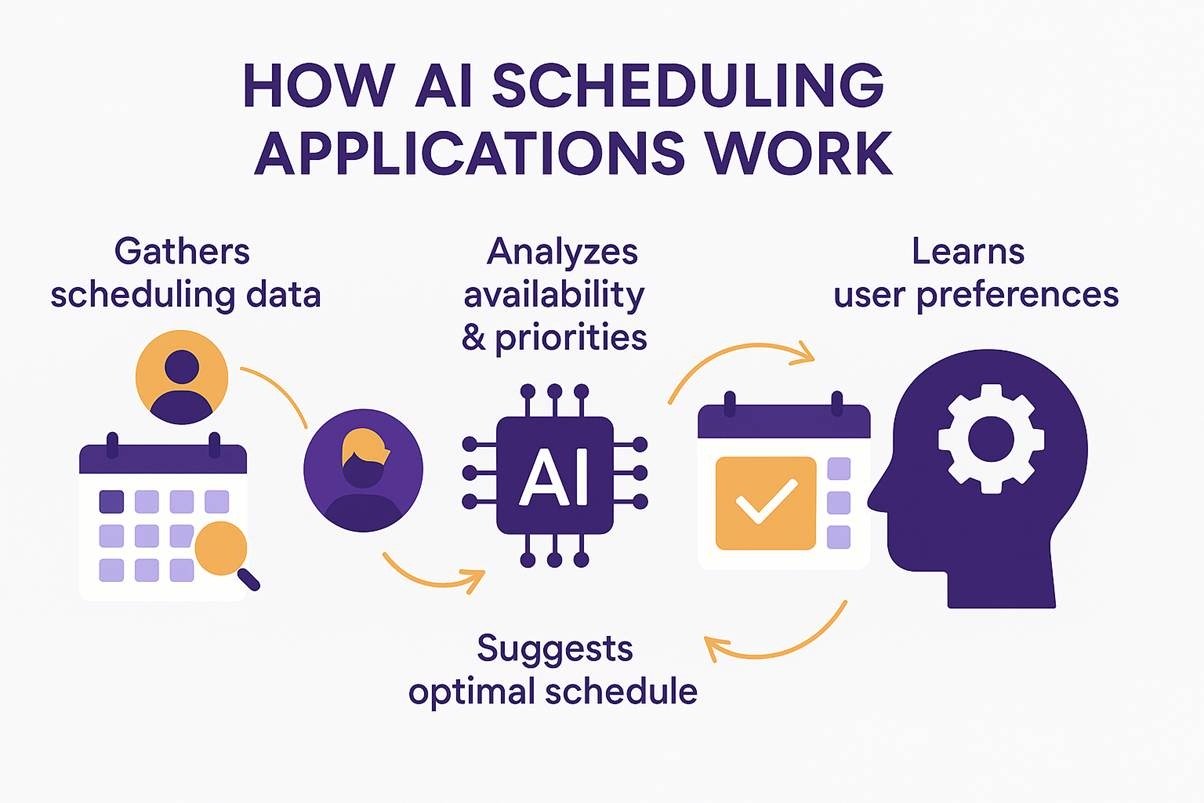
The working of an AI Scheduling Application can be understood quite simply. It collects details about schedules, such as who needs to meet, when people are available, and what tasks are most important. Then, it compares all that information and finds the best possible arrangement.
For example, if you need to organize a meeting among five team members in different time zones, the AI will scan everyone’s calendars, spot common free slots, and suggest the most convenient time. If someone cancels, it automatically finds a new slot without you having to start over.
The more you use the system, the better it gets at understanding your preferences. It starts to recognize patterns like when you prefer to work, how long your meetings usually last, and which days you keep free for focused work. Over time, it becomes more accurate and personalized, saving hours of manual effort.
When you invest in AI Scheduling Application Development, the goal is to simplify scheduling, improve efficiency, and reduce wasted time. It allows individuals and businesses to focus on meaningful work instead of spending hours planning it. By handling the repetitive and time-sensitive parts of scheduling, AI brings balance, organization, and clarity to daily operations.
Investing in AI Scheduling Application Development is one of the smartest decisions a business can make today. It is not just about using technology to plan meetings or assign shifts, but about creating an intelligent system that understands priorities, adapts to changes, and helps teams work more efficiently. When you develop an AI Scheduling App, you build a tool that brings structure, balance, and intelligence to daily operations.
Let’s explore the most important benefits of developing an AI Scheduling Application and how it can transform the way businesses manage their time and people.
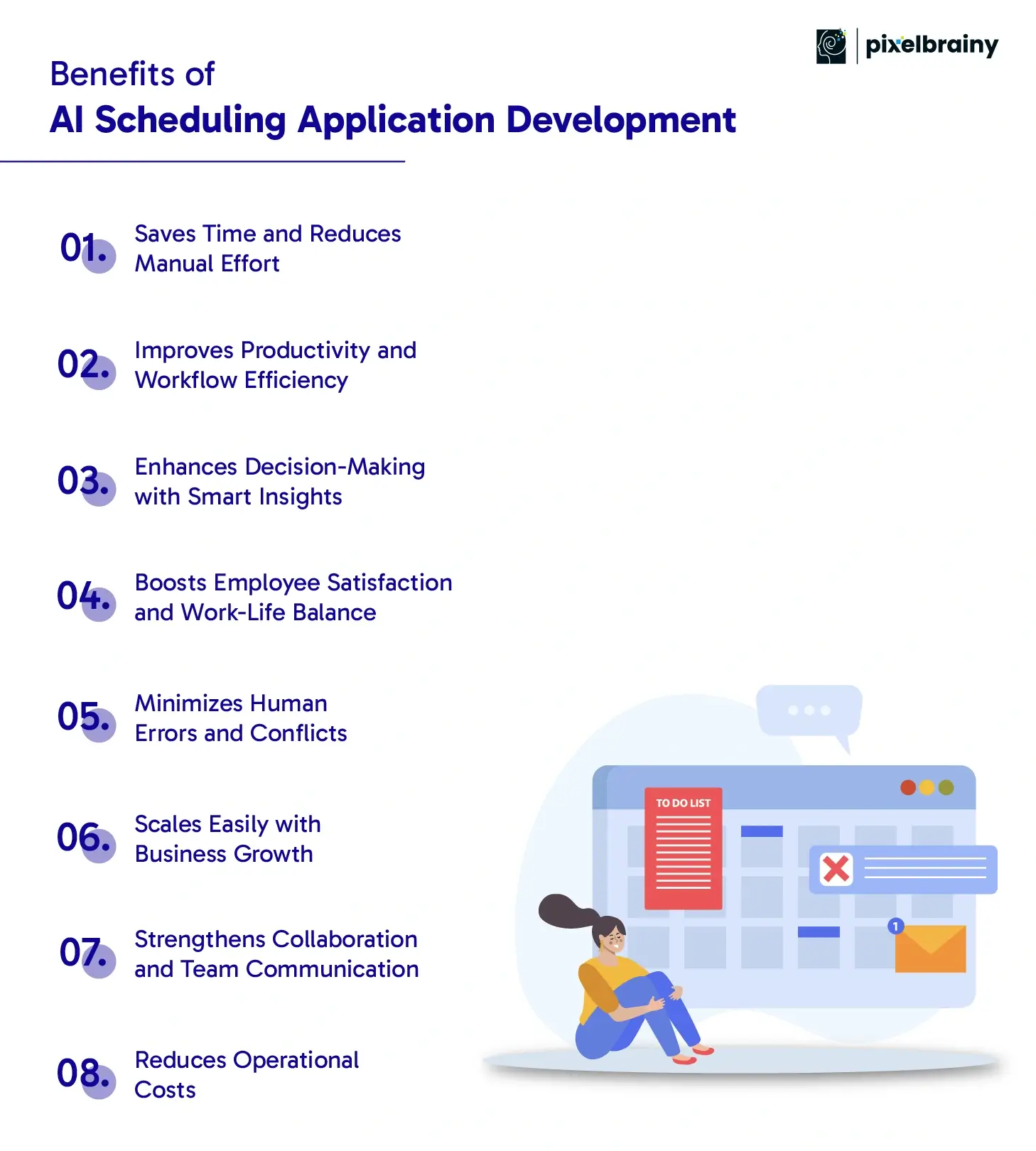
The primary advantage of AI Scheduling App Development is how much time it saves. Traditional scheduling requires endless checking of calendars, back-and-forth messages, and manual coordination.
An AI Scheduling Application handles all this automatically. It scans everyone’s calendars, checks for availability, and suggests suitable time slots for meetings or tasks. When plans change, it adjusts schedules instantly without human input.
This automation frees teams from repetitive administrative work, allowing them to focus on activities that truly drive business growth and innovation.
When you create an AI Scheduling App, you are building more than just a calendar tool. You are developing a system that helps teams manage time more intelligently.
AI scheduling tools organize meetings and tasks in a way that avoids overlaps and unnecessary downtime. They create balance in daily routines, ensuring that important work gets the attention it deserves.
By optimizing time and reducing confusion, productivity naturally increases. Teams can dedicate more energy to meaningful projects instead of constantly rearranging schedules.
AI scheduling systems do not just plan events. They also collect valuable data about how time is being used.
Over time, the application identifies patterns such as peak work hours, meeting durations, or recurring bottlenecks. These insights help managers and decision-makers understand how to improve time management, allocate resources better, and remove inefficiencies.
When companies develop AI Scheduling Applications, they gain a clear picture of operational trends, helping them make smarter and data-driven decisions.
A balanced schedule leads to happier employees. An AI Scheduling App can automatically take personal preferences, working hours, and rest times into account when creating timetables.
This means employees are not overbooked or constantly dealing with last-minute changes. They get predictable schedules that support both productivity and personal well-being.
When businesses create AI Scheduling Apps with fairness and flexibility in mind, they reduce stress, prevent burnout, and build a more positive workplace culture.
Manual scheduling is prone to mistakes such as double-booked meetings, missed appointments, or time-zone confusion.
An AI Scheduling Application eliminates these issues by accurately cross-checking all data before confirming an event. If a conflict arises, the system immediately suggests an alternative slot or adjustment.
This not only saves time but also ensures reliability. When schedules are consistent and accurate, it builds trust among team members, clients, and management.
As organizations grow, managing schedules for multiple departments, projects, or time zones becomes more complex.
AI scheduling tools are built to scale. They can handle larger datasets, more users, and diverse operations without slowing down or requiring manual adjustments.
When you develop an AI Scheduling App, you can easily expand its functionality—whether that means adding advanced analytics, multi-location support, or automated shift distribution. It is a long-term solution that grows with your business.
Efficient scheduling strengthens teamwork. An AI Scheduling Application keeps everyone updated in real time by syncing across calendars and sending reminders automatically.
Team members know exactly when meetings are scheduled, what their responsibilities are, and when deadlines are approaching. This improves communication and reduces misunderstandings.
For companies focusing on AI Scheduling App Development, better collaboration means faster project completion and smoother coordination among teams working in different locations.
Another major benefit of AI Scheduling Application Development is cost efficiency. By automating scheduling tasks, companies reduce the time and resources spent on administrative work.
There is also less risk of errors that can cause delays or miscommunication, both of which are costly. Over time, the savings from reduced manual labor and improved efficiency result in a strong return on investment.
Businesses that choose to create AI Scheduling Applications not only save money but also gain better control over their operations.
The benefits of AI Scheduling Application Development go far beyond automation, redefining how modern organizations plan, work, and grow.
Before starting your journey in AI Scheduling Application Development, it’s essential to understand the different types of scheduling apps that can be created for various industries and user needs. Each type has a unique purpose, target audience, and set of features. Whether you are planning to develop an AI Scheduling App for personal productivity or a large-scale enterprise system, knowing these categories will help you choose the right direction for your project.
Let’s explore the main types of AI Scheduling Applications that businesses can design, build, and deploy to enhance efficiency and time management.
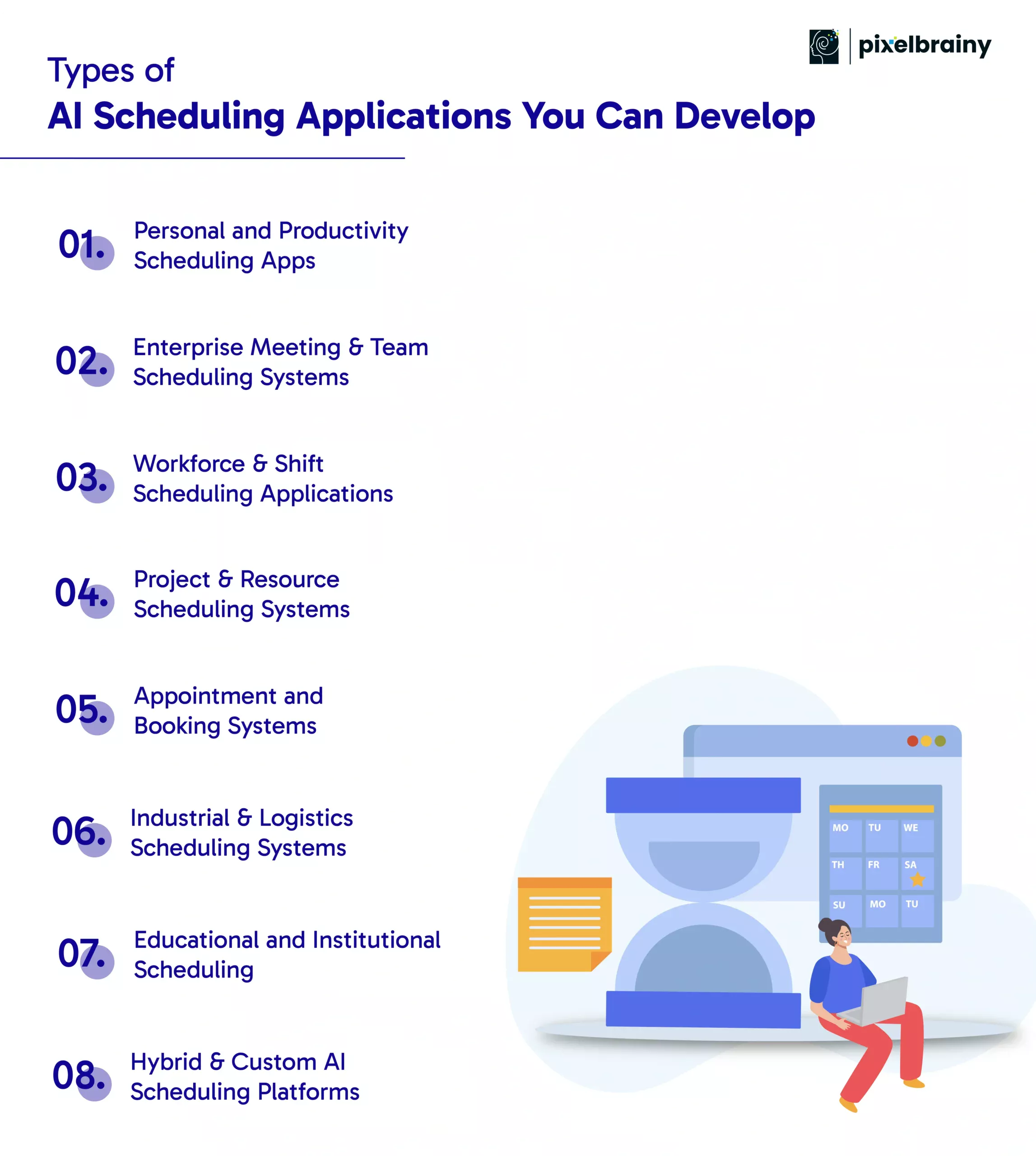
These applications are designed to help individuals manage their time, tasks, and priorities more effectively. A Personal AI Scheduling App acts as a smart assistant that automatically organizes daily routines, reminders, and meetings.
For example, apps like Reclaim.ai or Motion use AI to rearrange your day based on task importance and deadlines. They learn your work habits and automatically create a balanced schedule.
When you create an AI Scheduling Application for personal use, focus on simplicity, smart suggestions, and seamless integration with calendars and task managers. Such apps are ideal for freelancers, students, and professionals who want to make better use of their time.
These are advanced systems built to manage meetings, appointments, and collaboration across entire organizations. An Enterprise AI Scheduling System automates meeting coordination among teams, departments, and clients.
When you develop an AI Scheduling App for enterprises, you can include features such as automated meeting suggestions, multi-calendar synchronization, and integration with communication platforms like Microsoft Teams, Slack, or Zoom.
These applications help companies eliminate scheduling conflicts, improve internal communication, and save countless hours of administrative work.
A Workforce Scheduling App is essential for businesses that operate in shifts, such as healthcare, retail, or manufacturing. It helps managers assign shifts, track employee availability, and ensure compliance with labor laws.
AI can predict staffing needs based on demand, reduce overtime costs, and adjust shifts in real time when someone is unavailable.
When you build an AI Scheduling App for workforce management, focus on fairness, transparency, and ease of communication. This helps improve employee satisfaction and minimizes scheduling errors.
These systems are used to plan projects, allocate resources, and manage timelines efficiently. A Project Scheduling Application powered by AI can analyze project dependencies, deadlines, and resource availability to generate optimized schedules.
Such tools are widely used in construction, software development, and engineering. They help managers identify delays early, assign the right people to the right tasks, and forecast resource usage accurately.
Companies looking to create AI Scheduling Applications for project management can benefit from including predictive analytics, milestone tracking, and visualization dashboards for better oversight.
These applications are ideal for service-based industries such as healthcare, salons, spas, and consultancies. An AI Appointment Scheduling App helps businesses manage bookings, reduce no-shows, and improve customer experience.
It can automatically assign the best time slots, send reminders, and even adjust appointments when cancellations occur.
When you develop an AI Scheduling Application for appointments, include features like smart booking suggestions, real-time availability updates, and integrations with CRM systems. This ensures smooth communication between service providers and customers.
In industries like logistics, transportation, and manufacturing, scheduling is extremely complex. An AI-based Scheduling System can coordinate machinery, vehicles, and supply chains efficiently.
For example, in logistics, AI optimizes routes for delivery vehicles, reducing travel time and fuel costs. In factories, it schedules production tasks and maintenance without disrupting operations.
When businesses invest in AI Scheduling Application Development for industrial use, they gain better resource utilization, faster deliveries, and lower operational costs.
Educational institutions often face challenges in managing classes, exams, rooms, and faculty schedules. An AI Scheduling Application can simplify this by automatically generating timetables, resolving conflicts, and adapting to last-minute changes.
These systems are particularly useful for schools, colleges, and universities that operate multiple campuses or large departments.
When you build an AI Scheduling App for education, focus on flexibility, transparency, and user-friendly design so that administrators, teachers, and students can easily access and adjust schedules when needed.
Not all organizations fit into a single category. Many businesses require custom AI Scheduling Solutions that combine features from different scheduling types.
For instance, a large enterprise may need a system that handles project planning, workforce shifts, and client meetings all in one platform. A Hybrid AI Scheduling App allows this by integrating multiple scheduling modules tailored to unique business needs.
When companies create AI Scheduling Applications like this, they benefit from complete control, scalability, and the ability to adapt as their business grows. These platforms are ideal for enterprises seeking a unified scheduling ecosystem.
The world of AI Scheduling App Development offers endless opportunities across industries. Whether your goal is to enhance individual productivity or streamline operations across a large organization, each type of application serves a specific purpose.
By choosing the right model and approach to AI Scheduling Application Development, you can build a solution that not only saves time but also drives growth, efficiency, and smarter decision-making for years to come.

The scope of AI Scheduling Application Development extends far beyond calendar management. Today, businesses across industries are using AI-driven scheduling tools to optimize operations, improve coordination, and save time. From marketing campaigns to hospital appointments, AI scheduling has become a silent but powerful force driving productivity and efficiency.
Let’s explore how different industries are benefiting from AI Scheduling App Development, along with practical examples that show their real-world impact.
Marketing teams handle multiple campaigns, creative approvals, and content schedules simultaneously. An AI Scheduling Application helps coordinate all these activities efficiently.
AI can automate social media post timings, schedule content releases for maximum engagement, and align campaign meetings across different teams. It ensures that no deadline or launch is missed.
Example: HubSpot and Buffer use AI-powered tools to schedule marketing posts automatically based on audience engagement data. Similarly, teams can develop an AI Scheduling App that predicts the best times for campaign launches or customer outreach based on analytics.
By using AI scheduling, marketing departments gain clarity, save time, and execute campaigns with greater precision.
Engineering projects often involve multiple teams, dependencies, and resource management. An AI Scheduling System helps managers assign tasks efficiently, balance workloads, and monitor progress.
If a task takes longer than expected, the system automatically adjusts related timelines or redistributes work to available engineers.
Example: Jira and Monday.com have introduced AI features that automatically prioritize tasks and optimize sprint planning. Companies that create AI Scheduling Applications for engineering teams can provide similar automated sprint planning, workload balancing, and real-time project updates to improve productivity.
This kind of scheduling ensures projects move forward smoothly without bottlenecks or resource clashes.
Product development requires continuous coordination between teams handling design, testing, marketing, and delivery. An AI Product development company builds a Product Scheduling Application to ensure that every stage of development aligns with overall timelines.
AI can automatically adjust release dates, send reminders, and synchronize updates across departments.
Example: Asana Intelligence uses AI to manage project timelines and dependencies. Similarly, when you build an AI Scheduling App, it can provide predictive insights like “delays likely in testing” or “optimum time for feature rollout.”
Such systems help product teams maintain transparency and efficiency throughout the development cycle.
For sales teams, timing is everything. An AI Scheduling Application ensures that every meeting, demo, or client follow-up is perfectly planned.
AI can automatically schedule calls with leads, send reminders, and even find the best meeting times across time zones.
Example: Calendly and Chili Piper use AI-driven scheduling to automatically book meetings with prospects right after they fill out a form. Businesses that develop AI Scheduling Apps for sales can integrate them with CRM systems like Salesforce or HubSpot to streamline outreach and maximize conversions.
This reduces missed opportunities and helps sales teams close deals faster.
HR teams spend hours managing interviews, training sessions, and internal meetings. An AI Scheduling Application automates this entire process.
It can match candidate and interviewer availability, schedule onboarding sessions, and even remind managers about performance reviews.
Example: Breezy HR and HireVue use AI scheduling to automatically arrange interviews and assessments based on calendars and recruiter availability. When companies create AI Scheduling Applications for HR, they can simplify recruitment, improve candidate experience, and save significant time in coordination.
This leads to a smoother and more efficient hiring process.
Also Read: AI HR Software Development: Top Benefits and Features
Finance teams operate under strict timelines for audits, reports, and budgeting. An AI Scheduling App helps them organize recurring meetings, financial reviews, and submission deadlines.
AI can automatically generate reminders for tax filings or payment approvals and align schedules across departments.
Example: QuickBooks uses AI to schedule reminders for invoice payments and bookkeeping tasks. Similarly, businesses can develop AI Scheduling Applications that assist finance teams in managing compliance dates, reporting cycles, and multi-department meetings.
This reduces manual errors and ensures better time control in financial operations.
Also Read: AI Fintech App Development Cost: Factors and Examples
Executives often have packed calendars. An AI Scheduling System acts as a digital assistant that manages meetings, travel schedules, and event coordination seamlessly.
It can handle last-minute changes, manage multiple calendars at once, and send updates automatically to all attendees.
Example: Clara AI and x.ai (now acquired by Bizzabo) automate meeting scheduling for executives by understanding preferences and availability. Companies that build AI Scheduling Applications for EAs can create smart assistants capable of managing even the most complex executive calendars with zero conflicts.
This allows administrative professionals to focus on strategic work rather than repetitive scheduling.
Healthcare institutions rely on accurate and efficient scheduling to serve patients effectively. An AI Scheduling App can manage appointments, staff shifts, and operation room timings.
AI can predict appointment cancellations, fill empty slots automatically, and assign doctors or nurses based on workload and specialization.
Example: Zocdoc and QGenda use AI scheduling to manage appointments and healthcare staffing. Hospitals that develop AI Scheduling Applications can reduce patient wait times, improve doctor availability, and enhance overall care delivery.
AI scheduling in healthcare ensures precision, timeliness, and better patient satisfaction.
Also Read: How to Develop an AI Health Companion App: Benefits, Features and Cost
Schools, colleges, and corporate training institutes often face scheduling conflicts with classrooms, teachers, and students. An AI Scheduling Application automates timetable creation, exam scheduling, and resource allocation.
When any class or teacher becomes unavailable, the system instantly updates the schedule without human intervention.
Example: Untis and Classter use AI-based scheduling to build academic timetables and resolve resource conflicts automatically. Institutions that create AI Scheduling Applications for education can ensure seamless coordination and improved academic planning.
In logistics, every delay can cause significant financial loss. An AI Scheduling System helps in route optimization, delivery planning, and fleet management.
AI can predict delivery times, adjust schedules based on traffic, and assign vehicles to the most efficient routes.
Example: UPS’s ORION system uses AI to optimize delivery routes and schedules, saving millions in operational costs. Similarly, companies can build AI Scheduling Apps for logistics to improve delivery speed, reduce costs, and enhance customer satisfaction.
AI scheduling ensures that goods and services reach their destination on time with minimal resource wastage.
Customer service departments often deal with appointment requests, callbacks, and follow-ups. An AI Scheduling Application ensures these are organized effectively.
It can balance workloads, distribute requests evenly, and automatically schedule support sessions.
Example: Zendesk AI and Freshdesk integrate smart scheduling features that assign tickets and calls to available agents. Businesses that develop AI Scheduling Apps for customer service can reduce response times, improve satisfaction rates, and manage peak-hour demands efficiently.
AI scheduling brings structure and balance to customer operations.
Manufacturers rely on strict production timelines. An AI Scheduling Application can manage machine operations, raw material flow, and workforce allocation.
AI identifies the most efficient sequence for production tasks, predicts delays, and suggests preventive maintenance schedules.
Example: Siemens MindSphere and OptaPlanner use AI-based scheduling to optimize factory workflows. Companies that create AI Scheduling Applications for manufacturing gain better production efficiency, cost control, and reduced downtime.
AI ensures every production step aligns perfectly with deadlines and capacity limits.
Hotels, resorts, and travel companies depend heavily on accurate scheduling for room bookings, staff shifts, and guest services.
An AI Scheduling App can manage guest check-ins, assign housekeeping tasks, and predict occupancy rates.
Example: Skedulo and 7shifts help hospitality businesses automate shift planning and bookings. When organizations develop AI Scheduling Applications in this sector, they achieve higher service efficiency and smoother customer experiences.
AI ensures that every guest receives timely, personalized service with minimal manual effort.
The real power of AI Scheduling App Development lies in its flexibility to adapt to any industry and redefine how work gets done.
The foundation of any successful AI Scheduling Application Development project lies in its core features. These features define how the system performs, how easily users can interact with it, and how efficiently it automates scheduling tasks. When you develop an AI Scheduling App, focusing on the right set of core features ensures seamless scheduling, smart automation, and a positive user experience.
Below is a detailed list of the essential core features every AI scheduling application should include.
| Feature | Description |
| Smart Calendar Integration | Connects with Google Calendar, Outlook, and Apple Calendar to keep all schedules synchronized in real time. It ensures users never miss an event, regardless of which calendar they use. |
| Automated Scheduling | Uses intelligent algorithms to find the best time for meetings or events by analyzing participant availability. This eliminates manual coordination and speeds up planning. |
| Real-Time Availability Tracking | Displays the live availability of participants or resources, allowing users to book meetings without conflicts or overlaps. |
| Conflict Detection and Resolution | Automatically identifies double bookings or overlapping events and suggests alternate times for smooth coordination. |
| Notifications and Reminders | Sends automatic alerts for upcoming meetings, deadlines, or changes in schedules. It helps users stay organized and on time. |
| Multi-User Access and Roles | Supports role-based access, allowing different levels of control for users such as admins, managers, or employees. |
| Recurring Event Management | Simplifies repetitive scheduling by automating weekly, monthly, or annual events without manual setup each time. |
| Task Prioritization | Ranks tasks based on importance, urgency, and deadlines so users can focus on what matters most first. |
| Time Zone Synchronization | Adjusts meeting times automatically according to participants’ local time zones, making it ideal for global or remote teams. |
| Integrated Communication Tools | Embeds tools like Zoom, Microsoft Teams, or Google Meet for one-click meeting access directly within the scheduling interface. |
| User-Friendly Dashboard | Displays meetings, tasks, and updates in a clean, intuitive layout that enhances usability and user experience. |
| Customizable Scheduling Rules | Lets users set preferences such as working hours, meeting buffers, or break times to personalize their scheduling workflow. |
| Cloud Synchronization | Ensures all data is securely stored in the cloud and can be accessed anytime, anywhere from any device. |
| Analytics and Reporting | Provides insights into usage patterns, productivity trends, and meeting frequency to help teams make data-driven improvements. |
| Mobile Compatibility | Allows full scheduling functionality on mobile devices, enabling users to manage tasks and appointments on the go. |
The effectiveness of AI Scheduling App Development relies on integrating these core features that create a balanced combination of intelligence, usability, and real-time automation.
After implementing the core features, businesses can take their applications to the next level by integrating advanced capabilities. These features make an app more intelligent, interactive, and personalized. When you create an AI Scheduling Application with advanced functionalities, it not only automates scheduling but also anticipates user needs and enhances overall productivity.
Here are some advanced features that can elevate your AI Scheduling Application Development project and make it stand out in a competitive market.
| Advanced Feature | Description |
| AI-Powered Predictive Scheduling | Predicts ideal meeting times and resource use based on previous behavior, availability, and productivity trends, ensuring optimal planning. |
| Natural Language Processing (NLP) | Allows users to schedule tasks using simple, conversational commands like “Book a client meeting for Friday morning.” This makes scheduling intuitive and fast. |
| Intelligent Rescheduling | Detects cancellations or conflicts instantly and automatically rearranges meetings or tasks to the next best available slot. |
| Smart Resource Allocation | Assigns rooms, equipment, or team members efficiently based on availability and importance, preventing wasted resources. |
| AI Chatbot Assistance | Provides users with a virtual assistant that can create, modify, or cancel meetings and answer scheduling-related questions instantly. |
| Integration with CRM and ERP Systems | Connects with enterprise systems like Salesforce or SAP to align scheduling with business operations and customer management. |
| Advanced Analytics and Forecasting | Tracks performance trends, meeting efficiency, and resource usage to forecast future workloads and identify optimization opportunities. |
| Personalized Scheduling Insights | Learns user habits to recommend best times for meetings, breaks, or focus periods, creating a truly adaptive scheduling experience. |
| Voice Command Scheduling | Enables users to schedule or modify events using voice assistants like Alexa or Google Assistant for hands-free convenience. |
| AI-Based Time Optimization | Continuously analyzes user patterns to recommend the most productive times for meetings, reducing fatigue and maximizing focus. |
Adding these advanced features during AI Scheduling Application Development transforms a basic scheduling tool into an intelligent system that learns, adapts, and optimizes time for every user.
If you are wondering what is the process to build an AI Scheduling Application, it involves much more than writing code. The journey begins with research, followed by planning, design, development, testing, and deployment. Each step plays a critical role in ensuring that your application performs intelligently, efficiently, and reliably. Whether you are building a small MVP or a full-fledged enterprise solution, following a structured development process ensures that the end product delivers both functionality and value.
Here’s a complete breakdown of how the development of AI Scheduling Application typically unfolds, from concept to completion.
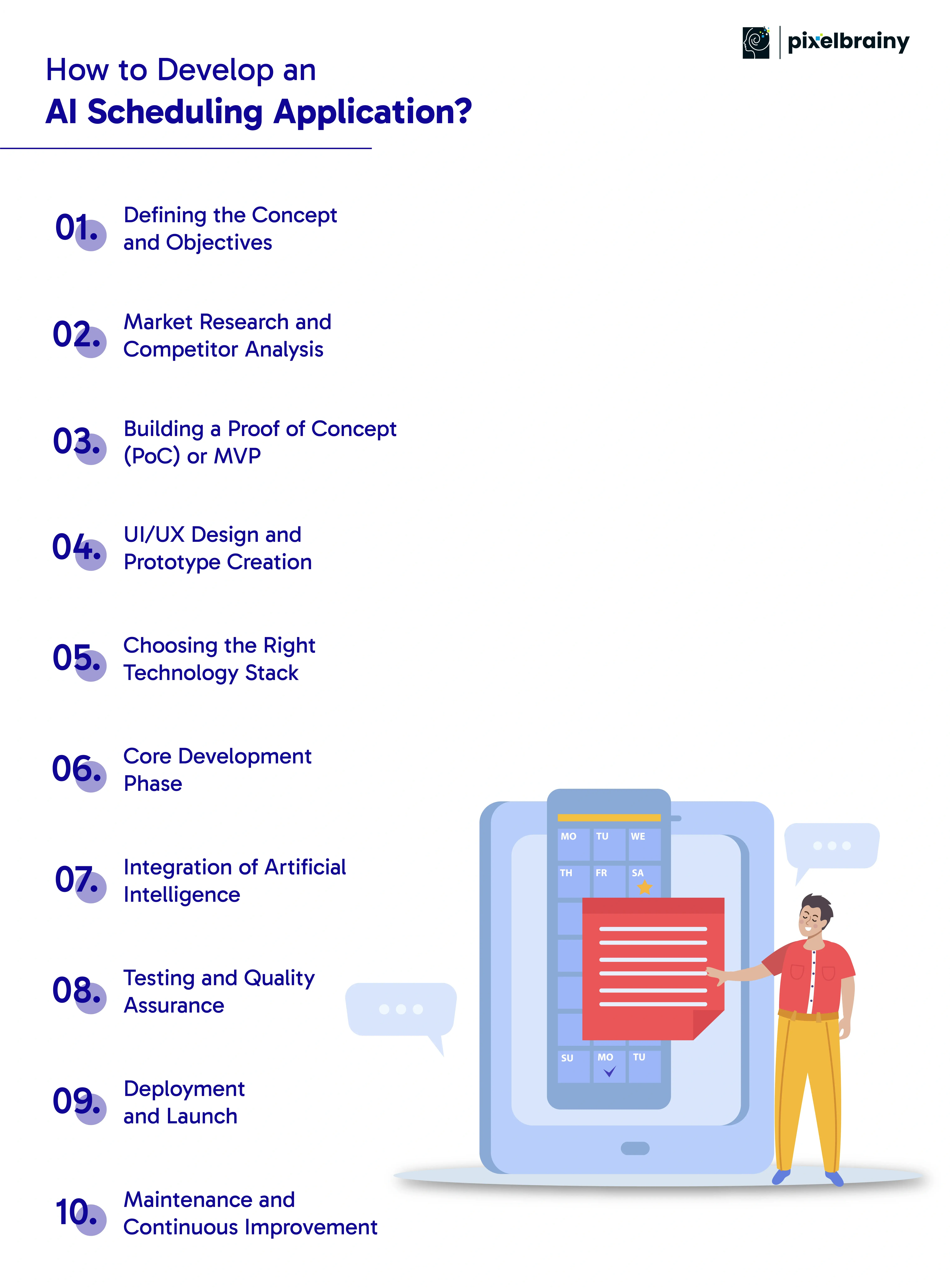
Every successful product starts with a clear goal. Begin by identifying the core problem your AI scheduling solution will solve. Understand the challenges users face with time management, coordination, or scheduling conflicts.
Research your target audience and define user personas such as managers, employees, or customers. This helps in outlining features that add genuine value to their daily workflow. At this stage, you also decide on your application’s scope—whether it will be a standalone scheduling tool, an enterprise system, or an integrated productivity platform.
Defining clear objectives early ensures that your project stays aligned with user expectations and business goals throughout the development cycle.
Before you start developing AI Scheduling App, it’s essential to study the current market landscape. Analyze existing products like Calendly, Reclaim, or Motion to identify what they do well and where they fall short.
Explore customer reviews, feature gaps, and pricing models to understand user pain points and opportunities. Market research helps you build a product that is not just another scheduling tool but one that offers unique value through AI-driven intelligence and personalization.
It’s also the stage where you can assess industry trends such as automation, remote collaboration, and AI adoption in enterprise environments.
Once you have validated the idea, start small by developing a PoC or MVP. A Proof of Concept helps test the technical feasibility of your idea, while a Minimum Viable Product showcases its core features to early users.
Creating an MVP allows you to evaluate user feedback, identify weaknesses, and refine the product before a full-scale launch. It reduces risks, saves development time, and ensures that you are building something people truly need.
This phase is critical to demonstrate the viability of your solution to investors or stakeholders before expanding further.
The next step involves crafting an intuitive user interface and seamless user experience. Partnering with a professional UI/UX Design company helps ensure your application is visually appealing, easy to navigate, and responsive across devices.
Designers create interactive prototypes that show how the scheduling system will look and function. During this stage, wireframes are tested to ensure usability and accessibility. A well-designed interface can significantly enhance adoption rates and customer satisfaction.
The focus here is to make the design simple, smart, and consistent with modern digital standards.
When planning Scheduling Application development Integrating AI, selecting the right technology stack is essential. The stack should support scalability, speed, and security while being flexible for future integrations.
For frontend development, frameworks like React, Angular, or Vue.js work well for interactive user interfaces. For backend systems, Node.js, Django, or .NET are reliable choices. AI components can be built using Python libraries such as TensorFlow or PyTorch.
Database options like PostgreSQL or MongoDB ensure fast and secure data handling. Cloud platforms like AWS, Google Cloud, or Azure help host the app efficiently while enabling real-time data processing.
This is where the coding process begins, bringing your vision to life. Developers start by integrating basic scheduling features such as calendar synchronization, automated time detection, and conflict management.
Next, AI modules are developed for intelligent scheduling, predictive recommendations, and data-driven decision-making. This phase involves backend logic, API development, and front-end integration.
Following agile development principles ensures iterative progress, continuous feedback, and smoother collaboration among team members. Regular testing within sprints keeps the product stable and secure during development.
At this point, the focus shifts to the intelligent part of your app — integrating AI algorithms that make scheduling smarter. The AI engine analyzes user preferences, availability, and historical behavior to recommend optimal meeting times or resource allocations.
Machine learning models continuously learn from usage data to improve accuracy over time. Natural Language Processing allows users to schedule meetings using simple text or voice commands.
The seamless integration of AI makes your scheduling app proactive, predictive, and adaptive to real-world scenarios.
Testing is one of the most crucial steps in AI Scheduling Application Development. The app must be tested for usability, functionality, performance, and data security.
QA teams perform multiple types of tests including unit testing, integration testing, and user acceptance testing. AI features also require validation to ensure that predictions, suggestions, and recommendations are accurate.
Extensive testing guarantees that the product performs well across different devices, browsers, and user environments without glitches.
After successful testing, the application is deployed on chosen platforms such as web, mobile, or enterprise systems. Before the public launch, ensure that all integrations with third-party tools, payment systems, and APIs are functioning correctly.
Prepare for the launch by setting up monitoring systems and performance tracking dashboards. Post-launch analytics help you understand how users interact with the app and where improvements are needed.
Launching in stages allows you to gather feedback early and implement refinements quickly.
The process does not end with launch. Continuous maintenance keeps your application secure, updated, and user-friendly. Collect user feedback regularly to identify areas for improvement or new feature opportunities.
As more users adopt the system, enhance scalability and performance through regular updates. AI models should also be retrained periodically to maintain accuracy and adaptability.
Working with one of the top AI development companies in USA can help ensure your product remains competitive through ongoing innovation and technical support.
To make AI Scheduling App successful, follow a structured development process from concept to launch while integrating AI intelligently to enhance automation, personalization, and long-term performance.

Also Read: A Comprehensive Guide To AI Mobile App Development
When planning your budget for AI Scheduling Application Development, you want realistic figures rather than vague guesses. Costs depend on complexity, features, integrations, and whether you’re building a simple prototype or a full-scale system. Below is a practical cost guide to help you understand what goes into building such an application.
| Type of AI Scheduling App | Estimated Cost Range | What This Level Includes |
| Basic AI Scheduling App | $20,000 – $50,000 | Core scheduling features: calendar sync, simple availability scans, basic user roles. Suitable for small teams or startups with minimal integrations and no heavy AI/ML modules. |
| Medium AI Scheduling App | $50,000 – $120,000 | Expanded feature set: recurring events, conflict resolution, notifications, multi-user access, some AI-powered suggestions. More polish and integrations (e.g., communication tools, time zones) built in. |
| Advanced AI Scheduling App | $120,000 – $200,000+ | Full-fledged solution: deep AI/ML for predictive scheduling, natural language input, sophisticated dashboards, enterprise-level integrations (CRM/ERP), large user base and high scalability. |
Setting a clear budget upfront for development of AI Scheduling Application helps you smartly allocate resources and avoid cost overruns while aiming for the right level of functionality.
Also Read: AI App Development Cost: From MVPs to Full-Scale AI App
Choosing the right tools and technology stack is the foundation of a successful AI Scheduling Application Development project. The combination of frameworks, AI libraries, and integration tools determines how efficiently the system performs, scales, and adapts to user needs. An optimized tech stack ensures smooth automation, faster processing, and a seamless user experience across platforms.
Below is a curated list of recommended tools and technologies for building an intelligent and efficient scheduling system.
| Layer / Category | Recommended Tools & Technologies | Purpose and Importance |
| Frontend (Web & Mobile) | React, Vue.js, Angular, Flutter, React Native, Swift (iOS), Kotlin (Android) | Enables creation of responsive and interactive user interfaces for both web and mobile users. Ensures smooth navigation and accessibility across devices. |
| Backend Frameworks | Node.js, Django, Flask, Express.js, .NET Core | Powers the main logic of scheduling, managing APIs, and handling data processing. Offers scalability and flexibility for complex AI-driven scheduling operations. |
| Database Systems | PostgreSQL, MongoDB, MySQL, Redis | Stores user data, events, preferences, and AI insights securely. Provides fast access and supports large-scale, real-time scheduling data. |
| AI and Machine Learning Libraries | Python (TensorFlow, PyTorch, Scikit-learn, Keras, MLflow) | Used to train and deploy models that predict availability, optimize scheduling patterns, and learn user behavior for smarter recommendations. |
| Calendar & Scheduling APIs | Google Calendar API, Microsoft Graph API, iCal, Apple Calendar API | Integrates external calendar systems for syncing schedules, events, and meetings across multiple platforms automatically. |
| Communication & Meeting Integrations | Zoom SDK, Microsoft Teams SDK, Twilio, WebRTC | Facilitates meeting scheduling, notifications, and video/audio call integration directly within the application. |
| Cloud Infrastructure & Hosting | AWS (EC2, Lambda, S3), Google Cloud Platform, Microsoft Azure | Provides scalable, secure, and high-performance hosting for AI applications with support for real-time data synchronization. |
| Authentication & Security | OAuth 2.0, JWT, SSL/TLS, LDAP, Encryption Libraries | Ensures secure user access and data protection, maintaining confidentiality and compliance with global privacy standards. |
| DevOps and CI/CD Tools | Jenkins, GitHub Actions, GitLab CI, Docker, Kubernetes | Automates builds, testing, and deployment, making the development process faster and more reliable for large teams. |
| Data Storage & Backup | Firebase, Amazon S3, Azure Blob Storage, Google Cloud Storage | Ensures reliable cloud storage, backup, and easy recovery of scheduling data and user preferences. |
| Analytics & Reporting Tools | Google Analytics, Mixpanel, Tableau, Power BI | Provides actionable insights on user behavior, scheduling trends, and productivity, enabling continuous product improvement. |
| Testing Tools | Selenium, Jest, Cypress, Postman | Helps in automating functional, performance, and integration testing to ensure smooth operation across platforms. |
| Notifications & Alerts | Firebase Cloud Messaging (FCM), OneSignal, Twilio Notify | Enables real-time alerts for meetings, updates, or scheduling changes through push notifications, SMS, or email. |
| Version Control & Collaboration | Git, GitHub, Bitbucket, GitLab | Allows teams to collaborate effectively, manage versions, and maintain a clean codebase throughout the development process. |
| Monitoring & Performance Tools | New Relic, Datadog, Prometheus, Grafana | Monitors system health, server performance, and application uptime to ensure consistent user experience and fast troubleshooting. |
Above these are the right tech stack for your AI Scheduling Application Development ensures a balance of innovation, scalability, and long-term performance that drives user satisfaction and business success.
While AI Scheduling Application Development offers immense potential, it also comes with a unique set of challenges. From technical hurdles like data integration and scalability to human-centered concerns such as user adoption and privacy, each challenge requires thoughtful planning and the right technology. Understanding these challenges early allows businesses to create more efficient, reliable, and user-friendly scheduling solutions.
Below is a breakdown of the major challenges faced during development, along with effective strategies to overcome them.
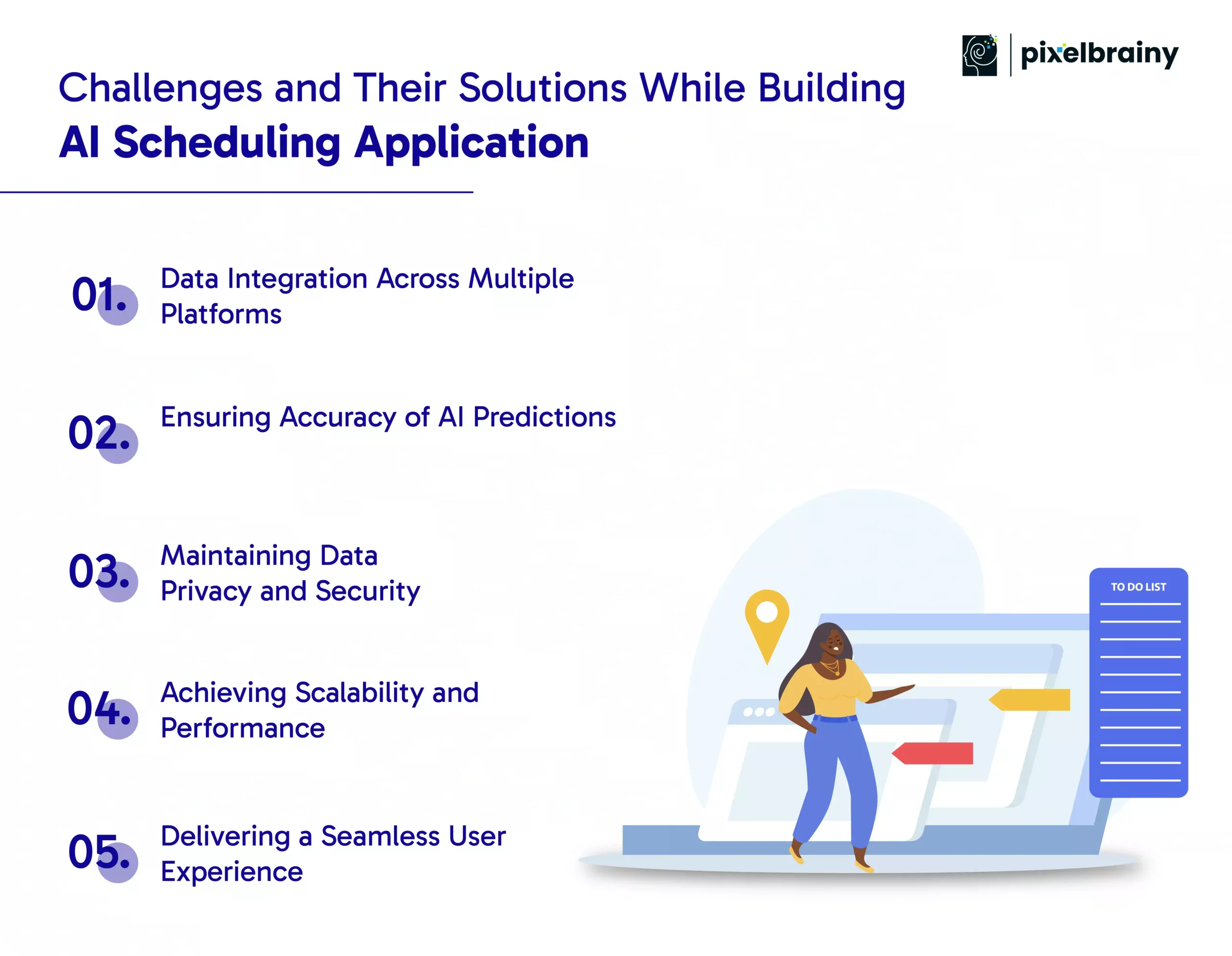
One of the biggest challenges during AI Scheduling Application Development is integrating data from different platforms like Google Calendar, Outlook, Microsoft Teams, and CRM systems. Each uses distinct APIs, authentication methods, and data structures, which can lead to synchronization issues.
To solve this, developers should rely on standardized APIs and build middleware services that act as a connector between different systems. Cloud-based synchronization and RESTful APIs ensure consistent data flow and real-time updates without loss of information.
AI scheduling relies heavily on historical data and user behavior patterns. If the training data is limited, inconsistent, or inaccurate, the system might make poor scheduling suggestions.
The best solution is to implement continuous learning mechanisms. This involves retraining AI models regularly using real user feedback and updated datasets. Leveraging machine learning frameworks like TensorFlow or PyTorch allows developers to build adaptive systems that improve prediction accuracy over time.
Because scheduling apps handle sensitive information like personal events, employee data, and organizational meetings, data security is a top concern. A single breach can damage both reputation and user trust.
Developers must implement strong encryption protocols, OAuth 2.0 authentication, and secure cloud storage. Compliance with international standards such as GDPR or HIPAA ensures that the application meets global data protection requirements. Regular security audits and penetration tests help detect vulnerabilities early.
As the number of users grows, so does the complexity of scheduling operations. Without proper architecture, performance can degrade, causing lags or failures during high-traffic periods.
To overcome this, developers should use scalable cloud infrastructure like AWS or Google Cloud. Microservices architecture and load balancing can distribute workloads efficiently, while caching frequently used data ensures faster response times even during heavy usage.
Even the most advanced AI scheduling engine can fail if users find it confusing or hard to use. Balancing intelligent automation with human-centered design is often a challenge.
The solution lies in prioritizing simplicity and clarity. A well-designed UI, intuitive navigation, and transparent explanations of AI decisions make users feel more in control. Conducting usability testing and incorporating real feedback ensures that the app aligns with how users naturally plan their time.
Addressing these core challenges early in the development of AI Scheduling Application ensures that the final product is secure, scalable, accurate, and trusted by users across industries.
Selecting the right AI development company is one of the most important decisions when planning to build an intelligent scheduling system. PixelBrainy combines deep AI expertise with practical business understanding to deliver smart, scalable, and performance-driven AI Scheduling Application Development solutions.
We approach every project as a collaboration. Our process begins with understanding your workflows, challenges, and objectives before crafting a solution that fits seamlessly into your organization. Whether you need a personal scheduling app, an enterprise meeting system, or a predictive workforce planner, we design applications that merge artificial intelligence with user-first design and automation excellence.
Our team includes data scientists, backend engineers, and UI/UX experts who specialize in developing AI scheduling apps that learn from user behavior and adapt over time. The combination of predictive modeling, machine learning, and intuitive interfaces ensures that your application is both intelligent and effortless to use.
Recently, PixelBrainy, an experienced AI app development company partnered with a logistics and supply-chain organization that struggled with frequent delivery delays caused by manual scheduling. The company needed a smarter way to manage vehicle assignments, driver shifts, and route optimization.
Our team built a custom AI-powered scheduling platform that analyzed live delivery data, driver availability, and traffic predictions to automatically generate optimized schedules. The system significantly reduced manual work and improved resource utilization across departments. Within a few months, the client reported a 40 percent improvement in scheduling accuracy and a 30 percent drop in delivery delays.
While the client name remains confidential due to contractual obligations, this project demonstrates how PixelBrainy’s expertise turns real-world scheduling challenges into measurable business success.
PixelBrainy doesn’t just deliver a finished app — we ensure it continues to evolve. Our long-term partnership model includes AI model optimization, scalability upgrades, and integration of emerging technologies as your business expands. This commitment to continuous improvement makes PixelBrainy a trusted ally for companies aiming to stay ahead in automation and intelligent workflow management.
Partnering with PixelBrainy means choosing an experienced AI development company dedicated to transforming scheduling complexities into intelligent, data-driven solutions that grow with your business.
The future of scheduling lies in intelligent automation powered by artificial intelligence. With the right strategy and technology, AI Scheduling Application Development can transform how businesses manage time, teams, and resources. From personal productivity tools to enterprise-level scheduling systems, AI brings unmatched precision and efficiency to every aspect of planning.
Partnering with an experienced AI development company like PixelBrainy ensures your application is not only innovative but also scalable, secure, and user-friendly. Our team’s deep expertise in data-driven automation and smart scheduling design helps you stay ahead in a competitive digital world.
If you’re ready to develop an AI scheduling app that enhances productivity and decision-making, we’re here to help.
Book an appointment with PixelBrainy today and turn your idea into a powerful AI-driven scheduling solution.
Unlike traditional tools that rely on manual input, an AI Scheduling Application uses machine learning and data analytics to make smart scheduling decisions automatically. It studies user behavior, availability, and past patterns to recommend the most efficient schedule without human intervention.
The timeline depends on complexity, features, and integrations. A basic version can take around 3–4 months, while a fully customized enterprise-level AI scheduling platform may require 6–9 months for complete development, testing, and deployment.
Yes, integration is one of the core aspects of AI Scheduling Application Development. These apps can connect seamlessly with calendars, communication platforms, and CRM systems using APIs, ensuring all data stays synchronized in real time.
AI-powered scheduling is valuable across multiple sectors including healthcare, logistics, education, hospitality, HR, and IT services. Anywhere time, resources, or appointments need coordination, an AI scheduling solution can significantly improve efficiency.
Not necessarily. Once the application is built, most processes run automatically. Routine maintenance, AI model retraining, and occasional updates can be managed by a small technical support team or outsourced to your AI development company.
Security is a top priority. These apps use encryption, secure authentication, and cloud compliance protocols such as GDPR and HIPAA. Choosing the right development partner ensures your AI scheduling app meets enterprise-grade security standards.

About The Author
Sagar Bhatnagar
Sagar Sahay Bhatnagar brings over a decade of IT industry experience to his role as Marketing Head at PixelBrainy. He's known for his knack in devising creative marketing strategies that boost brand visibility and market influence. Sagar's strategic thinking, coupled with his innovative vision and focus on results, sets him apart. His track record of successful campaigns proves his ability to utilize digital platforms effectively for impactful marketing efforts. With a genuine passion for both technology and marketing, Sagar continuously pushes PixelBrainy's marketing initiatives to greater success.


Transform your ideas into reality with us.
Working with the PixelBrainy team has been a highly positive experience. They understand the design requirements and create beautiful UX elements to meet the application needs. The dev team did an excellent job bringing my vision to life. We discussed usability and flow. Sagar worked with his team to design the database and begin coding. Working with Sagar was easy. He has the knowledge to create robust apps, including multi-language support, Google and Apple ID login options, Ad-enabled integrations, Stripe payment processing, and a Web Admin site for maintaining support data. I'm extremely satisfied with the services provided, the quality of the final product, and the professionalism of the entire process. I highly recommend them for Android and iOS Mobile Application Design and Development.

Great experience working with them. Had a lot of feedback and I found that unlike most contractors they were bugging me for updates instead of the other way around. They were extremely time conscience and great at communicating! All work was done extremely high quality and if not on time, early! They were always proactive when it comes to communication and the work is great/above par always. Very flexible and a great team to work with! Goes above and beyond to present us with multiple options and always provides quality. Amazing work per usual with Chitra. If you have UI/UX or branding design needs I recommend you go to them! Will likely work with them in the future as well, definitely recommended!

PixelBrainy is a joy to work with and is a great partner when thinking through branding, logo, and website layout. I appreciate that they spend time going into the "why" behind their decisions to help inform me and others about industry best practices and their expertise.

I hired them to design our software apps. Things I really like about them are excellent communication skills, they answer all project suggestions and collaborate right away, and their input on design and colors is amazing. This project was complex and needed patience and creativity. The team is amazing to do business with. I will be using them long-term. Glad to see there are some good people out there. I was afraid to try and outsource my project to someone but I am glad I met them! I really can't say enough. They went above and beyond on this project. I am very happy with everything they have done to make my business stand out from the competition.

It was great working with PixelBrainy and the team. They were very responsive and really owned the project. We'll definitely work with them again!

I recently worked with the PixelBrainy team on a project and I was blown away by their communication skills. They were prompt, clear, and articulate in all of our interactions. They listened and provided valuable feedback and suggestions to help make the project a success. They also kept me updated throughout the entire process, which made the experience stress-free and enjoyable.

PixelBrainy is very good at what it does. The team also presents themselves very professionally and takes care of their side of things very well. I could fully trust them taking up the design work in a timely and organised manner and their attention to detail saved us lots of effort and time. This particular project was quite intense and the team showed that they function very well under pressure. Very much looking forward to working with her again!

It's always an absolute pleasure working with them. They completed all of my requests quickly and followed every note I had for them to a T, which made our process go smoothly from start to finish. Everything was completed fast and following all of the guidelines. And I would recommend their services to anyone. If you need any design work done in the future, PixelBrainy should be your first call!

They took ownership of our requirements and designed and proposed multiple beautiful variants. The team is self-motivated, requires minimum supervision, committed to see-through designs with quality and delivering them on time. We would definitely love to work with PixelBrainy again when we have any requirements.

PixelBrainy was a big help with our SaaS application. We've been hard at work with a new UI/UX and they provided a lot of help with the designs. If you're looking for assistance with your website, software, or mobile application designs, PixelBrainy and the team is a great recommendation.

PixelBrainy designers are amazing. They are responsive, talented, and always willing to help craft the design until it matches your vision. I would recommend them and plan to continue them for my future projects and more!!!

They were awesome! Did a good job fast, and good communication. Will work with them again. Thank you

Creative, detail-oriented, and talented designers who take direction well and implement changes quickly and accurately. They consistently over-delivered for us.

PixelBrainy team is very talented and creative. Great designers and a pleasure to work with. PixelBrainy is an excellent communicator and I look forward to working with them again.

PixelBrainy has a very talented design team. Their work is excellent and they are very responsive. I enjoy working with them and hope to continue on all of our future projects.


