What if your business had an AI chatbot that understood your products, company policies, customer history, and internal knowledge instead of delivering generic answers?
As customer expectations continue to evolve, businesses are under constant pressure to provide fast, personalized, and accurate support across every touchpoint. Traditional chatbots and rule-based automation often struggle with complex conversations, resulting in inconsistent responses, longer resolution times, rising support costs, and poor customer experiences. That is why more organizations are investing in AI solutions that can understand business context, automate sophisticated workflows, and deliver meaningful interactions at scale.
If your goal is custom AI chatbot development, you need far more than choosing an AI model. A successful chatbot must be trained on your organization's knowledge base, product catalog, documentation, policies, customer interactions, and business processes to deliver reliable, context-aware responses. It should also integrate seamlessly with your CRM, ERP, helpdesk, and other enterprise systems while maintaining high standards of security, compliance, and data privacy.
Understanding how to develop custom AI chatbot solutions begins with identifying business objectives, selecting the right AI technologies, preparing quality training data, designing conversational experiences, integrating external systems, testing performance, and continuously improving the model based on user interactions. Every decision throughout the development lifecycle influences the chatbot's accuracy, scalability, adoption, and long-term return on investment.
Whether you want to build custom AI chatbot solutions for customer support, sales, HR, healthcare, banking, or internal operations, having a structured development roadmap helps reduce implementation risks and maximize business value. Organizations planning to create custom AI chatbot platforms should also evaluate infrastructure requirements, AI model selection, deployment options, ongoing maintenance, and development costs before starting the project.
This comprehensive guide explores every aspect of custom AI chatbot development for enterprises, including the complete development process, technology stack, essential features, implementation best practices, cost factors, and deployment strategies, helping you build an AI chatbot that delivers measurable business outcomes instead of generic conversations.

Artificial intelligence (AI) chatbots are applications or interfaces that utilize the latest technologies, such as artificial intelligence (AI) and natural language processing (NLP), to understand and respond to user queries. On top of that, they automate sales, customer support, and business operations, leading to faster and more efficient interactions.
Don't confuse AI chatbots with chatbots and virtual agents. Here is a quick difference between these three:
| Feature | Chatbots (Non-AI) | AI Chatbots | Virtual Agents |
| Technology Used | Pre-programmed scripts | AI, ML, NLU, NLP, LLMs | AI, ML, NLP, Contact Center AI |
| Response | TypeScripted, rule-based | Human-like, dynamic | Context-aware, intelligent |
| Learning Ability | No learning, fixed patterns | Continuously learns and improves | Learns from customer interactions and adapts |
| Interaction Mode | Basic text-based | Text and voice-based | Multichannel (voice, text, IVR, chat) |
| Use Case | Simple FAQs, predefined workflows | Customer service, sales, automation, recommendations | Contact centers, call centers, complex customer interactions |
| Examples | ELIZA, AOL Instant Messenger Bots, Basic FAQ Bots on websites | ChatGPT, Google Gemini, Meta AI, Claude, DeepSeek | Siri, Google Assistant, Amazon Alexa, |
Tip: Choose to build AI chatbot, virtual assistant, or non-AI chatbot post analyzing your business requirements. Contact a leading AI chatbot development company, like PixelBrainy, to get exceptional assistance.
AI chatbots perform human-like conversations by gaining strength from advanced technologies. Unlike basic bots that pursue fixed scripts, AI chatbots deeply analyze input, comprehend interactions, and enhance responses over time.
Let’s check out the AI chatbot functionality.
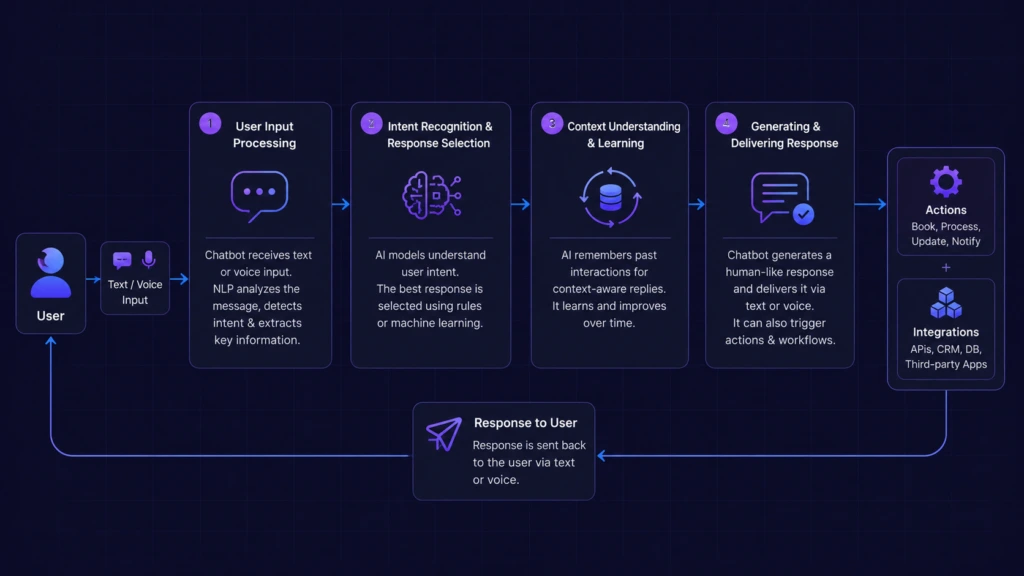
AI chatbots don’t just respond to user inputs; in fact, built with smart technology, they understand, retain, and interact like humans.
Here’s a breakdown of their major components and operational mechanics:
With these components performing together, AI-powered chatbots can automate tasks, manage complex conversations, and deliver instant support.
Besides being automation tools, AI chatbots drive business’s ultimate growth and result in improved sales and efficiency.
Here’s why investing in AI chatbot development is a strategic approach in 2026:
| Businesses leveraging AI chatbots achieve 3x higher sales conversions compared to website forms. |
| Rapidly expanding organizations generate 40% more revenue from personalization compared to their slower-growing counterparts. AI-powered chatbots and virtual assistants contribute to this by delivering personalized interactions, "interpreting" user queries, and providing tailored responses in conversational language. |
| According to Chatbot Magazine, research indicates that using chatbots to send personalized messages to customers who abandon their online shopping carts can increase revenue by up to 15%. |
| 74% of customers prefer using chatbots rather than human corporate agents for their queries. |
With quick advancements in machine learning and natural language processing (NLP), some AI chatbots have surfaced as industry leaders, providing intelligent assistance, seamless automation, and real-time engagement.
Have a Quick Glance:
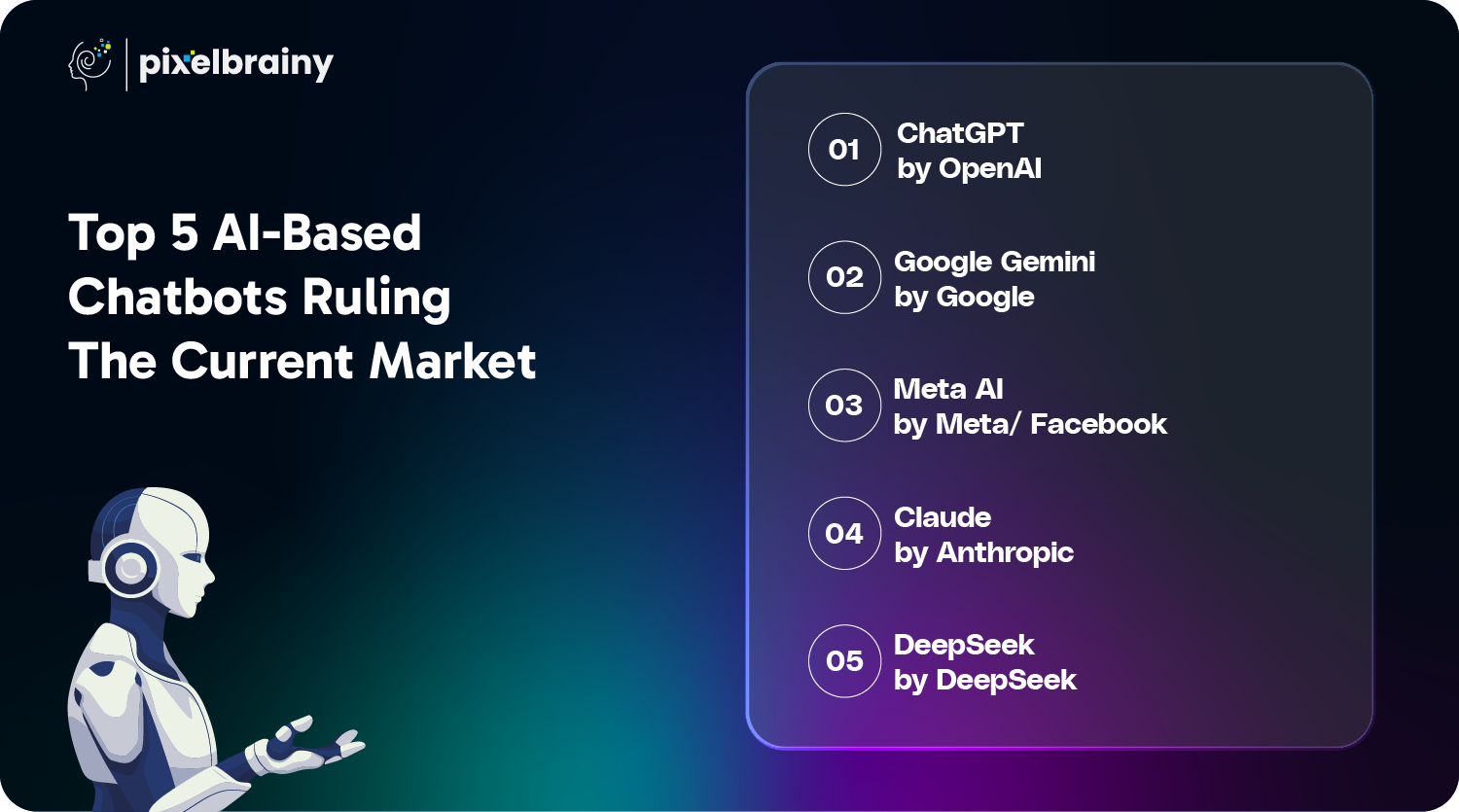
| AI Chatbot | Industry Use Cases | Integration Capabilities | Multilingual Support | Pricing Model | Customization & API Access | Best Deployment Mode |
| ChatGPT by OpenAI | Customer support, content creation, automation, coding assistance | APIs, third-party business tools, CRM integration | Yes | Free & paid plans (ChatGPT Plus, Enterprise) | API access for custom integrations | Cloud-based |
| Google Gemini | Search, workflow automation, business insights | Google Workspace (Docs, Gmail, Search), third-party AI tools | Yes | Free & premium business tiers | Limited API access, enterprise integrations | Cloud-based |
| Meta AI | Social media engagement, automated messaging, eCommerce | Facebook, Instagram, WhatsApp, Messenger, Shopify | Yes | Free with business-tier upgrades | Limited API for chatbot integration | Cloud-based |
| Claude by Anthropic | Safe AI interactions, customer support, business insights | APIs, third-party integrations (limited) | Yes | Subscription-based (Claude Pro, Enterprise) | API for controlled AI deployments | Cloud-based |
| DeepSeek | Research, complex problem-solving, AI-driven knowledge assistance | Research tools, AI development frameworks, APIs | Yes | Free & enterprise plans | Extensive API support for research & AI applications | Cloud-based & on-premises |
Here are the top five AI chatbots ruling the market in 2026 in detail:
Why it’s leading:
Best for: Businesses, content creators, and developers looking for a highly adaptive AI assistant.
Why it’s leading:
Best for: Enterprises and professionals relying on Google’s tools for workflow automation.
Why it’s leading:
Best for: Brands, businesses, and influencers leveraging social media marketing.
Why it’s leading:
Best for: Organizations prioritizing AI safety, businesses looking for ethical, trustworthy AI for decision-making, and enterprises managing sensitive data.
Why it’s leading:
Best for: Enterprises, organizations, and government agencies prioritizing AI safety and ethical AI deployment.
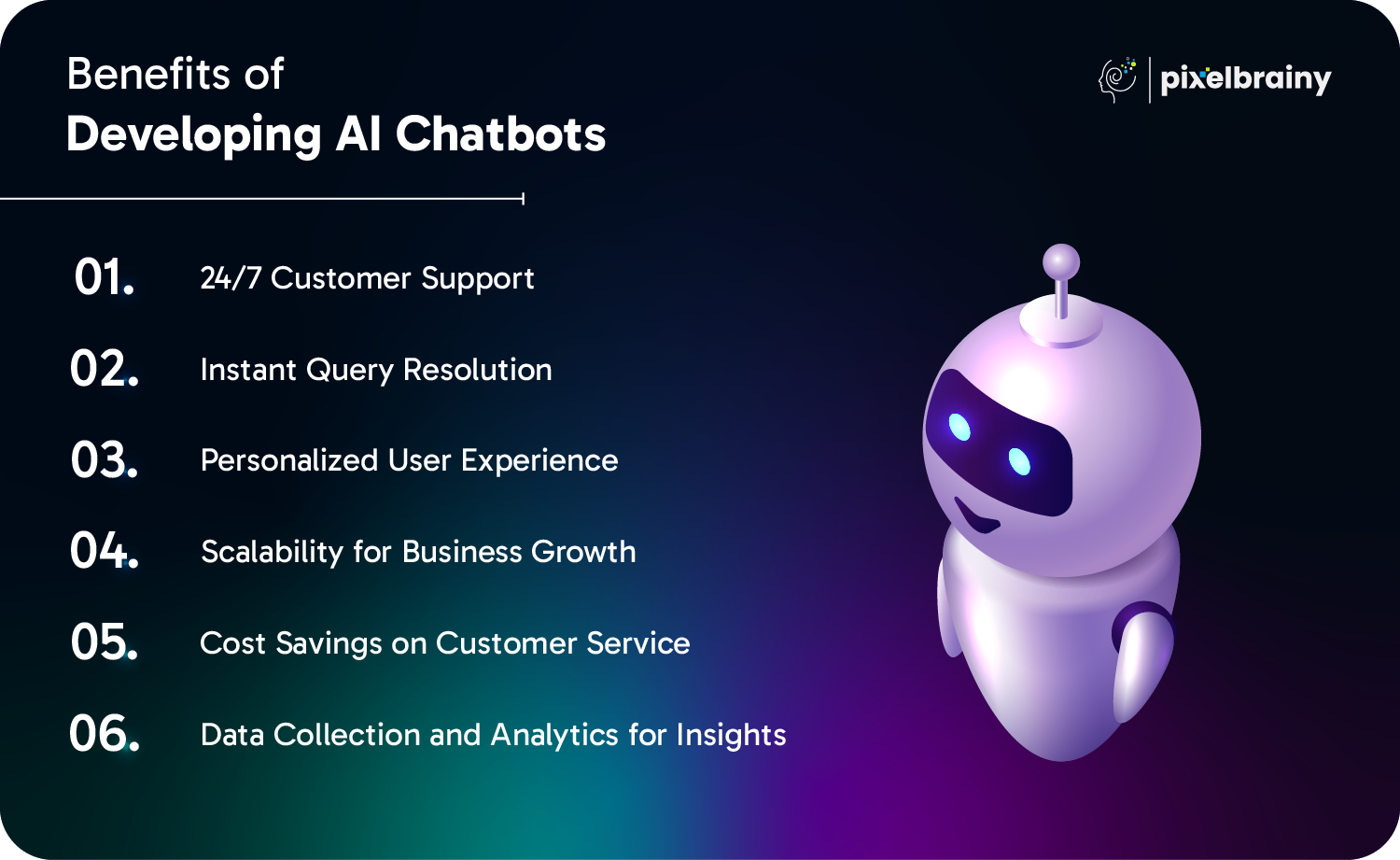
AI chatbots are a paradigm shift for businesses that offer rapid support, lower costs, and more intelligent customer interactions.
Here are the benefits you get in turn creating an AI chatbot:
AI chatbots come in diverse types designed to meet specific business needs.
Below, let’s discuss the most popular types of AI chatbots, along with real-world examples:

Example: Bank websites utilizing chatbots for basic FAQs such as "What are your working hours?"
Example: E-commerce chatbots that suggest products by analyzing browsing history.
Example: Customer service bots helping with flight bookings on airline websites.
Example: ChatGPT, which assists with coding, writing, and general inquiries.
Examples: Microsoft Copilot, Google Assistant, and Apple's Siri support users with day-to-day tasks.
Example: Domino’s chatbot allows customers to order pizza directly through chat.
Example: Meta AI on Instagram DMs, managing customer support and sales queries.
Example: Alexa and Google Nest help users regulate smart home devices with voice commands.
AI chatbots are transforming different sectors by automating tasks, improving customer engagement, and simplifying operations. Here’s how they are shaping different industry verticals with real-time examples:
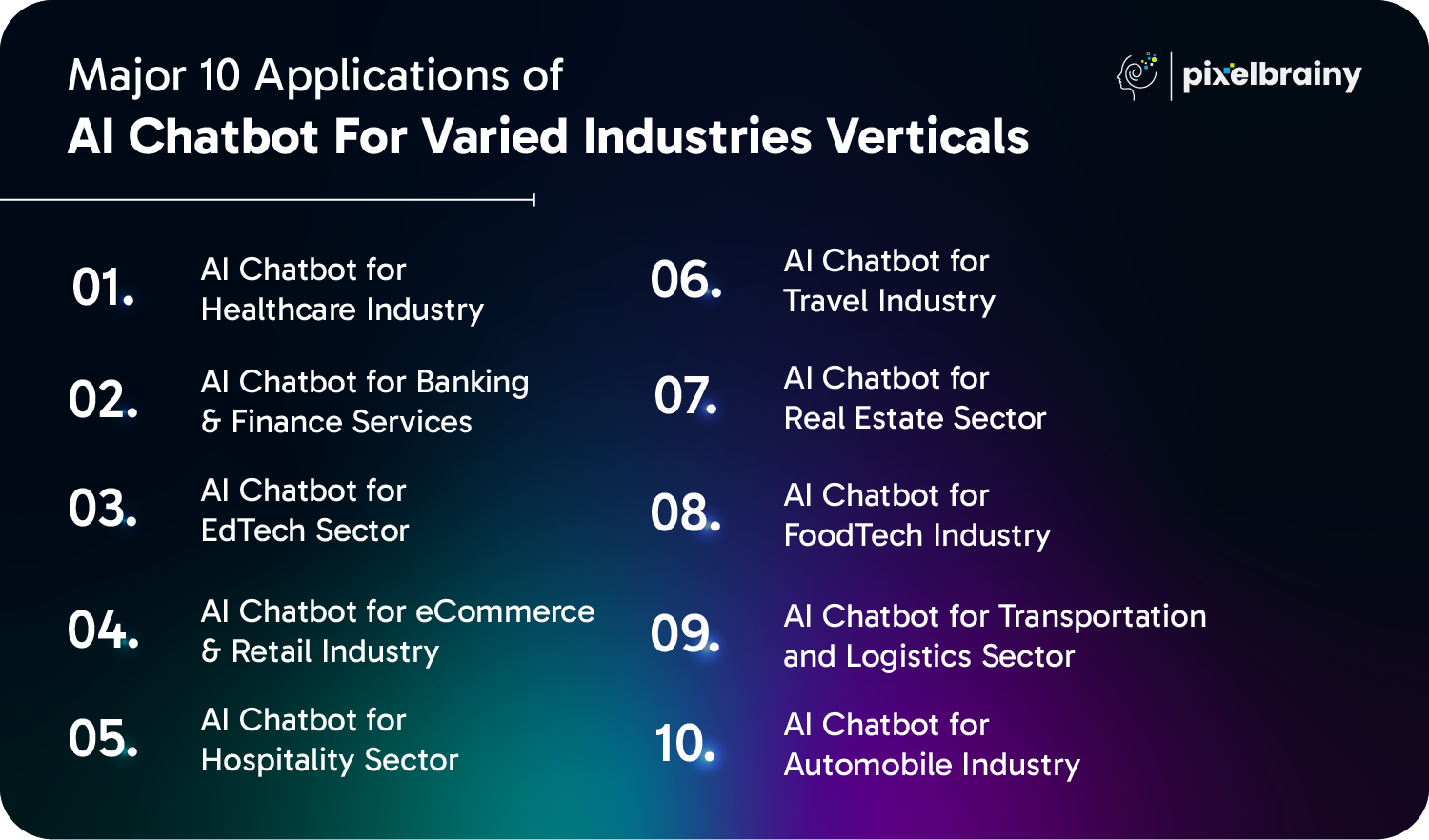
Example: Ada Health – An AI chatbot for health guidance and symptom assessment.
Example: Bank of America's Erica – An AI assistant for account management and bill payments.
Example: Duolingo Bot – An AI-driven language learning chatbot.
Example: H&M’s AI Chatbot – Assists shoppers with outfit suggestions and fashion advice.
Example: Hilton’s Connie – AI concierge powered by IBM Watson's AI provides local travel suggestions.
Example: Expedia’s AI chatbot – Assists with hotel bookings and travel recommendations.
Example: Zillow’s AI - Eases renting, buying, financing, and selling properties.
Example: Domino’s Chatbot – Lets customers order pizza through Facebook Messenger.
Example: DHL’s AI Chatbot – Offers real-time package tracking.
Example: Tesla’s AI Assistant – Provides voice-controlled assistance and remote car diagnostics.
To ensure the success of your AI chatbot, consider the below best practices:
Here are some top companies that have successfully used AI chatbots to dominate the market:
AI Adoption: Amazon rolled out “Interests,” an AI-powered shopping assistant that personalizes product recommendations per the user prompts. The company is also testing “Health AI,” a chatbot offering reliable health insights and product suggestions.
Impact: These AI-driven innovations boost customer engagement, enhance shopping experiences, and drive higher conversions.
AI Integration: CBA has set up a tech hub in Seattle to step into AI advancements from Microsoft and Amazon. The endeavor aims at AI-powered customer interactions and productivity enhancements.
Impact: With AI-driven solutions, CBA fortifies its digital banking services, providing efficiency and improved user experiences.
AI Implementation: Duolingo surged with "Duolingo Max," an AI-powered chatbot that delivers real-time language learning assistance utilizing OpenAI's GPT-4. It fosters interactive conversations and AI-driven explanations to improve learning experiences.
Impact: The AI chatbot remarkably boosts user retention, engagement, and personalized learning, making Duolingo a leader in the edtech industry.
Whether in e-commerce, banking, or healthcare, AI chatbots are proving to be a disruptor for businesses looking to optimize and scale operations.
Also Read: How To Build An AI Agent In 2026
If you're wondering, "What features should my custom AI chatbot include in the first version without overspending?", the answer is to start with a well-defined Minimum Viable Product (MVP).
An MVP focuses on the core capabilities that enable your chatbot to understand your business knowledge, handle customer queries accurately, and integrate with essential systems. Prioritizing the right features from the beginning helps reduce development costs, accelerate deployment, and create a strong foundation for future AI enhancements.
Here are 10 must-have features for a compelling AI chatbot:
| Feature | Description |
| Natural Language Processing (NLP) | Allows the chatbot to understand, analyze, and respond natively to user queries. Supports multiple languages for wider audience reach. |
| Multi-Channel Support | Integrates with mobile apps, websites, messaging apps (WhatsApp, Messenger), and social media. Provides a consistent experience across platforms. |
| Conversational Flow & Intent Recognition | Recognizes user intent and follows a well-organized conversation flow. Guides users toward a resolution with no unnecessary back-and-forth. |
| Quick Replies & Smart Suggestions | Offers predefined options to pace up conversations. Diminishes typing effort and improves user experience. |
| Seamless API & Third-Party Integrations | Connects with payment gateways, CRMs, and backend systems. Ensures real-time data retrieval and updates. |
| Personalized Responses with AI Learning | Adapts based on user preferences, behavior, and previous interactions. Offers a tailored experience to increase engagement. |
| Voice Support & Text-to-Speech | Permits users to interact via voice commands. Boost accessibility for users who choose voice over text. |
| Human Handoff & Live Chat Support | Transfers complicated queries to human agents when required. Ensures a seamless transition without frustrating users. |
| Data Security & User Privacy | Implements compliance (GDPR, HIPAA), end-to-end encryption, and secure authentication. Safeguards sensitive user data. |
| Analytics & Performance Tracking | Monitors response accuracy, user interactions, and engagement rates. Assists optimize chatbot performance over time. |
A well-planned AI chatbot MVP equipped with the right core features enables faster deployment, lower development costs, and a scalable foundation for future AI capabilities.
If you're asking, "How can I make my custom AI chatbot smarter after the MVP is launched?", the next step is to add advanced capabilities that improve intelligence, personalization, and business automation.
These features enable your chatbot to understand context, learn from interactions, support complex workflows, and deliver highly personalized experiences that drive greater customer satisfaction and long-term business value.
Here are 10 robust features to take your chatbot to a level ahead:
| Feature | Description |
| Context Awareness & Memory | Recalls past user preferences and conversations for a more personalized experience. Lets users continue a conversation with no repeating information. |
| Sentiment Analysis | Detects user emotions (happy, confused, frustrated) to revise responses accordingly. Fosters better customer experience management. |
| Hyper-Personalization with AI & ML | Utilizes the capabilities of machine learning to tailor responses based on user interests, behavior, and historical data. Offers product recommendations, custom proposals, and proactive support. |
| Multilingual & Real-Time Translation | Supports multiple languages and translates conversations immediately. Extends your chatbot’s reach to a global audience. |
| Real-Time Voice Cloning for Personalized Interaction | Enables the chatbot to simulate a specific voice in real time, making interactions more realistic and personalized. This is good for brand-specific virtual assistants or customer engagement. |
| Integration with AI Assistants (Alexa, Google Assistant, Siri) | Allows users to smoothly interact via popular AI voice assistants. Expands chatbot usability beyond web and mobile apps. |
| Proactive Messaging & Notifications | Sends alerts, personalized reminders, and offers based on user activity. Boosts customer engagement by proactively handling needs. |
| Advanced Image & Document Processing | Permits users to upload images, documents, or receipts for automated processing. Extracts and processes information using OCR (Optical Character Recognition). |
| AI-Powered Predictive Analytics | Uses historical data and AI models to anticipate user needs. Enhances decision-making by delivering relevant solutions in real time. |
| Auto-Learning & Self-Improvement | Continuously learns from user interactions and feedback to enhance responses. Adapts to new trends, phrases, and industry updates automatically. |
Adding advanced AI capabilities transforms your chatbot from a basic conversational assistant into an intelligent business solution that continuously learns, adapts, and scales with your organization's growing needs.
Building a successful AI chatbot requires much more than integrating a large language model into your application. A structured development process ensures the chatbot understands your business knowledge, delivers accurate responses, integrates with existing systems, and continuously improves through real-world interactions. Following the right approach also reduces implementation risks, accelerates deployment, and maximizes long-term ROI.
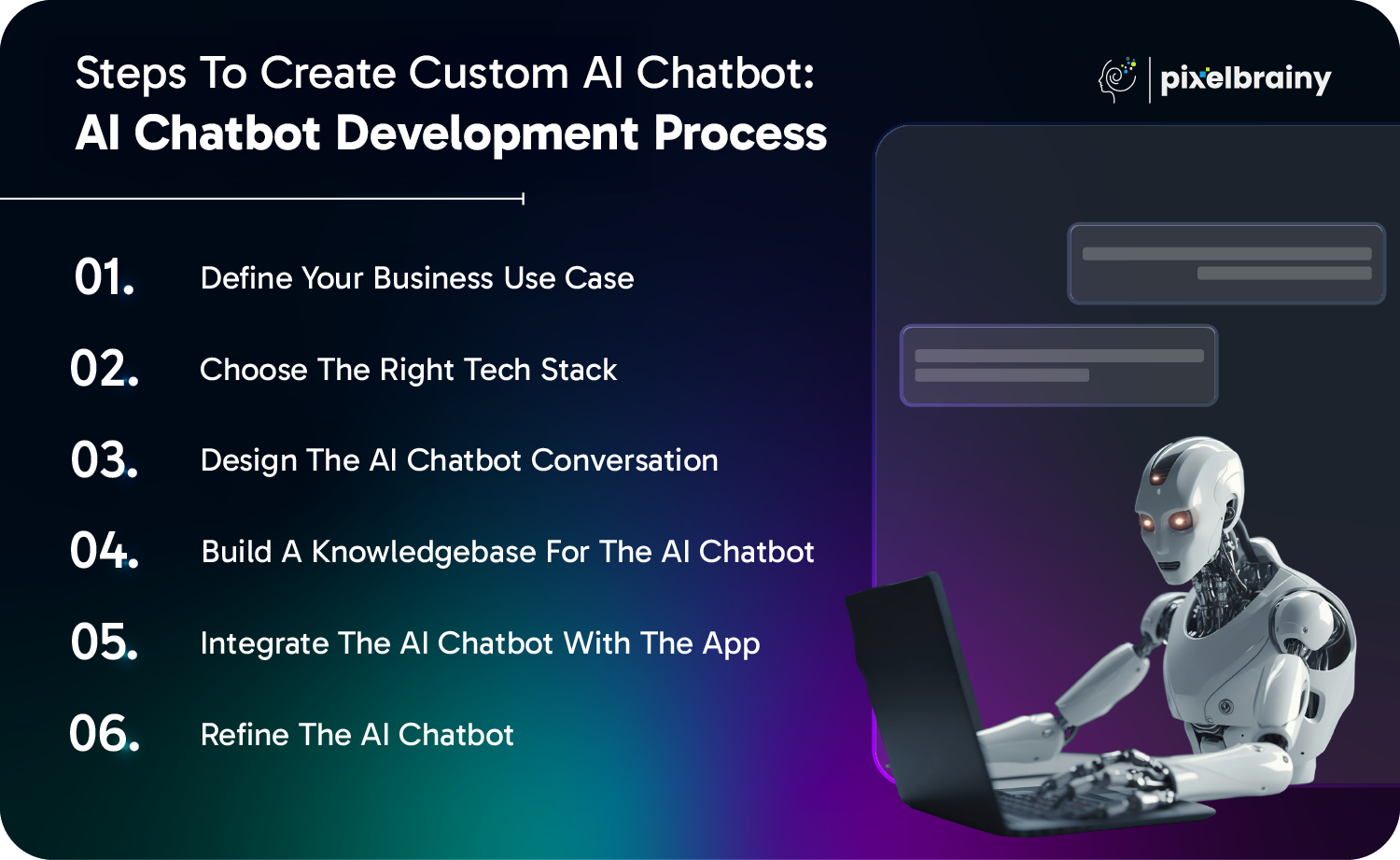
The first step is identifying the exact business problem your chatbot will solve. Whether the objective is customer support, lead qualification, employee assistance, appointment booking, or sales automation, clearly defining the use case helps shape the chatbot's capabilities and success metrics.
Next, identify your target audience, expected user journeys, preferred communication channels, and performance goals. At this stage, businesses should also determine whether a rule-based chatbot is sufficient or whether an AI-powered conversational chatbot with advanced reasoning capabilities is required. Many organizations begin with Poc Development to validate technical feasibility before moving to full-scale implementation.
Selecting the right technology stack determines your chatbot's scalability, security, and future flexibility. This includes choosing the appropriate large language model, NLP framework, vector database, backend architecture, cloud platform, programming language, and deployment environment.
A strong technical foundation often combines modern frameworks with robust AI model development practices to optimize response accuracy, latency, and domain-specific intelligence. Organizations should also evaluate hosting options, API capabilities, monitoring tools, and security requirements before development begins.
Also Read: Top 12+ AI Model Development Companies in the USA
An effective chatbot delivers natural, intuitive, and goal-oriented conversations rather than scripted interactions. Design conversation flows that accommodate multiple user intents, follow-up questions, contextual memory, fallback scenarios, and smooth escalation to human agents whenever necessary.
The conversational interface should also prioritize usability and accessibility. Collaborating with experienced UI/UX design companies helps create user experiences that improve engagement, reduce friction, and increase completion rates across web, mobile, and messaging platforms.
The quality of your chatbot depends on the quality of the knowledge it learns from. Build a centralized knowledge base using product documentation, FAQs, company policies, support tickets, training manuals, internal documents, and other verified business resources.
Modern AI chatbots commonly leverage Retrieval-Augmented Generation (RAG), embeddings, and vector databases to retrieve accurate business information before generating responses. Many businesses begin with MVP development to launch essential capabilities quickly, collect user feedback, and expand the knowledge base through continuous iteration.
Also Read: Top 10 AI MVP Development Companies in USA
A chatbot becomes significantly more valuable when it can interact with your existing business ecosystem. Connect it with CRMs, ERPs, payment gateways, customer support platforms, internal databases, calendars, inventory systems, and communication channels to automate real business workflows.
Professional AI integration services ensure secure API connectivity, seamless data exchange, authentication, permission management, and reliable performance across websites, mobile applications, WhatsApp, Slack, Microsoft Teams, and other enterprise platforms.
Launching the chatbot is only the beginning. Continuously monitor conversations, measure response quality, identify failure points, and analyze user feedback to improve performance over time. Track key metrics such as intent recognition accuracy, resolution rate, user satisfaction, response latency, and conversation completion.
Regular retraining with fresh business data, prompt optimization, and model evaluation helps maintain high accuracy as products, policies, and customer expectations evolve. Many organizations also benchmark implementation strategies adopted by top AI chatbot development companies to continuously enhance chatbot performance, scalability, and business impact.
By following these six strategic steps, you can develop a custom AI chatbot that delivers accurate responses, scales with your business, and creates measurable long-term value.
The cost to build AI chatbots depends on diverse factors, like complexity, integrations, features, AI model used, and development team location.
Below is a rough cost estimation:
| Chatbot Type | Development Complexity | Estimated Cost |
| Basic Rule-Based Chatbot | Simple Q&A, pre-defined responses | $10,000 – $20,000 |
| AI-Powered Chatbot with NLP | Understands intent, basic ML capabilities | $20,000 – $50,000 |
| Conversational AI Chatbot | Advanced NLP, context-aware, personalized interactions | $50,000 – $100,000 |
| Enterprise-Level AI Chatbot | Custom AI models, multilingual support, integrations with CRM & ERP | $100,000+ |
Advanced features like personalized recommendations and complicated workflows demand extensive AI training, raising costs.
High-accuracy NLP, sentiment analysis, and multi-language support require ongoing training, contributing to expenses.
Custom API integration with CRMs, third-party tools, and databases drive up development complexity and cost.
Meeting regulations like GDPR and HIPAA needs authentication, encryption, and audits, increasing development expenses.
Handling high traffic, cloud hosting, and real-time responses boosts infrastructure and maintenance costs.
Outsource to Experts: Optimize costs with an experienced AI development agency.
You need to emerge with a combination of AI frameworks, cloud services, programming languages, and integrations while you build AI chatbot to ensure smooth functionality and scalability.
Below is a breakdown of essential tools and technologies:
| Category | Tools & Technologies |
| Programming Languages | Python, JavaScript (Node.js), Java |
| AI & NLP Frameworks | Google Dialogflow, IBM Watson, OpenAI GPT, Rasa |
| Machine Learning Libraries | TensorFlow, PyTorch, spaCy, scikit-learn |
| Cloud Services | AWS, Google Cloud, Microsoft Azure |
| Database Management | Firebase, MongoDB, MySQL, PostgreSQL |
| Messaging Platforms | WhatsApp API, Facebook Messenger, Slack, Telegram |
| Voice Recognition | Google Speech-to-Text, Amazon Transcribe, Wit.ai |
| API & Integrations | RESTful APIs, Webhooks, CRM (Salesforce, HubSpot) |
| Analytics & Monitoring | Google Analytics, Botpress, Chatbase |
You should choose the right AI chatbot development company to make AI chatbot that meets your business requirements.
Here’s a step-by-step guide you can follow to find and hire the best AI chatbot development partner:
Tip*: Where to Find? Clutch, Upwork, LinkedIn, GoodFirms, Google Search.
If you're a business owner with little or no technical background, terms like NLP, LLMs, APIs, vector databases, and AI frameworks can quickly become overwhelming. You know your business needs an intelligent chatbot, but you also want confidence that you're making the right investment without being overcharged or sold unnecessary features. That's where PixelBrainy comes in.
As a trusted AI chatbot development company, we simplify the entire development journey by combining technical expertise with a business-first approach. Instead of overwhelming you with technical jargon, we help you understand every stage of the project, recommend the right technology based on your business goals, and build a solution that delivers measurable results. Whether you're launching your first AI initiative or modernizing enterprise operations, we act as your technology partner from strategy to deployment and beyond.
Our team works closely with you to understand your objectives before writing a single line of code, ensuring every feature contributes to measurable business outcomes and long-term ROI.
Challenge
A fast-growing eCommerce company struggled to manage thousands of daily customer inquiries related to product recommendations, order tracking, returns, and refunds. Increasing ticket volumes led to delayed responses, overwhelmed support agents, and declining customer satisfaction.
Solution
PixelBrainy developed and deployed a custom AI customer support chatbot integrated with the company's website and social media channels. The solution:
Results
Challenge
A leading financial institution faced high call center volumes caused by repetitive inquiries about account balances, loan eligibility, transaction history, and routine banking services. Long wait times negatively affected customer experience while increasing operational costs.
Solution
Our team implemented a secure AI-powered banking assistant capable of:
Results
At PixelBrainy, we build AI chatbots that do more than answer questions. They automate workflows, improve customer experiences, empower employees, and generate measurable business value while remaining scalable, secure, and easy to manage.
Whether you want to build your first AI chatbot MVP or develop a full enterprise-grade conversational AI platform, PixelBrainy a leading AI development company has the expertise to deliver it right the first time. So let's connect.
If you're planning to build a custom AI chatbot for your company that is trained on your products, policies, internal documentation, and customer data, understanding the complete development process is the first step toward making the right investment. Many business owners ask, "How do I develop a custom AI chatbot that can handle complex queries without giving generic responses, and how much will it cost?" The answer depends on factors such as your business requirements, AI model selection, integrations, knowledge base complexity, security needs, and long-term scalability.
Throughout this guide, you've learned how to define the right use case, choose the appropriate technology stack, prepare business-specific data, integrate enterprise systems, estimate development costs, and implement best practices for building an intelligent, enterprise-ready AI chatbot. Following a structured roadmap not only reduces development risks but also helps you create a solution that delivers accurate responses, automates business processes, improves customer experiences, and generates measurable ROI.
Choosing an experienced AI development partner ensures you receive the right technical guidance, transparent pricing, and a scalable solution that evolves alongside your business.
Ready to build a custom AI chatbot for your business? Schedule a call with our AI experts today to discuss your requirements, receive a personalized development roadmap, and get a transparent cost estimate for your project.
First, you need to define your use case, then choose the right AI framework, create a knowledge base, integrate NLP, and deploy it on your preferred platform.
Yes, you can build your own chatbot on no-code platforms like Google Dialogflow or ChatGPT API. For a fully customized AI chatbot, hire AI chatbot developers.
AI chatbots leverage NLP and machine learning to learn and improve over time, while regular chatbots follow predefined scripts with restricted responses.
They automate customer support, offer 24/7 service, personalize interactions, increase sales, and enhance operational efficiency.
A basic chatbot development takes 2 to 4 weeks, while an advanced AI-powered chatbot may take 2 to 6+ months based on complexity.
Contact PixelBrainy, discuss your requirements, get a customized development plan, and collaborate with our experts to build and deploy your AI chatbot.

About The Author
Sagar Bhatnagar
Sagar Sahay Bhatnagar brings over a decade of IT industry experience to his role as Marketing Head at PixelBrainy. He's known for his knack in devising creative marketing strategies that boost brand visibility and market influence. Sagar's strategic thinking, coupled with his innovative vision and focus on results, sets him apart. His track record of successful campaigns proves his ability to utilize digital platforms effectively for impactful marketing efforts. With a genuine passion for both technology and marketing, Sagar continuously pushes PixelBrainy's marketing initiatives to greater success.

Working with PixelBrainy has been a great experience. They took our vision for an AI-powered platform and turned it into a fully functional product. What impressed me most was their strong understanding of both design and development, and their ability to handle complex requirements with ease. The team was responsive, cooperative, and always open to feedback. They kept things organized, communicated clearly, and delivered quality work on time. I highly recommend PixelBrainy to anyone looking for a skilled and reliable development partner.

Working with the PixelBrainy team has been a highly positive experience. They understand the design requirements and create beautiful UX elements to meet the application needs. The dev team did an excellent job bringing my vision to life. We discussed usability and flow. Sagar worked with his team to design the database and begin coding. Working with Sagar was easy. He has the knowledge to create robust apps, including multi-language support, Google and Apple ID login options, Ad-enabled integrations, Stripe payment processing, and a Web Admin site for maintaining support data. I'm extremely satisfied with the services provided, the quality of the final product, and the professionalism of the entire process. I highly recommend them for Android and iOS Mobile Application Design and Development.

Great experience working with them. Had a lot of feedback and I found that unlike most contractors they were bugging me for updates instead of the other way around. They were extremely time conscience and great at communicating! All work was done extremely high quality and if not on time, early! They were always proactive when it comes to communication and the work is great/above par always. Very flexible and a great team to work with! Goes above and beyond to present us with multiple options and always provides quality. Amazing work per usual with Chitra. If you have UI/UX or branding design needs I recommend you go to them! Will likely work with them in the future as well, definitely recommended!

PixelBrainy is a joy to work with and is a great partner when thinking through branding, logo, and website layout. I appreciate that they spend time going into the "why" behind their decisions to help inform me and others about industry best practices and their expertise.

I hired them to design our software apps. Things I really like about them are excellent communication skills, they answer all project suggestions and collaborate right away, and their input on design and colors is amazing. This project was complex and needed patience and creativity. The team is amazing to do business with. I will be using them long-term. Glad to see there are some good people out there. I was afraid to try and outsource my project to someone but I am glad I met them! I really can't say enough. They went above and beyond on this project. I am very happy with everything they have done to make my business stand out from the competition.

It was great working with PixelBrainy and the team. They were very responsive and really owned the project. We'll definitely work with them again!

I recently worked with the PixelBrainy team on a project and I was blown away by their communication skills. They were prompt, clear, and articulate in all of our interactions. They listened and provided valuable feedback and suggestions to help make the project a success. They also kept me updated throughout the entire process, which made the experience stress-free and enjoyable.

PixelBrainy is very good at what it does. The team also presents themselves very professionally and takes care of their side of things very well. I could fully trust them taking up the design work in a timely and organised manner and their attention to detail saved us lots of effort and time. This particular project was quite intense and the team showed that they function very well under pressure. Very much looking forward to working with her again!

It's always an absolute pleasure working with them. They completed all of my requests quickly and followed every note I had for them to a T, which made our process go smoothly from start to finish. Everything was completed fast and following all of the guidelines. And I would recommend their services to anyone. If you need any design work done in the future, PixelBrainy should be your first call!

They took ownership of our requirements and designed and proposed multiple beautiful variants. The team is self-motivated, requires minimum supervision, committed to see-through designs with quality and delivering them on time. We would definitely love to work with PixelBrainy again when we have any requirements.

PixelBrainy was a big help with our SaaS application. We've been hard at work with a new UI/UX and they provided a lot of help with the designs. If you're looking for assistance with your website, software, or mobile application designs, PixelBrainy and the team is a great recommendation.

PixelBrainy designers are amazing. They are responsive, talented, and always willing to help craft the design until it matches your vision. I would recommend them and plan to continue them for my future projects and more!!!

They were awesome! Did a good job fast, and good communication. Will work with them again. Thank you

Creative, detail-oriented, and talented designers who take direction well and implement changes quickly and accurately. They consistently over-delivered for us.

PixelBrainy team is very talented and creative. Great designers and a pleasure to work with. PixelBrainy is an excellent communicator and I look forward to working with them again.

PixelBrainy has a very talented design team. Their work is excellent and they are very responsive. I enjoy working with them and hope to continue on all of our future projects.


Transform your ideas into reality with us.
Across these industries, each engagement brings unique challenges, from early-stage product development to scaling complex systems, helping us build a practical understanding of real-world product environments.