AI Summary Powered by PixelBrainy
Could an AI avatar handle your clinic’s busiest front-desk hours while your staff focus on patients who genuinely need human assistance?
For a multi-specialty clinic with 12 physicians, front-desk staff can become overwhelmed when patient check-ins, appointment scheduling, insurance verification, phone calls, and routine questions arrive simultaneously. Peak demand can create longer waits, missed calls, scheduling delays, and pressure.
This is where AI avatar development for clinic front desk operations can add capacity. A well-designed avatar can greet patients, answer questions, guide check-ins, assist with scheduling, collect information, support insurance workflows, and transfer complex requests to staff.
Developing an AI avatar for clinic front desk requires more than a talking digital character. A production-ready clinic front desk AI avatar needs conversational AI, speech recognition, natural voice generation, workflow automation, EHR and scheduling integrations, authentication, security, analytics, and human escalation.
The healthcare AI market is growing. Grand View Research estimates the global artificial intelligence in healthcare market will reach $50.7 billion in 2026 and projects it to reach $505.6 billion by 2033, representing a projected CAGR of 38.9%.
For a practice administrator, the key questions are cost, documented improvements, and qualified U.S. companies.
Query: I am the practice administrator of a multi-specialty clinic with 12 physicians and our front desk team is overwhelmed handling patient check-ins, appointment scheduling, insurance verification, and general patient questions simultaneously during peak morning hours. Before I present an AI avatar for our clinic front desk to our physician partners I need an honest cost estimate for building a production-grade AI clinic front desk avatar, what documented patient experience improvements look like for clinics that have deployed AI front desk avatars, and which development companies in the USA have built AI avatars specifically for medical clinic front desk environments.
This clinical front desks AI avatar development guide explains how to create a human-like AI avatar for clinic front desk operations, covering benefits, features, development, technology, costs, challenges, and implementation. The goal is to make a clinical front desks AI avatar that extends capacity, improves access, and automates routine work while preserving support.

What if a patient could walk into a busy clinic, ask a question naturally, complete a routine front-desk task, and get immediate assistance without waiting for a receptionist?
That is the basic idea behind a clinic front desk AI avatar.
A clinic front desk AI avatar is a digital, human-like assistant designed to handle routine patient-facing interactions at the reception desk. It combines conversational artificial intelligence, speech recognition, natural language processing, text-to-speech, a visual avatar, and clinic system integrations to create an interactive front-desk experience.
Unlike a conventional chatbot that expects patients to type questions into a small chat window, an AI avatar can communicate through voice, touch, text, and a visual digital human interface. This makes it particularly relevant for physical clinic reception areas where patients may prefer speaking rather than navigating forms or menus.
For example, imagine a patient arriving at a multi-specialty clinic during the morning rush and saying:
“I have an appointment with Dr. Sam at 9:30. Where do I check in?”
The avatar can identify the patient's request, provide the appropriate check-in instructions, and, when connected to the clinic's systems, potentially guide the patient through the next step.
The same assistant could handle questions such as:
This makes developing an AI avatar for clinic front desk operations less about replacing the receptionist and more about creating a digital layer that absorbs repetitive interactions while staff concentrate on patients who need personal assistance.
The architecture behind clinic front desk AI avatar development consists of several connected components. Each component has a specific role in turning a patient's spoken or typed request into an appropriate answer or action.
The first component is the interface through which the patient communicates with the AI.
For a physical clinic, this could be a reception kiosk or large touchscreen positioned near the check-in area. The same avatar can also be adapted for a clinic website, patient portal, tablet, or mobile application.
A physical setup may include:
For example, a patient who prefers speaking can simply ask a question instead of searching through several touchscreen menus.
This is particularly useful during busy reception periods when multiple patients are arriving, checking in, asking questions, and requesting appointment assistance at the same time.
If the patient speaks to the avatar, speech recognition converts the spoken request into text that the AI system can interpret.
Consider a patient saying:
“I can't make my appointment on Thursday. Can I move it to next week?”
The system first needs to accurately recognize the patient's words before it can determine what the patient wants.
For clinic environments, speech recognition needs to account for practical conditions such as background conversations, reception-area noise, different accents, varying speaking speeds, and patients who may speak quietly or unclearly.
A strong how to create a human-like AI avatar for clinic front desk strategy therefore involves testing the voice experience in the actual environment where patients will use it, rather than evaluating it only in a quiet development setting.
Once the patient's request has been converted into text, the conversational AI determines what the patient is trying to accomplish.
The same topic can contain very different intentions.
For example:
All four requests mention a physician or clinic, but they require different responses.
The AI therefore needs to identify the patient's intent, relevant details, and any missing information before deciding what happens next.
If the patient says:
“I want to see Dr. Mehta next week.”
the avatar may need to ask:
“Certainly. Do you have a preferred day or time?”
This creates a conversational experience rather than forcing the patient to repeatedly select options from a rigid menu.
An AI avatar cannot provide a reliable front-desk experience without access to accurate clinic information.
The clinic knowledge base acts as the controlled source for routine information the avatar is permitted to provide.
It may include:
For example, if a patient asks:
“How early should I arrive for my first appointment?”
the avatar should retrieve the clinic's approved instruction instead of generating an answer based on generic assumptions.
This controlled knowledge layer is an important part of a clinical front desks AI avatar development guide because the usefulness of the avatar depends heavily on the accuracy and freshness of the information it provides.
For clinics with a large amount of frequently changing information, retrieval-augmented generation, or RAG, can connect the conversational AI to approved information sources.
Suppose a clinic changes its check-in policy for a particular specialty.
Instead of relying on information that may have been learned during model training, the AI can retrieve the current clinic-approved information and use it when responding to the patient.
This can be especially useful when information changes across:
RAG can therefore become an important component when clinics want the avatar to provide answers grounded in their own operational information. The reference architecture similarly identifies approved knowledge retrieval as a key layer for healthcare AI assistants.
This is where a basic AI avatar can evolve into a functional digital front-desk assistant.
A production-grade solution may connect with systems such as:
The exact integrations depend on what the clinic wants the avatar to do.
For example, an informational avatar may only need access to a clinic knowledge base.
An avatar designed to support appointment workflows may additionally need secure access to scheduling functionality.
A patient check-in workflow may require identity verification and integration with the clinic's registration process.
This means AI avatar development for clinic front desk should begin with clearly defined workflows rather than simply choosing an avatar design first.
Patients rarely speak in perfectly structured commands.
A patient may say:
“My appointment is tomorrow morning, but something came up and I can't come. What should I do?”
The avatar needs to understand that the patient may be asking about cancellation or rescheduling.
It may then ask an appropriate follow-up question instead of immediately providing a generic cancellation policy.
The conversation can follow a structured flow:
Patient request → Intent detection → Required information → Verification, if needed → Appropriate response or action
This allows the system to manage more natural conversations while still operating within defined clinic rules.
After the AI determines what it should say, text-to-speech converts the response into spoken language.
Voice quality matters because the patient's perception of the interaction is influenced not only by the information provided but also by how the avatar communicates it.
A clinic can consider:
For example, instead of delivering a long response all at once, the avatar can provide information in short conversational segments and ask whether the patient needs additional help.
The avatar itself provides the visual component of the experience.
Depending on the solution, it can include:
However, making the avatar look realistic should not be the primary objective.
For a clinic front desk, clarity, trust, accessibility, and ease of interaction are more important than creating a digital human that simply looks impressive.
The avatar should make it immediately obvious that the patient is interacting with an AI assistant and provide an easy path to human help when necessary.
Not every front-desk interaction should be automated.
This is a critical consideration when you make a clinical front desks AI avatar for real patient environments.
For example, if a patient says:
“I think there is an error in my insurance information and I need someone to look at my account.”
the avatar may collect basic information and direct the patient to the appropriate staff member rather than attempting to resolve a complex issue independently.
Similarly, requests involving clinical symptoms, medical advice, sensitive personal situations, complaints, complex billing problems, identity concerns, or situations outside the system's approved scope should have an appropriate escalation path.
A well-designed avatar should know not only how to answer, but also when not to answer.
The final layer is analytics.
Clinic administrators can use interaction data to understand where patients are experiencing friction at the front desk.
Useful metrics can include:
For example, if hundreds of patients repeatedly ask where to complete new-patient forms, that may indicate an opportunity to improve the clinic's existing communication or check-in process.
Analytics can therefore make the AI avatar more than a front-desk automation tool. It can also provide operational insight into recurring patient needs.
A typical interaction can follow this sequence:
Patient speaks or types → Speech recognition → Intent and context detection → Clinic information or system data retrieved → AI determines response/action → Response generated → Voice and avatar presentation → Patient completes interaction → Human handoff when required
Consider this example:
Patient:
“I have an appointment with Dr. Rao this morning, but I haven't completed my forms.”
AI Avatar:
“No problem. I can help you find the new-patient forms. If you would like, I can also explain what you need to complete before checking in.”
The patient can then continue the conversation or request staff assistance.
This workflow demonstrates the central value of clinic front desk AI avatar development. The avatar does not need to automate every responsibility of a human receptionist. Instead, it can take care of appropriate repetitive interactions while keeping staff available for situations that require judgment, empathy, or direct intervention.
Why should a clinic invest in an AI avatar when it already has receptionists, phone support, online scheduling, patient portals, and automated reminders?
The answer is not simply to add another technology to the front desk.
The stronger business case is to reduce the pressure created by high-volume, repetitive patient interactions while giving patients another convenient way to get help, complete routine tasks, and access clinic information.
This becomes particularly important for multi-specialty clinics where front-desk teams may simultaneously handle appointment scheduling, check-ins, insurance questions, cancellations, referrals, physician availability, and general patient queries.
Consider a typical situation:
“Our clinic front desk gets overwhelmed every morning. Patients are checking in while other patients are calling to reschedule appointments, asking about insurance, and trying to reach specific physicians. We need a way to handle routine requests without making patients wait.”
This is where clinic front desk AI avatar development can become part of a broader patient-access and front-office automation strategy.
The objective is not to replace every receptionist responsibility. Instead, the AI avatar can take responsibility for clearly defined administrative interactions, provide immediate assistance for routine requests, connect with approved clinic systems, and transfer more complicated situations to staff.
AI adoption in medical practices is moving beyond experimentation, particularly in administrative workflows.
A February 2026 MGMA Stat poll of 177 medical-practice respondents found that scheduling was the leading area where practices were looking to add AI or automation, at 31%. Calls followed at 27%, registration and eligibility at 23%, and prior authorization at 16%.
These priorities closely match the work handled by a busy clinic front desk.
For example, an AI avatar could potentially assist with:
The important question is therefore not:
“Can AI replace our front desk?”
A more useful question is:
“Which front-desk workflows can AI handle safely and consistently, and which should remain with our staff?”
That distinction creates a much more practical starting point for developing an AI avatar for clinic front desk operations.
Front-desk demand is rarely evenly distributed throughout the day.
A clinic may experience significant increases in patient interactions during:
The problem is that a clinic cannot always increase staffing every time demand temporarily rises.
An AI avatar provides another approach.
Instead of adding staff solely to absorb repetitive interactions, the clinic can introduce an automated front-desk layer that handles predefined conversations simultaneously.
For example:
Patient:
“I can't make my appointment tomorrow. Can I move it to Friday?”
AI Avatar:
“Certainly. I can help you with the rescheduling process. Let me check the available options.”
If the avatar has an authorized connection to the scheduling system, it can retrieve available slots and guide the patient through the permitted workflow. If the request requires staff intervention, the conversation can be escalated.
This makes the business case about front-desk capacity, not simply about adding a digital character.
A clinic front desk AI avatar does not need to stop at answering:
“What time does the clinic open?”
With appropriate integrations and permissions, it can potentially support multi-step administrative workflows.
For example:
This direction aligns with broader healthcare AI investment.
Deloitte's February 2026 research found that 61% of surveyed healthcare technology executives were already building or implementing agentic AI initiatives or had secured budgets, while 85% planned to increase agentic AI investment over the following two to three years.
For clinic administrators, the implication is that future AI front desks may increasingly move from answering questions toward performing defined administrative tasks.
A traditional clinic chatbot might answer:
“What are your dermatology clinic hours?”
A more capable clinic front desk AI avatar could potentially handle:
“I need to reschedule my dermatology appointment because I can't come tomorrow.”
The difference is significant.
The second interaction may require the system to:
This requires much more than an animated avatar.
A production-grade solution may require:
That is why clinics should approach AI avatar development for clinic front desk as a workflow and systems-integration project, not simply an avatar-design project.
The broader direction of medical-practice operations also supports this shift.
MGMA reported in June 2026 that nearly seven in 10 medical groups had added or expanded AI tools during the previous year, with adoption concentrated in areas including ambient documentation, scheduling, patient communications, and revenue-cycle workflows. MGMA also reported that 36% of respondents identified automation as their most important cost-cutting lever for 2026.
That does not mean every clinic needs an AI avatar.
It does show that practices are increasingly looking at AI as an operational tool rather than only an experimental technology.
For a clinic evaluating an avatar, this creates an important distinction:
The avatar is the interface. The real value comes from the workflows behind it.
Patients already interact with clinics through multiple channels:
Website → Patient portal → Mobile device → Phone → SMS → Online scheduling → Front desk
An AI avatar can become another interface within this ecosystem.
For example:
Website → Patient portal → Voice assistant → AI avatar kiosk → Human receptionist
The underlying clinic knowledge, scheduling rules, identity controls, and workflow logic can potentially support multiple patient-access channels.
This means a clinic does not necessarily need to treat the AI avatar as an isolated technology purchase.
Instead, it can become part of a broader digital front-door strategy.
Scheduling automation can also extend beyond booking a new appointment.
A clinic may have appointments become available because of:
A 2026 study published in the Journal of Medical Internet Research examined automated appointment waitlists across 127 US health systems. Of those, 90, or 70.9%, reported using an automated waitlist. Among the highest-performing health systems in the study, 38.8% of appointments offered through the automated waitlist were filled, while appointments scheduled through the waitlist had a reported missed-appointment rate of 3.1%, compared with 6.6% across all appointments.
This research is about automated waitlists, not AI avatars specifically, so the results should not be presented as proof that an AI avatar will produce the same outcomes.
However, it demonstrates how automation can be connected to a broader appointment-access strategy.
A clinic front desk AI avatar could potentially become the conversational layer through which patients interact with such workflows.
A clinic does not need to begin with complex or clinically sensitive applications.
A practical clinic front desk AI avatar development roadmap can start with clearly defined administrative tasks such as:
Clinical diagnosis, treatment recommendations, medication decisions, and other high-risk medical decisions should remain outside the avatar's approved scope unless a separately governed clinical AI system is being used.
Starting with administrative workflows also gives the clinic an opportunity to establish:
One reason to consider a phased approach is that front-desk automation does not have to be built all at once.
A clinic could progress through stages such as:
Phase 1: Answer routine front-desk questions
Phase 2: Assist with appointment requests
Phase 3: Support cancellations and rescheduling
Phase 4: Assist with registration and check-in
Phase 5: Connect approved insurance and eligibility workflows
Phase 6: Support waitlist and appointment-fill workflows
Phase 7: Expand across website, voice, kiosk, and patient portal experiences
This approach allows the clinic to establish a measurable foundation before expanding the AI avatar's responsibilities.
Clinics should not invest in an AI avatar simply because a human-like interface looks impressive.
Before beginning clinic front desk AI avatar development, administrators should establish a baseline.
Useful measurements include:
This is particularly important because recent healthcare research shows that AI investment is increasingly being evaluated around measurable operational value.
The implication for a clinic is straightforward: build around a measurable operational problem, not around the technology itself.
So, Why Should Clinics Invest in an AI Front Desk Avatar?
The strongest case for developing an AI avatar for clinic front desk operations is not the digital human on the screen.
It is the possibility of creating a scalable patient-access layer around repetitive administrative workflows.
For a clinic dealing with heavy appointment traffic, frequent patient questions, peak-hour congestion, and staff workload pressure, an AI avatar can potentially provide an additional channel for routine interactions while allowing human employees to focus on cases requiring judgment, empathy, or direct intervention.
The technology is still evolving, and the available evidence largely measures AI automation and digital patient-access workflows rather than clinic front-desk avatars specifically. Therefore, clinics should evaluate an AI avatar through actual operational metrics, pilot results, patient experience data, security requirements, and workflow completion rates rather than assuming that AI adoption automatically produces better outcomes.
That makes the investment decision much more concrete:
Identify the front-desk bottleneck → select suitable workflows → define measurable outcomes → build the AI layer → integrate approved systems → monitor performance → expand gradually.
For clinics, that is the foundation of a practical clinical front desks AI avatar development strategy.
A clinic front desk AI avatar can give practices an additional way to manage routine patient interactions without making every request dependent on a receptionist.
For a multi-specialty clinic with several physicians, the front desk may simultaneously deal with check-ins, appointment requests, insurance questions, cancellations, scheduling changes, and general patient inquiries. Clinic front desk AI avatar development can help organize these repetitive interactions through a conversational, human-like interface while keeping human staff involved when a situation requires judgment or personal assistance.
The key benefits include:
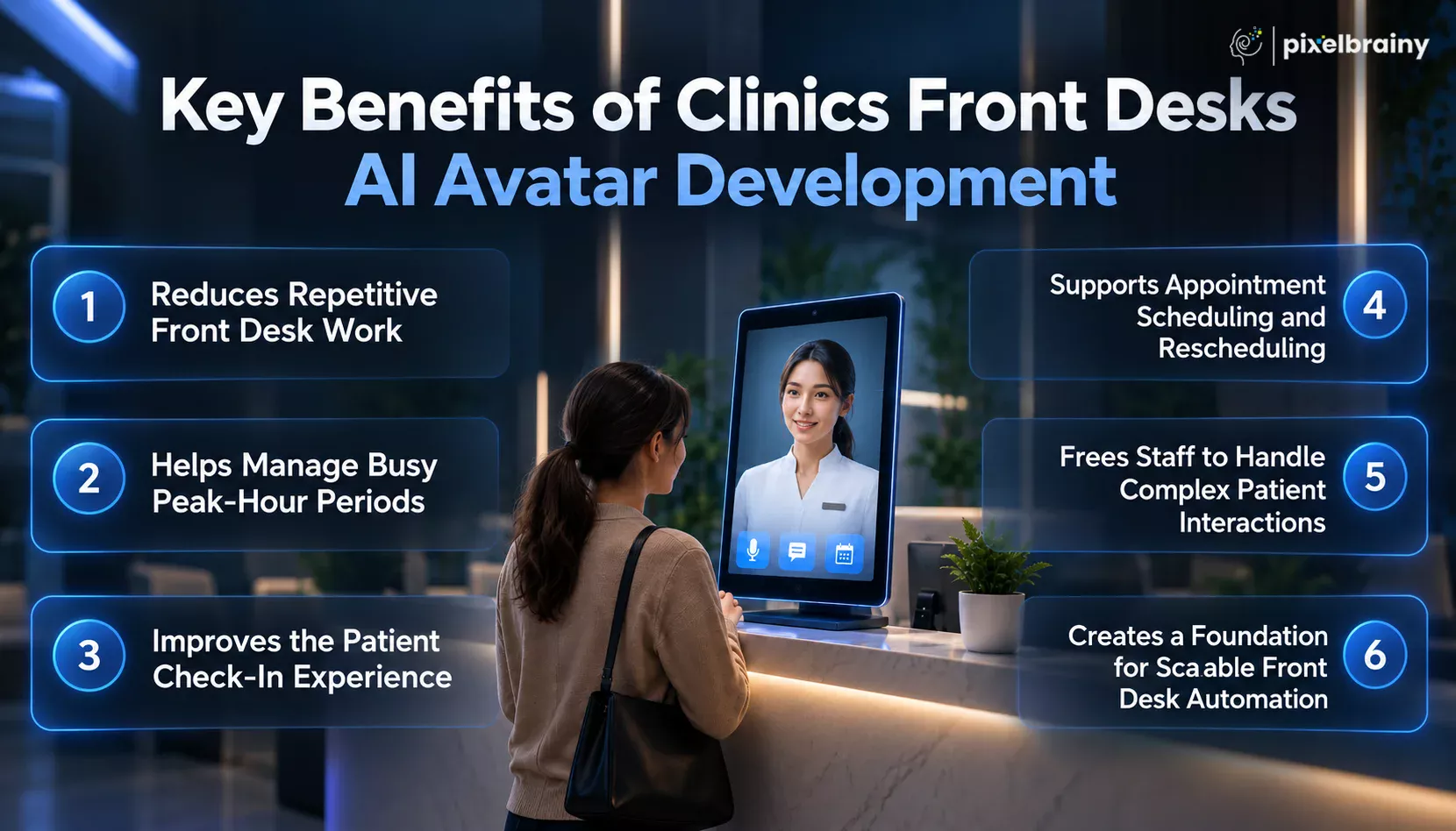
One of the biggest benefits of developing an AI avatar for clinic front desk operations is reducing repetitive administrative conversations.
Patients frequently ask similar questions about appointment timings, physician availability, clinic hours, check-in procedures, insurance information, forms, directions, and rescheduling.
Instead of requiring receptionists to answer every routine question manually, the AI avatar can provide approved information instantly.
This allows front-desk employees to spend more time assisting patients who are physically present or handling requests that require human involvement.
For a practice administrator dealing with an overloaded reception team during peak morning hours, this can create a more manageable division of work between the AI assistant and human staff.
Clinic front desks often become busiest when several activities happen simultaneously.
Patients may be arriving for appointments while phones are ringing and other patients are requesting appointment changes or asking questions.
A clinic front desk AI avatar can provide another channel for handling routine interactions during these periods.
For example, a patient waiting in the reception area could ask the avatar how to complete check-in while the receptionist helps another patient with an insurance issue.
The objective is not to remove human staff from the front desk. It is to prevent every small request from competing for the same staff member's attention.
Check-in can involve several small steps that patients may not always understand, especially when visiting a clinic for the first time.
An AI avatar can greet patients, explain the check-in process, provide instructions about forms, identify the appropriate next step, and answer common administrative questions.
A patient could simply ask:
“I am here for my first appointment with Dr. Mark. What do I need to do?”
The avatar can provide the clinic's approved instructions in a conversational format.
This can make the reception experience easier to navigate while allowing staff to concentrate on patients who need direct assistance.
Appointment management is a natural use case for AI avatar development for clinic front desk operations.
Patients can potentially use the avatar to request appointments, ask about provider availability, reschedule existing appointments, cancel visits, or understand the next steps for booking.
When connected to the appropriate scheduling system, the avatar can move beyond answering questions and support defined appointment workflows.
This is especially relevant to the real-world situation of a multi-specialty practice where the front desk is simultaneously managing scheduling for multiple physicians.
Instead of forcing every scheduling request through one receptionist, the AI can handle eligible routine requests and transfer exceptions to staff.
A strong clinical front desks AI avatar development strategy should not attempt to automate everything.
Some situations need human attention.
A patient may have a complicated insurance problem, a billing concern, an unusual scheduling request, a complaint, or a question that falls outside the avatar's approved responsibilities.
The AI can recognize these situations and provide a human handoff instead of continuing an unsuitable automated conversation.
This creates a practical division of responsibilities. The AI handles predictable front-desk tasks, while receptionists focus on conversations where empathy, judgment, context, or problem-solving are more important.
Another benefit of to make a clinical front desks AI avatar is the ability to expand its responsibilities over time.
A clinic does not need to begin with every possible feature. It can start with routine questions, check-in assistance, physician information, and appointment support.
Once those workflows are tested, the clinic can consider additional capabilities such as registration assistance, cancellation handling, waitlist requests, reminders, insurance-related workflows, and multilingual patient communication.
For a practice administrator evaluating an AI avatar before presenting the project to physician partners, this phased approach also makes the proposal easier to structure around specific operational problems rather than promising complete front-desk automation from day one.
A clinic front desk AI avatar is most valuable when it works alongside the existing reception team, handling appropriate routine interactions while giving staff more time for patients and situations that genuinely require human attention.
A clinic front desk AI avatar can support far more than answering basic patient FAQs. When designed around actual clinic workflows, it can assist with appointment management, patient check-in, insurance-related questions, physician information, registration guidance, and other routine administrative interactions.
This becomes especially relevant for multi-specialty practices where front-desk employees may have to manage several patient requests at once. For example, a practice administrator with 12 physicians may need to handle check-ins, appointment scheduling, insurance verification, and general patient questions simultaneously during busy morning hours. In such an environment, AI avatar development for clinic front desk operations can provide an additional channel for handling suitable routine requests.
The most practical use cases include:
Patient check-in is one of the most practical applications for a clinic front desk AI avatar.
The avatar can greet arriving patients and explain the clinic's check-in process. It can guide them toward the appropriate desk, kiosk, form, or next step based on the clinic's workflow.
For first-time visitors, it can explain what information or documents may be required before the appointment.
This can make the arrival experience easier while allowing receptionists to concentrate on patients who need direct assistance.
Appointment scheduling is a natural use case for developing an AI avatar for clinic front desk operations.
Instead of navigating multiple menus, patients can describe what they need conversationally.
For example:
Patient:
“I need an appointment with a cardiologist next week.”
AI Avatar:
“Certainly. Do you have a preferred day or time?”
When connected to an authorized scheduling system, the avatar can potentially identify suitable appointment options and guide the patient through the booking process.
Patients frequently contact clinics when they need to change or cancel an appointment.
An AI avatar can handle eligible requests through a conversational workflow rather than requiring every patient to call or wait for a receptionist.
For example:
“I have an appointment tomorrow, but I can't make it. Can I move it to next week?”
The avatar can identify the request, collect the necessary information, and, where supported, connect with the scheduling system.
Requests that fall outside predefined rules can be transferred to a staff member.
Multi-specialty clinics often have multiple physicians, specialties, appointment types, and schedules.
Patients may not know which provider they should contact or which specialty handles a particular service.
A clinic front desk AI avatar can answer questions such as:
“Which doctor should I book with for a dermatology consultation?”
“Is Dr. Patel available at this location?”
“What services does your cardiology clinic provide?”
The avatar can retrieve information from the clinic's approved physician and specialty database.
This gives patients a conversational way to find relevant information without repeatedly contacting the front desk.
Insurance-related questions can take up considerable front-desk time.
Patients may ask whether the clinic accepts a particular insurance provider, what information they need to provide, or how the eligibility process works.
A clinic front desk AI avatar can provide approved general insurance information and guide patients through the appropriate administrative process.
For example:
Patient:
“Do you accept my insurance for a primary-care appointment?”
AI Avatar:
“I can help you check the clinic's accepted insurance information. Please select your insurance provider.”
If the clinic has the required secure integration, the workflow can potentially extend to eligibility verification.
Complex coverage disputes should remain with qualified staff.
New patients often need more assistance than returning patients.
They may have questions about registration, forms, identification, arrival times, parking, insurance information, or what to expect before their first appointment.
The AI avatar can provide these instructions before the patient reaches the reception desk.
For example:
“This is my first visit. What should I bring with me?”
The avatar can respond using the clinic's approved new-patient instructions.
This can reduce repetitive questions while giving first-time patients a clearer starting point.
Patients regularly contact clinics for simple logistical information.
An AI avatar can answer questions such as:
For a physical clinic kiosk, the avatar can also provide visual directions where the interface supports them.
This makes the AI avatar useful for both information delivery and basic patient navigation.
Many front-desk questions are repetitive and predictable.
Patients may ask about:
These answers can be organized within an approved clinic knowledge base.
The AI avatar can then retrieve the relevant information and present it conversationally rather than requiring staff to answer the same questions repeatedly.
Patients sometimes want an appointment earlier than their currently scheduled slot.
An AI avatar can potentially become the conversational interface for a clinic's waitlist process.
A patient could say:
“If an earlier appointment becomes available, I'd like to take it.”
The system can capture the request and follow the clinic's approved waitlist workflow.
When connected to appropriate scheduling infrastructure, this can help turn appointment availability into a more interactive patient-access process.
Language preferences can affect how easily patients interact with clinic reception.
A properly configured AI avatar can support multiple languages for approved administrative information.
Patients could use their preferred language to ask about:
For clinics serving diverse patient populations, multilingual AI interaction can provide another way to access routine information.
The supported languages should be tested carefully before production deployment.
A good clinical front desks AI avatar development strategy must define when the AI should stop and involve a human.
For example, a patient may have a complicated insurance issue, billing concern, complaint, registration problem, or request that falls outside the system's approved capabilities.
Instead of repeatedly attempting to resolve the issue, the avatar can explain that staff assistance is required and route the patient to the appropriate team.
This creates a practical relationship between automated assistance and human support.
Patients may still need basic clinic information when reception staff are unavailable.
An AI avatar deployed through a clinic website, patient portal, or other digital channel can provide approved administrative information outside normal front-desk hours.
Patients can ask about appointment procedures, clinic hours, physician information, forms, or other general questions.
For practices exploring how to make a human-like AI avatar for clinic front desk, this creates an opportunity to extend the digital front-desk experience beyond the physical reception desk.
The system should clearly distinguish routine administrative assistance from urgent or clinical concerns.
Forms can create unnecessary friction when patients are unsure what information belongs in a particular field.
An AI avatar can guide patients through approved administrative forms by explaining field instructions or directing them to the correct section.
For example:
Patient:
“What information do I need to enter here?”
AI Avatar:
“This field asks for your current contact information. Please enter the phone number you would like the clinic to use.”
The avatar should provide administrative guidance without making clinical judgments.
In a larger clinic, not every patient needs the same type of assistance.
One patient may need check-in help, another may need appointment scheduling, while another may need billing support.
An AI avatar can identify the patient's stated need and provide the appropriate next step.
For example:
Patient request → Check-in → Registration
or
Patient request → Billing question → Billing staff
or
Patient request → Appointment change → Scheduling workflow
This can help create a more organized patient journey within a busy clinic environment.
For a multi-specialty clinic with several physicians, the AI avatar can act as a central conversational entry point for routine administrative requests.
A patient might ask about a physician, identify a specialty, request an appointment, ask about preparation instructions, and receive check-in guidance through the same interface.
This is particularly relevant when a practice administrator is evaluating AI avatar development for clinic front desk operations because the system can be designed around the clinic's actual workload rather than generic chatbot functionality.
The avatar can be configured around the workflows that consume the most front-desk time, while human staff remain responsible for complex or sensitive interactions.
When thoughtfully implemented, a clinic front desk AI avatar can connect patient questions, administrative workflows, scheduling assistance, and human support through one accessible conversational interface.
A successful clinic front desk AI avatar needs more than a realistic digital face and a conversational voice. The core feature set should be built around the everyday responsibilities of clinic reception teams, including patient communication, appointment assistance, check-in guidance, clinic information, and smooth escalation to human staff.
When planning AI avatar development for clinic front desk operations, practice administrators should first identify the repetitive workflows the avatar needs to support. For a multi-specialty clinic dealing with simultaneous check-ins, appointment requests, insurance questions, and general patient inquiries during peak hours, the right core features can determine whether the solution becomes a useful front-desk tool or simply an attractive digital interface.
The following features represent the essential foundation for developing an AI avatar for clinic front desk environments. Advanced capabilities such as predictive intelligence, sophisticated analytics, biometric technologies, autonomous agents, and other advanced functions should be considered separately during the next stage of development.
| Core Feature | Explanation |
|---|---|
| Human-Like Digital Avatar | A human-like digital avatar gives patients a recognizable visual interface for interacting with the clinic. It can use facial expressions, synchronized speech, and natural movements to make routine front-desk conversations feel more engaging and easier to follow. |
| Voice-Based Interaction | Voice interaction allows patients to speak naturally instead of typing every request. For clinic reception environments, this can make the system convenient for patients asking about appointments, check-in procedures, physician information, clinic hours, or other routine administrative needs. |
| Natural Language Understanding | Natural language understanding enables the avatar to interpret everyday patient requests rather than relying on exact keywords. It helps distinguish between questions about booking, cancellation, rescheduling, check-in, insurance information, and general clinic services. |
| Conversational Dialogue Management | Dialogue management helps the AI maintain context throughout a conversation. Instead of treating every patient message as a separate question, the avatar can remember the immediate conversation and ask relevant follow-up questions before providing an answer or starting an approved workflow. |
| Clinic Knowledge Base | A clinic knowledge base stores approved information that the avatar can use when responding to patients. It can include physician details, specialties, operating hours, services, appointment instructions, check-in procedures, insurance information, forms, contact details, and frequently asked questions. |
| Appointment Scheduling Support | Appointment scheduling support allows the avatar to guide patients through defined booking workflows. It can collect necessary appointment preferences, identify the requested specialty or provider, and connect with an authorized scheduling system when the clinic's infrastructure supports the required workflow. |
| Appointment Rescheduling and Cancellation | This feature enables patients to communicate routine appointment changes conversationally. The avatar can identify whether the patient wants to reschedule or cancel, collect required information, explain applicable clinic procedures, and transfer requests to staff when automated completion is not permitted. |
| Patient Check-In Guidance | Patient check-in guidance helps arriving patients understand what they need to do before seeing their provider. The avatar can explain registration steps, direct patients toward forms or check-in points, and provide clinic-approved instructions for new and returning patients. |
| Physician and Specialty Information | The avatar should provide accurate information about physicians, specialties, services, and applicable appointment types. This helps patients determine where to direct their request and reduces repetitive questions that would otherwise require reception staff to search for or communicate basic provider information. |
| Insurance Information Assistance | Insurance assistance allows the avatar to answer approved general questions about accepted plans, required information, and the clinic's insurance process. It can guide patients toward the appropriate next step while routing complex coverage or billing matters to qualified human staff. |
| Multilingual Communication | Multilingual communication allows the clinic front desk AI avatar to provide supported administrative information in different languages. This can help patients communicate about appointments, check-in, forms, clinic hours, and other routine requests when those languages have been properly configured and tested. |
| Text and Touch Interaction | Text and touch controls give patients an alternative when speaking is inconvenient or unavailable. A touchscreen interface can display appointment options, clinic information, check-in instructions, confirmation prompts, and other structured choices alongside the avatar's conversational interaction. |
| Human Handoff | Human handoff provides a clear transition when a request exceeds the avatar's approved capabilities. The system can recognize situations requiring staff involvement and direct patients to the appropriate receptionist or department instead of continuing an unsuitable automated conversation. |
| Secure User Authentication | Secure authentication helps protect patient-specific workflows when the avatar needs access to personal appointment or administrative information. Depending on the clinic's requirements, authentication can be incorporated before allowing access to protected information or performing authorized patient-specific actions. |
| Interaction Logging and Basic Monitoring | Interaction logging records appropriate information about conversations and system activity for operational monitoring and improvement. Clinics can review common requests, unsuccessful interactions, escalation patterns, and workflow issues while applying suitable privacy, security, and data-retention controls. |
For a practice administrator asking how to build a clinical human-like AI avatar for front desk operations, these core capabilities provide the foundation for a practical first deployment. The emphasis should remain on reliable patient communication, defined administrative workflows, accurate clinic information, and clear human support rather than adding advanced capabilities before the basics work consistently.
A strong core feature set gives a clinic front desk AI avatar the foundation it needs to deliver useful, consistent, and patient-friendly administrative assistance.
After implementing the essential capabilities, clinics can add advanced features to make their clinic front desk AI avatar development more intelligent, personalized, and adaptable. These features are designed for clinics that want their AI avatar to handle more sophisticated patient interactions while supporting staff efficiency.
For instance, a busy outpatient clinic may receive patients who speak different languages, have different appointment requirements, ask follow-up questions during the same conversation, or need assistance that changes based on the information they provide. Advanced AI capabilities can help the avatar respond to these situations more effectively.
| Advanced Feature | Explanation |
|---|---|
| Context-Aware Patient Conversations | Context-aware AI allows the avatar to understand information shared earlier in a conversation and use it in later responses. This creates smoother interactions because patients do not need to repeatedly provide the same appointment, physician, or service details. |
| Intelligent Patient Intent Recognition | Advanced intent recognition enables the AI avatar to identify the purpose behind a patient's request, even when the question is phrased differently. It can distinguish scheduling, cancellation, insurance, check-in, physician, and general information requests. |
| Personalized Patient Assistance | Personalization allows the AI avatar to tailor conversations using permitted patient and appointment information. Instead of delivering identical responses to everyone, the system can provide relevant guidance based on the patient's selected service, appointment details, language, or interaction context. |
| Smart Appointment Matching | Smart appointment matching can consider factors such as physician availability, specialty, appointment type, duration, and scheduling rules before presenting suitable options. This makes the AI avatar more capable of supporting complicated clinic scheduling requirements. |
| Real-Time Language Translation | Real-time translation enables patients and the AI avatar to communicate across supported languages during the same interaction. This feature can make clinic front desk assistance more accessible while helping staff manage multilingual communication without manually translating every routine request. |
| Adaptive Conversation Management | Adaptive conversation management allows the avatar to change its questioning and response approach according to the patient's answers. If a patient provides incomplete information, changes their request, or asks a related question, the system can adjust the conversation accordingly. |
| Intelligent Human Escalation | Advanced escalation uses defined rules and conversation signals to determine when a request should move from AI assistance to clinic staff. The avatar can transfer relevant conversation context so staff can continue the interaction without starting from the beginning. |
| Predictive Front Desk Assistance | Predictive capabilities can identify patterns in front desk interactions and anticipate likely next steps. For example, after helping with an appointment request, the avatar may proactively provide relevant preparation, location, arrival, or check-in information when appropriate. |
| Advanced Conversation Analytics | Advanced analytics can examine interaction patterns, recurring patient questions, unsuccessful conversations, escalation reasons, and frequently requested services. Clinic administrators can use these insights to identify workflow gaps and continuously improve the AI avatar experience. |
| Dynamic Knowledge Updating | Dynamic knowledge management allows the AI avatar to work with frequently changing clinic information, such as physician availability, services, operating policies, locations, and administrative instructions. This helps keep responses aligned with the clinic's current front desk information. |
These advanced capabilities can take AI avatar development for clinic front desk from basic task automation toward a more adaptive, personalized, and intelligent patient-facing experience.
The AI avatar development for clinic front desks process should begin with a clear understanding of the clinic's existing operations, technology, and patient needs. Clinics should not treat the avatar as a standalone chatbot. It should fit into the workflows already used by front desk teams and healthcare staff.
For example, a clinic may already use a hospital management system and patient portal, yet front desk employees may still handle many processes manually. In this situation, the development goal is not to replace those systems, but to develop a clinic front desks AI avatar that integrates with existing healthcare technology and provides patient assistance through approved workflows.
The following eight steps explain how to build clinical front desks AI avatar from scratch, from defining the initial requirements to launching and improving the solution.
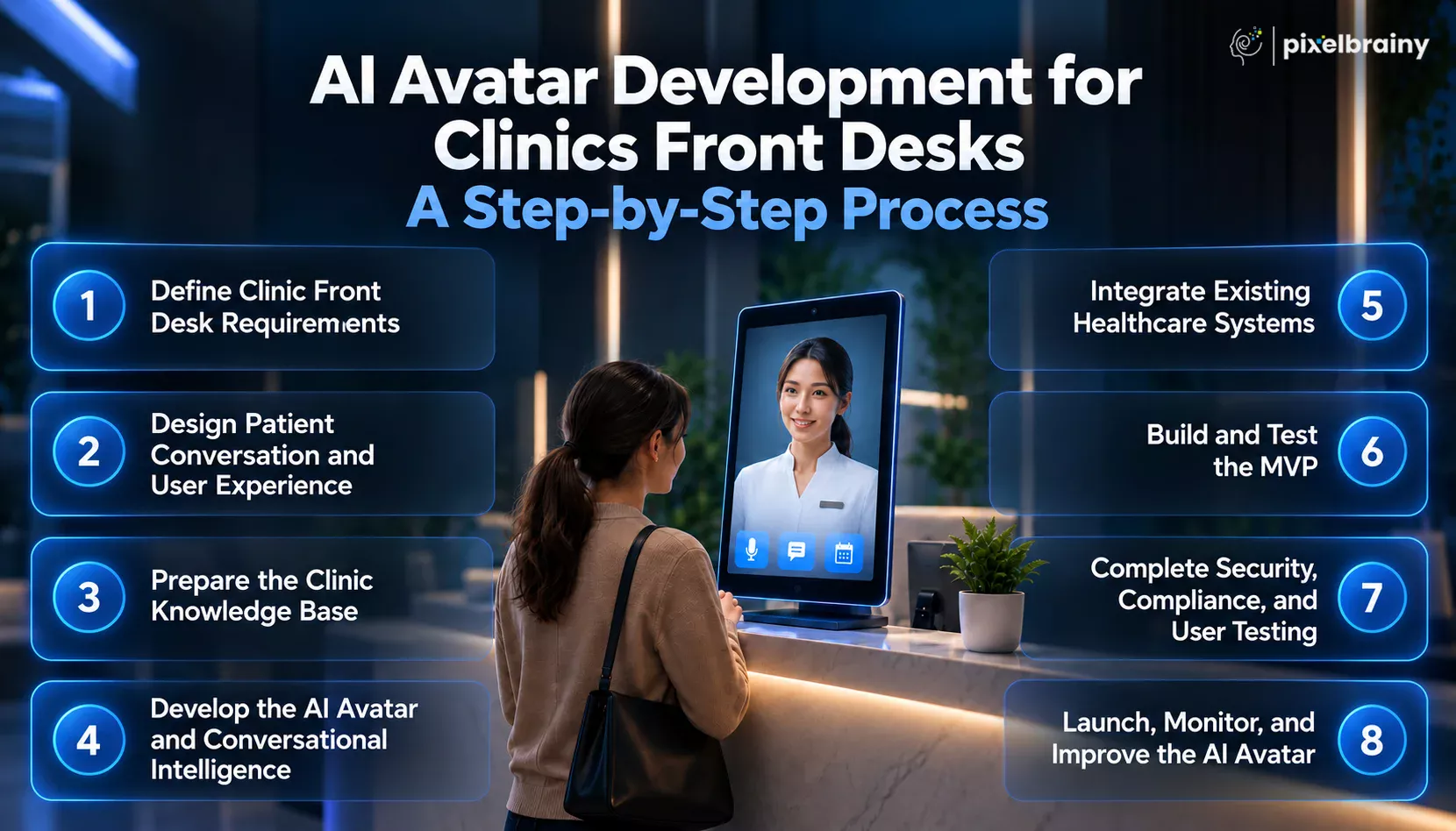
The first stage is to identify exactly what the AI avatar should accomplish. Begin by documenting the front desk activities that consume staff time and determine which tasks are suitable for AI assistance.
These may include:
Next, define which tasks the avatar can complete independently and which require staff approval. Establishing these boundaries early creates a clear development scope and prevents unnecessary functionality from being added to the initial system.
The next step is to plan how patients will communicate with the AI avatar. Decide whether the solution will operate through a reception kiosk, website, mobile interface, voice terminal, or multiple channels.
Create conversation flows for common patient situations and determine how the avatar should greet patients, ask questions, provide information, and complete tasks.
The design should also cover:
This stage helps teams visualize the steps to make clinic front desks AI avatar from idea to launch before development begins.
An AI avatar needs reliable clinic information to provide useful answers. Gather approved information from relevant departments and organize it into a structured knowledge base.
The information may include physician profiles, specialties, services, clinic locations, operating hours, appointment policies, check-in instructions, insurance guidance, and frequently asked questions.
The development team should also establish rules for handling information that the avatar does not know. Instead of generating an uncertain answer, the system should direct the patient to an appropriate staff member or approved resource.
A well-prepared knowledge foundation supports to create AI avatar for clinic front desks with consistent and relevant responses.
With the requirements and knowledge foundation established, development can begin on the avatar itself. This stage brings together the visual avatar, voice capabilities, natural language understanding, dialogue management, and workflow logic.
The AI should recognize different ways patients may express the same request. For example, "I need to see a cardiologist," "Can I book cardiology?" and "I want an appointment with a heart specialist" can represent a similar intent.
A limited PoC development can first validate selected interactions before the complete system is built. This approach allows the clinic to identify conversation or usability problems early.
The AI avatar becomes significantly more useful when it can work with the systems already used by the clinic. Developers should identify the applications required for each approved workflow and establish secure connections between them.
For a clinic already using a hospital management system and patient portal, the avatar could be designed to work with those existing platforms rather than forcing staff to adopt an entirely separate process.
Integration planning should define:
Proper AI integration helps connect patient conversations with real administrative workflows while maintaining appropriate system controls.
After the initial architecture and integrations are established, develop an MVP containing the most important front desk workflows. The first version does not need every possible capability.
For example, an MVP could focus on appointment assistance, check-in guidance, clinic information, physician information, and staff handoff.
Test the system using realistic patient conversations rather than only predefined questions. Include incomplete requests, different accents, spelling variations, interruptions, unexpected questions, and requests that fall outside the avatar's approved scope.
Front desk employees should participate in testing because they can identify practical workflow issues that may not be visible during technical development.
Also Read: Top 10 AI MVP Development Companies in USA
Before production deployment, the AI avatar should undergo comprehensive testing. This includes functionality, security, privacy, integration reliability, response accuracy, accessibility, and overall patient experience.
The team should verify what information the avatar can access and what actions it is authorized to perform. Testing should also cover situations such as unavailable appointments, incorrect information, failed integrations, unclear patient requests, and human escalation.
Clinics evaluating top AI development companies should consider their healthcare technology experience, integration capabilities, security processes, testing approach, and post-launch support.
User acceptance testing with clinic employees can provide another layer of validation before patients interact with the production system.
The final stage is production deployment followed by continuous improvement. A controlled rollout allows clinic staff to observe how the AI avatar performs in real front desk situations before expanding its use.
Monitor areas such as:
Use these findings to improve the knowledge base, conversation flows, and workflow logic. As clinic services, physicians, schedules, and policies change, the AI avatar should also be updated.
For ongoing improvements, clinics can hire AI developers with experience in conversational AI, healthcare integrations, and production AI systems. Working with experienced AI avatar development companies can also provide specialized expertise for maintenance and future expansion.
Following a structured development process of clinical front desks AI avatar helps clinics move from an initial idea to a secure, integrated, and patient-focused solution while keeping development aligned with real front desk workflows.
Also Read: AI Avatar Development for Mental Health App: Benefits, Costs, and Use Cases
The cost to develop an AI avatar for clinic front desk generally falls between $15,000 and $150,000+, depending on the product scope, AI capabilities, avatar quality, healthcare integrations, security requirements, and deployment scale. A basic patient-facing avatar can sit near the lower end, while a multi-tenant SaaS platform designed for hundreds or thousands of independent practices can move well beyond the initial development range.
For a digital health startup, the development budget of AI avatar for clinic front desk should be calculated differently from the cost of building an avatar for one clinic. A SaaS product needs tenant management, configurable clinic workflows, subscription management, isolated data environments, onboarding, analytics, integrations, administration, and scalable infrastructure.
This distinction is important for a startup planning to sell an AI front desk product to independent physician practices, dental clinics, and specialty medical offices. These organizations may face the same front desk staffing and patient experience challenges as larger healthcare organizations, but typically need a more affordable and configurable product rather than a large enterprise deployment.
So, if the question is what is the development pricing of AI avatar for clinic front desk, a practical planning range is $15,000 to $35,000 for a basic implementation, $35,000 to $75,000 for an advanced solution, and $75,000 to $150,000+ for an enterprise or scalable SaaS-grade product.
| AI Avatar Product Type | Estimated Development Cost | Typical Scope |
|---|---|---|
| Basic AI Avatar for Clinic Front Desk | $15,000 to $35,000 | Digital avatar, voice interaction, basic conversational AI, clinic knowledge base, FAQs, patient guidance, basic appointment assistance, web or kiosk interface, and human handoff. |
| Advanced AI Avatar for Clinic Front Desk | $35,000 to $75,000 | Advanced conversational AI, multilingual support, scheduling workflows, check-in assistance, personalization, analytics, stronger knowledge retrieval, healthcare integrations, and more sophisticated escalation. |
| Enterprise AI Clinic Front Desk | $75,000 to $150,000+ | Custom avatar experience, multiple healthcare integrations, advanced security, multi-location deployment, extensive workflow automation, enterprise administration, analytics, scalable infrastructure, and ongoing optimization. |
| Multi-Tenant SaaS AI Clinic Front Desk | $75,000 to $150,000+ | Product designed for multiple independent practices, tenant isolation, clinic-specific configuration, subscription management, onboarding, admin console, usage controls, analytics, white-label options, integrations, and scalable cloud architecture. |
Important: These are development planning ranges, not fixed market prices. A SaaS product can exceed $150,000 when it requires extensive healthcare integrations, sophisticated AI workflows, custom avatar technology, enterprise security, or large-scale infrastructure.
Several factors can significantly change the clinic front desk AI avatar development cost. The final budget should be calculated according to the product's actual technical and operational requirements.
A basic digital character costs less than a highly realistic avatar with custom facial expressions, lip synchronization, gestures, animation, and branded visual elements.
Voice recognition, natural-sounding speech, real-time conversation, accent handling, and multiple voice options can increase development and ongoing technology costs.
The complexity of patient conversations directly affects pricing. Simple FAQ responses require less development than contextual conversations, intent recognition, workflow management, and sophisticated dialogue handling.
The amount of clinic information and the complexity of retrieving accurate answers influence the cost. Physician information, services, policies, FAQs, and operational documents may all need to be organized.
Scheduling becomes more complex when the avatar needs to consider physician availability, appointment types, duration, rescheduling, cancellations, and practice-specific scheduling rules.
Connecting the avatar with EHRs, practice management platforms, patient portals, scheduling systems, or other healthcare applications can substantially affect the budget, particularly when multiple integrations are required.
Supporting multiple languages can require additional translation, speech recognition, text-to-speech, testing, and conversation design capabilities.
The cost increases when the avatar moves beyond simple check-in guidance and supports information collection, identity verification, or connections with existing clinic systems.
Advanced escalation can include staff notifications, department routing, conversation transfer, and context sharing so employees can continue an interaction efficiently.
For a startup selling the product to multiple clinics, the platform needs tenant isolation, clinic-specific configurations, user permissions, onboarding, administration, and scalable infrastructure. This can make the SaaS version considerably more expensive than a single-clinic implementation.
Healthcare applications may require stronger authentication, access controls, encryption, auditing, security testing, and appropriate data handling processes, depending on the product's workflows and regulatory requirements.
An admin system can include conversation monitoring, usage reporting, workflow performance, clinic configuration, user management, and operational analytics.
Testing requirements increase with the number of workflows, integrations, languages, devices, and patient interaction scenarios that the product must support.
After development, ongoing costs can include cloud hosting, AI model usage, voice processing, storage, APIs, monitoring, and other infrastructure. Actual monthly expenses depend heavily on patient interaction volume.
A production AI avatar requires continued maintenance, knowledge updates, security improvements, integration maintenance, bug fixes, AI optimization, and new feature development.
For the specific startup scenario of selling an AI avatar to independent physician practices, dental clinics, and specialty medical offices, the product should be budgeted as a SaaS platform rather than simply as a digital receptionist.
A realistic planning range can be:
The final price depends on whether the startup uses existing AI and avatar technologies or builds proprietary components, how many healthcare platforms need integration, how much customization each clinic requires, and how many customers the infrastructure must support.
For a startup targeting smaller healthcare practices, starting with a focused product can help control the initial AI avatar development cost for clinics. Core capabilities such as patient assistance, appointment support, clinic FAQs, human escalation, basic integrations, and multi-tenant administration can form the initial product, while more complex capabilities can be introduced in later releases.
In short, the cost to develop an AI avatar for clinic front desk can start around $15,000, while a fully deployable, scalable healthcare SaaS product can require $75,000 to $150,000+, depending on its integrations, AI capabilities, security requirements, and scale.
Also Read: AI Avatar Development Cost: Know How Much Your Digital Avatar Will Cost
A successful clinic front desk AI avatar development project requires several technology layers working together. The avatar itself is only one part of the solution. A production-ready system may need conversational AI, speech processing, avatar animation, knowledge retrieval, healthcare integrations, cloud infrastructure, security, analytics, and patient-facing interfaces.
For a healthcare clinical startup building an AI avatar as a SaaS product for independent physician practices, dental clinics, and specialty medical offices, the technology stack also needs to support multiple clinics, separate configurations, scalable usage, and integration with existing healthcare systems. This is particularly important when the goal is to build a deployable product rather than a simple demonstration.
The tools used for developing an AI avatar for clinic front desks can therefore be grouped into the following technology categories.
| Technology Layer | Tools and Platforms | Purpose in Clinic Front Desk AI Avatar Development |
|---|---|---|
| AI and Large Language Models | OpenAI, Anthropic, Google Gemini, open-source LLMs | Provides the reasoning and conversational intelligence required to understand patient questions, identify intent, generate responses, follow instructions, and manage front desk conversations. |
| Real-Time Voice AI | OpenAI Realtime API, speech-to-speech platforms, WebRTC, WebSocket | Enables patients to speak naturally with the AI avatar and receive real-time spoken responses. OpenAI's Realtime API supports low-latency multimodal interactions and speech-to-speech communication. |
| Speech Recognition | OpenAI speech capabilities, NVIDIA Riva ASR, cloud speech APIs | Converts patient speech into information the AI system can understand. This layer is important for voice-based check-in, scheduling, clinic questions, and other front desk conversations. NVIDIA ACE includes Riva ASR among its digital human components. |
| Text-to-Speech | OpenAI voice capabilities, NVIDIA Riva TTS, cloud TTS platforms | Converts AI-generated responses into natural spoken language. Voice quality, response speed, pronunciation, and language support directly affect how human-like the clinic avatar feels. NVIDIA ACE provides Riva TTS as part of its avatar technology stack. |
| AI Avatar and Digital Human Platforms | NVIDIA ACE, Audio2Face, Unreal Engine, Unity, custom avatar engines | Creates the visual identity, facial animation, lip synchronization, gestures, and interactive behavior of the digital receptionist. NVIDIA ACE provides technologies covering speech, intelligence, animation, and digital human experiences. |
| Knowledge Base and RAG | Vector databases, embedding models, retrieval systems, custom RAG pipelines | Allows the avatar to retrieve approved clinic information before responding. This can support physician information, services, FAQs, policies, locations, and other frequently changing front desk information. |
| Healthcare APIs and Integration Layer | REST APIs, FHIR-based integrations, HL7 interfaces, vendor APIs | Connects the avatar with scheduling systems, patient portals, EHRs, practice management platforms, and other healthcare applications when supported by the relevant systems. |
| Frontend Development | React, Next.js, Vue, Flutter, React Native | Builds the patient-facing interface where the AI avatar appears, including websites, kiosks, tablets, portals, and mobile experiences. |
| Backend Development | Node.js, Python, Java, .NET | Handles business logic, authentication, workflow orchestration, AI requests, integrations, user management, and communication between the avatar and healthcare systems. |
| Cloud Infrastructure | AWS, Microsoft Azure, Google Cloud | Provides computing, storage, networking, databases, monitoring, and scalable infrastructure for deploying the AI avatar and its supporting services. |
| Database Technology | PostgreSQL, MySQL, MongoDB, Redis | Stores appropriate application data such as clinic configurations, user accounts, workflow settings, appointment-related application data, analytics, and system metadata. |
| Authentication and Security | OAuth 2.0, OpenID Connect, role-based access control, encryption tools | Controls access to the application and protects sensitive information. A healthcare deployment should define appropriate authentication, authorization, encryption, logging, and access policies. |
| SaaS and Multi-Tenant Management | Custom tenant architecture, API gateways, identity platforms, subscription platforms | Supports a product serving multiple clinics. Each practice can have its own branding, physicians, knowledge base, workflows, users, permissions, and configuration while maintaining appropriate tenant separation. |
| Analytics and Monitoring | Cloud monitoring tools, application analytics, custom dashboards | Tracks conversations, system performance, workflow completion, errors, escalation rates, usage, and other operational indicators needed to improve the AI avatar. |
| Testing and Development Tools | GitHub, GitLab, CI/CD platforms, automated testing frameworks | Supports source control, collaboration, automated testing, deployment pipelines, regression testing, and ongoing maintenance of the AI avatar platform. |
Therefore, the right combination of AI models, voice technology, avatar platforms, healthcare integrations, cloud infrastructure, and security tools creates the technical foundation for a scalable AI avatar for clinic front desks.
Clinics can approach clinic front desk AI avatar development in two main ways: build a custom AI avatar specifically around their workflows or purchase an existing AI avatar solution from a provider. The right approach depends on the clinic's operational requirements, budget, existing healthcare technology, desired level of customization, and long-term product strategy.
A ready-made solution can provide faster access to common front desk capabilities, while custom clinic front desk AI avatar development gives organizations greater control over workflows, integrations, branding, AI behavior, and future functionality.
For a clinic considering building an AI avatar for clinic front desks, the decision should therefore focus on what the organization needs the avatar to accomplish rather than simply comparing development price with subscription price.
| Factor | Custom Clinic Front Desk AI Avatar | Buy Clinic Front Desk AI Avatar |
|---|---|---|
| Development Approach | Built specifically around the clinic's workflows, patient journeys, integrations, and business requirements. | Uses an existing product with predefined capabilities and configurable options. |
| Initial Cost | Usually higher because development, customization, integration, and testing are required. | Generally lower initial investment because the core product already exists. |
| Time to Deployment | Usually requires more planning, development, integration, testing, and deployment time. | Can typically be deployed faster when the clinic's requirements match the available product. |
| Customization | High level of customization across avatar design, conversation flows, workflows, branding, and integrations. | Customization depends on the provider's available configuration options. |
| Healthcare Integrations | Can be developed around the clinic's specific EHR, practice management, scheduling, or patient portal requirements. | Limited to the healthcare systems and integration options supported by the provider. |
| Patient Experience | The entire experience can be designed around the clinic's preferred patient journey and front desk processes. | Patient experience follows the capabilities and interface patterns of the selected platform. |
| Branding | Avatar appearance, voice, interface, tone, and branding can be customized extensively. | Branding options depend on the product and subscription plan. |
| AI Behavior | Conversation rules, knowledge sources, escalation logic, and workflows can be customized to specific requirements. | AI behavior is generally based on the provider's existing architecture and configuration capabilities. |
| Scalability | Architecture can be designed around the clinic's future requirements and expansion plans. | Scalability depends on the vendor's infrastructure, plans, usage limits, and supported features. |
| Maintenance | The clinic or its development partner is responsible for ongoing technical maintenance and improvements. | The provider generally manages the core product, updates, infrastructure, and technical maintenance. |
| Feature Updates | New capabilities can be developed according to the clinic's priorities. | New features depend on the provider's product roadmap. |
| Control | Greater control over technology architecture, workflows, integrations, and product behavior. | Less technical control, but less responsibility for managing the underlying technology. |
| Upfront Technical Effort | Requires requirements gathering, design, development, integration, testing, and deployment. | Requires product evaluation, configuration, integration setup, and implementation. |
| Best Fit | Clinics with unique workflows, complex integrations, strong customization requirements, or long-term AI automation plans. | Clinics that need standard front desk automation and want to deploy an existing solution quickly. |
Custom development can be appropriate when a clinic's front desk operations cannot be adequately supported by an off-the-shelf solution.
For example, a clinic may have specialized appointment workflows, multiple departments, unique patient routing rules, proprietary systems, or specific requirements for how the AI communicates with patients. In these situations, building the system around those requirements can provide greater flexibility.
Custom development can also make sense when the clinic wants:
The tradeoff is a larger initial investment and greater responsibility for maintenance, testing, security, and future enhancements.
Buying an existing clinic front desk AI avatar can be practical when the clinic's requirements closely match the capabilities of an available product.
A ready-made solution may already include conversational AI, voice interaction, appointment assistance, patient FAQs, scheduling integration, analytics, and staff handoff. This can reduce the amount of technical work required before deployment.
A purchased solution may be suitable for clinics that:
However, clinics should review integration support, data handling, customization limits, contract terms, scalability, and ongoing costs before adopting a third-party platform.
The financial comparison should extend beyond the initial price.
Custom AI avatar development for clinic front desks can involve a larger upfront investment, but the clinic gains greater control over the resulting system. Buying a ready-made platform may reduce initial development expenses, but recurring subscription, usage, integration, and customization costs can affect the long-term budget.
A useful comparison should therefore consider:
Custom solution: Development + integrations + infrastructure + maintenance + future enhancements
Purchased solution: Subscription + implementation + integration + usage fees + premium features + vendor-dependent customization
The lower initial price does not necessarily represent the lower total cost over several years, just as a higher initial development budget does not automatically provide greater value for every clinic.
Before committing to either approach, clinic leaders should evaluate the following:
| Standard patient FAQs and basic assistance | Buy |
|---|---|
| Fast deployment | Buy |
| Limited customization requirements | Buy |
| Highly specialized front desk workflows | Custom Development |
| Multiple complex healthcare integrations | Custom Development |
| Fully branded avatar experience | Custom Development |
| Unique scheduling and routing logic | Custom Development |
| Long-term control over AI functionality | Custom Development |
| Testing AI automation before larger investment | Buy or pilot an existing solution |
| Product intended for multiple healthcare organizations | Custom SaaS Development |
Ultimately, the decision between custom clinic front desk AI avatar development and buying an existing solution depends on the clinic's workflows, integration requirements, customization needs, budget, deployment timeline, and desired level of control.
Developing an AI avatar for clinic front desk operations requires careful planning because the system becomes part of the patient access experience and may interact with sensitive healthcare information. Common implementation challenges include interoperability, data quality, privacy, workflow integration, patient trust, and human oversight. Recent healthcare AI research also highlights these areas as important considerations for responsible deployment.
For example, a digital health startup may want to build a deployable AI clinic front desk avatar as a SaaS product for independent physician practices, dental clinics, and specialty medical offices. In that situation, the challenge is not only creating the avatar. The product must work reliably across different clinic environments, integrate with existing healthcare systems, protect patient information, and support approved front desk workflows.
Many clinics already use EHRs, practice management software, scheduling platforms, and patient portals. Connecting an AI avatar to these systems can become complicated when APIs, data structures, authentication methods, or workflows differ between platforms. Healthcare AI implementation research identifies interoperability and EHR integration as recurring technical challenges.
How to overcome it:
Start by mapping every workflow the avatar needs to access. Define the required data, permissions, APIs, and system actions before development begins. Use established interoperability approaches where supported, and test integrations using realistic appointment, patient assistance, and escalation scenarios.
A clinic front desk AI avatar development project may involve patient names, contact details, appointment information, insurance-related information, and other sensitive data. Poorly designed data flows or excessive data retention can create privacy and security risks. Healthcare AI guidance emphasizes privacy protection, access control, governance, and security throughout the AI lifecycle.
How to overcome it:
Use privacy and security by design. Apply appropriate encryption, authentication, authorization, access controls, audit logging, and data minimization. Clearly define what information the avatar can access and what actions it is permitted to perform. For US deployments involving protected health information, evaluate the applicable HIPAA requirements and vendor responsibilities.
Patients may ask questions outside the avatar's approved front desk responsibilities. If the AI generates an incorrect answer instead of acknowledging its limitation, the interaction can create confusion and reduce patient trust. Patient-facing AI systems therefore require clear boundaries and monitoring. The Institute for Healthcare Improvement specifically identifies patient-facing chatbots as an area where generative AI can introduce patient safety concerns.
How to overcome it:
Build the avatar around an approved clinic knowledge base and controlled retrieval system. Define which questions the system can answer, which workflows it can perform, and which situations require staff intervention. When reliable information is unavailable, the avatar should provide an appropriate escalation rather than inventing an answer.
Patients do not always make one simple request at a time. Someone may start by asking about an appointment, then ask about insurance, physician availability, directions, or check-in requirements. A basic conversational system can lose context when the patient's intent changes.
How to overcome it:
Use context-aware dialogue management as part of developing an AI avatar for clinic front desks. The system should retain relevant information throughout the conversation, recognize changes in intent, and move between approved workflows without forcing the patient to restart. Conversation testing should include incomplete questions, interruptions, multiple requests, and unexpected responses.
A realistic digital receptionist does not automatically create a better patient experience. Patients need to understand that they are interacting with AI and should have an easy way to reach a human when needed. Current healthcare AI discussions continue to emphasize transparency, trust, accountability, and human oversight.
How to overcome it:
Clearly identify the avatar as an AI assistant and provide an accessible human handoff option. Use simple language, appropriate voice design, multilingual support where relevant, and accessible interfaces. Conduct user testing with both patients and front desk employees before expanding the system.
For a startup building a SaaS product, every customer may have different physicians, specialties, scheduling rules, FAQs, branding, software integrations, and front desk processes. A system designed for one clinic may become difficult to maintain when deployed across many organizations.
How to overcome it:
Build a configurable architecture from the beginning. Separate clinic-specific information from the core AI engine and provide tenant-level configuration for knowledge bases, workflows, branding, permissions, integrations, and escalation rules. Use monitoring and human oversight after launch to identify recurring failures and improve the platform continuously. Staged deployment and stakeholder participation can also help align healthcare AI with local workflows.
Addressing integration, privacy, AI accuracy, conversation complexity, patient trust, and scalability early can make AI avatar development for clinic front desks more reliable and easier to deploy across real-world healthcare environments.
From this point, it is time to identify the right development partner that can turn a clinic front desk AI avatar concept into a production-ready healthcare solution. PixelBrainy a best AI avatar development company works on healthcare AI, conversational systems, digital avatars, integrations, and scalable AI products, with an approach centered on healthcare workflows and patient communication.
For a pediatric clinic, the requirements can be even more specialized. The avatar needs to feel welcoming to children without becoming distracting, while providing parents with detailed assistance for administrative tasks. This creates a dual-audience experience where visual design, conversation style, and workflow logic need to work together.
PixelBrainy starts by understanding the clinic's patient journey, front desk operations, existing systems, communication requirements, and target users. For pediatric practices, this includes considering how the avatar communicates with children versus parents.
The avatar's appearance, voice, animation, interface, and communication style are designed around the intended audience. Child-facing conversations can use simple, welcoming language, while parent-facing interactions can provide more detailed administrative guidance.
The AI can be configured around approved front desk workflows such as check-in, appointment assistance, insurance-related questions, paperwork guidance, physician information, and frequently asked questions.
PixelBrainy can integrate the avatar with relevant scheduling platforms, patient portals, EHR or EMR systems, and other healthcare applications where appropriate. Its published healthcare approach specifically highlights integration with existing clinical systems and workflows.
For organizations planning to serve multiple clinics, the platform can be structured around configurable workflows, clinic-specific knowledge, branding, permissions, and integrations. This makes the solution adaptable as requirements expand.
PixelBrainy has publicly described a confidential USA-based multi-specialty clinic project focused on reducing repetitive front desk workload and improving patient communication. The client name cannot be disclosed due to confidentiality requirements.
Project Aim:
The clinic wanted to reduce repetitive patient inquiries, improve appointment coordination, support multilingual communication, and reduce administrative pressure on its reception team.
Solution Delivered:
PixelBrainy developed a HIPAA-compliant AI avatar integrated with the clinic's website and scheduling infrastructure.
The solution included:
Reported Results:
According to PixelBrainy's published case study, the initial deployment resulted in reduced front desk inquiry load, faster appointment response handling, more consistent patient interactions, improved multilingual communication accessibility, and more efficient staff workload distribution.
The project demonstrates how build AI avatar for clinical front desks initiatives can combine conversational AI with actual administrative workflows instead of functioning only as a question-answering interface.
PixelBrainy's published capabilities cover AI product development, healthcare AI, avatar development, integrations, scalable architecture, and end-to-end implementation.
For a pediatric clinic asking which development partner can develop AI avatar for clinic front desks with a dual-audience experience, the key requirement is not simply an attractive avatar. It is the ability to combine patient-friendly design, conversational intelligence, healthcare workflows, integrations, security, and scalability.
PixelBrainy can help organizations plan and execute clinical front desks avatar development integrating AI around their specific operational and patient communication requirements.
Ready to create your clinic's AI front desk avatar? Connect with PixelBrainy to discuss your requirements and project scope.
AI avatars are becoming a practical way for clinics to modernize front desk operations while giving patients faster and more accessible assistance. From appointment scheduling and check-in guidance to insurance questions, clinic information, multilingual communication, and human handoff, a well-designed AI avatar for clinic front desks can support many repetitive administrative workflows.
However, successful AI avatar development for clinic front desks requires more than creating a human-like digital character. Clinics need the right conversational AI, healthcare integrations, security controls, knowledge management, user experience, and clearly defined workflows. Understanding the steps to make clinic front desks AI avatar from idea to launch, development costs, technology stack, customization options, and implementation challenges can help organizations plan the right solution.
Whether you want to develop clinic front desks AI avatar for one practice or create a scalable healthcare product, the right development approach can turn the concept into a practical patient-facing solution.
Ready to create your AI avatar for clinic front desk? Schedule a call with PixelBrainy today.
An AI avatar for clinic front desk is a digital receptionist that uses conversational AI, voice technology, and an interactive visual character to assist patients with routine administrative needs. It can answer questions, provide clinic information, support scheduling, guide check-in, and connect patients with human staff when necessary.
A standard patient kiosk generally provides touchscreen-based functions such as check-in, form completion, or appointment lookup. An AI clinic front desk avatar offers conversational interaction through voice, text, or touch. It can understand natural-language requests, answer questions, guide patients through workflows, and provide more personalized front desk assistance.
An AI avatar for clinic front desk is primarily designed to support human employees rather than completely replace them. It can manage repetitive questions, scheduling assistance, check-in guidance, and routine administrative requests. Complex, sensitive, unusual, or out-of-scope situations can be transferred to appropriate clinic staff.
HIPAA requirements depend on how the clinic front desk AI avatar handles protected health information and which organizations provide its supporting technology. Appropriate safeguards may include access controls, authentication, encryption, audit logging, data minimization, and appropriate vendor agreements. Clinics should assess their specific workflows and compliance responsibilities before deployment.
An AI avatar for clinic front desk can potentially integrate with EHR, EMR, practice management, scheduling, and patient portal systems that provide suitable integration capabilities. The exact systems supported depend on available APIs, interoperability standards, vendor permissions, authentication requirements, and the workflows the clinic wants to automate.
Yes. A clinic front desk AI avatar can be designed with multilingual speech recognition, translation, and text-to-speech capabilities. Supported languages depend on the selected AI and voice technologies. Multilingual functionality can help patients communicate in their preferred language for scheduling, check-in guidance, clinic information, and other administrative interactions.
A clinic front desk AI avatar can use predefined escalation rules to identify requests that require staff involvement. It can transfer the conversation to a receptionist or appropriate department and, when supported, provide relevant interaction context. This helps staff continue the conversation without unnecessarily asking patients to repeat information.
An AI avatar for clinic front desk can appear as a realistic digital human, stylized character, animated receptionist, or branded virtual assistant. Patients may interact through a reception display, kiosk, website, tablet, or other supported interface. Its appearance, voice, gestures, language, and communication style can be customized.
The timeline for AI avatar development for clinic front desks depends on functionality and integration requirements. A basic prototype may take several weeks, while a production-ready solution with healthcare integrations, customized workflows, security requirements, multilingual support, testing, and deployment can take several months.
The cost to develop an AI avatar for clinic front desk can range from approximately $15,000 to $150,000+ in 2026. Basic solutions may cost $15,000 to $35,000, advanced systems around $35,000 to $75,000, and enterprise or SaaS-grade platforms $75,000 or more.
Major challenges in developing an AI avatar for clinic front desks include healthcare system integration, patient data protection, inaccurate AI responses, complex conversations, patient trust, multilingual communication, human escalation, and scalability. Addressing these areas through controlled workflows, testing, security measures, knowledge management, and human oversight can improve deployment reliability.
Clinics should evaluate an AI avatar development company based on its healthcare AI experience, conversational AI capabilities, avatar technology, integration expertise, security practices, scalability, testing process, and post-launch support. PixelBrainy provides AI avatar and healthcare AI development services and can be considered when evaluating partners for clinic front desk AI projects.

About The Author
Sagar Bhatnagar
Sagar Sahay Bhatnagar brings over a decade of IT industry experience to his role as Marketing Head at PixelBrainy. He's known for his knack in devising creative marketing strategies that boost brand visibility and market influence. Sagar's strategic thinking, coupled with his innovative vision and focus on results, sets him apart. His track record of successful campaigns proves his ability to utilize digital platforms effectively for impactful marketing efforts. With a genuine passion for both technology and marketing, Sagar continuously pushes PixelBrainy's marketing initiatives to greater success.

Working with the PixelBrainy team has been a highly positive experience. They understand the design requirements and create beautiful UX elements to meet the application needs. The dev team did an excellent job bringing my vision to life. We discussed usability and flow. Sagar worked with his team to design the database and begin coding. Working with Sagar was easy. He has the knowledge to create robust apps, including multi-language support, Google and Apple ID login options, Ad-enabled integrations, Stripe payment processing, and a Web Admin site for maintaining support data. I'm extremely satisfied with the services provided, the quality of the final product, and the professionalism of the entire process. I highly recommend them for Android and iOS Mobile Application Design and Development.

Great experience working with them. Had a lot of feedback and I found that unlike most contractors they were bugging me for updates instead of the other way around. They were extremely time conscience and great at communicating! All work was done extremely high quality and if not on time, early! They were always proactive when it comes to communication and the work is great/above par always. Very flexible and a great team to work with! Goes above and beyond to present us with multiple options and always provides quality. Amazing work per usual with Chitra. If you have UI/UX or branding design needs I recommend you go to them! Will likely work with them in the future as well, definitely recommended!

PixelBrainy is a joy to work with and is a great partner when thinking through branding, logo, and website layout. I appreciate that they spend time going into the "why" behind their decisions to help inform me and others about industry best practices and their expertise.

I hired them to design our software apps. Things I really like about them are excellent communication skills, they answer all project suggestions and collaborate right away, and their input on design and colors is amazing. This project was complex and needed patience and creativity. The team is amazing to do business with. I will be using them long-term. Glad to see there are some good people out there. I was afraid to try and outsource my project to someone but I am glad I met them! I really can't say enough. They went above and beyond on this project. I am very happy with everything they have done to make my business stand out from the competition.

It was great working with PixelBrainy and the team. They were very responsive and really owned the project. We'll definitely work with them again!

I recently worked with the PixelBrainy team on a project and I was blown away by their communication skills. They were prompt, clear, and articulate in all of our interactions. They listened and provided valuable feedback and suggestions to help make the project a success. They also kept me updated throughout the entire process, which made the experience stress-free and enjoyable.

PixelBrainy is very good at what it does. The team also presents themselves very professionally and takes care of their side of things very well. I could fully trust them taking up the design work in a timely and organised manner and their attention to detail saved us lots of effort and time. This particular project was quite intense and the team showed that they function very well under pressure. Very much looking forward to working with her again!

It's always an absolute pleasure working with them. They completed all of my requests quickly and followed every note I had for them to a T, which made our process go smoothly from start to finish. Everything was completed fast and following all of the guidelines. And I would recommend their services to anyone. If you need any design work done in the future, PixelBrainy should be your first call!

They took ownership of our requirements and designed and proposed multiple beautiful variants. The team is self-motivated, requires minimum supervision, committed to see-through designs with quality and delivering them on time. We would definitely love to work with PixelBrainy again when we have any requirements.

PixelBrainy was a big help with our SaaS application. We've been hard at work with a new UI/UX and they provided a lot of help with the designs. If you're looking for assistance with your website, software, or mobile application designs, PixelBrainy and the team is a great recommendation.

PixelBrainy designers are amazing. They are responsive, talented, and always willing to help craft the design until it matches your vision. I would recommend them and plan to continue them for my future projects and more!!!

They were awesome! Did a good job fast, and good communication. Will work with them again. Thank you

Creative, detail-oriented, and talented designers who take direction well and implement changes quickly and accurately. They consistently over-delivered for us.

PixelBrainy team is very talented and creative. Great designers and a pleasure to work with. PixelBrainy is an excellent communicator and I look forward to working with them again.

PixelBrainy has a very talented design team. Their work is excellent and they are very responsive. I enjoy working with them and hope to continue on all of our future projects.


Transform your ideas into reality with us.
Across these industries, each engagement brings unique challenges, from early-stage product development to scaling complex systems, helping us build a practical understanding of real-world product environments.