AI Summary Powered by PixelBrainy
E-learning is not a new concept; it has accumulated huge recognition and adoption over time, especially during the pandemic. So, what's the need for an AI teaching assistant?
No doubt, traditional e-learning platforms have been helpful in making education more accessible through on-demand content, flexible course delivery, and auto-graded quizzes. But, when it comes to learner engagement, retention, and support, they consistently lag.
Digging deeper, we found that instructors are overwhelmed with repetitive questions. On the other edge, students withdraw in the absence of timely, personalized help. Moreover, support teams are over-committed, and expanding staff contributes to the cost.
How to deal with this? We should integrate AI in edtech. Here is where AI teaching assistants come into play. They bridge the gaps where traditional platforms fail, leading to diminished operational strain, increased retention, and a scalable path to better learning.
This guide will help you understand the benefits of AI in education, how you can boost the capabilities of an e-learning assistant using AI, the cost to develop AI teaching assistant, and every detail you need to match the steps of the shifting industry.
An AI teaching assistant is a smart, automated system crafted to ease and support learners throughout their educational path. Traditional support tools only provided answers to the questions asked. However, such AI tools for education go beyond this to understand the user's context, adapt to their needs individually, and proactively guide the learning process.
AI teaching assistants leverage the power of natural language processing (NLP), machine learning, and real-time analytics to recommend resources, track learner progress, respond to complex queries, and match the approach to a student’s behavior.
| Feature | Basic Chatbot / FAQ Bot | AI Teaching Assistant |
| Response Type | Predefined, rule-based replies | Context-aware, dynamic responses |
| Personalization | One-size-fits-all | Adapts to individual learner profiles |
| Learning Support | Limited to answering FAQs | Offers guidance, nudges, feedback, and progress tracking |
| Memory | No understanding of past interactions | Remembers context, adjusts based on learner history |
| Scalability | Answers limited queries well | Supports thousands of learners with varied needs |
| Integration | Works independently | Connects with LMS, content libraries, and analytics tools |
Simply put, an AI teaching assistant is a smart and effective tool compared to a basic chatbot.
With the surging demand for online learning, it becomes challenging to deliver constant, personalized, and scalable support. Here, AI teaching assistants appear as a strategic asset that provides a long-term solution.
Below, we have discussed some top reasons showcasing how investing in AI teaching assistant development makes strong business and educational sense:
With no guidance, motivation, or feedback, online learners often lose interest. Here, AI teaching assistants boost engagement by offering swift responses, personalized nudges, and learning suggestions whenever needed. This improves the complete learning experience and reduces dropout rates, a common issue in online education.
Insights: Syntea, an AI tutor, helped students bring down their study time by around 27% at the International University of Applied Sciences.
Intelligent Tutoring Systems boost student performance with effect sizes of approximately 0.66, raising learners’ percentiles on average from the 50th to the 75th percentile.
Instructors and support teams usually get flooded with repetitive student queries and administrative jobs. An AI teaching assistant emerges as a savior, streamlining FAQs, assignment clarifications, and learning tips, resulting in saving valuable time. This way, instructors can focus on deeper engagement, like mentoring and content quality, despite getting tangled in offering routine support.
Insights: Three in five (about 60%) teachers acknowledge the integration of AI into their daily teaching practices.
Traditional platforms usually struggle to bestow personalized attention to every learner, particularly while the number of users increases. AI teaching assistants hold the caliber to analyze a learner’s performance, behavior, and progress in real-time to adapt their interactions. Besides, they can offer the required resources, adjust the difficulty, and identify struggling learners, allowing true personalization at scale.
Insights: In 2025, per the records, the use of AI among students has elevated to 92% compared to the last year, which recorded about 66% in 2024.
Teachers claim they save up to 6 hours every week by utilizing AI tools for grading, lesson planning, and admin tasks.
Georgia State University's AI chatbot Pounce processed over 200,000 inquiries annually, contributing to about $200,000 in savings.
E-learning is a competitive market and is reshaping digital learning. Platforms that stand strong at the forefront, offering smart, AI-driven learner support, lead the industry. AI assistants are driving innovation besides boosting user experience, which helps magnetize learners, investors, and enterprise clients.
So, investing in an AI teaching assistant helps solve key pain points like instructor overload, learner retention, and support costs. By taking this strategic move, you can deliver improved, scalable personalized learning with AI.
In addition to supporting bots, AI teaching assistants drive learners' success, ease instructor workflows, and make digital education more optimized and growth-ready.
Below is a detailed look at the core benefits of AI in edtech.
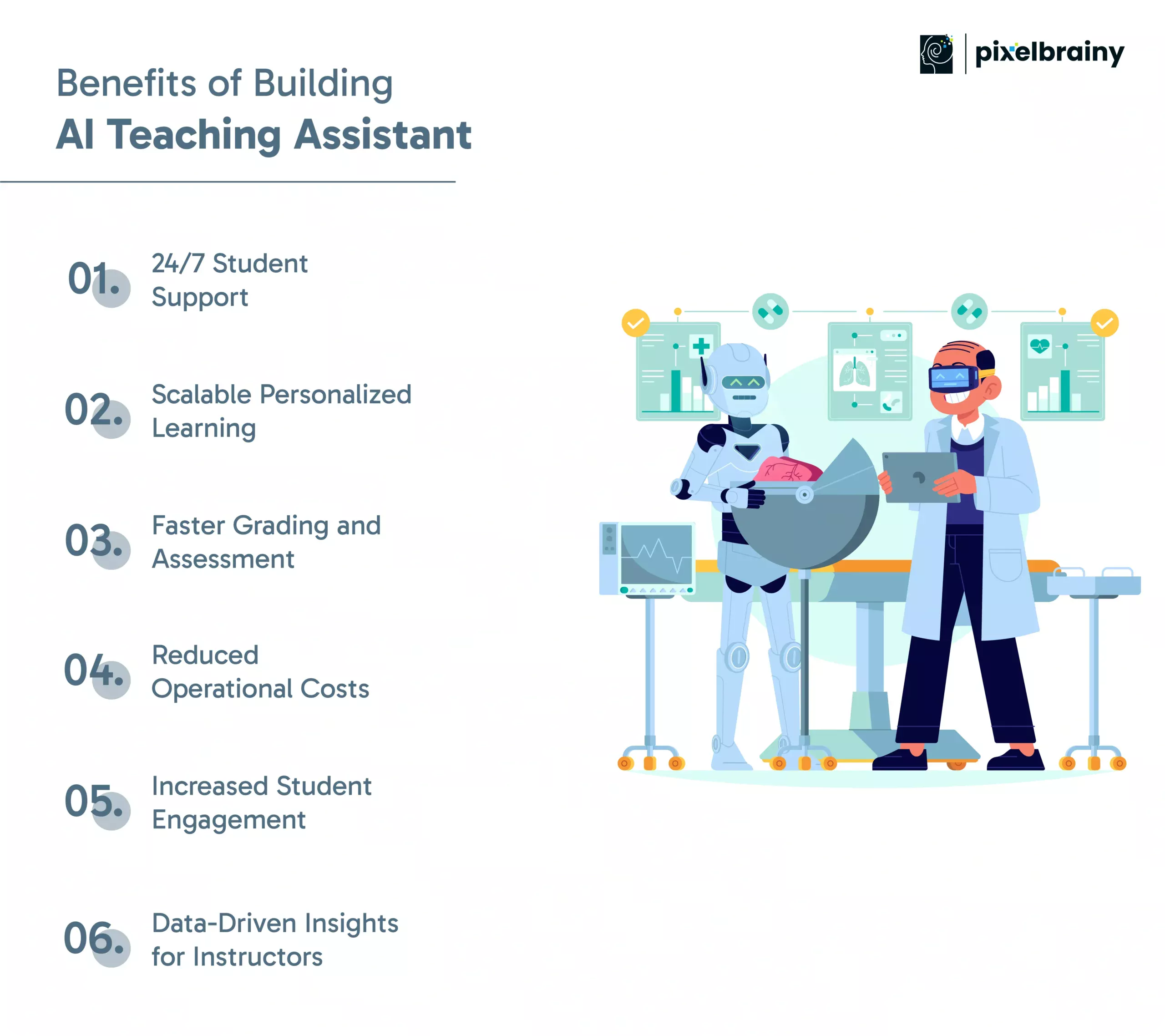
AI teaching assistants are always available online to help users with their requirements. Whether it’s a student revising across time zones or someone with a late-night question about an assignment, the assistant can offer instant help right when needed. This eradicates wait times, mitigates learner frustration, and increases satisfaction, specifically for asynchronous and global learning models.
Considering traditional models, it demands one-on-one instructor time for personalization. But, AI-powered assistants provide tailored learning experiences at scale. By analyzing learner data (such as progress, performance, and behavior), they clarify concepts, suggest resources, and even adjust the content difficulty, ensuring that each student gets targeted support.
AI-powered education tools can streamline the grading of quizzes, assignments, and also subjective questions (with natural language processing). This accelerates feedback cycles, enabling students to improve in real-time, and frees instructors from time-consuming manual assessment, augmenting learning and teaching efficiency.
However, it can be more expensive and unsustainable to hire additional support staff to meet the increasing needs of students. Scalable AI learning assistants work around the clock and manage thousands of interactions simultaneously without any training every semester. Over time, this triggers significant cost savings in onboarding, student support, and engagement management.
AI assistants keep learners actively engaged by sending reminders, prompts, and contextual suggestions. They step in at the right moment that holds them from leaving when students get stuck, slow down, or miss key content, ultimately boosting completion rates and learner success.
Apart from responding, AI assistants accumulate valuable data about learner behavior, course difficulties, engagement patterns, and drop-off points. Leveraging these insights, course designers and administrators make informed decisions to optimize the structure, improve the content, and refine the user experience.
In brief, beyond reducing friction in online education, AI teaching assistants create space for smarter operations, better learning, and sustainable growth.
AI teaching assistants are transforming how learners engage with content and how educators deliver support.
Below are the top AI assistant use cases in education where AI education software creates quantifiable outcomes across various learning models.
Students usually find themselves in a muddle during mid-lesson and require instant clarification. AI assistants serve as a critical solution, providing on-demand answers to common and complicated questions without disturbing the learning flow.
Best for: Self-paced learning platforms, open course models, and high-enrollment online programs
Example: A learner interacting with a data science module meets an unfamiliar term in a lesson. Despite posting on a forum or switching tabs, they ask the AI assistant and get an immediate explanation with links to relevant reading.
AI teaching assistants can simplify complex topics, breaking them into smaller, digestible steps. They adapt their guidance to suit the learner's pace and level of understanding, pretending like a virtual tutor.
Best for: STEM, finance, programming, analytics, and other technical subjects
Example: A student in an engineering course struggling to grasp circuit theory. The AI assistant for education guides them through the issue utilizing incremental explanations and visual aids, ensuring they excel in each part before moving on.
AI assistants manage frequent questions like course navigation, deadline reminders, or submission instructions. This frees instructors to aim at feedback, mentoring, and advanced academic support.
Best for: Large courses, university LMS systems, and cohort-based boot camps
Example: During the first week of class, most students ask about assignment deadlines and grading policies. The AI assistant addresses these queries at scale, diminishing the instructor’s inbox by about 70%.
AI teaching assistants can create practice quizzes based on a student’s past mistakes, progress, or weak edges. This focused revision helps learners target what they actually require to improve rather than repeating generic content.
Best for: Test prep platforms, certification courses, and degree programs with periodic assessments
Example: A student preparing for a business analytics exam gets a custom quiz from the AI assistant depending on the topics they have constantly found challenging, along with immediate feedback and improvement tips.
In large discussion forums, students usually miss crucial takeaways because of the clutter or long threads. AI assistants hold the potential to highlight common themes, summarize conversations, and even tag unresolved questions, resulting in more useful and inclusive discussions.
Best for: Community-driven courses, MOOCs, platforms with active peer forums or Slack/Discord groups
Example: After a week of forum posts relevant to a complex ethics case study, the AI assistant offers links to relevant materials and a summary of arguments and identifies unanswered questions for the instructor’s review.
During live sessions, instructors fail to answer every message or repeat all the instructions for late joiners. Real-time AI support for online students operates in the background, sharing resources, answering questions, or posting live notes.
Best for: Virtual classrooms, webinars, corporate training, and hybrid learning environments
Example: While conducting a design thinking workshop on Zoom, the instructor opted for a framework. A student asks about the same in the chat, and the AI swiftly shares a visual summary and relevant reading material without hindering the session.
Also Read: How to Build an AI Business Assistant
Every AI teaching assistant helps with streamlining manual processes. You need to decide how to make your platform stand out from the crowd. It needs to be well equipped with a powerful, intelligent, and secure feature set. Thus, it can truly support learners, mitigate instructor load, and scale effectively.
Below is a table highlighting the most critical features to include with the ones that can deliver the expected learning experience:
| Feature | Description |
| Natural Language Processing (NLP) | Enables the assistant to understand and respond to human language accurately |
| Contextual Understanding | Allows the AI to interpret questions based on course context or previous chats |
| Voice and Text Interaction | Offers flexibility in communication — especially for mobile or accessibility use |
| Real-time Response Generation | Provides instant answers without lag, keeping learners engaged |
| Integration with LMS Platforms | Connects directly with existing learning systems for content access and tracking |
| Personalized Learning Recommendations | Suggests resources, next steps, or revision areas based on learner data |
| Automated Grading Capabilities | Grades assignments and quizzes, saving instructor time and offering quick feedback |
| Multi-language Support | Makes learning accessible to diverse, global audiences |
| Adaptive Learning Algorithms | Adjusts learning paths based on student performance and behavior |
| Analytics and Reporting Dashboard | Gives instructors and admins real-time insights into performance and usage |
| Student Progress Tracking | Monitors completion rates, learning milestones, and weak areas |
| Conversational Memory | Remembers past interactions to offer relevant and consistent responses |
| 24/7 Availability | Ensures students can get help anytime, from anywhere |
| Sentiment Analysis | Detects learner mood or frustration to flag disengagement or burnout early |
| Data Privacy and Security Compliance | Ensures the system meets standards like GDPR or FERPA for user data protection |
| Customizable Knowledge Base | Lets admins update course-specific FAQs and learning content as needed |
| Integration with Video Conferencing Tools | Enables real-time assistance during live classes or webinars |
| Feedback Collection Mechanism | Gathers student feedback on lessons, instructors, and platform usability |
| Notification and Reminder System | Sends nudges for deadlines, incomplete modules, or exam prep |
| Scalability for Large User Bases | Supports thousands of learners simultaneously without performance loss |
A clear plan that combines educational objectives, user requirements, and scalable technology can help you develop an AI teaching assistant that thrives.
Here is a practical, stage-wise process that you can follow to build a fully functional AI assistant, along with the required roles and timelines to help plan your AI tutor development journey.
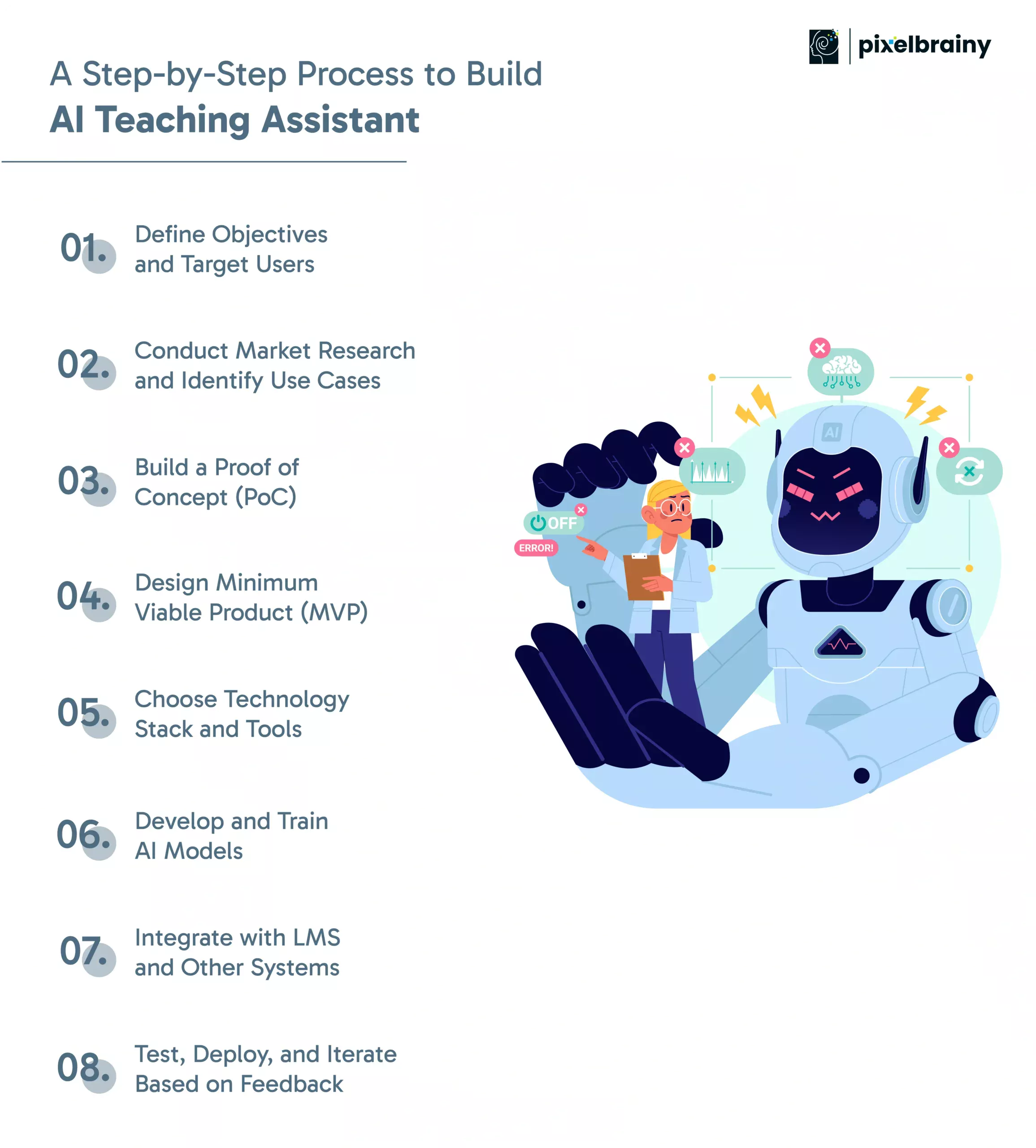
You should embark on recognizing your assistant’s core purpose: Is it to improve student retention, reduce instructor workload, or enhance engagement? Clearly define the target users, like high school students, university learners, corporate trainees, or instructors, and specify the pain points it should solve.
Key Roles: Product Manager and Education Strategist
Time Required: 1-2 weeks
Next, deeply analyze existing platforms and collect input from instructors, learners, and admins. Pinpoint which features will be most helpful for your context, such as real-time Q&A, automated grading, or progress nudging. Remember to prioritize low-complexity, high-impact use cases for early success.
Key Roles: Business Analyst, UX Researcher, and Domain Experts
Time Required: 2-3 weeks
Start with creating a simple version to test its technical feasibility and user reception. This could be an AI chatbot for learning that provides assignment reminders or answers FAQs. A PoC helps you validate your assumptions before you commit to full-fledged development.
Key Roles: AI Engineer, Backend Developer, and QA Tester
Time Required: 2-4 weeks
Now, translate the crucial use cases into a working product through focused MVP development, including key features such as conversation memory, AI integration with the LMS, and basic analytics. The objective here is to deliver value rapidly and test the product in a real environment with minimal risk.
Key Roles: Product Manager, UI/UX Designer, and Full-Stack Developer
Time Required: 4-6 weeks
Go for the appropriate AI frameworks, programming languages, cloud services, and tools based on security, scalability, and budget. For example, choose OpenAI for language understanding, Node.js for the backend, and PostgreSQL for data storage.
Key Roles: Solution Architect and DevOps Engineer
Time Required: 1 week
Ahead, it's time to train the assistant to reap the benefits of relevant educational content, such as past student queries, textbooks, or assignments. Utilize supervised learning, fine-tuning, or prompt engineering to ease the model in understanding domain-specific terminology and student behavior.
Key Roles: AI/ML Engineer, Data Annotator, and Content Specialist
Time Required: 4-8 weeks
Aim at facilitating seamless connectivity between the assistant and your video platforms (e.g., Zoom), LMS (like Moodle, Canvas, or Blackboard), and backend databases. This ensures the assistant has complete access to course content, user profiles, and learning progress.
Key Roles: Backend Developer and Integration Engineer
Time Required: 2-3 weeks
In this development phase, run usability tests with actual instructors and learners to expose bugs or friction points. Accumulate feedback and iterate constantly to boost performance, accuracy, and UX. Plan phased rollouts to handle risk and collect insights in controlled environments.
Key Roles: QA Engineer, Customer Support, and Product Owner
Time Required: Initial testing and deployment: 2-3 weeks
Iteration: Ongoing
The cost to develop AI assistant for EdTech vary notably depending on project scope, feature complexity, team structure, and integration demands. For most platforms, the total development investment ranges between $20,000 for a simple MVP to $200,000+ for a fully-featured, scalable solution.
Below is a cost analysis based on development phases to help you plan everything well and stay within the budget you decide:
| Development Phase | Estimated Cost Range | Effort (Weeks) | Key Roles |
| Define Objectives & Market Research | $2,000 – $5,000 | 2–3 weeks | Product Manager, Business Analyst |
| Proof of Concept (PoC) | $5,000 – $15,000 | 2–4 weeks | AI Engineer, Developer, QA Tester |
| MVP Design & Development | $8,000 – $40,000 | 4–6 weeks | UX/UI Designer, Full-Stack Dev, PM |
| AI Model Training & Fine-Tuning | $10,000 – $50,000 | 4–8 weeks | ML Engineer, Data Annotator |
| LMS & Tool Integrations | $3,000 – $15,000 | 2–3 weeks | Backend Dev, Integration Specialist |
| Testing, Deployment & Feedback Loops | $5,000 – $20,000 | 2–3 weeks + ongoing | QA Engineer, Support Team, Product Owner |
| Total (Estimated Range) | $20,000 – $200,000+ | ~12–20 weeks | Varies by scale and region |
| Project Type | Typical Range | Use Case |
| Small MVP | $20,000 – $40,000 | FAQ chatbot, basic LMS integration, and student Q&A |
| Mid-Scale Deployment | $50,000 – $100,000 | Context-aware support, analytics, and auto-grading |
| Enterprise Solution | $120,000 – $200,000+ | Adaptive learning with AI, and full LMS sync, AI tutor engine |
Note: This is an estimate; the actual cost of AI teaching assistant development depends on your project type, use cases, complexity, and more aspects.
If you want to build AI teaching assistants to be robust and scalable, ensure your tech stack covers language understanding, backend logic, user interface, data analytics, and seamless integration with learning platforms.
Below is a categorized overview of popular and effective AI tools for e-learning platforms that developers use during development.
| Category | Tools & Technologies | Purpose |
| AI & NLP Frameworks | OpenAI (GPT-4), Rasa, Dialogflow, spaCy, Hugging Face Transformers | Natural language processing, understanding queries, generating human-like responses |
| Backend Development | Python (FastAPI, Flask, Django), Node.js, PostgreSQL, MongoDB, Redis, Firebase | Building APIs, managing databases, storing user interactions, hosting models |
| Frontend & UI | React, Next.js, Vue.js, Tailwind CSS, Material UI, TypeScript | Creating user interfaces for learners, instructors, and admins |
| LMS & Tool Integration | Moodle, Canvas, Blackboard APIs, Zoom SDK, MS Teams API, Google Calendar, Calendly | Connecting to course content, video platforms, and scheduling tools |
| Analytics & Monitoring | Mixpanel, Amplitude, Google Analytics, Grafana, Prometheus, Sentry, LogRocket | Tracking user activity, monitoring system health, performance logging |
| Security & Compliance | OAuth 2.0, JWT, AWS Cognito, Auth0, GDPR modules, FERPA compliance tools | User authentication, identity management, and data privacy protection |
| Communication & Alerts | Twilio, SendGrid, FCM (Firebase Cloud Messaging) | Sending email, SMS, push notifications, and reminders |
The choice of tech stack relies on your project requirements, functionality, and expected outcomes. So, go for it meticulously.
While AI teaching assistants hold the caliber to revolutionize the industry, the development team has to encounter technical, ethical, and operational challenges. You need to be skilled enough to recognize these obstacles early and find ways to confront them.
Here are some major issues that come your way while you create AI teaching assistant.
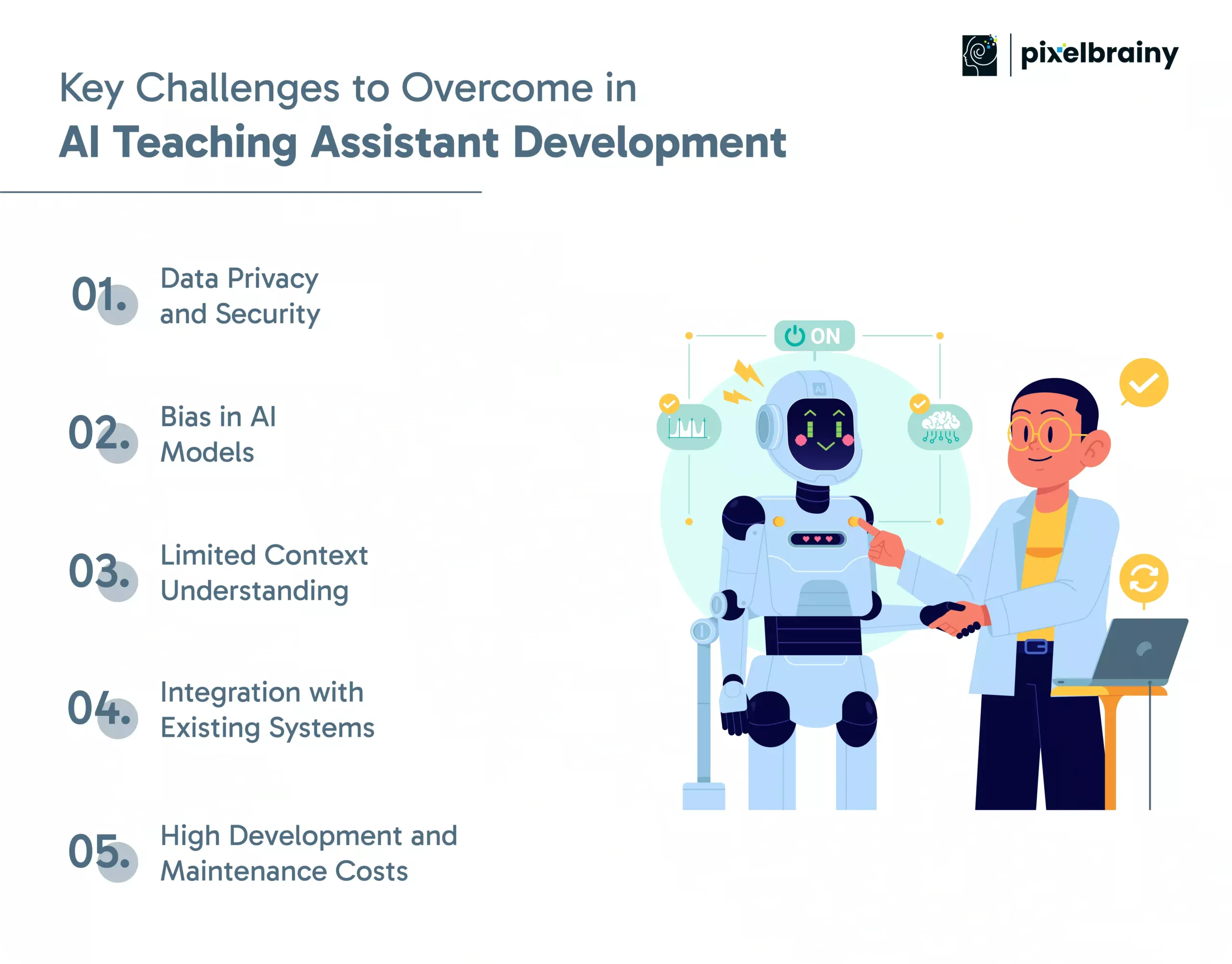
Solution: You must implement role-based access controls, encryption protocols (SSL, TLS), and secure authentication (OAuth 2.0, JWT). Apart from that, ensure compliance with applicable education data regulations like GDPR, FERPA, and COPPA. Additionally, frequent audit data usage and anonymized sensitive details are used in model training.
Solution: Remember to make use of various representative datasets during training. Besides, apply fairness-checking tools like IBM AI Fairness 360. You must allow educators and domain experts to join you in annotation and review processes. It’s best to regularly test the assistant’s responses for bias and retrain models as required.
Solution: Reap the benefits of conversation memory and context-aware NLP models (like GPT-4 with chat history). Next, effortlessly integrate LMS data to provide the assistant course-specific awareness. Additionally, train the AI on frequently asked questions and to improve relevance.
Solution: Leverage the potential of middleware APIs and modular architectures that facilitate easy connection with common LMS platforms like Canvas, Moodle, and Blackboard. Further, collaborate with IT admins early to decide workflows and avoid friction during integration.
Solution: Start with a lean MVP targeting one or two use cases. You must utilize open-source frameworks where possible. Ahead, prefer outsourcing complex jobs like model training or UI development. Choose reusable components wherever possible and scale features progressively based on real usage.
Before building an AI teaching assistant, the development team should have a complete understanding of how educators work, how learners think, and how to transform complex AI systems into practical, scalable edtech AI solutions.
Here, PixelBrainy wins the race. They combine deep domain knowledge with technical expertise to assist educational organizations in launching feature-packed AI-driven assistants that actually deliver value.
With a proven track record in EdTech innovation, PixelBrainy helps meet real-world educational needs with the power of AI, creating a secure, adaptive, and ready-to-scale assistant.
Not convinced yet? Our case study speaks for itself.
Client: Mid-sized EdTech platform offering STEM courses
Challenge: High volume of repetitive student queries and low engagement during self-paced modules
Solution: PixelBrainy created and deployed an AI teaching assistant empowered with NLP, course-aware Q&A, and integration into their LMS and Zoom. The assistant provided real-time feedback, progress nudges, and peer forum summaries.
Results:
Duration: 10 weeks to deploy MVP
Tools Used: OpenAI API, React frontend, Moodle integration
Ready to Develop Smarter Learning Support? Whether you are launching your first assistant or scaling to enterprise-level automation, PixelBrainy is all set to bring your AI vision to life.
AI teaching assistants are no longer an advanced integration but a core component of modern education. From improving learner engagement to automating the load on instructors, they provide a scalable, cost-effective, and smart way to transform digital learning experiences.
But success can't be obtained from technology alone. It needs strategic planning, powerful data practices, the right feature set, and an edtech AI development company that understands AI and education.
Whether you are an EdTech startup, a university, or a training provider, it's time to seize the opportunity to enhance your platform with AI.
Build your AI assistant fast and flawlessly with PixelBrainy. Time to act now!
The cost typically ranges from $20,000 to $200,000 or more, depending on the feature set, complexity, and level of integration. Ongoing maintenance costs may incorporate server hosting, AI model updates, support, and compliance, usually 10-20% of the initial development cost annually.
Yes. You can integrate most AI assistants for education with popular LMS platforms like Moodle, Canvas, Blackboard, or custom-built systems utilizing APIs. Seamless integration ensures the assistant can access user data, course content, and learning progress in real time.
Well, accuracy relies on the NLP models used, the quality of training data, and the domain-specific tuning of the assistant. With proper implementation and refinement, AI teaching assistants can reach about 85-95% precision for common and context-aware queries.
The useful data includes: - Historical student queries - Course content and quizzes - FAQs - Instructor notes - Forum discussions The more contextual and structured the data, the more precise and personalized the assistant becomes.
You can ensure compliance by: - Encrypting all data in transit and at rest - Implementing consent-based data collection - Anonymizing training data - Following standards like GDPR, FERPA, and COPPA - Working with an experienced team of AI developers ensures these safeguards are built into the system from day one.
Based on the scope, timelines vary. But a basic MVP can be delivered in 6 to 10 weeks, and a feature-rich edtech AI solution may take 3 to 5 months, including research, integration, and testing.

About The Author
Sagar Bhatnagar
Sagar Sahay Bhatnagar brings over a decade of IT industry experience to his role as Marketing Head at PixelBrainy. He's known for his knack in devising creative marketing strategies that boost brand visibility and market influence. Sagar's strategic thinking, coupled with his innovative vision and focus on results, sets him apart. His track record of successful campaigns proves his ability to utilize digital platforms effectively for impactful marketing efforts. With a genuine passion for both technology and marketing, Sagar continuously pushes PixelBrainy's marketing initiatives to greater success.

Working with the PixelBrainy team has been a highly positive experience. They understand the design requirements and create beautiful UX elements to meet the application needs. The dev team did an excellent job bringing my vision to life. We discussed usability and flow. Sagar worked with his team to design the database and begin coding. Working with Sagar was easy. He has the knowledge to create robust apps, including multi-language support, Google and Apple ID login options, Ad-enabled integrations, Stripe payment processing, and a Web Admin site for maintaining support data. I'm extremely satisfied with the services provided, the quality of the final product, and the professionalism of the entire process. I highly recommend them for Android and iOS Mobile Application Design and Development.

Great experience working with them. Had a lot of feedback and I found that unlike most contractors they were bugging me for updates instead of the other way around. They were extremely time conscience and great at communicating! All work was done extremely high quality and if not on time, early! They were always proactive when it comes to communication and the work is great/above par always. Very flexible and a great team to work with! Goes above and beyond to present us with multiple options and always provides quality. Amazing work per usual with Chitra. If you have UI/UX or branding design needs I recommend you go to them! Will likely work with them in the future as well, definitely recommended!

PixelBrainy is a joy to work with and is a great partner when thinking through branding, logo, and website layout. I appreciate that they spend time going into the "why" behind their decisions to help inform me and others about industry best practices and their expertise.

I hired them to design our software apps. Things I really like about them are excellent communication skills, they answer all project suggestions and collaborate right away, and their input on design and colors is amazing. This project was complex and needed patience and creativity. The team is amazing to do business with. I will be using them long-term. Glad to see there are some good people out there. I was afraid to try and outsource my project to someone but I am glad I met them! I really can't say enough. They went above and beyond on this project. I am very happy with everything they have done to make my business stand out from the competition.

It was great working with PixelBrainy and the team. They were very responsive and really owned the project. We'll definitely work with them again!

I recently worked with the PixelBrainy team on a project and I was blown away by their communication skills. They were prompt, clear, and articulate in all of our interactions. They listened and provided valuable feedback and suggestions to help make the project a success. They also kept me updated throughout the entire process, which made the experience stress-free and enjoyable.

PixelBrainy is very good at what it does. The team also presents themselves very professionally and takes care of their side of things very well. I could fully trust them taking up the design work in a timely and organised manner and their attention to detail saved us lots of effort and time. This particular project was quite intense and the team showed that they function very well under pressure. Very much looking forward to working with her again!

It's always an absolute pleasure working with them. They completed all of my requests quickly and followed every note I had for them to a T, which made our process go smoothly from start to finish. Everything was completed fast and following all of the guidelines. And I would recommend their services to anyone. If you need any design work done in the future, PixelBrainy should be your first call!

They took ownership of our requirements and designed and proposed multiple beautiful variants. The team is self-motivated, requires minimum supervision, committed to see-through designs with quality and delivering them on time. We would definitely love to work with PixelBrainy again when we have any requirements.

PixelBrainy was a big help with our SaaS application. We've been hard at work with a new UI/UX and they provided a lot of help with the designs. If you're looking for assistance with your website, software, or mobile application designs, PixelBrainy and the team is a great recommendation.

PixelBrainy designers are amazing. They are responsive, talented, and always willing to help craft the design until it matches your vision. I would recommend them and plan to continue them for my future projects and more!!!

They were awesome! Did a good job fast, and good communication. Will work with them again. Thank you

Creative, detail-oriented, and talented designers who take direction well and implement changes quickly and accurately. They consistently over-delivered for us.

PixelBrainy team is very talented and creative. Great designers and a pleasure to work with. PixelBrainy is an excellent communicator and I look forward to working with them again.

PixelBrainy has a very talented design team. Their work is excellent and they are very responsive. I enjoy working with them and hope to continue on all of our future projects.


Transform your ideas into reality with us.
Across these industries, each engagement brings unique challenges, from early-stage product development to scaling complex systems, helping us build a practical understanding of real-world product environments.