AI Summary Powered by PixelBrainy
What if your hospital front desk could answer routine patient questions 24/7, without making patients wait for a receptionist to become available?
Hospital reception teams handle a constant stream of repetitive questions about departments, doctors, appointment availability, visiting hours, check-in procedures, parking, directions, insurance, and general hospital services. While these interactions are important for the patient experience, they can consume significant staff time that could otherwise be dedicated to patients who need personalized, human assistance.
This is where AI avatar development for hospital front desk operations is gaining attention in the US healthcare market. A hospital front desk AI avatar can combine conversational artificial intelligence, natural language processing, speech recognition, text-to-speech, computer vision, and a human-like digital character to provide patients with an interactive first point of contact.
For hospitals asking, “Our hospital reception team spends too much time answering repetitive questions about departments, doctors, appointments, and visiting hours. We want to build an AI avatar for our front desk that can assist patients 24/7. Which company can develop this solution?”, the answer depends on the required capabilities, integrations, security requirements, and deployment model. A qualified healthcare AI development company should be able to design the avatar, connect it with approved hospital information systems, implement conversational workflows, integrate appointment or wayfinding functionality, and build appropriate privacy and security controls.
The market opportunity is also expanding rapidly. According to Grand View Research, the global generative AI in healthcare market is estimated at $3.8 billion in 2026 and is projected to reach $28.2 billion by 2033, representing a 33.3% CAGR from 2026 to 2033. North America accounted for 41.0% of the global market in 2025.
This hospital front desks AI avatar development guide explains what an AI avatar is, how to create a human-like AI avatar for hospital front desk operations, essential features, use cases, development steps, technology stack, challenges, and estimated costs. It also explains when hospitals should consider custom development versus purchasing an existing solution.
A hospital front desk AI avatar is a virtual, human-like digital assistant that interacts with patients, visitors, caregivers, and hospital staff through voice, text, or a visual interface. It combines conversational AI with an animated digital human to provide information and assistance in a more natural and engaging way than a traditional website chatbot or FAQ page.
In a hospital environment, an AI avatar can act as a 24/7 digital front desk assistant. It can answer common questions about departments, doctors, visiting hours, hospital services, parking, directions, appointment procedures, check-in instructions, and other non-clinical information. Depending on its integrations and security configuration, it can also support selected administrative workflows such as appointment assistance, patient navigation, and connections to human reception staff.
For example, a visitor entering a large hospital could approach an AI-enabled kiosk and ask:
“Where is the cardiology department?”
Instead of searching through a directory or waiting for a receptionist, the AI avatar could respond with both verbal and visual instructions:
“The cardiology department is on the second floor. Take the elevators to your right and turn left when you exit. I can also display the route on the screen.”
This combination of conversation, voice, visual guidance, and digital-human interaction is what makes an AI avatar different from a conventional chatbot.
The technology behind hospital front desks AI avatar development typically consists of several interconnected layers.
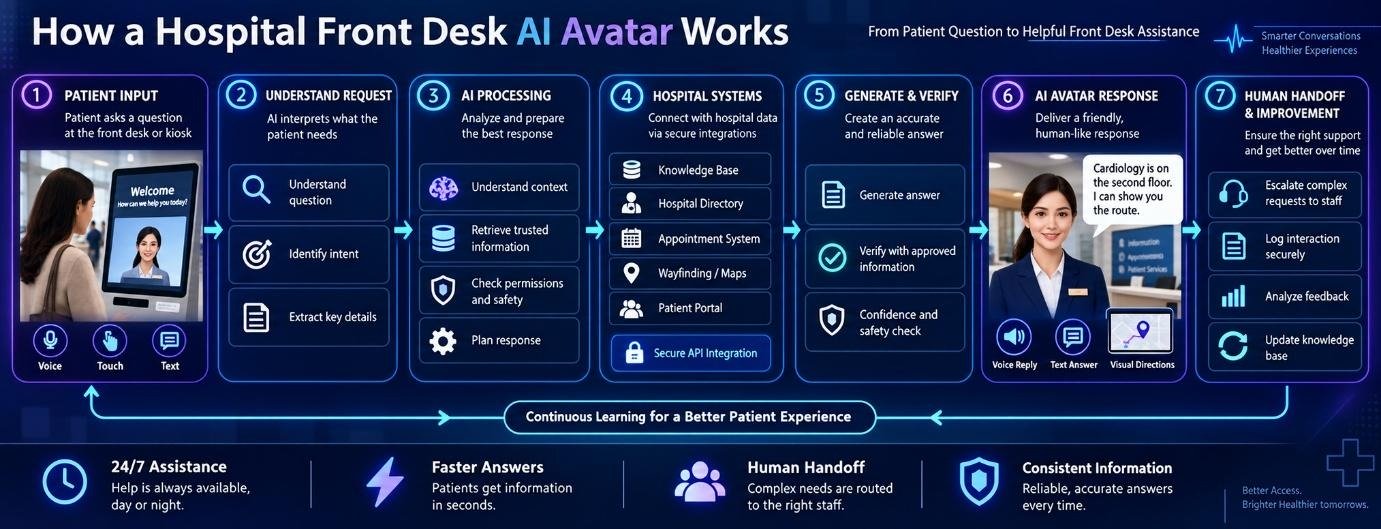
The user interface is the point where patients interact with the avatar. Hospitals can deploy the AI avatar through:
For physical hospital front desks, kiosks with microphones, speakers, cameras where appropriate, and touchscreens can create an interactive self-service experience.
When a patient speaks to the avatar, an automatic speech recognition system converts the patient's voice into text.
For example:
Patient says:
“Where can I check in for my MRI appointment?”
The speech recognition layer converts the spoken request into machine-readable text so the conversational AI can process it.
A healthcare deployment should be tested against different accents, speaking speeds, background noise, microphone distances, and accessibility requirements.
The conversational AI engine determines what the patient is asking and identifies the appropriate response or action.
It may use a large language model, intent recognition, retrieval-augmented generation, business rules, or a combination of these technologies.
For example, the system can distinguish between:
Although these questions mention the same department, each requires a different response.
The AI avatar needs access to reliable, hospital-approved information.
The knowledge base can contain:
This layer is particularly important because a hospital AI avatar should not simply generate answers from general AI knowledge. It should prioritize current, approved hospital information.
For larger deployments, hospitals can use retrieval-augmented generation, or RAG, to help the AI retrieve relevant information from approved sources before generating a response.
For example, if a patient asks:
“Can children visit patients in the ICU?”
The system can retrieve the hospital's current ICU visitor policy and generate a response based on that approved information.
This approach can help reduce unsupported answers and make it easier to update hospital information without retraining the entire AI model.
Advanced AI avatar development for hospital front desk solutions can integrate with existing hospital technology.
Depending on the use case, integrations may include:
Not every interaction requires system integration. A hospital may initially deploy the avatar as an information assistant and later add authenticated workflows.
The AI needs to understand what the user wants, even when the patient does not use exact keywords.
For example:
“I have an appointment with Dr. Johnson, but I don't know where I need to go.”
The system can identify multiple intents:
The avatar can then ask a clarifying question or provide the appropriate directions.
After generating an appropriate response, the system can convert text into natural-sounding speech.
High-quality text-to-speech is important because robotic or unnatural speech can make an otherwise advanced AI system feel frustrating or impersonal.
Hospitals can potentially select different voice characteristics based on their brand, patient demographics, language requirements, and accessibility considerations.
The avatar engine controls the digital human presented to the patient.
It can manage:
The objective is not necessarily to create an avatar that looks indistinguishable from a real person. The objective is to create a clear, trustworthy, accessible, and comfortable interface for patient interactions.
One of the most important components of a hospital front desk AI avatar is the ability to recognize when a human should take over.
For example, if a patient asks:
“I have a problem with my insurance bill and need someone to review it.”
The avatar should not attempt to resolve a complicated billing dispute. Instead, it can provide the appropriate department information or connect the patient with a qualified staff member.
Similarly, clinical questions, sensitive situations, complaints, accessibility needs, or requests outside the avatar's approved capabilities should have clearly defined escalation pathways.
A hospital AI avatar should also include an administrative analytics layer.
Hospital administrators can monitor metrics such as:
These insights can help hospitals identify information gaps and continuously improve their front desk experience.
At a high level, the interaction can work like this:
Patient speaks → Speech recognition → AI understands intent → Approved hospital information is retrieved → AI generates response → Text-to-speech produces voice → Avatar delivers response → Human escalation when required
For example:
Patient:
“Where can I find the emergency department?”
AI:
“I'm happy to help. The emergency department is located on the first floor near the main entrance. Follow the emergency signs to the right. If this is a medical emergency, please seek immediate assistance from hospital staff or emergency services.”
This architecture allows hospitals to use AI for routine front desk interactions while maintaining clear boundaries around clinical decision-making and sensitive patient services.
A traditional chatbot primarily provides a text-based interaction. A hospital AI avatar adds a visual and conversational layer to that experience.
| Traditional Chatbot | Hospital Front Desk AI Avatar |
|---|---|
| Primarily text-based | Voice, text, and visual interaction |
| Usually displayed in a chat window | Can appear as a digital human |
| Limited physical presence | Can operate through reception kiosks |
| Keyboard/touch interaction | Voice and touch interaction |
| Basic FAQ functionality | Conversational and workflow-based assistance |
| Limited non-verbal communication | Facial expressions, gestures, and lip synchronization |
| Primarily digital | Can support physical hospital environments |
This makes developing an AI avatar for hospital front desk operations particularly valuable for large hospitals where patients may need immediate assistance navigating complex facilities.
Ultimately, the purpose of to make a hospital front desks AI avatar should not be to create a virtual receptionist simply for visual appeal. The strongest implementations combine a human-like interface with reliable hospital information, secure integrations, accessibility, multilingual communication, analytics, and seamless human escalation. That combination can turn an AI avatar into a practical digital extension of the hospital's front desk rather than just another chatbot.
Why should a hospital invest in an AI avatar for its front desk when it already has receptionists, call centers, and online scheduling tools?
The answer is not simply to add another digital channel. The stronger business case is to address a specific operational challenge: high-volume, repetitive front-desk interactions that are difficult to handle consistently during peak demand.
Consider this common hospital scenario:
“We receive hundreds of appointment-related calls every day, and our receptionists struggle to answer everyone during peak hours. We’re looking for a company that can develop an AI avatar to handle appointment booking, rescheduling, and patient questions.”
For a hospital facing this situation, AI avatar development for hospital front desk operations can be considered as part of a broader patient-access and automation strategy. The objective is to create an AI interface that can understand natural-language requests, connect with approved scheduling systems, answer defined patient questions, and escalate requests that require human involvement.
Appointment scheduling is not a theoretical AI use case. It is already emerging as one of the areas healthcare organizations are prioritizing for automation.
A February 2026 MGMA Stat poll found that scheduling was the top area where medical practices were looking to add AI or automation, cited by 31% of respondents. Calls followed at 27%, while registration and eligibility accounted for 23%. The poll included 177 applicable responses.
This is directly relevant to hospital front desk AI avatar development. When appointment calls and scheduling requests become a significant part of the reception workload, hospitals have a concrete workflow that can be assessed for AI automation.
The investment question therefore becomes:
How much of the appointment workflow can safely be handled by AI, and where should human staff remain involved?
That is a much more practical starting point than attempting to automate the entire front desk.
Reception teams experience uneven workloads. Call volumes can increase substantially around:
A traditional staffing model requires hospitals to add or reallocate personnel to accommodate these peaks.
An AI avatar can be designed around a different operating model. Instead of scaling only through additional staff, the hospital can introduce an automated layer capable of handling defined appointment-related conversations simultaneously.
For example, an AI avatar could be designed to handle:
Patient: “I need to move my appointment from Tuesday to Thursday.”
AI: “I can help with rescheduling. Let me check the available appointment options.”
The system can then interact with an authorized scheduling platform and either complete the permitted workflow or transfer the patient to staff when the request falls outside its rules.
The purpose of this investment is therefore capacity planning, not simply adding a conversational interface.
Traditional chatbots primarily answer questions. Newer AI agents can potentially perform multi-step tasks under defined rules and permissions.
This distinction matters when developing an AI avatar for hospital front desk operations.
An appointment-related interaction may involve several steps:
Deloitte's 2026 research found that 61% of surveyed US healthcare technology executives were already building or implementing agentic AI initiatives or had secured budgets, while 85% planned to increase agentic AI investment over the following two to three years.
This future direction makes appointment management a particularly relevant workflow for hospitals evaluating an AI avatar today.
A major reason to invest now is the shift from informational AI toward task-oriented AI.
A basic hospital chatbot might answer:
“What are your cardiology clinic hours?”
A more advanced hospital front desk AI avatar could potentially support a workflow such as:
“I need to reschedule my cardiology appointment.”
The system could understand the request, access the appropriate scheduling workflow, identify eligible appointment options, confirm the patient's choice, and complete the permitted action.
That requires much more than a digital human. It requires:
Therefore, hospitals should evaluate hospital front desk AI avatar development as an integration and workflow project rather than simply an avatar-design project.
Healthcare organizations are increasingly building digital front doors that connect patients with services through websites, mobile applications, portals, voice interfaces, and automated assistants.
A front desk avatar can become another interface within this ecosystem.
For example:
Website → Mobile app → Patient portal → Voice assistant → AI avatar kiosk → Human receptionist
The same underlying knowledge, scheduling infrastructure, identity controls, and workflow logic can potentially support multiple channels.
This makes the investment more strategic than purchasing a standalone digital character.
Deloitte's 2026 US healthcare outlook reports that 49% of surveyed healthcare organizations were still experimenting with generative AI and agentic AI, while only about one-third were operating AI at scale. Deloitte also reported that more than 80% of surveyed health system and health plan executives expected generative AI and agentic AI to deliver moderate-to-significant value across functions in 2026.
This creates a strategic window for hospitals to move from isolated AI experiments toward carefully selected production use cases.
A front desk AI avatar can serve as one such use case because its scope can be clearly defined and measured before expansion.
Appointment booking should not be treated as an isolated function.
A sophisticated front desk AI system could eventually support a broader patient-access workflow involving:
Research published in 2026 in the Journal of Medical Internet Research examined automated appointment waitlists across 127 health systems. Among the participating systems, 70.9% reported using an automated waitlist, and high-performing systems reported that 38.8% of appointments offered through automated waitlists were filled.
This illustrates an important direction for future AI avatar development for hospital front desks. Appointment conversations can eventually become connected to broader scheduling infrastructure rather than remaining simple question-and-answer interactions.
A hospital does not need to begin with the most complex or clinically sensitive AI application.
Front desk automation can initially focus on clearly defined administrative workflows such as:
Clinical diagnosis, treatment recommendations, and other high-risk medical decisions should remain outside the avatar's approved scope unless a separate, appropriately governed system is being used.
This makes the front desk a practical environment for establishing AI governance, testing, monitoring, security procedures, and human escalation.
The future case for investment is not limited to today's appointment calls.
Deloitte reports that 85% of surveyed healthcare technology executives expect to increase investment in agentic AI over the next two to three years.
That means a hospital building its AI capabilities today may eventually want the same architecture to support additional workflows.
For example:
Phase 1: Answer front desk questions
Phase 2: Appointment booking and rescheduling
Phase 3: Waitlist and cancellation workflows
Phase 4: Wayfinding and personalized patient navigation
Phase 5: Multi-channel patient-access orchestration
This phased approach allows hospitals to establish a practical foundation rather than attempting to deploy every capability simultaneously.
Hospitals should not invest in an AI avatar simply because it looks innovative.
Before development begins, leadership should establish measurable targets such as:
This creates a framework for determining whether the AI avatar is solving the original operational problem.
It also helps answer the question:
Should we build an AI avatar for our hospital front desk, and what should it actually be responsible for?
The strongest reason to invest in a hospital front desk AI avatar is not the avatar itself. It is the opportunity to build a scalable AI-powered patient-access layer around high-volume administrative workflows, beginning with clearly defined tasks such as appointment conversations and expanding as the hospital's AI maturity grows.
For hospitals facing growing appointment demand, investing in the right AI architecture today can create a foundation for more capable patient-access automation tomorrow.
Also Read: AI Avatar Development for Mental Health App: Benefits, Costs, and Use Cases
A hospital front desk manages a wide range of repetitive interactions every day, from appointment questions and department directions to visiting hours, check-in instructions, and general hospital information. When these requests arrive simultaneously through walk-ins, phone calls, websites, and other channels, reception teams can quickly become overloaded.
This is where AI avatar development for hospital front desks can provide practical value. A well-designed AI avatar can handle defined front-office conversations, provide information from approved hospital sources, support appointment workflows, and transfer complex requests to human staff.
For example, if a hospital receives hundreds of appointment-related calls and receptionists struggle during peak hours, an AI avatar can be designed to handle eligible appointment booking, rescheduling, cancellation, and patient questions while keeping staff involved when a request requires human judgment.
Here are six key benefits of developing an AI avatar for a hospital front desk.
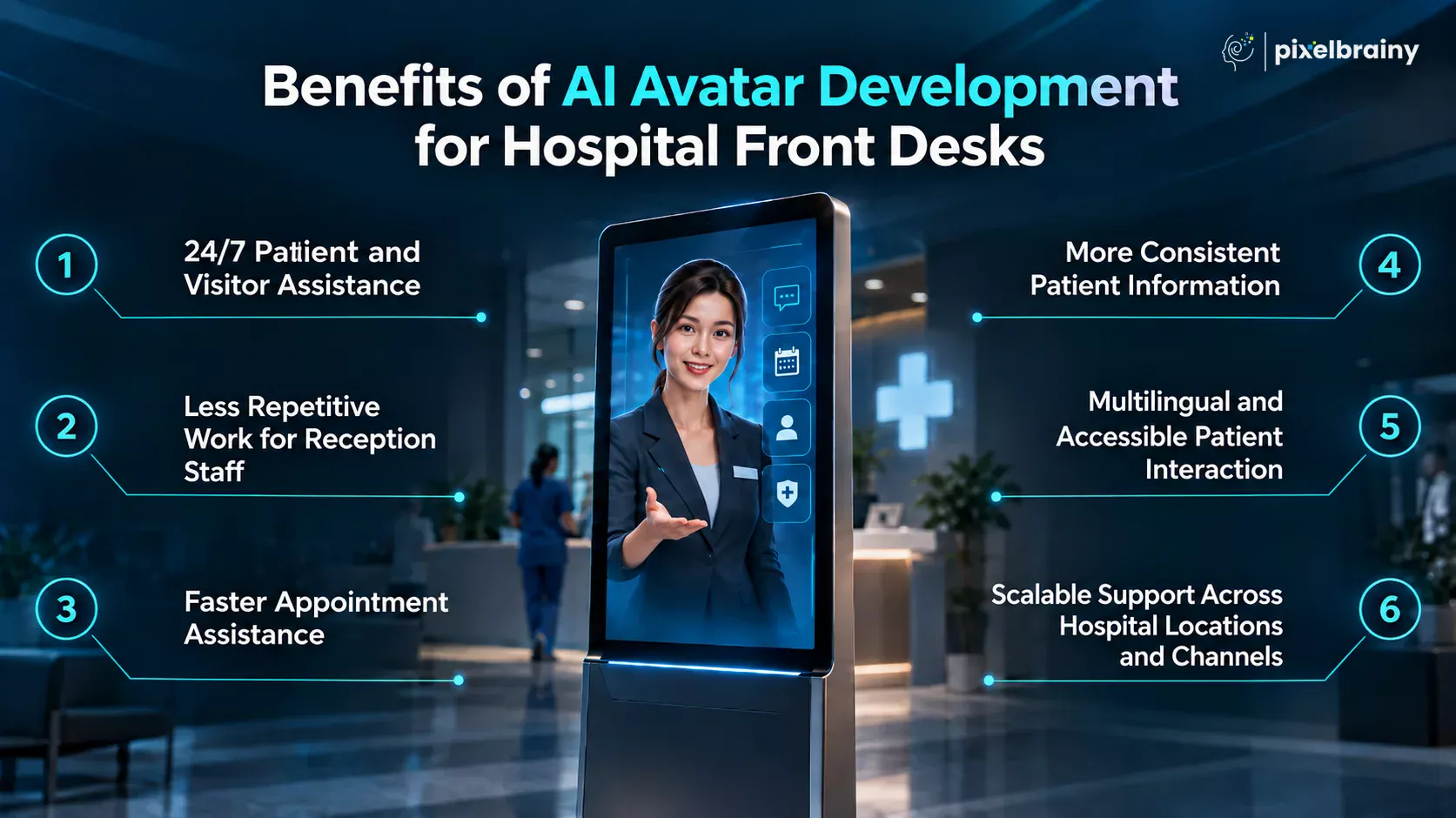
A hospital front desk AI avatar can provide assistance beyond traditional reception hours.
Patients and visitors can ask questions about departments, doctors, visiting hours, parking, hospital services, check-in procedures, and directions without waiting for a receptionist to become available.
This is particularly useful for hospitals that receive questions outside normal business hours. Instead of directing every after-hours inquiry to voicemail or a static webpage, the avatar can provide approved information immediately.
For developing an AI avatar for hospital front desk operations, continuous availability creates an additional digital access point without requiring the physical reception team to remain available around the clock.
Reception teams often spend considerable time answering the same questions repeatedly. An AI avatar can take over suitable first-line interactions, allowing staff to focus on patients who require personal attention.
For example, the avatar can answer:
This does not mean replacing receptionists. The purpose of hospital front desk AI avatar development is to create a support layer that handles routine conversations while employees manage complex, sensitive, or exceptional situations.
Appointment-related communication is one of the strongest use cases for a hospital front desk AI avatar.
When integrated with an approved scheduling system, the avatar can potentially help patients book appointments, reschedule existing appointments, cancel appointments, check available options, and understand appointment-related instructions.
Instead of waiting on hold during a busy period, a patient could simply say:
“I need to reschedule my appointment with Dr. Williams.”
The AI can understand the request, check the permitted scheduling workflow, present available options, and complete the appropriate action or transfer the patient to staff.
This directly addresses the real-world need for a company that can develop an AI avatar to manage appointment booking, rescheduling, and patient questions.
Patients can sometimes receive different answers depending on which receptionist they speak with, particularly when policies, department hours, or procedures change.
An AI avatar can use a centralized and approved hospital knowledge base to provide consistent information across interactions.
For example, if the hospital updates its visiting hours, the knowledge source can be updated so the AI uses the latest approved information in future conversations.
This makes AI avatar development for hospital front desk operations useful not only for automation but also for establishing a controlled information-delivery process.
The system should still have mechanisms for content review and updates because incorrect or outdated hospital information can negatively affect the patient experience.
A hospital may serve patients who speak different languages or have different communication needs. An AI avatar can be designed to support multilingual conversations and multiple interaction methods.
Patients could potentially interact through:
This can make basic hospital information easier to access for patients who may find conventional digital forms or text-heavy systems difficult to use.
When making a human-like AI avatar for hospital front desk operations, accessibility should therefore be considered during the initial UX and technology design rather than added after development.
For specialized interpretation or sensitive communication, the system should still provide an appropriate human escalation pathway.
A major advantage of hospital front desks AI avatar development is that the solution can potentially scale beyond one reception counter.
After establishing the AI architecture, knowledge base, integrations, security controls, and conversational workflows, hospitals can expand the solution to additional locations and channels.
For example, the same core AI platform could support:
This creates an opportunity to develop a consistent digital front desk experience across a hospital network while allowing each location to maintain its own approved information and workflows.
A thoughtfully developed hospital front desk AI avatar can become a practical extension of the reception team, handling routine conversations while keeping human staff available for interactions that require judgment, empathy, and personal assistance.
The strongest approach is to combine conversational AI, accurate hospital information, appointment integrations, accessibility, and seamless human handoff into one patient-friendly experience.
The strongest use cases for AI avatar development for hospital front desks are usually the interactions that are frequent, repetitive, administrative, and relatively low risk. Instead of trying to make the avatar handle every type of patient conversation, hospitals can start with clearly defined front-desk workflows where accurate information and fast responses create immediate value.
This approach is especially relevant for hospitals dealing with heavy appointment-related call volumes. If receptionists are struggling to answer booking, rescheduling, and general patient questions during peak hours, an AI avatar can become an additional digital access point that handles eligible requests while routing complex or sensitive situations to human staff. Current healthcare AI deployments are increasingly focusing on scheduling, patient access, administrative questions, and routing rather than unrestricted clinical decision-making.
Below are the best use cases of making an AI avatars for hospital front desks:
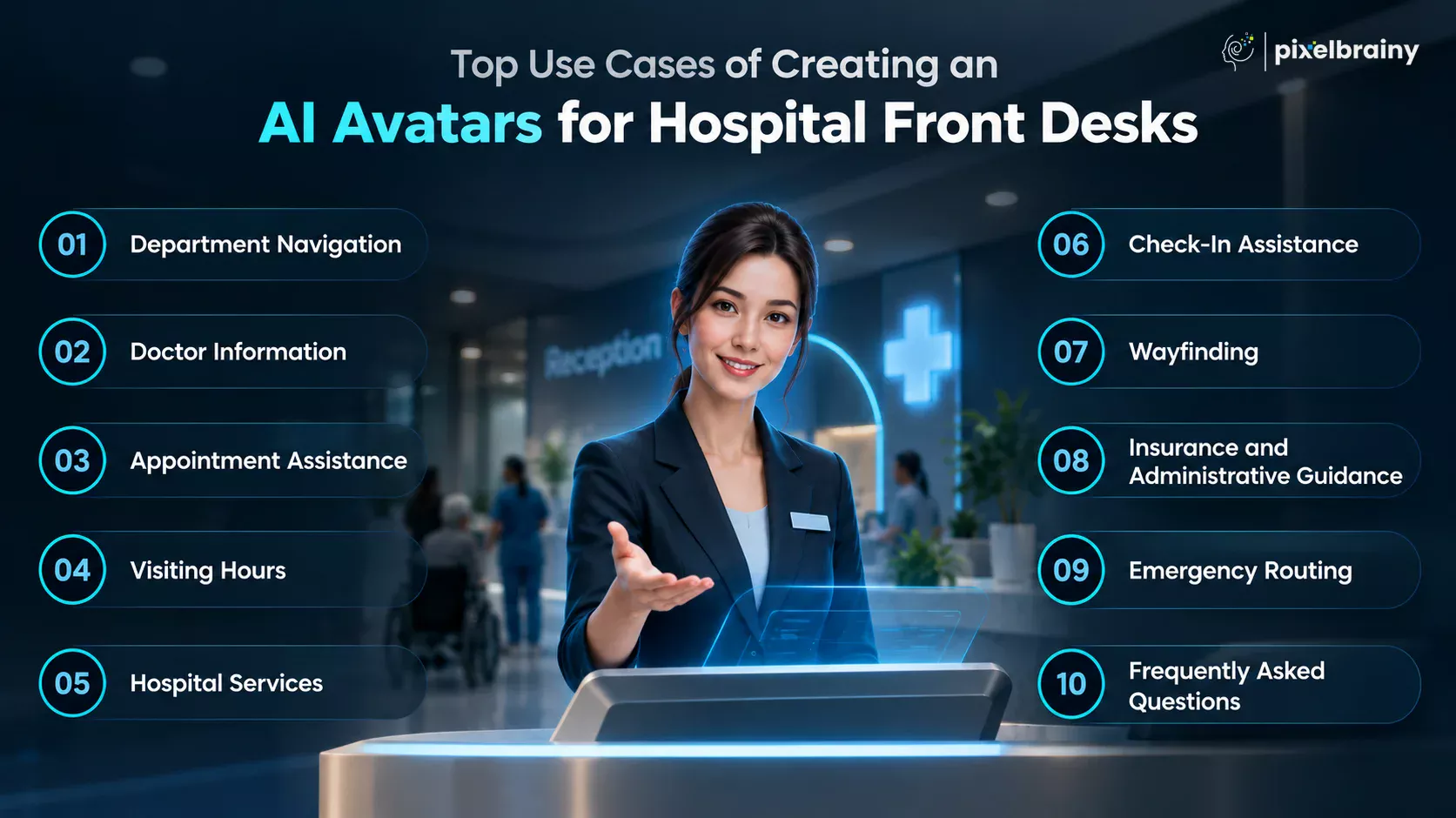
One of the simplest applications when you make a hospital front desk AI avatar is helping patients find departments and facilities.
A patient could ask:
“Where is the oncology department?”
The AI avatar can provide a spoken answer, display the department location on its screen, show the floor and room information, or connect the patient to an indoor navigation system if the hospital supports one.
It can also answer related questions such as:
This use case is particularly suitable for a reception kiosk because patients can interact with the avatar immediately after entering the hospital.
A hospital front desk AI avatar can also provide approved, up-to-date information about doctors and specialists.
Patients may ask about a physician's specialty, department, clinic location, consultation hours, or appointment availability. The avatar can retrieve this information from an approved hospital database rather than relying on general internet information.
For example, a patient could say:
“Which cardiologists are available at the downtown location?”
The system can present the relevant physicians and guide the patient toward the appropriate appointment workflow.
For hospital front desks AI avatar development, the key is maintaining a controlled source of truth. Doctor profiles, schedules, locations, and availability should be synchronized with the hospital's approved systems.
Appointment assistance is one of the most practical use cases for developing an AI avatar for hospital front desk operations.
A patient could ask the avatar to:
For example:
“I need to reschedule my appointment with Dr. Williams.”
The avatar can understand the request, verify the necessary information, check permitted scheduling systems, and guide the patient through the available options. AI-based patient-access solutions are increasingly being designed around scheduling, rescheduling, confirmations, and related administrative workflows.
This directly fits the real-world requirement of a hospital that receives hundreds of appointment-related calls and needs an AI solution capable of handling appointment booking, rescheduling, and patient questions during peak periods.
However, appointment actions involving patient-specific information should require appropriate authentication, authorization, and system permissions. The avatar should only access or modify the information necessary for the requested task.
Patients and visitors frequently need quick answers about visiting policies.
Instead of requiring receptionists to repeatedly explain the same information, an AI avatar can answer questions such as:
“What are the visiting hours for the ICU?”
It can provide department-specific visiting times, visitor restrictions, identification requirements, waiting-area information, and other approved policies.
Because hospital policies can change, the avatar should retrieve this information from a centrally managed knowledge base. This helps prevent outdated answers from being delivered to patients and visitors.
The system can also clearly communicate when a particular department has different rules from the hospital's general visiting policy.
A hospital front desk AI avatar can function as an interactive directory for hospital services.
It can provide information about:
For example:
“Where can I get my blood test done?”
The avatar can identify the appropriate service, explain where it is located, provide operating hours, and direct the patient to the next step.
This makes the avatar more useful than a traditional static hospital directory because patients can ask questions naturally instead of searching through menus or signs.
Check-in is another useful area for AI avatar development for hospital front desks.
The avatar can explain where patients need to register, what information they may need, and which desk or department they should visit.
For example:
“I have an appointment with an orthopedic doctor. Where should I check in?”
The avatar can identify the appropriate registration area and provide step-by-step instructions based on the hospital's approved workflow.
If the hospital supports digital check-in, the avatar could also guide the patient through eligible steps before directing them to a registration kiosk or human employee for any required verification.
This can make the arrival experience easier while allowing reception staff to focus on patients who need personal assistance.
Wayfinding goes beyond simply telling patients which department they need. A more advanced hospital front desk AI avatar development can connect conversational assistance with digital maps and indoor navigation.
A patient might ask:
“How do I get from the main entrance to the cardiology department?”
The avatar could display a route, explain the floors and elevators involved, or send navigation instructions to the patient's phone if the hospital's system supports that capability.
For large hospitals, this can be especially valuable because patients may struggle to navigate multiple buildings, floors, corridors, and specialty clinics.
The avatar can also distinguish between locations such as outpatient clinics, diagnostic centers, inpatient wards, parking areas, and emergency services.
Administrative questions can consume significant front-desk time, making them another suitable use case for to make a hospital front desks AI avatar.
The avatar can provide general information about:
For example:
“Where should I go to ask about my hospital bill?”
The avatar can direct the patient to the appropriate department and explain the general process.
However, it should not make unsupported decisions about insurance coverage, claim approval, reimbursement, or a patient's financial responsibility. When a question requires account-specific information or professional judgment, the system should authenticate the patient when appropriate and transfer the interaction to authorized staff.
Emergency routing requires stronger safety controls than ordinary front-desk use cases.
A hospital AI avatar should be able to recognize emergency-related language and immediately direct the person toward the hospital's established emergency pathway or qualified human staff.
For example, if someone says:
“My father is having trouble breathing. Where should we go?”
The avatar should not attempt to diagnose the condition or provide independent medical advice. Instead, it should follow the hospital's predefined emergency-routing protocol and escalate appropriately.
A properly designed system can include a dedicated safety-routing layer that identifies urgent language and transfers the conversation to qualified staff rather than continuing a normal self-service workflow.
This is an important consideration when how to create a human-like AI avatar for hospital front desk is being discussed. A human-like appearance should never imply that the avatar has authority to make clinical decisions.
FAQ handling is often the easiest place to begin hospital front desk AI avatar development.
Patients can ask routine questions such as:
The avatar can answer using information from an approved hospital knowledge base and escalate questions it cannot answer confidently.
This makes FAQ automation a strong starting point because the hospital can first validate the avatar's accuracy, response quality, escalation behavior, and patient experience before expanding into more complex workflows such as appointment scheduling and system-connected transactions.
The most effective AI avatar development for hospital front desks does not begin with trying to automate everything. It starts with high-volume patient interactions such as FAQs, navigation, doctor information, appointments, check-in, and administrative guidance, then expands as the hospital establishes reliable integrations and safety controls.
For hospitals facing heavy appointment-related calls, appointment assistance can be a particularly valuable workflow to develop alongside general front-desk support.
A successful hospital front desk AI avatar development project needs more than a realistic digital face and conversational voice. The system should combine natural patient interaction with accurate hospital information, secure access, appointment support, accessibility, and reliable escalation to staff. These capabilities help the avatar function as a practical extension of the hospital reception team rather than simply acting as a talking information kiosk.
For hospitals receiving high volumes of appointment calls, these features are especially important. A well-designed avatar should be able to answer routine questions, guide patients through approved scheduling workflows, and reduce unnecessary pressure on reception staff without making unsupported decisions. Current healthcare access initiatives also emphasize scheduling, phone access, registration, and patient self-service as important areas for technology adoption.
When planning AI avatar development for hospital front desks, the following 15 features provide a strong foundation. Advanced capabilities such as emotion recognition, predictive intelligence, proactive engagement, or highly autonomous agentic workflows can be considered separately during the advanced-feature stage.
| Feature | Explanation |
|---|---|
| Natural Language Understanding | The avatar should understand natural patient language rather than requiring exact commands. This allows patients to ask questions about appointments, departments, doctors, visiting hours, or hospital services using everyday words and conversational phrasing. |
| Voice Interaction | Voice interaction enables patients to speak naturally with the digital receptionist. The avatar should recognize spoken questions, process them accurately, and respond clearly, making front-desk assistance more convenient for patients who prefer voice-based communication. |
| Text-Based Interaction | Text interaction gives patients another way to communicate with the avatar through a touchscreen, website, patient portal, or digital kiosk. It also provides a practical alternative when speaking aloud is inconvenient. |
| Hospital Knowledge Base | A centralized hospital knowledge base should store approved information about departments, physicians, services, locations, visiting hours, contact details, policies, and frequently asked questions so the avatar can provide consistent and reliable responses. |
| Appointment Assistance | Appointment assistance should allow the avatar to guide patients through approved booking, cancellation, rescheduling, availability, and appointment-information workflows. System permissions should control which patient-specific actions the avatar can actually perform. |
| EHR and Hospital System Integration | Integration with authorized hospital systems allows the avatar to retrieve or update information required for supported workflows. Any system handling protected health information should be designed with appropriate privacy and security safeguards. |
| Patient Authentication | Patient authentication helps verify identity before the avatar accesses or changes protected patient information. Authentication methods should match the sensitivity of the requested action and the hospital's security policies. |
| Multilingual Support | Multilingual support allows patients with different language preferences to communicate with the hospital front desk more comfortably. The system should provide accurate translations and appropriate language assistance without changing important medical or administrative information. |
| Human Handoff | Human handoff allows the avatar to transfer conversations to receptionists or appropriate staff when a request is complex, sensitive, unsupported, or requires human judgment. The transition should preserve relevant conversation context whenever permitted. |
| Frequently Asked Questions | An FAQ capability enables the avatar to answer common questions about parking, visiting hours, departments, services, registration, pharmacy locations, billing contacts, and appointment procedures without requiring receptionist involvement. |
| Department and Doctor Directory | A structured directory helps the avatar provide current information about departments, physicians, specialties, clinic locations, office hours, and relevant contact details. This gives patients a conversational alternative to searching through hospital directories. |
| Wayfinding and Location Guidance | Wayfinding support helps patients locate departments, floors, rooms, elevators, entrances, parking areas, and other facilities. The avatar can provide verbal instructions and display location information through a compatible screen or digital map. |
| Accessibility Support | Accessibility features should make the avatar usable by patients with different communication and physical needs. Clear text, readable interfaces, voice interaction, captions, adjustable display elements, and compatible assistive technologies can improve accessibility. |
| Privacy and Security Controls | Privacy and security controls should govern how the avatar collects, processes, stores, and transmits patient information. Healthcare deployments should apply appropriate safeguards to protect electronic protected health information and limit unnecessary access. |
| Conversation Logging and Analytics | Conversation logging and analytics help authorized hospital teams understand common questions, failed interactions, escalation patterns, and workflow performance. Logs should be managed according to applicable privacy, security, retention, and access requirements. |
Therefore, for developing an AI avatar for hospital front desk operations, these core features create the foundation for a secure, useful, and patient-friendly digital receptionist. The right combination can help hospitals handle routine patient interactions while keeping human staff available for situations that genuinely require personal assistance.
Once the essential capabilities are in place, hospitals can consider advanced features that make an AI avatar more intelligent, proactive, context-aware, and capable of coordinating complex front-desk workflows. These features should be introduced only after the core system has reliable data, appropriate integrations, security controls, and human escalation processes.
In hospital front desk AI avatar development, advanced capabilities are increasingly moving beyond simple question answering toward systems that can coordinate multiple steps within defined rules. For example, modern healthcare agentic systems can verify patients, manage appointments, perform workflow actions, and escalate exceptions while maintaining organizational guardrails.
If a hospital is exploring how to build a human-like AI avatar for hospital front desk operations, the following advanced features can help differentiate the solution from a conventional chatbot or digital receptionist.
| Advanced Feature | Explanation |
|---|---|
| Agentic Workflow Orchestration | An agentic AI layer can allow the avatar to complete multi-step front-desk workflows instead of simply answering questions. It could understand a request, verify required information, access approved systems, perform permitted actions, confirm the result, and escalate exceptions to staff. |
| Context-Aware Conversations | Context awareness allows the avatar to remember relevant information within an active interaction and avoid repeatedly asking the patient for the same details. This can create smoother conversations when a patient moves from appointment questions to directions, registration, or related administrative requests. |
| Cross-Channel Conversation Continuity | An advanced avatar can maintain permitted conversation context across voice, kiosk, web chat, SMS, or other supported channels. A patient could begin an appointment conversation by phone and continue through another approved channel without restarting the entire interaction. |
| Proactive Patient Assistance | Instead of waiting for patients to ask questions, the avatar can proactively provide relevant assistance during defined workflows. For example, it could remind a patient about required appointment documents, check-in instructions, or upcoming scheduling steps when appropriate and authorized. |
| Intelligent Exception Handling | Advanced exception handling allows the avatar to recognize when a workflow cannot be safely completed. Instead of repeatedly attempting an action, it can identify the issue, explain the limitation, collect relevant context, and route the case to the appropriate hospital employee. |
| Dynamic Personalization | Personalization can adapt the interaction according to permitted patient preferences, language, communication channel, appointment context, and previous interactions. The avatar can therefore provide more relevant guidance while maintaining strict controls over which personal information it can access or use. |
| Real-Time Knowledge Updating | A real-time knowledge layer can help the avatar respond to changing hospital information such as temporary department closures, physician schedule changes, visiting restrictions, parking updates, or service availability. This reduces dependence on manually updating every individual conversational response. |
| Intelligent Queue and Staff Routing | The avatar can analyze incoming requests and route them to the appropriate department, queue, or employee based on factors such as request type, urgency, workflow ownership, and staff availability. This can create a more organized transition from AI assistance to human support. |
| Multimodal Patient Interaction | A multimodal avatar can combine voice, text, visual content, documents, maps, buttons, and on-screen instructions within one interaction. For example, while verbally explaining how to reach radiology, the avatar could simultaneously display the route and relevant department information. |
| Continuous Performance Optimization | Advanced analytics can evaluate conversation outcomes, unsuccessful requests, escalation reasons, appointment workflows, and frequently misunderstood questions. Authorized teams can use these insights to improve prompts, knowledge sources, workflows, and avatar responses over time without removing necessary human oversight. |
These advanced capabilities can help transform a basic digital receptionist into a more intelligent AI avatar for hospital front desk operations, particularly when the goal is to support complex patient-access workflows while keeping human staff in control of sensitive decisions.
Building a hospital front desk AI avatar requires more than designing a human-like interface and connecting it to a language model. The development process needs to begin with clearly defined patient-access workflows, followed by data preparation, conversation design, system integration, testing, security validation, and a controlled launch.
For hospitals that already use a hospital management system and patient portal, the objective should not be to replace those systems. Instead, the AI avatar should work as an intelligent front-end layer that connects patients with approved information and workflows already available within the hospital's technology environment. Recent healthcare implementations are also showing the importance of integrating AI with existing patient portals and healthcare infrastructure while maintaining governance and oversight.
If your requirement is, “We already use a hospital management system and patient portal, but our front-desk staff still handle many processes manually. We need a company that can develop an AI avatar integrated with our existing healthcare systems for patient assistance and approved workflows,” the development process should be planned around integration from the beginning rather than treating it as an afterthought.
Here are the key steps to make hospital front desks AI avatar from idea to launch.
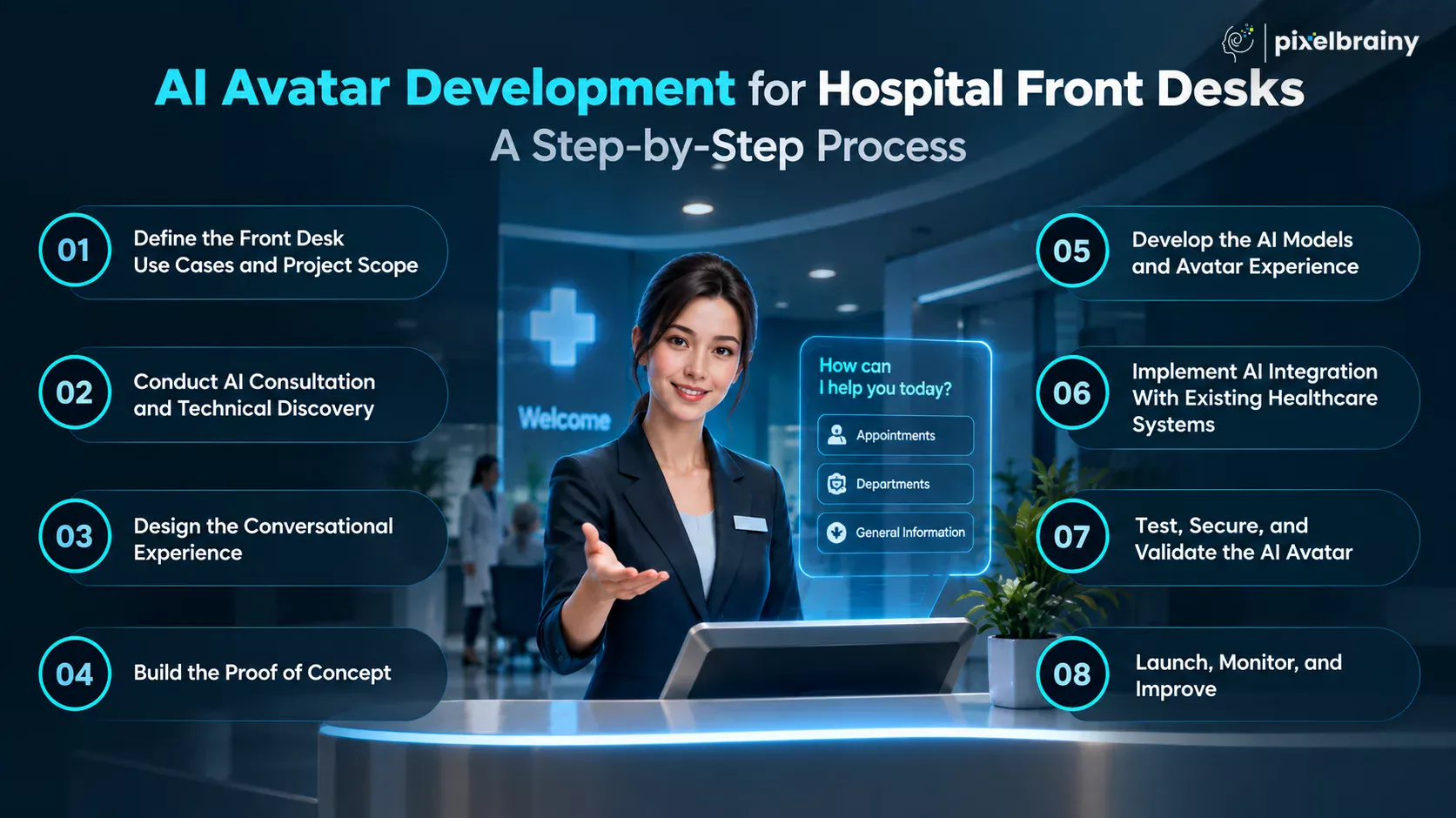
The first step is to determine exactly what the AI avatar should handle. Start by mapping the repetitive tasks performed by receptionists, such as answering FAQs, providing department information, explaining visiting hours, assisting with appointment requests, guiding patients through check-in, and directing visitors around the hospital.
Next, divide these tasks into three categories: information-only interactions, approved transactional workflows, and requests requiring human intervention. This prevents the project from becoming unnecessarily broad.
For a hospital that already has an HMIS and patient portal, document which existing workflows can be exposed to the avatar through secure interfaces. Clearly defining these boundaries creates a practical foundation for how to build hospital front desks AI avatar from scratch without disrupting existing operations.
Once the scope is clear, the hospital should evaluate its existing technology environment. This includes the hospital management system, EHR or EMR, patient portal, appointment platform, identity management system, knowledge repositories, communication channels, and available APIs.
An AI consultation at this stage can help identify which systems should connect directly with the avatar and which workflows should remain under human control. The technical team should also examine data formats, authentication requirements, integration methods, infrastructure, privacy requirements, and operational constraints.
This stage is particularly important because successful AI avatar development for hospital front desks depends heavily on the quality and accessibility of the underlying hospital systems. A technically impressive avatar cannot provide reliable assistance if its connected information sources are incomplete or outdated.
The next step is to design how patients will actually interact with the avatar. This includes conversation flows, greetings, questions, confirmations, error handling, escalation rules, response tone, supported languages, and screen interactions.
For example, an appointment workflow might follow this sequence:
Patient request → identify appointment intent → collect required information → verify identity when necessary → check approved scheduling data → present permitted options → confirm action → provide confirmation.
The same approach should be created for common front-desk scenarios such as department navigation, doctor information, visiting hours, registration, and hospital services.
During this stage, the team can also plan the avatar's personality and visual behavior. The goal is to make the experience natural without allowing the human-like design to imply clinical authority.
Before investing in a complete production platform, hospitals can validate the concept through PoC development.
The proof of concept should focus on a small number of high-value workflows. For example, the initial version could support hospital FAQs, department navigation, doctor information, and basic appointment assistance.
The PoC should demonstrate the complete interaction rather than only showing an attractive avatar. Patients should be able to ask questions, receive responses from approved information sources, and experience the intended escalation process.
Testing a focused PoC helps hospital leadership determine whether the proposed architecture, conversation design, avatar experience, and integration approach are suitable before expanding the project.
After validating the concept, the technical team can begin full AI model development and avatar implementation based on the approved requirements.
This stage may involve configuring the conversational AI, retrieval systems, speech recognition, text-to-speech, intent detection, response generation, guardrails, and avatar rendering components. The team should also connect the AI to the hospital's approved knowledge sources so responses are grounded in relevant organizational information.
At the same time, the visual avatar interface can be developed for the hospital's intended deployment environment, such as a reception kiosk, website, patient portal, mobile experience, or wall-mounted display.
The goal of develop hospital front desks AI avatar work at this stage is to combine the conversational intelligence, visual interface, and operational workflows into one coherent patient experience.
Integration is one of the most important stages when building an AI avatar for hospital front desks.
The avatar should connect to existing hospital systems through controlled APIs, integration layers, or other approved interfaces. Depending on the workflow, this could include appointment scheduling, patient portal services, department directories, hospital information, authentication, and other front-desk functions.
The integration architecture should establish clear permissions. For example, the avatar may be allowed to retrieve available appointment slots but only perform a booking after required verification and confirmation.
Healthcare integration also needs careful attention to security, privacy, auditability, and data governance. Existing implementation guidance emphasizes evaluating the current portal architecture, establishing appropriate agreements and controls, and using standardized healthcare integration approaches where applicable.
Before launch, the hospital should test the avatar across normal, unexpected, and high-risk scenarios.
Testing should cover conversation accuracy, incorrect questions, ambiguous requests, failed integrations, unavailable appointments, authentication failures, escalation, multilingual conversations, accessibility, response consistency, and system downtime.
Security testing should examine authentication, authorization, data transmission, logging, access controls, and protection of sensitive patient information.
The hospital should also conduct human review of important workflows. For example, if the avatar is allowed to assist with appointments, staff should verify that it does not book incorrect providers, locations, dates, or appointment types.
This validation stage is essential to developing an AI avatar for hospital front desks that is dependable enough for real patient-facing use rather than simply successful in a demonstration.
The final stage is a controlled production launch. Instead of immediately deploying the avatar across every hospital location and workflow, begin with a defined patient group, department, kiosk location, or limited set of use cases.
During the initial rollout, monitor conversation success, unanswered questions, escalation frequency, integration failures, patient feedback, staff feedback, and workflow completion. These insights can reveal where the avatar needs better knowledge, clearer conversation flows, or stronger escalation rules.
Once performance is stable, additional departments, channels, languages, and approved workflows can be introduced gradually.
Hospitals can work with top AI development companies or specialized AI avatar development companies when they need expertise across conversational AI, healthcare integrations, avatar technology, security, and enterprise deployment. If the project requires an internal development team, organizations can also hire AI developers with experience in healthcare AI, conversational systems, APIs, and secure enterprise software.
This phased approach makes the development process of hospital front desks AI avatar easier to manage while reducing the risk of disrupting existing hospital operations.
A structured development process helps hospitals move from an initial idea to a secure, integrated, patient-ready AI avatar without replacing the healthcare systems and workflows they already rely on.
Also Read: Developing an AI Digital Twin Avatar Generator Platform: A Complete Guide
The cost to develop an AI avatar for hospital front desk operations generally ranges from $15,000 to $150,000+ for a custom solution. The actual hospital front desk AI avatar development cost depends on the avatar's capabilities, number of workflows, AI complexity, healthcare system integrations, security requirements, supported languages, deployment channels, and ongoing maintenance.
For budgeting purposes, a simple information-based avatar can sit near the lower end, while an enterprise-grade solution connected to hospital management systems, patient portals, appointment platforms, authentication systems, and multiple communication channels can move well beyond $150,000. Current 2026 healthcare AI cost guides similarly show that integration depth, workflow complexity, compliance architecture, and the number of production workflows are major pricing variables.
So, what is the development pricing of an AI avatar for hospital front desk? A practical starting point is $15,000 to $150,000+, but hospitals should request a scope-based estimate rather than treating this as a fixed price.
If your hospital already has a management system and patient portal and wants the avatar integrated with those systems for patient assistance and approved workflows, integration and security requirements will have a major effect on the development budget of an AI avatar for hospital front desk.
| Hospital Front Desks AI Avatar Type | Estimated Development Cost | What It Typically Includes |
|---|---|---|
| Basic AI Avatar for Hospital Front Desk | $15,000 to $35,000 | Human-like avatar interface, conversational AI, hospital FAQs, department and doctor information, visiting hours, basic wayfinding, text or voice interaction, and a limited knowledge base. |
| Advanced AI Avatar for Hospital Front Desk | $35,000 to $80,000 | Everything in the basic version plus appointment assistance, multilingual interaction, stronger knowledge retrieval, human handoff, analytics, authentication, selected hospital integrations, and multiple front-desk workflows. |
| Enterprise AI Hospital Front Desk | $80,000 to $150,000+ | Multi-system integration, patient portal connectivity, appointment workflows, enterprise security, multiple locations, multiple channels, advanced administration, scalability, monitoring, analytics, customization, and ongoing optimization. |
These are planning ranges, not fixed quotations. Comparable 2026 healthcare AI estimates place focused healthcare AI projects in the tens of thousands of dollars, while multi-workflow production systems can reach $150,000 or more depending on integrations and compliance requirements.
The visual design of the avatar affects the initial development cost. A basic animated character requires less work than a highly customized digital human with realistic facial expressions, lip synchronization, gestures, branded appearance, and interactive screen elements.
The hospital may also need different avatar layouts for reception kiosks, websites, patient portals, or large digital displays.
The conversational intelligence determines how naturally the avatar understands and responds to patients. Basic FAQ conversations cost less than systems capable of handling complex appointment conversations, contextual follow-ups, authentication, and multi-step administrative workflows.
The choice between an existing foundation model, customized AI components, retrieval-based architecture, or additional model tuning can also influence the final cost.
Integration can become one of the largest components of the cost estimation of hospital front desk AI avatar development.
If the avatar needs to communicate with an existing hospital management system, scheduling platform, patient portal, or other healthcare software, developers must build and test secure connections between those systems.
The more systems and workflows involved, the greater the development effort.
Connecting the avatar with an existing patient portal can allow patients to move from general assistance toward approved authenticated workflows.
For example, the avatar could guide a patient toward appointment information or initiate an authorized scheduling process.
The exact cost depends on whether the existing portal provides suitable APIs, authentication mechanisms, and integration capabilities.
Appointment workflows require more development than simple informational conversations.
The avatar may need to identify the requested specialty, doctor, location, appointment type, and preferred time, then communicate with the scheduling system and confirm the result.
Booking, cancellation, and rescheduling capabilities therefore increase the hospital front desk AI avatar development cost.
A voice-enabled avatar requires speech recognition, conversational processing, text-to-speech, interruption handling, microphone support, and appropriate voice configuration.
Costs can increase further when the hospital needs multiple languages, specialized terminology, telephone integration, or high-volume voice interactions.
Ongoing voice usage fees should also be considered separately from one-time development costs.
Supporting multiple languages increases development and testing requirements.
The system needs appropriate speech recognition, translation, text-to-speech, conversation testing, and hospital terminology for each supported language.
A hospital supporting English only will generally have a lower development budget than one requiring several languages across voice and text channels.
Healthcare AI systems require stronger security controls when they handle patient-specific information.
Costs can include authentication, authorization, encryption, audit logging, access controls, secure APIs, security testing, and compliance-related engineering.
The exact requirements depend on the data accessed and the hospital's regulatory and organizational environment. Healthcare organizations need appropriate safeguards when systems handle protected health information.
If the avatar needs to answer questions using hospital-specific information, developers may need to create a structured knowledge base or retrieval-augmented generation architecture.
This can include document processing, information classification, retrieval logic, source management, response grounding, and mechanisms for updating hospital information.
The cost increases when the avatar must work with large or frequently changing collections of hospital documents.
A front-desk avatar deployed on a physical kiosk requires additional hardware and software work.
This may include touchscreen displays, cameras, microphones, speakers, computing hardware, kiosk operating systems, network configuration, physical enclosure integration, and remote device management.
A software-only website avatar generally avoids much of this additional expense.
A hospital avatar should know when to transfer a conversation to a human.
Developers may need to create routing rules that connect the avatar with receptionists, appointment teams, billing staff, patient services, or other departments.
The cost depends on whether the handoff is simply a phone transfer or involves live chat, staff dashboards, conversation history, queue management, and department-specific routing.
Analytics allow hospital teams to understand how patients interact with the avatar.
Development may include dashboards for conversation volume, successful requests, unanswered questions, escalations, workflow completion, appointment interactions, and system errors.
Ongoing monitoring can help identify where the avatar needs better information or conversation design.
Every additional workflow can increase development effort.
A basic avatar answering hospital FAQs is relatively straightforward. Adding appointment booking, rescheduling, registration guidance, insurance questions, billing assistance, visitor management, and other processes requires additional conversation logic, integrations, testing, and permissions.
This is why clearly defining the initial scope is important when calculating the cost to develop an AI avatar for hospital front desk operations.
A single-hospital deployment is generally simpler than an enterprise deployment covering multiple facilities.
Different locations may have different doctors, departments, visiting policies, operating hours, services, maps, appointment systems, and administrative procedures.
The avatar may therefore need location-aware knowledge and configuration for each facility.
The initial development cost is not the entire investment.
After launch, hospitals may need ongoing maintenance for AI models, integrations, security updates, knowledge-base changes, new workflows, performance monitoring, infrastructure, and conversation optimization.
A larger enterprise deployment may require a dedicated support and optimization arrangement.
An enterprise hospital avatar can exceed the initial $15,000 to $150,000+ range when the project includes several complex requirements at the same time.
Examples include:
Healthcare AI cost research also identifies EHR integration, compliance architecture, workflow count, and production scale as major factors that move projects toward higher budgets.
For most hospitals, the most practical approach is to avoid building every feature at once.
A hospital could begin with a $15,000 to $35,000 basic avatar focused on FAQs, department information, doctor information, visiting hours, and wayfinding.
After validating patient adoption and response quality, the hospital could move toward a $35,000 to $80,000 advanced solution with appointment assistance, authentication, multilingual interaction, and selected system integrations.
Large healthcare organizations with multiple locations and deeper system connectivity may require an $80,000 to $150,000+ enterprise implementation.
This staged approach also makes it easier to measure the value of each additional workflow before increasing the overall development budget.
The right hospital front desk AI avatar development cost is ultimately determined by the workflows, integrations, security requirements, and scale needed to deliver a reliable patient-facing experience.
Also Read: AI Avatar Development Cost: Know How Much Your Digital Avatar Will Cost
Building a reliable hospital front desk AI avatar requires several technology layers working together. The avatar interface is only one part of the solution. A production-ready system may need conversational AI, speech technologies, a knowledge base, healthcare APIs, identity management, integration middleware, analytics, cloud infrastructure, and security controls.
For hospitals that already use a hospital management system and patient portal, the technology stack should be designed around those existing systems. The AI avatar can act as an interaction layer that connects patients with approved information and workflows without replacing the hospital's core technology.
Healthcare interoperability is particularly important when the avatar needs to access patient or appointment information. FHIR provides a standardized way for healthcare applications to exchange data, while SMART on FHIR adds authentication and authorization mechanisms for applications accessing FHIR resources.
So, when planning AI avatar development for hospital front desks, the following tools and platforms can form the core technology stack.
| Tool or Platform Category | What It Does in a Hospital Front Desk AI Avatar | Examples and Considerations |
|---|---|---|
| AI Foundation Models | Provides the language intelligence needed to understand patient questions, generate responses, classify intents, and support conversational workflows. | OpenAI models, Azure AI models, AWS Bedrock models, and other enterprise-grade foundation models can be evaluated according to security, performance, cost, and healthcare requirements. OpenAI also introduced healthcare-focused offerings in 2026. |
| Conversational AI Framework | Manages conversation flows, intents, context, prompts, tool calls, escalation rules, and structured interactions between the patient and the AI avatar. | Custom orchestration layers, enterprise conversational AI platforms, or agent frameworks can be used depending on workflow complexity. |
| Speech-to-Text Technology | Converts spoken patient questions into text that the conversational AI can understand. This is essential for voice-enabled kiosks and voice-based front-desk experiences. | Azure Speech, Amazon Transcribe, Google Cloud Speech-to-Text, and other speech APIs can support real-time voice interaction. |
| Text-to-Speech Technology | Converts the avatar's generated responses into natural-sounding speech. Voice quality is important because it strongly affects how human and accessible the digital receptionist feels. | Azure Speech, Amazon Polly, Google Cloud Text-to-Speech, and specialized voice platforms can be considered based on language, latency, voice quality, and licensing requirements. |
| AI Avatar and Digital Human Platform | Provides the visual representation of the digital receptionist, including facial animation, lip synchronization, gestures, expressions, and real-time rendering. | Custom WebGL or 3D avatar development, digital human platforms, and real-time avatar SDKs can be used depending on the desired level of realism and customization. |
| Knowledge Base and RAG Platform | Gives the avatar access to approved hospital information such as department details, doctor profiles, visiting hours, policies, services, and FAQs. Retrieval-augmented generation can help ground responses in approved sources. | Vector databases, document stores, enterprise search platforms, and RAG frameworks can be combined to create a controlled hospital knowledge layer. |
| FHIR and Healthcare Interoperability Layer | Enables the AI avatar to communicate with healthcare applications and exchange standardized healthcare information where supported. | HL7 FHIR APIs and healthcare data services can provide an interoperability foundation. Azure Health Data Services, for example, provides a managed FHIR service with API access and SMART on FHIR support. |
| SMART on FHIR | Provides standardized authentication and authorization for applications that need controlled access to FHIR-based healthcare information. | SMART on FHIR uses OAuth 2.0 and OpenID Connect and can restrict applications to appropriate scopes and resources. |
| API Gateway and Integration Middleware | Acts as a controlled communication layer between the avatar and hospital systems. It can manage API requests, authentication, routing, throttling, monitoring, and integration logic. | Azure API Management, Amazon API Gateway, Google Cloud API Gateway, or custom integration middleware can be used. |
| Hospital Management System Integration | Connects the avatar to approved hospital workflows such as appointments, departments, registration, physician directories, and other front-office processes. | Integration depends on the hospital's existing HMIS, APIs, middleware, database architecture, and vendor capabilities. |
| Patient Portal Integration | Allows the avatar to extend approved patient portal capabilities into a conversational interface. Patients can potentially move from general questions to authenticated workflows when permitted. | APIs, OAuth-based authentication, SMART on FHIR, and existing portal integration mechanisms can be used depending on the platform. |
| Identity and Authentication Platform | Verifies users before the avatar accesses or performs patient-specific operations. This is particularly important for appointment details and other protected information. | Microsoft Entra ID, Auth0, Okta, AWS identity services, or a hospital's existing identity platform can be integrated according to security requirements. |
| Cloud Infrastructure | Provides computing, storage, networking, databases, monitoring, scalability, and deployment infrastructure for the AI avatar. | Microsoft Azure, AWS, Google Cloud, or an approved private cloud environment can support different healthcare deployment requirements. AWS, for example, provides healthcare-focused services and AI infrastructure designed for healthcare workflows. |
| Security and Compliance Tools | Protects patient information and helps organizations monitor access, activity, configuration, and security events. | Encryption, secrets management, IAM, audit logging, security monitoring, vulnerability testing, and appropriate healthcare compliance controls should be incorporated into the architecture. |
| Analytics and Monitoring Platform | Tracks avatar usage, conversation outcomes, failed requests, escalation rates, system performance, and workflow completion. | Cloud monitoring services, application performance monitoring tools, dashboards, and custom analytics can help hospital teams continuously evaluate the system. |
A typical hospital front desks AI avatar development architecture can connect these technologies in a defined sequence:
Patient → Avatar Interface → Speech or Text Processing → Conversational AI → Knowledge Base or Healthcare API → Hospital System → Response Generation → Avatar → Patient
For example, a patient might ask:
“Can I reschedule my appointment with Dr. Smith?”
The speech layer converts the request into text. The conversational AI identifies the appointment intent. The authentication layer verifies the patient when required. The integration layer then communicates with the approved scheduling system, retrieves permitted appointment options, and returns the result to the AI. Finally, the avatar explains the available options and confirms the approved action.
For systems using FHIR, the interoperability layer can provide a standardized route for exchanging healthcare information, while SMART on FHIR can add controlled authentication and authorization.
The technology stack should therefore be built around the hospital's actual workflows rather than simply adding as many AI tools as possible.
A well-integrated technology stack turns a human-like AI avatar into a secure, connected digital front desk that can work alongside the hospital's existing healthcare systems.
Successful AI avatar development for hospital front desks depends on more than conversational accuracy or a realistic digital human. Because the avatar interacts directly with patients and may connect to appointment systems, patient portals, and hospital management software, development should prioritize safety, privacy, accuracy, accessibility, and clear human oversight.
For a hospital that already uses a hospital management system and patient portal but still handles many front-desk processes manually, the best approach is to position the avatar as a controlled digital access layer. It should assist patients with approved workflows while keeping existing healthcare systems and human staff involved where necessary.
The following best practices can help organizations develop hospital front desks AI avatar solutions that are useful, secure, scalable, and suitable for real patient-facing environments.
A hospital should begin its hospital front desks avatar development using AI by identifying exactly which front-desk tasks the avatar will handle. Suitable starting points can include FAQs, department navigation, doctor information, visiting hours, appointment assistance, registration guidance, and basic administrative questions.
Each workflow should have clearly defined inputs, permitted actions, expected responses, and escalation conditions. This prevents the avatar from attempting tasks outside its approved scope.
For the real-world requirement of integrating an AI avatar with an existing hospital management system and patient portal, developers should map each manual process to the appropriate existing system before building the conversational workflow.
An AI avatar should not depend only on a general-purpose language model to answer hospital-specific questions. Information about doctors, departments, visiting hours, services, locations, policies, and appointment procedures should come from approved and maintained hospital sources.
A retrieval-based architecture can help the avatar locate relevant information before generating an answer. Hospital teams should also establish ownership for updating this information when policies, schedules, locations, or services change.
This practice is essential for developing an AI avatar for hospital front desks because a confident but outdated response can create confusion for patients and additional work for reception staff.
Privacy should be considered from the beginning of AI avatar development for hospital front desks, particularly when the system connects to patient portals, appointment platforms, or hospital management systems.
The avatar should only access the information required for a specific approved task, with authentication and authorization applied where patient-specific information is involved. HHS guidance emphasizes protecting individually identifiable health information and limiting access or disclosure to what is reasonably necessary for the intended purpose.
Hospitals should also establish appropriate logging, encryption, access controls, retention policies, and security testing as part of the development lifecycle.
A hospital AI avatar should complement front-desk employees rather than create a barrier between patients and human assistance. Patients should have a clear path to a receptionist or appropriate hospital employee when the avatar cannot confidently complete a request.
Escalation rules should cover complex administrative questions, failed transactions, sensitive conversations, unsupported requests, authentication problems, and situations that require human judgment.
NIST's AI Risk Management Framework emphasizes defining human roles and responsibilities for AI oversight and monitoring.
For a hospital already handling many processes manually, this approach allows the avatar to absorb repetitive work while preserving the existing staff structure for cases that require personal assistance.
The success of building an AI avatar for hospital front desks depends heavily on how easily patients can use it. A visually impressive avatar is not enough if patients cannot hear, understand, read, or interact with it comfortably.
The interface should support clear language, readable text, appropriate speech speed, captions where applicable, voice interaction, touchscreen controls, and accessible navigation. Multilingual support can also be valuable where the hospital serves diverse patient populations.
The avatar should communicate in a professional and reassuring manner without pretending to be a human clinician. Its identity and capabilities should remain clear so patients understand when they are interacting with an AI system.
A hospital should avoid deploying every workflow at once. A phased rollout can begin with lower-risk use cases such as FAQs, department navigation, visiting hours, doctor information, and basic appointment guidance.
Once those workflows demonstrate reliable performance, the hospital can gradually introduce more system-connected capabilities.
Performance should be monitored using measures such as successful conversations, unanswered questions, escalation rates, workflow completion, integration failures, and patient feedback. Regular reviews can identify where the knowledge base, conversation design, integrations, or escalation rules need improvement.
This approach makes hospital front desk AI avatar development an ongoing improvement process rather than a one-time software launch.
The best hospital AI avatar is one that combines accurate information, secure integrations, accessible conversations, and human oversight to make front-desk assistance faster without compromising patient trust.
The build vs. buy decision for a hospital front desk AI avatar should not be based only on the initial price or how impressive an avatar looks in a product demonstration. The more important question is whether the solution can fit the hospital's existing workflows, technology stack, security requirements, and long-term patient-access strategy.
For example, consider a hospital with an existing hospital management system and patient portal where front-desk employees still handle many processes manually. The hospital wants an AI avatar that can assist patients and connect with existing healthcare systems for approved workflows. In this situation, a generic purchased avatar may provide the conversational interface, but it may not provide the exact integrations and workflow logic the hospital needs.
Healthcare AI decisions are increasingly being evaluated around workflow fit, integration depth, data control, time to value, and long-term ownership rather than simply asking whether an organization should build or buy.
| Decision Factor | Custom AI Avatar Development | Buy an AI Avatar |
|---|---|---|
| Initial investment | Usually higher | Usually lower initially |
| Deployment speed | Longer | Faster |
| Customization | Very high | Limited to vendor capabilities |
| Hospital system integration | Can be designed around existing systems | Depends on available connectors and APIs |
| Workflow control | Hospital controls the workflow design | Vendor controls supported workflows |
| Avatar appearance | Fully customizable | Usually predefined or configurable |
| Patient experience | Designed around hospital requirements | Based on the vendor's platform |
| Data and architecture control | Greater control | Shared with vendor |
| Future feature development | Hospital controls roadmap | Depends on vendor roadmap |
| Maintenance | Hospital or development partner manages it | Vendor usually manages the platform |
| Scalability | Can be designed for specific enterprise requirements | Depends on platform capabilities |
| Vendor dependency | Lower if architecture is portable | Potentially higher |
Custom development becomes attractive when the hospital's workflows are unique or when the AI avatar needs to become deeply connected with existing healthcare systems.
For instance, the avatar may need to communicate with the hospital management system, patient portal, appointment scheduler, doctor directory, authentication service, and internal knowledge base. A custom architecture allows developers to design these connections around the hospital's actual environment.
It also gives the hospital greater control over the avatar's conversation flows, escalation rules, interface, security architecture, supported languages, and future roadmap.
Custom development is particularly useful when the hospital plans to expand the avatar from basic FAQs into appointment assistance, registration, wayfinding, administrative support, and other approved workflows.
Buying can be the better option when the hospital has straightforward requirements and wants to get a solution into production quickly.
A commercial platform may already provide the avatar interface, conversational AI, voice interaction, knowledge-base capabilities, analytics, and common patient-assistance features. If the vendor already supports the hospital's existing technology environment, implementation can be significantly simpler.
A purchased solution can also make sense when the AI avatar is not a strategic differentiator and the hospital does not want to maintain the underlying AI infrastructure itself.
However, the hospital should verify integration capabilities before signing a contract. A product that works well as a standalone receptionist may become much less useful if it cannot connect reliably to the hospital's scheduling system or patient portal.
The decision does not always have to be completely custom or completely off the shelf.
A hospital can purchase proven technology components while developing its own workflow and integration layer. For example, the hospital could use an established foundation model and speech platform while custom-building the patient-access workflows, hospital knowledge layer, system integrations, authentication, and escalation logic.
This approach can provide faster implementation without forcing the hospital to redesign its existing processes around a vendor's platform. Healthcare AI decision frameworks increasingly identify this layered approach as a practical way to combine speed with workflow control.
For the requirement:
“We already use a hospital management system and patient portal, but our front-desk staff still handle many processes manually. We need a company that can develop an AI avatar integrated with our existing healthcare systems for patient assistance and approved workflows.”
Custom development is likely the stronger option, particularly if the hospital needs deep integration with its existing systems and wants the avatar to perform hospital-specific workflows.
A hybrid approach may be even more practical if the hospital wants to use proven AI and avatar technologies while retaining control over its healthcare integrations and patient-access workflows.
Buy when the hospital needs standardized capabilities and rapid deployment.
Build custom when integration, workflow customization, security control, and long-term flexibility are priorities.
Go hybrid when the hospital wants faster implementation while still requiring custom healthcare integrations and workflow control.
The right choice is the one that fits the hospital's existing technology, patient workflows, budget, and long-term AI strategy rather than simply the one with the lowest upfront price.
Creating an AI avatar for hospital front desks involves more than developing a conversational interface. The system must work within real hospital environments where accuracy, privacy, interoperability, accessibility, and patient trust are critical. Recent healthcare AI discussions continue to identify data governance, fragmented systems, workflow integration, and organizational adoption as major barriers to scaling AI in hospitals.
A useful way to frame the challenge is through a practical patient-access scenario:
“Our reception team wants to use an AI avatar to answer patient questions and reduce front-desk workload, but how can we make sure it gives accurate information, protects patient data, and transfers complex requests to staff when needed?”
This type of requirement shows why hospital front desk AI avatar development needs strong safeguards alongside conversational capabilities.
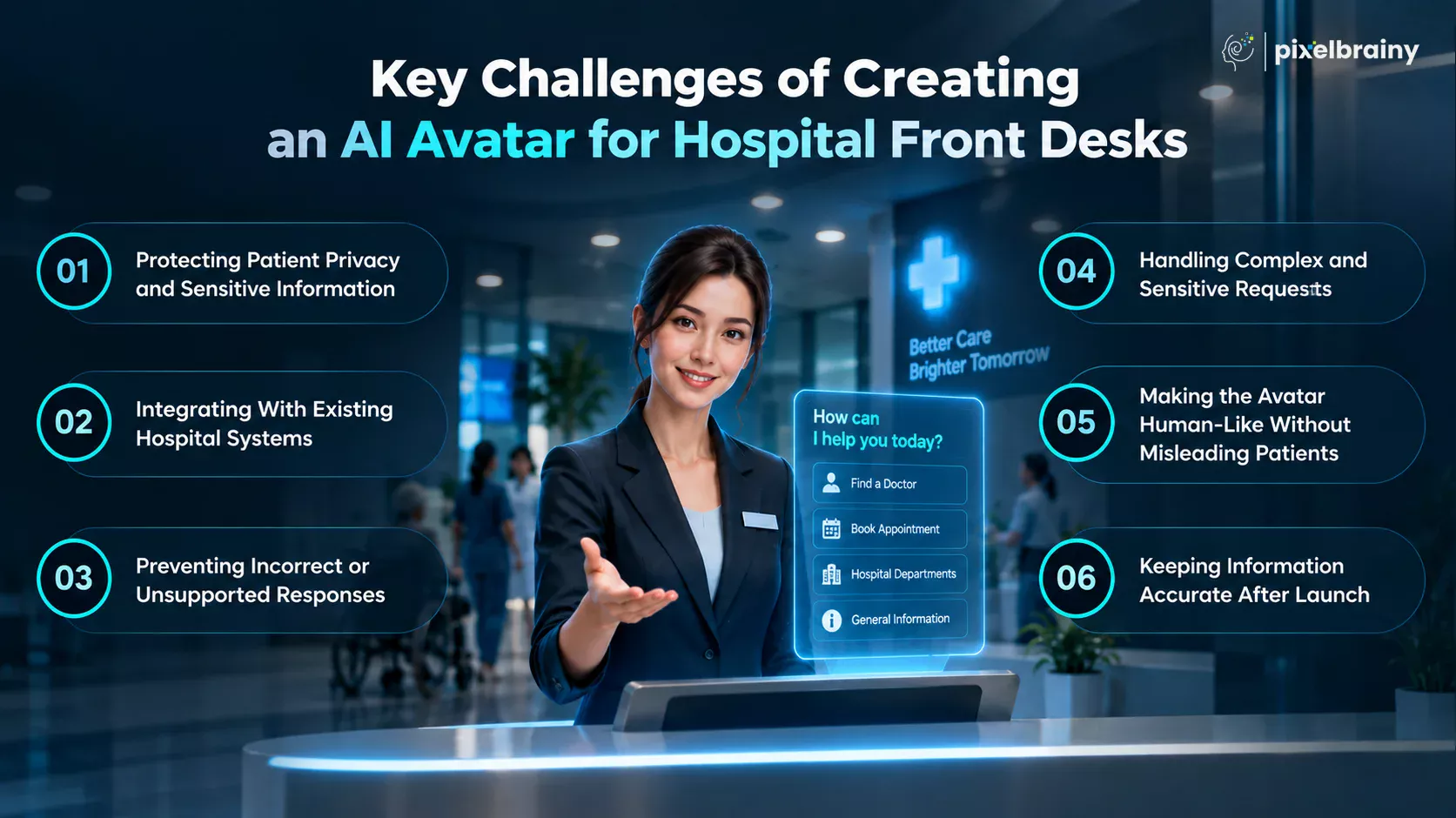
Challenge:
A hospital AI avatar may eventually interact with appointment details, patient identifiers, insurance information, or other sensitive data. Connecting an AI system to healthcare applications without appropriate access controls can create privacy and security risks.
Recent healthcare AI incidents demonstrate why hospitals need strict controls over which AI tools can access organizational information and credentials.
Solution:
Build privacy into the architecture from the beginning. Use authentication, authorization, encryption, secure APIs, audit logging, access controls, and data minimization. The avatar should only access information required for the specific approved workflow.
Challenge:
Hospitals often have multiple systems for appointments, patient portals, registration, physician directories, billing, and hospital management. These systems may use different technologies, APIs, and data structures, making integration one of the more demanding parts of AI avatar development for hospital front desks.
Solution:
Map the required workflows before development and identify which systems the avatar actually needs to access. Use appropriate APIs and healthcare interoperability standards where available. A dedicated integration layer can help the avatar communicate with existing systems without replacing the hospital's core infrastructure.
Challenge:
A conversational AI can misunderstand a patient's question or generate an answer that sounds convincing but does not match current hospital information. An incorrect answer about visiting hours, department locations, doctors, or appointment procedures can quickly reduce patient trust.
Solution:
Connect the avatar to an approved hospital knowledge base and use retrieval-based responses for organization-specific information. Add confidence thresholds and fallback responses so the avatar does not guess when reliable information is unavailable. It should clearly acknowledge limitations and direct patients to staff when necessary.
Challenge:
Not every patient interaction can be automated. A patient may ask for an exception, provide incomplete information, become confused, or raise a sensitive issue that requires human judgment. Allowing the avatar to continue without escalation can create unnecessary risk.
Solution:
Create clearly defined escalation rules during developing an AI avatar for hospital front desks. The system should recognize unsupported, ambiguous, sensitive, or high-risk requests and route them to the appropriate employee.
Human oversight should remain part of the operating model rather than being treated as a backup added after deployment. Healthcare AI research similarly highlights workflow integration, accountability, and predefined escalation as important safeguards for patient-facing AI.
Challenge:
A realistic digital human can make conversations feel more natural, but patients may mistakenly believe they are speaking with a human receptionist, nurse, or healthcare professional. This can create confusion about the avatar's authority and capabilities.
Solution:
Clearly identify the system as an AI avatar and explain what it can and cannot do. Keep its role focused on approved front-desk activities such as information, navigation, scheduling assistance, and administrative guidance.
The interface should also provide accessible alternatives such as text, captions, touchscreen controls, and an easy path to human assistance. Research on patient-facing AI avatars emphasizes transparency, vetted content, accessibility, and human follow-up as important deployment safeguards.
Challenge:
Hospital information changes constantly. Doctors change schedules, departments move, visiting policies are updated, services become temporarily unavailable, and appointment procedures evolve. An avatar that was accurate when launched can become unreliable if its information sources are not maintained.
Solution:
Establish an ongoing knowledge-management and AI governance process. Assign responsibility for updating hospital information, monitor unanswered questions and escalations, review important workflows regularly, and test the system after significant operational changes.
For hospital front desks AI avatar development, continuous monitoring is therefore just as important as the initial build. The goal is not simply to launch an AI avatar, but to maintain a reliable digital front desk as the hospital's services and workflows evolve.
A successful hospital AI avatar combines intelligent automation with strong privacy, accurate information, reliable integrations, and human oversight so patients always have a safe path to the right assistance.
The future of AI avatar development for hospital front desks is likely to move beyond answering basic questions. As conversational AI becomes more capable, front-desk avatars can evolve into intelligent patient-access interfaces that understand context, coordinate approved workflows, connect multiple hospital systems, and know when human intervention is required.
Healthcare AI is already moving from experimentation toward operational use, while organizations are placing greater emphasis on governance, clean data, cybersecurity, and patient trust. The WHO is also examining the shift toward increasingly autonomous AI workflows and the importance of meaningful human oversight.
A practical future-facing query could be:
“How can our hospital use an AI avatar to provide personalized front-desk assistance while allowing receptionists to focus on patients who need human support?”
Here are six ways AI avatars could transform hospital front desks in the coming years.
Future hospital avatars will likely move beyond answering predefined questions. Instead, they could understand a patient's overall request and coordinate several approved steps within a single conversation.
For example, a patient might say, “I need to see a cardiologist next week, preferably in the morning.”
The avatar could identify the specialty, understand the preferred timing, check authorized scheduling information, present suitable options, and guide the patient through confirmation.
This represents a shift from conversational assistance toward workflow-oriented patient access. Healthcare organizations are already exploring agentic AI that can schedule appointments, identify appropriate physicians, and guide patients through healthcare processes.
Future hospital front desks AI avatar development will increasingly focus on context and personalization.
Instead of providing exactly the same interaction to every visitor, an avatar could adapt its assistance based on permitted information such as the patient's appointment, preferred language, hospital location, or current stage in the registration process.
For example, an authenticated patient arriving for an outpatient appointment could receive relevant check-in instructions, department directions, and appointment information without having to explain the same details repeatedly.
Personalization should still operate within strict privacy and authorization boundaries. The goal is not to expose more patient information, but to use permitted information more intelligently to reduce friction.
The future front desk may no longer operate as a collection of disconnected systems.
An AI avatar could become a conversational layer connecting approved functions across the hospital management system, patient portal, appointment platform, navigation system, physician directory, and administrative services.
A patient could potentially start with a simple question and move through several connected workflows without switching between different interfaces.
This direction is particularly relevant for developing an AI avatar for hospital front desks because fragmented data and complex system environments remain major barriers to scaling healthcare AI. The World Economic Forum identifies scattered data, regulation, privacy concerns, and fragmented healthcare environments among the factors that make healthcare AI difficult to scale.
Today's front-desk technology generally waits for patients to initiate an interaction. Future AI avatars could become more proactive within clearly defined boundaries.
For example, an avatar could recognize that a patient has arrived for an appointment and provide relevant check-in guidance. It could explain where to go, identify the required registration step, or remind the patient about approved preparation instructions.
The same concept could extend to visitors who appear uncertain about where to go or patients who have started but not completed a supported administrative workflow.
However, proactive assistance should remain transparent and permission-based. It should help patients navigate healthcare services without becoming intrusive.
The future is unlikely to be about completely replacing receptionists. Instead, AI avatar development for hospital front desks can create a combined model in which AI handles repetitive interactions while employees focus on situations requiring empathy, judgment, or personal assistance.
The avatar could answer routine questions, provide directions, assist with approved scheduling workflows, and collect basic information. When a request becomes complex, sensitive, or outside its capabilities, the interaction could move to a human employee with relevant context preserved where permitted.
The AMA's 2026 guidance similarly emphasizes preserving human connection, clinical judgment, and responsible technology use as AI becomes more embedded in healthcare.
Future hospital avatars could use interaction analytics to identify where patients experience friction.
For example, the system might discover that patients frequently ask the same question about a particular department, repeatedly abandon a registration workflow, or require human assistance at a specific stage of appointment scheduling.
Hospital teams could use these insights to improve workflows, update information, redesign conversations, and determine where additional automation is appropriate.
This creates a continuous improvement cycle rather than treating the avatar as a finished product after launch. Current healthcare AI thinking increasingly emphasizes continuous monitoring, institutional safeguards, and human oversight as AI becomes more autonomous.
The future hospital front desk will likely combine AI-powered self-service with human support, creating a faster, more personalized, and more connected patient-access experience without removing the human element from healthcare.
From the sections above, it is clear that creating a hospital AI avatar is not simply about adding a digital human to a reception screen. The right development partner needs to understand conversational AI, healthcare workflows, system integration, security, patient experience, and the practical limitations of automation.
This is where PixelBrainy can support hospitals looking to modernize front-desk operations. As an AI avatar development company, PixelBrainy provides custom avatar development, integration, testing, multilingual implementation, API development, and ongoing optimization. Its approach focuses on building AI experiences around real workflows rather than treating the avatar as only a visual interface.
A hospital does not necessarily need to replace its existing management system, patient portal, or reception team to introduce AI. PixelBrainy can design the avatar as an additional digital interaction layer that works with existing platforms and approved workflows.
For hospitals looking for hospital front desks AI avatar development services, this means the project can be structured around the systems already in place. PixelBrainy's AI capabilities include integration services, AI product development, AI consulting, and AI agent development, which can support projects where the avatar needs to interact with existing applications and workflows.
The objective is not simply to create a realistic digital receptionist. The avatar can be designed to provide useful AI hospital solutions in the form of an avatar, such as answering routine questions, providing department information, assisting with approved appointment workflows, guiding patients through hospital processes, and escalating complex requests to human staff.
PixelBrainy's avatar capabilities include conversational avatars, voice-enabled avatars, virtual human avatars, multilingual implementation, API development, integration, testing, and post-launch optimization.
Consider this requirement:
“We want to modernize our hospital reception but don't want to completely replace our existing systems or staff. Can a development company create an AI avatar for front-desk automation that handles routine queries while escalating complex requests to our team?”
Yes. This is precisely the type of workflow-oriented architecture that should be considered when you build AI avatar for hospital front desks.
The avatar can handle defined, repetitive interactions while human employees remain responsible for complex, sensitive, or exceptional cases. PixelBrainy's development approach includes requirement discovery, architecture planning, conversational intelligence, system integration, testing, security review, deployment, and continuous enhancement.
As part of a confidential healthcare project, PixelBrainy worked on an AI-driven digital interaction experience designed to make patient-facing communication more accessible and efficient. The solution involved conversational AI, a human-like avatar interface, structured knowledge, and workflow-oriented interactions.
Because the client operates in a sensitive healthcare environment, its name and identifying project details cannot be disclosed. The project demonstrates the type of approach required when develop AI avatar for hospital front desks solutions where user experience, reliable information, integration, and controlled automation need to work together.
PixelBrainy combines AI engineering with UX-focused product development, helping organizations create intelligent experiences that are understandable and practical for real users. Its broader capabilities include AI integration, AI consulting, AI product development, and AI avatar development.
For hospitals exploring hospital front desks avatar development integrating AI, this combination can help turn a front-desk automation concept into a scalable patient-access solution while keeping existing systems and human teams at the center of the workflow.
Ready to modernize your hospital front desk? Connect with PixelBrainy to discuss your AI avatar vision and approved patient-access workflows.
An AI avatar can turn a traditional hospital reception into a more accessible, responsive, and efficient digital front desk. Throughout this guide, we explored how AI avatar development for hospital front desks can support patient assistance, appointment workflows, department navigation, FAQs, check-in guidance, and administrative support while keeping human staff involved where judgment or personal assistance is required.
The key to successful hospital front desk AI avatar development is not simply creating a human-like digital character. It is about connecting conversational AI with accurate hospital information, existing healthcare systems, secure integrations, accessibility features, and reliable human handoff. A phased approach can help hospitals start with practical use cases and expand as their AI capabilities mature. Current healthcare implementations are increasingly exploring AI-powered front-door and patient-access experiences, reinforcing the direction toward more intelligent digital access.
With the right technology partner, hospitals can develop an AI avatar for hospital front desks that complements existing systems and staff while creating a smoother patient experience.
Book an appointment with PixelBrainy today to discuss your hospital AI avatar project.
Yes. A hospital front desk AI avatar can be designed as an interaction layer that connects with existing hospital management systems, patient portals, appointment platforms, and other approved applications through APIs or healthcare interoperability standards. This allows hospitals to automate selected front-desk workflows without replacing their core technology infrastructure.
Yes, provided the required scheduling system integration and permissions are available. An AI avatar can understand requests such as booking, cancellation, or rescheduling, verify the patient when necessary, retrieve permitted appointment slots, and confirm the approved action. This makes appointment assistance one of the practical use cases for AI avatar development for hospital front desks.
The avatar should use an approved hospital knowledge base rather than relying only on general AI knowledge. Information about doctors, departments, visiting hours, services, and policies should have designated owners and update processes. Retrieval-based architecture, confidence controls, testing, and human escalation can further reduce unsupported responses. Healthcare organizations are increasingly emphasizing data governance and implementation controls as AI adoption expands.
Yes. Human handoff should be an important part of hospital front desks AI avatar development. The avatar can identify unsupported, sensitive, ambiguous, or complex requests and route them to an appropriate staff member. Depending on the implementation, relevant conversation context can also be passed to the employee so the patient does not have to repeat everything.
Yes. A multilingual avatar can support patients who prefer different languages through voice or text interaction. The exact language coverage depends on the selected speech recognition, translation, text-to-speech, and AI technologies. Multilingual hospital avatar solutions are already being positioned for reception, wayfinding, appointment guidance, and other patient-facing interactions.
Yes. Developing an AI avatar for hospital front desks can include conversational wayfinding, where patients ask questions such as, “How do I reach radiology?” The avatar can provide floor and department information, display a route, or generate QR-based directions when connected to an appropriate indoor navigation system.
A custom solution can be tailored to the hospital's branding, avatar appearance, voice, languages, conversation style, knowledge base, workflows, system integrations, authentication requirements, and escalation rules. Hospitals can start with routine information and gradually add approved capabilities as the solution matures.
Yes. A phased rollout is often a practical approach. The hospital can begin with a limited set of use cases such as FAQs, wayfinding, doctor information, visiting hours, or appointment guidance, evaluate patient and staff feedback, and then expand. This also allows the organization to validate integration, privacy, usability, and workflow performance before wider deployment. The Ottawa Hospital, for example, has described a staged approach for testing an AI-powered digital assistant before broader implementation.

About The Author
Sagar Bhatnagar
Sagar Sahay Bhatnagar brings over a decade of IT industry experience to his role as Marketing Head at PixelBrainy. He's known for his knack in devising creative marketing strategies that boost brand visibility and market influence. Sagar's strategic thinking, coupled with his innovative vision and focus on results, sets him apart. His track record of successful campaigns proves his ability to utilize digital platforms effectively for impactful marketing efforts. With a genuine passion for both technology and marketing, Sagar continuously pushes PixelBrainy's marketing initiatives to greater success.

Working with the PixelBrainy team has been a highly positive experience. They understand the design requirements and create beautiful UX elements to meet the application needs. The dev team did an excellent job bringing my vision to life. We discussed usability and flow. Sagar worked with his team to design the database and begin coding. Working with Sagar was easy. He has the knowledge to create robust apps, including multi-language support, Google and Apple ID login options, Ad-enabled integrations, Stripe payment processing, and a Web Admin site for maintaining support data. I'm extremely satisfied with the services provided, the quality of the final product, and the professionalism of the entire process. I highly recommend them for Android and iOS Mobile Application Design and Development.

Great experience working with them. Had a lot of feedback and I found that unlike most contractors they were bugging me for updates instead of the other way around. They were extremely time conscience and great at communicating! All work was done extremely high quality and if not on time, early! They were always proactive when it comes to communication and the work is great/above par always. Very flexible and a great team to work with! Goes above and beyond to present us with multiple options and always provides quality. Amazing work per usual with Chitra. If you have UI/UX or branding design needs I recommend you go to them! Will likely work with them in the future as well, definitely recommended!

PixelBrainy is a joy to work with and is a great partner when thinking through branding, logo, and website layout. I appreciate that they spend time going into the "why" behind their decisions to help inform me and others about industry best practices and their expertise.

I hired them to design our software apps. Things I really like about them are excellent communication skills, they answer all project suggestions and collaborate right away, and their input on design and colors is amazing. This project was complex and needed patience and creativity. The team is amazing to do business with. I will be using them long-term. Glad to see there are some good people out there. I was afraid to try and outsource my project to someone but I am glad I met them! I really can't say enough. They went above and beyond on this project. I am very happy with everything they have done to make my business stand out from the competition.

It was great working with PixelBrainy and the team. They were very responsive and really owned the project. We'll definitely work with them again!

I recently worked with the PixelBrainy team on a project and I was blown away by their communication skills. They were prompt, clear, and articulate in all of our interactions. They listened and provided valuable feedback and suggestions to help make the project a success. They also kept me updated throughout the entire process, which made the experience stress-free and enjoyable.

PixelBrainy is very good at what it does. The team also presents themselves very professionally and takes care of their side of things very well. I could fully trust them taking up the design work in a timely and organised manner and their attention to detail saved us lots of effort and time. This particular project was quite intense and the team showed that they function very well under pressure. Very much looking forward to working with her again!

It's always an absolute pleasure working with them. They completed all of my requests quickly and followed every note I had for them to a T, which made our process go smoothly from start to finish. Everything was completed fast and following all of the guidelines. And I would recommend their services to anyone. If you need any design work done in the future, PixelBrainy should be your first call!

They took ownership of our requirements and designed and proposed multiple beautiful variants. The team is self-motivated, requires minimum supervision, committed to see-through designs with quality and delivering them on time. We would definitely love to work with PixelBrainy again when we have any requirements.

PixelBrainy was a big help with our SaaS application. We've been hard at work with a new UI/UX and they provided a lot of help with the designs. If you're looking for assistance with your website, software, or mobile application designs, PixelBrainy and the team is a great recommendation.

PixelBrainy designers are amazing. They are responsive, talented, and always willing to help craft the design until it matches your vision. I would recommend them and plan to continue them for my future projects and more!!!

They were awesome! Did a good job fast, and good communication. Will work with them again. Thank you

Creative, detail-oriented, and talented designers who take direction well and implement changes quickly and accurately. They consistently over-delivered for us.

PixelBrainy team is very talented and creative. Great designers and a pleasure to work with. PixelBrainy is an excellent communicator and I look forward to working with them again.

PixelBrainy has a very talented design team. Their work is excellent and they are very responsive. I enjoy working with them and hope to continue on all of our future projects.


Transform your ideas into reality with us.
Across these industries, each engagement brings unique challenges, from early-stage product development to scaling complex systems, helping us build a practical understanding of real-world product environments.