AI Summary Powered by PixelBrainy
What if your website could answer customer questions, recommend relevant products or services, and provide assistance around the clock without requiring a support agent for every interaction?
That is the role of an AI chatbot integrated into a website. Unlike a basic chat widget that only displays predefined responses, a modern AI chatbot can understand natural-language questions, identify user intent, retrieve relevant information, and guide visitors toward the next action. Depending on the business use case, it can support product discovery, answer service questions, capture leads, assist with bookings, provide order information, and connect users with a human agent when needed.
Consider this real business query: “I want to add an AI chatbot to my business website that answers customer questions about our products and services 24 hours a day without requiring human staff. What is the step-by-step process for integrating an AI chatbot into a website and which development companies in the USA specialize in business AI chatbot website integration?”
For a business with a growing website audience, the challenge is not simply adding chatbot software. The chatbot needs to be connected to the right business information, designed around real customer journeys, integrated with existing systems, and tested to ensure that responses are useful and reliable. The implementation approach may differ depending on whether the goal is customer support, lead generation, product recommendations, sales assistance, or a combination of these functions.
AI chatbot integration in website infrastructure can therefore become part of a broader digital strategy for improving communication and automating repetitive interactions. For eCommerce, SaaS, professional services, healthcare, finance, and other businesses, the right solution can create a more responsive website experience while reducing unnecessary manual effort.
In this guide, we will explain how to integrate an AI chatbot into a website, how the technology works, key features to consider, integration methods, development costs, best practices, and important factors for choosing an experienced development partner.
An AI chatbot on a website works as an intelligent conversational layer between your business and its visitors. It uses technologies such as artificial intelligence, natural language processing (NLP), knowledge retrieval, and connected business systems to understand questions, generate relevant responses, and complete specific actions.
Unlike a traditional rule-based chatbot that responds only to predefined inputs, an AI chatbot can interpret natural-language questions and use business information to provide context-aware answers. Depending on how it is configured, it can access product catalogs, FAQs, CRM data, booking systems, order information, or other approved data sources.
Here’s a breakdown of how the process typically works:
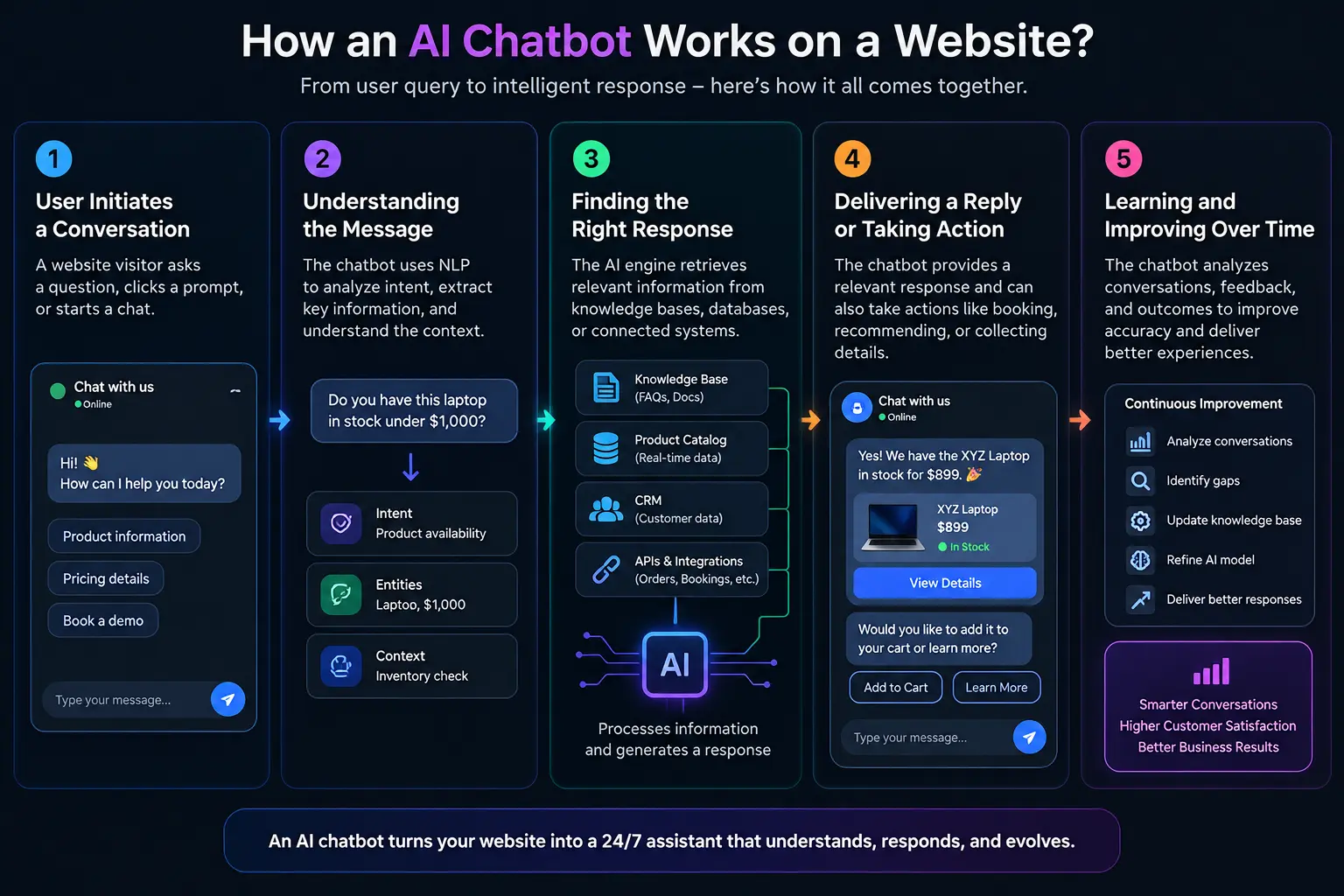
The process begins when a website visitor opens the chatbot and enters a question, selects a suggested prompt, or starts a conversation through a predefined interaction. The chatbot captures the user's input and sends it to the conversational processing layer.
For example, a visitor might ask about product availability, pricing, service details, delivery timelines, or request assistance with a specific task. The chatbot can also collect relevant information during the conversation to understand what the visitor needs.
The chatbot analyzes the user's message using NLP and conversational AI to identify the intent, important entities, and context. Instead of simply matching exact keywords, the system interprets what the visitor is trying to accomplish.
For instance, if a user asks, “Do you have this laptop in stock under $1,000?”, the chatbot can identify the product category, price requirement, and inventory-related intent. This allows the system to determine which information or action is required next.
After understanding the request, the chatbot determines where the appropriate answer should come from. It may retrieve information from a business knowledge base, approved documents, product catalog, CRM, database, or other connected system. A generative AI model can then use that information to formulate the response.
For more advanced implementations, AI chatbot integration in website infrastructure can connect the chatbot with real-time business systems so that information such as product availability, appointment slots, order status, or account details can be provided based on current data.
The chatbot presents the response directly within the website conversation. Based on its capabilities and permissions, it can also perform actions rather than simply provide information.
For example, it may recommend products, qualify a lead, schedule a demo, collect contact details, retrieve an order status, submit a support request, or transfer the conversation to a human agent when the request requires human assistance.
Improvement comes from analyzing conversation outcomes, feedback, unresolved questions, and usage patterns. Businesses can review chatbot conversations to identify missing information, inaccurate responses, common user requests, and areas where the conversation flow needs refinement.
The AI model, knowledge base, prompts, workflows, and escalation rules can then be updated based on these findings. This ongoing optimization helps the chatbot become more useful and better aligned with changing customer needs and business requirements.
An AI chatbot transforms a website into an interactive communication channel by understanding visitor intent, retrieving relevant business information, delivering contextual responses, and automating appropriate actions throughout the customer journey.
Why are businesses integrating AI chatbots into their websites instead of relying entirely on human teams to handle every visitor interaction?
As website traffic grows, answering repetitive questions, qualifying leads, guiding visitors, and providing support manually can create delays for both customers and internal teams. AI chatbot integration for website operations creates an automated conversational layer that can respond instantly, support visitors at any time, personalize interactions, and connect users with the right information or business action.
Consider a practical business query: “We receive hundreds of website inquiries every day about pricing, product availability, service details, and appointment bookings. How can we integrate an AI chatbot into our website to handle these questions automatically while sending high-intent prospects to our sales team?”
A well-planned AI chatbot integration in website infrastructure can address this type of requirement by combining conversational AI with business knowledge, customer data, CRM systems, product catalogs, booking platforms, and other approved information sources. The chatbot can handle routine interactions while escalating complex or high-value conversations to human teams.
The value therefore goes beyond simply adding a chat window to a website. Businesses can use AI chatbots to improve customer communication, support lead generation, personalize the user journey, reduce repetitive workload, and gather useful insights from website conversations. The exact advantages depend on how the chatbot is designed, what systems it connects with, and which business processes it is expected to automate.
Here are the key reasons businesses invest in AI chatbot integration for website experiences:
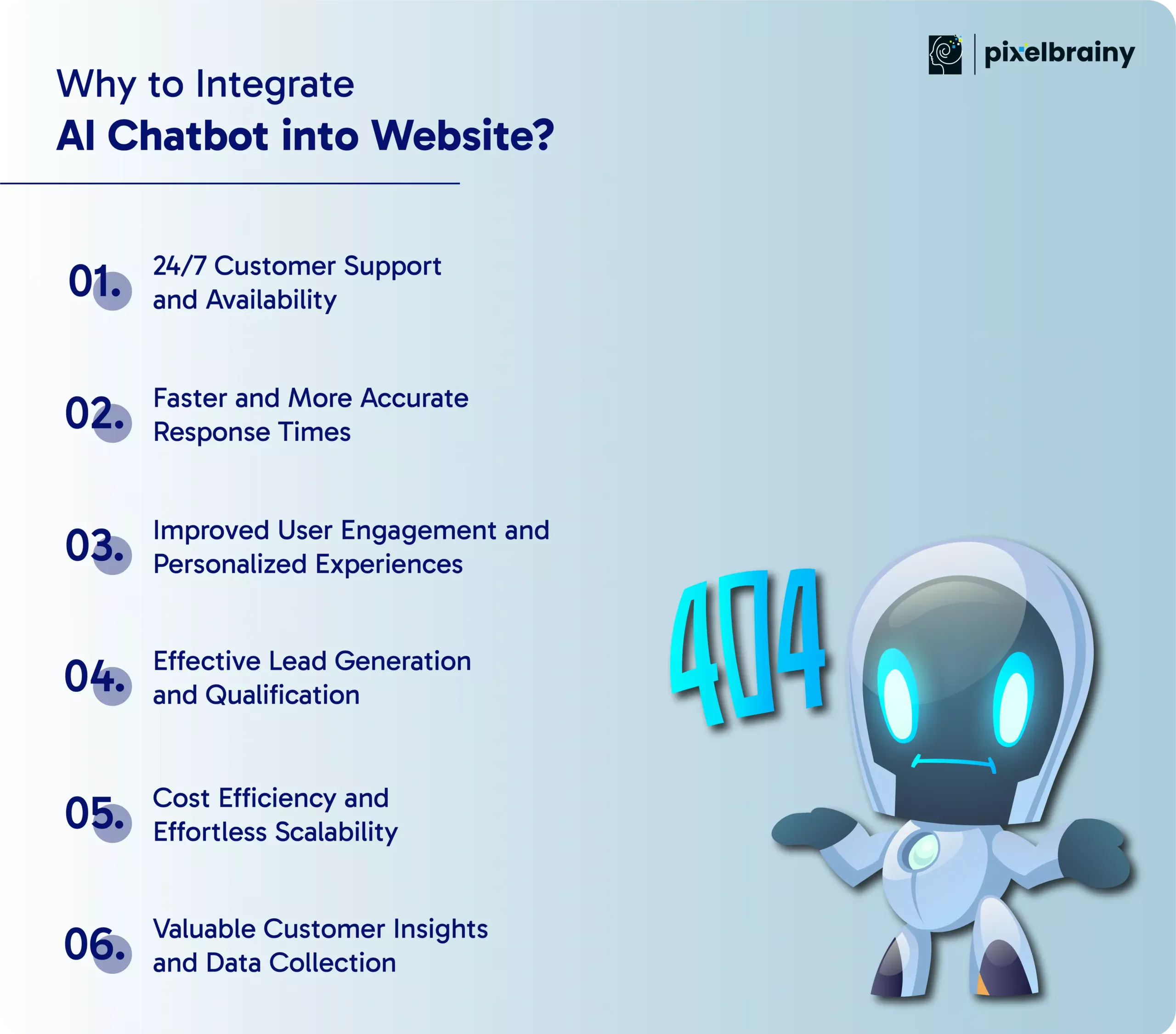
Customers don’t follow business hours anymore — and your support shouldn’t either. AI chatbots ensure that your website remains active and responsive every hour of the day, including weekends and holidays.
Key advantages:
This continuous availability enhances user experience and helps you serve a global audience without hiring additional support staff.
Speed is a major factor in customer satisfaction. With a chatbot, visitors no longer have to wait for human assistance or navigate through complex menus to find what they need.
Here’s how it helps:
The result is a smooth, frustration-free browsing experience that keeps visitors engaged and reduces bounce rates.
AI chatbots don’t just answer questions — they start meaningful conversations. By analyzing user data and behavior, they can personalize every interaction to match individual preferences.
How personalization improves engagement:
This level of personalization makes visitors feel understood and valued, significantly increasing the chances of conversions.
One of the most powerful reasons to integrate AI chatbot into website is its ability to convert casual visitors into qualified leads automatically.
What chatbots can do:
By automating lead generation, you reduce manual workload and ensure no opportunity slips through the cracks.
Hiring, training, and managing large support teams is expensive. Chatbots drastically reduce these costs by handling a high volume of interactions simultaneously without compromising quality.
Business benefits include:
This scalability makes chatbots especially valuable for businesses looking to grow without significantly increasing overhead.
Every conversation with a chatbot is a data-gathering opportunity. This information can help you refine your marketing strategies, optimize your website, and develop better products or services.
Examples of insights you can gather:
By leveraging these insights, you can make data-driven decisions that directly contribute to business growth.
By integrating an AI chatbot into your website, you can create a faster, more responsive digital experience while automating repetitive interactions and giving your teams better opportunities to focus on high-value customer conversations.
Also Read: Top 20 Chatbot Development Companies in United States
An AI chatbot for website experiences can be useful for any business that receives recurring visitor questions, manages customer interactions online, or wants to automate routine communication. The right use case is not limited to customer support. Depending on the business model, an AI chatbot can assist with product discovery, lead qualification, onboarding, appointment scheduling, account assistance, order updates, and information retrieval.
The strongest candidates are businesses where customers need immediate answers and where repetitive conversations consume significant employee time. When planning AI chatbot integration in website operations, businesses should first identify the interactions that are frequent, structured, and suitable for automation, while defining clear paths for escalation when human expertise is required.
Here are the key industries that can benefit from integrating AI chatbots into their websites:
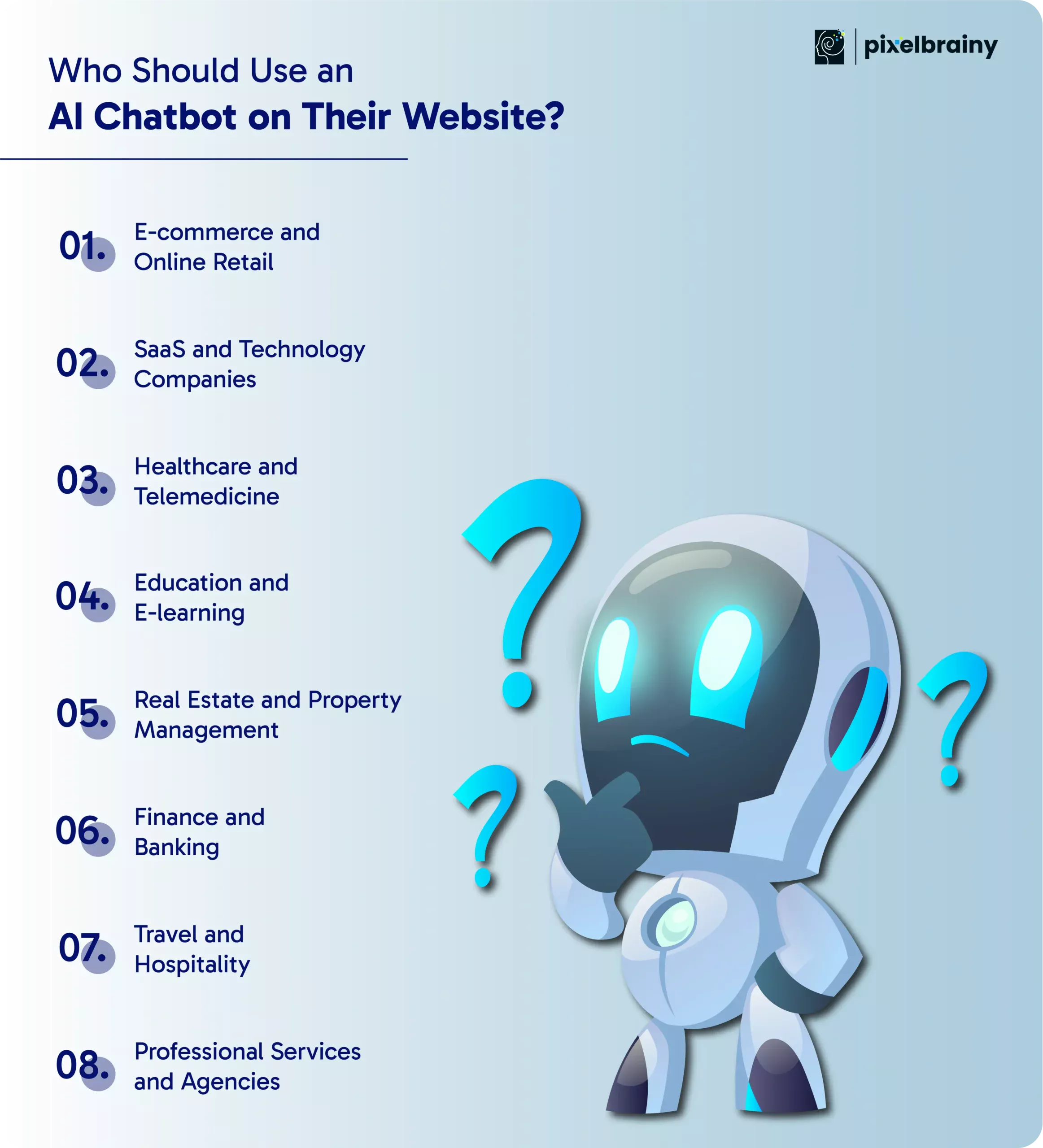
For e-commerce businesses, an AI chatbot can act as a virtual shopping assistant throughout the customer journey. It can answer questions about products, pricing, availability, shipping, returns, and payment options while helping visitors find products that match their requirements.
A chatbot can also use information from product catalogs and customer interactions to provide relevant recommendations. After a purchase, it can assist with order status, delivery updates, return requests, and common post-purchase questions.
For businesses planning AI chatbot integration for website operations, connecting the chatbot with product, inventory, order management, and customer support systems can make the experience more useful than a standalone FAQ bot.
SaaS websites receive questions at different stages of the customer lifecycle, from evaluating features to troubleshooting products. An AI chatbot can provide instant answers from approved documentation, explain product capabilities, guide users through onboarding, and help prospects understand which plan fits their requirements.
It can also qualify leads, collect business requirements, schedule demos, and route technical or account-specific issues to the appropriate team.
For SaaS companies, AI chatbot integration in website environments can therefore support both customer service and revenue workflows while reducing repetitive requests handled manually by sales and support teams.
Healthcare organizations can use website chatbots for administrative and informational interactions such as appointment scheduling, clinic information, service details, insurance-related questions, and preparation instructions.
For health-related conversations, the chatbot should operate within clearly defined boundaries and provide appropriate escalation to qualified professionals when a request requires clinical judgment. Sensitive data also requires strong privacy and security controls.
Businesses considering how to integrate AI chatbot in website platforms for healthcare should therefore prioritize data protection, consent, access controls, and carefully scoped use cases alongside conversational functionality.
Also Read: 10 Innovative Mobile App Ideas for the Healthcare Sector
Educational institutions and e-learning platforms can use AI chatbots to provide instant assistance with admissions, course information, schedules, fees, enrollment procedures, and general student support.
Once connected to approved institutional information, the chatbot can also guide learners toward relevant resources and answer recurring questions without requiring administrative staff to respond individually to every inquiry.
For online learning products, an AI chatbot can also support onboarding and navigation, helping students understand how to access courses, assignments, learning materials, and other services.
Also Read: How to Build an AI Teaching Assistant: Costs and Benefits for E-learning Assistants
Real estate websites often receive repetitive questions about properties, pricing, locations, amenities, availability, and viewing schedules. An AI chatbot can collect these requirements and help visitors find relevant listings or initiate the next step.
For example, it can ask about budget, preferred location, property type, number of bedrooms, and purchase or rental preferences before presenting relevant options. It can also capture contact information, schedule property visits, and route qualified prospects to agents.
This makes AI chatbot integration for website particularly useful for automating early-stage communication while allowing real estate professionals to focus on higher-value conversations and transactions.
Also Read: How to Develop an AI Real Estate App for Realtors and Startups?
Financial institutions can use AI chatbots for common customer interactions such as product information, account-related guidance, payment questions, loan information, application processes, and service navigation.
Because financial conversations can involve sensitive information, chatbot implementations should use appropriate authentication, authorization, privacy controls, and escalation workflows. The chatbot should also distinguish between general information and actions requiring authenticated access or human review.
For banks and fintech companies, AI chatbot integration in website platforms can create a more accessible first layer of digital assistance while keeping higher-risk or complex requests within controlled workflows.
Also Read: AI Fintech App Development Cost: Factors and Examples
Travel websites need to handle a wide range of questions about destinations, reservations, pricing, policies, schedules, and itinerary changes. AI chatbots can help visitors search for options, answer booking-related questions, and guide them through reservation processes.
When integrated with approved booking and customer systems, the chatbot can also support itinerary details, reservation changes, cancellation requests, and travel updates.
Travel businesses can use AI chatbot integration for website experiences to make trip planning more conversational while providing assistance before, during, and after a booking.
Also Read: How to Build AI Trip Planner Assistant: Benefits, Steps and Cost
Consulting firms, legal practices, marketing agencies, financial service providers, and other professional service businesses can use website chatbots to collect project requirements, answer service-related questions, qualify prospects, and schedule consultations.
The chatbot can ask visitors structured questions about their needs, budget, timeline, or service requirements and then route qualified leads to the appropriate team. It can also share relevant service information, case studies, documentation, and next-step guidance.
For service businesses, AI chatbot integration in website workflows can reduce response delays while creating a more structured path from initial website visit to qualified business conversation.
The best candidates for AI chatbot integration are businesses with frequent website interactions, repeatable customer questions, and clear workflows that can be automated without compromising the need for human expertise.
A website chatbot should do more than answer frequently asked questions. The right AI chatbot for website use cases should combine conversational intelligence, business data, integrations, security, and analytics to support the specific goals of your website.
For example, a SaaS company may need a chatbot that answers product questions, qualifies leads, pulls information from its knowledge base, books demos, and transfers complex requests to sales or support. An eCommerce business may instead prioritize product recommendations, order assistance, inventory information, and customer service workflows.
When planning AI chatbot integration in website operations, businesses should evaluate whether the chatbot can understand user intent, access reliable information, perform approved actions, maintain context, and scale as website traffic increases. The following features are important when selecting or developing a business-ready AI chatbot.
NLP and conversational AI allow the chatbot to understand natural-language questions instead of depending on exact keywords or predefined commands. The system should identify intent, interpret context, and generate relevant responses based on the user's request.
Why it matters:
A chatbot should be able to support the channels where your customers interact with your business. Depending on your strategy, this may include your website, mobile application, messaging platforms, and other digital touchpoints.
Why it matters:
A capable AI chatbot should use relevant customer context to make conversations more useful. Depending on permissions and the business use case, this may include previous interactions, customer preferences, browsing context, account information, or journey stage.
Why it matters:
The chatbot becomes more useful when it can securely connect with the systems your business already uses. Common integrations include CRM platforms, eCommerce systems, product databases, knowledge bases, booking software, analytics tools, and customer support platforms.
Why it matters:
For websites focused on sales, the chatbot should be capable of turning conversations into structured lead information. It can ask qualifying questions, collect contact details with appropriate consent, identify buyer intent, and route qualified prospects to the right sales team.
Why it matters:
Businesses serving customers across regions may need chatbot support in multiple languages. The implementation should consider translation quality, supported languages, terminology, and consistency in the brand's communication.
Why it matters:
An AI chatbot should provide measurable data about how visitors interact with it. Useful metrics can include conversation volume, response quality, unresolved queries, escalation rates, user feedback, lead conversion, and response latency.
Why it matters:
The chatbot architecture should support increasing website traffic, larger knowledge bases, additional integrations, new workflows, and evolving business requirements. Businesses should also be able to modify prompts, workflows, knowledge sources, permissions, and chatbot behavior without rebuilding the entire solution.
Why it matters:
Security is essential when a chatbot handles customer conversations, personal information, account data, or business records. The solution should include appropriate authentication, authorization, encryption, access controls, logging, data retention policies, and compliance measures relevant to the business and jurisdiction.
Why it matters:
The right AI chatbot features create a secure and scalable conversational layer that can understand visitors, access relevant business information, automate approved actions, and support measurable website outcomes.
A successful AI chatbot integration in website infrastructure starts with more than placing a chat widget on a webpage. The chatbot needs a defined business purpose, reliable knowledge sources, appropriate AI capabilities, secure system connections, and a clear path for handling requests that require human assistance.
Businesses asking “What is the process of integrating an AI chatbot into a website?” should approach implementation as a sequence of planning, configuration, integration, testing, and optimization stages. The exact setup depends on whether the chatbot is intended for customer support, lead generation, product discovery, appointment booking, sales assistance, or another business workflow.
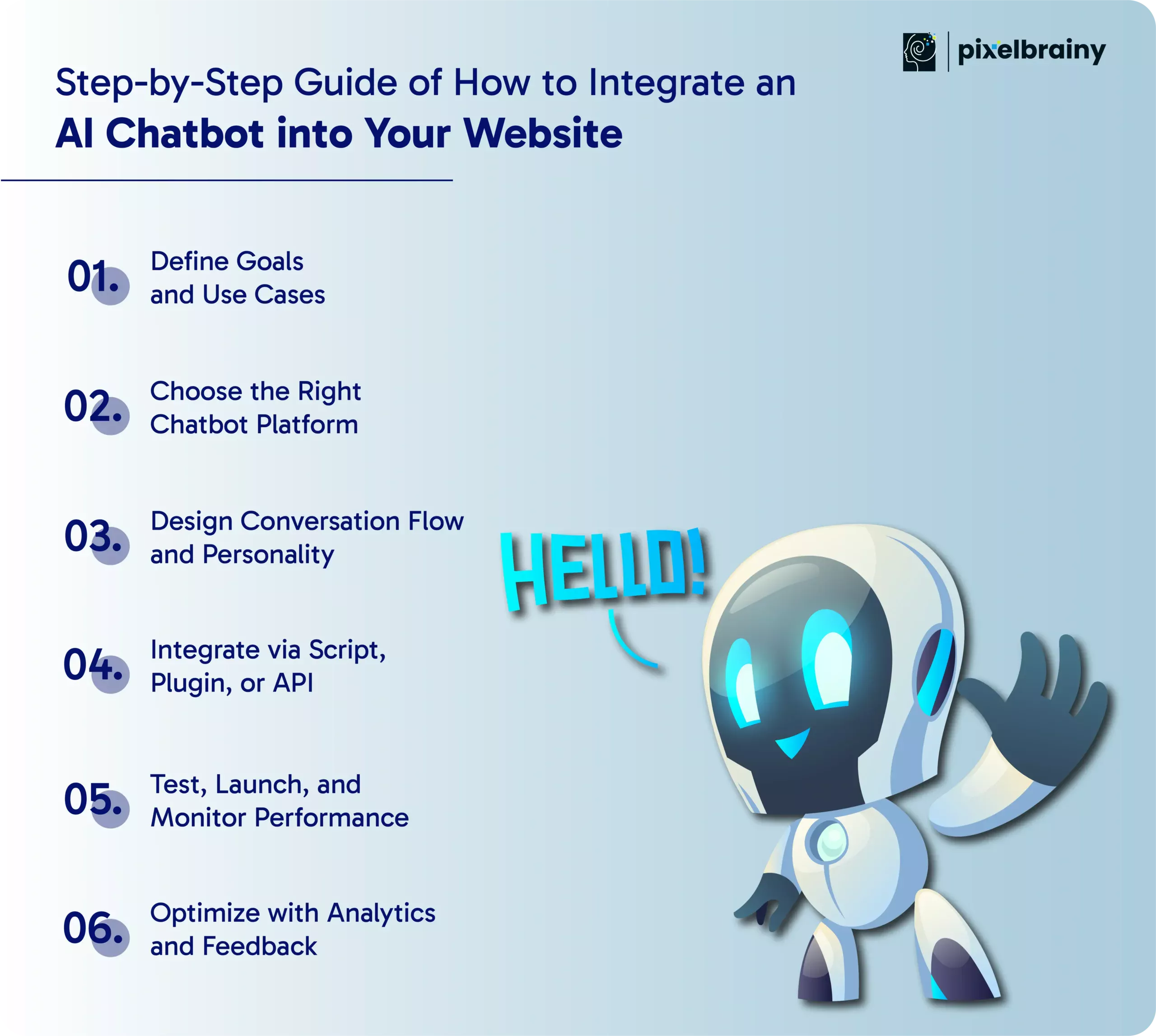
Start by identifying what the chatbot needs to accomplish on your website. Common objectives include answering frequently asked questions, supporting product discovery, capturing and qualifying leads, scheduling appointments, assisting with purchases, or handling routine customer service requests.
Map the questions visitors commonly ask and identify which conversations can be automated safely. For example, an eCommerce business may prioritize product discovery and order assistance, while a SaaS company may focus on onboarding, documentation, and demo requests.
Also define measurable goals such as response accuracy, qualified leads, resolution rate, booking completions, or reduced support workload. A clear scope prevents unnecessary functionality and gives the development team measurable targets.
Select a chatbot platform based on your use cases, customization requirements, technical resources, budget, and expected traffic. Depending on the project, businesses can use conversational AI platforms, chatbot SaaS products, custom AI solutions, or a combination of these approaches.
Evaluate capabilities such as natural language processing, knowledge retrieval, multilingual support, analytics, integrations, authentication, scalability, and human handoff. Also check whether the platform can connect with the data sources and business systems your chatbot needs to access.
For businesses planning to expand AI chatbot integration for website experiences across multiple channels, consider the platform's API capabilities and long-term flexibility before committing to a solution.
Define how the chatbot should communicate before connecting it to the website. Map common questions, possible user intents, follow-up questions, decision paths, fallback responses, and escalation scenarios.
The chatbot's communication style should match your brand. A professional service company may require a formal tone, while an eCommerce brand may use a more conversational style. The instructions should also define what the chatbot can answer, what information it can access, and when it should transfer the user to a human.
Well-designed conversation flows help prevent repetitive responses, unclear answers, and dead-end interactions.
Once the chatbot is configured, connect it to your website using the integration method that matches your platform and technical requirements.
For advanced AI chatbot integration in website environments, API-based connectivity can enable the chatbot to retrieve current information or support approved business actions instead of providing only static responses.
Before launch, test the chatbot against realistic conversations rather than checking only individual features. Evaluate whether it understands different ways of asking the same question, maintains context, retrieves the correct information, handles unclear requests, and responds appropriately when it cannot help.
Also test integrations, authentication, error handling, website performance, security, and mobile responsiveness.
After deployment, monitor metrics such as response accuracy, resolution rate, escalation frequency, response time, conversation drop-offs, user satisfaction, and lead or conversion activity. Early monitoring can reveal problems that were not visible during development.
An AI chatbot requires ongoing optimization after deployment. Review conversation logs and analytics to identify unanswered questions, incorrect responses, repeated requests, broken workflows, and new customer needs.
Use these insights to improve the chatbot's knowledge sources, prompts, conversation flows, integrations, and escalation rules. Customer feedback can also help identify where the chatbot creates friction or where users prefer human assistance.
Regular optimization ensures that AI chatbot integration for website operations continues to support changing customer expectations and evolving business requirements.
Following these six steps helps businesses integrate an AI chatbot into their website with a clear purpose, reliable system connections, controlled deployment, and a continuous improvement process.
What is the cost of integrating an AI chatbot into a website, and what should a business include when preparing its chatbot development budget?
The total investment varies according to the chatbot's purpose, conversational complexity, AI capabilities, integrations, interface requirements, deployment method, and ongoing maintenance. For a business that only needs FAQ responses and lead capture, the budget can remain relatively controlled. A more advanced solution that connects with CRM, eCommerce, booking, payment, or internal business systems requires additional development and integration work.
For example, a business may ask, “How much should we budget to integrate an AI chatbot into our website if it needs to answer product questions, qualify leads, connect with our CRM, and hand complex conversations to our sales team?” The answer depends on the functionality and level of customization required.
On average, businesses may invest between $10,000 and $50,000 to build and implement a professional-grade AI chatbot. The following estimates provide a starting point, but the final AI chatbot integration cost should be calculated after defining the technical scope.
| Type of Chatbot | Estimated Cost |
| Basic rule-based chatbot | $5,000 – $10,000 |
| AI-powered chatbot with NLP | $15,000 – $30,000 |
| Fully customized enterprise chatbot | $30,000 – $50,000+ |
These figures provide a baseline for understanding AI chatbot integration in website development. Actual pricing can vary based on the following factors:
The chatbot's capabilities have a direct impact on the development budget. A basic FAQ chatbot requires less engineering than a solution with NLP, contextual conversations, multilingual support, recommendations, analytics, and automated business actions.
The implementation approach also affects the cost of integrating an AI chatbot into a website. A SaaS chatbot platform can reduce initial development effort, while a custom solution provides greater control over functionality, data, workflows, and integrations.
Connecting the chatbot with CRM systems, databases, eCommerce platforms, payment services, booking systems, or other business applications requires additional engineering and testing.
The chatbot interface and conversation architecture also influence pricing. A simple text-based widget costs less than a branded conversational experience with custom flows, interactive elements, multimedia, and advanced user journeys.
AI chatbot integration in website infrastructure requires ongoing monitoring and updates after launch. Businesses may need to improve knowledge sources, refine responses, update integrations, review analytics, and add new capabilities as customer requirements change.
The development team's experience, location, technical specialization, and engagement model can significantly influence the total budget. Freelancers may offer lower initial rates, while specialized development companies generally provide broader capabilities for architecture, integrations, security, testing, and long-term support.
The final AI chatbot integration cost should therefore be based on the business use case, required features, integration scope, customization level, and long-term operating requirements rather than a single fixed price.
A realistic chatbot budget accounts for both the initial integration and the ongoing technology, maintenance, and optimization required to keep the AI chatbot useful as your website and business grow.

Also Read: AI Chatbot Development Cost: Factors and Examples
A successful AI chatbot integration into website operations depends on more than connecting an AI model to a chat widget. The chatbot needs a clearly defined purpose, well-designed conversations, reliable access to business information, appropriate personalization, continuous performance monitoring, and strong privacy controls.
Consider a business asking, “We have integrated an AI chatbot into our website, but how can we make sure it gives useful answers, works smoothly across devices, protects customer data, and actually supports our sales and customer service goals?” The answer lies in how the chatbot is designed, integrated, monitored, and improved after launch.
Whether the objective is AI chatbot integration for website support, lead generation, product assistance, or sales, businesses should establish clear operating boundaries and measurable outcomes from the beginning. A chatbot should know what it can handle independently, what information it can access, and when a conversation needs to be transferred to a human team.
The following best practices can help businesses create a more reliable, accessible, secure, and business-focused chatbot experience.
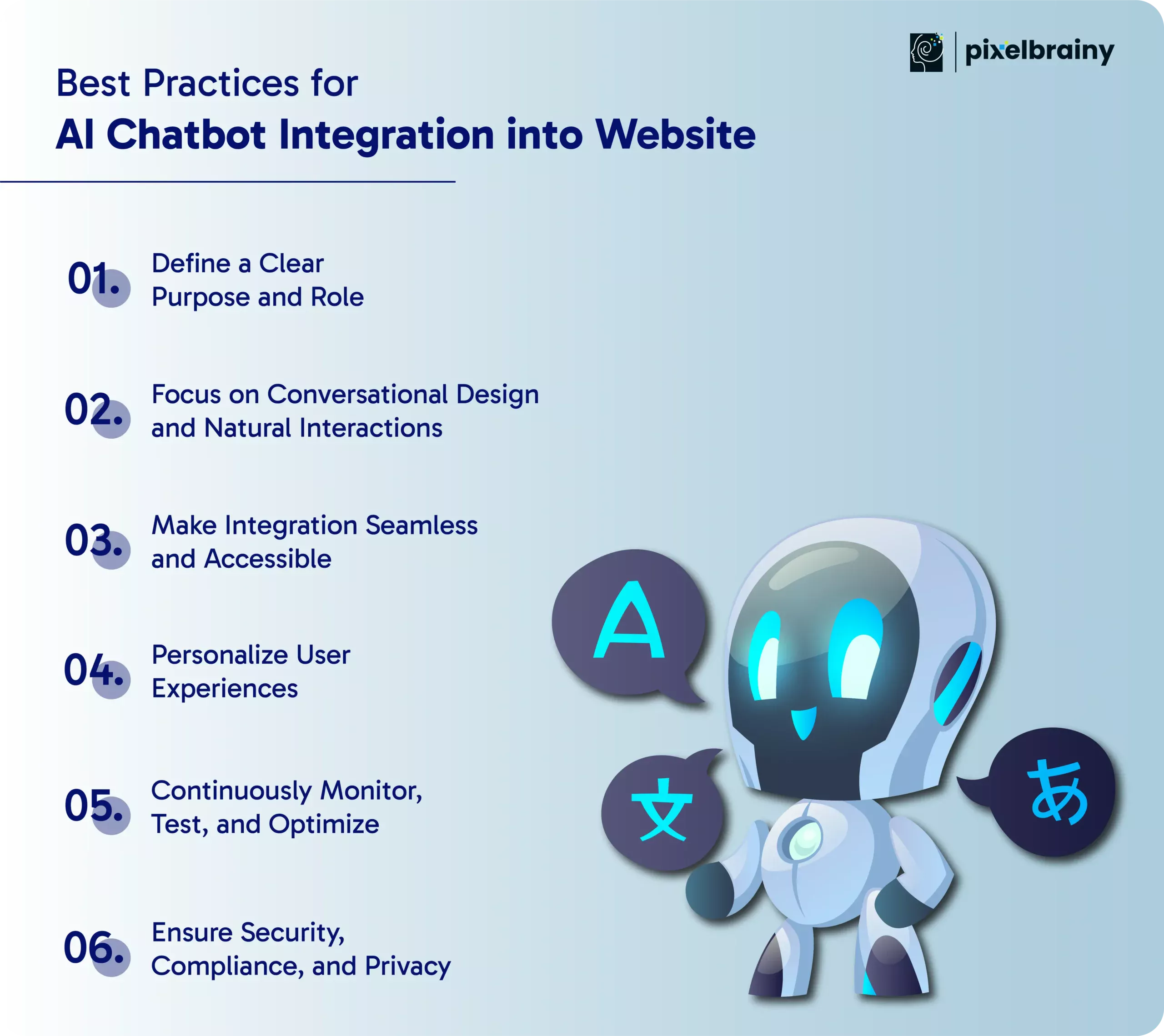
Before integrating a chatbot, outline its main objectives and use cases. Decide whether it will handle customer support, guide users through purchases, generate leads, or provide product recommendations. A well-defined purpose ensures that the chatbot is built with specific goals in mind and that its functionality aligns with user expectations.
Pro Tip: Start with one or two core functions and expand later based on user feedback and business needs. This approach ensures better adoption and avoids overwhelming users with too many features at once.
The success of a chatbot depends heavily on how natural and engaging its conversations feel. Instead of using rigid or robotic responses, design dialogue that mimics human conversation. Incorporate natural language processing (NLP) to understand user intent and context, and personalize responses based on previous interactions.
Pro Tip: Include small talk, empathetic language, and context-aware replies to make the chatbot more relatable and improve user satisfaction. A friendly tone and simple language can make conversations feel effortless and human-like.
Your chatbot should be easy to find and use on your website. Place it in a prominent location, such as the bottom-right corner, and ensure it loads quickly without affecting site performance. Integration should also include cross-platform support so users can continue conversations across devices and channels.
Pro Tip: Optimize for mobile responsiveness, as a large percentage of chatbot interactions happen on smartphones. Also, ensure accessibility features like keyboard navigation and screen reader compatibility are available for all users.
Personalization transforms a chatbot from a simple assistant into a powerful engagement tool. Use data from previous conversations, browsing behavior, and purchase history to tailor responses and recommendations. This creates a more meaningful and relevant interaction that builds trust and boosts conversions.
Pro Tip: Segment users based on preferences or journey stages and adjust chatbot behavior accordingly. For example, returning visitors might receive product recommendations, while new users could get onboarding assistance.
A chatbot’s effectiveness improves with ongoing analysis and optimization. Track metrics such as conversation success rate, user satisfaction scores, response time, and conversion rates. Use this data to refine responses, improve workflows, and add new capabilities.
Pro Tip: Conduct regular A/B tests on conversation flows and calls-to-action to determine what resonates best with users. Feedback loops are invaluable for ensuring your chatbot remains relevant and high-performing.
Since chatbots often handle sensitive information, data security should always be a top priority. Implement encryption protocols, secure API connections, and strict access controls. Additionally, comply with relevant data protection regulations like GDPR or CCPA to protect user data and maintain trust.
Pro Tip: Be transparent about data usage and always offer users an option to opt out of data collection. Including a brief privacy notice at the start of a conversation builds credibility and user confidence.
Following these best practices helps businesses make AI chatbot integration into website operations more reliable, accessible, secure, and aligned with measurable customer and business goals.
Also Read: How to Build an AI Chatbot for Insurance Agencies?
A successful AI chatbot integration in a website project should solve a specific business problem, connect with the right data and systems, and create a useful experience for website visitors. PixelBrainy approaches chatbot projects from this perspective, combining AI engineering, website integration, conversational design, and product development to create solutions aligned with real business requirements.
PixelBrainy is an AI chatbot development company in USA that helps businesses integrate intelligent chatbot experiences into websites across eCommerce, SaaS, professional services, and other digital businesses. The focus is not simply on adding a chat interface, but on creating a chatbot that can understand customer questions, access relevant business information, support defined workflows, and escalate conversations when human assistance is required.
PixelBrainy recently completed an AI chatbot integration in website project for a confidential eCommerce client. The client needed an AI-powered solution capable of providing 24/7 customer support, handling complex customer queries, and personalizing product recommendations.
The team developed and deployed an advanced AI-powered chatbot with natural language processing, multilingual support, CRM integration, and order management system connectivity. Within three months of launch, the solution achieved:
Instead of using a generic chatbot setup, PixelBrainy focuses on creating an implementation that fits the business's existing digital environment.
We begin by identifying where the chatbot can create the most value, whether that involves customer support, lead qualification, product discovery, appointment scheduling, order assistance, or another defined workflow.
The chatbot can be connected to approved knowledge bases, product catalogs, CRM systems, databases, order systems, and other relevant sources so responses are based on useful business information.
Not every conversation should be automated. We can design escalation paths that transfer complex, sensitive, or high-value conversations to the appropriate human team with relevant context.
The chatbot's tone, response structure, prompts, and interaction flows can be designed around your brand voice and customer journey rather than using generic conversational patterns.
For businesses with existing digital infrastructure, chatbot implementation can be connected with websites, CRMs, eCommerce platforms, analytics systems, support tools, and other applications through suitable integration methods.
Post-launch conversations and analytics can reveal unanswered questions, drop-offs, common requests, and areas where the chatbot needs refinement. This creates an ongoing optimization cycle rather than treating deployment as the end of the project.
PixelBrainy combines AI development, chatbot engineering, system integration, and business-focused product development to help companies create chatbot experiences that are practical and scalable. Our approach can support projects ranging from a focused website chatbot to more sophisticated AI systems connected with multiple enterprise platforms.
For businesses planning AI chatbot integration in website environments, the objective is to create a conversational experience that fits naturally into existing operations while providing measurable value to customers and internal teams.
Partner with PixelBrainy to integrate an AI chatbot into your website and turn customer conversations into a smarter, more connected digital experience.
Integrating an AI chatbot into your website can turn a static website into an intelligent, interactive communication channel. When properly implemented, it can answer customer questions, provide relevant information, qualify leads, support product discovery, automate routine tasks, and connect users with the right human team when needed.
As this guide covered, successful AI chatbot integration in website operations depends on more than embedding a chatbot widget. Businesses need to define clear use cases, choose the right AI and chatbot technology, design effective conversation flows, connect reliable business data and systems, test the experience, and continuously improve it through analytics and user feedback.
The cost of integrating an AI chatbot into a website can also vary significantly based on customization, AI capabilities, integrations, interface complexity, development approach, and ongoing maintenance. This makes it important to define the business requirements and technical scope before committing to an implementation.
Whether you run an eCommerce store, SaaS platform, professional service website, or enterprise digital platform, the right chatbot strategy can help create faster and more relevant customer interactions while making your digital operations more efficient.
Ready to integrate an AI chatbot into your website? Book an appointment to discuss a custom AI chatbot solution designed around your business goals and customer experience.
Yes. AI chatbot integration in website environments can often be implemented through a script embed, plugin, or API, depending on the website platform and the level of customization required. A business can add the chatbot while keeping its existing website and connect it with selected CRM, database, eCommerce, booking, or support systems.
An AI chatbot for website interactions can be connected to approved sources such as FAQs, product catalogs, service pages, knowledge bases, CRM records, databases, and other business systems. The information it can access depends on the integrations, permissions, and data architecture configured during implementation.
To integrate an AI chatbot into a website for lead generation, define the qualification questions, connect the chatbot with your CRM or lead management system, and create workflows for capturing contact details and routing qualified prospects. The chatbot can engage visitors, collect relevant information, and pass high-intent leads to the appropriate sales team.
Yes. Through APIs or other integration methods, an AI chatbot integration in website infrastructure can connect with CRM platforms, eCommerce systems, booking tools, databases, analytics platforms, support software, and other approved business applications. This allows the chatbot to retrieve relevant information and support specific business workflows.
The cost of integrating an AI chatbot into a website depends on the chatbot type, AI capabilities, customization, integrations, conversation design, development method, and maintenance requirements. A basic chatbot can cost less, while an enterprise solution with multiple integrations and advanced AI capabilities requires a larger investment.
For eCommerce businesses, AI chatbot integration for website operations can connect the chatbot with product catalogs, inventory data, customer information, and order systems. This allows it to support product discovery, answer product questions, provide recommendations, assist with order-related queries, and guide customers toward checkout.
Accuracy depends on the chatbot's knowledge sources, AI configuration, prompts, integrations, and ongoing monitoring. Businesses should connect the chatbot to reliable and approved information sources, establish clear response boundaries, test real customer queries, and regularly review unanswered or incorrect conversations to improve the system.
Businesses evaluating AI chatbot integration in website projects should look for a development partner with experience in conversational AI, website integration, CRM connectivity, knowledge-based systems, security, scalability, and ongoing chatbot optimization. PixelBrainy provides AI chatbot development and integration services for businesses looking to implement customized conversational experiences on their websites.

About The Author
Sagar Bhatnagar
Sagar Sahay Bhatnagar brings over a decade of IT industry experience to his role as Marketing Head at PixelBrainy. He's known for his knack in devising creative marketing strategies that boost brand visibility and market influence. Sagar's strategic thinking, coupled with his innovative vision and focus on results, sets him apart. His track record of successful campaigns proves his ability to utilize digital platforms effectively for impactful marketing efforts. With a genuine passion for both technology and marketing, Sagar continuously pushes PixelBrainy's marketing initiatives to greater success.

Working with the PixelBrainy team has been a highly positive experience. They understand the design requirements and create beautiful UX elements to meet the application needs. The dev team did an excellent job bringing my vision to life. We discussed usability and flow. Sagar worked with his team to design the database and begin coding. Working with Sagar was easy. He has the knowledge to create robust apps, including multi-language support, Google and Apple ID login options, Ad-enabled integrations, Stripe payment processing, and a Web Admin site for maintaining support data. I'm extremely satisfied with the services provided, the quality of the final product, and the professionalism of the entire process. I highly recommend them for Android and iOS Mobile Application Design and Development.

Great experience working with them. Had a lot of feedback and I found that unlike most contractors they were bugging me for updates instead of the other way around. They were extremely time conscience and great at communicating! All work was done extremely high quality and if not on time, early! They were always proactive when it comes to communication and the work is great/above par always. Very flexible and a great team to work with! Goes above and beyond to present us with multiple options and always provides quality. Amazing work per usual with Chitra. If you have UI/UX or branding design needs I recommend you go to them! Will likely work with them in the future as well, definitely recommended!

PixelBrainy is a joy to work with and is a great partner when thinking through branding, logo, and website layout. I appreciate that they spend time going into the "why" behind their decisions to help inform me and others about industry best practices and their expertise.

I hired them to design our software apps. Things I really like about them are excellent communication skills, they answer all project suggestions and collaborate right away, and their input on design and colors is amazing. This project was complex and needed patience and creativity. The team is amazing to do business with. I will be using them long-term. Glad to see there are some good people out there. I was afraid to try and outsource my project to someone but I am glad I met them! I really can't say enough. They went above and beyond on this project. I am very happy with everything they have done to make my business stand out from the competition.

It was great working with PixelBrainy and the team. They were very responsive and really owned the project. We'll definitely work with them again!

I recently worked with the PixelBrainy team on a project and I was blown away by their communication skills. They were prompt, clear, and articulate in all of our interactions. They listened and provided valuable feedback and suggestions to help make the project a success. They also kept me updated throughout the entire process, which made the experience stress-free and enjoyable.

PixelBrainy is very good at what it does. The team also presents themselves very professionally and takes care of their side of things very well. I could fully trust them taking up the design work in a timely and organised manner and their attention to detail saved us lots of effort and time. This particular project was quite intense and the team showed that they function very well under pressure. Very much looking forward to working with her again!

It's always an absolute pleasure working with them. They completed all of my requests quickly and followed every note I had for them to a T, which made our process go smoothly from start to finish. Everything was completed fast and following all of the guidelines. And I would recommend their services to anyone. If you need any design work done in the future, PixelBrainy should be your first call!

They took ownership of our requirements and designed and proposed multiple beautiful variants. The team is self-motivated, requires minimum supervision, committed to see-through designs with quality and delivering them on time. We would definitely love to work with PixelBrainy again when we have any requirements.

PixelBrainy was a big help with our SaaS application. We've been hard at work with a new UI/UX and they provided a lot of help with the designs. If you're looking for assistance with your website, software, or mobile application designs, PixelBrainy and the team is a great recommendation.

PixelBrainy designers are amazing. They are responsive, talented, and always willing to help craft the design until it matches your vision. I would recommend them and plan to continue them for my future projects and more!!!

They were awesome! Did a good job fast, and good communication. Will work with them again. Thank you

Creative, detail-oriented, and talented designers who take direction well and implement changes quickly and accurately. They consistently over-delivered for us.

PixelBrainy team is very talented and creative. Great designers and a pleasure to work with. PixelBrainy is an excellent communicator and I look forward to working with them again.

PixelBrainy has a very talented design team. Their work is excellent and they are very responsive. I enjoy working with them and hope to continue on all of our future projects.


Transform your ideas into reality with us.
Across these industries, each engagement brings unique challenges, from early-stage product development to scaling complex systems, helping us build a practical understanding of real-world product environments.