AI Summary Powered by PixelBrainy
What if your chatbot could understand not just what your customers say... but also what they show?
Welcome to the age of the AI Visual Chatbot, a powerful blend of natural language processing and image recognition. These intelligent systems go beyond simple text interactions. They can analyze uploaded images, interpret screenshots, and deliver helpful, real-time responses based on both what users say and what they share visually.
As visual communication continues to dominate user behavior, more companies are exploring AI Visual Chatbot development to improve engagement and efficiency. In fact, over 80% of businesses are projected to use AI chatbots by 2026, with early adopters like Sephora, H&M, and Duolingo already experiencing the benefits.
So why the growing interest in visual AI? And more importantly, how do you actually build an AI Visual Chatbot that delivers real results?
Here’s what you’ll learn in this guide:
Whether you're just starting the creation of an AI Visual Chatbot or refining an existing one, this guide will walk you through everything you need to succeed.

An AI Visual Chatbot is an advanced type of chatbot that can understand both text and visual inputs. While traditional chatbots respond only to written or spoken language, a visual chatbot is capable of analyzing images, screenshots, and even scanned documents to provide relevant, intelligent responses.
This technology combines two core areas of artificial intelligence:
The result is a more intuitive and human-like interaction. For example, instead of describing a product issue, a user can upload a photo. The chatbot can then recognize the item or detect the problem and provide assistance immediately. This makes the experience faster, easier, and more accurate for the user.
What Makes It Different:
As companies look to modernize customer service and user engagement, many are exploring how to build AI Visual Chatbots tailored to their needs. From e-commerce and healthcare to education and real estate, the applications are wide-ranging. If you're considering developing an AI Visual Chatbot, understanding its core capabilities is the first step toward creating a smarter digital experience.
Why are so many businesses choosing to invest in AI Visual Chatbot development? The answer is simple, customer expectations are changing, and companies need smarter tools to keep up.
Consumers are no longer satisfied with basic text-based chatbot interactions. They want faster, more intuitive solutions that reflect how they communicate in real life, often using images, screenshots, and visuals to express problems or find information. Traditional chatbots cannot support this need. This is where developing an AI Visual Chatbot makes a real impact.
The global chatbot market is growing rapidly. According to Grand View Research, it is projected to reach 27.29 billion USD by 2030, growing at a compound annual growth rate (CAGR) of 23.3% from 2024. While not all chatbots today are visual, this trend clearly shows increasing demand for intelligent, conversational automation. As AI capabilities expand, visual features are becoming the next evolution of chatbot development.
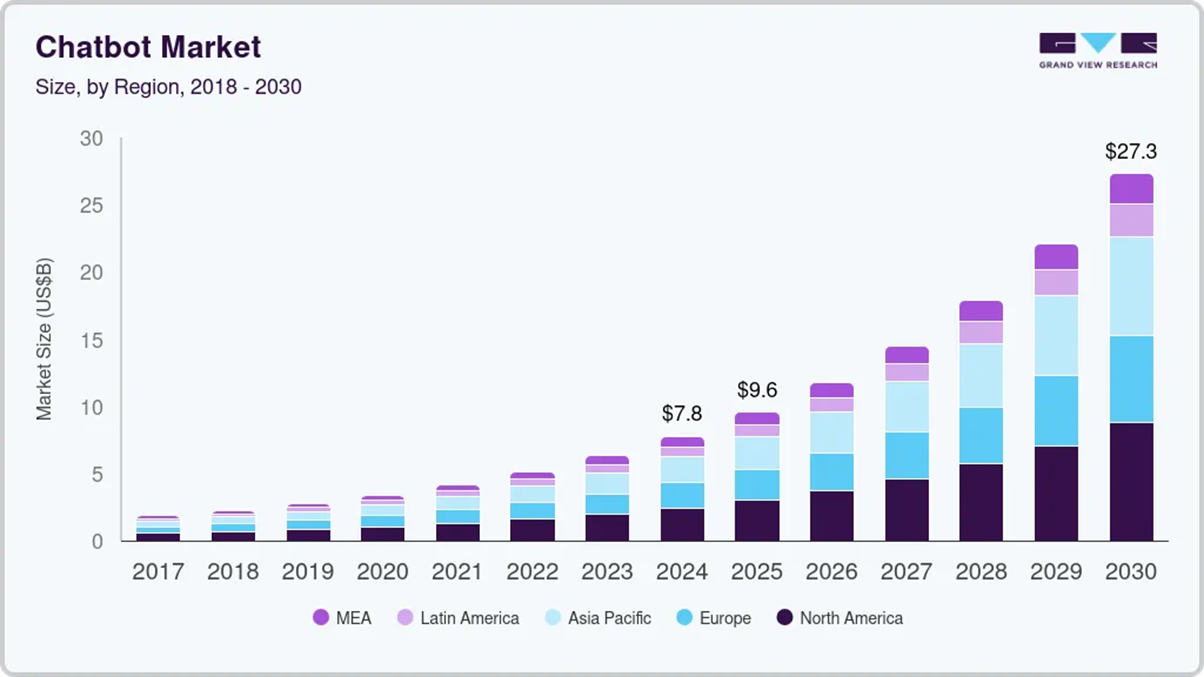
By starting now, companies that develop and invest in AI Visual Chatbot solutions can gain a significant edge in user experience, operational efficiency, and brand loyalty. Early adoption also allows for more time to test, improve, and scale these systems across different touchpoints.
In the following section, we’ll explore exactly what makes these visual chatbots so powerful and how they deliver value across industries.
Developing an AI Visual Chatbot goes beyond automating conversations. It introduces a more intelligent, visual, and user-friendly way to interact with customers. With the ability to understand both images and text, building AI Visual Chatbots enhances efficiency, improves satisfaction, and creates a stronger digital experience.
Below are the top benefits of investing in this technology:
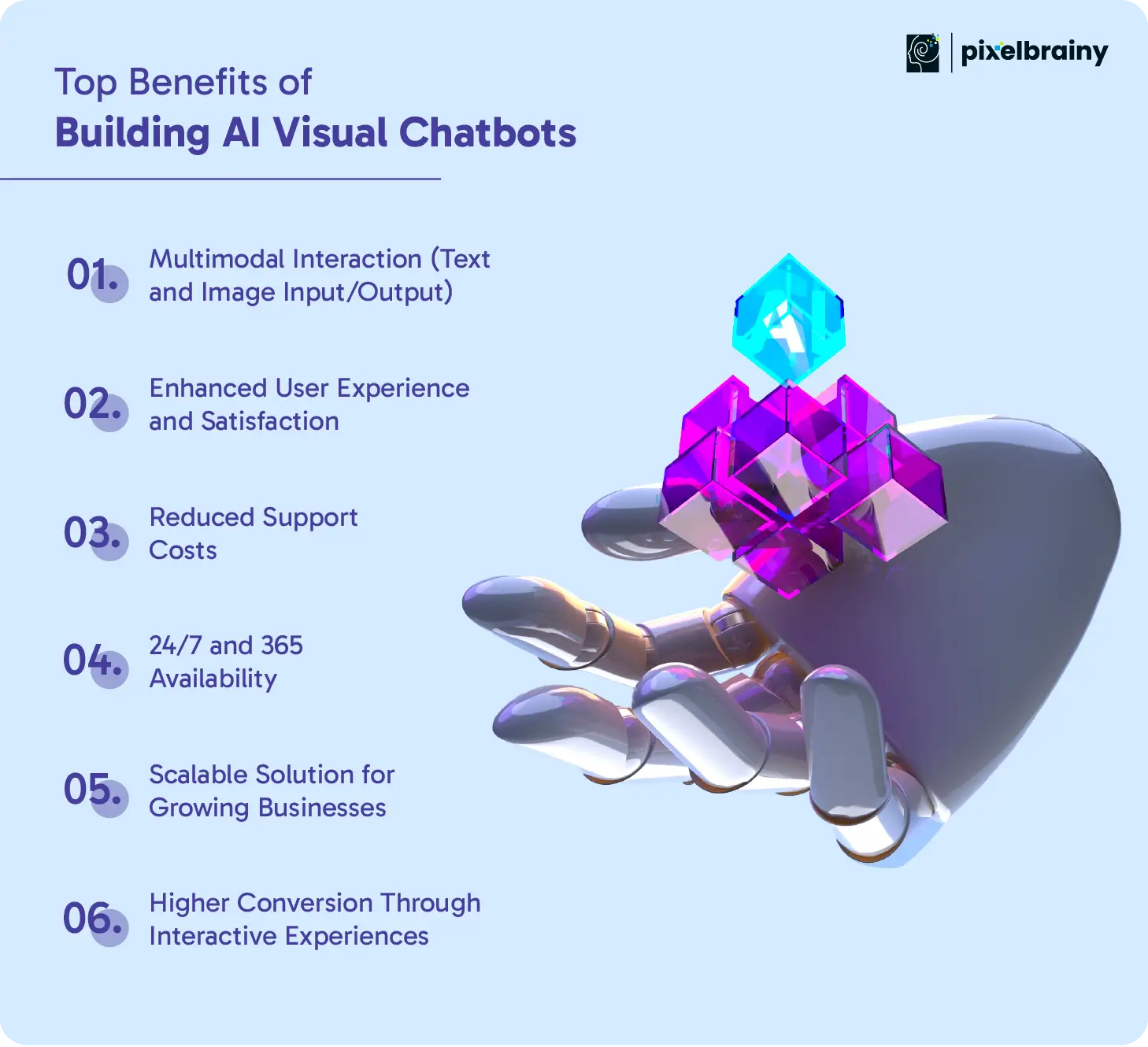
AI Visual Chatbots combine language understanding with computer vision, allowing users to interact using both text and images.
Key advantages:
By providing visual and intelligent responses, AI Visual Chatbots make interactions smoother and more accurate.
Key advantages:
Building AI Visual Chatbots helps businesses automate visual problem-solving, cutting down the need for human agents.
Key advantages:
AI Visual Chatbot development ensures your support system never sleeps and can serve users anytime, anywhere.
Key advantages:
As your company grows, your chatbot must grow with it. Developing AI Visual Chatbots provides the flexibility and power to scale.
Key advantages:
AI Visual Chatbots guide users through actions visually, increasing engagement and conversions.
Key advantages:
These benefits make AI Visual Chatbot development a game-changing step for businesses aiming to modernize support, sales, and user engagement.
Also Read: How To Develop Custom AI Chatbot: Benefits, Types, And Cost
If you're planning to start the development of a visual chatbot with AI, the platform you choose will define your chatbot’s intelligence, flexibility, and performance. With the growing demand for visual interaction, selecting the right foundation is essential.
Below are the leading platforms for the creation of AI Visual Chatbots, each offering powerful features for building advanced, image-aware conversational experiences.
Google Dialogflow is a widely used conversational AI platform that excels in natural language understanding. When integrated with Google Cloud Vision AI, it becomes a powerful solution for building chatbots that can analyze and respond to both text and images.
Key features:
This combination allows businesses to build scalable and intelligent AI Visual Chatbots that respond to what users say and show, ideal for e-commerce, retail, and support automation.
The Microsoft Bot Framework, when combined with Azure Cognitive Services, offers a comprehensive platform for developing AI Visual Chatbots. Azure provides various prebuilt AI models for both natural language processing and image analysis.
Key features:
This is a strong platform for companies looking to maintain strict data governance while enhancing chatbot intelligence through visual inputs.
IBM Watson Assistant is a reliable platform known for its customizable conversation flows and AI-powered dialogue management. When paired with IBM’s Visual Recognition service, it enables a more dynamic approach to AI Visual Chatbot development.
Key features:
This platform is suitable for businesses requiring advanced conversational AI combined with enterprise-level visual recognition capabilities.
Amazon Lex provides the same conversational technology that powers Alexa. When integrated with Amazon Rekognition, it becomes a capable platform for the creation of AI Visual Chatbots that can handle voice, text, and image inputs.
Key features:
With its cloud-native flexibility, this stack is ideal for businesses already invested in the AWS ecosystem.
For businesses looking for maximum flexibility and control, Rasa combined with custom vision APIs provides a customizable route to AI Visual Chatbot development.
Key features:
This approach allows full customization and is best suited for teams with technical expertise who want to experiment with cutting-edge chatbot capabilities.
Selecting the right platform for building an AI Visual Chatbot depends on your business goals, technical resources, and target users. Whether you need enterprise-grade support or full development freedom, these platforms offer a strong foundation for creating truly intelligent visual chatbot solutions.
The true potential of AI Visual Chatbot development is seen when applied across real-world industries. By combining text and image recognition, these chatbots help businesses automate tasks, improve customer experiences, and deliver faster service. From healthcare to retail, the creation of AI Visual Chatbots is changing how people interact with technology.
Below are some of the most powerful and practical applications of developing AI Visual Chatbots across industries.
In the healthcare sector, accuracy and speed are critical. AI Visual Chatbots are being used to assist with pre-diagnosis, appointment management, and patient education.
Patients can upload photos of skin conditions, eye infections, or injuries, and the chatbot provides a preliminary assessment or routes the case to the right specialist.
These bots also read scanned medical documents and explain test results in simple language, helping patients make informed decisions without confusion. This reduces dependency on overburdened staff while maintaining quality care.
Real estate firms are using AI Visual Chatbots to match users with ideal properties faster.
Buyers can upload images of homes they like, and the chatbot uses visual recognition to suggest similar listings based on style, layout, or color themes. Bots also assist with image-based floor plan comparisons, virtual tours, and scheduling property visits—all from within a chat window.
This makes property search faster, more engaging, and tailored to individual preferences.
Also Read: A Guide to Real Estate AI Software Development
In banking and finance, document handling can be tedious. Developing AI Visual Chatbots helps automate tasks like KYC (Know Your Customer) checks, loan applications, and credit evaluations.
Clients can submit ID cards, tax documents, or scanned financial reports. The chatbot reads, verifies, and extracts information instantly.
For example, a user applying for a loan can upload a salary slip, and the chatbot calculates eligibility without manual review. This improves speed, security, and operational efficiency.
Sports brands and fitness coaches are tapping into AI Visual Chatbot development to personalize workouts and improve performance.
Users can upload images or videos of their form during exercises. The chatbot provides posture correction advice, injury prevention tips, or alternative moves.
Fitness gear retailers also use bots that recommend shoes or accessories when a user sends an image of what they currently own. This creates a more interactive and supportive fitness journey.
Filing claims can be one of the most frustrating processes for customers. AI Visual Chatbots simplify this by accepting visual proof and automating key steps.
Users upload photos of damaged vehicles, flooded properties, or stolen items. The chatbot assesses the damage using visual recognition models and estimates repair costs or starts the claims process.
This not only reduces paperwork but also builds trust by speeding up settlements.
Also Read: How to Build an AI Chatbot for Insurance Agencies?
In mental health care, visual chatbots offer a more empathetic and less intimidating way to communicate.
Some bots are designed to detect emotional cues from selfies—such as sadness, stress, or fatigue—and respond with supportive messages or resources. Others guide users through visual journaling or breathing exercises.
By making emotional support more accessible and private, these bots can supplement professional therapy and reduce stigma.
Travelers often rely on visuals—like screenshots of bookings or photos of destinations—to plan trips.
AI Visual Chatbots can take a picture of a landmark or travel ad and suggest related itineraries, hotels, or local guides.
They also help with booking support, checking visual documents like passports or boarding passes, and offering photo-based translations or directions for international travelers.
Across industries, customer support is one of the most common areas for AI Visual Chatbot development.
When a user uploads a screenshot of an error message or a damaged product, the chatbot instantly identifies the problem and guides them through the solution.
This visual troubleshooting reduces wait times, avoids miscommunication, and lowers the need for live support agents.
In retail, visual chatbots drive conversions by creating smarter shopping experiences.
A user might upload a photo of a product they saw online, and the chatbot will instantly find similar items in the store's inventory. For returns, users can send pictures of damaged products, and the chatbot processes the complaint automatically.
This visual shopping assistant approach improves satisfaction and increases the likelihood of purchase.
In education, developing AI Visual Chatbots supports interactive learning.
Students can upload math problems, diagrams, or handwritten notes. The chatbot scans and explains them step-by-step. Bots can also quiz learners using image-based content or evaluate assignments through scanned submissions.
This brings learning to life and helps teachers scale support for a larger number of students.
From diagnostics in healthcare to customer service in eCommerce, the creation of AI Visual Chatbots is transforming how businesses operate. These smart, image-aware systems allow brands to connect with users in ways that are faster, more helpful, and far more human.
When developing an AI visual chatbot, it's essential to integrate features that enhance interactivity, accuracy, and user satisfaction. These features not only ensure seamless communication but also leverage the visual component to make the experience more engaging and informative.
| Feature | Description |
| Multimodal Input Support | Allows users to interact using both text and images, making the chatbot more flexible and user-friendly |
| Image Recognition | Enables the bot to analyze and understand uploaded images, enhancing responses with visual context |
| Natural Language Processing (NLP) | Processes and understands user queries in natural language, ensuring accurate and human-like responses |
| Context Awareness | Retains the context of previous interactions to provide coherent, relevant answers throughout the conversation |
| Object Detection | Identifies multiple objects within an image to offer detailed insights or perform specific tasks |
| OCR (Optical Character Recognition) | Extracts text from images, making it useful for reading documents, signs, or labels |
| Voice Integration | Allows users to communicate with the chatbot via voice commands, making the interface more accessible |
| Image Generation | Creates custom images based on user prompts or instructions, useful for design, marketing, or education |
| Emotion Detection | Analyzes facial expressions or tone to gauge the user's emotions and respond empathetically |
| Multi-language Support | Supports several languages, increasing accessibility for a global user base |
| Personalization | Learns from user interactions to offer tailored responses and recommendations |
| Real-time Feedback | Gives immediate responses and visual outputs, improving user engagement and satisfaction |
| Data Privacy Controls | Ensures user data and images are handled securely with options for consent and deletion |
| API Integration | Connects with external services like CRMs or databases to fetch or update information in real time |
| Custom Workflows | Supports custom rules or actions based on user input, such as booking, ordering, or form filling |
| Error Handling | Detects and gracefully handles misunderstandings or unrecognized inputs with clarifying questions |
| Adaptive Learning | Continuously improves from user interactions to become more intelligent and context-aware |
| User Interface Customization | Provides options to tweak the chatbot’s visual layout and branding for a seamless UX |
| Visual Search | Lets users upload an image to find similar items or products, great for e-commerce or research |
| Content Moderation | Automatically filters inappropriate images or text to maintain a safe interaction space |
By incorporating these core features, your AI visual chatbot can deliver a more intelligent, interactive, and visually engaging user experience. Prioritizing functionality and user-centric design ensures long-term value and scalability.
If you’re wondering what is the process to develop an AI Visual Chatbot, the answer begins with strategy. Many businesses jump straight into coding, but a thoughtful, structured roadmap saves time, reduces risk, and results in a more intelligent and usable product.
Whether you're creating an MVP or a full-scale product, building an AI Visual Chatbot involves a mix of planning, AI integration, user experience, and performance tuning. Below is a seven-step roadmap that reflects real-world success patterns used by both startups and global enterprises.
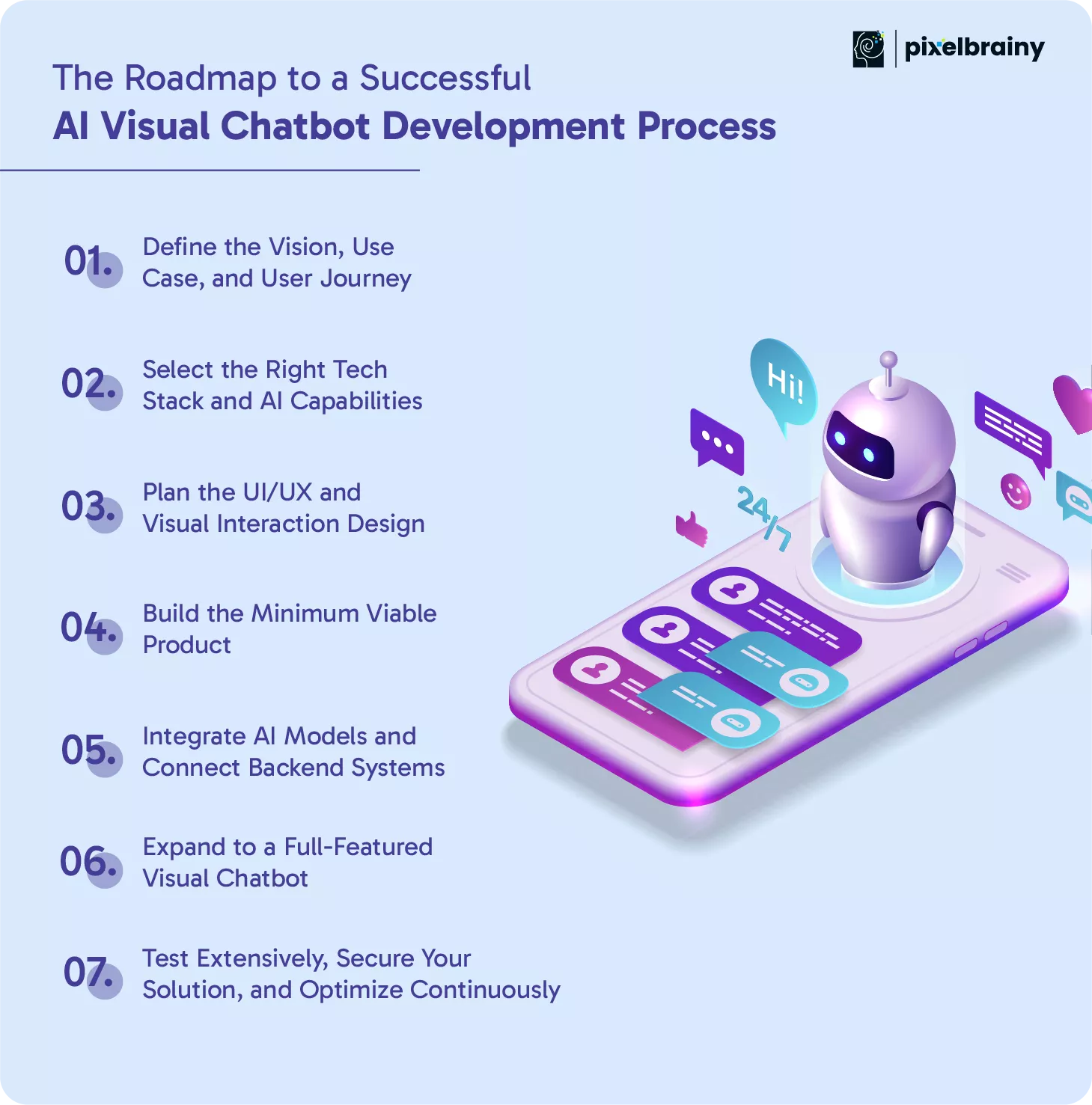
The first and most important step is clarity. Understand the core problem your chatbot will solve and how it fits into the user experience. Is it aimed at visual product search, document verification, medical image triage, or customer support?
Start by defining your users and their intent. What kind of visuals will they upload—product images, receipts, x-rays, or screenshots? What actions will they expect the chatbot to take? The clearer your scope, the easier it is to prioritize functionality and avoid scope creep later.
Goal: Focus the chatbot around a high-impact use case that can evolve with user feedback.
This step involves choosing platforms, APIs, and tools that support visual understanding and conversational intelligence. For example, you might combine Rasa for dialogue management, Amazon Rekognition for image processing, and OpenAI or Azure for NLP.
Choosing the wrong tech early can lead to poor performance, integration issues, or limited scalability. That’s why businesses often partner with top AI development companies—not just for implementation, but for architectural guidance that future-proofs the solution.
Why It Matters: Your chatbot’s intelligence, speed, and reliability are defined by the tools you select from the start.
Design isn’t just about looks—it shapes how users feel when they interact with your bot. This is where working with a professional UI/UX design company can truly elevate your product. The interface should make it easy to upload images, receive visual feedback, and continue conversations without friction.
Mapping intuitive conversation flows is also critical. A chatbot should gently guide users through tasks, clarify confusion, and recover gracefully from poor-quality uploads or invalid queries.
Best Practice: Prototype key user flows and test them with real users before development begins. Early feedback often reveals major UX improvements.
Rather than launching with a long list of features, create a lean version of your AI Visual Chatbot that focuses on doing one or two things really well. For example, an eCommerce chatbot might only handle product search by image at first, while a healthcare MVP might focus on reading x-rays or skin images.
This step gives you room to test technical viability, gather real user feedback, and ensure your visual recognition models are accurate under practical conditions.
Pro Tip: Launch internally first. Let real employees or loyal users stress-test the MVP before a public rollout.
This is the core stage of Chatbot Development using AI. Integrate your NLP engine (like GPT, BERT, or Watson) to handle language, and connect it with computer vision APIs for image analysis. Also, connect backend systems like CRMs, databases, and user profiles to deliver real-time, personalized responses.
AI integration is more than model selection—it involves data preprocessing, model training or tuning, and response optimization. Don’t forget image validation, confidence scoring, and fallback mechanisms for when AI is unsure.
Goal: Enable the chatbot to act like a smart assistant that understands both visuals and context.
Once the MVP is stable and valuable, it's time to scale. Introduce features such as multi-language support, personalized product recommendations, advanced image workflows, analytics dashboards, and omnichannel deployment across mobile, web, and chat apps.
This is where your chatbot matures into a complete business asset. You’ll want to enhance not only AI but also UX, visual responsiveness, accessibility, and integration depth.
Why It Matters: Users expect consistency across touchpoints. If your bot performs differently on web vs. mobile, it damages trust and experience.
Before going live, test across browsers, devices, user types, and edge cases. Make sure your chatbot handles blurry images, unsupported formats, and invalid inputs gracefully. Equally important is securing the system by encrypting image uploads, applying data access controls, and complying with privacy laws like GDPR or HIPAA.
After launch, track metrics such as visual recognition accuracy, dropout rates, average response time, and user satisfaction. Use this data to fine-tune NLP models and improve visual accuracy.
Best Practice: Schedule AI model re-training every quarter, especially if your chatbot serves a growing or changing dataset.
A well-planned roadmap is the key to successful AI Visual Chatbot development, ensuring your solution is intelligent, scalable, and aligned with real user needs. Each step moves you closer to building a chatbot that delivers both value and impact.
One of the most common questions businesses ask is: what will be the cost to create an AI Visual Chatbot? The answer depends on multiple factors, including feature complexity, technology stack, visual processing requirements, and whether you're developing in-house or working with a development partner.
Unlike traditional bots, visual chatbots require more advanced infrastructure—combining natural language processing with computer vision, image upload handling, and deep AI integration. This makes AI Visual Chatbot Development Cost slightly higher, but also more valuable in terms of impact and user engagement.
On average, the cost of AI Visual Chatbot development ranges between $25,000 and $150,000 or more, depending on the scope and scale of the solution.
Cost Estimation Formula
To simplify, here's a basic formula for estimating the cost of AI Visual Chatbot development:
Estimated Cost = (Development Hours × Hourly Rate) + AI Tools/API Costs + Infrastructure/Hosting Fees
Example Calculation
Let’s say you want to build an MVP version of an AI Visual Chatbot for product recommendations using image uploads:
Total Estimated MVP Cost = (400 × $60) + $800 + $500 = $25,300
If you're building a full-featured version, costs can range from $40,000 to $150,000+, depending on scale, AI complexity, and platform support.
In short, the cost of AI Visual Chatbot development can be adapted to fit your business size and needs. Start small with an MVP, test the value, and scale strategically. Accurate budgeting begins with a clear roadmap and the right development partner.
Building a powerful AI visual chatbot requires a well-curated combination of tools, frameworks, and technologies. These components work together to enable image recognition, natural language processing, data integration, and real-time interactions.
| Tool/Technology | Category | Purpose |
| TensorFlow / PyTorch | Deep Learning Framework | Enables training and deployment of machine learning models used for image and text analysis |
| OpenCV | Computer Vision Library | Facilitates image processing and feature detection needed for interpreting visual inputs |
| Transformers (Hugging Face) | NLP Framework | Powers the chatbot’s language understanding, sentiment analysis, and text generation |
| OpenAI GPT / LLaMA / Gemini | Pretrained Language Models | Provides conversational intelligence, contextual awareness, and multi-turn dialogue handling |
| Google Vision AI / Amazon Rekognition | Image Recognition APIs | Extracts information from images such as objects, faces, text, and scenes |
| Dialogflow / Rasa | Conversational AI Platform | Manages dialogue flow, intent recognition, and user interaction logic |
| Streamlit / Gradio | UI Frameworks | Enables rapid prototyping of AI chatbot interfaces with image upload and chat functionalities |
| Flask / FastAPI | Backend Framework | Powers the API layer for integrating AI services and managing backend communication |
| MongoDB / Firebase | Database Solution | Stores user data, chat history, and interaction logs securely and efficiently |
| Docker / Kubernetes | DevOps & Deployment Tools | Ensures scalable, containerized deployment of the chatbot across environments |
These tools and technologies form the backbone of a robust AI visual chatbot, ensuring seamless integration of vision, language, and user interaction. Choosing the right stack is crucial for performance, scalability, and user experience.
When you start to build an AI Visual Chatbot for your business, it's easy to get caught up in features and user experience. But if your chatbot handles images, documents, or personal data, privacy and security should come first. These are not just technical checkboxes—they're business essentials.
Whether you're planning to make your own AI Visual Chatbot or working with a development partner, you need to bake in compliance and protection from day one. A secure foundation helps you avoid legal trouble, builds trust with users, and ensures your solution can scale responsibly.
Here’s how to ensure your development of an AI Visual Chatbot meets today’s highest security and compliance standards:
Every image a user uploads might carry personal or sensitive information. During the development of an AI Visual Chatbot, you must ensure that users know what data is being collected, how it's being used, and how they can request removal.
This means:
Best Practice: Add a privacy disclaimer directly in the chatbot flow, especially before allowing image uploads.
When you build an AI Visual Chatbot that accepts user images, secure transmission is critical. Use encrypted connections (HTTPS), and make sure all image uploads go through secure, authenticated APIs.
Pro Tip: Enable image validation and compression on the server side to reduce security risks.
A secure chatbot should be transparent—not just to users, but also to your internal teams. Implement logging systems that track:
These audit trails are crucial for troubleshooting, compliance reviews, and defending your system in case of disputes or false positives.
Visual AI isn’t perfect. Lighting, image quality, or context can confuse even the best models. Your chatbot should recognize when confidence is low and respond appropriately.
That might include:
This protects users from misdiagnoses or incorrect recommendations, especially in critical industries like healthcare or insurance.
AI bias is a real risk—especially in visual recognition. If your model was trained on limited data, it might fail to recognize certain ethnicities, environments, or product types.
To avoid this:
Why it matters: Building trust is just as important as building functionality.
When you make your own AI Visual Chatbot, you’re not just creating a tool—you’re building a system that interacts with real people in real time. Putting security and compliance at the center of your AI Visual Chatbot development not only protects your users, but also ensures your chatbot is scalable, reliable, and built to last.
Building a visual chatbot is exciting, but it’s easy to overlook critical areas that impact performance, user experience, and scalability. Many businesses rush into development with the right intentions but fall into avoidable traps along the way.
To help you build smarter, here are the most common challenges in AI Visual Chatbot development—and how to overcome them effectively.
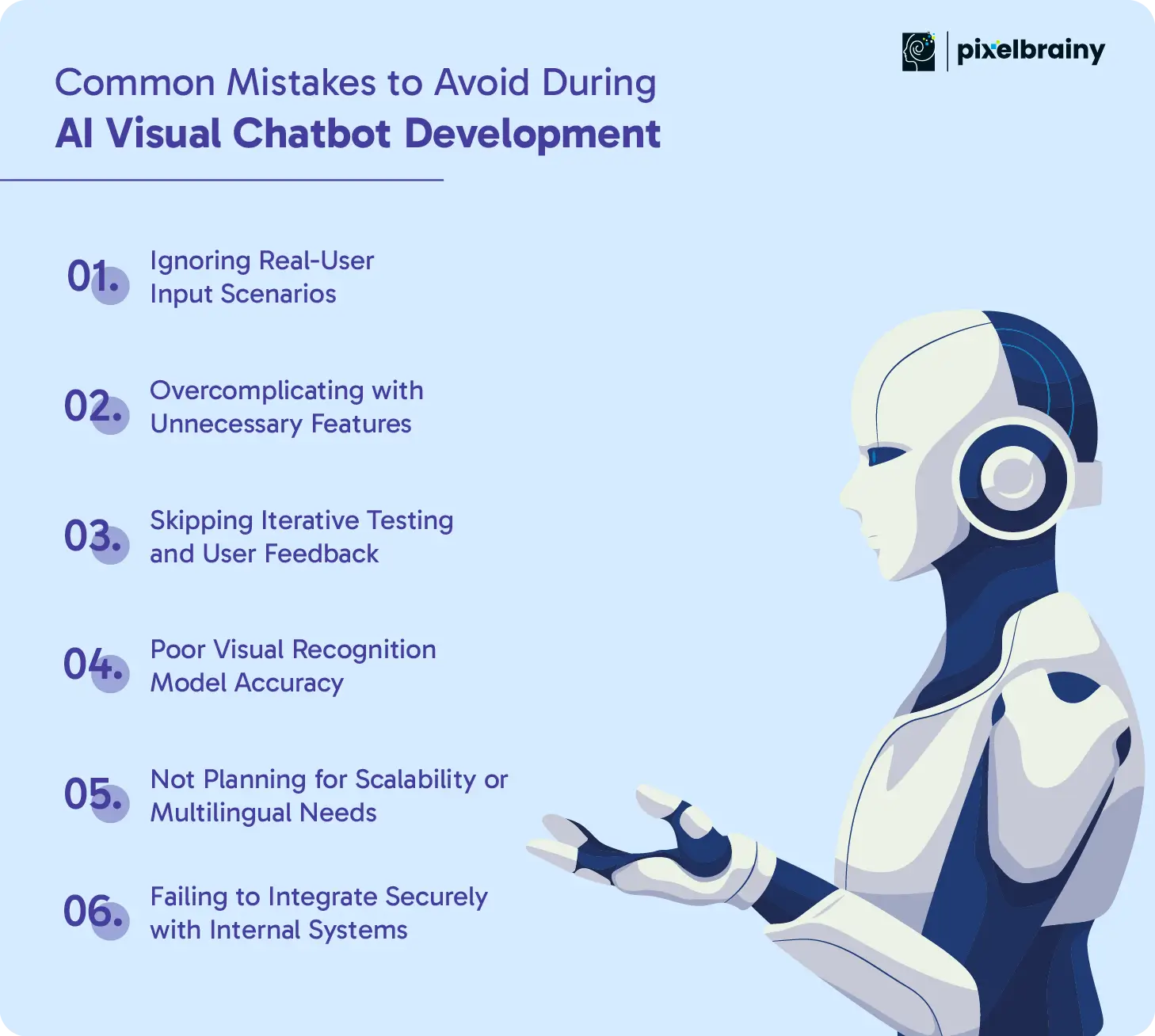
The Mistake: Developers often test image recognition using ideal conditions, but real users may upload blurry, dark, or incomplete visuals.
The Solution: Include edge-case images in your test dataset. Simulate real-life user behavior early and train your model accordingly. Always allow users to retake or reupload when inputs are unclear.
The Mistake: Trying to build everything at once leads to bloated chatbots that confuse users and delay deployment.
The Solution: Start small with a clear use case. Focus on features that solve real problems. Expand only after validating success through user feedback.
The Mistake: Launching without cycles of user testing means you're building in the dark.
The Solution: Test frequently during development. Use beta users to identify pain points, improve response clarity, and adapt your visual workflows based on actual input patterns.
The Mistake: Using off-the-shelf visual AI without tuning can result in poor accuracy, especially for domain-specific images.
The Solution: Fine-tune models with relevant, diverse image sets from your industry. Monitor accuracy and retrain regularly to improve performance over time.
The Mistake: Many bots are built without considering future growth or international users.
The Solution: Use scalable cloud infrastructure and choose chatbot platforms that support multi-language NLP. Design conversations and image workflows that can adapt to different regions and user types.
The Mistake: Weak API connections or lack of security layers put user data at risk.
The Solution: Use encrypted APIs and secure authentication protocols when connecting your chatbot to CRMs, databases, or storage systems. Audit access controls regularly and follow compliance standards from the start.
Avoiding these pitfalls while creating an AI Visual Chatbot will not only save time and budget, but also lead to a more reliable, scalable, and user-friendly solution.
When you're looking to develop an AI Visual Chatbot that combines intelligent conversation with real-time visual understanding, choosing the right partner makes all the difference. At PixelBrainy, we specialize in building robust, user-centric AI chatbot solutions tailored to meet industry-specific needs. Whether you're a growing startup or an enterprise brand, we bring the right mix of strategy, design, and AI expertise to bring your vision to life.
As a leading AI chatbot development company in USA, our approach goes beyond just writing code. We help businesses define the right use case, choose the best tools, and deliver fully functional visual chatbots that are secure, scalable, and built to perform. From MVP planning to full-feature deployment, our team works closely with you every step of the way.
Whether you're starting from scratch or upgrading an existing solution, PixelBrainy is the partner you can trust to deliver future-ready AI chatbot solutions that drive real results.
AI Visual Chatbots are transforming the way businesses communicate by combining natural language processing with visual recognition. From handling support queries to assisting with product discovery, these bots are revolutionizing user interaction across industries.
The real value lies in the execution. With proper planning, the right tools, and a trusted partner in AI development, your business can launch a solution that delivers both performance and long-term impact. Choosing an experienced team ensures your chatbot is not only functional but also secure, scalable, and user-friendly.
Whether you’re planning an MVP or a full-featured platform, now is the ideal time to start. Investing in AI Visual Chatbot development puts your business ahead of the curve and closer to the future of intelligent automation.
Ready to turn your idea into action? Book an appointment with PixelBrainy to discuss your project and get expert guidance on your chatbot journey.
An AI Visual Chatbot is a conversational tool powered by natural language processing (NLP) and computer vision. It can understand both text and visual inputs, such as images or screenshots, allowing users to interact in a more intuitive and dynamic way.
The cost of AI Visual Chatbot development typically ranges between $25,000 to $150,000+, depending on features, complexity, and scale. MVPs cost less, while full-featured solutions with integrations and multilingual support cost more.
AI Visual Chatbots are widely used in healthcare, eCommerce, real estate, insurance, education, and travel. Any industry that requires image-based interaction or support can benefit from implementing this technology.
Yes. With proper API integration, AI Visual Chatbots can connect to CRMs, product databases, inventory systems, and support platforms. This enables real-time, contextual responses tailored to each user.
Common challenges include poor image recognition accuracy, ignoring real-user input behavior, limited scalability, and lack of proper security compliance. Working with an experienced AI chatbot development company helps avoid these pitfalls.
The timeline to develop an AI Visual Chatbot typically ranges from 4 to 6 weeks, depending on the project scope. An MVP with core features can be completed faster, while a full-scale solution with custom AI, integrations, and multilingual support may take longer. Working with an experienced AI development team helps streamline this process through strategic planning and agile execution.

About The Author
Sagar Bhatnagar
Sagar Sahay Bhatnagar brings over a decade of IT industry experience to his role as Marketing Head at PixelBrainy. He's known for his knack in devising creative marketing strategies that boost brand visibility and market influence. Sagar's strategic thinking, coupled with his innovative vision and focus on results, sets him apart. His track record of successful campaigns proves his ability to utilize digital platforms effectively for impactful marketing efforts. With a genuine passion for both technology and marketing, Sagar continuously pushes PixelBrainy's marketing initiatives to greater success.
Working with PixelBrainy has been a great experience. They took our vision for an AI-powered platform and turned it into a fully functional product. What impressed me most was their strong understanding of both design and development, and their ability to handle complex requirements with ease. The team was responsive, cooperative, and always open to feedback. They kept things organized, communicated clearly, and delivered quality work on time. I highly recommend PixelBrainy to anyone looking for a skilled and reliable development partner.

Working with the PixelBrainy team has been a highly positive experience. They understand the design requirements and create beautiful UX elements to meet the application needs. The dev team did an excellent job bringing my vision to life. We discussed usability and flow. Sagar worked with his team to design the database and begin coding. Working with Sagar was easy. He has the knowledge to create robust apps, including multi-language support, Google and Apple ID login options, Ad-enabled integrations, Stripe payment processing, and a Web Admin site for maintaining support data. I'm extremely satisfied with the services provided, the quality of the final product, and the professionalism of the entire process. I highly recommend them for Android and iOS Mobile Application Design and Development.

Great experience working with them. Had a lot of feedback and I found that unlike most contractors they were bugging me for updates instead of the other way around. They were extremely time conscience and great at communicating! All work was done extremely high quality and if not on time, early! They were always proactive when it comes to communication and the work is great/above par always. Very flexible and a great team to work with! Goes above and beyond to present us with multiple options and always provides quality. Amazing work per usual with Chitra. If you have UI/UX or branding design needs I recommend you go to them! Will likely work with them in the future as well, definitely recommended!

PixelBrainy is a joy to work with and is a great partner when thinking through branding, logo, and website layout. I appreciate that they spend time going into the "why" behind their decisions to help inform me and others about industry best practices and their expertise.

I hired them to design our software apps. Things I really like about them are excellent communication skills, they answer all project suggestions and collaborate right away, and their input on design and colors is amazing. This project was complex and needed patience and creativity. The team is amazing to do business with. I will be using them long-term. Glad to see there are some good people out there. I was afraid to try and outsource my project to someone but I am glad I met them! I really can't say enough. They went above and beyond on this project. I am very happy with everything they have done to make my business stand out from the competition.

It was great working with PixelBrainy and the team. They were very responsive and really owned the project. We'll definitely work with them again!

I recently worked with the PixelBrainy team on a project and I was blown away by their communication skills. They were prompt, clear, and articulate in all of our interactions. They listened and provided valuable feedback and suggestions to help make the project a success. They also kept me updated throughout the entire process, which made the experience stress-free and enjoyable.

PixelBrainy is very good at what it does. The team also presents themselves very professionally and takes care of their side of things very well. I could fully trust them taking up the design work in a timely and organised manner and their attention to detail saved us lots of effort and time. This particular project was quite intense and the team showed that they function very well under pressure. Very much looking forward to working with her again!

It's always an absolute pleasure working with them. They completed all of my requests quickly and followed every note I had for them to a T, which made our process go smoothly from start to finish. Everything was completed fast and following all of the guidelines. And I would recommend their services to anyone. If you need any design work done in the future, PixelBrainy should be your first call!

They took ownership of our requirements and designed and proposed multiple beautiful variants. The team is self-motivated, requires minimum supervision, committed to see-through designs with quality and delivering them on time. We would definitely love to work with PixelBrainy again when we have any requirements.

PixelBrainy was a big help with our SaaS application. We've been hard at work with a new UI/UX and they provided a lot of help with the designs. If you're looking for assistance with your website, software, or mobile application designs, PixelBrainy and the team is a great recommendation.

PixelBrainy designers are amazing. They are responsive, talented, and always willing to help craft the design until it matches your vision. I would recommend them and plan to continue them for my future projects and more!!!

They were awesome! Did a good job fast, and good communication. Will work with them again. Thank you

Creative, detail-oriented, and talented designers who take direction well and implement changes quickly and accurately. They consistently over-delivered for us.

PixelBrainy team is very talented and creative. Great designers and a pleasure to work with. PixelBrainy is an excellent communicator and I look forward to working with them again.

PixelBrainy has a very talented design team. Their work is excellent and they are very responsive. I enjoy working with them and hope to continue on all of our future projects.

Transform your ideas into reality with us.
Across these industries, each engagement brings unique challenges, from early-stage product development to scaling complex systems, helping us build a practical understanding of real-world product environments.