AI Summary Powered by PixelBrainy
Every IT team knows the pressure of keeping systems running while users expect instant help, clear answers, and human-like interactions. This is where AI Avatars for an IT Support Agent are transforming how modern organizations deliver technical assistance at scale. Instead of long wait times, overloaded service desks, or repetitive troubleshooting, businesses can now rely on intelligent virtual agents that work around the clock and respond with precision.
AI Avatar Development for an IT Support Agent is no longer an experimental concept reserved for large enterprises. Mid-sized companies, startups, SaaS providers, and global enterprises are actively exploring how to create an AI Avatar for an IT Support Agent to streamline internal support and improve employee experience. By combining conversational AI, visual avatars, and deep IT knowledge, organizations can build support agents that feel approachable, consistent, and efficient.
Building an AI Avatar for an IT Support Agent allows IT leaders to reduce operational costs, minimize ticket backlogs, and free human engineers to focus on complex issues. At the same time, HR leaders, CIOs, and digital transformation teams see value in deploying always available support that scales effortlessly as the organization grows. Whether the goal is to develop an AI Avatar for an IT Support Agent for internal helpdesks, remote workforce support, or enterprise-wide IT automation, the opportunity is clear.
This guide is designed for decision makers, product managers, IT leaders, and business owners seeking practical understanding of planning, designing, and deploying a powerful AI driven IT support avatar.

An AI avatar for an IT support agent is a digital, human-like interface powered by artificial intelligence that helps users resolve technical issues quickly and efficiently. It combines conversational AI, machine learning, and natural language processing with a visual or voice-based persona to deliver interactive and intuitive IT support experiences. Unlike traditional rule based chatbots that rely on scripted responses, AI avatars understand user intent, context, and follow up questions in real time.
These intelligent avatars can communicate through text, voice, or on-screen visuals, making interactions feel more natural and approachable. By connecting with IT knowledge bases, ticketing tools, and enterprise systems, an AI avatar can diagnose problems, guide users through solutions, and escalate complex issues when needed. This makes AI avatars a powerful solution for modern, scalable IT support.
An AI avatar for an IT support agent operates through a structured, intelligent workflow that enables it to understand problems, deliver solutions, and continuously improve. Instead of responding with fixed scripts, it follows a dynamic process designed to mirror human support interactions.
The process begins when a user interacts with the AI avatar through text, voice, or a visual interface. The avatar captures the query, whether it is a simple request like a password reset or a complex technical issue.
Using natural language processing, the AI avatar analyzes the user’s input to understand intent, context, and urgency. It identifies key entities such as device type, software name, or error codes to determine the nature of the issue.
Once the intent is clear, the avatar accesses connected IT knowledge bases, troubleshooting guides, and enterprise systems. It may also integrate with ticketing platforms, identity management tools, or monitoring systems to fetch real time data.
The AI avatar then provides step by step guidance, executes predefined actions, or creates support tickets if escalation is required. Responses are delivered in a conversational and user-friendly manner.
Machine learning models analyze past interactions, feedback, and outcomes to refine responses, ensuring better accuracy and faster resolutions over time.
By combining intelligent language understanding, system integrations, and continuous learning, an AI avatar delivers fast, accurate, and human like IT support experiences at scale.
Investing in building an AI avatar for IT support agent is not just a technological upgrade. It is a strategic move that can dramatically improve operational performance, end-user experience, and cost efficiency for businesses of all sizes. As organizations grapple with rising support demands and limited human resources, AI avatars offer a scalable solution that handles a wide range of tasks including troubleshooting, FAQs, ticket creation, and real-time guidance. These intelligent agents ensure faster response times, reduce the burden on IT teams, and deliver consistent high-quality support across the enterprise.
Market trends clearly show the growing importance of intelligent support automation. According to industry research, AI customer interactions are expected to power up to 95% of all customer and support engagements by 2025, significantly reducing response and resolution times while enhancing user satisfaction. Additionally, 90% of customer experience leaders report positive return on investment from implementing AI tools for support and service roles, highlighting the measurable impact of automation on efficiency and bottom-line outcomes.
Beyond efficiency gains, IT Support Agent AI Avatar development enables businesses to reallocate human expertise toward higher-value tasks, foster proactive support strategies, and support AI chatbot adoption while providing 24/7 assistance without the need to expand support teams.
With the global AI agents market projected to grow robustly at over 30% CAGR through 2032, investing now can future-proof support infrastructure and deliver competitive advantage in an increasingly digital economy.
These factors make it clear that to create an AI avatar for IT support agent is a powerful way to enhance performance, reduce operational costs, and improve satisfaction for both internal users and external customers.
Organizations across industries are increasingly adopting intelligent automation to modernize IT support operations and improve service delivery. When planned to develop an AI Avatar for IT Support Agent, businesses unlock a wide range of real-world use cases that go far beyond basic troubleshooting, enabling smarter, faster, and more consistent IT support experiences.
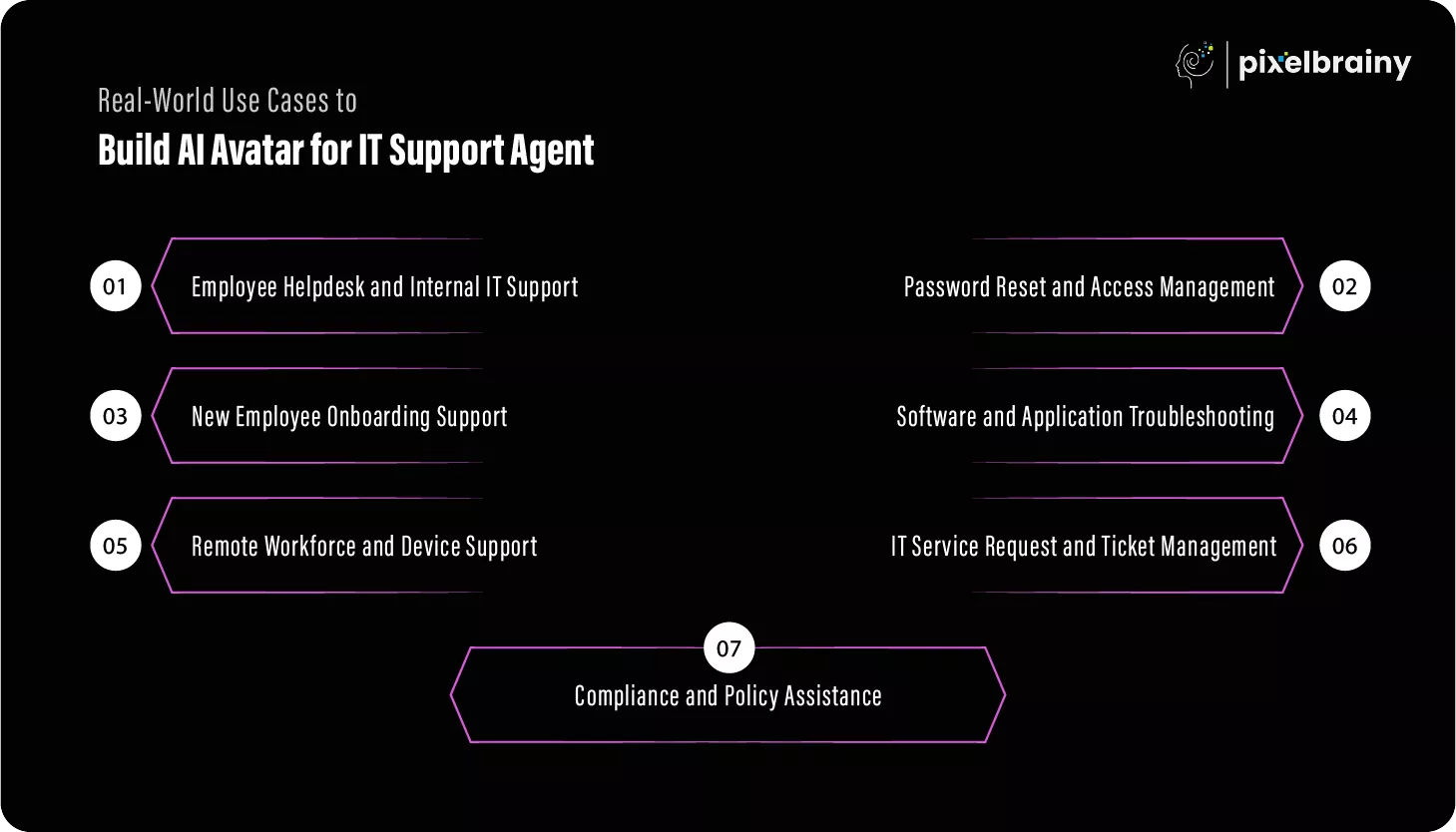
One of the most impactful reasons to make an AI Avatar for IT Support Agent is to enhance internal helpdesk operations. Employees frequently encounter routine IT challenges such as system access issues, email configuration problems, printer errors, or software installation requests. These repetitive tasks often overwhelm IT teams and slow down productivity across departments.
Through AI Avatar Creation for IT Support Agent, organizations can offer employees instant assistance without waiting for a human agent. The avatar guides users step by step through issue resolution, answers follow up questions, and provides contextual explanations tailored to the employee’s role or device. This approach significantly reduces ticket volume while ensuring uninterrupted employee workflows.
Password resets and access related issues account for a large share of IT support requests. When building an AI Avatar for IT Support Agent, this use case becomes a high value automation opportunity that improves both efficiency and security.
The AI avatar securely verifies user identity, walks employees through password recovery processes, and assists with multi factor authentication issues. By integrating with identity and access management systems, the avatar ensures compliance with security policies while minimizing human intervention. This not only speeds up issue resolution but also reduces the risk of human error in sensitive access related tasks.
Onboarding new employees is a resource intensive process for IT teams, especially during periods of rapid hiring. AI Avatar development for IT Support Agent allows organizations to deliver a smooth and consistent onboarding experience without increasing operational burden.
The AI avatar helps new hires set up their devices, install essential applications, configure email and collaboration tools, and understand IT policies. By offering on demand guidance, the avatar ensures new employees become productive faster while allowing IT teams to focus on strategic initiatives rather than repetitive setup tasks.
Software related issues are often complex and vary based on user roles, devices, and system configurations. When planned to develop an AI Avatar for IT Support Agent, software troubleshooting becomes more efficient and standardized.
The AI avatar can analyze error messages, identify common application issues, and provide targeted solutions based on historical data and system integrations. It can guide users through diagnostic steps, suggest configuration changes, or escalate issues when necessary. This reduces downtime and ensures consistent problem resolution across the organization.
With remote and hybrid work models becoming permanent, IT teams must support employees across different locations and time zones. Building an AI Avatar for IT Support Agent enables continuous support for remote workers without geographical limitations.
The avatar assists users with network connectivity issues, VPN configuration, device performance optimization, and security updates. By providing 24/7 availability, the AI avatar ensures remote employees receive timely assistance, improving productivity and reducing frustration caused by delayed support.
Managing IT service requests efficiently is critical for maintaining service quality. Through AI Avatar Creation for IT Support Agent, organizations can automate the entire ticket lifecycle.
The AI avatar collects detailed information about issues, categorizes and prioritizes requests, creates tickets in IT service management systems, and keeps users informed about progress. This structured approach improves transparency, reduces back and forth communication, and helps IT teams resolve issues faster and more effectively.
IT policies and security guidelines are often complex and difficult for employees to remember. When planned to develop an AI Avatar for IT Support Agent, organizations can use the avatar as a reliable source of compliance and policy guidance.
The AI avatar answers questions related to data security, acceptable use policies, and compliance requirements in a clear and consistent manner. This reduces policy related confusion, supports regulatory adherence, and ensures employees follow best practices without overwhelming IT teams.
By addressing these diverse real-world scenarios, building an AI Avatar for IT Support Agent empowers organizations to deliver scalable, secure, and user focused IT support that adapts to modern workplace demands.
To successfully deliver value, IT Support Agent AI Avatar development must be built on a strong set of core capabilities. These foundational features ensure the avatar can understand users, resolve issues accurately, integrate with enterprise systems, and provide a consistent support experience across the organization.
| Feature | Description |
| Natural Language Understanding (NLU) | This feature allows the AI avatar to understand user queries written or spoken in everyday language. It identifies intent, keywords, and context rather than relying on predefined commands. As a result, users can communicate naturally without adapting their language to the system. |
| Conversational AI Engine | The conversational engine manages dialogue flow and maintains context across multiple interactions. It enables the avatar to ask clarifying questions, handle follow ups, and deliver coherent responses. This creates a human like and engaging support experience. |
| Knowledge Base Integration | The AI avatar connects with internal IT documentation, FAQs, and troubleshooting guides. This ensures responses are accurate, consistent, and aligned with organizational policies. It also allows instant updates when knowledge sources change. |
| Ticket Creation and Management | This feature enables the avatar to automatically create, update, and track IT support tickets. It collects required information from users and assigns appropriate priorities. This reduces manual workload for IT teams and improves response times. |
| User Authentication and Verification | Secure identity verification ensures only authorized users access sensitive IT support actions. The avatar can integrate with SSO, MFA, or directory services. This maintains security while enabling self service capabilities. |
| Multichannel Support | The AI avatar supports interactions across web portals, mobile apps, intranets, and collaboration tools. This allows users to access IT support wherever they work. It also ensures a consistent experience across platforms. |
| Multilingual Support | This feature enables the avatar to communicate in multiple languages. It is especially valuable for global organizations with diverse workforces. Multilingual support improves accessibility and user satisfaction. |
| Context Awareness | The avatar remembers previous interactions and understands user roles, devices, and environments. This helps deliver personalized responses and faster resolutions. Context awareness reduces repetitive questioning. |
| IT System Integrations | Integration with monitoring tools, asset management systems, and service platforms enables real time data access. The avatar can retrieve device status, software versions, or system alerts. This leads to more accurate troubleshooting. |
| Escalation to Human Agents | When issues exceed predefined complexity, the avatar seamlessly transfers cases to human IT staff. It shares conversation history and diagnostics. This ensures continuity without frustrating users. |
| Analytics and Reporting | Built in analytics track usage, resolution rates, and user satisfaction. IT leaders can use these insights to optimize support operations. Data driven decisions improve overall efficiency. |
| Role Based Access Control | Different user roles receive different support capabilities. For example, administrators and end users see different options. This feature enforces governance and security policies. |
| Automated Troubleshooting Workflows | Predefined workflows guide users through structured resolution steps. The avatar can execute scripts or checks automatically. This speeds up resolution for common issues. |
| Availability and Uptime | The AI avatar operates continuously without downtime. Users can access IT support at any time, regardless of location or time zone. This supports modern remote work environments. |
| Compliance and Audit Logging | All interactions and actions are logged for auditing purposes. This supports compliance with internal policies and regulations. It also improves accountability and traceability. |
These core features form the essential foundation for building an AI Avatar for IT Support Agent that is reliable, secure, and scalable.
Once core capabilities are in place, advanced features elevate the AI avatar from a support tool to an intelligent digital assistant. These enhancements improve personalization, proactive support, and long-term performance optimization.
| Feature | Description |
| Voice Based Interaction | Voice input and output enable hands free support experiences. Users can interact naturally without typing. This is especially useful for accessibility and mobile environments. |
| Emotion and Sentiment Detection | The avatar analyzes tone and sentiment to identify frustrated or confused users. It adapts responses accordingly to maintain a positive experience. This builds trust and empathy. |
| Predictive Issue Resolution | Using historical data and system signals, the avatar predicts potential IT issues. It can notify users before problems escalate. This shifts support from reactive to proactive. |
| Personalization Engine | The avatar customizes responses based on user behavior, role, and preferences. This makes interactions more relevant and efficient. Personalization improves adoption and satisfaction. |
| Proactive Notifications | The AI avatar sends alerts about outages, updates, or required actions. Users receive timely information without submitting tickets. This reduces disruption and confusion. |
| Self-Learning Optimization | Machine learning continuously improves response accuracy and resolution quality. Feedback loops refine performance over time. This ensures long term scalability. |
| Advanced Analytics and Insights | Deeper analytics provide insights into trends, bottlenecks, and user behavior. IT leaders gain predictive and strategic visibility. This supports informed decision making. |
| Automation of IT Actions | The avatar can trigger scripts, system updates, or configuration changes automatically. This reduces manual intervention. Automation speeds up resolution for repetitive tasks. |
| Cross Platform Integration | Advanced avatars integrate with enterprise collaboration tools and digital workplaces. This embeds IT support into daily workflows. Users receive help without switching tools. |
| Custom Avatar Personality | The avatar’s tone, appearance, and communication style align with brand identity. This improves engagement and trust. A consistent persona enhances user experience. |
By incorporating advanced features, developing an AI Avatar for an IT Support Agent becomes a strategic investment that drives proactive, personalized, and intelligent IT support at scale.
Developing an AI powered IT support avatar requires more than technical implementation. It involves strategic planning, user centric design, enterprise integration, and continuous optimization. For CIOs, IT managers, digital transformation leaders, and enterprise decision makers, understanding what is the process of developing an AI Avatar for an IT Support Agent is essential to ensure long term success and measurable ROI. Below is a detailed, end to end breakdown of the development process.
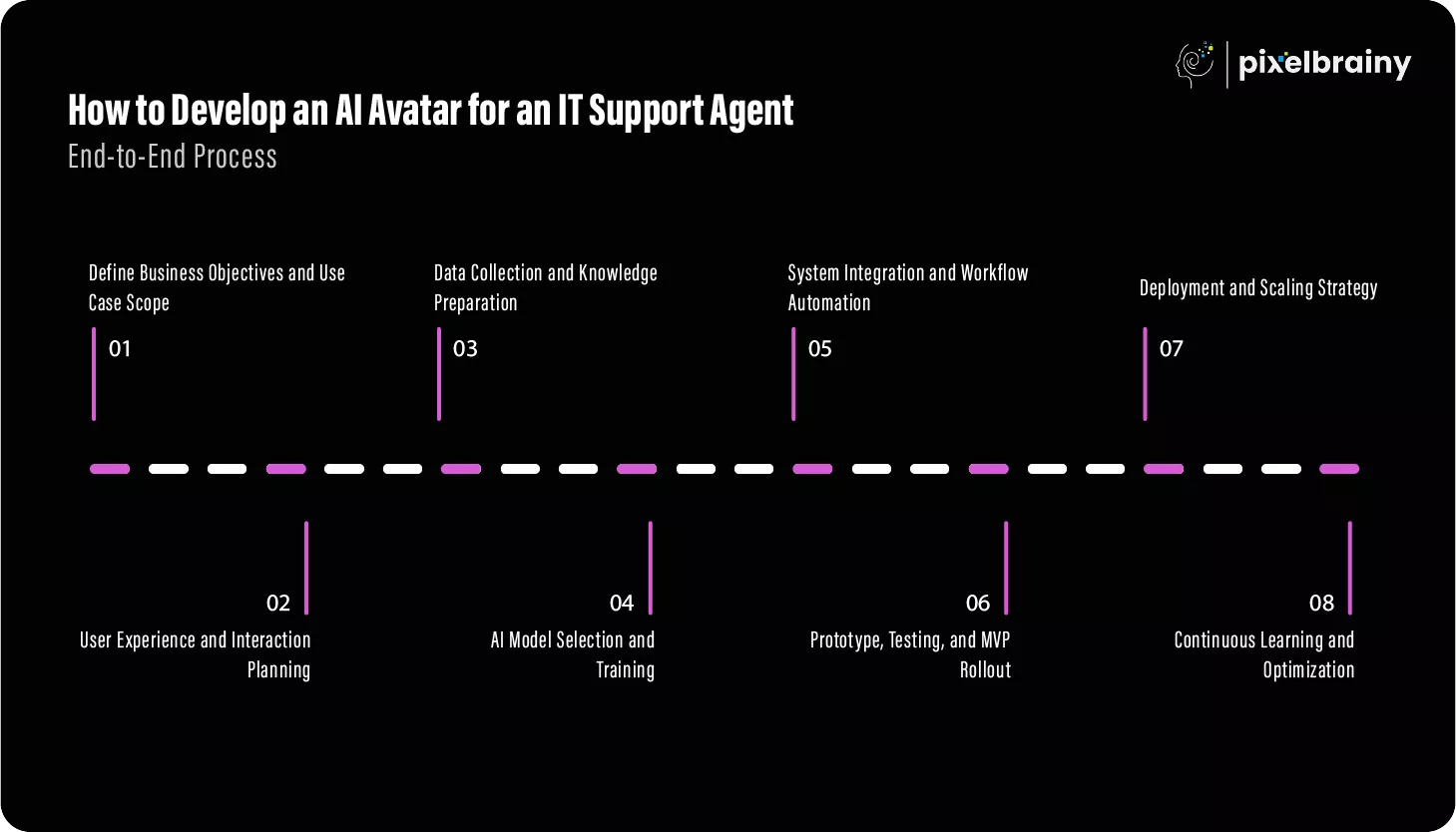
The first phase of AI Avatar development for an IT Support Agent begins with aligning the solution to business goals. IT leaders and stakeholders must identify which support tasks should be automated, such as employee helpdesk queries, software troubleshooting, or onboarding assistance. This step also includes defining performance benchmarks, expected cost savings, and service level improvements. Clear scope definition prevents feature creep and ensures the solution addresses real operational challenges faced by IT teams.
Goal: Create a clear strategic foundation that aligns technical development with business priorities and user needs.
This stage focuses on designing how employees and end users will interact with the AI avatar on a daily basis. Collaboration with a ui/ux design company helps define conversational flows, avatar tone, accessibility standards, and visual identity. For HR leaders and IT managers, intuitive interactions are critical to driving adoption and minimizing resistance. Thoughtful interaction planning highlights how users ask questions, receive guidance, and transition to human support when needed.
Goal: Deliver a frictionless, intuitive experience that builds trust and encourages widespread usage.
High quality data is essential for AI Avatar creation for an IT Support Agent to function accurately. IT teams and data specialists gather internal documentation, system manuals, FAQs, historical support tickets, and policy guidelines. This data is then cleaned, structured, and categorized to ensure relevance and accuracy. Without proper data preparation, even advanced AI models fail to deliver reliable support.
Goal: Build a strong knowledge foundation that enables consistent and accurate problem resolution.
During this phase, suitable AI and language models are selected based on complexity, scalability, and security requirements. Engineers train the models to understand IT specific terminology, context, and multi-step queries. Many organizations initiate PoC development to test performance, accuracy, and feasibility before full scale investment. This stage reassures executives and IT leaders about the solution’s potential.
Goal: Validate AI capabilities and ensure the avatar can handle real world IT scenarios effectively.
Also Read: AI Chatbot Proof of Concept (PoC) Development for Enterprises: From Idea to Impact
Once the AI model is trained, integration becomes the focus. The avatar is connected to ticketing platforms, identity management systems, monitoring tools, and enterprise software. This enables automated workflows such as ticket creation, access requests, and system checks. For IT operations managers, seamless integration is key to reducing manual effort and improving response times.
Goal: Enable end to end automation that connects intelligence with action.
Before full deployment, organizations typically launch MVP development to test the AI avatar with a limited user group. This phase includes functional testing, security audits, performance validation, and usability assessments. Feedback from real users helps refine workflows, responses, and escalation logic. For decision makers, this step minimizes risk while validating business impact.
Goal: Ensure reliability, usability, and security before large scale rollout.
After successful testing, the AI avatar is deployed across departments or locations in phases. Infrastructure is optimized to support increasing usage and ensure uptime. Partnering with top AI development companies in USA can help enterprises manage scalability, compliance, and advanced security needs. This step is critical for organizations planning long term adoption.
Goal: Deliver a stable, scalable AI support solution across the enterprise.
Post deployment, building an AI Avatar for an IT Support Agent becomes an ongoing process. The system continuously learns from new interactions, user feedback, and evolving IT environments. Performance metrics guide improvements, ensuring the avatar remains accurate and relevant. This phase ensures sustained value for IT leaders and business stakeholders alike.
Goal: Maintain long term efficiency, adaptability, and business alignment.
By following this comprehensive development process of AI Avatar for an IT Support Agent, organizations can confidently deploy a scalable, user centric solution that delivers measurable operational and strategic value.
Also Read: Developing an AI Digital Twin Avatar Generator Platform
The cost to create an AI Avatar for an IT Support Agent varies widely depending on scope, complexity, and enterprise requirements. On average, AI Avatar development for an IT Support Agent ranges between $10,000 to $100,000+, covering everything from basic MVP solutions to fully customized enterprise grade deployments.
For CTOs, CIOs, startup founders, and product managers, understanding these cost variations helps in budgeting, planning, and aligning expectations with business goals.
| AI Avatar Type | Description | Estimated Timeline | Estimated Cost |
| Basic AI Avatar for an IT Support Agent (MVP) | Covers essential conversational AI, basic IT queries, and limited system integration. Ideal for pilot projects and startups testing feasibility. | 6–8 weeks | $10,000 – $25,000 |
| Advanced AI Avatar for an IT Support Agent | Includes custom avatar design, voice support, deeper IT system integrations, and analytics. Suitable for growing businesses and mid sized enterprises. | 10–16 weeks | $30,000 – $60,000 |
| Enterprise AI Avatar for an IT Support Agent | Fully customized, scalable solution with advanced security, compliance, automation, and enterprise integrations. Designed for large organizations. | 4–6 months | $70,000 – $100,000+ |
The level of realism in the avatar significantly impacts cost. A text based or simple visual avatar costs less than a fully animated, voice enabled digital human. Custom branding and personalization further increase development efforts and pricing.
Advanced language models and domain specific training require higher investment. Costs rise when training data is extensive or when fine tuning models for IT specific terminology and workflows. This directly affects the accuracy and performance of the AI avatar.
Integrating the AI avatar with ticketing tools, identity management systems, monitoring platforms, and enterprise software increases development time and cost. Each integration requires testing, security validation, and maintenance planning.
Enterprise environments often demand strict compliance with data protection and security standards. Implementing encryption, audit logging, and access controls adds to development cost but is critical for large scale deployments.
Cloud infrastructure, hosting, and usage based AI services influence long term costs. An enterprise AI Avatar for an IT Support Agent requires robust infrastructure to handle high interaction volumes reliably.
Post deployment costs include model updates, knowledge base expansion, performance monitoring, and feature enhancements. While MVPs require minimal upkeep, advanced and enterprise solutions demand continuous investment.
By understanding the cost to create an AI Avatar for an IT Support Agent across MVP to enterprise levels, organizations can make informed investment decisions that balance functionality, scalability, and long-term business value.
Building an intelligent and scalable IT Support Agent AI Avatar requires a well aligned technology stack that brings together artificial intelligence, system integration, security, and user experience layers. For CTOs, IT architects, and product leaders, selecting the right tech stack is critical to ensure performance, accuracy, scalability, and long-term maintainability of the solution.
Below is a comprehensive breakdown of the core technologies involved in building an IT Support Agent AI Avatar.
| Technology Layer | Tools and Technologies | Role in AI Avatar Development |
| AI and Language Models | Large Language Models, NLP frameworks, intent recognition engines | Enable natural language understanding, context handling, and intelligent response generation for IT queries |
| Machine Learning Frameworks | TensorFlow, PyTorch, Scikit learn | Support model training, fine tuning, and continuous learning based on interaction data |
| Speech Recognition and Voice AI | Speech to text and text to speech engines | Allow voice based interaction, hands free support, and accessibility for users |
| Avatar Rendering and Visualization | 2D or 3D avatar engines, animation frameworks | Create human like digital avatars with facial expressions, lip sync, and visual engagement |
| Frontend Development | Web and mobile frameworks, conversational UI components | Deliver seamless user interactions across portals, apps, and internal systems |
| Backend Development | Node.js, Python, Java based services | Handle business logic, API orchestration, and data processing |
| Integration and APIs | REST APIs, GraphQL, middleware platforms | Connect the AI avatar with ticketing systems, identity management, and monitoring tools |
| IT Service Management Tools | Service management and ticketing platforms | Enable ticket creation, tracking, escalation, and workflow automation |
| Identity and Access Management | SSO, MFA, directory services | Ensure secure authentication, authorization, and role based access |
| Cloud Infrastructure | AWS, Azure, Google Cloud | Provide scalable compute, storage, hosting, and deployment capabilities |
| Data Storage and Databases | SQL, NoSQL, vector databases | Store user data, conversation history, logs, and embeddings for AI models |
| Analytics and Monitoring | Logging tools, dashboards, performance monitoring | Track usage, resolution rates, response accuracy, and system health |
| Security and Compliance | Encryption tools, audit logging, compliance frameworks | Protect sensitive data and meet enterprise security and regulatory requirements |
| DevOps and Deployment | CI/CD pipelines, containerization tools | Support continuous integration, deployment, and system reliability |
A well-chosen tech stack ensures the AI avatar performs reliably under high usage, integrates seamlessly with enterprise IT environments, and evolves with changing business needs. It also reduces technical debt, improves security posture, and accelerates time to market for AI powered IT support solutions.
By leveraging a robust and future ready tech stack, organizations can confidently build an IT Support Agent AI Avatar that delivers intelligent, secure, and scalable support experiences across the enterprise.
Also Read: How to Build AI Visual Chatbot: Features and Cost
Creating a successful AI powered IT support avatar requires more than advanced technology. It demands thoughtful planning, strong governance, and a user first mindset. For CIOs, IT leaders, product managers, and digital transformation teams, following best practices ensures the AI avatar delivers consistent value, high adoption, and long-term scalability.
Before attempting to create an AI Avatar for an IT Support Agent, it is essential to clearly define what problems the avatar is expected to solve. Many organizations fail by trying to automate everything at once instead of prioritizing high impact use cases. A focused approach ensures faster success and measurable outcomes.
A clear scope helps guide AI Avatar development for an IT Support Agent while keeping cost, complexity, and expectations under control.
User adoption is critical when building an AI Avatar for an IT Support Agent. If employees do not trust or understand the avatar, usage will remain low regardless of technical quality. Designing intuitive, transparent, and human friendly interactions significantly improves acceptance.
A user centric approach builds confidence and ensures the AI avatar becomes a trusted part of daily IT operations.
The effectiveness of AI Avatar creation for an IT Support Agent depends heavily on the quality of data used to train it. Poor or outdated data leads to inaccurate responses and user frustration. Organizations must treat data preparation as a critical success factor.
Strong data foundations enable accurate, consistent, and context aware IT support responses.
IT support often involves sensitive user data, credentials, and system access. Best practices in AI Avatar development for an IT Support Agent demand strict security and compliance measures from day one, especially in enterprise environments.
Security focused design protects both users and organizations while building long term trust in the AI solution.
Even the most advanced AI cannot resolve every IT issue. A well designed AI avatar must know when to escalate problems to human agents and do so smoothly without frustrating users.
This hybrid approach ensures reliable service while maintaining user satisfaction.
Launching an AI avatar is not the end of the journey. Continuous improvement is essential to maintain relevance and effectiveness as IT environments change. Organizations that actively optimize their AI avatars see greater long-term value.
Ongoing optimization ensures the AI avatar evolves alongside business and IT needs.
By following these best practices to create an AI Avatar for an IT Support Agent, organizations can build a secure, user friendly, and scalable solution that consistently delivers measurable IT support value.
While AI avatars offer significant advantages for modern IT support, their development comes with a unique set of challenges. Understanding these challenges early helps IT leaders, CTOs, and digital transformation teams mitigate risks, control costs, and ensure successful deployment.
Below are the most common challenges in IT Support Agent AI Avatar development and practical ways to address them.
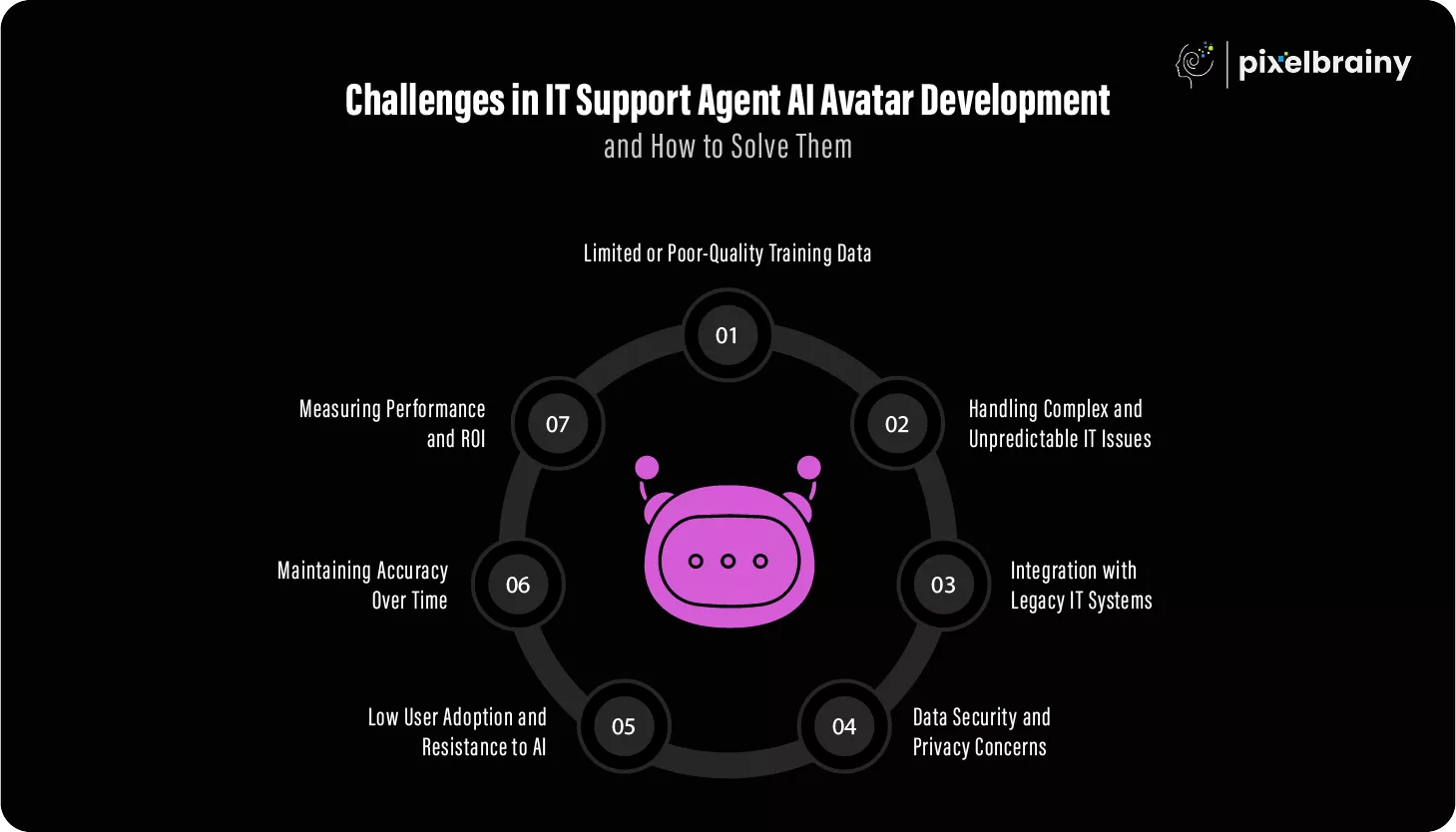
One of the biggest challenges in developing an AI Avatar for an IT Support Agent is the lack of structured, high quality training data. Incomplete documentation, outdated FAQs, or inconsistent ticket records can lead to inaccurate responses and poor user experiences.
How to solve it: Organizations should invest time in auditing, cleaning, and organizing IT knowledge before training the AI. Combining historical support tickets with updated documentation and continuously refreshing data ensures accuracy and relevance over time.
Not all IT problems follow predictable patterns. Advanced technical issues, system outages, or edge cases can overwhelm an AI avatar if not properly managed.
How to solve it: Define clear boundaries for what the AI avatar can and cannot handle. Implement smart escalation mechanisms that route complex issues to human agents while passing full context, ensuring continuity and faster resolution.
Many organizations rely on legacy systems that lack modern APIs, making integration with AI avatars complex and time consuming. Poor integration limits automation and reduces the avatar’s effectiveness.
How to solve it: Use middleware, custom connectors, or phased integration strategies. Prioritize critical systems first and gradually expand integrations as infrastructure modernizes, ensuring minimal disruption to existing workflows.
IT support interactions often involve sensitive data such as credentials, system access details, and personal information. Any security gap can pose serious organizational risks.
How to solve it: Adopt a security first approach by implementing encryption, strong authentication, role based access controls, and audit logging. Regular security testing and compliance checks help maintain trust and regulatory alignment.
Employees may hesitate to rely on an AI avatar due to lack of trust, fear of automation, or unfamiliarity with the technology. Low adoption reduces ROI and limits impact.
How to solve it: Focus on user education, transparent communication, and intuitive design. Clearly explain how the AI avatar helps users, provide easy access to human support, and gradually introduce automation to build confidence.
IT environments change frequently with new tools, policies, and systems. An AI avatar that is not regularly updated quickly becomes outdated and unreliable.
How to solve it: Establish continuous learning and maintenance processes. Regularly update knowledge bases, retrain models, and monitor performance metrics to keep the AI avatar aligned with evolving IT operations.
Without proper metrics, it is difficult to assess whether the AI avatar is delivering real value or meeting business goals.
How to solve it: Define clear KPIs such as ticket deflection rate, resolution time, user satisfaction, and cost savings. Use analytics dashboards to track performance and guide ongoing optimization.
By proactively addressing these challenges with the right strategy, governance, and technology, organizations can successfully deploy an IT Support Agent AI Avatar that is secure, reliable, and built for long term impact.
Also Read: How to Build an AI Virtual Character Chat App
Organizations aiming to modernize IT operations need a partner that combines AI expertise with real enterprise delivery experience. PixelBrainy LLC has positioned itself as a trusted AI Avatar development company by delivering practical, scalable, and secure AI development solutions tailored specifically for IT environments.
PixelBrainy LLC brings hands on experience in AI Avatar development for IT Support Agent use cases, covering internal helpdesks, employee self-service, and enterprise IT automation. The team understands IT workflows, system dependencies, and user behavior, which is critical when developing an AI Avatar for IT Support Agent that must operate reliably within complex infrastructures. Their approach focuses on accuracy, user trust, and seamless escalation to human agents.
From discovery and architecture design to deployment and optimization, PixelBrainy LLC offers complete AI development solutions. Organizations looking to make an AI Avatar for IT Support Agent benefit from structured planning, strong data engineering, and scalable cloud-based architectures. This ensures faster time to value and long-term adaptability as IT needs evolve.
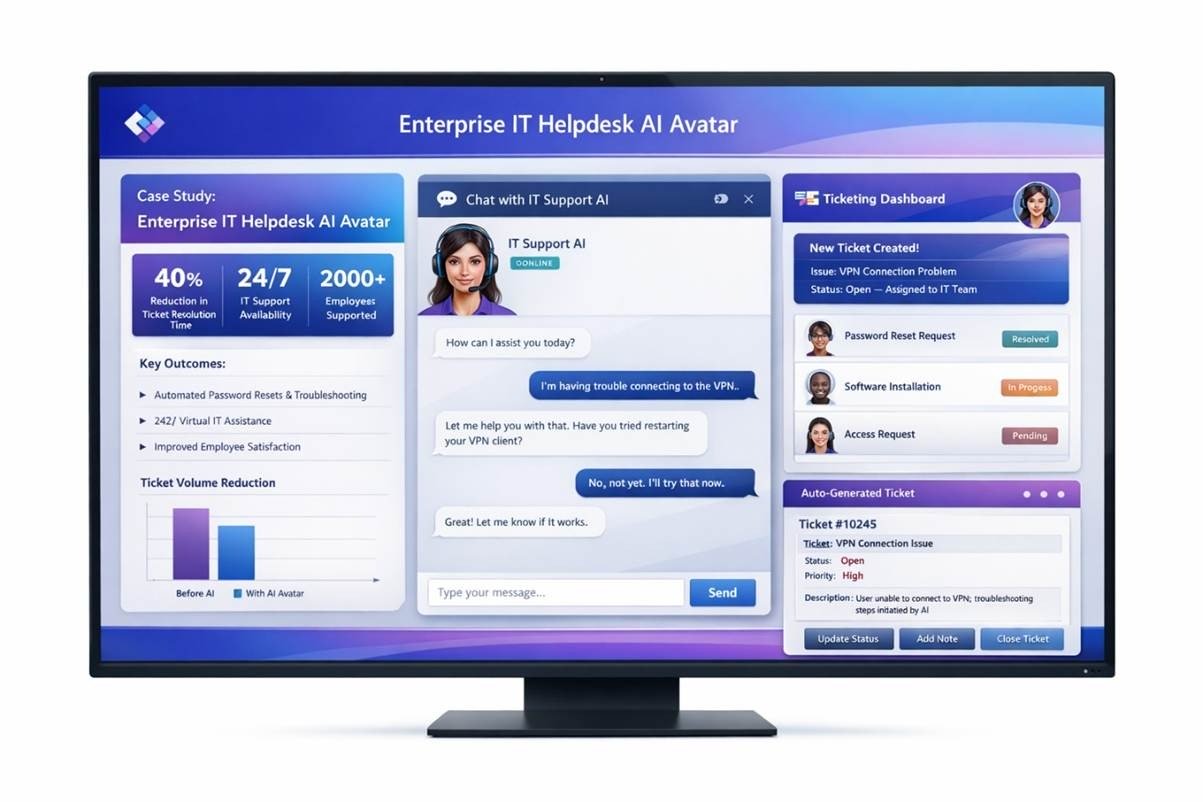
A mid-sized technology services enterprise based in the United States with over 2,000 employees operating across multiple states. The organization struggled with rising IT ticket volumes, slow resolution times, and limited after hours support for remote teams.
The internal IT team was overwhelmed by repetitive requests such as password resets, access issues, software troubleshooting, and onboarding support. Ticket backlogs affected employee productivity, while expanding the IT team increased operational costs. The client needed a scalable solution to deliver 24/7 IT support without compromising security or user experience.
PixelBrainy LLC led the IT Support Agent AI Avatar Development from strategy to deployment. The solution included:
The project was executed in phases, starting with use case prioritization and data preparation, followed by model training and system integration. A controlled rollout ensured minimal disruption while collecting real user feedback for optimization.
This case study demonstrates PixelBrainy LLC’s ability to deliver real world value through developing an AI Avatar for IT Support Agent in the competitive USA market.
An AI Avatar for an IT Support Agent represents a shift from reactive IT assistance to intelligent, always available support that scales with your organization. By combining conversational AI, automation, and enterprise integrations, businesses can significantly reduce IT workload while delivering faster, more consistent support experiences. From MVP pilots to enterprise-wide deployments, AI Avatar development for an IT Support Agent empowers IT teams to focus on high value initiatives instead of repetitive tasks.
Success lies in aligning the avatar with real IT use cases, investing in the right technology stack, and following a structured development process backed by strong security and continuous optimization. When executed correctly, an AI avatar becomes more than a tool, it becomes a strategic asset that improves productivity, employee satisfaction, and operational resilience across the enterprise.
Take the next step toward smarter IT support. Book an appointment today to explore how an AI Avatar for an IT Support Agent can be tailored to your business needs.
No, an AI Avatar for IT support is designed to complement human agents, not replace them. It handles repetitive and high volume issues efficiently, while complex, critical, or sensitive cases are escalated to human IT professionals.
Deployment timelines depend on scope and complexity. A basic MVP can be launched in a few weeks, while advanced or enterprise grade AI Avatar development for IT Support Agent solutions may take several months including testing and integrations.
Yes, when built correctly. Modern AI avatars follow enterprise security practices such as encrypted data handling, role based access, audit logging, and secure authentication to protect sensitive IT information.
Absolutely. AI Avatar creation for IT Support Agent can be personalized based on user roles, departments, device types, and access levels, ensuring relevant and accurate support for each employee group.
Yes, most modern AI avatars support multi modal interaction, including text chat, voice commands, and visual interfaces, making IT support more accessible and user friendly.
Performance is tracked using metrics such as ticket deflection rate, resolution time, user satisfaction, accuracy of responses, and cost savings, helping organizations continuously optimize the system.

About The Author
Sagar Bhatnagar
Sagar Sahay Bhatnagar brings over a decade of IT industry experience to his role as Marketing Head at PixelBrainy. He's known for his knack in devising creative marketing strategies that boost brand visibility and market influence. Sagar's strategic thinking, coupled with his innovative vision and focus on results, sets him apart. His track record of successful campaigns proves his ability to utilize digital platforms effectively for impactful marketing efforts. With a genuine passion for both technology and marketing, Sagar continuously pushes PixelBrainy's marketing initiatives to greater success.

Working with PixelBrainy has been a great experience. They took our vision for an AI-powered platform and turned it into a fully functional product. What impressed me most was their strong understanding of both design and development, and their ability to handle complex requirements with ease. The team was responsive, cooperative, and always open to feedback. They kept things organized, communicated clearly, and delivered quality work on time. I highly recommend PixelBrainy to anyone looking for a skilled and reliable development partner.

Working with the PixelBrainy team has been a highly positive experience. They understand the design requirements and create beautiful UX elements to meet the application needs. The dev team did an excellent job bringing my vision to life. We discussed usability and flow. Sagar worked with his team to design the database and begin coding. Working with Sagar was easy. He has the knowledge to create robust apps, including multi-language support, Google and Apple ID login options, Ad-enabled integrations, Stripe payment processing, and a Web Admin site for maintaining support data. I'm extremely satisfied with the services provided, the quality of the final product, and the professionalism of the entire process. I highly recommend them for Android and iOS Mobile Application Design and Development.

Great experience working with them. Had a lot of feedback and I found that unlike most contractors they were bugging me for updates instead of the other way around. They were extremely time conscience and great at communicating! All work was done extremely high quality and if not on time, early! They were always proactive when it comes to communication and the work is great/above par always. Very flexible and a great team to work with! Goes above and beyond to present us with multiple options and always provides quality. Amazing work per usual with Chitra. If you have UI/UX or branding design needs I recommend you go to them! Will likely work with them in the future as well, definitely recommended!

PixelBrainy is a joy to work with and is a great partner when thinking through branding, logo, and website layout. I appreciate that they spend time going into the "why" behind their decisions to help inform me and others about industry best practices and their expertise.

I hired them to design our software apps. Things I really like about them are excellent communication skills, they answer all project suggestions and collaborate right away, and their input on design and colors is amazing. This project was complex and needed patience and creativity. The team is amazing to do business with. I will be using them long-term. Glad to see there are some good people out there. I was afraid to try and outsource my project to someone but I am glad I met them! I really can't say enough. They went above and beyond on this project. I am very happy with everything they have done to make my business stand out from the competition.

It was great working with PixelBrainy and the team. They were very responsive and really owned the project. We'll definitely work with them again!

I recently worked with the PixelBrainy team on a project and I was blown away by their communication skills. They were prompt, clear, and articulate in all of our interactions. They listened and provided valuable feedback and suggestions to help make the project a success. They also kept me updated throughout the entire process, which made the experience stress-free and enjoyable.

PixelBrainy is very good at what it does. The team also presents themselves very professionally and takes care of their side of things very well. I could fully trust them taking up the design work in a timely and organised manner and their attention to detail saved us lots of effort and time. This particular project was quite intense and the team showed that they function very well under pressure. Very much looking forward to working with her again!

It's always an absolute pleasure working with them. They completed all of my requests quickly and followed every note I had for them to a T, which made our process go smoothly from start to finish. Everything was completed fast and following all of the guidelines. And I would recommend their services to anyone. If you need any design work done in the future, PixelBrainy should be your first call!

They took ownership of our requirements and designed and proposed multiple beautiful variants. The team is self-motivated, requires minimum supervision, committed to see-through designs with quality and delivering them on time. We would definitely love to work with PixelBrainy again when we have any requirements.

PixelBrainy was a big help with our SaaS application. We've been hard at work with a new UI/UX and they provided a lot of help with the designs. If you're looking for assistance with your website, software, or mobile application designs, PixelBrainy and the team is a great recommendation.

PixelBrainy designers are amazing. They are responsive, talented, and always willing to help craft the design until it matches your vision. I would recommend them and plan to continue them for my future projects and more!!!

They were awesome! Did a good job fast, and good communication. Will work with them again. Thank you

Creative, detail-oriented, and talented designers who take direction well and implement changes quickly and accurately. They consistently over-delivered for us.

PixelBrainy team is very talented and creative. Great designers and a pleasure to work with. PixelBrainy is an excellent communicator and I look forward to working with them again.

PixelBrainy has a very talented design team. Their work is excellent and they are very responsive. I enjoy working with them and hope to continue on all of our future projects.


Transform your ideas into reality with us.
Across these industries, each engagement brings unique challenges, from early-stage product development to scaling complex systems, helping us build a practical understanding of real-world product environments.