AI Summary Powered by PixelBrainy
Can an AI parenting assistant truly understand how a child develops over time, or will it simply become another app offering generic age-based parenting advice?
Imagine you are a consumer technology startup planning to build an AI parenting assistant app that combines developmental milestone tracking, sleep schedule optimization, feeding guidance, behavior management coaching, and age-appropriate activity recommendations into one intelligent experience. The objective is not to provide parents with another collection of articles, checklists, or static age-based content. Instead, the app should understand a child's history, identify changing patterns, personalize recommendations, and continuously adapt its guidance as the child grows from newborn through adolescence.
This is what makes AI parenting assistant app development different from conventional parenting app development. The real value lies in creating longitudinal intelligence that can connect information collected over weeks, months, and years.
The market opportunity is also growing. According to The Business Research Company, the global parenting apps market is projected to increase from $1.93 billion in 2026 to $3.11 billion by 2030, representing a forecast CAGR of 12.6%. The report identifies AI integration, health and nutrition tracking, developmental milestone features, and cloud-based growth monitoring among the factors contributing to market growth.
For a startup researching how to create an AI parenting assistant app with child development tracking and milestone features, the key challenge is determining how AI can move beyond answering isolated questions. For example, a parent might ask, "My toddler has started resisting bedtime over the past two weeks. Has anything changed in our routine that could be contributing to this?"
A sophisticated AI assistant could analyze permitted historical sleep and routine data, identify relevant changes, explain observable patterns, suggest age-appropriate strategies, and indicate when professional guidance may be appropriate.
Existing parenting products demonstrate parts of this opportunity through personalized activities, milestone tracking, sleep intelligence, and AI-supported guidance. However, businesses looking to develop an AI powered parenting assistant app need an architecture that connects child profiles, developmental milestones, historical records, parent preferences, recommendations, and safety controls.
This guide explains how to build an AI parenting assistant app, including its essential features, advanced capabilities, development process, technology stack, business models, common challenges, estimated development cost, and considerations for companies seeking AI parenting assistant app development services.

An AI parenting assistant app is an intelligent mobile or web application that uses artificial intelligence, machine learning, natural language processing, recommendation systems, and child-development knowledge to provide personalized support to parents and caregivers. Unlike a traditional parenting app that primarily offers articles, checklists, trackers, or reminders, an AI-powered parenting assistant can interpret user-provided information, understand context, identify patterns, and generate relevant guidance based on the child's age, developmental stage, routines, and previous interactions.
The main purpose of an AI parenting assistant app is to bring multiple parenting activities into one personalized platform. Parents can use the application to track developmental milestones, monitor sleep and feeding routines, discover age-appropriate activities, manage daily schedules, record behavioral observations, and ask parenting questions through an AI-powered conversational interface.
The application typically works through several interconnected layers.
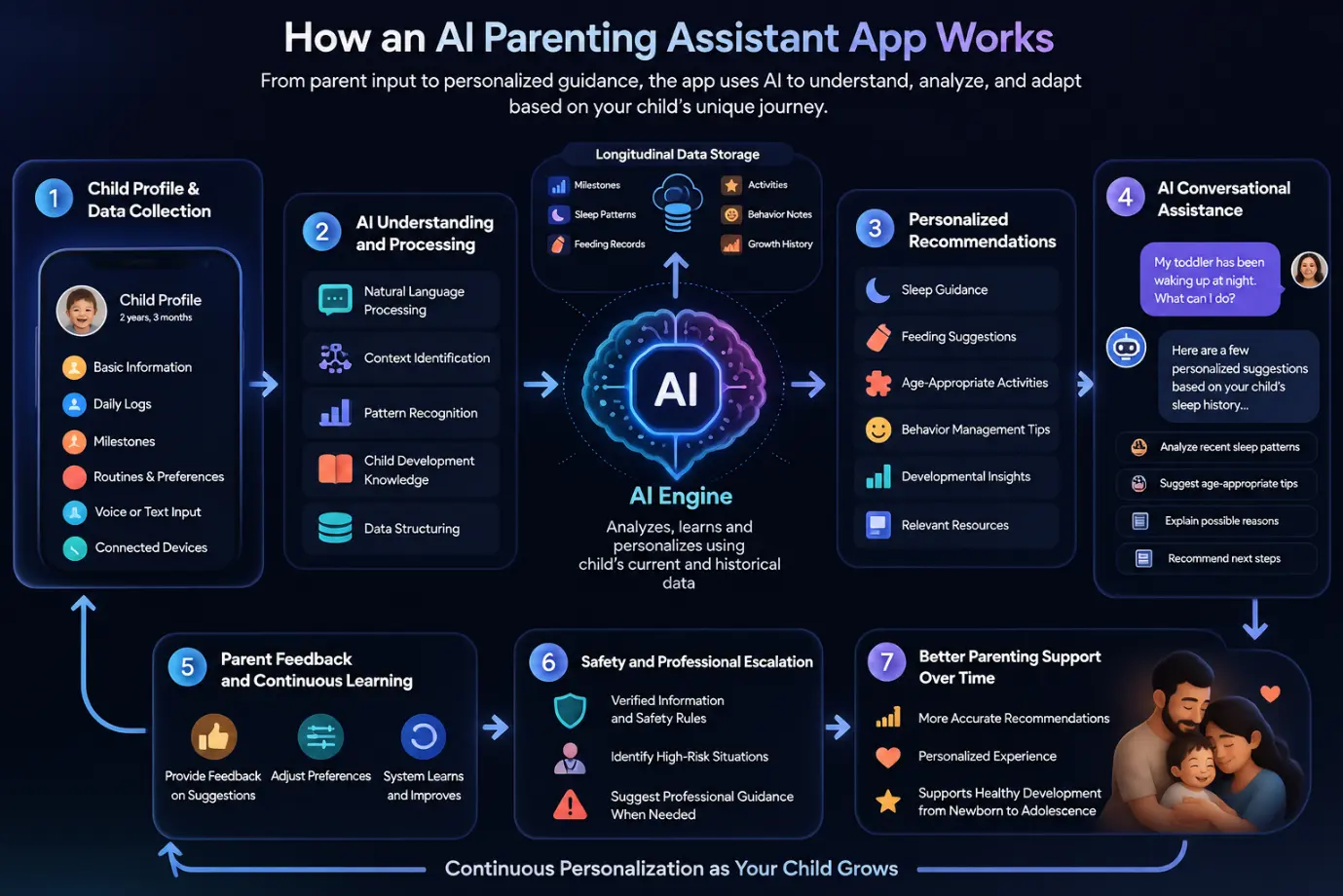
The parent first creates a child profile containing information such as age, birth date, developmental stage, routines, milestones, preferences, and relevant observations. Parents can add information through forms, quick logs, conversational chat, voice input, or connected devices.
The AI analyzes the information provided by the parent and identifies relevant context. Natural language processing allows parents to communicate naturally instead of using complicated forms. For example, a parent could type, "My 18-month-old has been waking twice every night this week," and the system can identify sleep-related information from the statement.
A key component when businesses build an AI parenting assistant app is longitudinal data management. Instead of treating every interaction as a separate event, the application can maintain a structured timeline of milestones, sleep patterns, activities, feeding records, and other permitted information.
This allows the AI to consider historical context when generating future responses.
The recommendation engine can combine the child's profile, historical information, parent preferences, developmental stage, and verified knowledge to provide personalized suggestions. Recommendations may include activities, routines, educational resources, or questions to discuss with a qualified professional.
Parents can interact with the application through a chatbot or voice assistant. The AI can answer parenting questions, summarize logged information, explain developmental concepts, and help parents discover relevant features.
Because parenting applications can involve health, nutrition, development, and child safety, responsible AI design is essential. The system should use verified information, safety rules, appropriate disclaimers, and escalation pathways for situations that may require professional or emergency assistance.
In simple terms, the workflow is:
Parent Input → Child Data → AI Analysis → Context Retrieval → Personalized Recommendation → Parent Feedback → Continuous Personalization
This architecture allows companies to develop an AI powered parenting assistant app that goes beyond static parenting content and delivers a more contextual, personalized, and continuously evolving experience.
Why are parents already turning to AI for parenting questions, and what does that mean for startups planning to build an AI parenting assistant app?
For a consumer technology startup, the investment opportunity is becoming clearer because parents are already using artificial intelligence for everyday parenting decisions. The market is moving from simple tracking applications toward platforms that can understand context, answer questions conversationally, and provide personalized guidance. This creates an opportunity for businesses to develop a dedicated AI parenting assistant app rather than leaving these interactions to general-purpose AI tools.
The strongest reason to invest is user adoption. A May 2026 survey by Lurie Children's of 1,004 U.S. parents with children aged 17 and younger found that 81% had used AI to help with parenting tasks. Among those parents, 43% used AI weekly and 15% used it daily. The most common uses included health or medical information, meal planning, behavior advice, academic support, and planning activities or crafts.
This creates a specific opportunity for startups asking how to build an AI parenting assistant app. Instead of parents entering parenting questions into a general AI chatbot, a dedicated application can provide answers within a structured child profile, developmental timeline, and verified parenting knowledge environment.
The market itself is also signaling where parenting technology is heading. Technavio forecasts that the global parenting apps market will grow by approximately $1.39 billion between 2025 and 2030, at a projected 17% CAGR. Its 2026 market analysis identifies the integration of generative AI and community-powered validation as key market drivers.
For companies evaluating AI parenting assistant app development services, this suggests that AI can become a core product architecture rather than simply an additional chatbot feature.
Consider this real startup scenario:
You are building a family technology platform and notice that parents are already asking general AI tools about sleep problems, toddler behavior, meal ideas, developmental activities, and daily routines. Should your company build an AI parenting assistant that keeps these interactions connected to each child's profile and history?
This is where a dedicated platform can create a distinct product position.
A purpose-built AI parenting assistant can connect:
Child Profile → Milestones → Sleep History → Feeding Records → Activities → Behavioral Observations → Parent Preferences → AI Guidance
Instead of answering one isolated question, the application can use permitted historical information to understand the context behind the question.
A parenting relationship can continue for years. A child may progress from newborn care to toddler development, preschool activities, school preparation, and eventually adolescent support.
This creates a reason to develop an AI powered parenting assistant app around a longitudinal architecture from the beginning.
For example, the system could retain structured information about previously recorded milestones and activities and use relevant historical context when generating future recommendations.
This can make the product architecture more defensible than a static content library.
Parents do not always want to search through categories such as "18-month developmental activities" or "toddler sleep."
They may simply ask:
"What can I do with my child for 15 minutes today that supports language development?"
A conversational interface can transform the application into a question-and-action platform.
The opportunity for a startup is therefore not just to add AI to a parenting app, but to redesign how parents interact with parenting information.
An AI parenting platform can be structured around several potential revenue channels rather than relying on a single monetization method.
Possible models include:
This flexibility is particularly relevant for startups planning to build a scalable AI parenting assistant app for parenting platforms and health systems.
Traditional parenting applications are often centered on recording information. Generative AI makes it possible to build interactive workflows around that information.
For example, instead of simply displaying:
Sleep: 10 hours
the application could help parents understand:
"Your child's average nighttime sleep has changed compared with the previous two weeks. Would you like to review the recent routine changes?"
The important investment opportunity is the intelligence layer that turns structured parenting data into contextual interactions.
Building the data and AI architecture early can provide a foundation for future capabilities such as:
The objective is not to build every feature immediately. It is to establish an architecture that can support these capabilities as the product and user base grow.
The same 2026 Lurie Children's survey found that 91% of surveyed parents said AI boosted their confidence as a parent, but 50% said they always double-check AI parenting advice and another 41% said they sometimes verify it.
This creates an important investment consideration. A successful parenting AI product needs more than an impressive language model. It needs verified knowledge, transparent responses, appropriate safety guardrails, privacy controls, and clear escalation pathways when professional guidance may be necessary.
For companies exploring AI parenting assistant app development, the opportunity lies in building a trusted, specialized AI environment around the parenting journey rather than simply replicating a general chatbot.
Investing in this space now means building around an emerging behavior while creating the technical foundation for a parenting platform that can evolve with families over time.
Section 4: Top Benefits of Developing an AI Parenting Assistant App
First make intro content focusing real query in context to this section, then explain each types in 80-80 words, break each types in para, as don’t make long long para..
Not every AI parenting assistant app needs to serve the same audience. A consumer parenting startup may need an intelligent everyday parenting companion, while a pediatric health system may require a clinically governed patient engagement platform. An employer may want a family wellness benefit, whereas an education company may want to extend its learning platform into the home.
Understanding these different types of AI parenting assistant app development helps businesses choose the right product architecture, AI capabilities, data model, monetization strategy, and compliance approach.
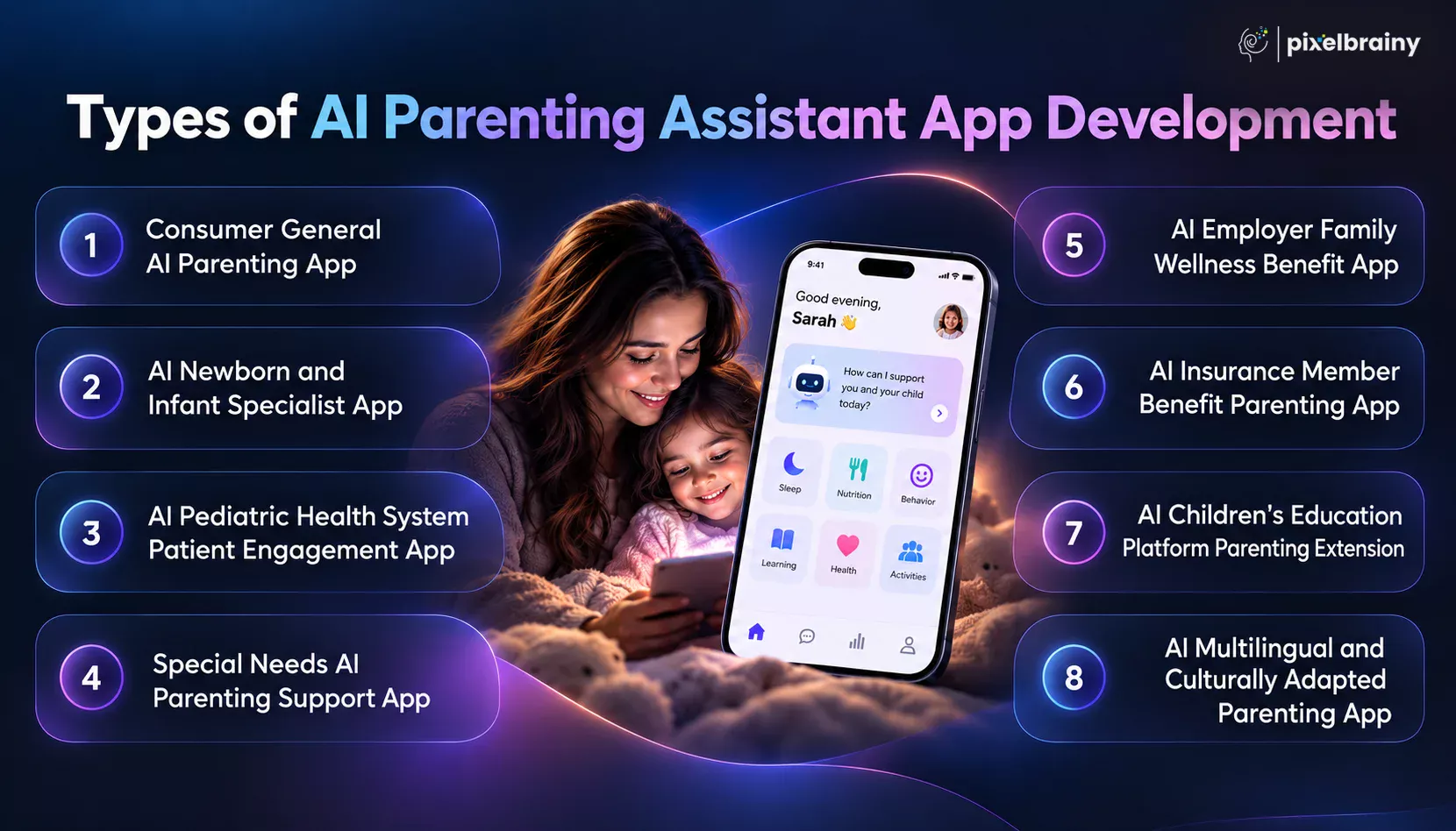
A consumer general AI parenting app is designed for parents who want one intelligent platform for everyday parenting support.
This type of application can combine:
A parent could ask:
"What activities can I do with my 2-year-old today that support language development?"
The AI can use the child's age, previously recorded activities, parent preferences, and approved knowledge sources to generate relevant suggestions.
This model is suitable for startups researching how to build an AI parenting assistant app for consumers because it offers the broadest feature scope and can support subscription-based monetization.
The product should still distinguish general parenting education from medical diagnosis or clinical advice.
An AI newborn and infant parenting app focuses specifically on the first stages of a child's life, when parents frequently need support with feeding, sleep, routines, developmental milestones, and newborn care.
Typical features can include:
A startup might ask:
"How can we develop an AI newborn parenting assistant that understands my baby's feeding and sleep history instead of giving generic newborn advice?"
The answer requires more than an LLM. The application needs structured event tracking, age-aware recommendations, longitudinal data, and strong safety controls.
Developmental monitoring is particularly relevant in this category. The CDC currently provides milestone resources from 2 months through 5 years, including its Milestone Tracker app, and emphasizes that developmental monitoring involves observing how a child grows and changes over time.
This makes an AI infant development tracking app a potentially valuable extension of conventional newborn tracking.
A pediatric health system can use AI parenting technology as an extension of its existing patient engagement infrastructure.
Instead of building a consumer-only parenting application, the organization could create an AI pediatric patient engagement app connecting parents, caregivers, and healthcare providers.
Potential features include:
For example, a parent could ask:
"What information should I bring to my child's upcoming developmental appointment?"
The application could create a checklist based on information the parent has already recorded.
This model aligns with the broader role of pediatric patient portals. The American Academy of Pediatrics notes that patient portals can support information sharing, patient engagement, patient safety, and communication between clinicians and patients or guardians.
For businesses asking how to build an AI parenting assistant for a pediatric health system, interoperability, authentication, privacy, clinical governance, auditability, and escalation workflows become central architectural requirements.
A special needs AI parenting support app can be designed to help families organize information, access educational resources, prepare for professional conversations, and manage everyday routines.
Potential use cases include support for families navigating:
Possible features include:
A parent might ask:
"How can I create a simple home activity routine that supports the skills my child's therapist is working on?"
The AI can organize information already provided by the parent and suggest educational activities that align with approved guidance.
However, this category requires especially careful product design. The application should not diagnose a child or independently determine that a child has a particular developmental condition. The CDC explicitly notes that developmental milestone tools are not substitutes for standardized, validated developmental screening tools.
Therefore, the appropriate positioning is AI parenting support, not AI diagnosis.
Companies can also provide an AI parenting assistant as an employee family wellness benefit.
In this model, the employer or benefits provider pays for access while employees and their families use the platform.
The application could provide:
Consider this business scenario:
"We are an employer with thousands of working parents. How can we develop an AI family wellness app that gives employees personalized parenting support without requiring them to search multiple websites?"
The product would need to prioritize privacy, family account management, easy onboarding, and enterprise administration.
The business model can operate as:
Employer → Family Wellness Platform → Employee → Family
This creates a B2B2C opportunity for companies developing AI parenting assistant apps for employee benefits programs.
Also Read: AI Employee Wellness App Development: Features and Cost
Health insurers and insurance technology companies can use AI parenting applications as member engagement tools.
An AI insurance parenting app could provide families with:
For example, a parent could ask:
"What should I prepare before my child's next pediatric visit, and what information should I discuss with the doctor?"
The platform could provide educational guidance while directing the member toward appropriate healthcare resources.
For insurers, the product architecture would need to consider:
This makes AI parenting assistant app development for insurance companies substantially different from developing a consumer parenting chatbot.
Education companies can extend their existing children's learning platforms by adding an AI parenting layer.
Instead of focusing only on what the child does inside the learning application, the platform can help parents understand how to support learning at home.
Potential features include:
A real product query could be:
"How can we extend our children's education platform with an AI parenting assistant that converts learning data into useful activities parents can do at home?"
The AI could connect learning history with parent-facing recommendations.
For example:
Child completes language activity → Platform analyzes learning interaction → AI identifies relevant area → Parent receives home activity recommendation
This creates a bridge between children's digital learning and parental involvement.
The American Academy of Pediatrics' 2026 policy work also emphasizes that children's digital environments should be designed with developmental needs in mind, rather than focusing only on engagement.
A multilingual AI parenting assistant app is designed for families who communicate in different languages or need parenting information adapted to their cultural and local context.
This can be particularly important for global parenting platforms.
Potential capabilities include:
For example:
"How can we build a multilingual AI parenting assistant for families in India that supports English, Hindi, and regional languages while keeping developmental information consistent?"
The challenge is not simply translating English content into another language. The AI needs to preserve meaning, safety, developmental terminology, and appropriate cultural context.
The CDC itself provides milestone resources in English and Spanish, demonstrating the importance of making developmental information accessible across languages.
A scalable culturally adapted AI parenting platform could eventually support different countries, languages, family structures, educational systems, and healthcare environments without changing the underlying intelligence architecture.
For companies deciding which type of AI parenting assistant app to build, defining the target audience and business environment first will determine the appropriate AI architecture, feature set, development roadmap, and technology investment.
What features should a startup prioritize when it wants to build an AI parenting assistant app that parents will actually use every day?
The answer is not simply to add as many AI capabilities as possible. A successful AI parenting assistant app development strategy should begin with practical, high-frequency parenting workflows such as child profile management, milestone tracking, sleep and feeding logs, activity recommendations, reminders, AI conversations, and progress monitoring. These core features create the foundation on which more advanced capabilities can later be developed.
For example, the CDC's 2026 Milestone Tracker includes child profiles, developmental milestone checklists, milestone summaries, activities, appointment reminders, and resources for families. This demonstrates how structured child-development tracking can form an important foundation for a parenting application.
A real product query in this space could be:
"How can we develop an AI parenting assistant app that lets parents track their child's milestones, sleep, feeding, activities, and daily routines while using AI to provide personalized guidance based on the information they record?"
The following 15 features represent the core functionality businesses should consider when planning AI parenting assistant app development. These focus on essential product capabilities rather than advanced or experimental AI features.
| Key Feature | Explanation |
|---|---|
| Child Profile Management | A child profile should store essential information such as name, birth date, age, gender where relevant, developmental stage, preferences, and caregiver details. Supporting multiple child profiles allows families to manage different children within one account. |
| AI Parenting Chatbot | An AI parenting chatbot allows parents to ask questions using natural language and receive contextual educational guidance. It should understand the child's age, relevant profile information, and conversation context while avoiding unsupported medical diagnosis or professional claims. |
| Developmental Milestone Tracking | A milestone tracker lets parents record developmental progress across areas such as movement, communication, learning, and social behavior. The feature can organize milestones by age and provide appropriate activities or resources while clearly distinguishing monitoring from clinical screening. |
| Sleep Tracking | Sleep tracking allows parents to record naps, bedtime, wake times, nighttime awakenings, and sleep duration. The application can organize these records into simple trends and summaries, helping parents understand changes in their child's routine over time. |
| Feeding Tracking | A feeding tracker can record breastfeeding sessions, bottle feeds, solid foods, meals, quantities, and feeding times. Structured feeding records can help parents review routines and give the AI useful context for generating relevant educational guidance. |
| Growth Tracking | Growth tracking allows parents to record measurements such as weight, height, and head circumference where appropriate. The application can display historical measurements through charts and provide educational context without presenting the information as a medical diagnosis. |
| Age-Based Activity Recommendations | The app should recommend developmentally appropriate activities based on the child's age, interests, available time, and previously completed activities. This transforms the application from a simple tracker into a practical source of everyday parent-child activity ideas. |
| Behavior Tracking | Parents can record recurring behaviors, situations, routines, and observations through structured forms or natural-language input. The AI can organize these observations into summaries and provide general parenting resources without labeling ordinary behavior as a clinical condition. |
| Daily Routine Management | A routine management feature helps parents organize everyday activities such as meals, naps, bedtime, playtime, school preparation, and other recurring tasks. Parents can create schedules and adjust them as the child's routines change. |
| Smart Reminders | Smart reminders can notify parents about scheduled activities, appointments, developmental check-ins, feeding routines, or other events they choose to track. Reminder settings should be customizable so parents can control notification frequency and avoid unnecessary interruptions. |
| Personalized Parenting Content | A personalized content library can organize parenting articles, guides, checklists, videos, and educational resources according to the child's age and the parent's interests. AI can help surface relevant resources instead of forcing users to search manually. |
| Child Development Dashboard | A development dashboard should provide a simple overview of milestones, activities, routines, sleep, feeding, growth records, and other tracked information. Clear visual summaries allow parents to understand their child's recorded history without navigating multiple sections. |
| AI Weekly or Daily Summary | AI-generated summaries can convert multiple logs into an easy-to-read overview of recent parenting activity. For example, the app can summarize recorded sleep, feeding, milestones, activities, and routine changes during a selected period. |
| Caregiver Collaboration | Caregiver collaboration allows parents to securely share selected child information with partners, grandparents, nannies, or other authorized caregivers. Permissions should control who can view, add, edit, or manage specific information within the child's profile. |
| Appointment and Health Reminders | Appointment and health reminders can help parents organize pediatric visits, developmental checkups, vaccination records, and other family events. The feature can also allow parents to store questions or observations they want to discuss with healthcare professionals. |
These core capabilities give an AI parenting assistant app a practical foundation for daily use while creating the structured information required for personalized AI interactions. The CDC's current Milestone Tracker similarly combines milestone tracking, activities, summaries, appointment reminders, and information that can be shared with healthcare providers.
A strong core feature set should make parenting information easier to track, understand, organize, and act on before introducing more complex AI capabilities.
What if an AI parenting assistant app could do more than answer questions and track milestones by actually understanding a child's changing development, remembering relevant family context, and adapting its recommendations over time?
Once the essential features of an AI parenting app are established, businesses can differentiate their product through more sophisticated capabilities. These features can turn a conventional parenting tracker into an intelligent, context-aware platform. They are particularly relevant for startups asking how to build an advanced AI parenting assistant app, parenting platforms planning personalization, and health systems looking to create longitudinal family engagement tools.
A useful design principle is longitudinal intelligence. The CDC describes developmental monitoring as observing how a child grows and changes over time, while emphasizing that developmental monitoring is different from professional developmental screening.
A real product query for this stage could be:
"How can we build an AI parenting assistant that remembers a child's developmental history, understands changing family routines, generates personalized recommendations, and knows when parents should seek professional guidance?"
The following non-ordinary features can help create that type of differentiated AI parenting assistant app development experience.
| Non-Ordinary Feature | Explanation |
|---|---|
| Longitudinal Child Intelligence | A longitudinal intelligence layer maintains a structured history of milestones, activities, routines, observations, and other permitted child data. The AI can retrieve relevant historical context and use it to make future conversations more personalized and consistent. |
| AI Parenting Memory With User Controls | Instead of treating every conversation as independent, the application can maintain useful parenting context across sessions. Parents should have clear controls for reviewing, correcting, deleting, or limiting stored information so personalization remains transparent and user controlled. |
| Adaptive Developmental Roadmap | An adaptive roadmap can dynamically organize developmental activities and educational resources around the child's recorded progress. It can show what parents have already explored, what areas they may want to focus on next, and which resources are relevant. |
| Multimodal AI Parenting Assistant | A multimodal assistant can work with text, voice, images, documents, and structured records instead of relying exclusively on typed questions. Parents could speak a question, upload a relevant document, or provide information through different interaction methods. |
| AI Generated Personalized Activity Plans | Rather than selecting activities from a static library, the AI can create personalized activity plans using factors such as age, developmental interests, available time, household materials, and previously completed activities. The system can also explain the purpose of each activity. |
| AI Generated Parent Professional Report | The application can transform months of permitted logs into a concise report containing milestones, observations, routine changes, parent questions, and relevant history. Parents could use the report to prepare for conversations with pediatricians, teachers, therapists, or other professionals. |
| Context Aware Safety and Escalation Engine | A dedicated safety layer can identify situations where an ordinary AI response may be inappropriate and direct the conversation toward professional or emergency resources when necessary. This is especially important because developmental monitoring should not be treated as a substitute for professional screening. |
| Family Routine Intelligence | Family routine intelligence can connect information about sleep, meals, school, activities, appointments, and household schedules to help parents organize daily life. The AI can identify routine conflicts and suggest practical scheduling options without presenting them as medical recommendations. |
| AI Caregiver Collaboration Intelligence | Instead of simply allowing multiple caregivers to access the same account, an intelligent collaboration layer can organize relevant updates between authorized caregivers. Parents could receive summaries of logged activities, routines, or observations while maintaining granular permissions for sensitive information. |
| Personalized Parenting Knowledge Graph | A parenting knowledge graph can connect child-development concepts, activities, milestones, parenting resources, routines, and user preferences. When a parent asks a question, the system can retrieve relationships between relevant information instead of relying solely on a general-purpose language model. |
These capabilities can create a much more differentiated product than a standard AI chatbot layered onto a parenting tracker. The strongest implementations should still maintain clear boundaries between developmental monitoring, educational guidance, and professional assessment. The CDC specifically recommends discussing concerns with a child's doctor and notes that milestone resources are not substitutes for standardized developmental screening.
The goal of these advanced capabilities is to make the AI parenting assistant increasingly contextual, personalized, transparent, and useful as the family's journey evolves.
Building an AI parenting application requires much more than connecting a chatbot to a mobile interface. The development process of an AI parenting app needs to combine product strategy, child-development knowledge, secure data architecture, AI engineering, user experience, safety mechanisms, testing, and continuous improvement.
For businesses researching the steps to develop an AI parenting app from idea to launch, the process should begin with defining the parenting problem and target audience before selecting AI models or development technologies. Whether the objective is to build an AI parenting app from scratch for consumers, create a pediatric engagement platform, or develop a multilingual solution for diverse parent populations, every technical decision should support the intended use case.
A particularly important real-world query is:
"Our pediatric health system wants to build an AI parenting assistant app that extends our pediatricians' reach beyond the well-child visit by providing parents with AI-guided health monitoring, developmental screening, symptom assessment for common childhood illnesses, and seamless connection to our pediatric telehealth service when clinical evaluation is warranted. Which development companies have built AI parenting apps with pediatric clinical content and telehealth integration that meet the safety and accuracy standards required for clinical pediatric organization endorsement?"
For this type of project, the development partner must demonstrate capabilities across clinical content governance, AI safety, healthcare interoperability, privacy, telehealth integration, and rigorous testing. The following eight steps provide a practical framework for developing an AI parenting app from initial concept through launch.
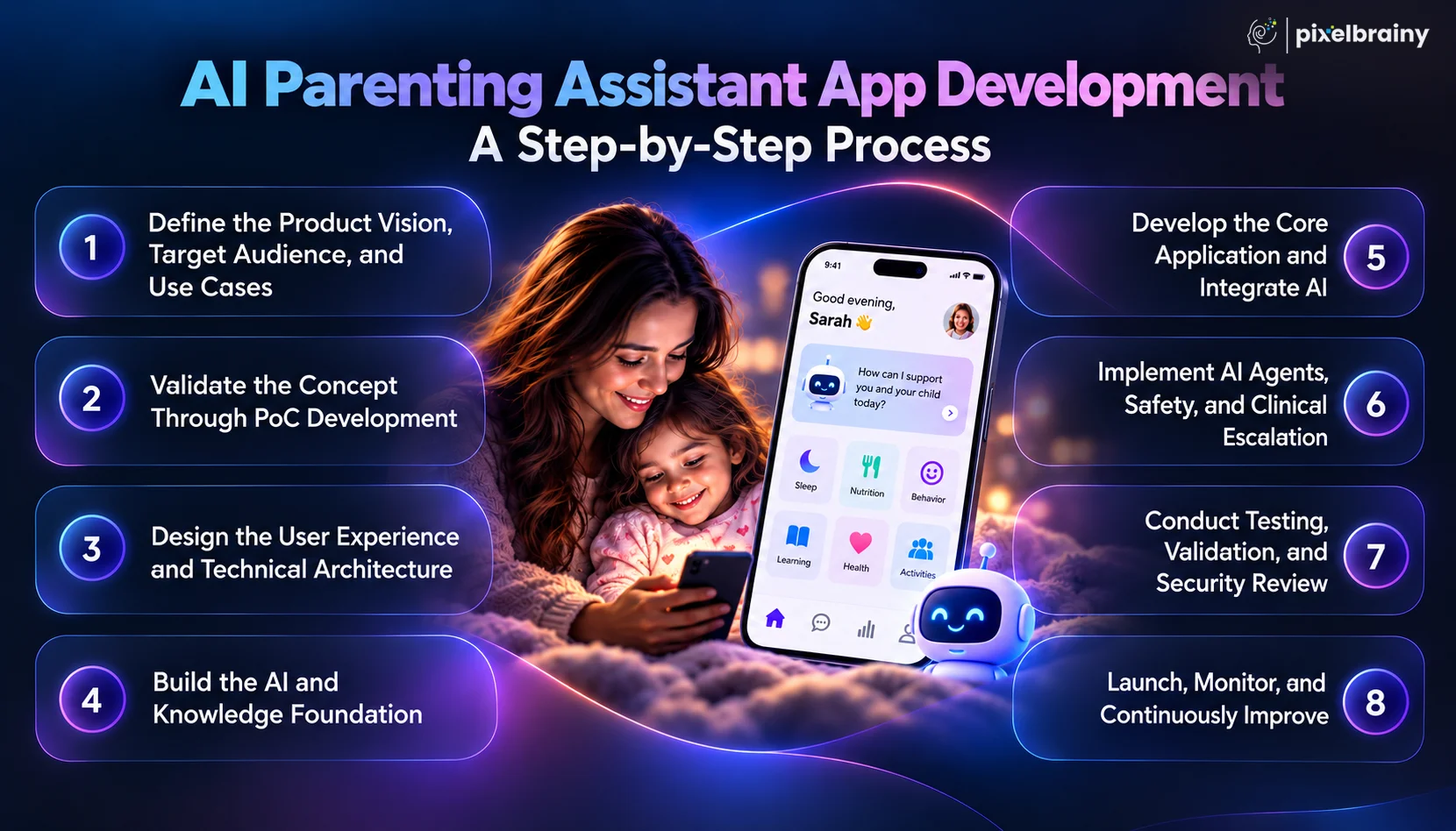
The first step in AI parenting app development is defining exactly who the application serves and what problem it solves. A consumer parenting application, pediatric health platform, employer wellness product, and insurance member application will require very different architectures.
Start by defining the target users, parenting stages, geographic markets, supported languages, and primary use cases. Document whether the app will focus on developmental tracking, sleep, feeding, behavior, health education, telehealth, or a broader parenting experience.
At this stage, businesses should also define what the AI can and cannot do. For a pediatric healthcare product, clinical decision-making boundaries, escalation requirements, professional oversight, and safety policies should be established before development begins.
Before investing in full-scale MVP development, validate whether the proposed AI workflows are technically achievable and useful. A focused PoC development phase can test critical concepts such as conversational AI, child-profile personalization, milestone retrieval, multilingual interactions, symptom-routing workflows, or integration with a healthcare platform.
For example, a healthcare organization could test whether an AI assistant can retrieve approved pediatric information and determine when a conversation should move from educational guidance to a telehealth workflow.
The PoC should measure response quality, latency, AI cost, personalization accuracy, safety performance, and user experience. Successful validation provides a stronger technical foundation for the next development stage.
Once the concept is validated, design the application experience and underlying architecture. Working with a specialized UI/IUX design company can help transform complex parenting workflows into simple interfaces that parents can use quickly.
The architecture should define the mobile and web applications, backend services, databases, authentication, APIs, AI layer, knowledge base, analytics, notifications, and administrative systems.
For multilingual products, the architecture should support localization from the beginning rather than adding translation capabilities after launch. This is particularly important when developing an AI parenting app with multilingual support for diverse parent populations, because language, terminology, cultural context, and safety information must remain consistent.
The next stage is AI model development, where the intelligence layer is designed around the application's specific requirements. The system may combine large language models, retrieval-augmented generation, recommendation models, classification systems, structured rules, and child-development knowledge.
Approved parenting and clinical information should be organized into a controlled knowledge layer so that responses can be grounded in appropriate sources.
For healthcare applications, clinical content should go through appropriate expert review and governance. The objective is not simply to generate fluent answers, but to create an AI system that can distinguish educational questions from situations requiring professional evaluation.
Also Read: Top 12+ AI Model Development Companies in the USA
After the architecture and AI foundation are established, development moves into the main application build. This includes child profiles, milestone tracking, sleep and feeding records, activity recommendations, conversational interfaces, notifications, dashboards, caregiver access, and administrative functionality.
At this stage, AI integration connects the application interface with the intelligence layer. Developers implement authentication, APIs, data storage, model calls, retrieval systems, analytics, and safety controls.
For healthcare products, this stage may also include telehealth, electronic health record, patient portal, identity, or other approved healthcare integrations. Businesses can hire AI developers with experience in both application engineering and production AI systems to manage these interconnected components.
More complex applications may introduce specialized workflows through AI agent development companies, particularly when different responsibilities need separate controls.
For example, a pediatric parenting platform could use dedicated workflows for:
The application should define exactly when the AI can provide educational information and when it must recommend professional evaluation.
For healthcare organizations, this is particularly important. An AI parenting assistant should not independently diagnose a child simply because a parent enters symptoms. Instead, it can provide approved educational information, identify situations requiring additional attention according to validated protocols, and route the parent toward an appropriate clinical service.
Testing is one of the most important stages of building an AI parenting app because traditional software testing alone cannot validate AI behavior.
Teams should evaluate:
For healthcare-focused products, organizations may also work with AI healthcare software development companies that understand healthcare data security, interoperability, clinical workflows, and regulatory considerations.
Real-world testing should involve representative users and qualified reviewers before the application reaches a broad audience.
The final stage is not simply publishing the application to an app store. A production AI parenting platform requires continuous monitoring and optimization.
Begin with a controlled launch and measure activation, retention, AI engagement, recommendation usage, response quality, safety incidents, and user feedback.
Monitor AI performance continuously because model behavior, knowledge sources, user expectations, and product requirements can change over time.
Businesses should establish a process for reviewing problematic responses, updating approved content, improving prompts, evaluating models, and releasing new capabilities.
Organizations evaluating top AI app development companies should therefore ask how the provider handles post-launch AI monitoring, model evaluation, security updates, scalability, and ongoing maintenance rather than focusing only on the initial development quotation.
From AI consultation through product discovery, architecture, AI engineering, testing, launch, and optimization, every stage should contribute to a safe and scalable parenting experience.
A structured development process helps transform an AI parenting concept into a reliable, scalable product that can support parents while maintaining the privacy, safety, and trust expected from modern parenting and healthcare platforms.
How much does it cost to develop an AI parenting app that can provide personalized guidance, understand a child's context, and operate reliably at production scale?
The cost to develop an AI parenting app can range from approximately $30,000 to $200,000+, depending on the application's complexity, AI capabilities, number of platforms, integrations, security requirements, development team, and target market. A simple AI parenting MVP may stay near the lower end of this range, while a production-grade platform with advanced personalization, longitudinal child data, healthcare integrations, multilingual support, and sophisticated AI infrastructure can move well beyond $200,000.
For startups, the development budget of an AI parenting app should therefore be estimated according to the product scope rather than a single fixed price. Businesses should separately consider initial development, AI infrastructure, third-party services, cloud hosting, maintenance, security, and ongoing model usage.
A relevant real-world query is:
"I am a first-time parent and entrepreneur and I want to build an AI parenting assistant app that provides new parents with instant expert-level guidance on the specific parenting challenges they are facing right now rather than generic parenting content that applies to every child. What does a production-grade AI parenting assistant app cost to build and which development companies have built AI parenting apps with documented parent satisfaction and engagement improvement over generic parenting content platforms?"
For this type of product, the cost estimation of an AI parenting app needs to account for more than the chatbot itself. The development team must build the child profile, personalization layer, knowledge retrieval system, conversational experience, safety controls, analytics, backend infrastructure, and potentially a longitudinal intelligence engine.
For businesses considering AI parenting app development for healthcare businesses, the budget can be significantly higher because healthcare interoperability, privacy, security, clinical content governance, authentication, auditability, and telehealth integration can introduce additional development requirements.
| AI Parenting App Type | Estimated Development Cost | Typical Scope |
|---|---|---|
| Basic AI Parenting App | $30,000 to $60,000 | AI chatbot, parent registration, child profile, basic milestone tracking, parenting content, simple recommendations, notifications, admin panel, and basic analytics. |
| Advanced AI Parenting App | $60,000 to $120,000 | Personalized AI assistant, RAG, milestone intelligence, sleep and feeding tracking, activity recommendations, AI summaries, caregiver accounts, dashboards, personalization, analytics, and stronger safety controls. |
| Production-Grade AI Parenting App | $120,000 to $200,000+ | Advanced AI architecture, longitudinal child intelligence, personalized recommendations, multilingual support, voice capabilities, AI agents, healthcare or telehealth integrations, enterprise security, advanced analytics, scalable cloud infrastructure, and continuous AI evaluation. |
These figures are planning ranges rather than fixed quotations. Actual AI parenting app development pricing depends on the product requirements and development team.
A basic chatbot using an external LLM API requires substantially less engineering than an AI assistant combining RAG, personalization, memory, recommendation models, classification, AI agents, and multiple safety layers.
Number of Features
The development cost increases as more functionality is introduced, including:
If the goal is to provide guidance based on a child's individual history rather than generic parenting content, the platform needs structured historical data, retrieval mechanisms, personalization logic, and potentially recommendation models.
This can substantially increase both development complexity and testing requirements.
Building for both iOS and Android can affect the budget. Adding a web dashboard or parent web application introduces additional frontend and testing requirements.
AI parenting app development for healthcare businesses may require integrations with:
These integrations can significantly affect the overall budget.
Applications dealing with child and family information require strong security architecture.
Potential requirements include:
Healthcare-focused products may require additional compliance and governance work depending on their intended use and target market.
An application supporting English only will generally require less development effort than one supporting multiple languages, voice interactions, localized content, and culturally adapted AI responses.
Development cost is only one part of the total investment.
Ongoing costs can include:
As the user base grows, these recurring costs can become an important part of the business model.
The hourly rates of development teams vary significantly by geography and specialization. A team experienced in consumer mobile development may have a different pricing structure from a team specializing in AI healthcare software development, enterprise integrations, or production machine learning.
An AI parenting assistant needs a simple experience because parents may use it while managing children, feeding a baby, preparing meals, or handling bedtime routines.
User research, interaction design, prototyping, usability testing, and accessibility can therefore affect the overall development budget of an AI parenting app.
AI applications require additional testing beyond conventional software QA.
The development budget may need to cover:
A production AI parenting assistant is not finished when the first version launches. Models, APIs, knowledge sources, security requirements, and user expectations change over time.
Businesses should therefore budget separately for:
For a startup planning a production-grade AI parenting assistant app, the initial $30,000 to $200,000+ development range should be treated as the starting investment, with ongoing AI infrastructure and product maintenance budgeted separately.
The right development budget ultimately depends on whether you are building a basic parenting chatbot, a personalized consumer platform, or a production-grade AI parenting and healthcare ecosystem.
Also Read: AI App Development Cost: From MVPs to Full-Scale AI App
What technology stack is required to build an AI parenting assistant app that securely manages child profiles, tracks developmental data, supports personalized AI conversations, and scales as more families join the platform?
The AI parenting assistant app development stack typically combines a mobile or web frontend, secure backend, database, AI models, knowledge retrieval, cloud infrastructure, authentication, analytics, and security tools. The right architecture depends on whether you are building a consumer MVP, enterprise parenting platform, or healthcare-focused application.
A real product query is:
"What technology stack should we use to build an AI parenting assistant app with personalized AI conversations, child development tracking, longitudinal data, multilingual support, secure parent accounts, and scalable cloud infrastructure?"
Here is a practical technology stack for developing an AI parenting app:
| Technology Layer | Recommended Tools and Technologies | Role in AI Parenting Assistant App Development |
|---|---|---|
| Mobile Application | React Native, Flutter, Swift, Kotlin | The mobile layer provides the primary parent experience for child profiles, milestone tracking, sleep and feeding logs, AI conversations, notifications, dashboards, and daily parenting activities. React Native or Flutter can support cross-platform development, while Swift and Kotlin are suitable when highly platform-specific capabilities are required. |
| Web Application | React.js, Next.js | A web application can provide parent account management, detailed dashboards, administrative functionality, professional portals, or healthcare organization interfaces. React and Next.js can support responsive web experiences and integrate with backend APIs and authentication systems. |
| Backend Development | Python, FastAPI, Django, Node.js | The backend manages users, child profiles, parenting records, AI requests, business logic, notifications, integrations, permissions, and application APIs. Python is particularly useful when AI and machine learning services are deeply integrated into the backend architecture. |
| Primary Database | PostgreSQL, MySQL, MongoDB | The database stores structured information such as parent accounts, child profiles, milestones, sleep records, feeding events, activities, preferences, caregiver permissions, and application settings. PostgreSQL can be particularly useful when the platform requires relationships between multiple types of longitudinal child data. |
| AI and LLM Layer | OpenAI models, Anthropic models, Google AI models, Amazon Bedrock | Foundation models power conversational assistance, summarization, content generation, classification, and other AI workflows. Model selection should consider accuracy, latency, privacy, cost, context requirements, and the sensitivity of the application data. |
| RAG and Knowledge Retrieval | Vector database, embeddings, document store, retrieval pipeline | Retrieval-augmented generation can connect the AI assistant to approved parenting, developmental, educational, or clinical information. This helps the application retrieve relevant source material instead of relying entirely on the model's general knowledge. |
| Vector Database | Pinecone, Weaviate, Qdrant, pgvector | A vector database stores embeddings that allow the application to retrieve semantically relevant information. It can support use cases such as retrieving age-appropriate parenting resources, relevant knowledge articles, or information associated with a specific user query. |
| AI Memory and Context Layer | PostgreSQL, Redis, structured memory services | The memory layer can store relevant conversational context and structured user information separately. This allows the AI to retrieve appropriate child history without treating the entire conversation history as permanent memory. |
| Cloud Infrastructure | AWS, Microsoft Azure, Google Cloud | Cloud infrastructure provides computing, storage, networking, security, monitoring, databases, APIs, and scaling capabilities. AWS, for example, provides services across authentication, APIs, databases, AI, storage, analytics, and application deployment. |
| Authentication and Authorization | Auth0, Amazon Cognito, Firebase Authentication, OAuth 2.0, OpenID Connect | Secure authentication protects parent accounts and controls access to child information. Role-based authorization can distinguish between parents, caregivers, administrators, professionals, and other authorized users. AWS documents Amazon Cognito for authentication and authorization in mobile and web architectures. |
| API and Integration Layer | REST APIs, GraphQL, API Gateway, AppSync | APIs connect the mobile application with backend services, AI models, databases, healthcare systems, telehealth platforms, calendars, wearables, and other approved services. AWS documents API Gateway and AppSync as scalable API components for web and mobile applications. |
| Cloud Functions and Processing | AWS Lambda, Google Cloud Functions, Azure Functions | Serverless functions can handle lightweight backend operations such as notifications, AI orchestration, data processing, scheduled tasks, and API workflows without requiring dedicated servers for every operation. AWS's generative AI reference architecture uses Lambda for application logic and API workflows. |
| Push Notifications | Firebase Cloud Messaging, Apple Push Notification Service, OneSignal | Notification services can deliver reminders for activities, appointments, routines, milestone check-ins, and other user-configured events. Notification frequency should remain under user control to prevent the parenting assistant from becoming intrusive. |
| Analytics and Product Intelligence | Mixpanel, Amplitude, Firebase Analytics, Google Analytics | Analytics platforms help measure onboarding, retention, feature engagement, AI usage, recommendation interactions, subscription behavior, and user journeys. These insights can guide product improvements and identify workflows where parents receive the most value. |
| Security and Monitoring | AWS CloudWatch, Datadog, Sentry, encryption, audit logging | Security and monitoring tools help detect application errors, unusual activity, infrastructure issues, and performance problems. Sensitive child and family information should be protected through encryption, access controls, secure APIs, logging, and appropriate data-retention policies. |
| DevOps and CI/CD | GitHub Actions, GitLab CI/CD, Docker, Kubernetes where required | DevOps infrastructure automates testing, deployment, version management, and production releases. Containerization can help standardize application environments, while automated pipelines reduce deployment errors as the AI parenting platform grows. |
| AI Evaluation and Testing | Automated evaluations, prompt testing, model monitoring, human review | AI systems require testing beyond conventional application QA. Evaluation should measure factuality, hallucination, safety, age appropriateness, multilingual performance, privacy, response consistency, and escalation behavior before and after production releases. |
| Voice and Multilingual AI | Speech-to-text APIs, text-to-speech APIs, multilingual LLMs | Voice and multilingual technologies allow parents to communicate with the assistant in different languages or through speech. This can be particularly useful for busy caregivers and for applications targeting diverse parent populations across different regions. |
A well-planned technology stack gives an AI parenting assistant the foundation it needs to deliver personalized intelligence securely while remaining scalable as users, data, integrations, and AI workloads increase.
How can an AI parenting assistant app generate sustainable revenue while remaining affordable enough for parents to use regularly? The right business model should balance user growth, recurring revenue, personalization, and the cost of AI infrastructure.
For startups planning AI parenting app development, monetization can begin with a simple consumer subscription and later expand into healthcare, employer, insurance, or education partnerships. The goal is to create multiple revenue opportunities without making essential parenting support inaccessible.
A real product query is:
"What business model should we use for an AI parenting assistant app that offers personalized parenting guidance, child development tracking, AI conversations, and premium features while attracting and retaining parents over the long term?"
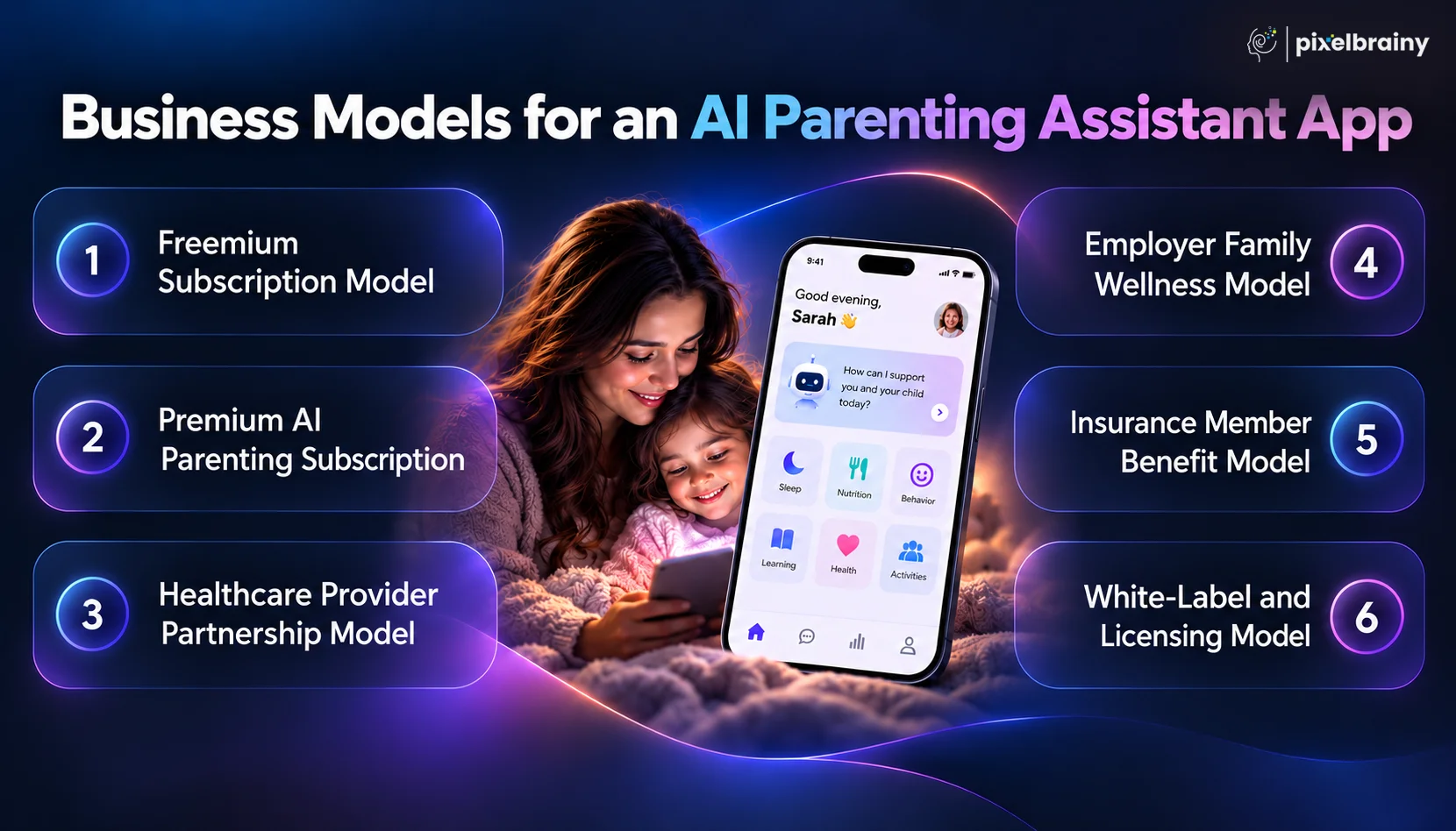
A freemium model allows parents to download and use the basic AI parenting assistant for free while charging for advanced personalization, deeper insights, additional child profiles, and premium AI capabilities.
How it can work:
Revenue opportunity: Recurring subscription revenue can create predictable cash flow while the free tier helps increase downloads and user adoption.
A subscription-only model positions the app as a specialized AI parenting companion that provides continuous, personalized support throughout a child's development.
How it can work:
Revenue opportunity: This model works around recurring payments and can increase customer lifetime value when parents continue using the app as their child's needs change.
Pediatric clinics, hospitals, and healthcare organizations can offer an AI parenting assistant app as a digital extension of their existing patient engagement services.
How it can work:
Revenue opportunity: B2B contracts can create larger revenue opportunities than individual subscriptions while helping healthcare organizations maintain engagement with families between appointments.
Employers can provide an AI parenting assistant as part of their employee wellness or family support benefits. This approach allows parents to access parenting resources without paying the full subscription cost themselves.
How it can work:
Revenue opportunity: Enterprise contracts can provide recurring B2B revenue while giving startups access to larger groups of potential users.
Health insurers can offer an AI parenting assistant as a digital member benefit designed to provide parents with educational resources, developmental guidance, and navigation support.
How it can work:
Revenue opportunity: Insurance partnerships can create large-scale distribution because a single contract can introduce the AI parenting platform to thousands or millions of eligible members.
A white-label model allows healthcare companies, parenting platforms, educational organizations, or family-focused brands to offer the AI parenting assistant under their own branding.
How it can work:
Revenue opportunity: Licensing can create higher-value enterprise contracts while allowing the same underlying technology to serve multiple organizations and user populations.
Business Model Comparison for AI Parenting Assistant App:
| Business Model | Primary Customer | Revenue Approach | User Acquisition Potential |
|---|---|---|---|
| Freemium Subscription | Parents | Free + premium upgrades | High |
| Premium AI Subscription | Parents | Recurring subscription | Medium to High |
| Healthcare Partnership | Hospitals and healthcare providers | B2B contracts | High |
| Employer Family Wellness | Employers | Enterprise contracts | High |
| Insurance Member Benefit | Insurance companies | Enterprise licensing or member-based pricing | Very High |
| White-Label and Licensing | Organizations and platforms | Licensing and implementation fees | High |
A diversified monetization strategy can help an AI parenting assistant app grow its user base while creating recurring revenue across both consumer and enterprise channels.
What challenges should you consider before building an AI parenting assistant app for real-world families?
A real-world product query might be:
“We want to develop an AI parenting assistant app that provides personalized parenting guidance, tracks child development, answers health-related questions, protects sensitive family data, and connects parents with pediatric professionals when necessary. What are the biggest development challenges we should prepare for, and how can we overcome them?”
This query highlights why AI parenting app development requires more than integrating an AI chatbot into a mobile application. Developers must address AI accuracy, child data privacy, personalization, safety, inclusivity, and long-term system reliability. These challenges can directly affect parent trust, user retention, and the scalability of the AI parenting platform.
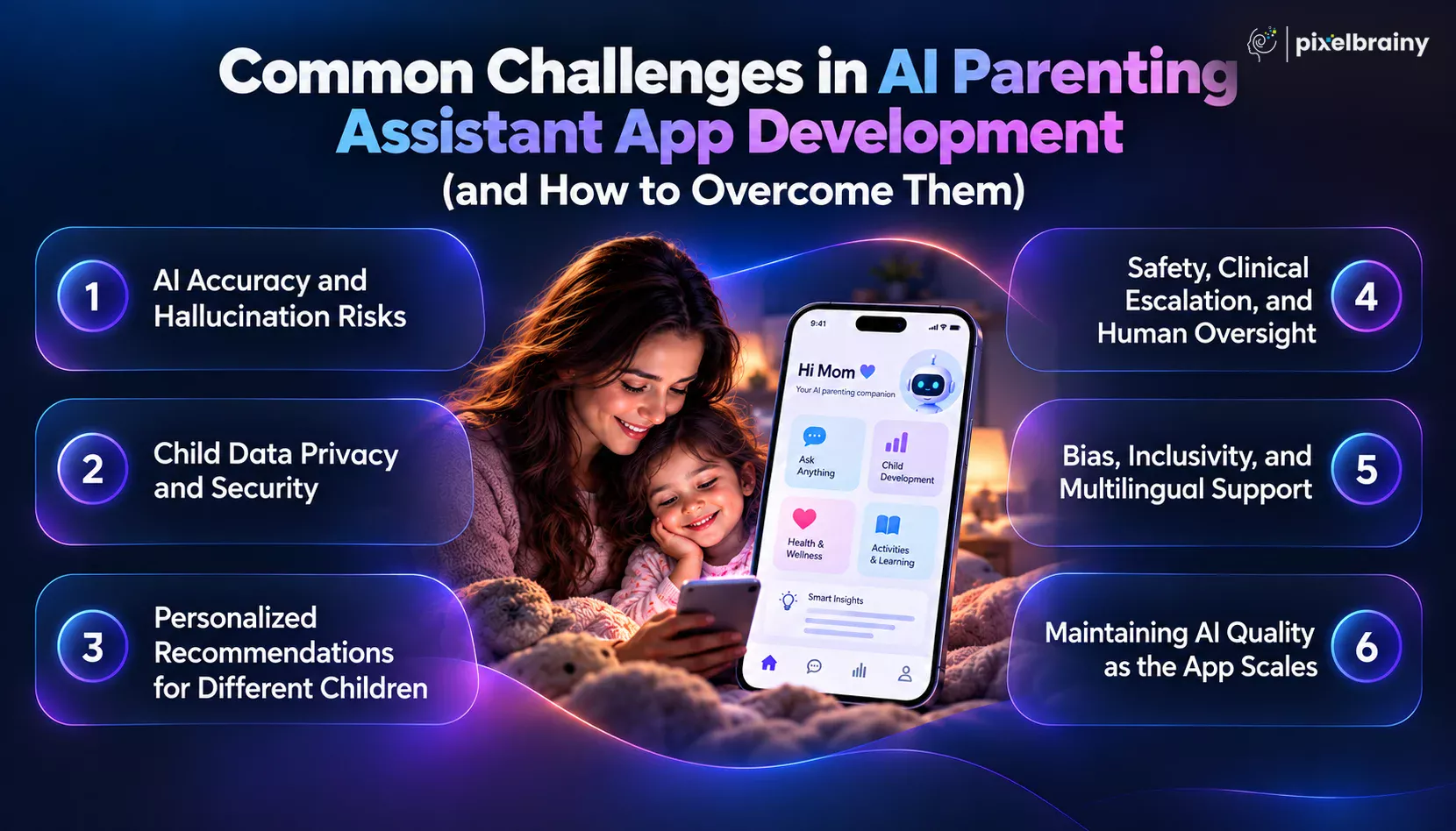
An AI parenting assistant may generate confident-sounding answers that are incomplete, outdated, or inappropriate for a particular child's age and situation. This becomes especially important when parents ask questions related to symptoms, medications, developmental concerns, nutrition, sleep, or behavioral changes.
How to overcome it:
The American Academy of Pediatrics has specifically highlighted misinformation, privacy risks, and the need for safe integration of generative AI in pediatric contexts
An AI parenting assistant app can collect highly sensitive information, including child profiles, developmental observations, health information, family routines, and caregiver details. A security failure can therefore create significant privacy and trust concerns.
How to overcome it:
The AAP's 2026 guidance emphasizes safety and privacy by default for digital platforms involving children, while pediatric health data can create additional confidentiality considerations.
Children develop at different rates, and parenting needs can vary according to age, developmental stage, family environment, culture, language, and individual circumstances. A generic AI response may therefore fail to provide meaningful personalization.
How to overcome it:
For AI parenting app development, personalization should be based on relevant context rather than simply inserting a child's age into a generic prompt.
Parents may ask an AI parenting assistant questions that require professional evaluation. The application must recognize when a conversation goes beyond general parenting support and requires pediatric, mental health, emergency, or other professional assistance.
How to overcome it:
Recent pediatric AI research emphasizes the need for validation frameworks, governance structures, accountability, and human oversight when AI is used in pediatric settings.
AI parenting recommendations may not work equally well across different languages, cultures, family structures, socioeconomic contexts, or developmental populations. Limited or biased training data can affect the quality and fairness of recommendations.
How to overcome it:
WHO's 2026 responsible AI work identifies fragmented or biased datasets, governance gaps, and equity concerns among important barriers to responsible AI deployment in health.
AI parenting app development does not end after launch. As the user base grows, the application must handle more conversations, new parenting scenarios, changing knowledge sources, model updates, increased infrastructure costs, and evolving safety requirements.
How to overcome it:
A scalable AI parenting assistant therefore needs ongoing governance, monitoring, testing, and improvement rather than a one-time AI integration.
The major challenges in building an AI parenting assistant app involve AI accuracy, child data privacy, personalization, safety escalation, inclusivity, and continuous quality management. Addressing these areas from the beginning can create a more trustworthy foundation for long-term AI parenting app growth.
From the above challenges, features, technology requirements, and business models, it is now time to identify the right development partner who can turn the concept into a secure, scalable, and parent-focused digital product.
A real product query that reflects this requirement is:
“We want to build an AI parenting assistant app specifically for the immigrant and multicultural family market in the USA, where parenting approaches, child development expectations, and family dynamics differ from mainstream American parenting frameworks. What does a culturally adapted multilingual AI parenting assistant app cost to build, and which development companies have built parenting apps with genuine cultural competence rather than translated versions of mainstream American parenting content?”
This type of product requires more than translation or a standard AI chatbot. It needs thoughtful personalization, multilingual AI, culturally relevant knowledge, secure data architecture, conversational intelligence, and an understanding of how different families use technology.
PixelBrainy can support organizations looking to build AI parenting assistant app solutions that combine conversational AI, personalized experiences, scalable architecture, and user-focused product design.
As PixelBrainy as a leading AI app development company, our approach focuses on understanding the product objective first and then aligning AI capabilities, application architecture, user experience, integrations, and security requirements around it.
Key areas of expertise can include:
For one confidential project, our team worked on an AI-enabled parenting technology solution designed to provide parents with more personalized digital guidance instead of relying solely on static content libraries.
The solution incorporated:
Because the project was delivered under client confidentiality, specific client identification and commercially sensitive implementation details cannot be disclosed. However, the experience demonstrates how a parenting-focused AI product can be structured around personalization, contextual intelligence, and scalable technology rather than generic chatbot functionality.
If your objective is to create AI parenting assistant app for a specific demographic, healthcare organization, employer, insurer, or parenting platform, the development partner needs to understand both the technology and the users behind it.
PixelBrainy can help organizations move from product discovery and architecture through AI integration, application development, testing, deployment, and ongoing optimization, including AI parenting assistant app agent development services for more sophisticated conversational workflows.
Whether you want to develop AI parenting assistant app for a consumer audience or create a specialized multilingual platform for multicultural families, the development strategy should be shaped around your users, business model, data requirements, and AI objectives.
Ready to turn your parenting AI concept into a scalable product? Connect with PixelBrainy to discuss your project.
An AI parenting assistant app can become much more than a digital parenting chatbot. With the right combination of conversational AI, child development tracking, personalized recommendations, secure data management, multilingual support, and intelligent automation, it can become a trusted digital companion for parents throughout different stages of their child's development.
As this guide explored, successful AI parenting app development requires careful planning across features, technology, AI architecture, business models, safety, privacy, and development costs. Whether your goal is to build AI parenting assistant app for consumers, healthcare organizations, employers, insurers, or multicultural families, the product should be designed around real parenting needs rather than generic AI capabilities.
The right development strategy can help you develop AI parenting assistant app solutions that are scalable, personalized, secure, and prepared for future AI advancements. With the right technology partner, your idea can move from concept to a production-ready platform designed for meaningful parent engagement.
Ready to turn your AI parenting vision into reality? Book an appointment with PixelBrainy today.
The cost to develop an AI parenting assistant app can range from approximately $30,000 to $200,000+, depending on AI complexity, personalization, integrations, security requirements, supported platforms, multilingual capabilities, and development scope. A basic AI parenting app may require a smaller investment, while a production-grade platform with advanced AI, healthcare integrations, and longitudinal intelligence can require a significantly larger budget.
The timeline for building an AI parenting assistant app commonly ranges from several months for an MVP to a year or more for a complex production platform. The final timeline depends on the number of features, AI architecture, mobile and web requirements, third-party integrations, testing, security validation, and whether the application requires healthcare-related workflows.
An AI parenting assistant can use information such as the child's age, developmental stage, routines, interests, previous interactions, activities, and parent-provided observations to generate more relevant recommendations. A combination of structured child profiles, AI models, retrieval systems, and longitudinal context can make recommendations more personalized than static parenting content.
Yes. Developing an AI parenting assistant app for multicultural families can include multilingual conversations, culturally relevant knowledge, localized recommendations, and language-specific AI evaluation. For immigrant and multicultural families, cultural adaptation should go beyond translating English content and should account for differences in parenting practices, family structures, communication styles, and expectations.
To create an AI parenting assistant app, the technology stack can include large language models, RAG, vector databases, embeddings, cloud infrastructure, secure APIs, mobile frameworks, databases, analytics, authentication, and AI evaluation systems. The exact architecture depends on whether the product provides general parenting guidance, developmental support, healthcare-related functionality, or a combination of these capabilities.
An AI parenting app should establish clear boundaries between general parenting information and clinical guidance. It can use trusted knowledge sources, response validation, risk classification, safety rules, escalation workflows, and professional referrals for situations requiring clinical evaluation. For healthcare-focused applications, additional privacy, governance, security, and validation requirements should be considered during AI parenting app development.
Yes. An AI parenting assistant app can potentially integrate with healthcare platforms through secure APIs and appropriate interoperability standards. Depending on the use case, integrations may support appointment information, educational resources, patient engagement, telehealth connections, or other approved workflows. Healthcare integrations require careful attention to authentication, authorization, privacy, security, and organizational requirements.
PixelBrainy can help organizations develop an AI parenting assistant app tailored to specific audiences, including consumer parents, healthcare organizations, employers, insurers, and multicultural families. Its capabilities can cover AI architecture, conversational AI, personalized recommendations, multilingual experiences, secure application development, integrations, testing, and scalable deployment. For specialized parenting products, businesses should also evaluate a partner's ability to understand user needs, implement responsible AI practices, and build a product architecture that can evolve as the platform grows.

About The Author
Sagar Bhatnagar
Sagar Sahay Bhatnagar brings over a decade of IT industry experience to his role as Marketing Head at PixelBrainy. He's known for his knack in devising creative marketing strategies that boost brand visibility and market influence. Sagar's strategic thinking, coupled with his innovative vision and focus on results, sets him apart. His track record of successful campaigns proves his ability to utilize digital platforms effectively for impactful marketing efforts. With a genuine passion for both technology and marketing, Sagar continuously pushes PixelBrainy's marketing initiatives to greater success.

Working with PixelBrainy has been a great experience. They took our vision for an AI-powered platform and turned it into a fully functional product. What impressed me most was their strong understanding of both design and development, and their ability to handle complex requirements with ease. The team was responsive, cooperative, and always open to feedback. They kept things organized, communicated clearly, and delivered quality work on time. I highly recommend PixelBrainy to anyone looking for a skilled and reliable development partner.

Working with the PixelBrainy team has been a highly positive experience. They understand the design requirements and create beautiful UX elements to meet the application needs. The dev team did an excellent job bringing my vision to life. We discussed usability and flow. Sagar worked with his team to design the database and begin coding. Working with Sagar was easy. He has the knowledge to create robust apps, including multi-language support, Google and Apple ID login options, Ad-enabled integrations, Stripe payment processing, and a Web Admin site for maintaining support data. I'm extremely satisfied with the services provided, the quality of the final product, and the professionalism of the entire process. I highly recommend them for Android and iOS Mobile Application Design and Development.

Great experience working with them. Had a lot of feedback and I found that unlike most contractors they were bugging me for updates instead of the other way around. They were extremely time conscience and great at communicating! All work was done extremely high quality and if not on time, early! They were always proactive when it comes to communication and the work is great/above par always. Very flexible and a great team to work with! Goes above and beyond to present us with multiple options and always provides quality. Amazing work per usual with Chitra. If you have UI/UX or branding design needs I recommend you go to them! Will likely work with them in the future as well, definitely recommended!

PixelBrainy is a joy to work with and is a great partner when thinking through branding, logo, and website layout. I appreciate that they spend time going into the "why" behind their decisions to help inform me and others about industry best practices and their expertise.

I hired them to design our software apps. Things I really like about them are excellent communication skills, they answer all project suggestions and collaborate right away, and their input on design and colors is amazing. This project was complex and needed patience and creativity. The team is amazing to do business with. I will be using them long-term. Glad to see there are some good people out there. I was afraid to try and outsource my project to someone but I am glad I met them! I really can't say enough. They went above and beyond on this project. I am very happy with everything they have done to make my business stand out from the competition.

It was great working with PixelBrainy and the team. They were very responsive and really owned the project. We'll definitely work with them again!

I recently worked with the PixelBrainy team on a project and I was blown away by their communication skills. They were prompt, clear, and articulate in all of our interactions. They listened and provided valuable feedback and suggestions to help make the project a success. They also kept me updated throughout the entire process, which made the experience stress-free and enjoyable.

PixelBrainy is very good at what it does. The team also presents themselves very professionally and takes care of their side of things very well. I could fully trust them taking up the design work in a timely and organised manner and their attention to detail saved us lots of effort and time. This particular project was quite intense and the team showed that they function very well under pressure. Very much looking forward to working with her again!

It's always an absolute pleasure working with them. They completed all of my requests quickly and followed every note I had for them to a T, which made our process go smoothly from start to finish. Everything was completed fast and following all of the guidelines. And I would recommend their services to anyone. If you need any design work done in the future, PixelBrainy should be your first call!

They took ownership of our requirements and designed and proposed multiple beautiful variants. The team is self-motivated, requires minimum supervision, committed to see-through designs with quality and delivering them on time. We would definitely love to work with PixelBrainy again when we have any requirements.

PixelBrainy was a big help with our SaaS application. We've been hard at work with a new UI/UX and they provided a lot of help with the designs. If you're looking for assistance with your website, software, or mobile application designs, PixelBrainy and the team is a great recommendation.

PixelBrainy designers are amazing. They are responsive, talented, and always willing to help craft the design until it matches your vision. I would recommend them and plan to continue them for my future projects and more!!!

They were awesome! Did a good job fast, and good communication. Will work with them again. Thank you

Creative, detail-oriented, and talented designers who take direction well and implement changes quickly and accurately. They consistently over-delivered for us.

PixelBrainy team is very talented and creative. Great designers and a pleasure to work with. PixelBrainy is an excellent communicator and I look forward to working with them again.

PixelBrainy has a very talented design team. Their work is excellent and they are very responsive. I enjoy working with them and hope to continue on all of our future projects.


Transform your ideas into reality with us.
Across these industries, each engagement brings unique challenges, from early-stage product development to scaling complex systems, helping us build a practical understanding of real-world product environments.